The 10 Most Dangerous GitHub Repos in Trading (Full Course)
文章目录
I will break down exactly how to build your own AI hedge fund out of 10 free GitHub repos, with the exact code for each one and a single script that runs them all.
Can't code? Every repo below comes with one prompt you paste into Claude Code. It installs everything for you. Let's get straight to it.
Bookmark this - DM me your current setup and I'll personally review the first 20. MOVE FAST.
Microsoft open-sourced an AI agent that does a quant researcher's job.
In real stock markets it delivered ~2x the annual return of benchmark factor libraries, with 70% fewer factors, for under $10.
That's one repo. This article has ten.
Last time I rebuilt a Bloomberg Terminal with REA. This is the other half: the stack that turns a terminal into a fund.
A single Bloomberg seat: ~$32,000 a year. These 10 repos: $0 in software.
Together they have over 575,000 GitHub stars. Two come with papers at NeurIPS and AAAI. One runs your morning research for free on GitHub Actions. One turns Buffett, Munger and Druckenmiller into AI agents.
The tool gap between a fund and you just closed. The process gap didn't.
By the end of this article you will know how to:
-
Run an AI investment committee that argues bull vs bear before every trade
-
Get an AI research note in your Telegram every weekday, running on free GitHub servers
-
Filter every chart through 100 simulated futures before you take the trade
-
Let Microsoft's agent mine new factors while you sleep
-
Scan the biggest crypto exchanges for funding-rate gaps with one loop
-
Wire it all into one fund, run every morning by a single ~80-line Python script
The build map:
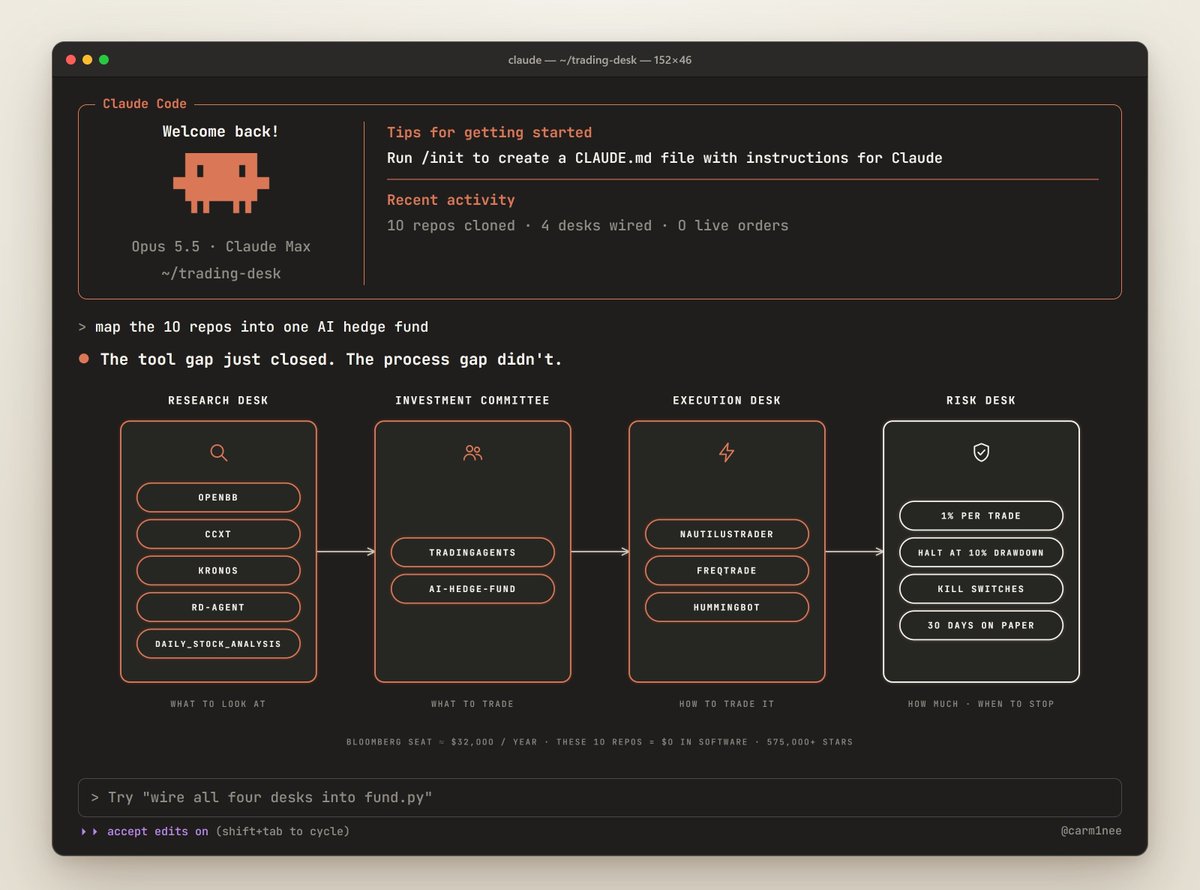
Research desk · OpenBB + ccxt + Kronos + RD-Agent + daily_stock_analysis → what to look at
Investment committee · TradingAgents + ai-hedge-fund → what to trade
Execution desk · NautilusTrader + freqtrade + hummingbot → how to trade it
Risk desk · your rules → how much, and when to stop
#1 · TradingAgents: A Whole Trading Firm Made of AI Agents
github.com/TauricResearch/TradingAgents · 112.5k stars · Apache-2.0 · arXiv 2412.20138
112,000 stars in under 2 years. It copies the org chart of a real trading firm and puts an LLM in every seat:
-
4 analysts · fundamentals, sentiment, news, technical
-
Bull and bear researchers who debate every idea
-
A trader who turns the debate into a decision
-
A risk team (aggressive · neutral · conservative) that attacks the decision
-
A portfolio manager who approves it or kills it
Nobody trades until the bear has had his say.
Set it up: open Claude Code and paste this
Clone github.com/TauricResearch/TradingAgents and install it in a Python 3.13 virtual environment. Set it up for Anthropic with my API key: claude-opus-5-5 as the deep-thinking model, claude-sonnet-5-5 as the quick one. Then launch tradingagents.
Use it like this:
-
Pick a ticker and today's date
-
Watch the 4 analysts write their reports in real time
-
Read the bull vs bear debate. This is where the edge is: you see both sides before any money moves.
-
Check the risk team's vote. If the conservative agent flags it, ask yourself why.
-
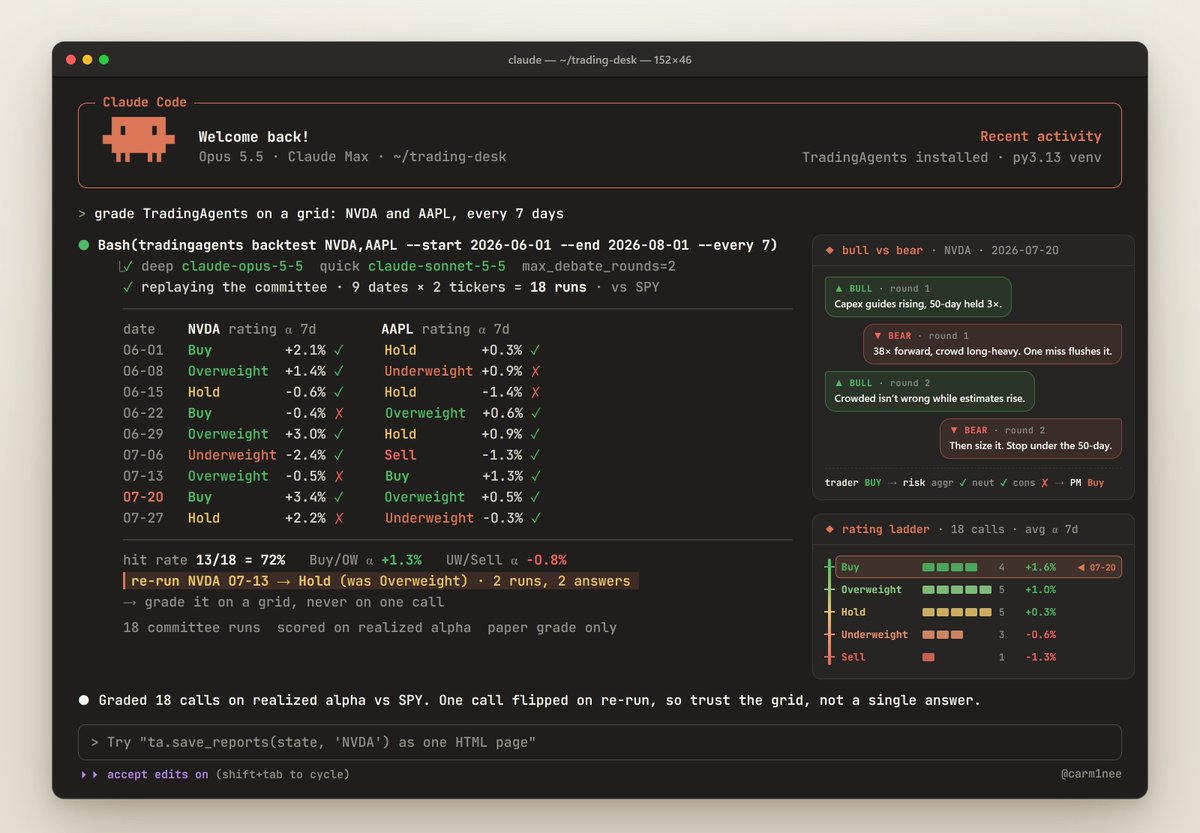
Before you trust a single call, grade the whole firm on past dates:
tradingagents backtest NVDA,AAPL --start 2026-06-01 --end 2026-08-01 --every 7
It replays the committee every 7 days and scores each call on realized alpha against the benchmark.
The code: load your real book, so the risk team argues about your position, not a hypothetical one
from tradingagents.default_config import DEFAULT_CONFIG
from tradingagents.graph.trading_graph import TradingAgentsGraph
from tradingagents.portfolio import PortfolioContext

config = DEFAULT_CONFIG.copy()
config["llm_provider"] = "anthropic"
config["deep_think_llm"] = "claude-opus-5-5"     # managers: deep thinking
config["quick_think_llm"] = "claude-sonnet-5-5"  # analysts: fast
config["max_debate_rounds"] = 2                   # bull vs bear, twice

book = PortfolioContext.model_validate({
    "cash": 25_000, "currency": "USD",
    "positions": [{"ticker": "NVDA", "quantity": 120,
                   "average_price": 150}]})

ta = TradingAgentsGraph(config=config)
state, rating = ta.propagate("NVDA", "2026-10-21", portfolio=book)
print(rating)  # Buy / Overweight / Hold / Underweight / Sell
ta.save_reports(state, "NVDA")  # the whole debate as one HTML page
No API budget? It also runs on a ChatGPT Plus or Pro plan: tradingagents login chatgpt.
The catch: same ticker, same date, two runs can give two different answers. It's built on language models. That's why you grade it on a grid, never on one call.
#2 · ai-hedge-fund: Buffett, Munger and Druckenmiller as AI Agents
github.com/virattt/ai-hedge-fund · 64.1k stars · MIT
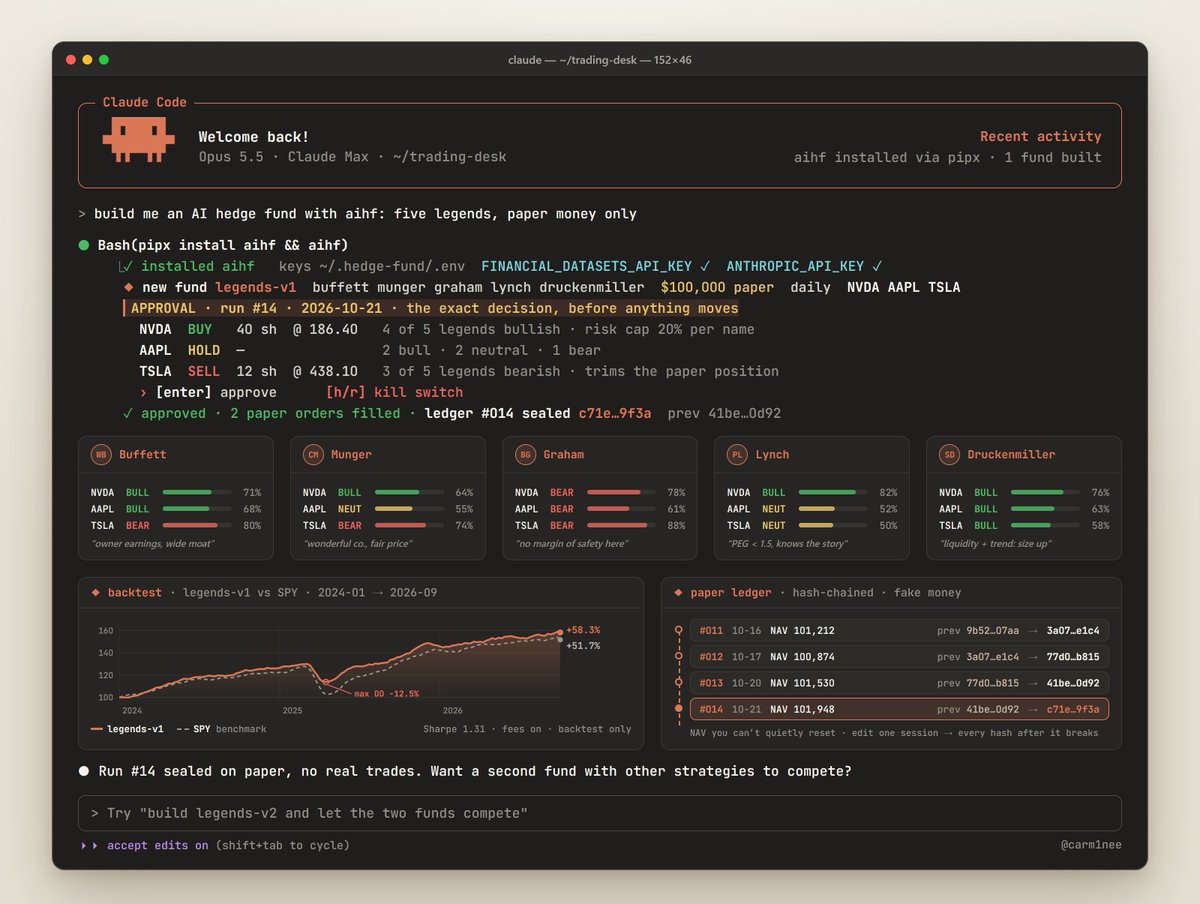
An investment committee where Warren Buffett, Charlie Munger, Ben Graham, Peter Lynch and Stan Druckenmiller each vote on your idea. Each legend is a signal module in the code, with risk, portfolio, backtesting and paper-trading modules on top.
Five of the greatest investors who ever lived, arguing about your watchlist.
Set it up: open Claude Code and paste this
Install aihf with pipx. Save my Financial Datasets API key as FINANCIAL_DATASETS_API_KEY and my Anthropic key as ANTHROPIC_API_KEY in ~/.hedge-fund/.env.
Use it like this:
-
Type aihf in your terminal and build a fund: strategies, capital, cadence, tickers
-
Backtest it. The equity curve draws against its benchmark.
-
Paper trade it on real market days with fake money. Every session goes into a hash-chained ledger, so your NAV is a track record you can't quietly reset.
-
Build a second fund with different strategies on the same tickers and let them compete. When two different styles agree on a name, pay attention.
Before every run, an approval step shows the exact decision about to execute. h/r is the kill switch.
By hand:
pipx install aihf     # or: pip install aihf
aihf                  # 1st run asks for FINANCIAL_DATASETS_API_KEY
                      # + one model key, saved to ~/.hedge-fund/.env
The catch:
"the system does not actually make any trades"
Educational only. Which is exactly where you want to start.
#3 · daily_stock_analysis: A Free AI Analyst That Runs Itself
github.com/ZhuLinsen/daily_stock_analysis · 66.8k stars · 55.5k forks · MIT
55,000 forks. That's the number that matters. People aren't just starring it. They're running their own copy.
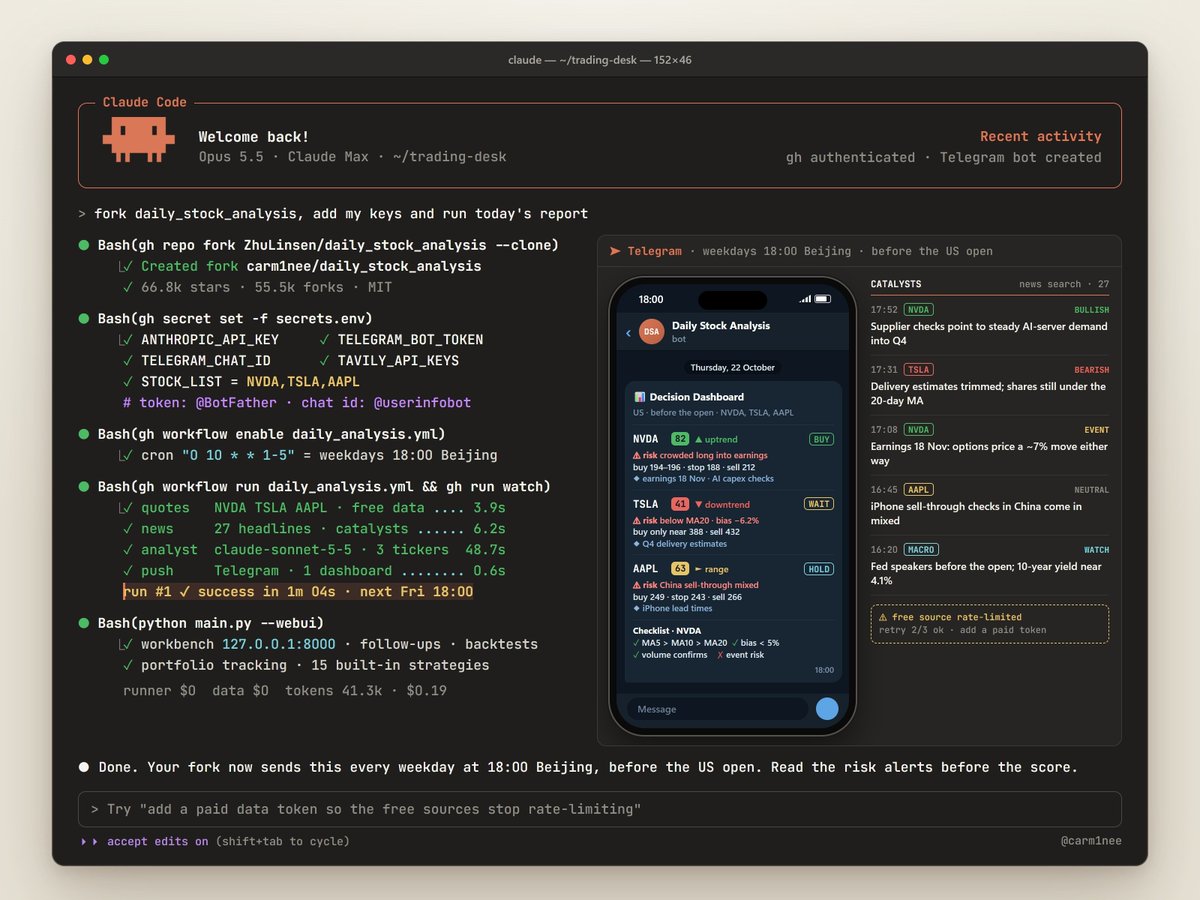
Every weekday it sends a decision dashboard to your Telegram: score · trend · buy and sell levels · risk alerts · catalysts · a checklist. US, Hong Kong, China, Japan, Korea, Taiwan and ETFs. Free data sources out of the box.
A research analyst on payroll costs six figures. This one costs a fork.
Set it up: open Claude Code and paste this
Fork github.com/ZhuLinsen/daily_stock_analysis to my GitHub with the gh CLI. Add these Actions secrets to the fork: ANTHROPIC_API_KEY, TELEGRAM_BOT_TOKEN, TELEGRAM_CHAT_ID, TAVILY_API_KEYS and STOCK_LIST=NVDA,TSLA,AAPL. Enable Actions on the fork and run the daily analysis workflow once.
Telegram bot token: create a bot with @BotFather. Your chat ID: message @userinfobot.
Use it like this:
-
Every weekday at 18:00 Beijing time the dashboard lands in your Telegram. That's before the US open.
-
Read the risk alerts before the score. That's the part that saves you money.
-
Want to dig deeper? Run it on your own machine and open the workbench: follow-up questions, backtests, portfolio tracking and 15 built-in strategies, from moving-average crosses to Elliott waves.
By hand:
git clone https://github.com/ZhuLinsen/daily_stock_analysis.git
cd daily_stock_analysis && pip install -r requirements.txt
cp .env.example .env    # fill in the same keys
python main.py --stocks NVDA,TSLA,AAPL   # one report, right now
python main.py --webui                   # workbench: 127.0.0.1:8000git clone https://github.com/ZhuLinsen/daily_stock_analysis.git
cd daily_stock_analysis && pip install -r requirements.txt
cp .env.example .env    # fill in the same keys
python main.py --stocks NVDA,TSLA,AAPL   # one report, right now
python main.py --webui                   # workbench: 127.0.0.1:8000
The catch: free data sources get rate-limited and change without warning. If you rely on it every day, add a paid data token.
#4 · Kronos: GPT, but for Candlesticks
github.com/shiyu-coder/Kronos · 42.7k stars · MIT · AAAI 2026
"A Foundation Model for the Language of Financial Markets"
Kronos reads candles like words. It turns price action into tokens and predicts the next candle the way a language model predicts the next word.
Trained on 12 billion candles from 45 exchanges. In its paper it improved price-forecasting RankIC by 93% over the leading time-series foundation model.
Set it up: open Claude Code and paste this
Clone github.com/shiyu-coder/Kronos and install torch, einops, huggingface_hub, safetensors, ccxt and pandas. Save the script below as paths.py inside the Kronos folder and run it.
Use it like this:
-
Run it on the chart you're about to trade
-
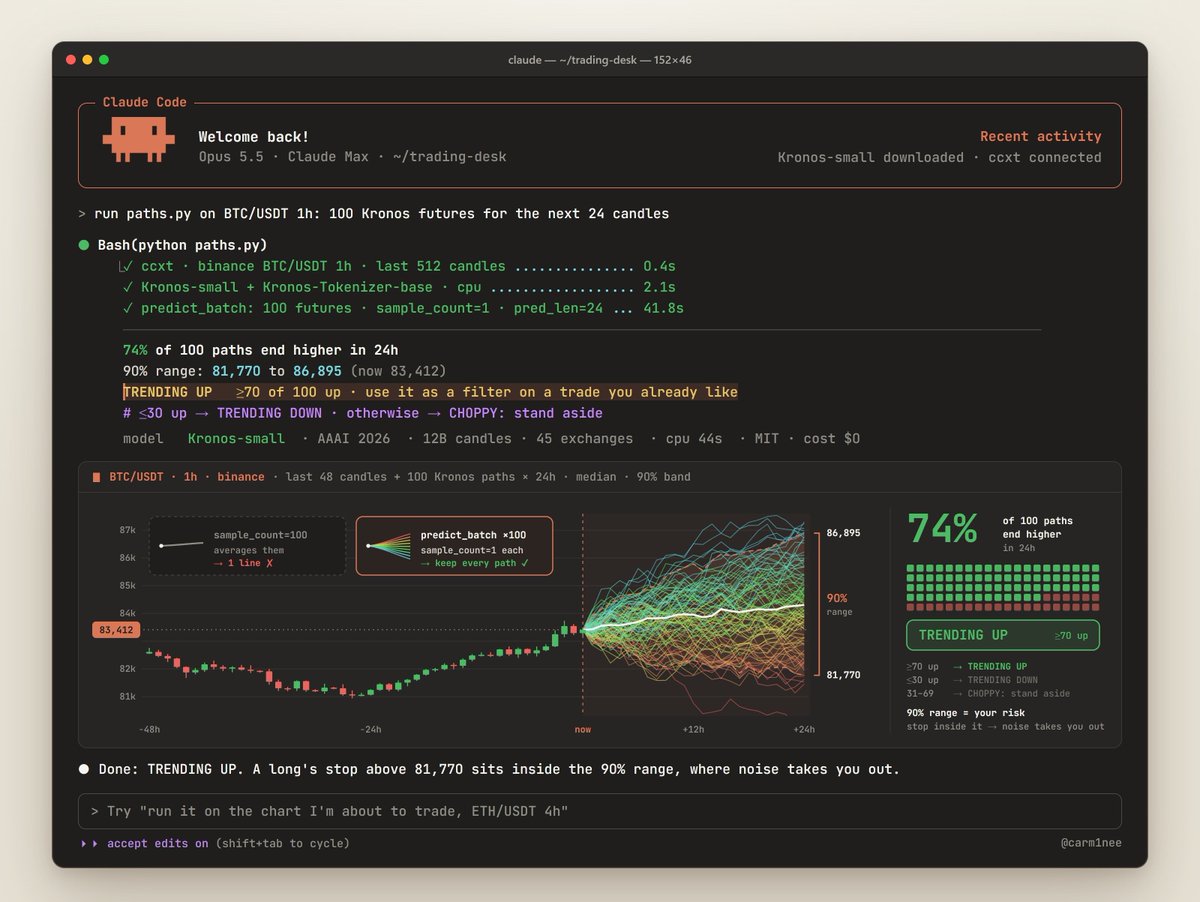
70+ paths up → TRENDING UP. 30 or fewer → TRENDING DOWN. Anything in between → CHOPPY: stand aside.
-
The 90% range is your risk. If your stop sits inside it, normal noise will take you out.
# git clone https://github.com/shiyu-coder/Kronos && cd Kronos
# pip install torch einops huggingface_hub safetensors ccxt pandas
import ccxt, numpy as np, pandas as pd
from model import Kronos, KronosTokenizer, KronosPredictor

raw = ccxt.binance().fetch_ohlcv("BTC/USDT", "1h", limit=512)
df = pd.DataFrame(raw, columns=["ts", "open", "high", "low",
                                "close", "volume"])
ts = pd.to_datetime(df["ts"], unit="ms")
future = pd.Series(pd.date_range(ts.iloc[-1], periods=25, freq="h")[1:])

tok = KronosTokenizer.from_pretrained("NeoQuasar/Kronos-Tokenizer-base")
model = Kronos.from_pretrained("NeoQuasar/Kronos-small")
kp = KronosPredictor(model, tok, max_context=512)

N = 100  # 100 separate futures. sample_count=100 would average them.
paths = kp.predict_batch(
    df_list=[df[["open", "high", "low", "close", "volume"]]] * N,
    x_timestamp_list=[ts] * N, y_timestamp_list=[future] * N,
    pred_len=24, T=1.0, top_p=0.9, sample_count=1, verbose=False)

last = df["close"].iloc[-1]
ends = np.array([p["close"].iloc[-1] for p in paths])
up = (ends > last).mean()
lo, hi = np.percentile(ends, [5, 95])
print(f"{up:.0%} of 100 paths end higher in 24h")
print(f"90% range: {lo:,.0f} to {hi:,.0f}  (now {last:,.0f})")
print("TRENDING UP" if up >= 0.7 else
      "TRENDING DOWN" if up <= 0.3 else "CHOPPY: stand aside")
Here's the trick most people miss: sample_count=100 averages all 100 paths into one line. That throws the signal away. The code above batches the same chart 100 times and keeps every path.
It takes a few minutes on a laptop CPU and seconds on a GPU. Use it as a filter on trades you already like, not as a signal on its own.
The catch: even the Kronos team says raw forecasts need market beta and style factors stripped out, and fees and slippage modeled, before they're real alpha.
Bonus: Google's TimesFM (google-research/timesfm · 34.7k stars) is the other time-series foundation model worth testing against it.
#5 · Microsoft Qlib + RD-Agent: An AI That Does Quant Research for You
github.com/microsoft/qlib · 49.6k stars · MIT
github.com/microsoft/RD-Agent · 15.0k stars · MIT · NeurIPS 2025
Qlib is Microsoft's AI-oriented quant platform: data → models → backtest.
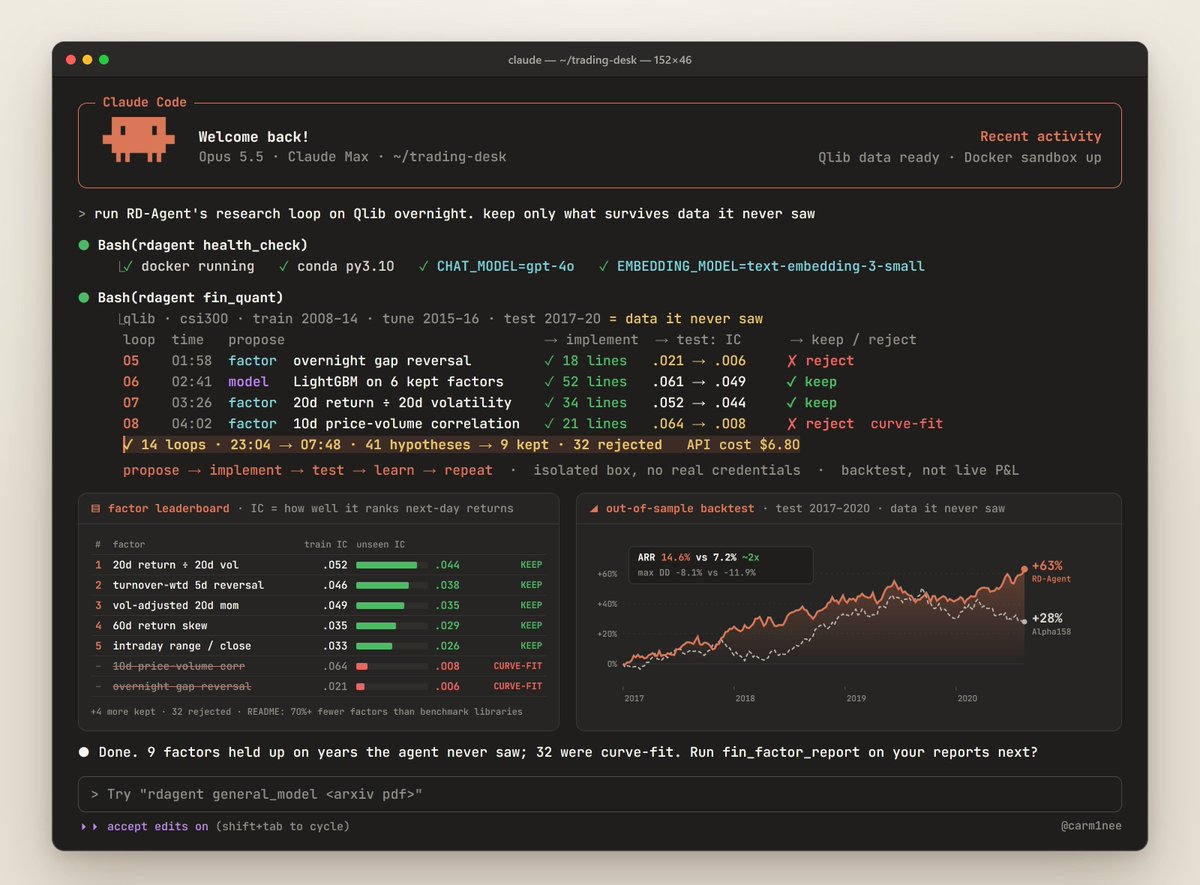
RD-Agent is the part that should make quant shops nervous. It runs the research loop on its own: proposes factors and models, codes them, tests them, learns, repeats.
Reported in its README, in real stock markets:
-
~2x the annual return of benchmark factor libraries
-
With 70%+ fewer factors
-
For under $10
The job quant shops hire PhDs for, running in a loop for less than the price of lunch.
Set it up: open Claude Code on a Linux machine with Docker and paste this
Set up github.com/microsoft/RD-Agent: create a conda env with Python 3.10, pip install rdagent, write a .env with CHAT_MODEL=gpt-4o, EMBEDDING_MODEL=text-embedding-3-small and my OpenAI key, run rdagent health_check, then start rdagent fin_quant in the background and log its progress.
Use it like this:
-
Let fin_quant run overnight. It proposes factors and models, codes them, backtests them and keeps iterating.
-
Got research PDFs? fin_factor_report turns their ideas into coded factors.
-
Got a paper? general_model turns it into a working model.
-
Keep only what survives a stretch of data it never saw. Everything else is curve-fitting.
By hand:
conda create -n rdagent python=3.10 -y && conda activate rdagent
pip install rdagent
cat > .env <<'END'
CHAT_MODEL=gpt-4o
EMBEDDING_MODEL=text-embedding-3-small
OPENAI_API_KEY=sk-...
END
rdagent health_check

# factors and models evolve together. Let it run overnight
rdagent fin_quant
# a folder of financial reports → coded factors
rdagent fin_factor_report --report-folder=reports
# a research paper → a working model
rdagent general_model "https://arxiv.org/pdf/2210.09789"
The catch: it writes code and runs it. Give it an isolated machine with no real credentials on it.
#6 · OpenBB: The Free Data Layer
github.com/OpenBB-finance/OpenBB · 74.5k stars
"Open Data Platform for analysts, quants and AI agents"
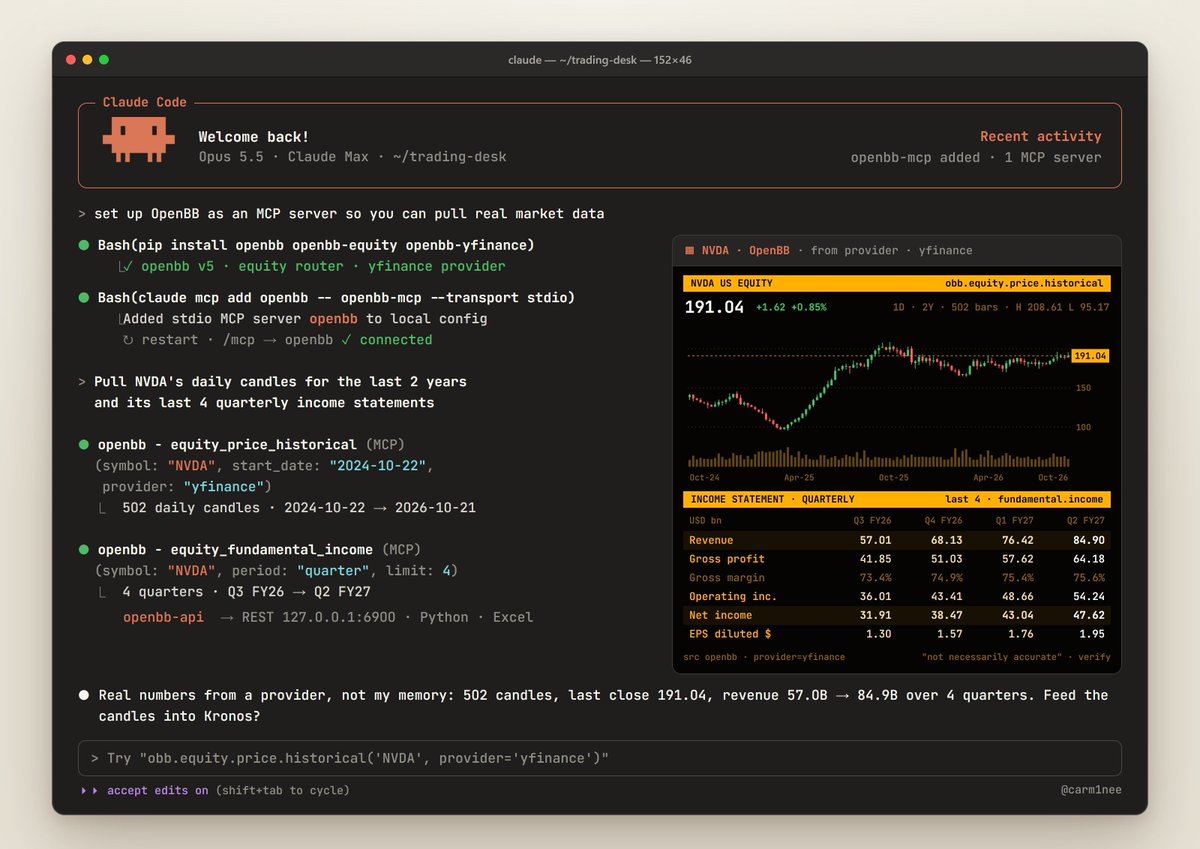
Every repo on this list is useless without data. OpenBB is the plumbing. Connect once, use it everywhere: Python for quants, Excel for analysts, MCP servers for AI agents, a REST API for everything else.
This is the "free Bloomberg" layer people keep asking about.
Set it up: open Claude Code and paste this
Install openbb, openbb-equity and openbb-yfinance. Then add OpenBB to yourself as an MCP server with: claude mcp add openbb -- openbb-mcp --transport stdio
Use it like this:
-
Restart Claude Code and ask in plain English: "Pull NVDA's daily candles for the last 2 years and its last 4 quarterly income statements"
-
You get real numbers from a data provider, not the model's memory
-
Feed the same candles straight into Kronos with the code below
# pip install openbb openbb-equity openbb-yfinance
from openbb import obb

df = obb.equity.price.historical(
    "NVDA", start_date="2024-01-01", provider="yfinance"
).to_dataframe()
print(df[["open", "high", "low", "close", "volume"]].tail())
Heads up: the current pip install openbb (v5) ships without obb.equity. That's why the first line also installs the equity router and the Yahoo provider.
The same data layer, served to every other tool you run:
openbb-api      # REST API on 127.0.0.1:6900
claude mcp add openbb -- openbb-mcp --transport stdio   # Claude Code
The catch: OpenBB connects you to providers. Premium datasets still need their own keys. And in its own words, the data "is not necessarily accurate". Cross-check anything you trade on.
#7 · ccxt: One API for Every Crypto Exchange
github.com/ccxt/ccxt · 44.5k stars · MIT
"A unified trading API with more than 100 crypto exchanges and prediction markets"
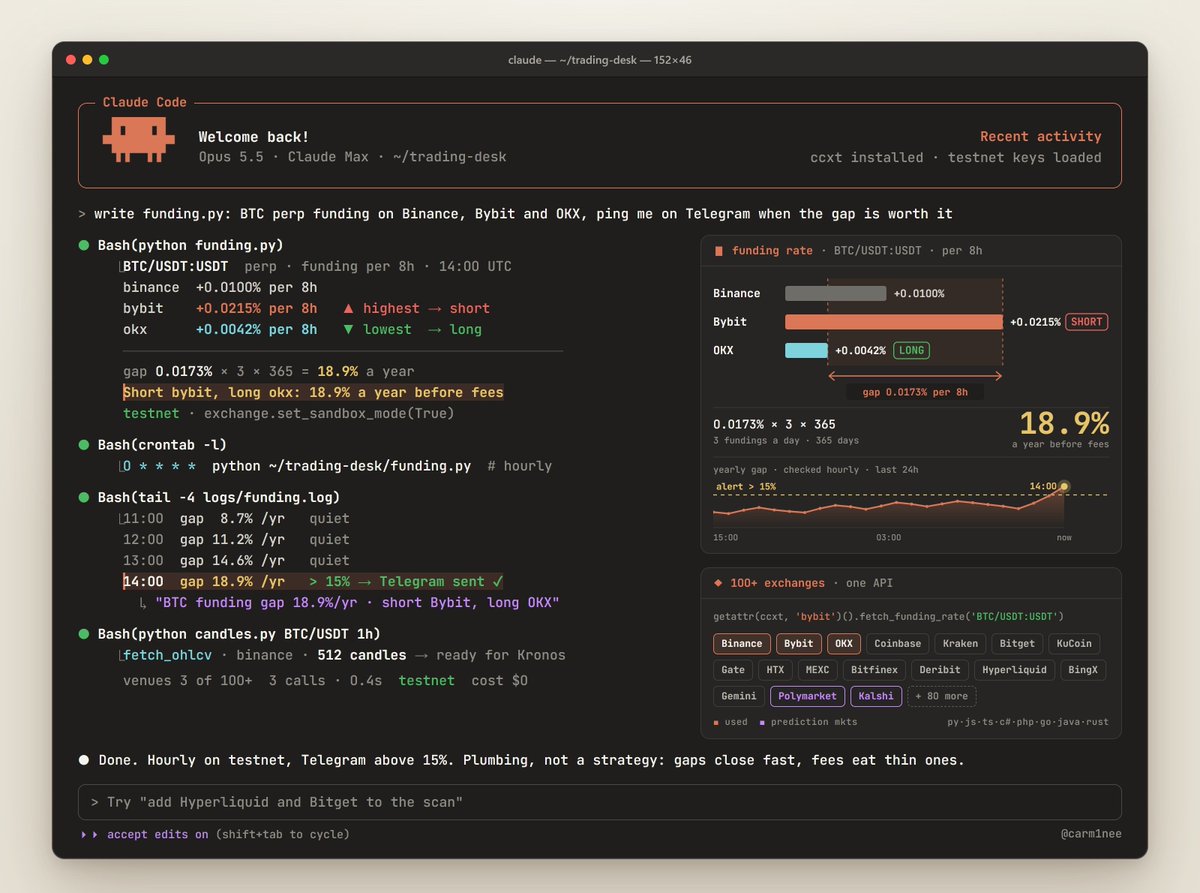
Write your bot once. Run it anywhere. Same code for market data and orders on 100+ venues, Polymarket and Kalshi included. Switching exchanges means changing one string. JavaScript, TypeScript, Python, C#, PHP, Go, Java and Rust.
Set it up: open Claude Code and paste this
pip install ccxt. Save the funding-rate script below as funding.py and run it. Then schedule it every hour and send me a Telegram message when the yearly gap tops 15%.
Use it like this:
-
It prints the funding rate for the same BTC perp on Binance, Bybit and OKX
-
Short where funding is highest, long where it's lowest. You collect the gap while it lasts, whichever way BTC moves.
-
Before real money, run both legs on testnet: exchange.set_sandbox_mode(True)
# pip install ccxt
import ccxt

rates = {}
for name in ["binance", "bybit", "okx"]:
    r = getattr(ccxt, name)().fetch_funding_rate("BTC/USDT:USDT")
    rates[name] = r["fundingRate"]
    print(f"{name:8} {r['fundingRate']:+.4%} per 8h")

hi = max(rates, key=rates.get)
lo = min(rates, key=rates.get)
gap = (rates[hi] - rates[lo]) * 3 * 365   # BTC perps pay every 8h
print(f"Short {hi}, long {lo}: {gap:.1%} a year before fees")
Swap fetch_funding_rate for fetch_ohlcv("BTC/USDT", "1h") and you have candles for Kronos.
The catch: it's plumbing, not a strategy. Funding gaps close fast and fees eat the thin ones. Do the math after costs.
#8 · freqtrade: The Crypto Bot That Retrains Itself
github.com/freqtrade/freqtrade · 55.7k stars · GPL-3.0
A free crypto bot with everything a bot shop would charge you monthly for: backtesting · plotting · money management · Hyperopt, machine learning that tunes your parameters · FreqAI, which "self-trains to the market via adaptive machine learning" · dry-run · control from Telegram or a web UI.
Spot and futures on Binance, Bybit, OKX, Kraken, Hyperliquid and more.
A bot that adapts while you sleep. Which is exactly why you test it before you trust it.
Set it up: open Claude Code and paste this
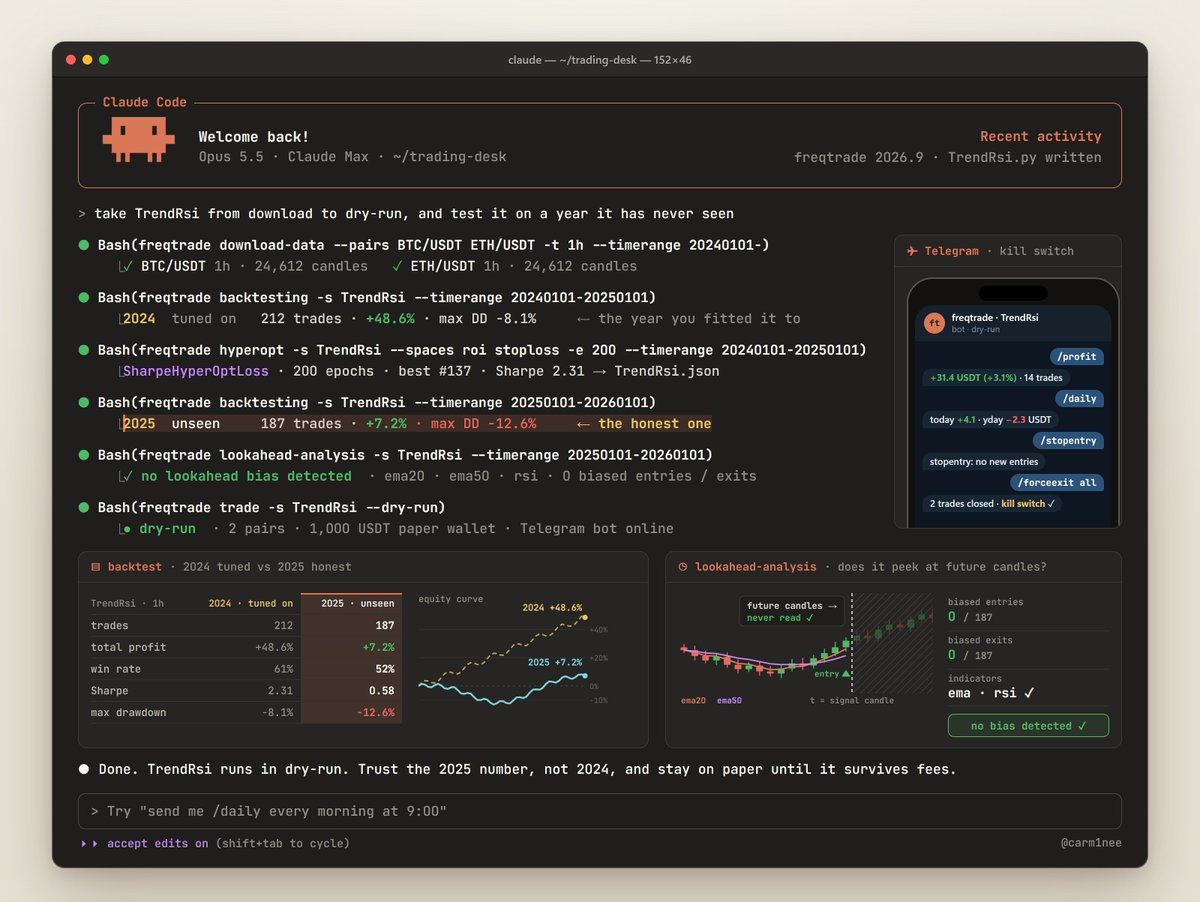
Install freqtrade with the hyperopt extra in a Python 3.12 virtual environment. Create user_data and a dry-run Binance config, and save the TrendRsi strategy below. Download 1h BTC/USDT and ETH/USDT data since 2024-01-01. Then run a backtest on 2024, hyperopt on 2024, a backtest on 2025 and lookahead-analysis on 2025, and show me the results side by side.
Use it like this:
-
Compare the two backtests. 2024 is what you tuned on. 2025 is the honest one: data it never saw.
-
lookahead-analysis is the step most people skip. It checks whether your strategy secretly peeks at future candles. A backtest that cheats always looks amazing.
-
Survived both? Run it in dry-run and control it from your phone: /profit · /daily · /stopentry · and /forceexit all is your kill switch.
# user_data/strategies/TrendRsi.py
from technical import qtpylib
import talib.abstract as ta
from freqtrade.strategy import IStrategy


class TrendRsi(IStrategy):
    INTERFACE_VERSION = 3
    timeframe = "1h"
    minimal_roi = {"0": 0.05}   # take profit at +5%
    stoploss = -0.02            # cut losers at -2%

    def populate_indicators(self, df, metadata):
        df["ema20"] = ta.EMA(df, timeperiod=20)
        df["ema50"] = ta.EMA(df, timeperiod=50)
        df["rsi"] = ta.RSI(df, timeperiod=14)
        return df

    def populate_entry_trend(self, df, metadata):
        up = qtpylib.crossed_above(df["ema20"], df["ema50"])
        df.loc[up & (df["rsi"] < 70), "enter_long"] = 1
        return df

    def populate_exit_trend(self, df, metadata):
        down = qtpylib.crossed_below(df["ema20"], df["ema50"])
        df.loc[down, "exit_long"] = 1
        return df
By hand:
pip install "freqtrade[hyperopt]"              # Python 3.12+
freqtrade create-userdir --userdir user_data
freqtrade new-config -c user_data/config.json  # binance, dry-run: yes
freqtrade download-data --pairs BTC/USDT ETH/USDT -t 1h \
    --timerange 20240101-
freqtrade backtesting --strategy TrendRsi --timerange 20240101-20250101
freqtrade hyperopt --strategy TrendRsi --hyperopt-loss SharpeHyperOptLoss \
    --spaces roi stoploss -e 200 --timerange 20240101-20250101
freqtrade backtesting --strategy TrendRsi --timerange 20250101-
freqtrade lookahead-analysis --strategy TrendRsi --timerange 20250101-
freqtrade trade --strategy TrendRsi --dry-run
The catch: in the README's own words, "Do not risk money which you are afraid to lose." Stay in dry-run until the numbers survive fees.
#9 · hummingbot: Get Paid Like a Market Maker
github.com/hummingbot/hummingbot · 20.6k stars · Apache-2.0
"Our mission is to democratize high-frequency trading"
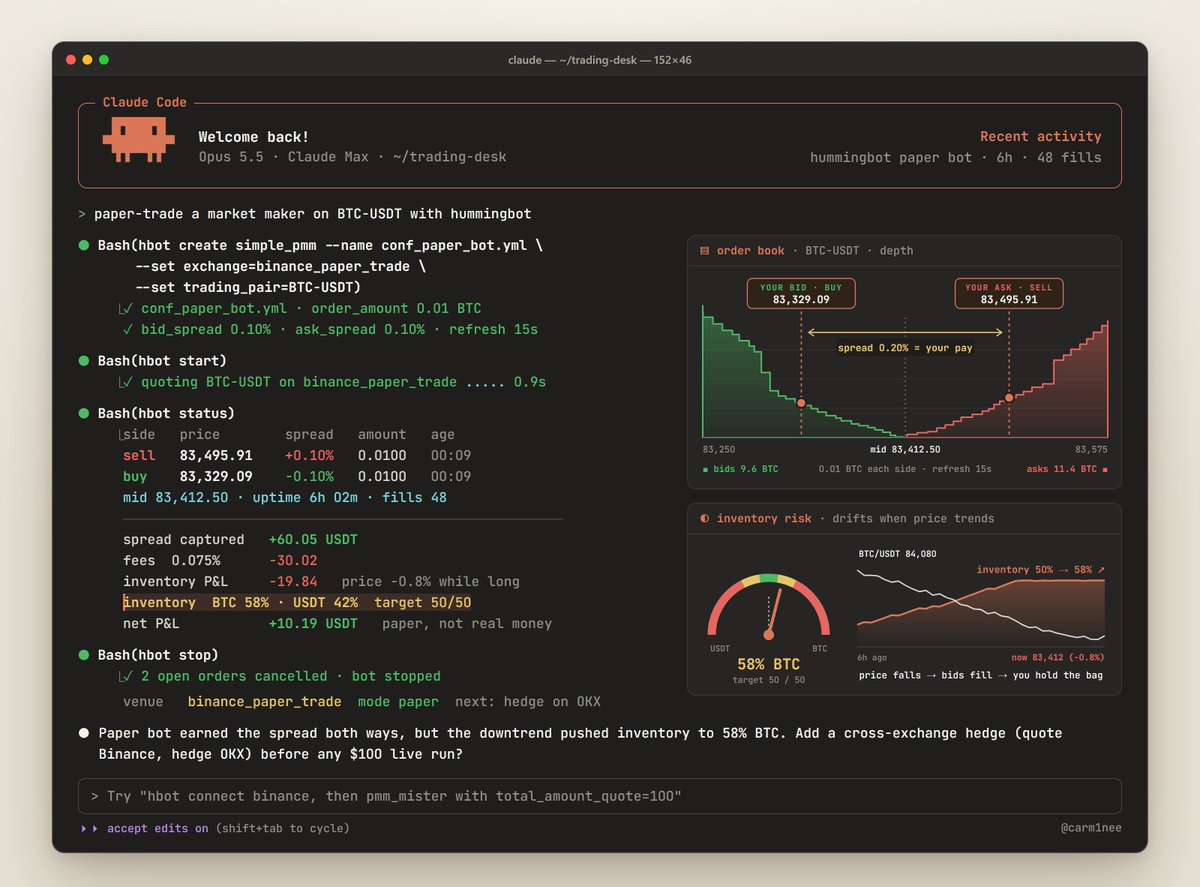
Everything above decides what to buy. hummingbot does what market makers do: quote both sides of the book and earn the spread.
Its README says users generated over $34 billion in volume across 140+ venues in the past year.
Market making · arbitrage · cross-exchange hedging · grid · DCA · TWAP. Centralized and decentralized, spot and perps: Binance, OKX, Bybit, Hyperliquid, dYdX, Uniswap and more.
Most traders guess the direction. Market makers get paid by both sides.
Set it up: open Claude Code and paste this
Clone github.com/hummingbot/hummingbot and run make install (install Miniconda first if it's missing). Then create the simple_pmm paper bot on binance_paper_trade for BTC-USDT, start it, and show me hbot status every 10 minutes.
Use it like this:
-
Let the paper bot quote both sides against live Binance data. No API keys, no money.
-
Watch your inventory when the price trends against you. That's the real risk in market making, and paper is the cheap place to learn it.
-
When paper survives, go live with $100 of size
-
Next level: cross-exchange market making. Quote on one exchange, hedge the fills on another.
By hand, paper first:
git clone https://github.com/hummingbot/hummingbot.git && cd hummingbot
make install && conda activate hummingbot     # needs Miniconda
hbot create simple_pmm --name conf_paper_bot.yml \
     --set exchange=binance_paper_trade --set trading_pair=BTC-USDT
hbot start conf_paper_bot.yml
hbot status
hbot stop
Then live, with $100:
hbot connect binance          # API keys, stored encrypted
hbot create pmm_mister --name conf_my_bot.yml --set connector_name=binance \
     --set trading_pair=BTC-USDT --set total_amount_quote=100
hbot start conf_my_bot.yml
Want an AI on top? Condor, hummingbot's AI harness, connects LLM decisions to deterministic execution. You run it from Telegram or a web dashboard.
The catch: market makers get paid for carrying inventory risk. When the market runs one way, you're the one holding the bag. Paper first, tiny size second.
#10 · NautilusTrader: The Engine a Fund Would Build
github.com/nautechsystems/nautilus_trader · 30.5k stars · LGPL-3.0
"Production-grade Rust-native trading engine with deterministic event-driven architecture"
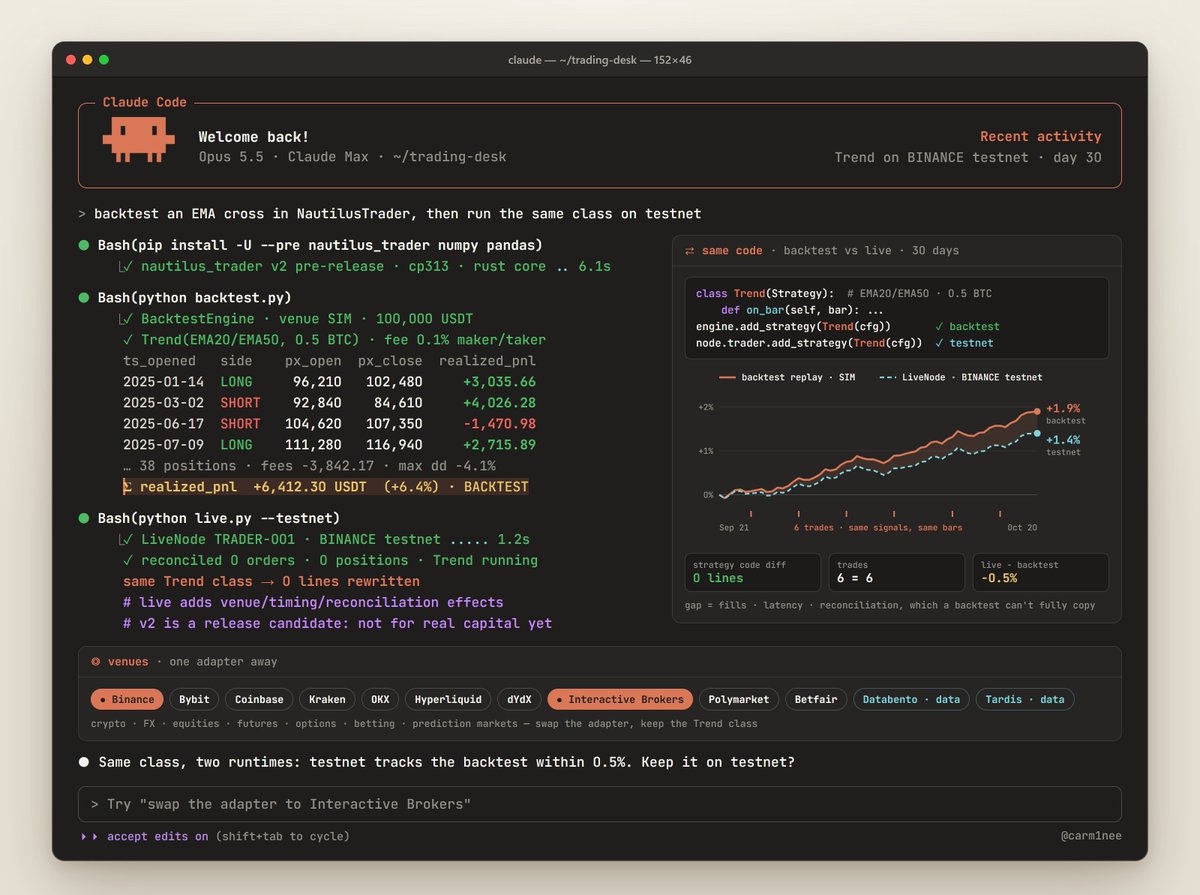
Here's the dirty secret of most backtests: the code you test isn't the code you trade.
NautilusTrader closes that gap. Research, backtest and live trading run in one engine. The same strategy code runs in backtest and live. Backtests resolve down to the nanosecond.
-
Venues and data · Binance, Bybit, Coinbase, Kraken, OKX, Hyperliquid, dYdX, Interactive Brokers, Polymarket, Betfair, Databento, Tardis
-
Assets · crypto, FX, equities, futures, options, betting exchanges and prediction markets
Set it up: open Claude Code and paste this
Create a Python 3.13 virtual environment and install nautilus_trader with --pre, plus numpy and pandas. Save the backtest below as backtest.py, replace the demo candles with the last 1,000 hourly BTC/USDT candles from Binance via ccxt, run it and summarize the PnL after fees.
Use it like this:
-
Prototype in freqtrade or a notebook. Port only what survives.
-
Backtest on real tick and order-book data: Databento for futures and equities, Tardis for crypto
-
When it survives, hand the same Trend class to a LiveNode with the Binance or Interactive Brokers adapter. No rewrite.
# pip install -U --pre nautilus_trader numpy pandas   (Python 3.13+)
from decimal import Decimal
import numpy as np, pandas as pd
from nautilus_trader.backtest import BacktestEngine
from nautilus_trader.common import LogLevel
from nautilus_trader.config import (BacktestEngineConfig, LoggerConfig,
                                    StrategyConfig)
from nautilus_trader.execution import MakerTakerFeeModel
from nautilus_trader.indicators import ExponentialMovingAverage as EMA
from nautilus_trader.model import *
from nautilus_trader.trading import Strategy

PAIR = CurrencyPair(
    instrument_id=InstrumentId.from_str("BTC/USDT.SIM"),
    raw_symbol=Symbol("BTC/USDT"), base_currency=Currency.from_str("BTC"),
    quote_currency=Currency.from_str("USDT"), price_precision=2,
    size_precision=4, price_increment=Price.from_str("0.01"),
    size_increment=Quantity.from_str("0.0001"), ts_event=0, ts_init=0)
BAR = BarType.from_str("BTC/USDT.SIM-1-HOUR-LAST-EXTERNAL")

class Trend(Strategy):  # this exact class also runs live
    def __init__(self):
        super().__init__(StrategyConfig())
        self.fast, self.slow = EMA(20), EMA(50)

    def on_start(self):
        self.register_indicator_for_bars(BAR, self.fast)
        self.register_indicator_for_bars(BAR, self.slow)
        self.subscribe_bars(BAR)

    def on_bar(self, bar):
        if not self.indicators_initialized():
            return
        flat = self.portfolio.is_net_flat(PAIR.id)
        if self.fast.value > self.slow.value and flat:
            qty = PAIR.make_qty(Decimal("0.5"))
            self.submit_order(self.order_factory.market(
                PAIR.id, OrderSide.BUY, qty))
        elif self.fast.value < self.slow.value and not flat:
            self.close_all_positions(PAIR.id)

# Demo candles (random walk). Swap in real ones from ccxt.
px = 60_000 * np.exp(np.cumsum(
    np.random.default_rng(7).normal(0, 0.004, 5_000)))
ts = pd.date_range("2025-01-01", periods=len(px), freq="h")
bars = [Bar(bar_type=BAR, open=Price(p, 2), high=Price(p * 1.002, 2),
            low=Price(p * 0.998, 2), close=Price(p, 2),
            volume=Quantity(100, 4), ts_event=t.value, ts_init=t.value)
        for t, p in zip(ts, px)]

engine = BacktestEngine(BacktestEngineConfig(
    logging=LoggerConfig(stdout_level=LogLevel.ERROR)))
engine.add_venue(
    venue=Venue("SIM"), oms_type=OmsType.NETTING,
    account_type=AccountType.CASH,
    starting_balances=[Money(100_000, Currency.from_str("USDT"))],
    fee_model=MakerTakerFeeModel(maker_rate=Decimal("0.001"),
                                 taker_rate=Decimal("0.001")))
engine.add_instrument(PAIR)
engine.add_data(bars)
engine.add_strategy(Trend())
engine.run()
print(engine.generate_positions_report()["realized_pnl"].tail())
The --pre in the install line matters: it gets you v2, which is what the docs cover. Without it you get v1 and this code won't run. The wheel also doesn't pull in numpy and pandas, so install them yourself.
The catch: the README warns that live trading adds venue, timing and reconciliation effects a backtest can't fully reproduce. And v2 is still a release candidate they don't recommend for real capital yet.
The Full Course: Build Your Own AI Hedge Fund
On their own, each repo is a toy. Stacked, they're a fund.
The org chart:
Research desk · OpenBB + ccxt for data · Kronos for 100 futures per chart · RD-Agent mining factors overnight · daily_stock_analysis in your Telegram before the open
Investment committee · TradingAgents for the debate · ai-hedge-fund for the legends' vote
Execution desk · NautilusTrader for stocks, futures and FX · freqtrade for crypto · hummingbot for market making
Risk desk · you, with rules written down before the first trade
The combo: one script that runs the fund
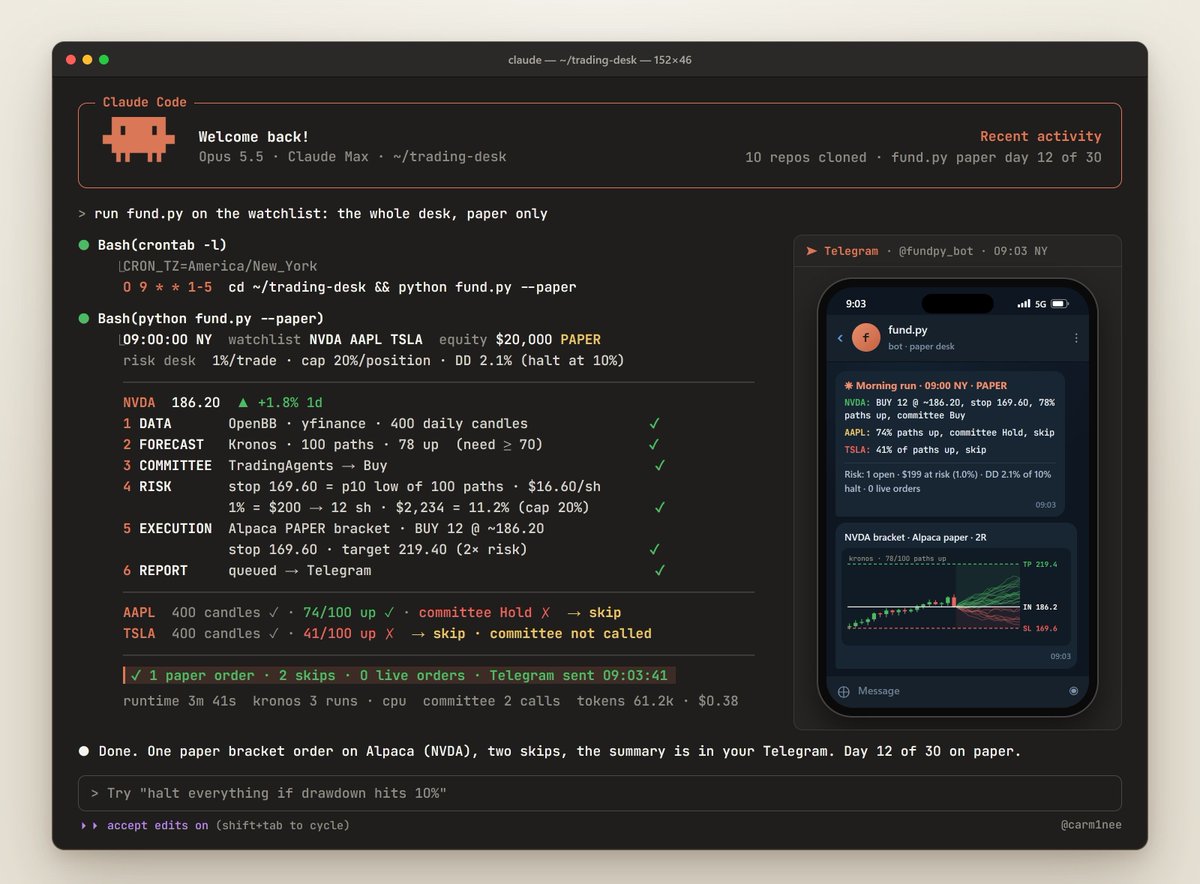
Every morning fund.py does what a fund's desks do, in order:
-
Pulls ~400 daily candles per ticker (OpenBB)
-
Runs 100 Kronos futures. Fewer than 70 pointing up → skip. This is the cheap filter.
-
Sends only the survivors to the TradingAgents committee, so the expensive LLM debate never runs on junk
-
Sizes the trade so the stop costs 1% of equity, capped at 20% of the account per position
-
Places a bracket order on your Alpaca paper account: stop at the 10th-percentile low of the 100 paths, target at 2x the risk
-
Texts you the summary on Telegram
Set it up: open Claude Code and paste this
Clone github.com/shiyu-coder/Kronos. In a Python 3.13 virtual environment install torch, einops, huggingface_hub, safetensors, alpaca-py, requests, openbb, openbb-equity, openbb-yfinance and git+https://github.com/TauricResearch/TradingAgents.git. Save the script below as fund.py inside the Kronos folder. Use my ANTHROPIC_API_KEY, my Alpaca paper keys as ALPACA_API_KEY and ALPACA_SECRET_KEY, and my Telegram bot as TG_TOKEN and TG_CHAT_ID. Run it once, then schedule it for 9:00 New York time every weekday.
# fund.py: OpenBB data → Kronos 100 paths → TradingAgents committee
#          → 1% risk sizing → Alpaca paper bracket order → Telegram
# Run it from inside the cloned Kronos folder. Paper account only.
import datetime as dt, os
import numpy as np, pandas as pd, requests
from openbb import obb
from model import Kronos, KronosPredictor, KronosTokenizer
from tradingagents.default_config import DEFAULT_CONFIG
from tradingagents.graph.trading_graph import TradingAgentsGraph
from alpaca.trading.client import TradingClient
from alpaca.trading.enums import OrderClass, OrderSide, TimeInForce
from alpaca.trading.requests import (MarketOrderRequest,
                                     StopLossRequest, TakeProfitRequest)

WATCHLIST = ["NVDA", "AAPL", "TSLA"]
RISK = 0.01      # lose at most 1% of equity if the stop hits
AGREE = 0.70     # 70 of 100 Kronos paths must end higher
DAYS = 5         # forecast the next 5 sessions

kronos = KronosPredictor(
    Kronos.from_pretrained("NeoQuasar/Kronos-small"),
    KronosTokenizer.from_pretrained("NeoQuasar/Kronos-Tokenizer-base"),
    max_context=512)
cfg = DEFAULT_CONFIG.copy()
cfg.update(llm_provider="anthropic", deep_think_llm="claude-opus-5-5",
           quick_think_llm="claude-sonnet-5-5")
committee = TradingAgentsGraph(config=cfg)
broker = TradingClient(os.environ["ALPACA_API_KEY"],
                       os.environ["ALPACA_SECRET_KEY"], paper=True)
equity = float(broker.get_account().equity)
today = dt.date.today()
log = []

for ticker in WATCHLIST:
    # 1. DATA: ~400 daily candles
    df = obb.equity.price.historical(
        ticker, start_date=today - dt.timedelta(days=730),
        provider="yfinance").to_dataframe()
    df = df[["open", "high", "low", "close", "volume"]].tail(400)
    ts = pd.Series(pd.to_datetime(df.index))
    nxt = pd.Series(pd.bdate_range(ts.iloc[-1], periods=DAYS + 1)[1:])

    # 2. FORECAST: 100 paths. The cheap filter runs first.
    paths = kronos.predict_batch(
        df_list=[df] * 100, x_timestamp_list=[ts] * 100,
        y_timestamp_list=[nxt] * 100, pred_len=DAYS,
        T=1.0, top_p=0.9, sample_count=1, verbose=False)
    price = float(df["close"].iloc[-1])
    up = np.mean([p["close"].iloc[-1] > price for p in paths])
    if up < AGREE:
        log.append(f"{ticker}: {up:.0%} of paths up, skip")
        continue

    # 3. COMMITTEE: the expensive LLM debate runs only on survivors
    _, rating = committee.propagate(ticker, today.isoformat())
    if rating not in ("Buy", "Overweight"):
        log.append(f"{ticker}: {up:.0%} up, committee {rating}, skip")
        continue

    # 4. RISK: stop at the 10th-percentile low across all 100 paths
    stop = float(np.percentile([p["low"].min() for p in paths], 10))
    risk = price - stop
    if risk <= 0:
        continue
    qty = int(min(equity * RISK / risk, equity * 0.2 / price))
    if qty < 1:
        continue

    # 5. EXECUTION: paper bracket order, 2:1 reward to risk
    broker.submit_order(MarketOrderRequest(
        symbol=ticker, qty=qty, side=OrderSide.BUY,
        time_in_force=TimeInForce.DAY, order_class=OrderClass.BRACKET,
        take_profit=TakeProfitRequest(
            limit_price=round(price + 2 * risk, 2)),
        stop_loss=StopLossRequest(stop_price=round(stop, 2))))
    log.append(f"{ticker}: BUY {qty} @ ~{price:.2f}, stop {stop:.2f}, "
               f"{up:.0%} paths up, committee {rating}")

# 6. REPORT: one message to your phone
text = "\n".join(log) or "No trades today."
requests.post(
    f"https://api.telegram.org/bot{os.environ['TG_TOKEN']}/sendMessage",
    data={"chat_id": os.environ["TG_CHAT_ID"], "text": text})
print(text)
By hand:
git clone https://github.com/shiyu-coder/Kronos && cd Kronos
pip install torch einops huggingface_hub safetensors alpaca-py requests \
    openbb openbb-equity openbb-yfinance \
    git+https://github.com/TauricResearch/TradingAgents.git
export ANTHROPIC_API_KEY=... ALPACA_API_KEY=... ALPACA_SECRET_KEY=...
export TG_TOKEN=... TG_CHAT_ID=...
python fund.py      # the script above, saved as fund.py
Schedule it 30 minutes before the open and the desk runs while you sleep.
The 30-day build:
Week 1 · Data + the morning note
-
Fork daily_stock_analysis and wire it to Telegram
-
Install OpenBB and ccxt and pull candles for your watchlist
Week 2 · The committee
-
Run TradingAgents' backtest grid on your watchlist
-
Build two funds in ai-hedge-fund and start them paper trading
Week 3 · Forecasts + research
-
Run 100 Kronos paths on every chart you care about
-
Let RD-Agent mine factors overnight. Keep only what survives out-of-sample.
Week 4 · Execution, on paper
-
Port the one idea that survived into NautilusTrader or freqtrade
-
Run fund.py every morning on your Alpaca paper account
-
Let it run on paper for 30 days before a single real dollar goes in
The daily loop, once it's live:
-
Before the open: the daily_stock_analysis note lands in Telegram
-
fund.py runs: Kronos filters the watchlist, the committee argues the survivors, Alpaca gets bracket orders, your phone gets the summary
-
After the close: every call sits in TradingAgents' memory log. The next run settles it against what actually happened.
-
Every weekend: rerun the TradingAgents backtest grid and let RD-Agent mine fresh data
The risk desk (non-negotiable):
-
Write your limits down before the first trade. A common starting point: risk 1% of capital per trade, stop everything at a 10% drawdown.
-
Test every kill switch before you need it: ai-hedge-fund's kill switch · freqtrade's /stopentry · hbot stop
-
Nothing goes live without three things: a walk-forward backtest with fees · a look-ahead check · 30 days on paper
The glue:
Open Claude Code with Opus 5.5, paste this article, and ask it to wire everything into one repo, one step at a time. openbb-mcp gives it your data. Alpaca's official MCP server (alpacahq/alpaca-mcp-server) lets it place paper trades on stocks, ETFs, crypto and options. TradingView's free Lightweight Charts (tradingview/lightweight-charts) draws your 100 Kronos paths over real candles.
The edge was never the tools. It's knowing how they fit together.Schedule it 30 minutes before the open and the desk runs while you sleep.
The 30-day build:
Week 1 · Data + the morning note
-
Fork daily_stock_analysis and wire it to Telegram
-
Install OpenBB and ccxt and pull candles for your watchlist
Week 2 · The committee
-
Run TradingAgents' backtest grid on your watchlist
-
Build two funds in ai-hedge-fund and start them paper trading
Week 3 · Forecasts + research
-
Run 100 Kronos paths on every chart you care about
-
Let RD-Agent mine factors overnight. Keep only what survives out-of-sample.
Week 4 · Execution, on paper
-
Port the one idea that survived into NautilusTrader or freqtrade
-
Run fund.py every morning on your Alpaca paper account
-
Let it run on paper for 30 days before a single real dollar goes in
The daily loop, once it's live:
-
Before the open: the daily_stock_analysis note lands in Telegram
-
fund.py runs: Kronos filters the watchlist, the committee argues the survivors, Alpaca gets bracket orders, your phone gets the summary
-
After the close: every call sits in TradingAgents' memory log. The next run settles it against what actually happened.
-
Every weekend: rerun the TradingAgents backtest grid and let RD-Agent mine fresh data
The risk desk (non-negotiable):
-
Write your limits down before the first trade. A common starting point: risk 1% of capital per trade, stop everything at a 10% drawdown.
-
Test every kill switch before you need it: ai-hedge-fund's kill switch · freqtrade's /stopentry · hbot stop
-
Nothing goes live without three things: a walk-forward backtest with fees · a look-ahead check · 30 days on paper
The glue:
Open Claude Code with Opus 5.5, paste this article, and ask it to wire everything into one repo, one step at a time. openbb-mcp gives it your data. Alpaca's official MCP server (alpacahq/alpaca-mcp-server) lets it place paper trades on stocks, ETFs, crypto and options. TradingView's free Lightweight Charts (tradingview/lightweight-charts) draws your 100 Kronos paths over real candles.
The edge was never the tools. It's knowing how they fit together.