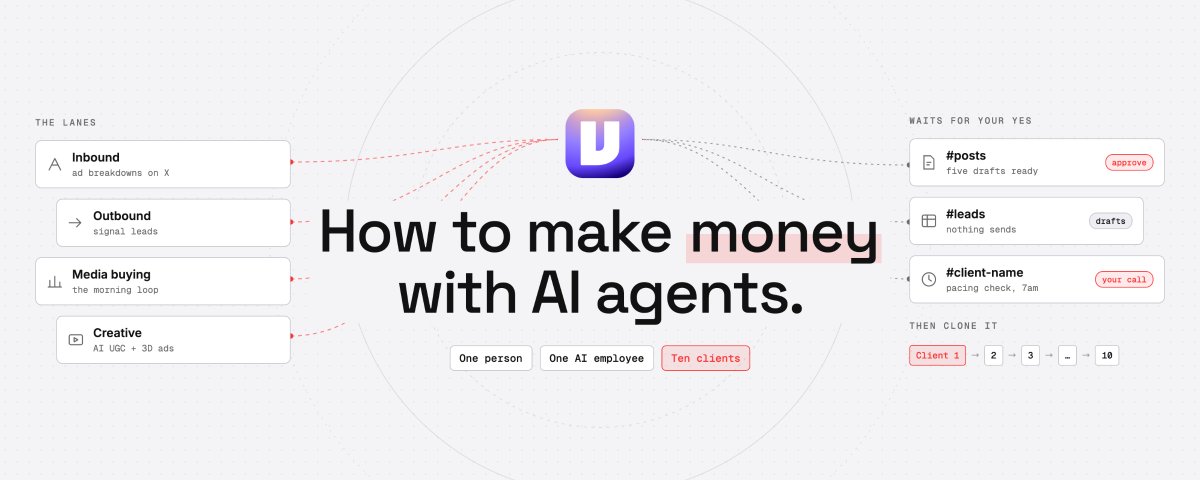
How to make money with AI agents
文章目录
部分视频或图片暂未收录,已在正文保留提示;需要时可查看原文。查看原文 ↗
I'm going to show you how to build a one-person agency that runs on a team of agents, from finding clients to delivering services...
the opportunity is huge because ecom brands are desperately trying to find people that can help them scale with AI ads
the good news is that a single AI employee can carry this task
this is for you if you run paid ads for clients today, or you run them for your own brand and you've started taking clients
it's also for you if you're just looking for a business model to automate with AI
and here's the part that makes it a business instead of a job: you learn the process on one client, duplicate it, and build much faster to 10 others
here's what's inside:
-
inbound: an X brand built on ad breakdowns
-
outbound: ecommerce brands that show a reason to talk
-
media buying: the daily account loop, behind your yes
-
AI UGC: the creative factory, run order included
-
long-form 3D ads: the Pixar-style method, story first
-
how i use Viktor myself: bookkeeping that's done before anyone opens it
-
managing it all: one setup that copies from client one to ten
every step below is a setup you can rebuild in your own workspace this week
inbound: build the agency's X brand on ad breakdowns
your first clients come from people who've watched you think about ads in public...
so the agency needs an account that posts what's working in paid social right now, with the receipts attached
Viktor runs the research side as a weekly job, and you keep the final word on every post
this piece is in partnership with Viktor, the AI employee who runs every lane below as your chief of staff
the weekly brief is one sentence, pin it in a #posts channel:
every monday, find what's trending in my niche, write five posts for X with the sources attached, and wait for my ok
the niche here is ads, so point the research at the ads themselves:
-
winning hooks in the Ad Library this month
-
formats brands keep running for weeks
-
creative angles your future clients' competitors are testing
asking Viktor what competitors are doing is too vague, asking him which hooks the best story ads in your niche use this month gets you an answer you can post
Viktor connects to 9,800+ tools, so check his catalog for the research and scheduling apps you already use before you add anything new
then the rules the platform enforces, because breaking them gets the account hidden or banned:
-
no copy-pasting the same post across accounts
-
no bot replies to strangers
-
no automated likes or follows
the posts go out from your hand, Viktor only drafts and waits
now turn the audience into pipeline...
when a post about ads pulls replies from founders, those people already raised their hand, so they go to the top of your outbound list as warm leads
check who fits your client profile, then write to them yourself, from your own account, one at a time, because the platforms ban automated messaging
inbound is slow to start, which is why Viktor runs it every monday from day one
outbound to ecommerce brands
inbound takes months to build, so outbound fills the calendar while it grows...
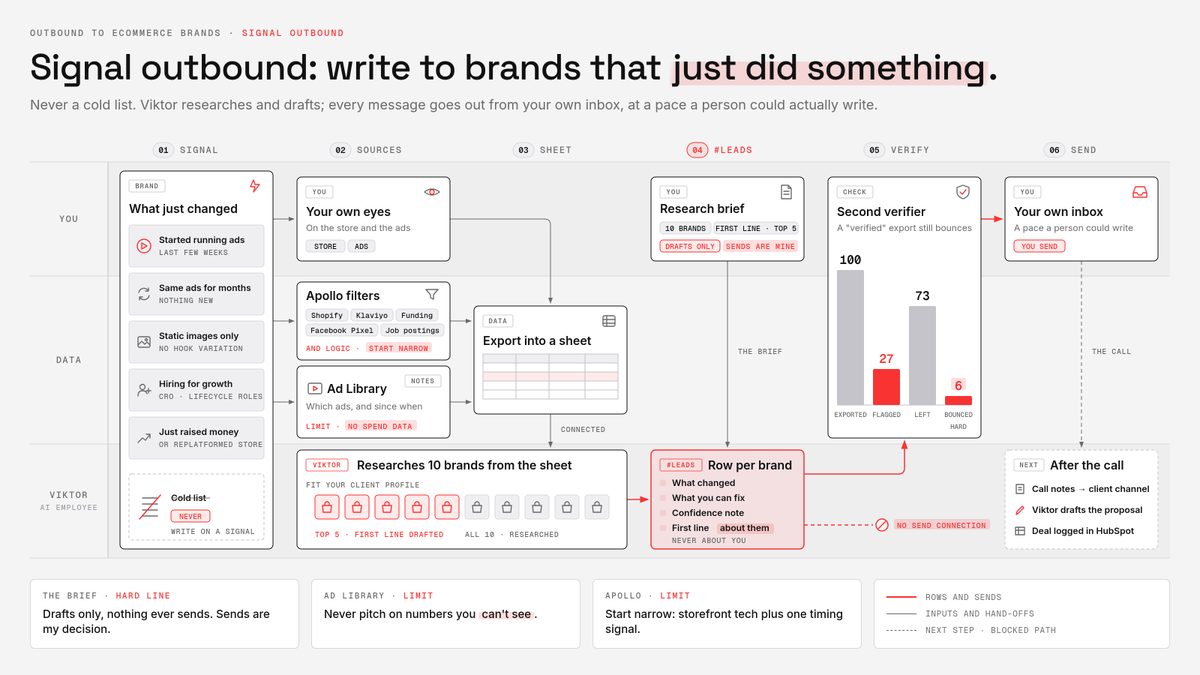
and the move is signal outbound: you write to a brand that just did something, never to a cold list
the reasons to reach out, from the ecommerce side:
-
they started running ads in the last few weeks
-
the same ads have been live for months, nothing new
-
static images only, no video, no hook variation
-
they're hiring for growth, CRO or lifecycle roles
-
they just raised money or replatformed their store
brands that just started running ads are warmer prospects than brands running the same ads for years
the data comes from three places, each with a limit you need to know:
-
Apollo filters: Shopify, Facebook Pixel, Klaviyo, job postings, funding
-
the Ad Library: which ads a brand runs and since when
-
your own eyes on the store and the ads
the Ad Library shows commercial ads but no spend data, so never pitch a brand on numbers you can't see
Apollo uses AND logic across filters, so start narrow: storefront tech plus one timing signal
export the list into a sheet, connect it, and drop the research brief in a #leads channel:
research the 10 brands in this sheet that fit [your client profile]. for each: what changed at their business, what you can see in their ads that we fix, and a confidence note on how solid the read is. draft a first line for the top 5 that opens with what you spotted at THEIR business. drafts only, nothing ever sends, sends are my decision
every row Viktor sends back has what changed, what you can fix, a confidence note and a first line about them, never about you
the #leads channel deliberately gets no connection that can send
before anything goes out, run the emails through a second verifier, because a "verified" export still bounces
one test exported 100 contacts Apollo had flagged as verified, 27 came back flagged by a second verifier and six of the 73 left still hard-bounced
you send every message from your own inbox, at a pace a person could actually write
then the call...
paste the call notes into the client's channel and Viktor drafts the proposal from what the founder said, in their words, for you to edit and send
log the deal in HubSpot so the pipeline lives in one place Viktor can read
the scale test for outbound: Viktor's confidence column stays honest without you re-checking the sites
Viktor runs media buying
the client signed, now the account work starts, and this is where one person used to need a small team...
Viktor checks every account each morning, flags pacing and spend problems in Slack, drafts the client reports and builds new ad variants
connect the client's ad accounts, plus a sheet for anything the platforms don't hold
Meta opened its ads AI connectors in open beta on April 29, 2026, the ads MCP server and the ads CLI, and the defaults decide where your guardrails go
here's what the platform side does by default:
-
MCP write tools create campaigns, ad sets and ads paused
-
the CLI creates campaigns, ad sets and ads paused too
-
CLI creatives are the exception, stage them with PAUSED yourself
-
the CLI takes no confirmation when you set a campaign ACTIVE
and one default that should scare you a little: out of the box every ad account allowed all seven write actions, budgets, campaigns, ad sets, ads, targeting, creative and status
so set the ads MCP server rules per ad account in Business Suite before anything connects, for example a budget cap that blocks requests over $1,000
if you manage client accounts through your own developer app, the ads_mcp_management permission at Advanced Access goes through App Review, plan for it before client two
paused only means nothing spends yet, so the review has to happen in Viktor's channel before anything goes live
step 1: Viktor writes the test plan first
summarize this client's offer in two lines so i know you understood it. then propose a test media plan: 2 specific audiences, 2 ad angles per audience, and how you'd split [the client's daily cap]. after i approve the plan here, build the campaign with everything PAUSED. nothing goes live without my explicit go
step 2: the build
Viktor builds the campaign paused from the approved plan, then you ask for the build summary and check the account ID, objective, budget, targeting, pixel and status before you switch it on
step 3: the morning loop
every morning Viktor posts one pacing check per client in that client's channel: spend against plan, what's pacing high or low, which ads are losing
Viktor points out the losers daily and proposes the pause, and the pause happens when you approve it
budget and strategy stay with you, every budget change waits for your yes
and when the ad platforms and the store show different numbers, pick ONE as the truth in the client's brief and Viktor reports from that one only
step 4: the weekly loop
Viktor drafts the client report overnight, and it waits in the channel for your review before anything reaches the client
the daily loop is the proof: Viktor posts it, you decide what happens next
AI UGC: the creative factory
ad accounts die on creative fatigue, so the agency that ships fresh creative every week keeps its clients...
and AI UGC is how one person ships that volume, with Viktor running the brief and you approving every face before the batch renders
the run order, rebuilt from my UGC factory:
-
research winning ads in TikTok Creative Center and the Ad Library
-
file every winner in a vault sheet: hook, beat order, who's on camera
-
pull the product complaints from reviews into the same sheet
-
script at three and a half words per second, about 105 words for 30 seconds
-
build a character sheet: one close-up and one full-body shot
-
the person can hold the product but never change it
-
render the hook clip first, approve the face and the voice
-
fire the remaining clips in parallel from the same images
-
stitch, pull frames, check continuity across every clip
-
label it as AI, then you decide whether the ad sells
step 7 is the one nobody should skip...
if the hook feels off, re-roll it now, because everything else inherits this clip, and a bad identity caught here costs one clip instead of the whole batch
extract the approved hook's audio and attach it as the audio reference on every remaining clip, so the voice holds across the set
the video platform runs a few jobs at once and rejects the rest, so submit the next clip when a slot frees
Viktor's part: he fills the vault sheet, writes the scripts at the word count, drafts the character sheet briefs and builds the variant set from the client's product photos and brand guidelines
the renders run on your video platform account, where you submit them and approve the cost
fal can still charge for a request that fails once GPU time was spent, so you approve the face before paying for every other clip
one approved hook, then the batch, every time
long-form 3D ads: the Pixar-style method
UGC wins on volume, but some brands need one ad people watch to the end...
so the second format is a long-form 3D animated ad in the Pixar style, built like a short film where the product is necessary to the story
because a long-form story ad is a sales letter wearing a story, and once the method is written down it can run again and again
the whole method comes from my long-form ads article, where i built our Little Light production end to end, and everything below is that run
the production layer from that build:
-
the Fal CLI, every image and video model from one place
-
a Suno song as the master soundtrack
-
Seedance for the picture
-
an Obsidian vault for every ad, spine and script
the written method is the instruction set, and the CLI controls what generates, in what order, with which model
that's what you need when the same run has to repeat the same way twice
step 1: mine the Ad Library for structures
shortlist the long-form story ads that are visibly being maintained: still active, running for months, repeated creative patterns, the same offer and destination
the library holds no performance metrics, so a long-running ad means someone keeps paying for it, and that's all it means
for each one, write down the hook, the trigger, the mechanism, the product use, the payoff and the CTA
step 2: extract the spine before writing a word
-
the trigger that starts the story
-
the problem getting worse
-
the discovery moment
-
the mechanism that explains why it works
-
the product demonstrated inside the plot
-
the payoff
-
the CTA
then carry that spine into a completely different story... same skeleton, new flesh, zero copying
step 3: make the product necessary
give the product a job inside the plot, so removing it would break the story
the test: delete the product from your outline, and if the story still works, rewrite until it doesn't
step 4: the story first, then the song
write the script as prose, the way you'd tell the story to one person, beat by beat along the spine
start with lyrics and rhyme makes the decisions the sales argument should make, so the order stays fixed
then open Suno in Custom mode, add a Style, the Lyrics and a Title, and your script becomes the lyrics
the controls that matter:
-
structure labels like Verse and Outro to set the flow
-
the Style Influence setting, from Loose to Strong
-
the Exclude Styles box to cut instruments or vocal styles
-
the Extend option when the song needs more at the end
generate several takes, keep the strongest, then map where each phrase lands and split the track into one reference window per planned sequence
keep the master file untouched, every cut comes from it and the finished ad gets assembled under it
step 5: lock characters, products and geography
the Pixar look holds only when the model gets something firm: a clear reference image, a locked style, controlled motion, stable lighting, defined framing
-
a character sheet per character, with close-up panels
-
empty hands in the turnaround, held props drift across angles
-
a few options per character, pick one, lock it
-
a product sheet with the canonical depiction
-
an environment sheet per location, same street, same rooms
record them once, then attach the exact same sheets to every sequence
step 6: turn the song into timed sequences
the song runs on global time, each shot runs on local time, and the translation between the two is the job
every sequence brief carries the matching sheets, the song cut for exactly its window, and what happens at the start, middle and end of the clip
step 7: generate with Seedance, one sequence at a time
upload the references and give each one a job:
this image is the character
this image is the product
this image is the environment
this audio is the timing
start: [what happens] · middle: [what happens] · end: [what happens]
generate short and assemble in the edit, because shorter clips hold consistency better than one long generation
the two failures that matter: generating without the song attached, and generating without the detailed character sheets
keep generated audio off too, a baked-in soundtrack can only be muted, never removed
song in, sheets in, generated audio off... every sequence, no exceptions
step 8: the montage
lay the untouched master song on the timeline and fit the picture under it, sequence by sequence, on the timestamps from your phrase map
trim the edges so cuts land on the music, check the same faces, products and geography across every cut, then watch the full playback once without touching anything
then write the whole method down: research questions, shortlist rules, spine template, song settings, sheet checklist, sequence brief, generation rules
the vault keeps every shortlisted ad, spine and script, so the second run starts from accumulated research instead of an empty folder
the paperwork that keeps a film consistent lands in the client's creative channel for your approval: the spine, the story draft, the three sheets, the sequence list timed to the song
the first ad costs you the method, every ad after that only costs you the run
how i use Viktor myself
before the setup that ties it all together, here's how Viktor runs inside my own business...
my team and my accountant all work in one Slack workspace, and Viktor sits in there with them
his main job is the money paperwork:
-
collecting receipts
-
collecting invoices
-
sending invoices to my clients
so by the time my accountant opens the books, the bookkeeping is already prepared
across the team it saves 10+ hours every week, and it's super convenient: everyone just asks Viktor inside Slack
that's the same pattern the agency runs on... Viktor does the legwork inside Slack, a human signs off
manage and connect it all
now the part that turns one client into ten...
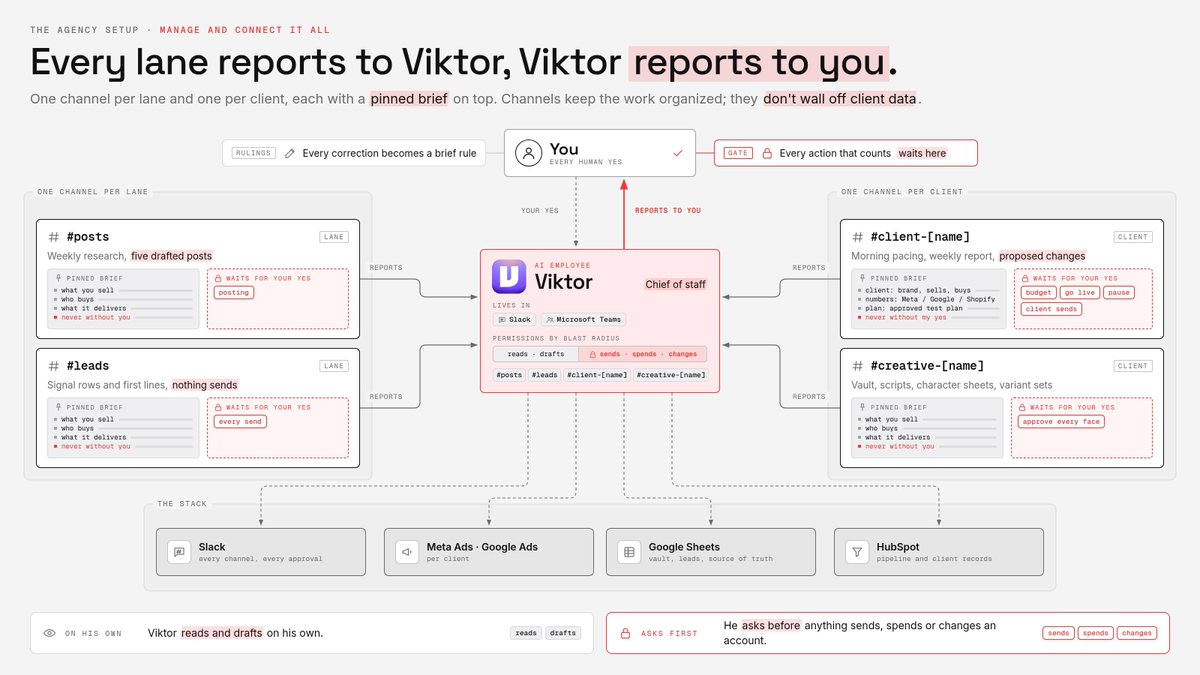
Viktor is the chief of staff: every lane reports to Viktor, and he reports to you
Viktor lives in Slack and Microsoft Teams, so the whole setup sits where you already work
the stack for this agency, kept to what you need:
-
Slack for every channel and every approval
-
the client's ad accounts, connected per client
-
one sheet for the vault, the leads and the source of truth
-
HubSpot for the pipeline and client records
the channels to create, one per lane and one per client:
-
#posts: the weekly research and five drafted posts
-
#leads: signal rows and first lines, nothing sends
-
#client-[name]: morning pacing, weekly report, proposed changes
-
#creative-[name]: vault, scripts, character sheets, variant sets
then pin one message at the top of each channel that says what you sell, who buys, what this channel delivers, and what never goes out without you
that pinned message is Viktor's whole briefing, so write it like you're onboarding a new hire who's smart but knows nothing about you yet
here's the pinned brief for a client channel:
client: [brand], [what they sell], [who buys]
this channel delivers: a pacing check every morning, a client report drafted every week, proposed changes with the reason
source of truth for numbers: [Meta / Google / Shopify, pick one]
the plan: [link to the approved test plan]
never without my yes: budget changes, going live, pausing anything, anything sent to the client
permissions go by blast radius: Viktor reads and drafts on his own, and asks before anything sends, spends or changes an account
every action that counts waits for a human yes, and that includes the small ones
keep a rulings note too: every time you correct him, write the rule into the channel's brief so tomorrow's queue is shorter
one more honest line: a channel per client keeps the work organized, and that's all it does, client data isn't walled off by it
so if a client needs strict separation, sort that out before you connect their accounts
now cloning...
-
the pinned brief, with the client details swapped
-
the one-sentence weekly and daily jobs, pasted again
-
the test plan brief, word for word
-
the rulings note, which only grows
-
the ads MCP server rules for each new ad account
the guardrails copy too, if you set them up front...
the rules API sets the same limits on every new ad account, one call per rule, per asset, so client ten starts as locked down as client one
(the rules are in limited availability, so check your business is enrolled first)
and the rule that keeps you from drowning: build one lane at a time, run it until it produces on its own, then add the next one
the 7am test: client one's pacing post from Viktor landed this morning without a message from you, and only then do you sign client two
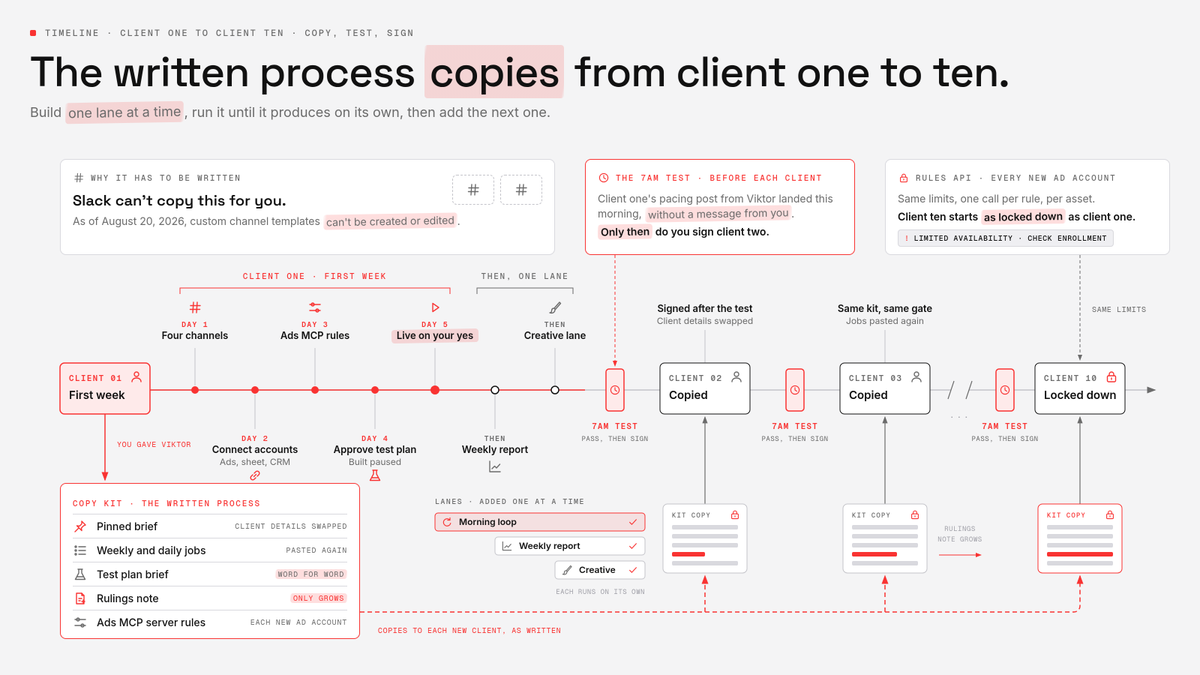
the first client and the first week:
-
day 1: create the four channels and pin the briefs
-
day 2: connect the ad accounts, the sheet and the CRM
-
day 3: set the ads MCP server rules
-
day 4: approve the test plan, Viktor builds it paused
-
day 5: go live on your yes, start the morning loop
then the weekly report, then the creative lane, then client two
your job shrinks to the part only you should do: saying yes to the send, the spend and the change
hire @viktor_com for your team, he's free to start (use code MACHINA100 for $100 in credits) - full link in the replies
Paid Partnership