Claude 2.0: Everything That's Changed (FULL GUIDE)
文章目录
Claude 2.0 is here, and it's incredible.
Claude has changed more in the last few weeks than most people realize.
Here's everything worth knowing (including prompts to test yourself).
I. Giving Claude a Team of "Helpers"
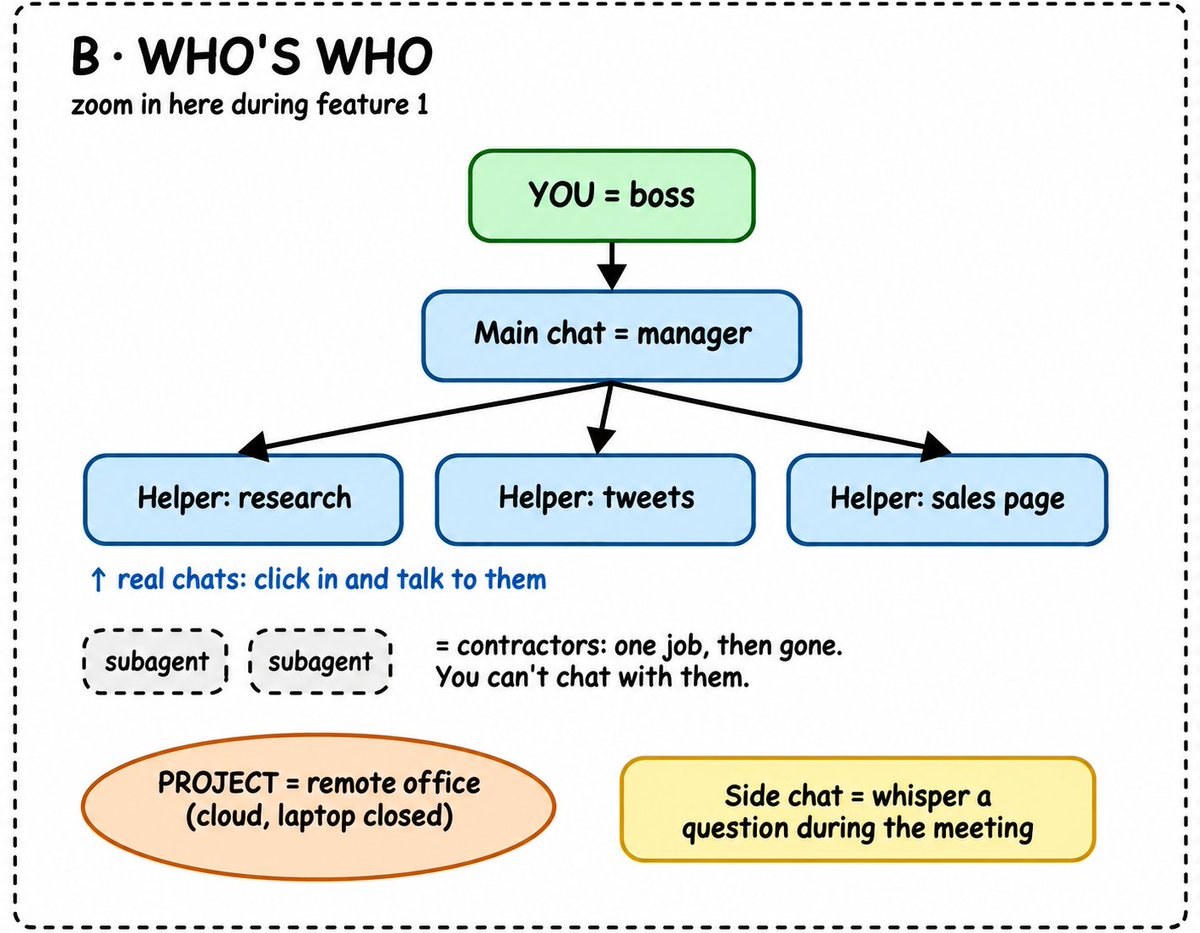
You can now equip Claude with a team of "helper" subagents that pop up in sidechats.
Instead of researching, writing, and planning in separate chats, you give Claude the main job and let its helpers work on different parts in parallel. The main conversation collects their work when they're done.
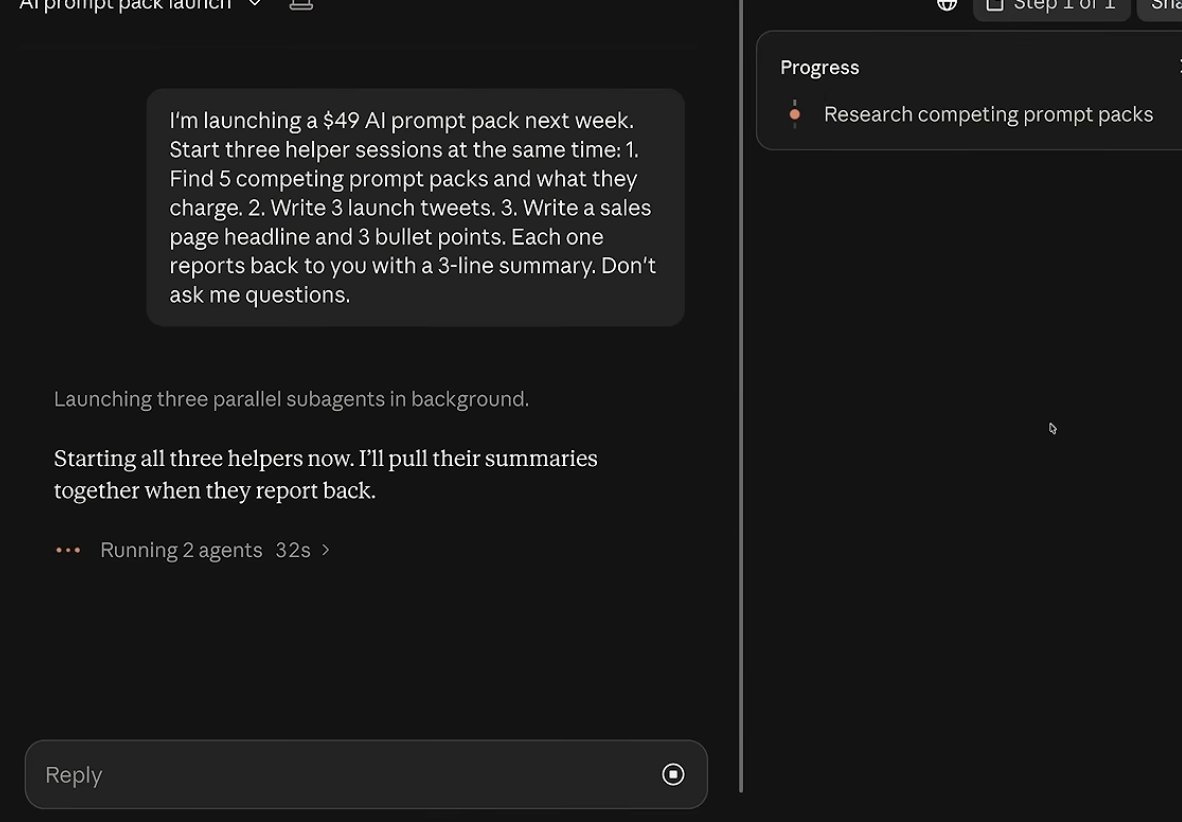
Let's say you're launching a $49 digital product. You need competitor research, X posts, and a sales page. Rather than prompting for all three one after another, try this:
example
Prompt:
I'm launching a $49 [product] for [target audience]. Start three helpers in parallel.

Research five competitors, including their offers, pricing, and positioning.

Draft five X posts for the launch using my product description and writing style.

Draft a simple sales page covering the problem, offer, benefits, and FAQs.

Give every helper the same product and audience context. When they're done, combine the results, flag anything that conflicts, and tell me what still needs my decision. Don't publish anything.
You can follow each helper's progress from the task panel where the feature is available.
For a larger ongoing project, Claude Code can also work with an approved repository of source files. That prevents every helper from working with a different version of the facts.
II. Manage Your Other Sessions in One Chat
Claude Code can now work across supported desktop sessions. One session can check what others are doing, ask for updates, and pass along changes without you having to reopen everything.
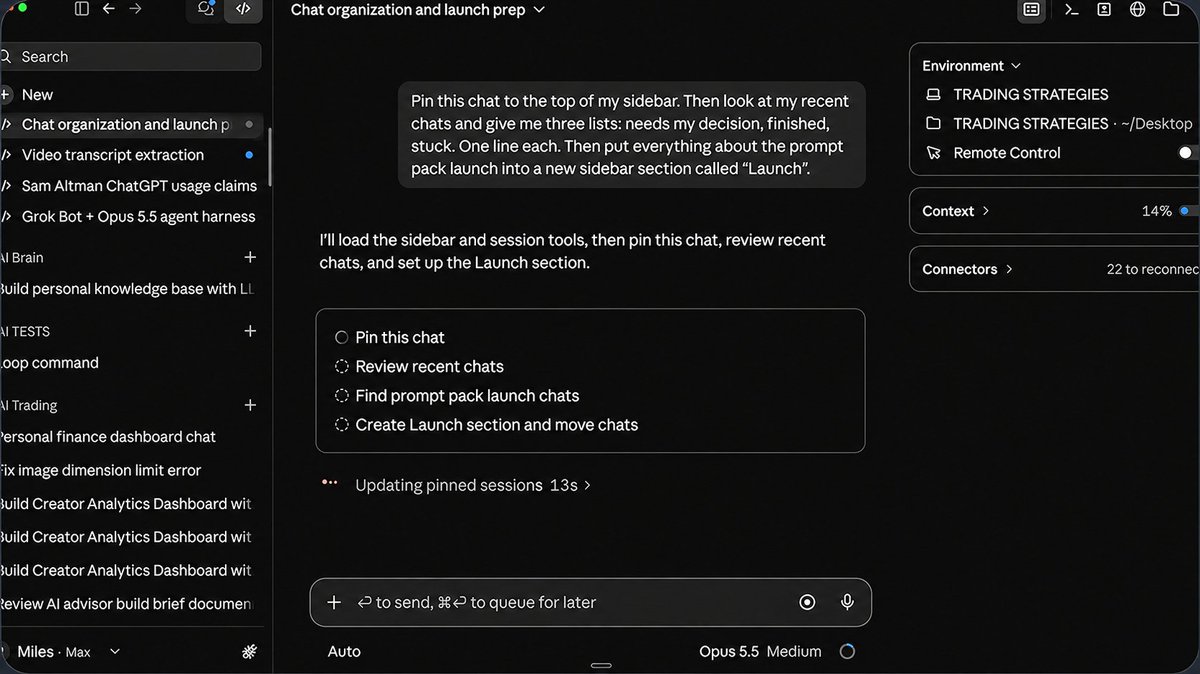
For example, if you're working on several articles, builds, or research tasks, create one manager session using this prompt:
Act as my project manager. Review the Claude Code sessions you can access.

Give me three lists: Needs my decision, Finished, and Stuck.

Keep each item to one line, with the session name and next action.

Suggest a clean way to group and rename the sessions. Ask before changing or archiving anything.
You can also give it a correction that applies elsewhere:
Our product is for beginners, not experienced users. Tell the launch-post and sales-page sessions to revise their drafts for beginners. Show me what changed.
This is a more practical way to supervise several tasks at once:
III. Use Side Chats + Split Screen
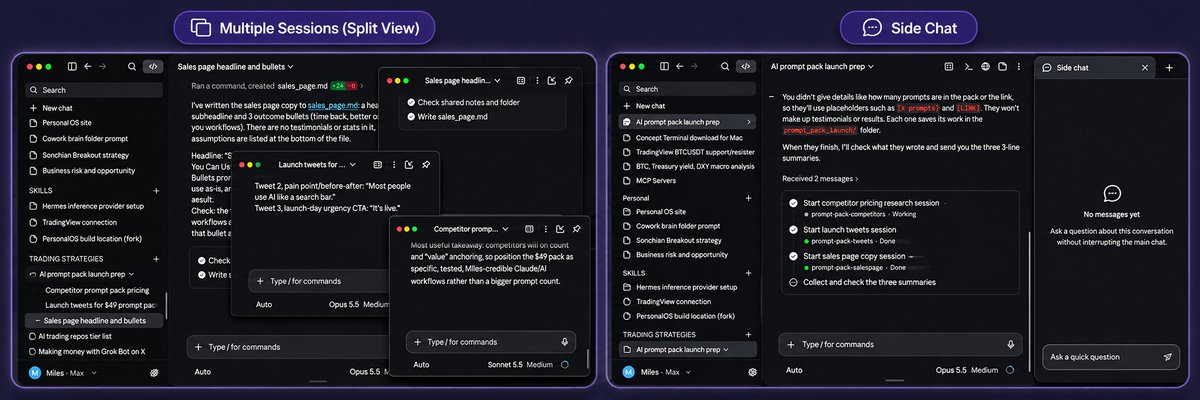
You can now open a Side Chat by clicking the tab menu at the top-left corner of Claude Code and selecting Side Chat. Alternatively, type /btw in your chat.
The side chat already has your main conversation's context, so you can ask questions, check an assumption, or clarify something without interrupting the original task.
Another useful addition is Split Screen.
You can now have multiple Claude Code sessions open side by side instead of constantly switching between chats.
To use it, simply right-click another chat in your sidebar, select:
Open in → Split view.
Alternatively, hold Option on Mac or Alt on Windows while clicking a chat.
For example, you could have one session researching competitors, another writing content, and a third working on a website, all visible at once.
You can also pop supported panels into separate windows and move them across monitors.
This makes it much easier to oversee multiple agents, review their progress, and manage different projects without losing track of what's happening.
IV. Edit Docs and Google Sheets Directly in Claude
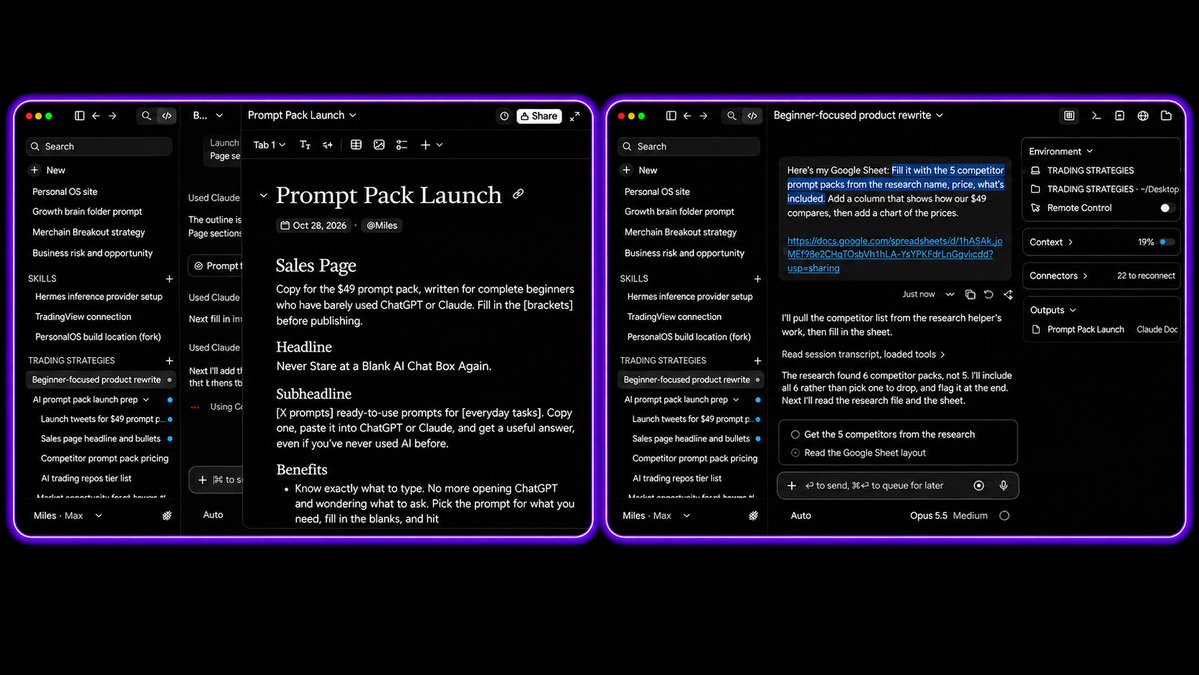
Claude Docs are new.
You can review the draft, make changes together, and share or export the finished document. Claude Design and Slides are also now closer to the same workflow.
Claude can also update an actual spreadsheet while keeping the rest of your research in context.
Example prompt:
Open my connected Google Sheet at [link]. Use the competitor research in this project to fill in these columns: Company, Product, Price, Target Audience, Main Offer, and Source.

Add one row per competitor. Leave anything unverified blank and don't overwrite existing data. Tell me what you added once finished.
No repeated copying and reformatting.

Connect the relevant Google app and review the changes before using the sheet for important decisions.
V. Clean Up the Skills Eating Your Context
The more Skills and plugins you add, the more instructions Claude may need to carry into its sessions. Some of them could be taking up context even if you barely use them.
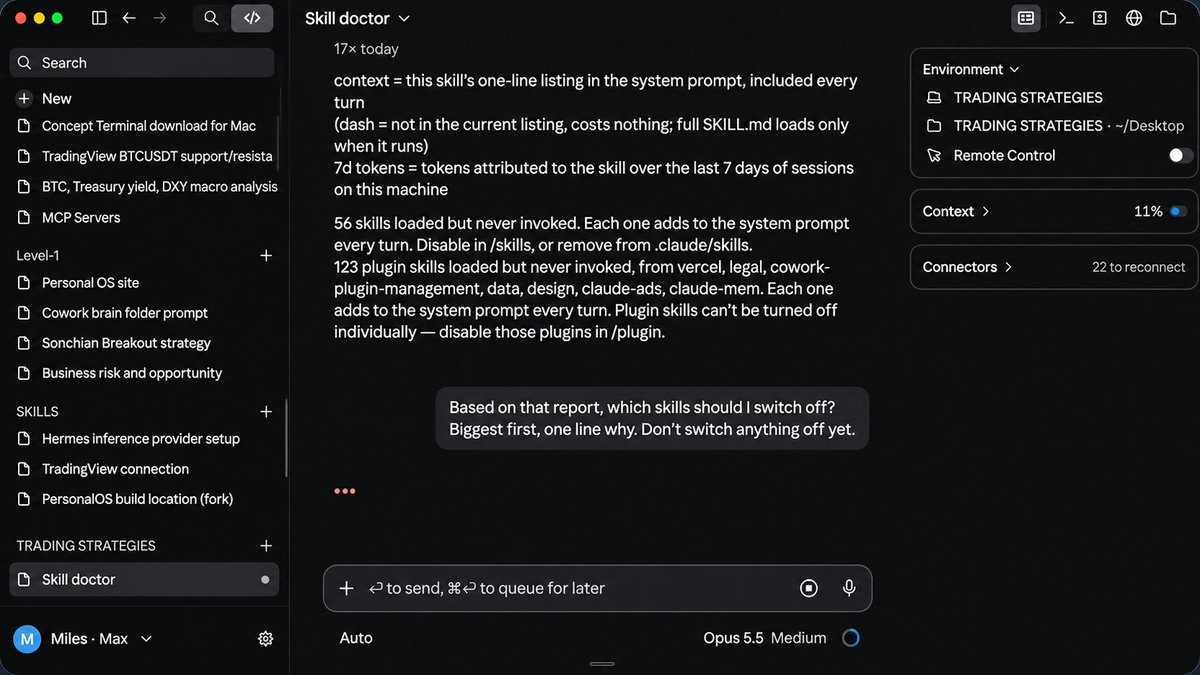
In Claude Code, there's a new command, /skill-doctor to see which installed Skills are costing the most context and which ones you haven't been using.
Then ask:
Based on this report, which unused Skills should I disable first? Rank them by context cost, explain each in one line, and don't change anything yet.
It will show you which instructions are taking up space unnecessarily.
VI. Customize Claude With "Mods"
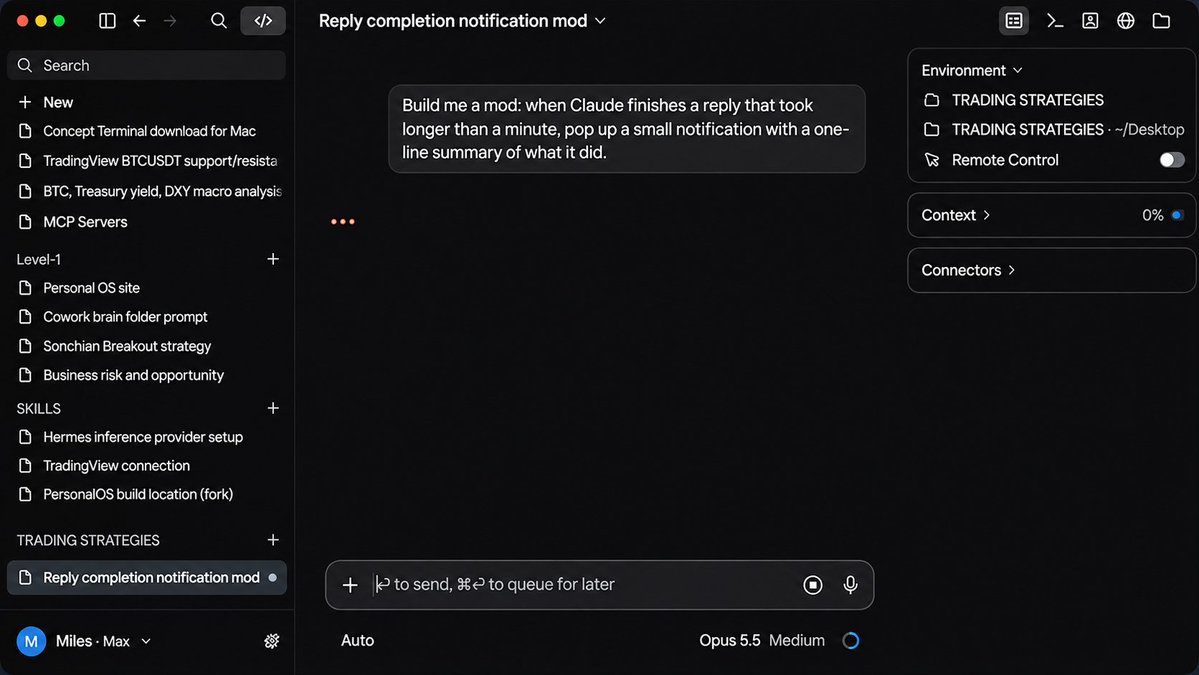
Claude Code now supports Mods, which let you change parts of how the app works instead of waiting for an official setting.
For example, you could build a Mod that shows a desktop notification when a long task finishes, with a one-line summary of the result.
Try this in Claude Code:
Build a simple Mod that notifies me whenever a task finishes after running for more than one minute.

Include a one-line summary and a way to jump back to the session. Show me the code and ask before installing it.
Mods are built with TypeScript and can be packaged inside plugins. Only run ones you trust: they can have the same computer access as Claude Code itself.
VII. Other Features Worth Trying (older features that got mini upgrades)
A few smaller changes round out the new experience:
Dispatch: On accounts that already have access, you can assign work from your phone and return to the result on your desktop. For tasks using local files, your computer must stay awake with Claude Desktop running.
Claude Design: Create and refine one-pagers, prototypes, and other visual work in the same conversation. You can give it a design system so the output follows your existing brand.
Plugins and Skills: Browse the available library before building everything yourself. You may already find a useful workflow for writing, marketing, research, or finance.
Final Thoughts
Thank you for making it this far.
For more AI content like this and practical guides, be sure to follow me here: @aiedge_. Every week, I break down the latest AI tools and workflows.
And if you want more guides like this straight to your inbox, join the AI Edge newsletter. Each issue covers the tools, prompts, and workflows that are actually worth your time.
👉** https://newsletter.aiedgehq.co**/
沿着这个主题继续读
从一篇文章,找到相关的教程、经验和阅读路径。