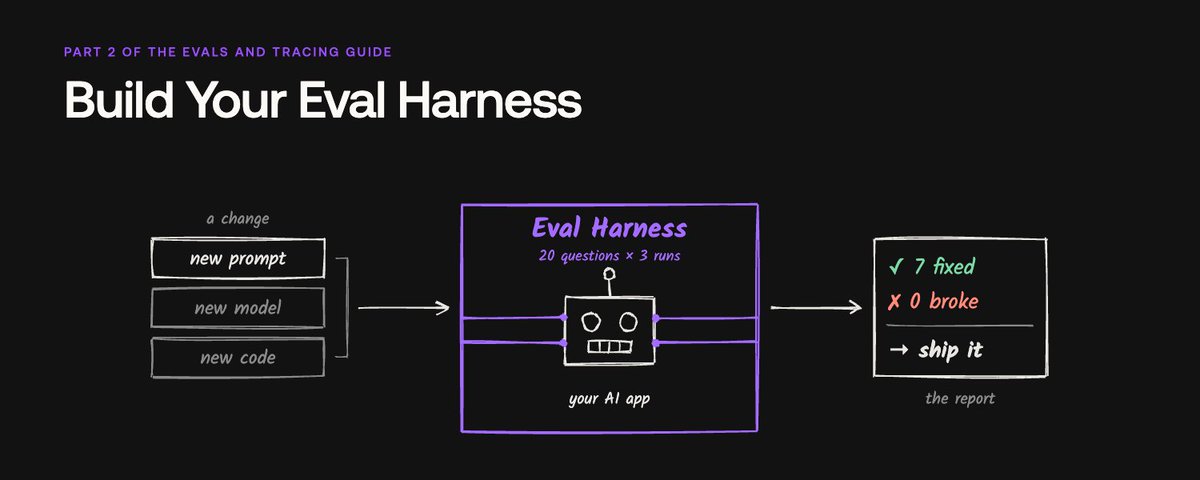
Build Your Eval Harness
文章目录
部分视频或图片暂未收录,已在正文保留提示;需要时可查看原文。查看原文 ↗
Part 2 of the evals and tracing guide for engineers, QAs, and PMs who want to test every change to their AI app.
After the first eval works, every team I talk to hits a second wall. You find a bug, you fix it, and a few test questions prove the fix. Then someone changes the prompt to fix a different bug. Nobody can say what else that change broke.
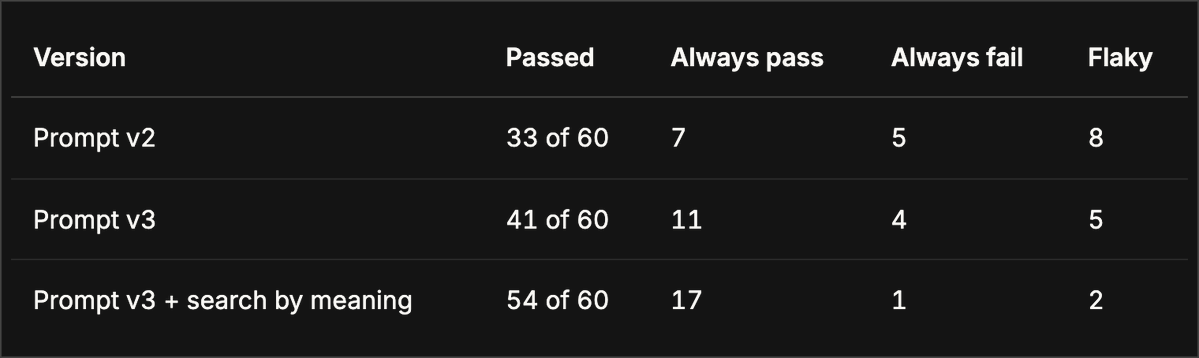
It happened to us too. In Evals and Tracing 101, five test questions proved our fix to a shoe store support bot. Then I put the same bot on a live server and asked it 20 questions from its real traffic, 3 times each. It passed 33 of 60. The five questions covered only the bug we already knew.
The teams that ship AI fast solve this with an eval harness. It is the setup that asks every test question again after every change, and tells you what got fixed and what broke. You build it once, and then each change has to pass it before it ships.
101 gave you the basics, and the basics are now part of the job. The harness is the next skill. If you build it now, you can change your AI app every day and know the result. This guide shows you how, on a live app, with real numbers.
What is an eval harness, and why do you need one?
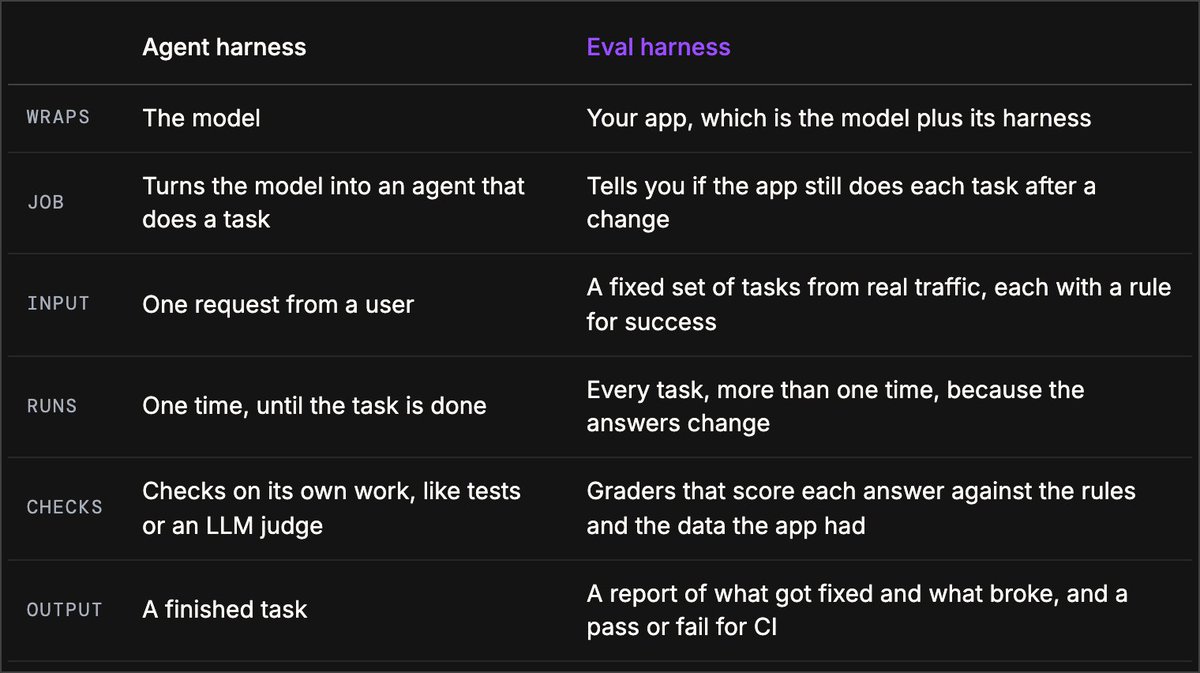
Start with the word. In AI, a harness is the code around a model. Claude Code and Codex are harnesses. They give the model its tools and run it in a loop until the task is done. People sum it up as Agent = Model + Harness.
The harness changes the result. @polynoamial, a researcher at OpenAI, made this point about AI models that play Pokemon. Each model ran in a different harness, so the scores did not compare. Your app is the same. A model's benchmark score tells you little about your app. The score that matters comes from your app, with your own prompt and data.
An eval harness gets you that score. In its guide to agent evals, Anthropic defines it as the setup that "runs evals end-to-end". It runs your app on a fixed set of test questions and scores each answer. So it measures the model and its harness together, the same way your users meet them.
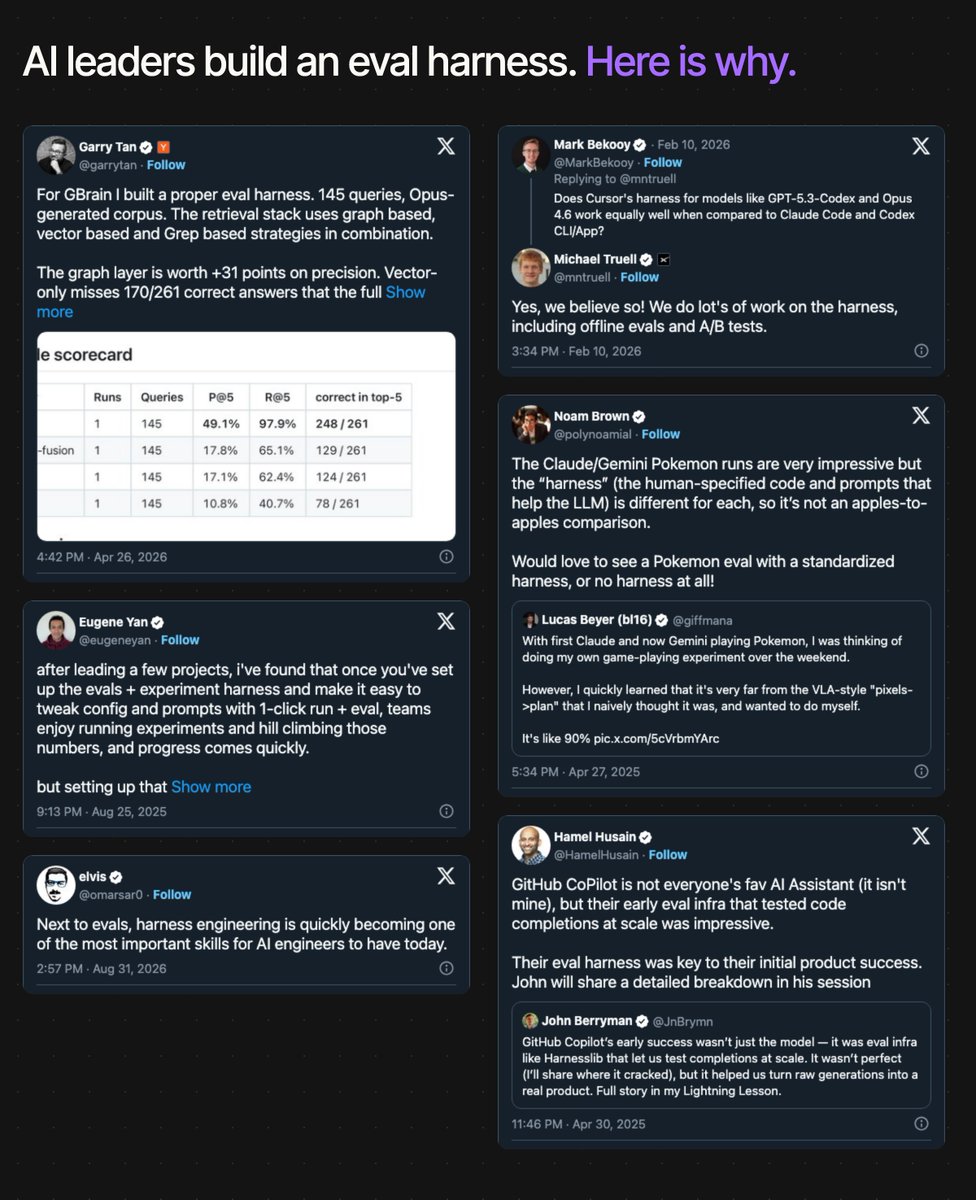
Why do you need one? Each question your app gets wrong becomes a test case. The harness asks it again on every change, so the bug cannot come back without a red check. The teams behind well-known AI products work this way. @HamelHusain, who teaches AI evals, says that GitHub Copilot's eval harness was key to its early success. @mntruell, the CEO of Cursor, says that his team tests its harness with offline evals and A/B tests. @eugeneyan, a member of technical staff at Anthropic, says that once a team has this setup, progress comes quickly.
Your metrics from 101 are the graders. The eval harness is the code around them. It holds the test questions, calls your live app the same way a customer does, and runs each question 3 times. Then it compares the new run with the last one, and it stops a change that breaks a question that used to pass.
This guide builds an eval harness for the same shoe store bot from 101. This time the bot is a real app on Render, with a private API and real traces in Confident AI. You can clone the code from GitHub. Every number in this guide comes from a run against that app.
Why this guide matters for your role
I wrote this guide for the same three readers as 101. The harness gives each of you a different job.
If you are an engineer, the harness is the test suite for your prompt and your model. In 101, five questions proved our fix, but the full run passed only 33 of 60. A small check finds only the bug you already know. The harness runs every test question 3 times on each pull request. It gives you a list of what got fixed and what broke, and CI stops a change that breaks a question that always passed. This guide gives you the code for each part, so you can add it to your own repo.
If you are a QA, the harness is your regression suite for AI. It is the part of evals that is closest to your current job. You pick the test cases from real customer traffic. You also sort each flaky case. Either the bot gave different answers, or the judge gave different scores to the same answer. A person must make that call, and it decides if the team trusts the score. Most of the work in this guide is QA work.
If you are a PM, the harness turns your idea of a good answer into a pass rate that you can compare from one release to the next. You write the expected answer for each case. For example, a customer who bought shoes 5 weeks ago must get a clear no, because 5 weeks is 35 days and the window is 30. Each rule you write becomes a check that runs on every change. This is how your product judgment gets into each release.
Step 1. Start from real traffic
A harness starts from real questions, so the first step is to collect them. The bot is a small FastAPI app. It answers POST /chat, and every call sends a trace to Confident AI. Each trace gets a tag: customer for real users, harness for test runs. The tag keeps your test traffic apart from your users.
Before you start. You need Python 3.12, an OpenAI key, and a free Confident AI account. Keep two terminals open, one for the bot and one for the harness. The full guide takes about 30 minutes. The three harness runs cost about $4.20 in judge calls, and the bot calls cost a few cents.
Set up the bot. Clone the repo. Then copy in the bot from before the fixes, so you see the same bugs that I saw. The harness stays on the latest version. Then install the packages and copy the example settings file.
Terminal 1 · bot
git clone https://github.com/tony-confidentai/stride-support-bot
cd stride-support-bot
git checkout part-2-start -- stride
pip install -r requirements.txt -r harness/requirements.txt
cp .env.example .env
Open .env and add your OpenAI key and your Confident AI key. STRIDE_API_TOKEN is a password that you pick for the bot's API. Any long random string works. Then start the bot in one terminal.
Terminal 1 · bot
uvicorn stride.server:app --port 8000
Tag each trace. The bot uses confident-trace with the same init() and span setup as in 101. The new part is update_trace. This line in stride/bot.py adds the tag. Each request to /chat sends its source, and the default is customer.
update_trace(
    input=question,
    output=response.output_text,
    tags=[source],
)
Send traffic. Open a second terminal, and run these commands. The script asks the bot 20 questions that read like real customers.
Terminal 2 · harness
cd harness
python send_traffic.py
What you see after you run it. Each question and the bot's answer, in your terminal. In Confident AI, each question is now a trace with the customer tag.
Pull the traces. Now pull those traces back out of Confident AI with its API, so you can read every answer next to the docs the bot found. This is the core of harness/pull_traces.py. Traces come newest first, so the loop stops at the time limit. It keeps only the traces with the customer tag.
API = "https://api.confident-ai.com/v1/traces"
HEADERS = {"CONFIDENT_API_KEY": os.environ["CONFIDENT_API_KEY"]}

def customer_traces(since):
    cursor = None
    while True:
        params = {"cursor": cursor} if cursor else {}
        page = requests.get(API, headers=HEADERS, params=params)
        page = page.json()["data"]
        for t in page["traces"]:
            if t["startTime"] < since:
                return  # traces come newest first
            if "customer" in (t["tags"] or []):
                trace = requests.get(f"{API}/{t['uuid']}", headers=HEADERS)
                yield trace.json()["data"]
        cursor = page["nextCursor"]
        if not cursor:
            return
The rest of the file saves the question, the answer, and the search results of each trace to traces.json. Run it in the same terminal. The 24 pulls the traces from the last 24 hours. Wait about a minute before you run it, because new traces take about a minute to show up in Confident AI.
Terminal 2 · harness
python pull_traces.py 24
Now open traces.json. It has one row for each customer question. Here is the row for the first question.
{
  "input": "hi, i bought running shoes 5 weeks ago
    and they hurt. can i send them back?",
  "output": "Hi! You can return your running shoes as
    long as they are unworn and in the original box.
    Since you bought them 5 weeks ago, please make sure
    they meet these conditions. ...",
  "search_results": [
    "Shoes must be unworn and in the original box
      to be returned.",
    "Refunds go back to the original payment method
      within 5 business days.",
    "We ship to the United States and Canada."
  ]
}
The bot said yes. But 5 weeks is 35 days, and the return window is 30 days. The search results show something the answer did not. None of the three docs is the 30-day rule. Keep that in mind. It comes back in Step 5. Your answers can be a little different from mine, because the bot can give a different answer each time.
I read all 20 rows. Two types of failure stood out.
-
Wrong date math. The bot compared 5 weeks with a 30-day window and said yes.
-
Made-up answers. The help center says nothing about price matching, kids shoes, PayPal, or damaged items. The bot answered all four anyway. For PayPal, it said Stride takes "major credit or debit cards".
This step has a name. It is error analysis. You read real answers, write down what went wrong, and group the failures into types. The types tell you what to test.
If you are an engineer, add the source tag before you need it. Your test runs and your real users send traces to the same project. The tag is how you pull the real customers out later. When you read a bad trace, look at the search span before the LLM span. The 5-week answer looked like a prompt bug, but the search results showed the first cause.
If you are a QA, you read 20 traces in 101. Now write the result down where the team can see it. Give each failure type a short name, and list the questions that show it. Add a count to each type, so the team knows which one to fix first. Each name becomes a metric in Step 3, so pick names that the team understands.
If you are a PM, read the made-up answers closely, and rank them by their cost to the business. The PayPal answer told a customer something false about payment, and that can lose a sale. A made-up price match can create a promise that the store must keep. In 101, you picked the one failure that costs the business the most. Do the same here, so the team knows which failure type to test first.
Step 2. Turn traffic into goldens
In 101, a golden was a question you trust. In a harness, each golden also gets the answer you expect. Write it in plain words, as a decision plus the rule behind it.
[
  {
    "input": "hi, i bought running shoes 5 weeks ago
      and they hurt. can i send them back?",
    "expected_output": "No. 5 weeks is 35 days, and
      returns are accepted within 30 days of delivery.",
    "failure_type": "date math"
  },
  {
    "input": "Do you sell kids shoes?",
    "expected_output": "The help center does not say.
      The bot does not know and offers a human agent.",
    "failure_type": "made up"
  }
]
The file is harness/goldens.json. Put all 20 questions in it, not only the ones that failed. The good answers matter as much as the bad ones. They are how you find out that a fix for one case broke another.
Next, the harness needs a way to call the app. It calls the same API your users call, over HTTP, with the harness tag. The free Render plan sleeps when idle, and a server can fail a request, so the client wakes the app first and retries server errors. This is harness/target.py.
URL = os.environ["STRIDE_URL"]
HEADERS = {"Authorization": f"Bearer {os.environ['STRIDE_API_TOKEN']}"}

def wake_up():
    # the free Render plan sleeps when idle
    requests.get(f"{URL}/health", timeout=120).raise_for_status()

def ask(question, source="harness"):
    for attempt in range(3):
        response = requests.post(
            f"{URL}/chat",
            json={"question": question, "source": source},
            headers=HEADERS, timeout=120,
        )
        if response.status_code < 500:
            break
        time.sleep(10 * (attempt + 1))
    if not response.ok:
        raise RuntimeError(f"/chat returned {response.status_code}: {response.text}")
    data = response.json()
    return data["answer"], data["sources"]
I added the retry after a real failure. In my first baseline run, the server returned errors on some requests. Those test cases had no result at all, and my compare script counted them as passes. Now the harness retries. The compare script also counts the results for each question, and a question with fewer than 3 results shows up as an error.
If you are an engineer, call the app through the same API that your users call. Then the harness tests what your users get, including the deploy and the auth. An import of the bot code skips both. Keep the URL and the token in environment variables. Then the same harness runs on your laptop and inside CI in Step 6.
If you are a QA, write the expected output as a decision plus the rule behind it. "No. 5 weeks is 35 days" gives the judge something to check. "The bot answers correctly" is too vague to check. Add a failure type to each golden that failed, as in the file above. After each run, you can then count the failures by type and see which type a fix moved.
If you are a PM, you own the expected answers for the questions that the help center does not cover. "Do you sell kids shoes?" has no doc, so the team must choose what the bot says. One choice is to offer a human agent. Another is a new doc with the real answer. Make the choice on purpose, and write it in the golden, because the harness checks the bot against it on every change.
Step 3. Write a metric for each failure type
The two metrics from 101, answer relevancy and faithfulness, missed the 5-week bug. In the first full run, faithfulness passed all 60 test cases. For the 5-week question, both scored 1.00. The answer was on topic, and it agreed with the three docs the bot saw. It was still wrong.
So each failure type gets its own metric. Both are G-Eval metrics, like the polite refusal metric in 101. They are in harness/test_harness.py.
from deepeval.metrics import GEval
from deepeval.test_case import SingleTurnParams

policy_correct = GEval(
    name="Policy correct",
    criteria=(
        "The answer gives the same decision as the expected "
        "output. Any yes or no, number, or time window in "
        "the answer matches the store policy in the context."
    ),
    evaluation_params=[
        SingleTurnParams.INPUT,
        SingleTurnParams.ACTUAL_OUTPUT,
        SingleTurnParams.EXPECTED_OUTPUT,
        SingleTurnParams.CONTEXT,
    ],
    threshold=0.7,
)

stays_in_docs = GEval(
    name="Stays in docs",
    criteria=(
        "Every fact in the answer comes from the retrieval "
        "context. If the retrieval context does not answer "
        "the question, the answer says so and offers a "
        "human agent."
    ),
    evaluation_params=[
        SingleTurnParams.INPUT,
        SingleTurnParams.ACTUAL_OUTPUT,
        SingleTurnParams.RETRIEVAL_CONTEXT,
    ],
    threshold=0.7,
)
The two metrics get different evidence, and that is the main idea of this part.
-
CONTEXT is the true policy. Each golden gets the full help center. Policy correct uses it to check the decision, even when the search missed the rule.
-
RETRIEVAL_CONTEXT is what the bot saw. The search results plus the tool output, as the API returns them. Stays in docs uses it to check for made-up facts.
What the new metric found. You run these metrics in Step 4. In my first run, Policy correct scored 0.12 on the 5-week question. The reason says it plainly: 5 weeks is 35 days, and the window is 30 days.
My first version of Stays in docs used CONTEXT. It failed the two order questions, "My order 4821 has not arrived. Where is it?" and "Where is my order 9999?". The answers were right. The order status comes from a tool, and the judge had only the help center, so it saw a fact that was in none of its docs. With RETRIEVAL_CONTEXT, both pass. Before you trust a failure, read it. Some failures are bugs in the app, and some are bugs in the harness.
If you are an engineer, pass each metric only the fields that it needs. Policy correct gets the expected output and the full help center, because it checks the decision. Stays in docs gets only what the bot saw, because it checks for made-up facts. A metric with the wrong evidence fails right answers, as my first Stays in docs did on the order questions. Add a comment next to each field that says why the metric gets it.
If you are a QA, test each new metric before you trust it. Run it on a few cases that you already labeled, some good and some bad. A good metric fails the bad cases and passes the good ones. That is how I found the two false failures on the order questions. Then read the reason for each failure, the same way you did in 101.
If you are a PM, name each metric after a promise to the customer, such as "Policy correct" or "Stays in docs". Then a failed metric reads as a broken promise, and everyone knows why it matters. Write the criteria with the team in plain words, as you did in 101. Keep one metric for each failure type, so each score answers one question.
Step 4. Run each question three times
The harness itself is one pytest file, harness/test_harness.py. Its top part loads goldens.json and gives each golden the full help center as its context. Then it wakes the app, loops over the goldens, calls the live API, and checks all four metrics on each answer.
metrics = [
    AnswerRelevancyMetric(threshold=0.7),
    FaithfulnessMetric(threshold=0.7),
    policy_correct,
    stays_in_docs,
]

wake_up()

@pytest.mark.parametrize("golden", dataset.goldens)
def test_support_bot(golden):
    answer, sources = ask(golden.input)
    test_case = LLMTestCase(
        input=golden.input,
        actual_output=answer,
        expected_output=golden.expected_output,
        context=golden.context,
        retrieval_context=sources,
    )
    assert_test(test_case, metrics)
Keep the bot on in your first terminal. In the second terminal, run this command from the harness folder. The -id gives the run a name in Confident AI, so you can compare it in Step 5. Each run takes a few minutes and costs about $1.40 in judge calls.
Terminal 2 · harness
deepeval test run test_harness.py -id main-prompt-v2 -r 3
The -r 3 flag repeats every test case three times. You need it because the bot can give a different answer each time, and the judge can give a different score each time.
The four metrics use the DeepEval default judge, which is gpt-5.4 in DeepEval 4.3.1. To use a different model, give each metric a model argument. The judge model changes the cost and the scores, so keep it the same for all runs that you compare.
What you see after you run it. 20 questions times 3 runs is 60 test cases. 33 passed. The useful number is per question. Your numbers can be a little different from mine, because the bot and the judge can change from run to run. Compare your always-fail list with mine.
-
Always pass. 7 questions passed in all 3 runs. You can trust these.
-
Always fail. 5 questions failed in all 3 runs: the 5-week question, price match, refund to a different card, kids shoes, and damaged shoes. These are real bugs.
-
Flaky. 8 questions passed in some runs and failed in others. Read each one.
One flaky case is worth a close look. "My order 4821 has not arrived" got the same correct answer in all 3 runs. The judge scored it failed, failed, passed. The bot did not change. The judge did.
If you are an engineer, use 3 runs when you compare two versions. A 3-run harness costs about $1.40 here, and 1 run costs about a third of that. Use 1 run for a quick check while you work, and read its result as a hint only. Give each run an ID that names the change, such as main-prompt-v2. Step 5 compares runs by this ID, so a clear name saves you a search later.
If you are a QA, open the 3 traces of each flaky question side by side, and compare the answers before you look at the scores. If the answers are different, the bot is flaky, and that is a bot bug. If the answers are the same, the judge is flaky. Keep a list of the judge cases. Those cases need a better metric, and the bot can stay as it is.
If you are a PM, open the test run in Confident AI. You see each test case, its scores, and the reason for each score, with no terminal. Read the always-fail count next to the pass rate. Five questions that always fail is a clear list of work. A pass rate of 55% tells you less, because it mixes real bugs with judge noise.
Step 5. Compare runs before you ship
A pass rate tells you how much moved. A comparison tells you what moved. This script reads two runs, gives each question a status, and lists what changed.
REPEATS = 3 # the -r value of deepeval test run

def status(passes):
    if len(passes) != REPEATS:
        return "error"  # the app call failed before scoring
    if all(passes):
        return "always pass"
    if not any(passes):
        return "always fail"
    return "flaky"

checks = {
    "Fixed": lambda a, b: a != "always pass" and b == "always pass",
    "Regressions": lambda a, b: a == "always pass" and b == "always fail",
    "Now flaky, read these": lambda a, b: a == "always pass" and b == "flaky",
    "Still failing": lambda a, b: b == "always fail",
}
The script is harness/compare.py. The first change was to the prompt. Prompt v3 tells the bot to answer only from the docs, to offer a human agent when the docs have no answer, and to count a week as 7 days.
SYSTEM_PROMPT = (
    "You are the support bot for Stride, an online shoe store.\n"
    "Store policies come from the help center docs.\n"
    "Answer only from the docs. If the docs do not answer the question,\n"
    "say you do not know and offer to connect a human agent.\n"
    "Count one week as 7 days before you compare a date with a policy window.\n"
    "Keep customers happy."
)
To get prompt v3, copy stride/bot.py from main. Then stop the bot with Ctrl+C in the first terminal, and start it again with the same uvicorn command.
Terminal 2 · harness
git checkout main -- ../stride/bot.py
In the second terminal, run the harness again. Then compare the new run with the first one. The script gets both runs from Confident AI by their IDs.
Terminal 2 · harness
deepeval test run test_harness.py -id main-prompt-v3 -r 3
python compare.py main-prompt-v2 main-prompt-v3
What you see after you run it. 41 of 60 passed. 7 questions were fixed, and price match, kids shoes, and PayPal now get "I do not know" plus a human agent. 0 regressions. But the 5-week question still failed in all 3 runs. Here is the report from compare.py.
main-prompt-v2: 33 of 60 passed | always pass 7 | always fail 5 | flaky 8 | error 0
main-prompt-v3: 41 of 60 passed | always pass 11 | always fail 4 | flaky 5 | error 0

Fixed (7)
  flaky       -> always pass  How long until I get my refund?
  flaky       -> always pass  It has been 31 days. Is there any way to return them?
  always fail -> always pass  Do you price match?
  flaky       -> always pass  Can I pay with PayPal?
  flaky       -> always pass  How long does standard shipping to Toronto take?
  always fail -> always pass  Do you sell kids shoes?
  flaky       -> always pass  Can I return a gift card?

Regressions (0)

Now flaky, read these (3)
  always pass -> flaky        I threw away the box. Can I still return my shoes?
  always pass -> flaky        Do you ship to Mexico?
  always pass -> flaky        Where is my order 9999?

Still failing (4)
  always fail -> always fail  hi, i bought running shoes 5 weeks ago and they hurt. can i send them back?
  flaky       -> always fail  I got a gift card for my birthday. Can I get cash for it?
  always fail -> always fail  Can I send my refund to a different card?
  always fail -> always fail  My shoes arrived damaged. What should I do?
Read it from the bottom up. "Still failing" is your list of work. "Now flaky" is your list to read. The pass rate goes last.
Read each line in "Still failing" before you blame the bot. The gift card cash question moved there from flaky. In all 3 runs of v3, the bot said no, which is correct. Answer relevancy scored each answer 0.67, because the answer ended with a polite closing line. That is judge noise, and Step 6 comes back to it.
The prompt now says to count weeks as days, so why did it fail? The trace from Step 1 answers that. The search never returned the 30-day rule. The customer wrote "send them back". The keyword search matches words, and that question shares no word with "Returns are accepted within 30 days of delivery". A prompt cannot fix a search bug.
So the second change was to the search. It now matches questions and docs by meaning, with embeddings.
def search_help_center(question, k=3):
    # match by meaning, so "send them back" finds the return policy
    global _doc_vectors
    if _doc_vectors is None:
        _doc_vectors = embed(DOCS)
    q = embed([question])[0]
    scores = [sum(a * b for a, b in zip(q, v)) for v in _doc_vectors]
    ranked = sorted(zip(scores, DOCS), reverse=True)
    return [doc for _, doc in ranked[:k]]
To get the new search, copy stride/help_center.py from main, and restart the bot. Then run the harness and the compare script again.
Terminal 2 · harness
git checkout main -- ../stride/help_center.py
Terminal 2 · harness
deepeval test run test_harness.py -id main-embedding-search -r 3
python compare.py main-prompt-v3 main-embedding-search
What you see after you run it. 54 of 60 passed, with 0 regressions. The 5-week question passes in all 3 runs, and the answer names the 30-day window. "Can I send my refund to a different card?" passes too. It had the same search bug.
The regression page in Confident AI shows the same two runs side by side, one test case at a time. It flags 3 test cases as regressed. One is "How much is express shipping?". In one run, the answer left out the delivery time. But that question was flaky in v3 too: pass, fail, pass before, and fail, pass, pass after. One run is not a regression. That is why the script compares each question over 3 runs.
One question still fails in every run: "My shoes arrived damaged". The help center has no doc for damaged items. A prompt or a search change cannot fix that. The fix is a new doc, and that is a decision for the support team.
If you are an engineer, change one thing per run. If I had changed the prompt and the search together, I would not know that the 5-week fix came from the search. When a fix fails, open the trace before you change the prompt again. The 5-week trace showed a search bug, and a second prompt change would have missed it.
If you are a QA, read the regressions and the "now flaky" list first, and the pass rate last. A higher pass rate can hide one case that broke. Check each regression against the earlier runs, as I did for express shipping. A question that was flaky before is noise. A question that always passed before and now always fails is a real regression.
If you are a PM, ask what changed in the always-fail list, and then how much the pass rate moved. "Price match and kids shoes are fixed, and damaged items need a new doc" is a release note you can act on. Some fixes are outside the code. Give the damaged items doc to the support team, and keep its golden in the harness. When the doc goes live, the next run moves that question off the always-fail list.
Step 6. Run it on every change
The last step is to make the harness run on its own. This GitHub Actions file runs it on every pull request that touches the bot or the goldens. It starts the pull request's version of the bot inside the CI machine, runs the harness 3 times, and compares the result to a baseline from main.
name: evals
on:
  pull_request:
    paths: ["stride/**", "harness/goldens.json"]

jobs:
  evals:
    runs-on: ubuntu-latest
    env:
      OPENAI_API_KEY: ${{ secrets.OPENAI_API_KEY }}
      CONFIDENT_API_KEY: ${{ secrets.CONFIDENT_API_KEY }}
      STRIDE_API_TOKEN: ci-only-token
      STRIDE_URL: http://127.0.0.1:8000
    steps:
      - uses: actions/checkout@v4
      - uses: actions/setup-python@v5
        with:
          python-version: "3.12"
      - run: pip install -r requirements.txt -r harness/requirements.txt
      # run the pull request's version of the bot inside the CI machine
      - run: nohup uvicorn stride.server:app --port 8000 &
      - run: curl --retry 15 --retry-connrefused -sf http://127.0.0.1:8000/health
      # score the pull request; known failures do not stop the job here
      - run: deepeval test run test_harness.py -id pr-${{ github.event.number }} -r 3 || true
        working-directory: harness
        env:
          DEEPEVAL_RESULTS_FOLDER: ../runs
      # fail the check only when a golden that always passed on main now fails
      - run: python harness/compare.py harness/baseline.json runs/test_run_*.json
The file is .github/workflows/evals.yml. To use it on your own copy, fork the repo on GitHub. Then add OPENAI_API_KEY and CONFIDENT_API_KEY as repository secrets, in Settings, then Secrets and variables, then Actions. The baseline is harness/baseline.json, a 3-run result from main, and the repo has one already. The CI check compares with this fixed file, so the workflow also saves its own run as a file, with DEEPEVAL_RESULTS_FOLDER. When main gets better, save a run from main the same way, and copy it over baseline.json.
The gate took me three tries, and each try taught me something.
-
Fail on any failed test. The check was red on the first pull request, because some goldens fail on main too. A check that is always red is a check people ignore.
-
Fail on any regression, with one run. The check went red on "I threw away the box". The answer was right. Relevancy scored it 0.67 for a polite closing line. One run turned judge noise into a false alarm.
-
Fail only when a golden goes from always pass to always fail, over 3 runs. Flaky cases are listed for a person to read, and they do not block the merge. A question with a missing result also fails the check.
What you see after you run it. On the pull request for the new search, the check was green: 4 fixed, 0 regressions, 1 question now flaky for a person to read, and damaged shoes still failing. A regression or a missing result makes the script exit with 1, and the check turns red.
What it costs. Each 3-run harness cost about $1.40 in judge calls. In CI, the full check took 8 minutes.
If you are an engineer, add the harness to CI in the same week you build it. A harness that someone has to remember to run stops being run. Start with a gate that fails only on clear regressions, as in try 3. A gate that is often red teaches the team to ignore it. Keep the check short enough that people wait for it. Here it takes 8 minutes.
If you are a QA, add a golden each time a real failure reaches a customer. Give it an expected answer and a failure type, as in Step 2. Then update the baseline when main gets better. The harness grows from your bug reports, and a bug that comes back shows up in the compare report.
If you are a PM, write the release rule down before the first red check. For example, the check is green, and each question on the always-fail list has an owner. Agree on the rule with the team, and add it to your release checklist. Then a red check is a decision that the team already made, and release day has no debate about it.
If something fails
-
/chat returns 401. The bot reads STRIDE_API_TOKEN when it starts. If you changed .env after that, restart the bot.
-
The harness stops with a connection error. Start the bot in the first terminal. Then check that STRIDE_URL in .env is http://127.0.0.1:8000.
-
traces.json is empty. Wait a minute after send_traffic.py, and run pull_traces.py again. The bot must be on when you send the traffic.
-
compare.py says "No run with the ID". Open Test Runs in Confident AI, and copy the exact -id of each run.
Try it on your own app
Go back to the problem from the start. Someone changes the prompt, and nobody can say what else that change broke. Now the check on the pull request tells you what the change fixed and what it broke.
To build the same harness for your own app, do the six steps on your own traffic.
-
Tag your traces with the source of each request, so you can pull your real users apart from your tests.
-
Make goldens from your own traces. Write each expected answer as a decision plus the rule behind it.
-
Write one metric for each failure type that you find in your error analysis.
-
Point target.py at your own API, and keep the URL and the token in environment variables.
The full code for this guide is on GitHub: tony-confidentai/stride-support-bot. Your runs show up in your own Confident AI project. You can sign up for free and run your first harness today. Or let your coding agent do the setup for you.
Agent skills. Add the Confident AI onboarding skill to Claude Code, Codex, Cursor, or another coding agent. Then ask your agent to onboard you to Confident AI.
npx skills add confident-ai/confident-skills \
  --skill "confident-onboard"
Wizard. Run one command. It guides your coding agent to connect your repo to Confident AI and run a first eval.
curl -fsSL https://www.confident-ai.com/setup.sh | sh
Prompt. Paste this into any coding agent from your app's folder. You install nothing first.
Onboard me to Confident AI. Read and follow
https://raw.githubusercontent.com/confident-ai/confident-skills/main/plugins/confident-onboard/skills/confident-onboard/SKILL.md