Fable 5.2: Prompts for Most Dangerous LLM In History That Will F*cking Change You (full masterclass)
文章目录
Fable 5.2 is the BEST AI model in the wrold right now, and 99% of people have no idea how to use it
- 49% never touch it because it looks too expensive - 49% run it on everything and burn their limits on Haiku-level jobs
If you think Fable is just a smarter Opus with a bigger price tag, you're not alone. I thought the same
but Fable 5.2 was built for the hardest problems on Earth
Use it right, and it will change your life. Literally. Even with $20 subscrition ** In this article, I'll show you exactly how:**
- 10 copy-paste prompts
- Anthropic current official tip for Claude Code: Fable 5.2 → Opus 5.5 → Sonnet 5.5 → Haiku 5.5
- the setup that runs Fable on a $20 plan
- how to make Fable the BRAIN of a team of cheaper models
- the prompt that tells you who you really are and learns you
- what to hand it before bed, so you wake up to finished work
One evening of setup. So bookmark this, you'll come back to it
before the alpha - subscribe to my substack/linkedin for more fresh alpha -
https://substack.com/@0xcodila* - *https://www.linkedin.com/in/yaroslav-paraian-45b45843b/
Part 1 · Understand (skip if you know everything about model)
→ 01. Meet the Model Anthropic Keeps on a Leash
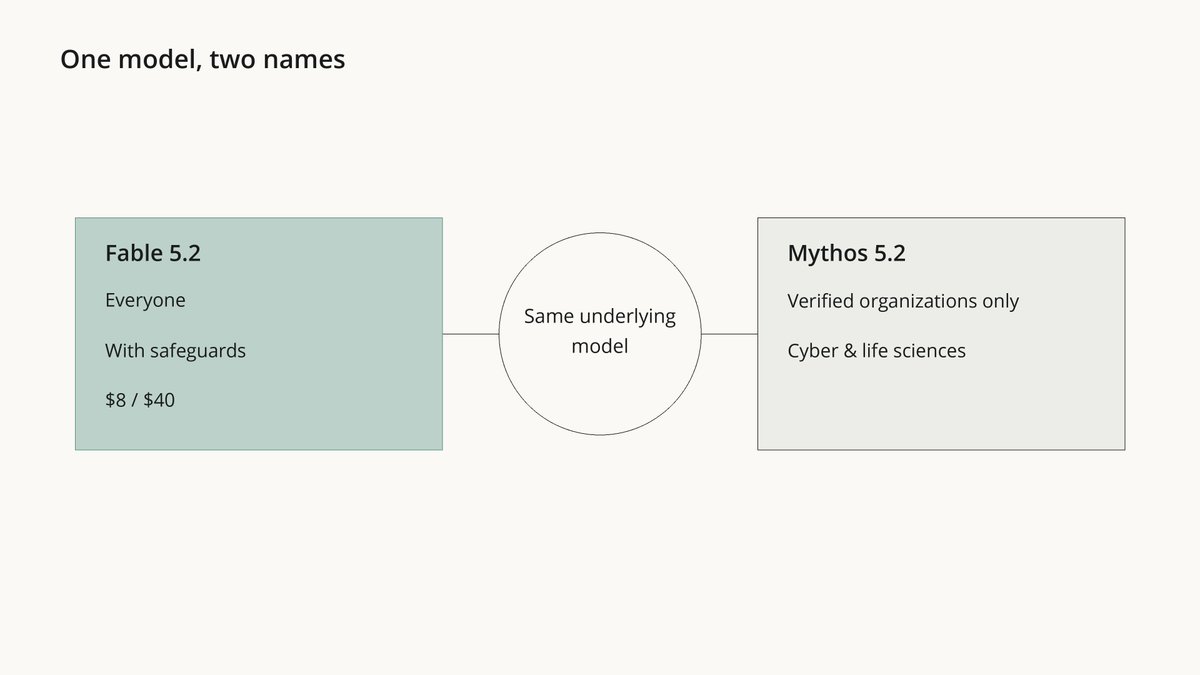
On November 9 Anthropic released two names: Fable 5.2 and Mythos 5.2
They are the same model
The official line:
"Claude Fable and Claude Mythos are the same underlying model. Fable has strong cybersecurity and biology safeguards to guard against misuse, which allows us to make it available to all users"
Mythos is the version without those safeguards. Only organizations that pass Anthropic's cyber or life-sciences verification get it
Fable is the one you get:
-
$8 per million input tokens, $40 per million output (down from $10/$50)
-
up to 30% faster than Fable 5.1
-
optional fast mode: up to 2.5x faster, for $16/$80
→ 02. See What It Already Did
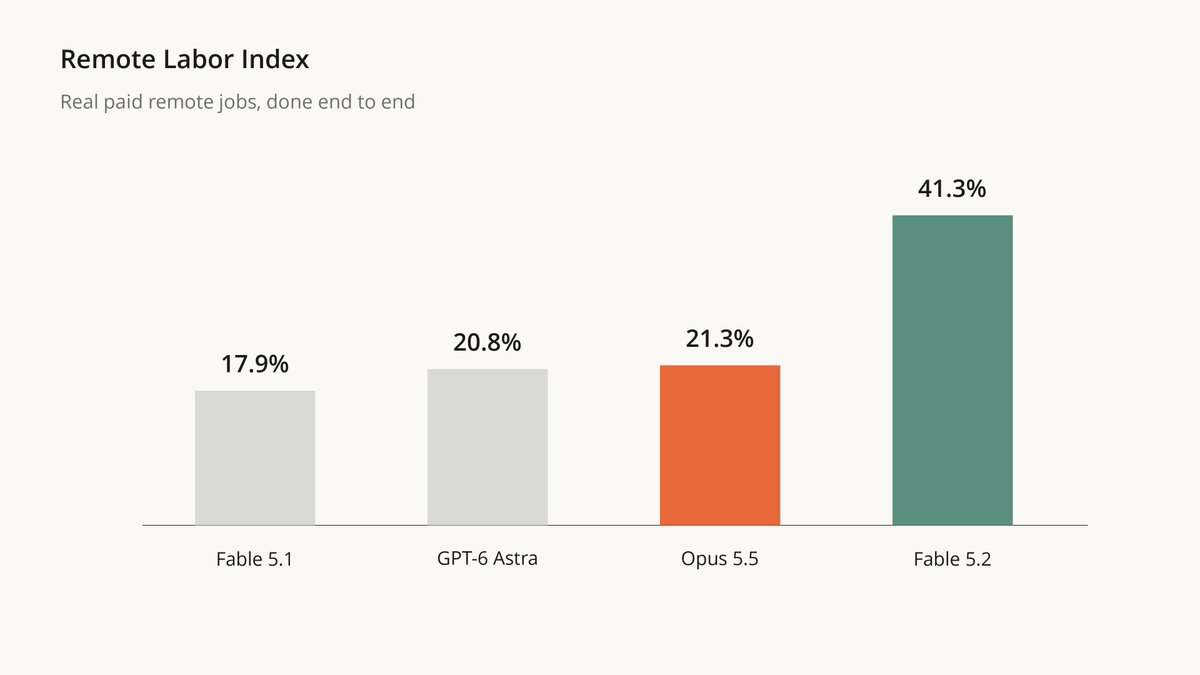
Remote Labor Index scores real paid remote jobs, done end to end:
-
Fable 5.2: 41.3%
-
Opus 5.5: 21.3%
-
GPT-6 Astra: 20.8%
-
Fable 5.1: 17.9%
It more than doubled its own previous version
-
hardware design (BenchCAD 2.1): 83.5, vs 65.3 for Opus 5.5 and 44.4 for Fable 5.1
-
using a computer like a human (OSWorld 2.1): 89.3%
What it built before launch:
-
an operating system from an empty folder. 1,000+ subagents, 8 days. It boots on a real laptop
-
3 electronic devices from scratch. All 3 worked without a single electrical fix
-
a Python → Rust migration. The service now starts about 26x faster
-
2 open problems in black-hole physics. Solved
"I had Claude Fable 5.2 run a 10-12 hour security audit. It sent out about 170 reviewer agents..." - Andrew Mager, Uber
→ 03. Wait... Isn't This Just an Expensive Opus?
Honest answer: sometimes, yes
Remember the 4.3x on research. And Anthropic's own advice on the launch page: for most tasks, start with Opus 5.5, "our strongest daily driver", and move up to Fable only when the job needs it
But look at the hard end
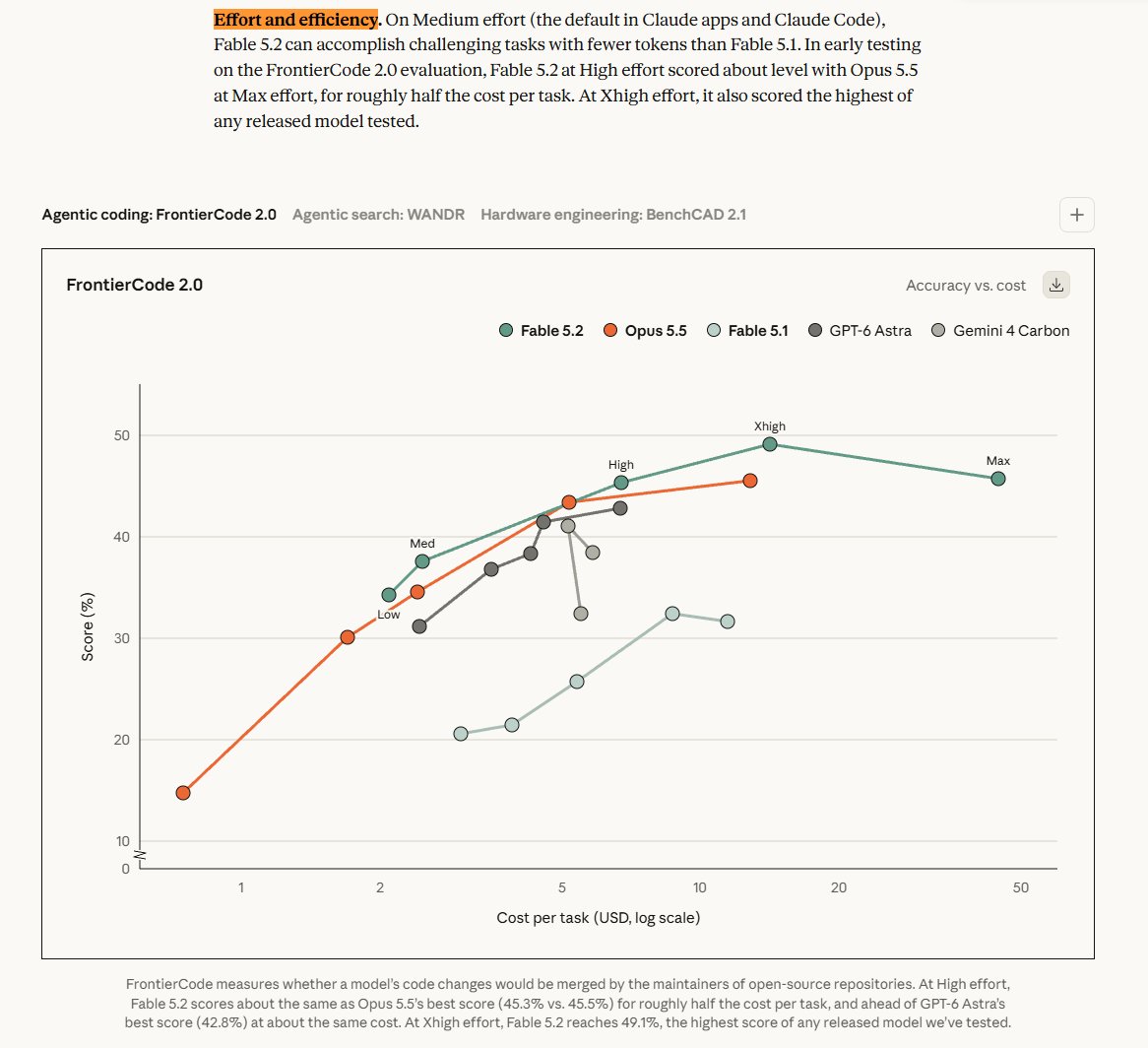
FrontierCode 2.0 checks one thing: would the maintainers of real open-source repos merge this code?
-
Fable 5.2 at High effort: 45.3%
-
Opus 5.5 at its absolute max: 45.5%
Same score, for roughly half the cost per task
At Xhigh, Fable reaches 49.1%, the highest of any released model Anthropic tested Anthropic
So on easy work it burns your money. On the hardest work it's cheaper than pushing Opus to its limit
The whole game is knowing which job is which
→ 04. Know Which Claude Does Which Job
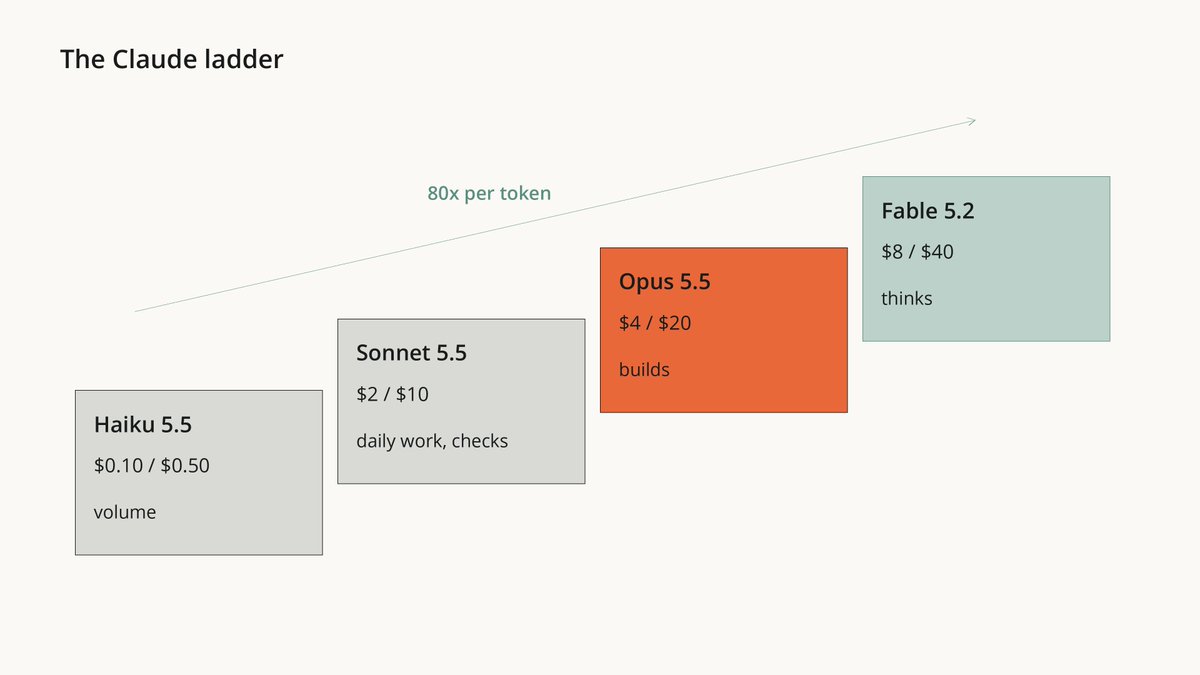
Claude Code's docs give each model one role. Prices per million tokens, input / output:
-
Fable 5.2 · $8 / $40: your hardest and longest-running work. Plans, architecture, root causes, jobs bigger than one sitting
-
Opus 5.5 · $4 / $20: complex reasoning and real builds. Anthropic's daily driver
-
Sonnet 5.5 · $2 / $10: daily coding, reviews, checks
-
Haiku 5.5 · $0.10 / $0.50: simple, high-volume work you can check. Renaming, tagging, pulling data out of files
Per token, Fable costs 80x what Haiku does
Every time Fable renames a file for you, you pay 80x for nothing
Claude Code model config · pricing
Part 2 · Set It Up at 100%
→ 05. Turn Fable On and Pick the Effort
Update Claude Code and switch the model:
claude update
/model fable
Fable 5.2 needs Claude Code v2.1.321 or later
On the $20 Pro plan: *until November 16, Fable is included up to half your weekly limit. If you were paying before launch, you also get one free Fable reset in Settings > Usage. After November 16, Fable runs on usage credits, and the /model picker says "Requires usage credits". Max and Ultra include it up to half the weekly limit *Fable on your plan
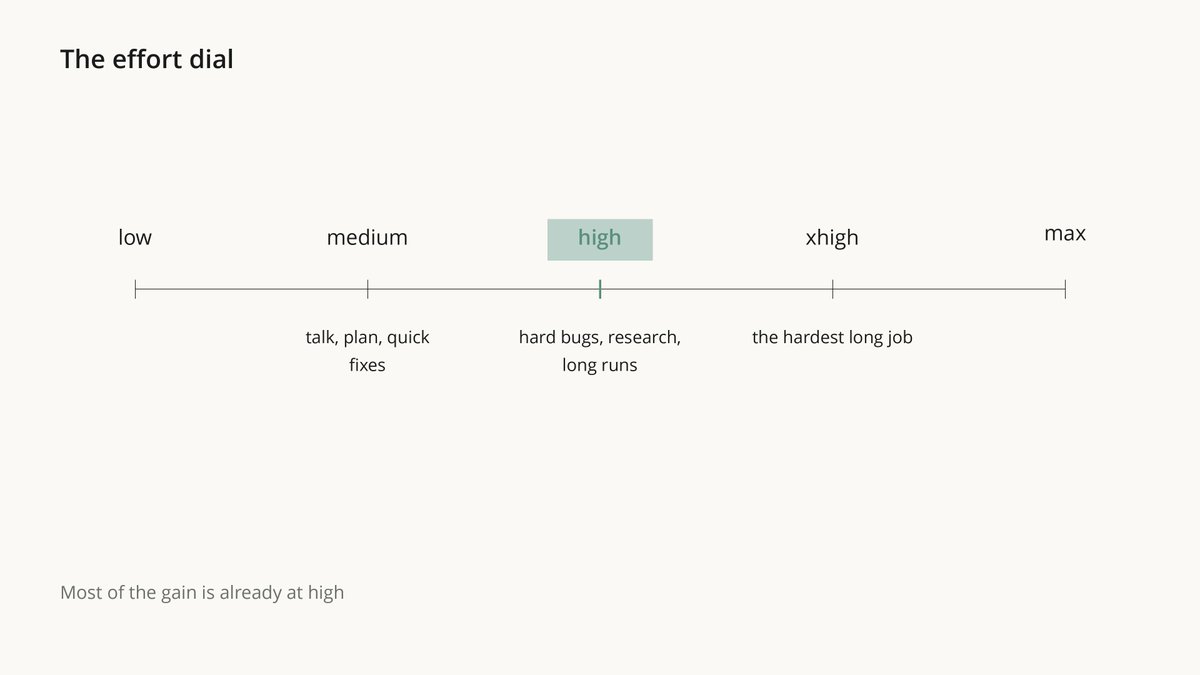
Now the setting most people never touch. In Claude Code, Fable starts at medium effort
/effort high
Anthropic's guide: "Most of the gain in capability is already present at high". Above that, gains are uneven and the bill isn't
How I'd use it:
-
medium: talking, planning, quick fixes
-
high: hard bugs, research, anything you leave running
-
xhigh: only the hardest long job, where you've seen it pay off
-
one hard question without changing the session? Put ultrathink in that prompt
One catch: at medium, Fable stops early more often. The next step fixes that
Your result: Fable on the right effort for each job
model config · Fable 5.2 prompting guide
→ 06. Paste One CLAUDE.md
This is the heart of the course!
Anthropic tested single sentences on Fable 5.2 and published exactly what each one changed. I ranked them:
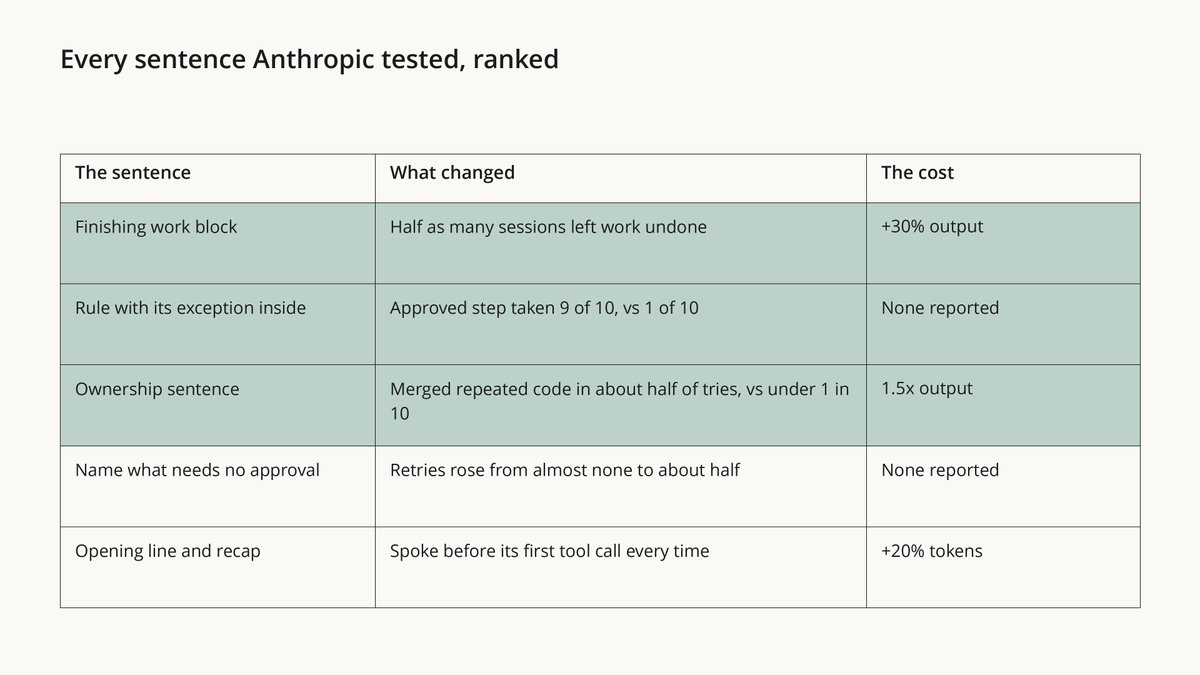
The top 3 in plain words:
-
the "Finishing work" block: half as many sessions ended with work left undone. Costs about 30% more output
-
a rule with its exception written in: "get a go-ahead first" → Fable took the approved step 9 times in 10. A "never" rule plus a separate "it's approved" line: 1 in 10
-
the ownership sentence: Fable cleaned up repeated code in about half the tries, vs under 1 in 10 without it
I put all of it into one file. Paste this into Claude Code:
Add the block below to the end of my user-level instructions file, ~/.claude/CLAUDE.md. Create the file if it doesn't exist. If it exists, show me the diff first and wait for my yes. If the file would pass 200 lines, tell me which of my old lines could move into a separate file, and change nothing else.

Then ask me which of my projects are fully mine to restructure. Add the sentence under "Ownership" only to the CLAUDE.md of those projects, as a diff I approve.

===== block for ~/.claude/CLAUDE.md =====
# Finishing work
Please avoid stopping while you still owe work the user asked for. Be persistent and do not stop unless needed.

While status notes are welcome, as is clarifying with the user on open decisions, carry on with work that does not depend on the user's answer without unnecessary stops.

If you notice yourself inviting the user to redirect you or offering to wait, instead proceed on the next part of the task. You may meet ordinary obstacles like errors, timeouts, locked files, empty results or failing tools. Diagnose them first, and when they are not real blockers, work through them with the access you have (wait and retry, fix the request, use another tool or source) rather than stopping unnecessarily.

If someone clearly decided something is a hard blocker, such as a file marked not to be touched, access that was intentionally withheld, or a safety guardrail, leave it alone, say plainly what you found, and look for another safe way to finish the task. Stopping before the task is complete is very rarely merited, as in when the task can't move forward without user input, or where the blocker is deliberate and should not be worked past. This does not override the need for confirmation on risky or destructive actions.

# Approvals
Get my go-ahead first before you delete data, force-push, deploy to production, pay for anything, or send or publish anything outside this computer. When I have given that go-ahead for a step, take it.
Steps that need no approval: reading files, running tests and read-only commands, creating and editing files inside the current project, and retrying a command that is safe to repeat.

# Updates
Before you start, say in a line what you're about to do; brief updates while you work help the user follow along. Close with a short recap that stands on its own (what you found, what you did, and what's next), so a reader who only sees the last message has the full picture.

# Communicating clearly
Write for an intelligent but low-context reader. The person reading has not seen your tool calls, your reasoning or the files you opened, and may be switching in from other work. Messages should generally be self-contained: the reader should understand what you mean without having to dig for other context. Put the key points in the first few sentences. Practice progressive disclosure in your sentence order, and do not use undefined references and ideas in line 1 that won't make sense until the reader reaches line 12.

Use plain words, and write in clear, understandable full sentences. Do not use a term or abbreviation that you made up during the work. Say what the thing is in a way any reader would understand. Write mostly in the style of ASD-STE100 Simplified Technical English: short sentences, one idea per sentence, active voice, and consistently using the same word for the same thing. Use a paragraph of flowing prose where ideas connect, and keep bullets for lists of separate items. Leave out unnecessary details unless the reader asks and practice concision, but do ensure that your messages have the key context. Aim to make your user-facing text as human-readable and clear as possible.

===== Ownership (only for projects I name) =====
This codebase is yours: what it's for and how it's built are your call, and you'll keep building on it.
It adds the blocks to your user CLAUDE.md and shows you the diff first
The ownership sentence goes only into projects you say are fully yours, because it makes Fable restructure code
Keep the file under 200 lines - Anthropic's docs: longer files eat context and get followed worse
Your result: Fable finishes what it starts, says what it's doing, asks only about what's actually risky, and writes reports a human can read
prompting guide · CLAUDE.md docs
→ 07. Delete These From Your Prompts
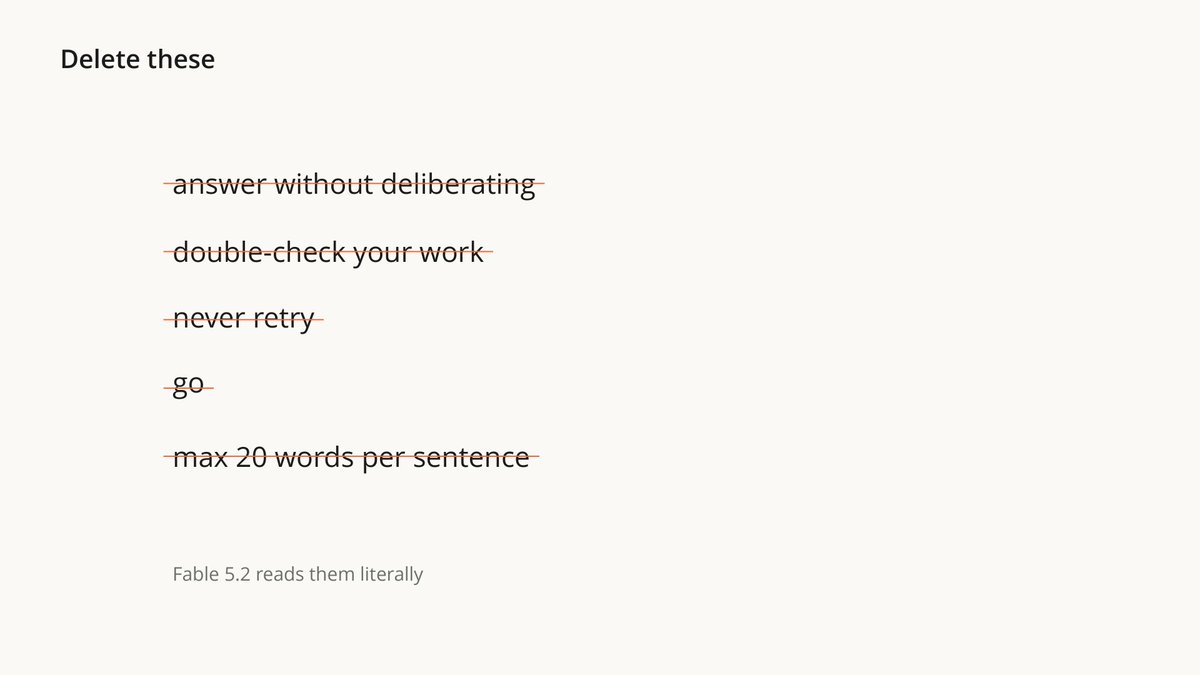
Fable 5.2 follows your old instructions more literally than any Claude before it
So lines you wrote for older models now backfire. From Anthropic's own guide:
-
"answer without deliberating": does nothing at medium and above. Lower the effort instead
-
token budgets in the prompt: removing a big one lowered cost with the same result
-
old "never" notes: one stale "never retry" note cut retries to about 4 in 10
-
"go": say exactly what you approve. "Yes, run the migration on staging"
-
"double-check your work": Fable already checks itself
-
"show your reasoning step by step": Fable can decline it
-
hard style rules like "20 words per sentence": its writing turns choppy
And the big one: the skill packs with 300K stars were written for older models. The guide says to read your skills and agent files for exactly these lines
Paste this into Claude Code:
<goal>
Clean my Claude Code instructions for Fable 5.2. Find the lines written for older models that now cost money, cause side effects, or do nothing, and fix them with my approval.
Done means: ./prompt-doctor/report.md lists every finding, ./prompt-doctor/backup/ holds a copy of every file before any change, and only the fixes I approved are applied.
</goal>

<where_to_look>
- ~/.claude/CLAUDE.md, and CLAUDE.md, CLAUDE.local.md and .claude/CLAUDE.md in the current project
- auto memory: ~/.claude/projects/*/memory/
- skills: ~/.claude/skills/*/SKILL.md and .claude/skills/*/SKILL.md, including skills installed by plugins if you can find their files
- agent files: ~/.claude/agents/ and .claude/agents/
- AGENTS.md or other instruction files in the current project
</where_to_look>

<what_to_find>
Anthropic's Fable 5.2 guide says these lines hurt or do nothing now:
1. Lines telling the model to think less or answer without deliberating. They don't work on Fable 5.2 at medium effort and above. Fix: delete; lower effort instead.
2. Token or length budgets written into the prompt. Removing a large one lowered cost with the same results. Fix: delete.
3. "Never" rules and notes whose reason no longer holds, especially "never retry" or "stop at the first error". Fix: delete, or rewrite with its scope and reason.
4. Absolute rules with no exception. Fix: write the exception into the rule itself ("get a go-ahead first before X").
5. Lines that push work to subagents by default. Fable already delegates readily in Claude Code. Fix: delete or limit to large, independent work.
6. Reminders to verify, test or double-check. Fable checks its own work. Fix: delete.
7. Requests to write out its reasoning in the answer, such as "show your reasoning step by step". Fable can decline these. Fix: delete.
8. Hard style limits such as "20 words or fewer per sentence". They make Fable's writing choppy. Fix: delete or soften.
9. Lines telling the model to treat an earlier answer as done. Fable then stops pointing out its own mistakes. Fix: delete unless I want that.
10. Bare approvals such as "go" or "continue" used as rules. Fix: name the exact action.
11. Instruction files over 200 lines. Fix: propose what to move into a separate file.
Also list any rule that contradicts another rule.
</what_to_find>

<rules>
- Read and list freely. Before any edit, copy the original file into ./prompt-doctor/backup/ with its path.
- Changes to any file outside ./prompt-doctor/ need my yes. Show each change as a diff, grouped by file, and apply only the diffs I approve.
- Don't touch a line just because it is cautious: keep cautions that still protect something real, such as production data, money or other people. When unsure, list it as "keep, your call".
- Never copy a secret, key or token into the report. Write [hidden].
</rules>

<report>
For each finding: file, line, the exact line, which number above it matches, what it costs me, and the proposed fix. End with three counts: lines to delete, lines to rewrite, lines to keep.
</report>

Start by listing the files you found and how many lines each has.
It reads your CLAUDE.md files, memory, skills and agents, backs up the originals, and shows every fix as a diff. Nothing changes without your yes
Your result: the same Fable with fewer pointless questions and a smaller bill
Part 3 · Fable as the Brain (best setup in the world)
→ 08. Make Fable the Brain, Not the Hands
This is the part that changes how you pay for AI
Anthropic's launch page gives Fable two roles almost nobody uses:
"Fable 5.2 can also play the role of Advisor (where Haiku, Sonnet, or Opus models consult it to help solve harder problems) or Orchestrator (where it delegates simpler tasks to smaller models)"
"It's almost like an incident commander that can send out faster models to get quick signals and coordinate" - Matt Lee, Datadog
Anthropic measured it on a job too big for one session: finding planted bugs in 22 million tokens of code
-
Fable alone at high: the best score, $563 per run
-
Fable as the brain, Sonnet as the hands: $165. 71% cheaper, for a lower score
-
Opus as the brain, Sonnet as the hands: about the same score as the Fable brain, $139
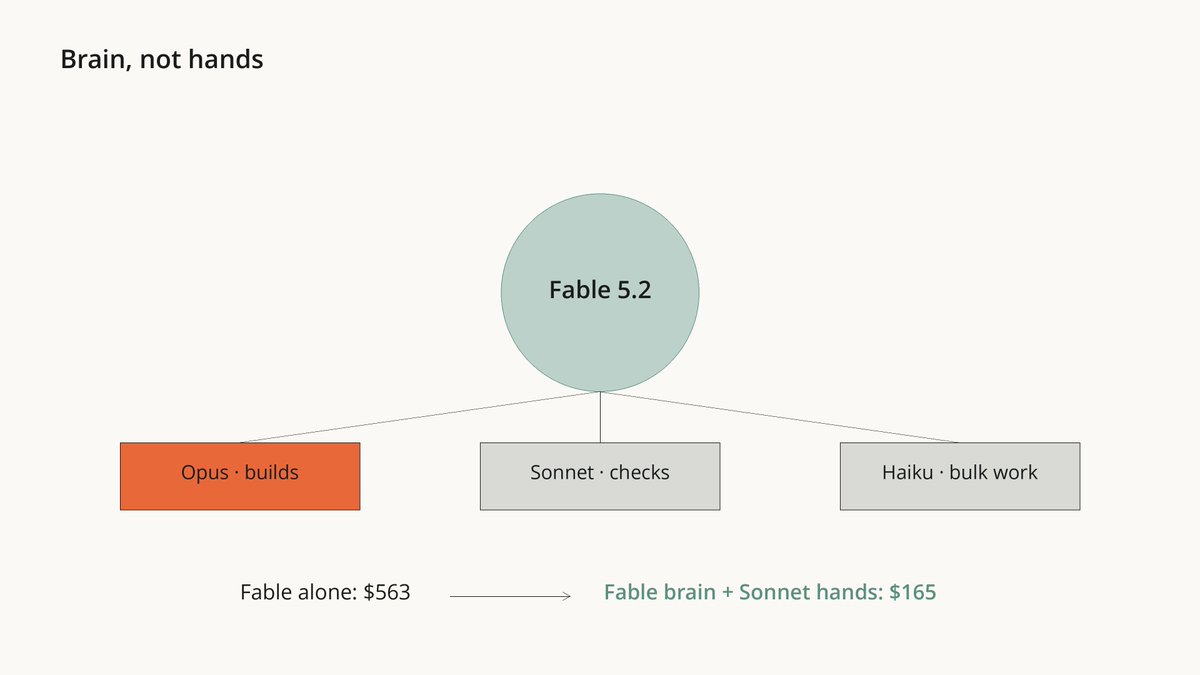
Thinking is Fable's job. Typing is not
→ 09. Let Sonnet Work and Fable Advise, Every Day
The cheapest way to have Fable's brain all day:
/model sonnet
/advisor fable
- Sonnet does every step. At the big moments it asks Fable: before it picks an approach, when an error keeps coming back, before it says "done"
It's an official pairing in the Claude Code docs: "Fable guidance at decision points without running Fable throughout"
The catch nobody mentions: an advisor only helps when it's asked. In one Anthropic test, with no line in the prompt asking for it, the advisor was consulted on 0 of 198 questions
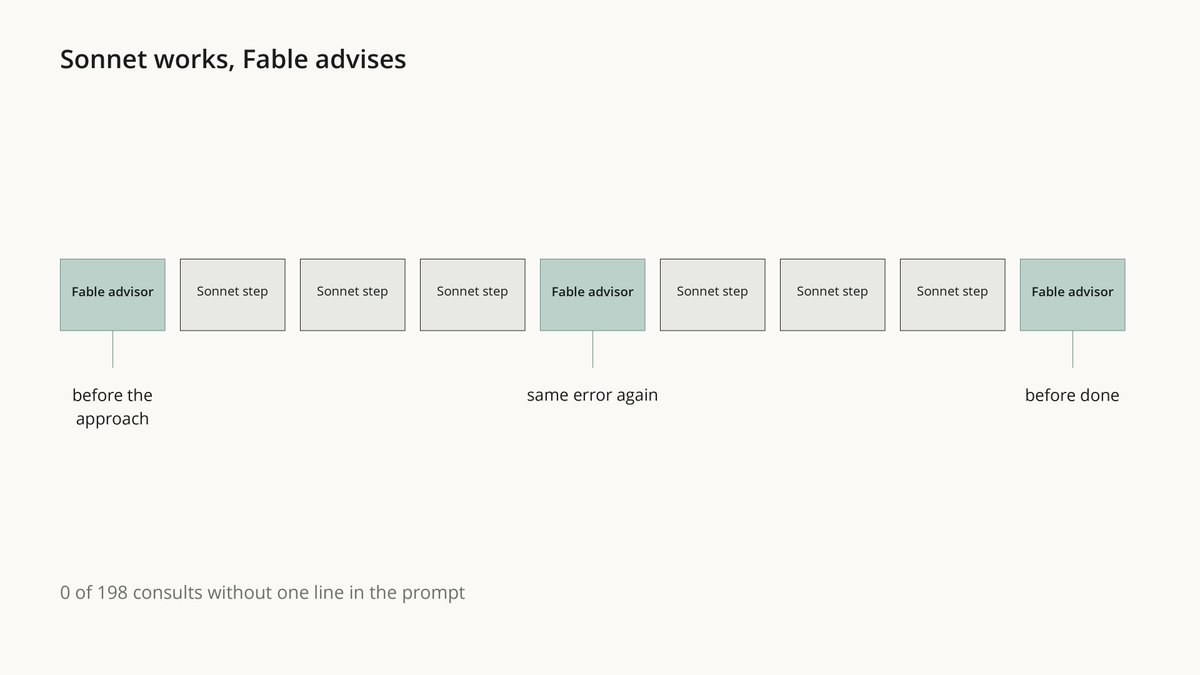
The team file in the next step adds one line to your CLAUDE.md that tells it when to ask
- Bonus: switching the advisor on or off keeps your prompt cache. Switching models mid-session throws it away, and Fable reads its cache at 1/40 of the normal input price
This is the setup for both: professional coders and AI enthusiasts
→ 10. Build Your 4-Model Team for Big Jobs
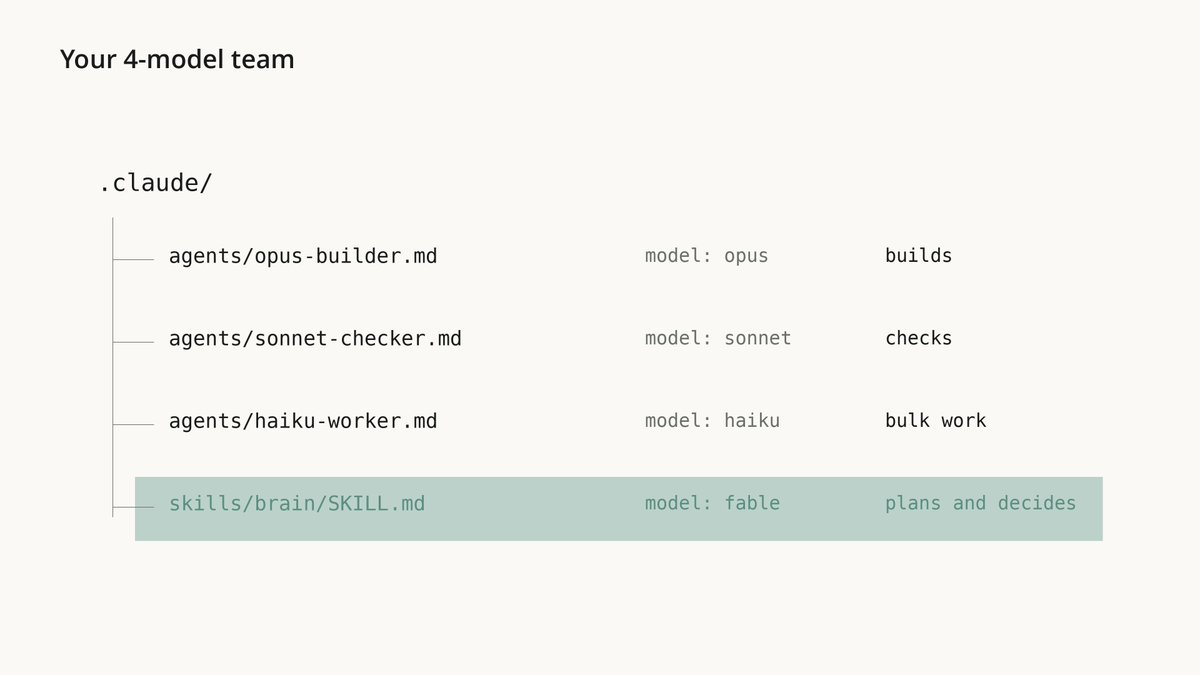
For a job bigger than one sitting, give Fable a team:
-
opus-builder (Opus 5.5): builds from a clear brief
-
sonnet-checker (Sonnet 5.5): checks finished work and changes nothing
-
haiku-worker (Haiku 5.5): repetitive work you can check. Never code
-
/brain (Fable 5.2, high effort): plans, splits the work, briefs the team, judges the result
**Each file has its model written inside. Paste this once into Claude Code:
**What this prompt does: creates three agents (Opus builds, Sonnet reviews, Haiku handles the routine work), a /brain skill that runs on Fable 5.2, and an advisor line in CLAUDE.md. It shows you every file before creating it.
Set up my Fable 5.2 team in Claude Code, at user level so it works in every project.

1. Create the four files below. Everything between a ===== marker line and the next ===== marker line is the exact file content, starting with its first --- line.
2. If a file already exists at that path, show me both versions and ask before you replace it.
3. Add the advisor lines at the bottom to the end of ~/.claude/CLAUDE.md. Create the file if it doesn't exist. If it exists, show me the diff and wait for my yes.
4. Finish with a list of what you created. If ~/.claude/agents/ or ~/.claude/skills/ didn't exist when this session started, tell me to restart Claude Code once.

===== ~/.claude/agents/opus-builder.md =====
---
name: opus-builder
description: Builds from a clear brief. Writes and changes code and files. Use for implementation work after the plan is decided.
model: opus
effort: medium
---
You build exactly what the brief asks, in the files it names. Don't change anything outside the brief.
If the brief is unclear, or a step fails in a way you can't fix, stop and report what blocked you instead of guessing.
End with a short report: what you changed, file by file; how you checked it; and what you did not finish.

===== ~/.claude/agents/sonnet-checker.md =====
---
name: sonnet-checker
description: Independently checks finished work against its brief. Runs tests and reads the code, and changes nothing. Use before any work is called done.
model: sonnet
effort: high
tools: Read, Grep, Glob, Bash
---
You did not write this work, and you don't change it. Check it against the brief: run the tests and the code, read the diff, and try the cases the brief cares about.
Report only real problems, each with the file, the line or command, and what you saw. If everything passes, say so in one line and list what you checked.

===== ~/.claude/agents/haiku-worker.md =====
---
name: haiku-worker
description: Repetitive work across many items whose results are easy to check, such as renaming, extracting fields, tagging, sorting, and short summaries of many files. Not for writing or fixing code.
model: haiku
effort: medium
---
Do exactly the task in the brief, item by item, in the format it asks for. Don't skip items.
If an item doesn't fit the instructions, list it under "Unclear" instead of guessing.

===== ~/.claude/skills/brain/SKILL.md =====
---
name: brain
description: Runs a big job with Fable 5.2 as the brain and Opus, Sonnet and Haiku subagents as the hands. Use only when I type /brain.
argument-hint: "[the job and what done means]"
model: fable
effort: high
disable-model-invocation: true
---
You are the brain on this job. You plan, decide, split the work, brief the team, and judge what comes back. Your team:
- opus-builder (Opus 5.5) builds from a clear brief.
- sonnet-checker (Sonnet 5.5) checks finished work against its brief and changes nothing.
- haiku-worker (Haiku 5.5) does repetitive, easy-to-check work across many items. Never code.

Each subagent starts without our conversation and pays for everything it reads, so delegate only when it pays:
- Delegate parts that don't depend on each other, work too large for one session, and repetitive work that is easy to check.
- Keep the work yourself when it is one chain of dependent steps or fits in this session. Planning, architecture, root causes and final decisions stay with you.
- Brief each subagent like a colleague who has seen nothing: the goal, the exact files, what done means, what not to touch, and the report you want back. Ask for short reports with evidence, not whole files.
- Never give two subagents the same file to edit at the same time.
- If opus-builder fails the same part twice, run it once more at high effort. If it fails again, do that part yourself.
- Before you call the job done, have sonnet-checker check the result against my goal, and fix what it finds.

Steps that need my yes first: deleting data, force-pushing, and changing anything outside this project.
Steps that need no approval: reading files, running tests, creating and editing files inside this project, starting subagents, and retrying a command that failed.

Start with a short plan: the parts, who does each one, and in what order. Then keep going until the job is done, with a one-line update every few steps.

The job: $ARGUMENTS

===== add to the end of ~/.claude/CLAUDE.md =====
## Advisor
When an advisor model is available, consult it before you commit to an approach, when the same error comes back, and before you call a task done. Save your work before that last consult.
Then hand it a whole job:
/brain Move the API from Python to Rust. Done means: every test passes and the service starts.
Fable writes a plan, hands out the parts, and has Sonnet check everything before it says done. Type /tasks to see which model each helper runs on
For a job that will take many messages, start the session with claude --model fable first
Two honest rules from Anthropic's measurements, already written into the file:
-
a team pays off only when the work is bigger than one session or splits into independent parts. For one chain of steps, a single model at lower effort was cheaper
-
Haiku helpers on code were no better than just lowering effort. So haiku-worker never writes code
And if the planning isn't the hard part, change one word in the brain file: fable → opus. In Anthropic's test: about the same score, 19% cheaper
Your result: one command, and a whole job runs on 4 models, each doing what it's best at
Part 4 · Prompts That Change You
→ 11. Let Fable Tell You Who You Are
Every prompt you ever typed into Claude Code is sitting on your disk
~/.claude/history.jsonl keeps every prompt. ~/.claude/projects/ keeps the full sessions
And Claude Code silently deletes those sessions after 30 days by default settings docs
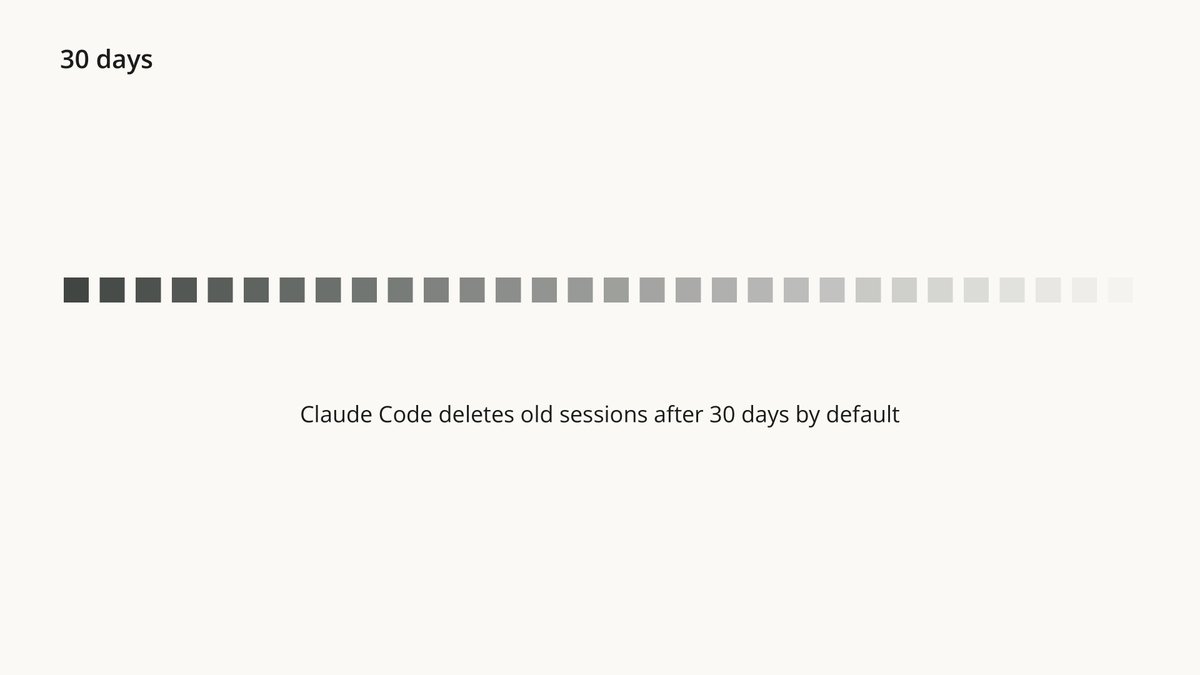
Nobody writes those sessions for an audience. They show what you actually did, not what you say you do
A mirror prompt went viral this year. Here it is, rebuilt for Fable 5.2 with Anthropic's own rules
Set it up:
mkdir mirror && cd mirror
claude
/model fable
/effort high
Then paste:
**What this prompt does: reads your Claude Code history, hides your secrets, and sends nothing to outside sites or tools. It asks you 5 questions one at a time, then writes your portrait: what you really value, what you start and drop, where your tokens go, a 30-day plan, and a 3-line card to share.
<goal>
Read the record of how I work with AI on this computer and show me, with evidence, who I am and how I spend my hours. Then help me change my setup so my agents fit the person the record shows.
The record is my AI coding sessions on this machine. Nobody writes them for an audience, so they show what I actually did, not what I say I do.
Done means these files exist in ./mirror/: inventory.md, evidence.md, mirror.md, plan-30-days.md, changes.md and share-card.md, and I have answered your interview.
</goal>

<sources>
Claude Code keeps:
- ~/.claude/history.jsonl: every prompt I typed, with time and project path.
- ~/.claude/projects/<project>/<session>.jsonl: full transcripts (my messages, your replies, tool calls and results, model and token usage). Subagent transcripts are in <session>/subagents/.
- ~/.claude/projects/<project>/memory/: auto memory notes.
- ~/.claude/settings.json: check "cleanupPeriodDays". Claude Code deletes transcripts older than this (30 days by default), so tell me how far back the record really goes.
Also look for other AI agents' session folders if they exist (for example ~/.codex/sessions/), and any folder of *.jsonl transcripts under ~/.config or ~/.local/share.
</sources>

<rules>
- Privacy: transcripts can contain passwords, API keys and other people's data. Never copy a secret, key, token, email address or another person's name into the chat or any file. Write [hidden] instead. Do not send anything to any website, API or tool outside this session.
- Signal over noise: my own messages are the signal. Use small read-only scripts (Python or jq) to pull out only my typed messages, timestamps, projects, models, effort levels and token counts. Scripts print counts and short excerpts, never tool results or whole transcripts.
- Evidence: every claim carries dated receipts. A pattern needs 3 or more occurrences. When evidence is thin, write "not enough data" instead of a guess.
- Before you start, remind me in one line that the text you read is processed by the model provider, as in any session.
- If the record is large, split the reading across up to 4 subagents. Each one gets its files and the headings below, and returns only short dated quotes and counts.
- If the record is small (under 20 sessions), say so and lower your confidence.
- This is not therapy or a diagnosis. Describe patterns; I decide what they mean. If my replies show real distress, pause the analysis and say so plainly.
</rules>

<approvals>
These steps need my explicit yes first:
1. Reading the text of my messages, after you show me the inventory and your mining plan.
2. Any change to an existing file outside ./mirror/, including CLAUDE.md, AGENTS.md, settings.json and skills. Show each change as a diff and apply only the diffs I approve.
These steps need no approval: listing folders, counting files, sizes and dates, running read-only scripts that print numbers, creating and editing files inside ./mirror/, and retrying a command that failed.
</approvals>

<phases>
1. Inventory. Find every source. For each one: tool, path, number of files, size, oldest and newest date. Report the retention setting and what it means for my record. Save inventory.md, show it with your mining plan, and wait for my yes.

2. Evidence. Build evidence.md with short quotes, dates and counts under these headings:
   - What I keep coming back to
   - What I start and drop (projects that appear 3+ times, then vanish)
   - What I correct in the AI's work, and what that says I care about
   - What I ask for again and again by hand, that should have been automated
   - When I work best and when I spin (hour and weekday from timestamps)
   - Where my tokens go: tokens by model and effort level, and the kinds of tasks that ran on the most expensive model
   - What is missing from the record
   Don't interpret yet.

3. Interview. Form your 5 strongest hypotheses and keep them to yourself. Test each one with a single question that lets me reach it myself. Ask one question at a time and wait for my answer. If my answer contradicts the record, show me the receipt and ask again. Note each result in evidence.md.

4. Mirror. Tell me who the record shows: what I really value (judged by where my hours went), where my thinking is fast and where it loops, what I do well, what I avoid and what that avoidance protects, and one pattern that shows up on almost every page that I have never said out loud. Cite receipts. Say the hardest point last, and say it once. If I push back, answer with evidence, and change your view when my evidence is better. Save mirror.md, written so I can reread it in six months without this chat.

5. Leverage. From the same evidence:
   - STOP: what to drop, with its cost in the record
   - HAND OFF: what an agent should own permanently, ranked by hours saved per week
   - KEEP: what already works
   - ONLY ME: the one or two things where my work is best
   - SCHEDULE: when to do deep work and when to do admin, from my own timestamps
   - MODELS: which kinds of my tasks need Fable, Opus, Sonnet or Haiku, and what the right choice would have saved. Use the prices at platform.claude.com/docs/en/about-claude/pricing; if you can't reach the page, give token counts only.
   Each item gets a first action I can take this week. Save plan-30-days.md.

6. Setup. In changes.md, propose diffs for CLAUDE.md or AGENTS.md, up to 3 new skills (~/.claude/skills/<name>/SKILL.md) that remove my most repeated manual requests, and a higher cleanupPeriodDays if my history is being deleted. Apply only what I approve.

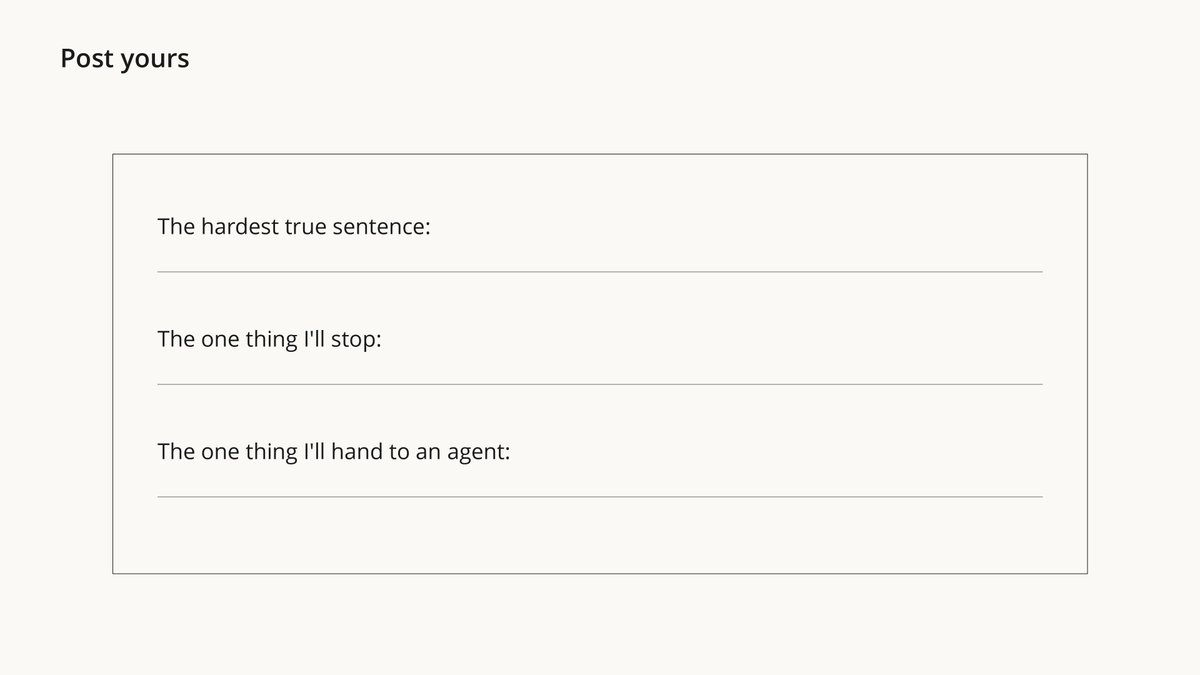
7. Share card. Write share-card.md: 3 short lines I could post publicly, with no names, projects, companies, places, amounts or secrets in them: the hardest true sentence about how I work, the one thing I'll stop, and the one thing I'll hand to an agent.
</phases>

<working_style>
Between approval points, keep going. Errors, empty folders and failed commands are ordinary obstacles: diagnose them and work through them instead of stopping.
Before you start, say in a line what you're about to do, and give a one-line update every few steps.
Write for a reader who hasn't seen your tool calls: plain words, short sentences, the key point first.
Be direct. No flattery, no filler. The standard: "You asked for a 'quick landing page' 9 times in 4 months and finished none. What would shipping one cost you?"
</working_style>

Start with phase 1.
It maps your history, asks you 5 questions one at a time, then tells you what you really value, what you start and drop, where your tokens go, and the one pattern you've never said out loud
No Claude Code? Mirror Lite works in the Claude app. Attach your notes or a ChatGPT/Claude data export and paste:
What this prompt does: the same mirror, built from your attached notes or chat export: evidence, 5 questions, a portrait, a "stop / hand off / keep / only me" plan, and a 3-line card to share.
<goal>
Read the files I attached. They are things I wrote myself: notes, journals or my chats with AI. Show me, with evidence, who I am and how I spend my time and attention. Then give me a 30-day plan.
</goal>

<rules>
- My own words are the evidence. Every claim carries a short quote and its date if the file has dates. A pattern needs 3 or more examples; otherwise write "not enough data".
- Never repeat a password, card number, address, or another person's name. Write [hidden].
- This is not therapy or a diagnosis. Describe patterns; I decide what they mean. If my writing shows real distress, pause and say so plainly.
- Be direct. No flattery. The standard: "You wrote 'start the course' 6 times since March and never wrote what came next. What would starting cost you?"
</rules>

<steps>
1. Evidence. Under these headings, list short quotes and counts: what I keep coming back to; what I start and drop; what I complain about but never change; when I sound most alive; what is missing that I would expect to see.
2. Interview. Form your 5 strongest guesses about me and keep them to yourself. Ask me one question at a time, each one built so I can reach the guess myself. Wait for my answer each time. If my answer contradicts my own writing, show me the quote and ask again.
3. Mirror. Tell me what I really value, judged by what I actually spend words and time on; what I do well; what I avoid and what the avoiding protects; and one pattern that shows up almost everywhere that I have never said out loud. Say the hardest point last, once. If I push back, answer with evidence, and change your view when my evidence is better.
4. Plan. STOP (what to drop), HAND OFF (what an AI could do for me every week), KEEP, ONLY ME (the one or two things where I'm at my best). Each with one first action for this week.
5. Share card. 3 short lines I could post publicly, with no names, places, amounts or secrets: the hardest true sentence about me, the one thing I'll stop, the one thing I'll hand to AI.
</steps>

Start with step 1.
Your result: a portrait you can reread in 6 months, a 30-day plan, and a 3-line share card with your hardest truth
→ 12. Build a Second Brain With Karpathy's File
Andrej Karpathy published a gist he called an "idea file": made to be pasted into your own agent, Claude Code included
The idea: your agent turns everything you read into a wiki of linked notes, and every new source makes it smarter. Long sessions across many files are exactly where Fable shines
Set it up:
mkdir second-brain && cd second-brain
mkdir raw
claude
/model fable
Put 3-10 of your sources in raw/: articles, PDFs, notes, transcripts. Then paste:
Read Andrej Karpathy's LLM Wiki idea file at https://gist.github.com/karpathy/442a6bf555914893e9891c11519de94f and build this wiki with me here.

<setup>
- raw/ holds my sources. Never edit them; cite them.
- wiki/ holds the pages you write and own. Keep index.md (every page with a one-line summary) and log.md (append-only, one entry per ingest, query or lint).
- Write the conventions into ./CLAUDE.md so every future session follows them.
</setup>

<first_job>
Ingest every file in raw/. For each one: talk me through the 3 most important takeaways, write its summary page, then update the people, concept and comparison pages it touches. Flag where a new source disagrees with an older one.
Done means: every file in raw/ has a summary page, index.md and log.md are current, and you have given me 5 questions this wiki can now answer that no single source can.
</first_job>

<working_style>
Creating and editing files inside this folder needs no approval. Ask me only on judgment calls: what matters most to me, and how to read a disputed claim.
Before you start, say in a line what you're about to do, and give a one-line update every few sources.
</working_style>
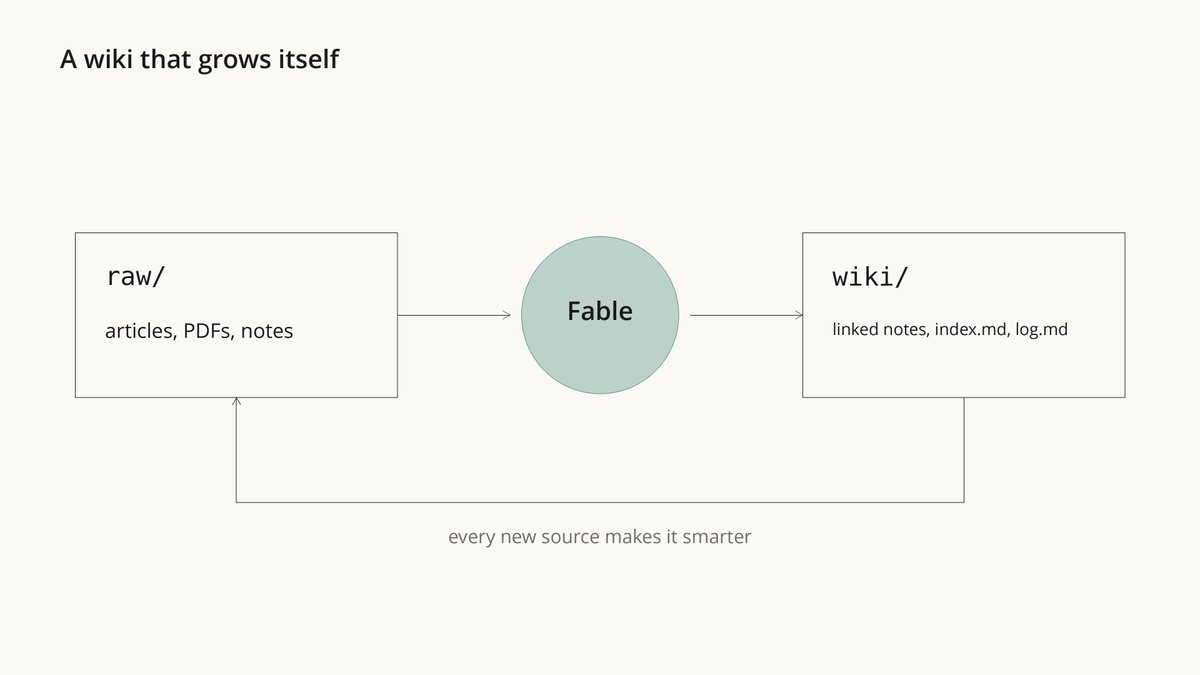
Your result: drop a file into raw/, and your wiki updates itself
→ 13. Run a Whole Team With One Word
Two built-in commands most people never type:
ultracode: move every test file under tests/ from Jest to Vitest
/deep-research What changed in the Node.js permission model between v20 and v22?
ultracode makes Claude write a workflow: many agents in the background, one report at the end. /deep-research fans out searches, cross-checks sources, and drops the claims that don't survive
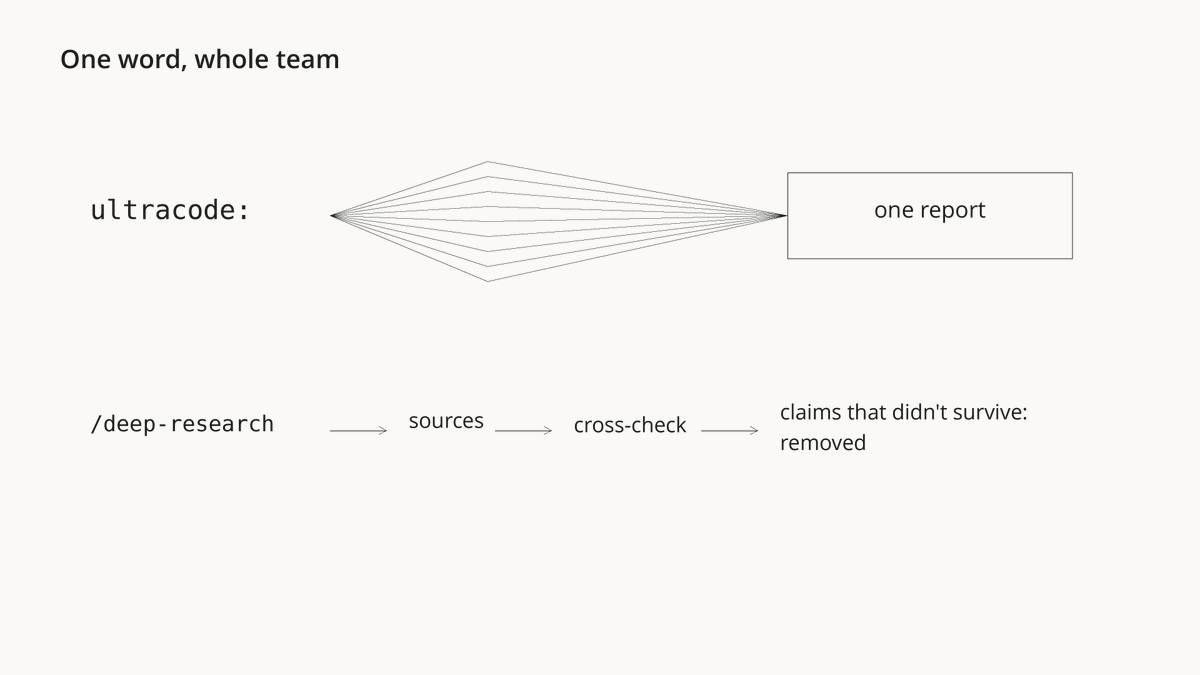
Honest: one run can use far more tokens than a normal chat. Anthropic's docs say to try it on a small slice first
→ 14. Find Where Your Money Actually Goes
Anthropic found the bill is decided by a few tasks. In one test, 2 problems out of 20 ate 43% of the money cost guide
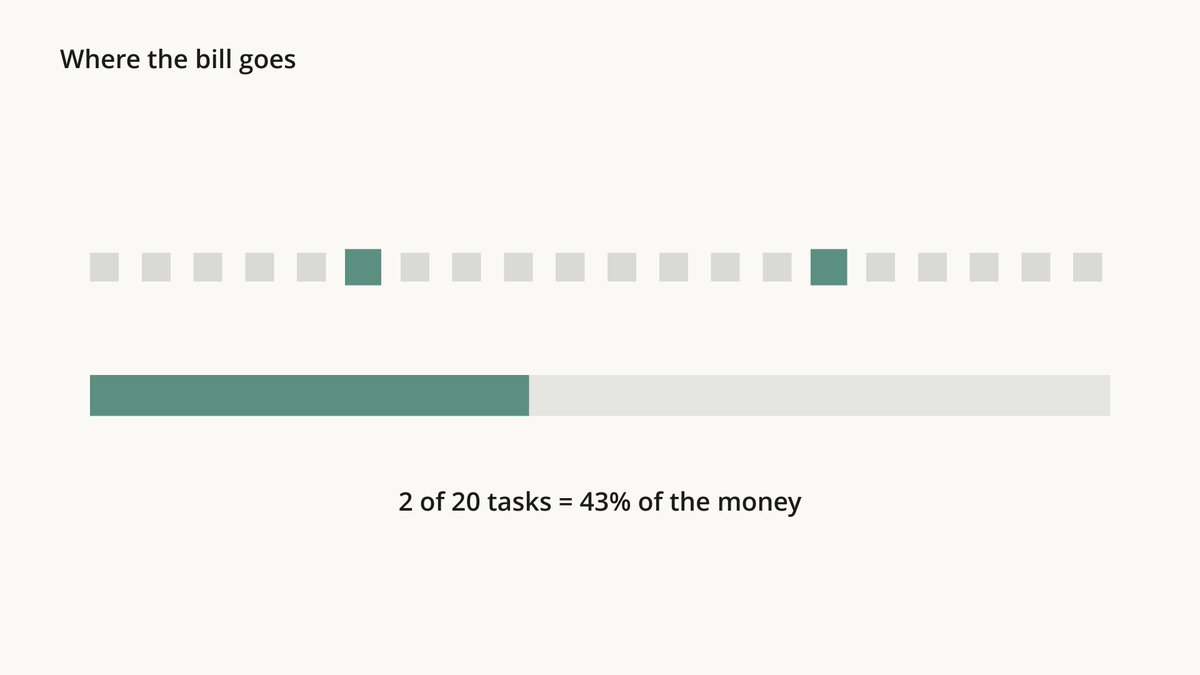
Paste into Claude Code:
**What this prompt does: runs ccusage on your local logs, finds your most expensive sessions and simple tasks that ran on expensive models, measures how much of your usage is cache and pasted data, and sets up the 2 easiest savings from Anthropic's own tests. It ends with a 3-line card.
<goal>
Show me where my Claude Code tokens go and set me up to spend less for the same results.
Done means: ./bill-autopsy/report.md and ./bill-autopsy/share-card.md exist, and I have approved or rejected each proposed change.
</goal>

<data>
1. Run `npx ccusage@latest daily` and `npx ccusage@latest session` and save the output in ./bill-autopsy/. ccusage is an open-source tool that reads Claude Code's local logs.
2. Then write a small read-only script that reads ~/.claude/projects/*/*.jsonl and pulls, per session: date, project folder, model, effort level if recorded, input, output and cache tokens, and the first 15 words of my first message. Nothing else.
3. Get prices from https://platform.claude.com/docs/en/about-claude/pricing. If you can't reach it, report tokens only.
</data>

<analysis>
- Spend by model, by project and by week.
- The most expensive 10% of sessions: what share of the total they carry, and what they were.
- Simple tasks that ran on Fable or Opus (renames, small edits, formatting, lookups): what they would have cost on Sonnet or Haiku.
- Cache: the share of input tokens read from cache. Flag sessions where I switched model or effort in the middle, since that throws the cache away.
- Pasted data: sessions where I pasted big tables or logs into the chat instead of giving a file.
</analysis>

<fixes>
Rank changes by money saved, each with the evidence from my logs:
- Effort: run routine work at low, and re-run only the failures at high. In Anthropic's test this cost about 40% less for about the same pass rate.
- Data as files: give tables and logs as files and let Claude write code over them. In Anthropic's test, pasted data got 7 of 25 answers right; the same data as a file got 25 of 25 at about a twelfth of the cost.
- Models: which of my task types belong on Haiku, Sonnet, Opus or Fable.
- Advisor: if most Fable time went to execution, suggest `/model sonnet` with `/advisor fable`.
Show any change to settings or CLAUDE.md as a diff and apply only what I approve.
</fixes>

<rules>
Read-only scripts and files inside ./bill-autopsy/ need no approval. Never copy message text beyond the 15-word excerpts, and never copy a secret, key or token: write [hidden].
</rules>

Last, write share-card.md: 3 lines I could post publicly with no project names: my share of tokens spent on the most expensive model, the biggest waste you found, and the one change I'm making.
It runs ccusage, an open-source tool, on your local logs, finds what went to the wrong model, and sets up the 2 cheapest wins from Anthropic's tests:
-
low effort first, then re-run only the failures at high: about 40% cheaper
-
data as a file instead of pasted into the chat: 25 of 25 right instead of 7, at a twelfth of the cost
On a subscription it saves limits, not dollars
Your result: a table of where every token went, and what to change tomorrow
→ 15. Hand It a Job Before Bed
claude --model fable --permission-mode auto
/effort high
Then paste this while you're still awake:
***What this prompt does: asks all its questions now, writes the plan to NIGHT-SHIFT.md, works on a separate git branch, ships nothing, writes MORNING-REPORT.md in the morning, and gives you a /goal line for the night.
I'm going to sleep in 15 minutes. Tonight you run a job without me. First we prepare it together.

1. Ask me every question you need now: the job, what done means, what you must not touch, how to check the result. Ask them all in one message.
2. Then write NIGHT-SHIFT.md with: the goal, a checklist of parts, the exact check that proves each part is done (a test command, a build, a file that exists), and the things you must not touch.
3. Create a new git branch for tonight's work, and commit after each finished part.
4. If the job splits into independent parts and the subagents opus-builder, sonnet-checker and haiku-worker exist, hand those parts to them and have sonnet-checker check each finished part. Otherwise do the work yourself.
5. Tonight: don't deploy, don't push to the main branch, don't delete anything outside this project, and don't pay for anything. If a part is blocked on me, write it down and move to the next part.
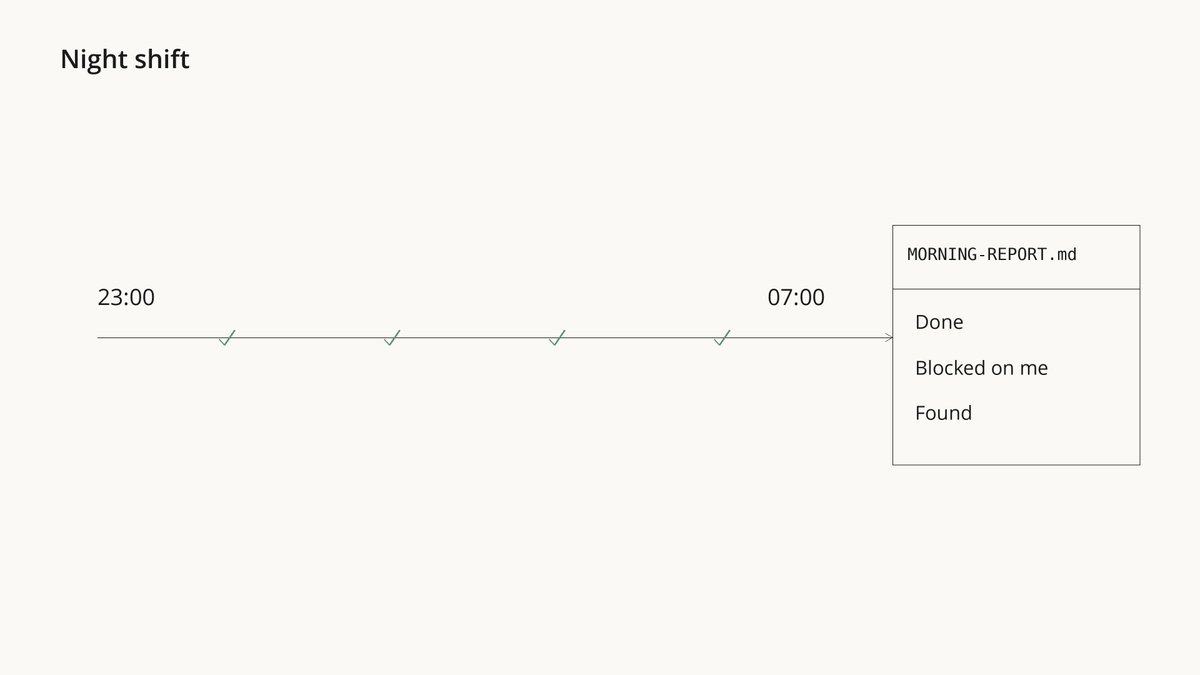
6. When everything is checked, write MORNING-REPORT.md with three headings: Done (with proof), Blocked on me, Found along the way.

When NIGHT-SHIFT.md is ready, print the exact /goal line for me to paste, in this form:
/goal Every item in NIGHT-SHIFT.md is checked off with its proof shown, and MORNING-REPORT.md exists, or stop after 40 turns
It asks all its questions while you're awake, writes the plan, then gives you one /goal line
/goal has a separate model check after every turn whether the job is really done, and keeps Fable working until it is. Auto mode has a second model review actions instead of you. The work stays on its own git branch and never gets deployed
Your result: you wake up to three headings: Done, Blocked on me, Found
The Free Stack
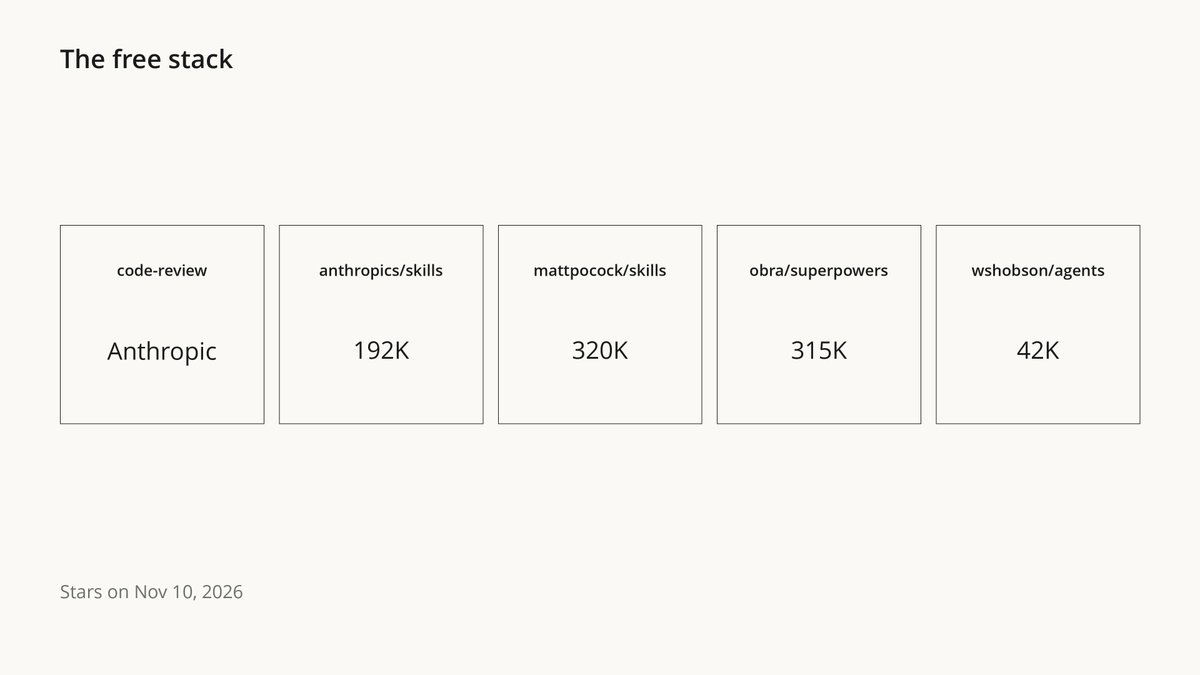
Install 2-3 at most, then run Prompt Doctor on them. Official first:
/plugin install code-review@claude-plugins-official
/plugin marketplace add anthropics/skills
/plugin install document-skills@anthropic-agent-skills
-
code-review (Anthropic): a second pair of eyes on every change
-
anthropics/skills (192K stars): Word, Excel, PDF and PowerPoint files, made for people who don't code
-
mattpocock/skills (320K): its grill-me skill interviews you before you build. /plugin install mattpocock-skills@claude-plugins-official
-
obra/superpowers (315K): brainstorm → plan → tests → subagents. Heavy for small tasks. /plugin install superpowers@claude-plugins-official
-
wshobson/agents (42K): ready agents you can put on fable. /plugin marketplace add wshobson/agents
None of these was built for Fable 5.2. That's exactly why Prompt Doctor comes after them
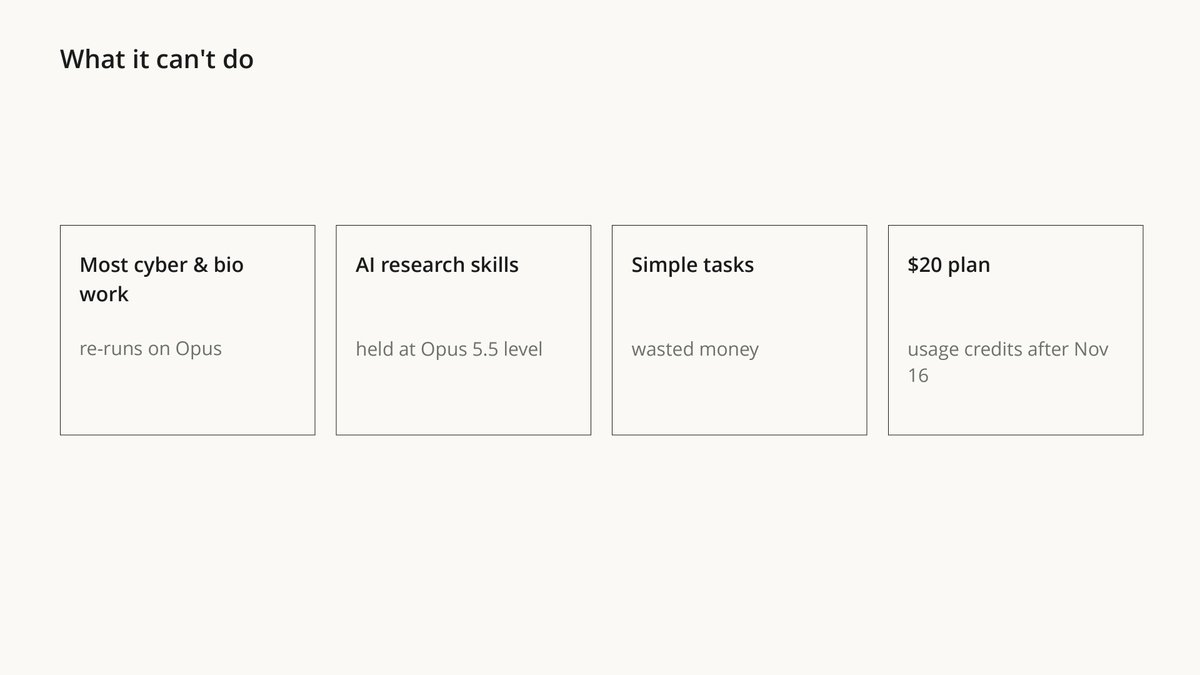
What It Can't Do
-
Most cybersecurity and biology work. Fable's safeguards block it, and Claude Code re-runs flagged requests on Opus automatically
-
The skills that speed up AI research. Anthropic held back kernel optimization and LLM architecture work. There it performs at about Opus 5.5 level
-
Cheap simple work. On easy tasks it's money thrown away. Use the ladder
-
Come free on the $20 plan. After November 16, Pro pays for Fable with usage credits. Max and Ultra include it up to half the weekly limit
buuttt here is some experiements:
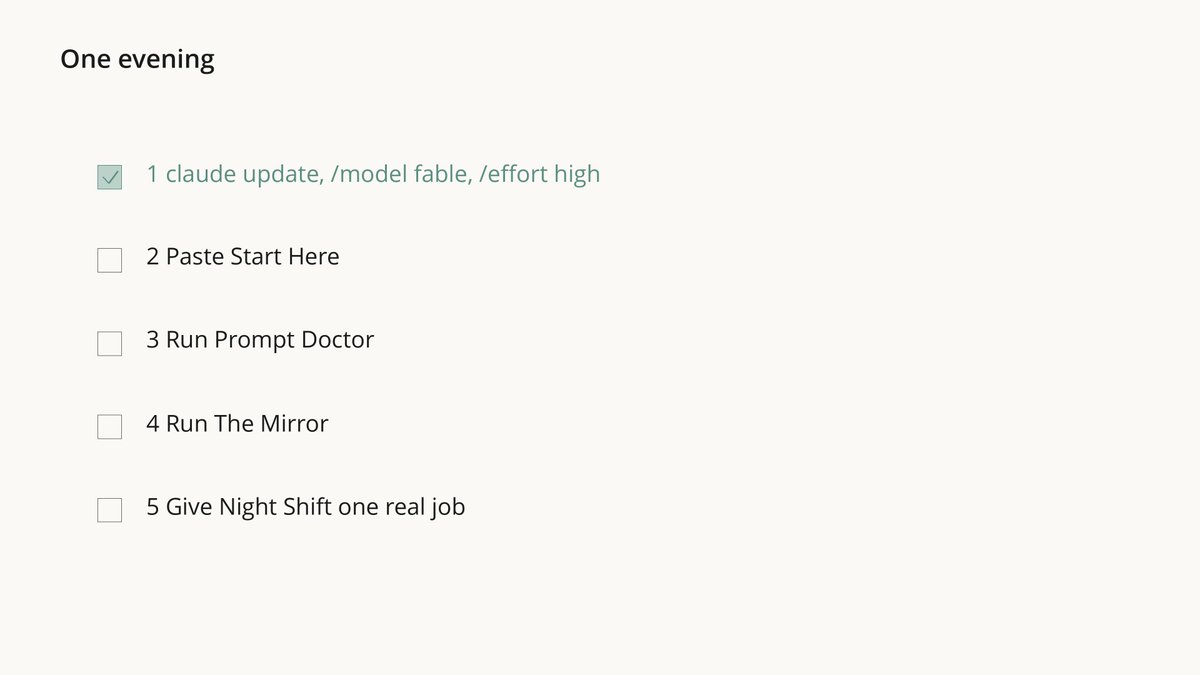
Your One-Evening Protocol
-
claude update, then /model fable and /effort high
-
Paste Start Here, or the prompts from 06 and 10 one by one
-
Run Prompt Doctor on everything you already had
-
Run The Mirror and post your share card
-
Before bed, give Night Shift one real job
The Last Prompt: Start Here
One paste instead of Parts 2 and 3. It asks 3 questions, waits for one yes, and sets up only what fits you:
Set up Claude Code so I use Fable 5.2 at 100%. Follow these steps in order.
What this prompt does: asks what you use Claude for, whether you take on big jobs, and which projects are fully yours, then shows you the whole plan. After one "yes" it makes a backup, installs the CLAUDE.md blocks, adds the team and the advisor if you need them, looks for harmful lines without changing anything, and suggests your next 3 prompts.
Also below, incredible course by Lance Martin how to build everything what I wrote here:
STEP 1. Ask me these 3 questions in one message and wait for my answers:
1. What do you mostly use Claude for: code, research and writing, or running a business?
2. Do you take on big jobs that run for hours or don't fit in one session? (yes / no)
3. Which projects on this computer are fully yours to restructure? (folder names, or "none")

STEP 2. Before you change anything, show me the full plan: every file you will create or change, as a list. Wait for my yes. That one yes covers every step below; show each diff as you go.

STEP 3. Back up ~/.claude/CLAUDE.md to ~/.claude/CLAUDE.md.backup if it exists. Then add the CORE block below to the end of ~/.claude/CLAUDE.md (create the file if needed). If the file would pass 200 lines, list which of my old lines could move to a separate file, and change nothing else.

STEP 4. Add the OWNERSHIP sentence only to the CLAUDE.md of the projects I named in question 3.

STEP 5. Only if I answered yes to question 2: create the TEAM files below at the exact paths, and add the ADVISOR lines to the end of ~/.claude/CLAUDE.md. If a file already exists, show me both versions and ask before replacing it. If ~/.claude/agents/ or ~/.claude/skills/ didn't exist when this session started, tell me to restart Claude Code once.

STEP 6. Scan my existing CLAUDE.md files, memory notes in ~/.claude/projects/*/memory/, skills and agent files for lines that hurt Fable 5.2: "think less" or "answer without deliberating", token budgets, old "never" rules with no reason, reminders to double-check, requests to show reasoning step by step, hard style limits, and default instructions to delegate. List them with file and line. Don't change them; that is the Prompt Doctor's job.

STEP 7. Finish with a short report: what you changed, what you found in step 6, and the 3 prompts from the course I should run next, picked from my answers: The Mirror (who I am, from my AI history), Bill Autopsy (where my tokens go), Night Shift (a big job while I sleep), Second Brain (a personal wiki), Prompt Doctor (fix the lines from step 6), Subscription Killer (cancel what I don't use).

Steps that need no approval after my yes in step 2: reading files, listing folders, and creating the backups.

===== CORE (for ~/.claude/CLAUDE.md) =====
# Finishing work
Please avoid stopping while you still owe work the user asked for. Be persistent and do not stop unless needed.

While status notes are welcome, as is clarifying with the user on open decisions, carry on with work that does not depend on the user's answer without unnecessary stops.

If you notice yourself inviting the user to redirect you or offering to wait, instead proceed on the next part of the task. You may meet ordinary obstacles like errors, timeouts, locked files, empty results or failing tools. Diagnose them first, and when they are not real blockers, work through them with the access you have (wait and retry, fix the request, use another tool or source) rather than stopping unnecessarily.

If someone clearly decided something is a hard blocker, such as a file marked not to be touched, access that was intentionally withheld, or a safety guardrail, leave it alone, say plainly what you found, and look for another safe way to finish the task. Stopping before the task is complete is very rarely merited, as in when the task can't move forward without user input, or where the blocker is deliberate and should not be worked past. This does not override the need for confirmation on risky or destructive actions.

# Approvals
Get my go-ahead first before you delete data, force-push, deploy to production, pay for anything, or send or publish anything outside this computer. When I have given that go-ahead for a step, take it.
Steps that need no approval: reading files, running tests and read-only commands, creating and editing files inside the current project, and retrying a command that is safe to repeat.

# Updates
Before you start, say in a line what you're about to do; brief updates while you work help the user follow along. Close with a short recap that stands on its own (what you found, what you did, and what's next), so a reader who only sees the last message has the full picture.

# Communicating clearly
Write for an intelligent but low-context reader. The person reading has not seen your tool calls, your reasoning or the files you opened, and may be switching in from other work. Messages should generally be self-contained: the reader should understand what you mean without having to dig for other context. Put the key points in the first few sentences. Practice progressive disclosure in your sentence order, and do not use undefined references and ideas in line 1 that won't make sense until the reader reaches line 12.

Use plain words, and write in clear, understandable full sentences. Do not use a term or abbreviation that you made up during the work. Say what the thing is in a way any reader would understand. Write mostly in the style of ASD-STE100 Simplified Technical English: short sentences, one idea per sentence, active voice, and consistently using the same word for the same thing. Use a paragraph of flowing prose where ideas connect, and keep bullets for lists of separate items. Leave out unnecessary details unless the reader asks and practice concision, but do ensure that your messages have the key context. Aim to make your user-facing text as human-readable and clear as possible.

===== OWNERSHIP (only for projects I name) =====
This codebase is yours: what it's for and how it's built are your call, and you'll keep building on it.

===== TEAM =====
Everything between a ===== marker line and the next ===== marker line is the exact file content, starting with its first --- line.

===== ~/.claude/agents/opus-builder.md =====
---
name: opus-builder
description: Builds from a clear brief. Writes and changes code and files. Use for implementation work after the plan is decided.
model: opus
effort: medium
---
You build exactly what the brief asks, in the files it names. Don't change anything outside the brief.
If the brief is unclear, or a step fails in a way you can't fix, stop and report what blocked you instead of guessing.
End with a short report: what you changed, file by file; how you checked it; and what you did not finish.

===== ~/.claude/agents/sonnet-checker.md =====
---
name: sonnet-checker
description: Independently checks finished work against its brief. Runs tests and reads the code, and changes nothing. Use before any work is called done.
model: sonnet
effort: high
tools: Read, Grep, Glob, Bash
---
You did not write this work, and you don't change it. Check it against the brief: run the tests and the code, read the diff, and try the cases the brief cares about.
Report only real problems, each with the file, the line or command, and what you saw. If everything passes, say so in one line and list what you checked.

===== ~/.claude/agents/haiku-worker.md =====
---
name: haiku-worker
description: Repetitive work across many items whose results are easy to check, such as renaming, extracting fields, tagging, sorting, and short summaries of many files. Not for writing or fixing code.
model: haiku
effort: medium
---
Do exactly the task in the brief, item by item, in the format it asks for. Don't skip items.
If an item doesn't fit the instructions, list it under "Unclear" instead of guessing.

===== ~/.claude/skills/brain/SKILL.md =====
---
name: brain
description: Runs a big job with Fable 5.2 as the brain and Opus, Sonnet and Haiku subagents as the hands. Use only when I type /brain.
argument-hint: "[the job and what done means]"
model: fable
effort: high
disable-model-invocation: true
---
You are the brain on this job. You plan, decide, split the work, brief the team, and judge what comes back. Your team:
- opus-builder (Opus 5.5) builds from a clear brief.
- sonnet-checker (Sonnet 5.5) checks finished work against its brief and changes nothing.
- haiku-worker (Haiku 5.5) does repetitive, easy-to-check work across many items. Never code.

Each subagent starts without our conversation and pays for everything it reads, so delegate only when it pays:
- Delegate parts that don't depend on each other, work too large for one session, and repetitive work that is easy to check.
- Keep the work yourself when it is one chain of dependent steps or fits in this session. Planning, architecture, root causes and final decisions stay with you.
- Brief each subagent like a colleague who has seen nothing: the goal, the exact files, what done means, what not to touch, and the report you want back. Ask for short reports with evidence, not whole files.
- Never give two subagents the same file to edit at the same time.
- If opus-builder fails the same part twice, run it once more at high effort. If it fails again, do that part yourself.
- Before you call the job done, have sonnet-checker check the result against my goal, and fix what it finds.

Steps that need my yes first: deleting data, force-pushing, and changing anything outside this project.
Steps that need no approval: reading files, running tests, creating and editing files inside this project, starting subagents, and retrying a command that failed.

Start with a short plan: the parts, who does each one, and in what order. Then keep going until the job is done, with a one-line update every few steps.

The job: $ARGUMENTS

===== ADVISOR (add to the end of ~/.claude/CLAUDE.md, only with the team) =====
## Advisor
When an advisor model is available, consult it before you commit to an approach, when the same error comes back, and before you call a task done. Save your work before that last consult.
The shift:
Fable used to mean "the expensive model" → now it means the brain on top of cheaper hands
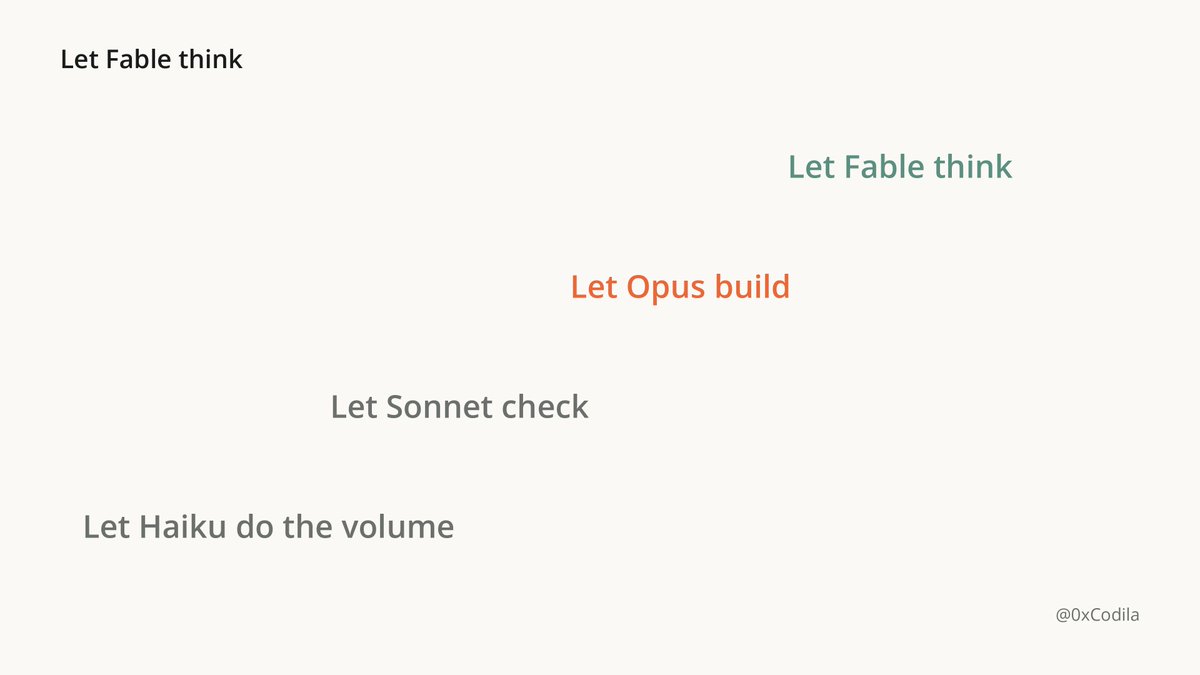
The real alpha is not the benchmarks. The real alpha is knowing which job deserves it
-
Let Haiku do the volume
-
Let Sonnet check
-
Let Opus build
-
Let Fable think
Most people will keep paying $40 per million tokens to ask if all ready
The few who set this up tonight will run a 4-model team for less than Fable alone
Hope it was useful, bookmark this course before your next build → @0xCodila
沿着这个主题继续读
从一篇文章,找到相关的教程、经验和阅读路径。