Agentic video understanding in Gemini: Developer Guide
文章目录
部分视频或图片暂未收录,已在正文保留提示;需要时可查看原文。查看原文 ↗
Analyzing long-form video in multimodal LLMs has traditionally relied on uniform sampling: decoding the full timeline at a fixed static frame rate (typically 1 FPS) and filling the context window with the entire visual data.
Agentic video understanding replaces static decoding with an active, server-side tool loop. Instead of loading an entire video upfront, the model inspects the timeline on demand by searching transcripts, fetching targeted frame sequences at adaptive frame rates, and isolating key audio tracks.
Key benefits over static (1 FPS) processing include:
-
Up to 88% fewer tokens per request
-
Up to 66% lower analysis cost on long-form media
-
Up to 7% higher accuracy on fine-grained visual reasoning tasks
How it works under the hood
Agentic video understanding replaces upfront ingestion with an iterative Think → Act → Observe loop:
-
Pass by reference: Instead of decoding the entire file, the API passes a lightweight pointer to the video. Initial context consumption includes only the video metadata (duration, container format, and file ID).
-
Think (Planning): Based on the user prompt, the model determines what information is needed to answer the query and decides which modalities or timestamps to inspect.
-
Act (Targeted tool calls): The model issues internal server-side tool calls to fetch specific video slices:
-
Transcript-first: For spoken content or general orientation, it reads timestamped speech transcripts before deciding if visual inspection is necessary.
-
Temporal zooming & adaptive FPS: To examine visual details, it loads only the relevant time window (e.g., seconds 14 to 16) and adjusts the frame rate (e.g., 5–10 FPS for fast motion, or 0.1 FPS to skim the video for relevant information).
-
Audio track: When acoustic cues, music, or speaker tone matter, it extracts the audio stream directly.
- Observe & synthesize: The extracted segments are returned to the model as observations. The model can perform another loop to refine its search or synthesize the final grounded answer.
See it in action
Side-by-side comparison of agentic vs static processing.
Developer Guide: Using agentic video understanding in the Gemini API
Agentic video understanding is supported across our latest models Gemini 3.8 Flash, 3.7 Flash, 3.6 Flash, and 3.5 Flash-Lite.
You can enable it by setting processing to "agentic" when sending the request.
import time
from google import genai

client = genai.Client()

# Upload a video
video_file = client.files.upload(file="path/to/lecture.mp4")

while video_file.state.name == "PROCESSING":
    time.sleep(2)
    video_file = client.files.get(name=video_file.name)

# Use agentic video processing
interaction = client.interactions.create(
    model="gemini-3.8-flash",
    input=[
        {
            "type": "video",
            "uri": video_file.uri,
            "mime_type": video_file.mime_type,
            "processing": "agentic"
        },
        {"type": "text", "text": "What are the three main arguments presented?"}
    ]
)

print(interaction.output_text)
print(interaction.usage.total_tokens)
Mixed-mode and multi-video requests
You can configure processing behavior independently for each media item in the same prompt. This is ideal for comparing a long reference recording against a short query clip:
interaction = client.interactions.create(
    model="gemini-3.8-flash",
    input=[
        # 45-minute reference match: process agentically
        {
            "type": "video",
            "uri": full_match_file.uri,
            "mime_type": "video/mp4",
            "processing": "agentic",
        },
        # 10-second query clip: process statically
        {
            "type": "video",
            "uri": highlight_snippet_file.uri,
            "mime_type": "video/mp4",
            "processing": "static",
        },
        {
            "type": "text",
            "text": "Find the exact timestamp in the full recording where the highlight sequence occurred.",
        },
    ],
)

print(interaction.output_text)
YouTube video support
You can also pass publicly accessible YouTube URLs directly together with agentic mode:
interaction = client.interactions.create(
    model="gemini-3.8-flash",
    input=[
        {
            "type": "video",
            "uri": "https://youtu.be/7Z5Vy9JBANs",
            "processing": "agentic"
        },
        {
            "type": "text",
            "text": "What are the 3 most important announcements in this keynote?",
        },
    ],
)

print(interaction.output_text)
Choosing between agentic and static mode
As a general rule, start with agentic mode, especially when optimizing for response quality or token efficiency. Select your processing mode based on asset length and the nature of the query:
When to use processing="agentic"
-
Long videos (> ~5 minutes): Lectures, webinars, earnings calls, sports matches, and broadcast media archives.
-
Fine-grained temporal tasks: Pinpointing exact timestamps or analyzing fast motion that 1 FPS misses.
-
Speech and visual separation: Queries that can be answered primarily via transcript search with targeted visual verification.
When to use processing="static"
- Short video clips (< 5 minutes): Latency-sensitive queries on short clips, such as product GIFs, UI animations, or social clips where frame-level precision across the entire clip is needed.
Benchmarks
Across standard video analysis benchmarks, agentic processing outperforms static sampling, reducing analysis costs by up to 66% and token consumption by up to 88%, while improving accuracy by up to 7%
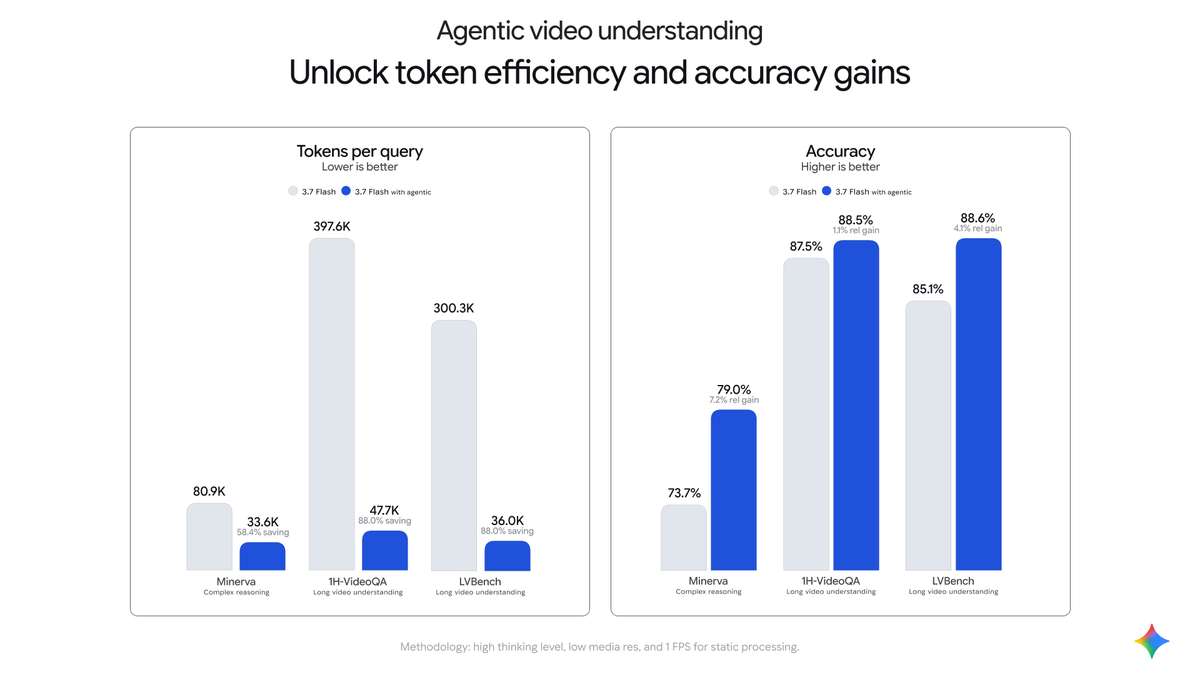
Activating agentic video understanding drops token consumption by up to 88% and boosts accuracy by up to 7% with Gemini 3.7 Flash.
Token billing & pricing
Billing for agentic video understanding requests follows standard base-model pricing:
-
Video input tokens: You are billed only for media tokens materialized during execution (the lightweight initial reference plus any frame slices and audio segments the model explicitly retrieved).
-
Thinking & output tokens: Model reasoning steps and tool calls are billed at standard output and thinking token rates.
-
Context caching: Videos loaded across multi-turn sessions trigger standard implicit caching and support explicit cache instances.
-
Batch API support: Agentic video processing can be used with the Gemini Batch API at 50% of the standard cost.
What's next
-
Review the Gemini API Video understanding docs.
-
Check the Pricing reference for standard and batch inference tiers.
-
Explore model specs and capabilities in the Gemini 3.8 Flash Model Card.
沿着这个主题继续读
从一篇文章,找到相关的教程、经验和阅读路径。