How to build a one-person marketing agency with AI

文章目录
部分视频或图片暂未收录,已在正文保留提示;需要时可查看原文。查看原文 ↗
Most of an agency’s week is reports, audits and pacing checks. Here is how to hand all three to an AI employee and keep only the decisions.
Most agencies follow the same pattern. A few clients turn into a dozen, and each new client means more reports, more audits, more progress checks, and more presentations. The workday ends long before the ideas run out.
Most of this work is structured and repeats every week, which means the AI agent can now handle it from start to finish, and you can review the results. Below is the whole workflow, step by step: what to automate, the exact prompts and skills, and where you stay in control.
What this covers:
-
The agency loop
-
The stack
-
One template for every workflow
-
Win: research before the pitch
-
Audit: find what is broken in an account
-
Run: daily pacing and your own internal tool
-
Report: the weekly client report
-
Grow: the creative loop
-
A week in a one-person agency
-
What you never hand off
This guide is designed to work for any agent configuration. Structure is the most important factor, and that is where the challenge lies, not in the tool itself. At each step, I’ll also show you the simplest implementation method I’ve been able to find.
1. The agency loop
Every client goes through five stages, on repeat:
-
Win: research the prospect, pitch
-
Audit: find what is broken in the accounts
-
Run: keep budgets on pace, every day
-
Report: show what happened and what is next
-
Grow: turn what worked into the next brief
Win and Grow involve analysis. Audit, Run, and Report involve collecting data, verifying it against rules, and generating reports. It is this intermediate phase that takes up the entire week, and it is here that an agent does its best work.
The rule for the whole guide: the agent gathers, checks and drafts. You decide.
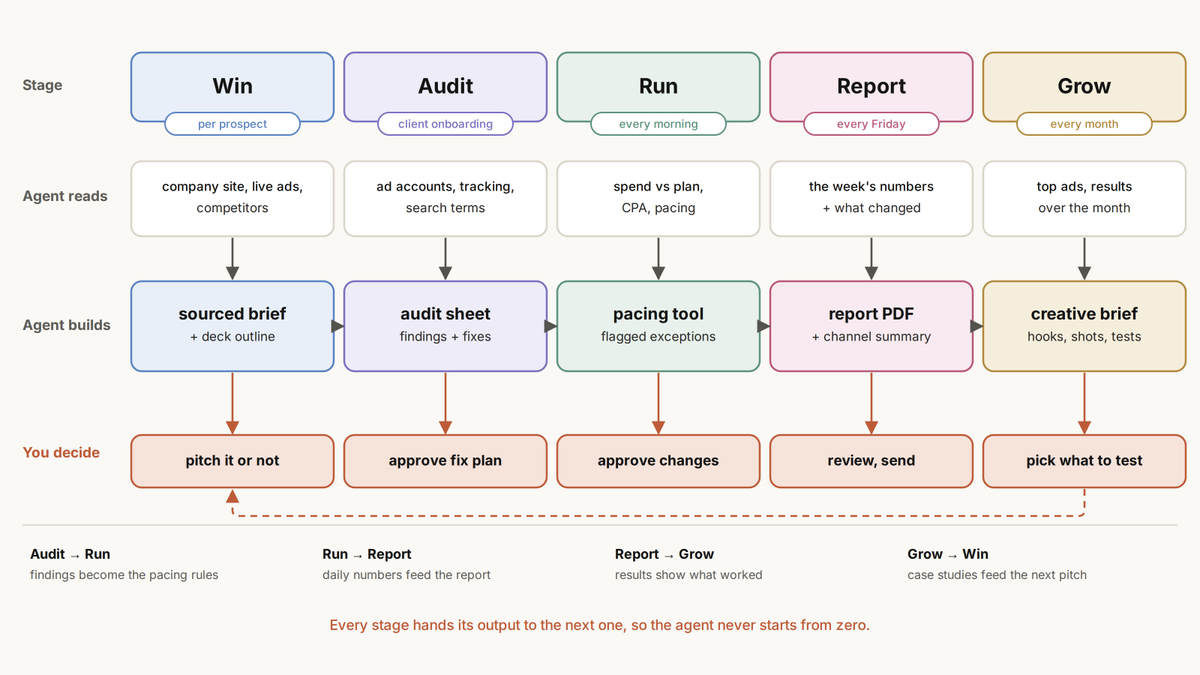
pic 1. The agency loop: what the agent prepares and what you decide at each stage.
2. The stack
Every working setup has five layers. Skip one and it breaks.
I’ll show you each level in two ways: on your own and with Viktor’s help. Viktor is an AI employee who joins your Slack or Microsoft Teams as a workspace member. You communicate with him as you would with a colleague, and he does the work: he extracts data, creates a spreadsheet, PDF, or dashboard, and posts the result back in the chat thread.
Layer 1. Access: what the agent can reach
Ad accounts, analytics, Shopify, Sheets. Read-only to start.
Yourself: one MCP connector per platform. With Viktor: he connects to 3,200+ tools, ad platforms included, and your credentials stay hidden from the AI.
Layer 2. Agent: who does the work
You need one that works with files and code, not only chat.
Yourself: Claude Code or Codex running in one folder:
agency/
├── clients/
│   └── northstar/
│       ├── rules.md        # targets, limits, escalations
│       └── reports/        # everything produced
├── skills/
│   ├── audit/SKILL.md
│   ├── pacing/SKILL.md
│   ├── weekly-report/SKILL.md
│   └── creative-brief/SKILL.md
└── log/runs.csv            # one line per run
With Viktor: he is the AI employee. He hands back finished files, not suggestions.
Layer 3. Memory: what it knows about each client
This is the file that has the greatest impact on the entire configuration. Every change you make adds a new line.
Goal metric: CPA, target $28
Budget: $48,000 a month, Google + Meta
Never: launch anything unpaused, touch brand campaigns
Always: source and date range next to every number
Escalate: pacing off by 10%+, any change over $2,000
Report tone: plain words, numbers first
Yourself: save it as clients/northstar/rules.md. With Viktor: one channel per client, with this pinned at the top. The channel history becomes his memory, so you never re-explain a client.
Layer 4. Clock: when work starts
Yourself: cron or scheduled tasks:
# every Friday at 8:00
0 8 * * 5  cd ~/agency && claude -p "Run the weekly-report skill for clients/northstar"
With Viktor: you just say it: “every Friday at 8:00, build the Northstar report.”
Layer 5. Gate: what needs you
Yourself: end every skill with one line: post the draft and wait for approval, never apply changes yourself. With Viktor: he prompts you to make a change to the branch using the Approve and Reject buttons, and nothing happens until you click them.
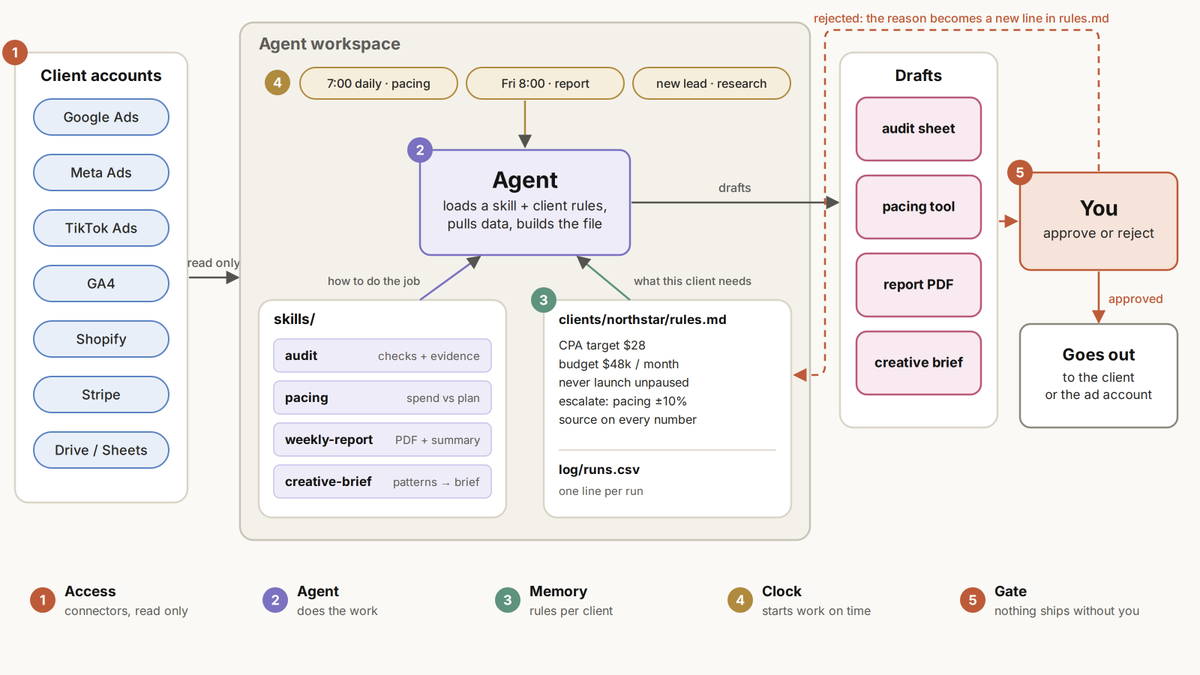
pic 2. How a task moves through the five layers, and where you approve it.
Start with one client and one workflow. Add the next one only when the first one starts working without your involvement.
3. One template for every workflow
Every task at the agency follows the same structure. Once you understand this, it will take just ten minutes to set up a new workflow.
-
Trigger: a schedule, a new lead, a message
-
Pull: fresh data from the connected accounts
-
Check: compare it against the client’s rules
-
Build: produce a file, not a chat reply
-
Approve: you say yes or no
-
Deliver: to the client or the ad account
-
Log: one line, so the next run knows what happened
Write it once as a skill, then copy it for every workflow in this guide:
---
name: [workflow-name]
description: [what it builds]. Use when [trigger].
---

1. Read clients/[client]/rules.md before anything else.
2. Pull [data] for [date range] from every connected account.
3. If a source fails, stop and say which one. Never fill gaps with guesses.
4. Check the numbers against the rules: targets, limits, escalations.
5. Build [deliverable]. Every number gets its source and date range.
6. Post the draft and a 4-line summary. Wait for approval.
   Never send, publish or change anything yourself.
7. Add one line to log/runs.csv: date, client, result, note.
Step 3 matters most. A workflow that quietly fills a missing number with a guess is worse than no workflow at all.
With Viktor, this template is simply a message that you send to him. He follows the same steps: he posts the draft in the thread and waits for your approval before anything is sent.
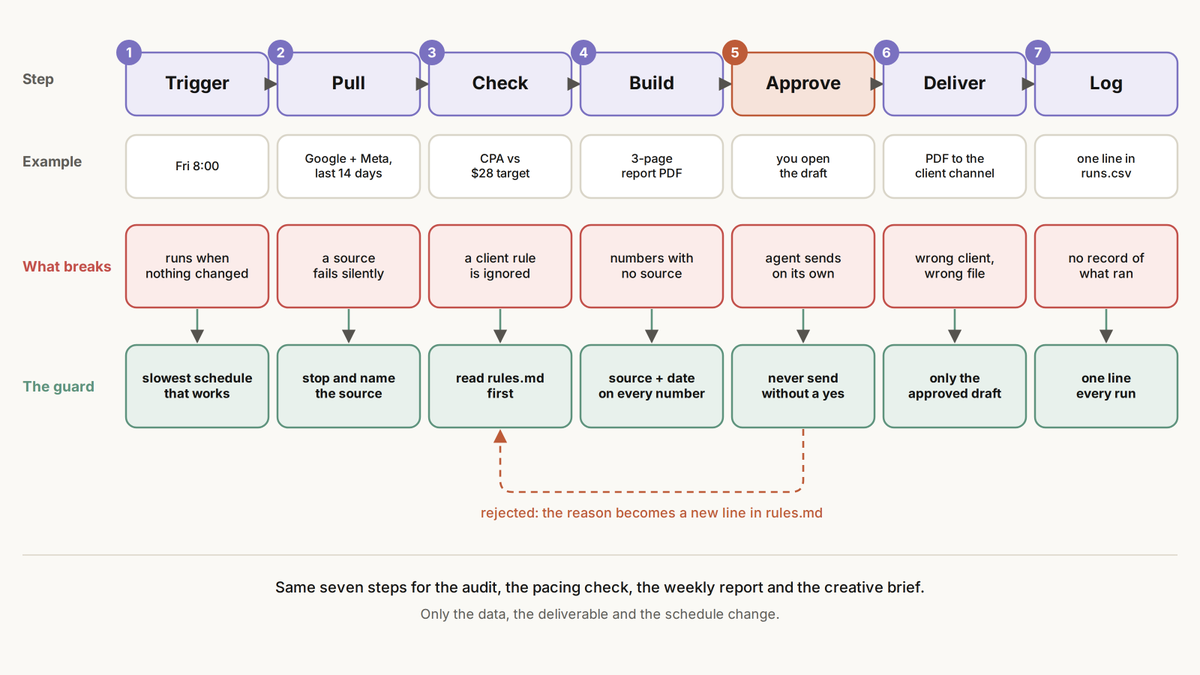
pic 3. The seven steps every agency workflow follows, and what can go wrong at each one.
4. Win: research before the pitch
Most presentations fail because of a lack of preparation. Prepare for every meeting with a potential client, it will only take a few minutes.
Trigger: a new lead Inputs: their website, their live ads, two or three competitors Output: a sourced brief plus a deck outline You decide: pitch or pass, and what to lead with
Public data covers most of it. Meta Ad Library and the Google Ads Transparency Center show every ad a company is running right now.
The prompt:
Research [company] before a pitch.

1. What they sell, to whom, at what price point.
2. Their live ads on Meta and Google: channels, angles, formats,
   how long the oldest ones have been running.
3. Two competitors: where they position differently.
4. Three gaps we could fix, each with the evidence and a link.
5. A 6-slide pitch outline built around those gaps.

Mark every claim as verified or a guess. No guesses in the outline.
The last line does the heavy lifting. A pitch built on a wrong guess about the client’s own business ends the meeting early.
Yourself: save it as *skills/prospect-research/SKILL.md *and run it when a lead comes in. With Viktor: drop the company name in your pipeline channel. He researches, posts the brief and the pitch outline in the thread, and you decide whether the lead is worth a call.
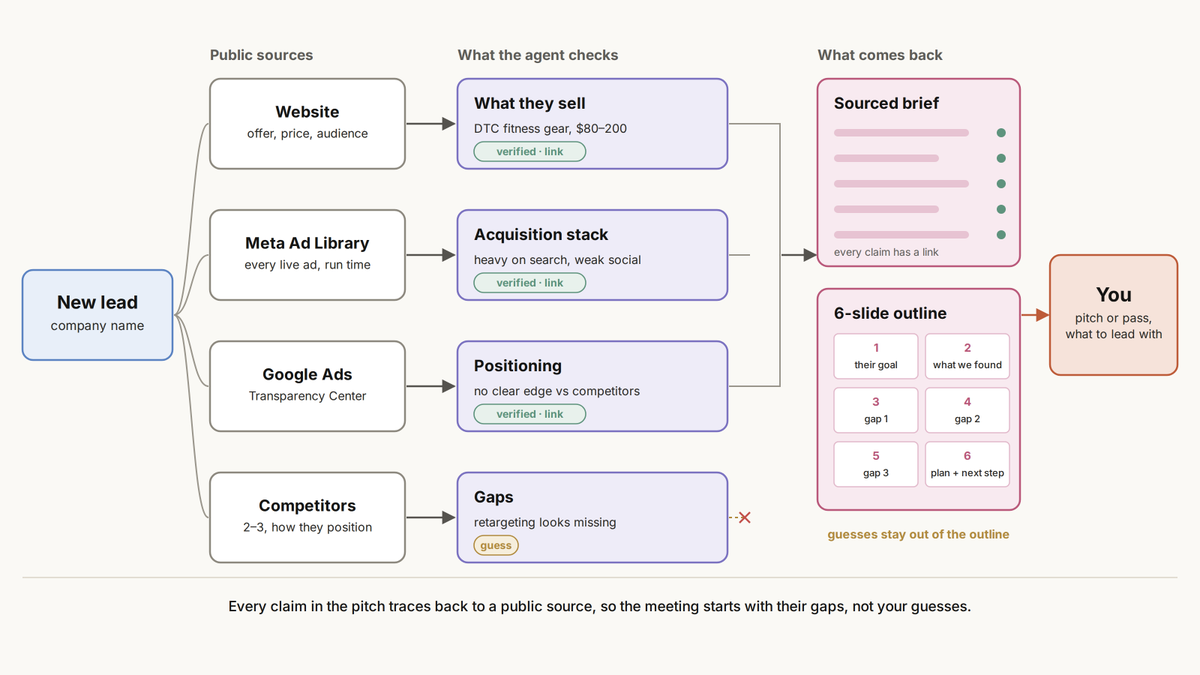
pic 4. From a company name to a pitch: what gets checked, what comes back, and where you decide.
5. Audit: find what is broken in an account
Do this when you sign a contract with a client, and then once a month. In addition, this is the strongest argument you can make during a presentation.
Trigger: a new client, then monthly Inputs: ad accounts, analytics, Shopify, search term reports Output: a spreadsheet showing a health assessment, status for each area, rationale, and one solution for each You decide: which fixes go into this week’s plan
Four checks cover most of the money:
-
Budget pacing: is spend on track for the month, per channel
-
Search waste: search terms that spend and never convert
-
Tracking gaps: conversions counted twice or not at all
-
Creative fatigue: top ads whose results are fading
The skill:
Audit [client] for [date range].

For each area (budget pacing, search waste, tracking, creative fatigue):
  status: Action (fix this week), Review (this month) or Okay
  score from 0 to 100, the main finding, the monthly $ impact
  the evidence: which report, which numbers
  one proposed fix

Add an overall health score and the total recoverable per month.
Deliver a spreadsheet: dashboard tab, evidence tab.
Propose fixes only. Change nothing in the accounts.
With Viktor, send this as one message in the client’s channel. He returns a spreadsheet with a dashboard tab and an evidence tab, and the formulas stay live, so changing one finding updates the whole dashboard.
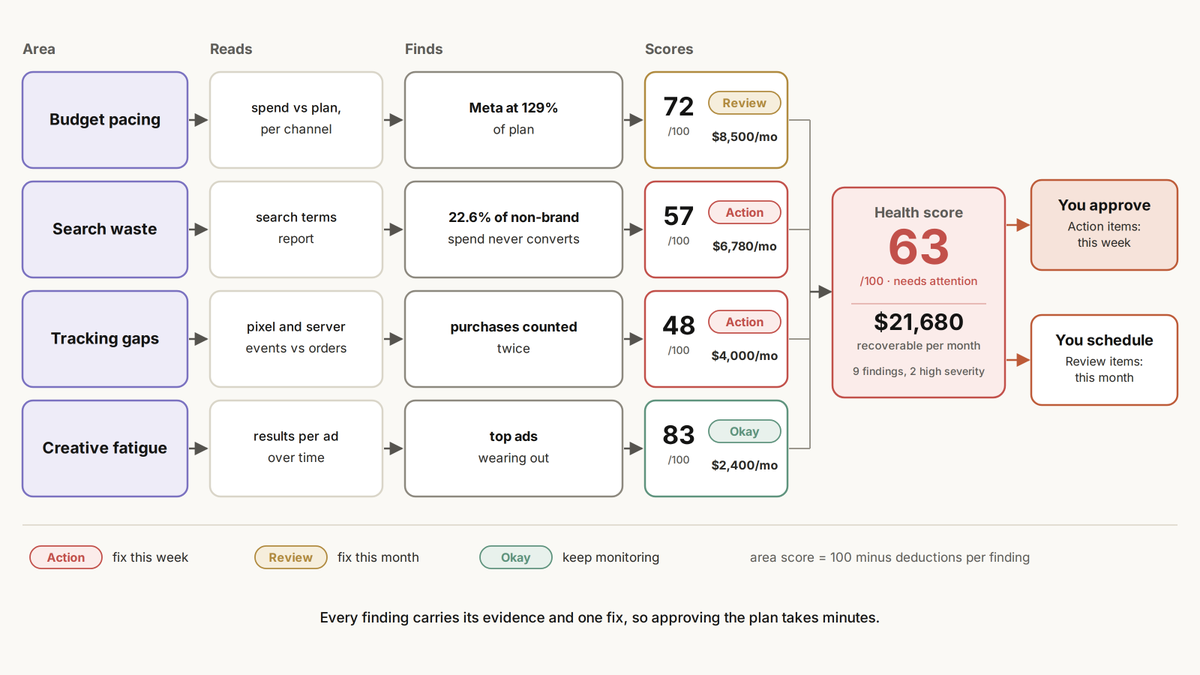
pic 5. The audit turns raw account data into a health score and a fix list.
6. Run: daily pacing and your own internal tool
Working on pacing is a never ending task. Every client, every channel, every morning.
Trigger: every day at 7:00 Inputs: spend per channel, monthly budgets, targets from rules.md Output: a pacing view and one proposed change for each client off pace You decide: approve or reject each change
The logic is simple:
-
Pace = spent so far ÷ what the plan says by today
-
Within ±10% is on track. Anything else is over or under
-
For every exception: one proposed change, with the reason and the numbers behind it
-
No exceptions means no message. You only hear about clients that need you
The skill:
Every day at 7:00, for every client in clients/:
  pull month-to-date spend per channel
  pace = spend ÷ (budget × day of month ÷ days in month)
  flag anything outside ±10%
  for each flag, propose one budget change: from, to, why, expected pace
Post only the flags. Change nothing until I approve.
The step up: build the tool once. Instead of a daily report, have the agent build a small internal app that your team will open every morning. It should include a list of clients, a progress indicator for each one, a chart of daily expenses, and suggestions for changes that can be implemented with a single click. Agencies put this off for years because no one has time to develop it.
Yourself: ask Claude Code to build it as a small web app that reads the same data and runs on your laptop or a cheap server.
With Viktor, it is one message. He builds it in Viktor Spaces: his space for live web apps. Every client on one screen, a forecast for the end of the month, a daily spend chart, and proposed changes with Approve and Reject buttons.
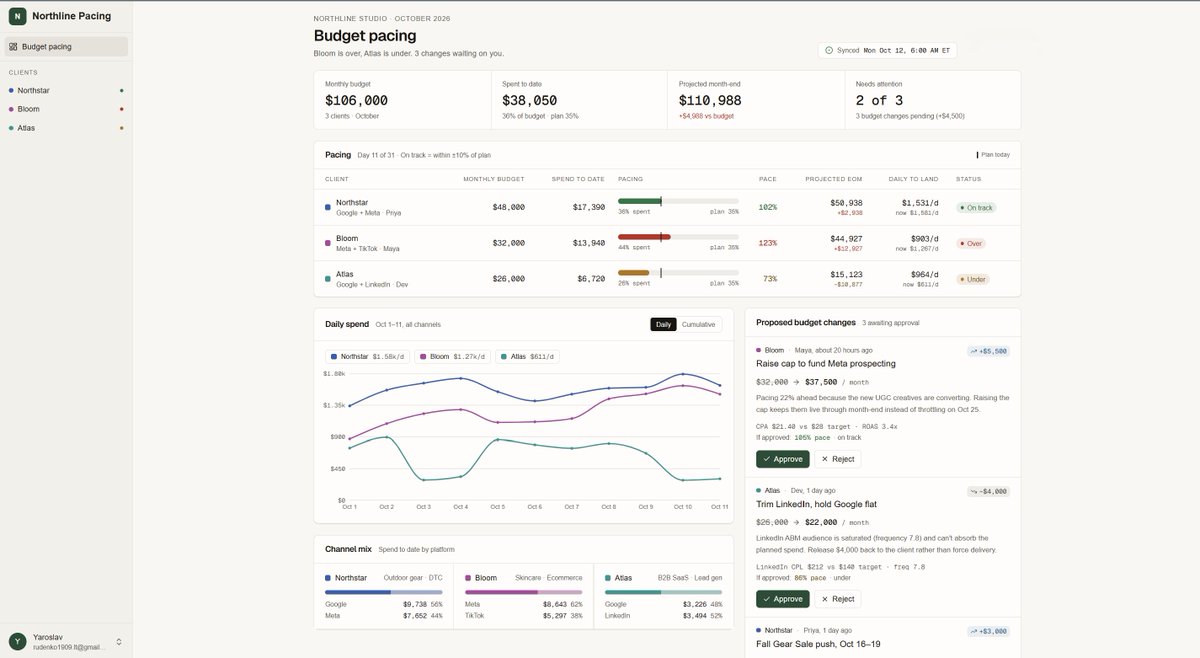
scr 1. The pacing tool Viktor built in Viktor Spaces: every client on one screen, changes waiting for approval.
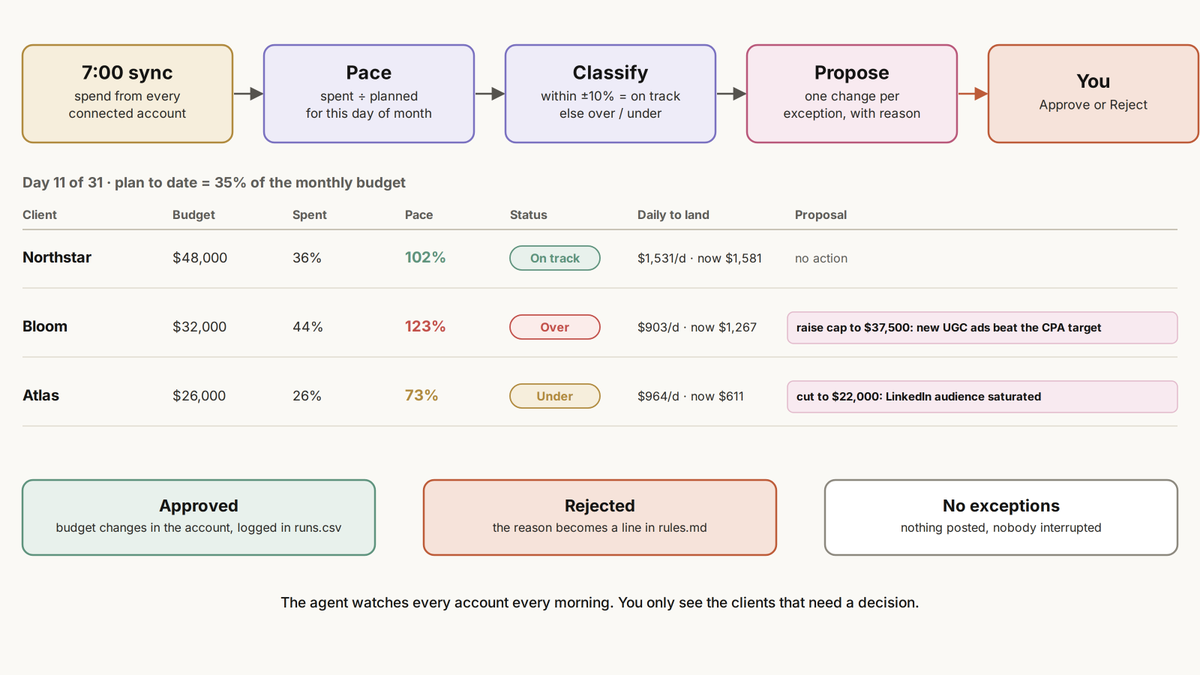
pic 6. The daily pacing loop on day 11: how pace is calculated, flagged and turned into a proposal.
7. Report: the weekly client report
A report is what the client actually sees of your work. This is what most agencies spend the entire days working on.
Trigger: every Friday at 8:00 Inputs: this week and last week from the ad platforms and the store Output: a 3-page PDF plus a 4-line summary in the client’s channel You decide: review it, then send
Every report answers three questions:
-
What happened: a headline in plain words and the KPIs against last week
-
Why: the daily trend and the ads behind it
-
What next: the actions, with anything that needs the client’s OK marked
One rule that saves arguments: platforms often report more conversions than the store records. Take revenue and orders from the store, and name the source of every other number.
The skill:
Every Friday at 8:00, build the weekly report for [client], [last Mon to Sun].

Page 1: one-sentence headline, spend, ROAS, CPA vs prior week.
Page 2: daily spend and ROAS charts, top 3 ads with results.
Page 3: what changed, why, next actions. Mark what needs client approval.

Revenue and orders from Shopify. Every other number names its source.
Deliver a branded PDF and a 4-line summary. Post as a draft for my review.
With Viktor, the same message gets you a three-page PDF and a 4-line summary posted in the client’s thread, with anything that needs client approval marked.
8. Grow: the creative loop
Clients stay when results keep improving. Results keep improving when every new ad builds on what already worked.
Trigger: once a month Inputs: every live ad and its results over the last 30 days Output: a creative brief built from the winning patterns You decide: which tests to run
The loop:
-
Results: pull every ad and how it performed
-
Patterns: what do the winners have in common? Format, hook, length, angle
-
Brief: turn the patterns into a hypothesis, hooks, shots and a format
-
Test: one variable at a time, against the current best ad
-
Rule: beats the control by 10% or more, scale it. Otherwise pause it and write down why
The skill:
Once a month, for [client]:
Pull every ad from the last 30 days with spend, ROAS and CPA.
Find what the top 20% have in common that the bottom 50% don't:
  format, hook, length, angle, creator style.
Write the next brief:
  hypothesis with an expected result, 3 hooks, required shots,
  format, and one test against the current best ad.
Post it as a draft. I pick which tests run.
With Viktor, run it in the client’s channel. He already knows the past briefs and test results from the thread, so each month starts from what the last one learned.
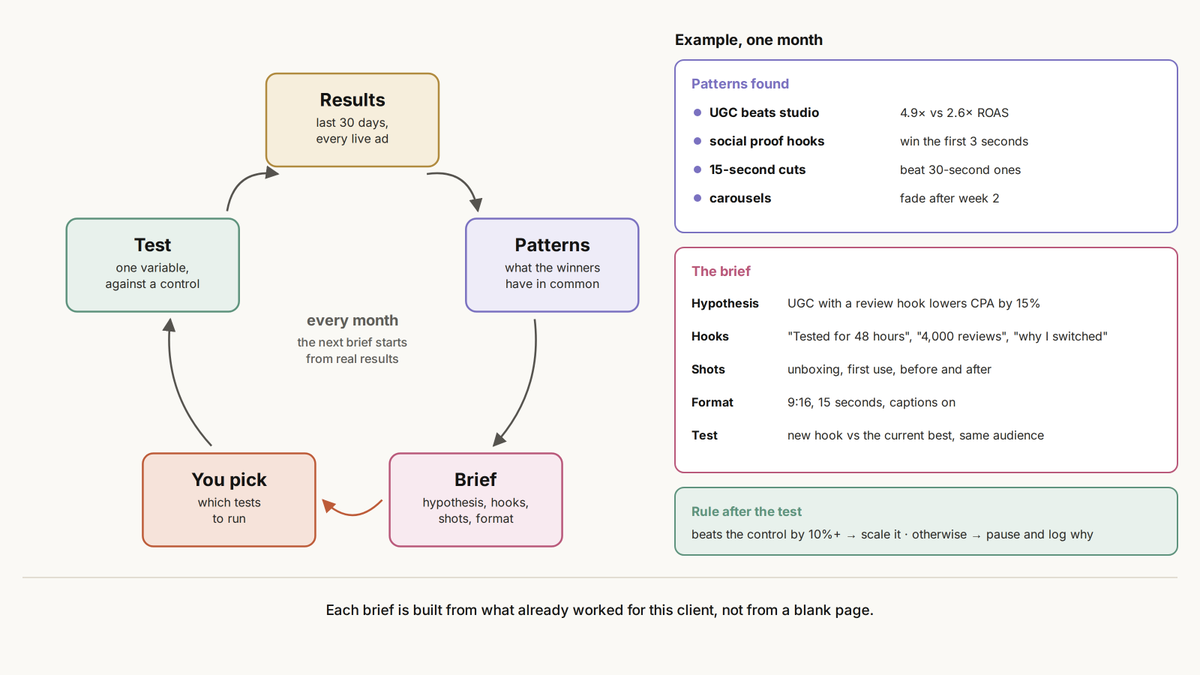
pic 7. The monthly creative loop, with an example of the patterns found and the brief they turn into.
9. A week in a one-person agency
Put all five workflows on a clock and the week takes a new shape.
-
Every morning: pacing for every client lands before you open the laptop
-
Every new lead: a research brief is ready before the first call
-
First Monday of the month: audits and creative briefs
-
Friday at 8:00: every weekly report is drafted and waiting for review
Your part shrinks to three things: approving changes, talking to clients, and deciding what to do next. The work still gets done. You just stop being the one who starts it.
10. What you never hand off
Two questions decide who owns a task: can it be undone, and does it need judgement?
-
Reversible routine work (pulling data, drafts, audits, research): the agent does it alone
-
Irreversible routine work (budget changes, sending reports): the agent proposes, you approve
-
Reversible judgement calls (pitch angle, which tests to run): the agent drafts options, you choose
-
Irreversible judgement calls (pricing, contracts, taking on or dropping a client): only you
Grow autonomy slowly:
-
Week 1: drafts only
-
Weeks 2 to 4: acts with your approval
-
Month 2 onward: small changes inside the limits in rules.md
Anything irreversible stays behind approval for good.
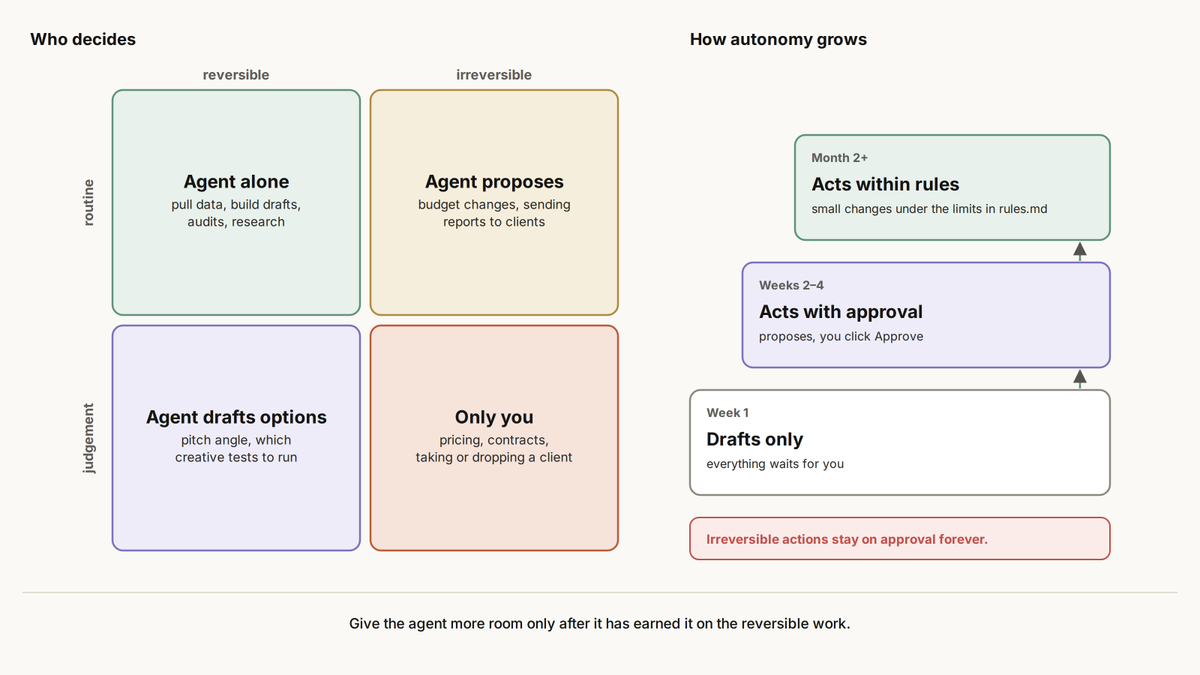
pic 8. Decision map.
Start with one client and the one workflow that eats the most of your week. Add the next only when the first one runs without you.
Nico Torres, Founder of Authority Makers, added $133,752 in new ARR in his first thirty days with Viktor. No new hires, no new service line.
Reports, audits or pacing: which one eats most of your week?
Thanks Viktor for sponsoring this article.
Try free at @viktor_com. $100 in credits, no card. Full link in my first reply.
Use code YARCHI100 when you sign up.
Paid Partnership