How to become a Marketing Engineer in 90 days (RESOURCES)

文章目录
部分视频或图片暂未收录,已在正文保留提示;需要时可查看原文。查看原文 ↗
If you already work in marketing or advertising, you know how much time goes into researching prospects, preparing campaign briefs, reviewing creative, and pulling reports. With AI, you can build agents and automations to handle a lot of that work.
I'll show you what to learn and build over the next 90 days to get ridiculously skilled at using AI agents in your marketing stack, with resources and projects for each step.
Even companies like Figma are hiring for a new role called a marketing engineer. They're looking for people who can build agents and integrations, organize the company knowledge those agents need, and help the marketing team use them.
The role brings marketing, design, taste, product thinking, and AI systems together. Knowing what makes a buyer care, spotting a weak creative, and understanding the product all become part of how you build the workflow.
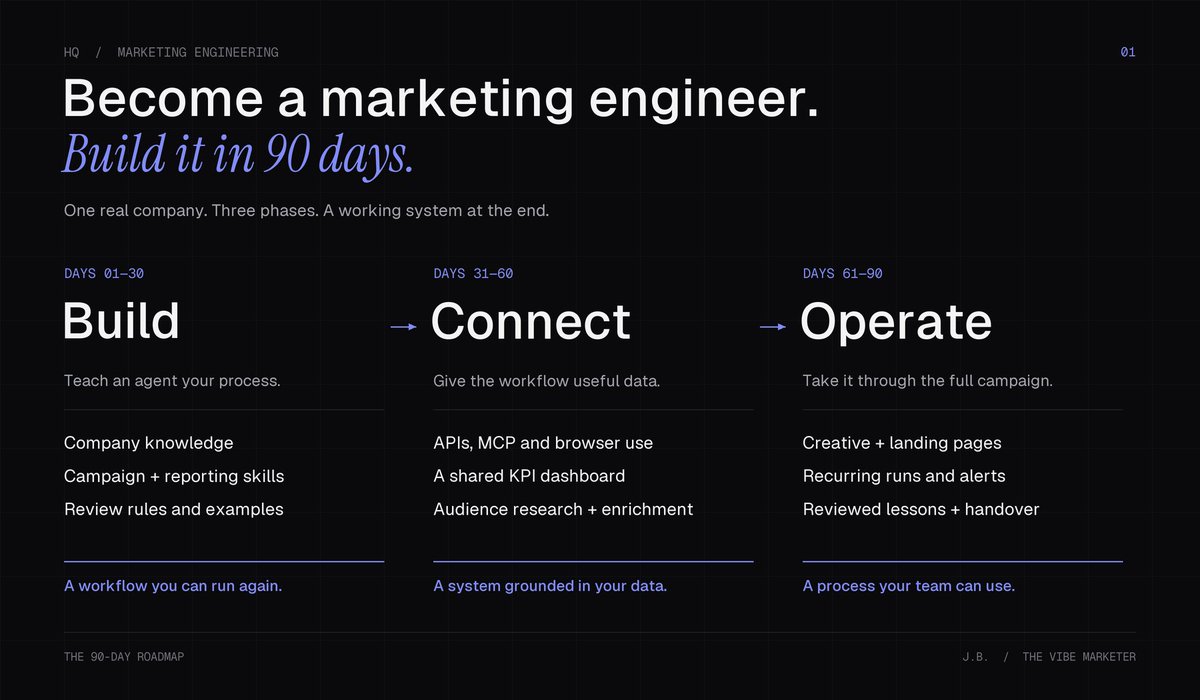
You're moving from execution to orchestration. You decide what needs to happen, give agents the context and tools to do it, and build a way to check whether the work helped the business. Your marketing experience gives you a head start because you already know where the process gets stuck.
By the end of this roadmap, you'll have a reusable campaign workflow, a reporting skill, and a connected KPI dashboard. You'll be able to take a brief through research, creative, and measurement, then use what you learn to improve the next campaign. You'll have a working demo and a process another marketer can run.
Here's what we'll cover:
-
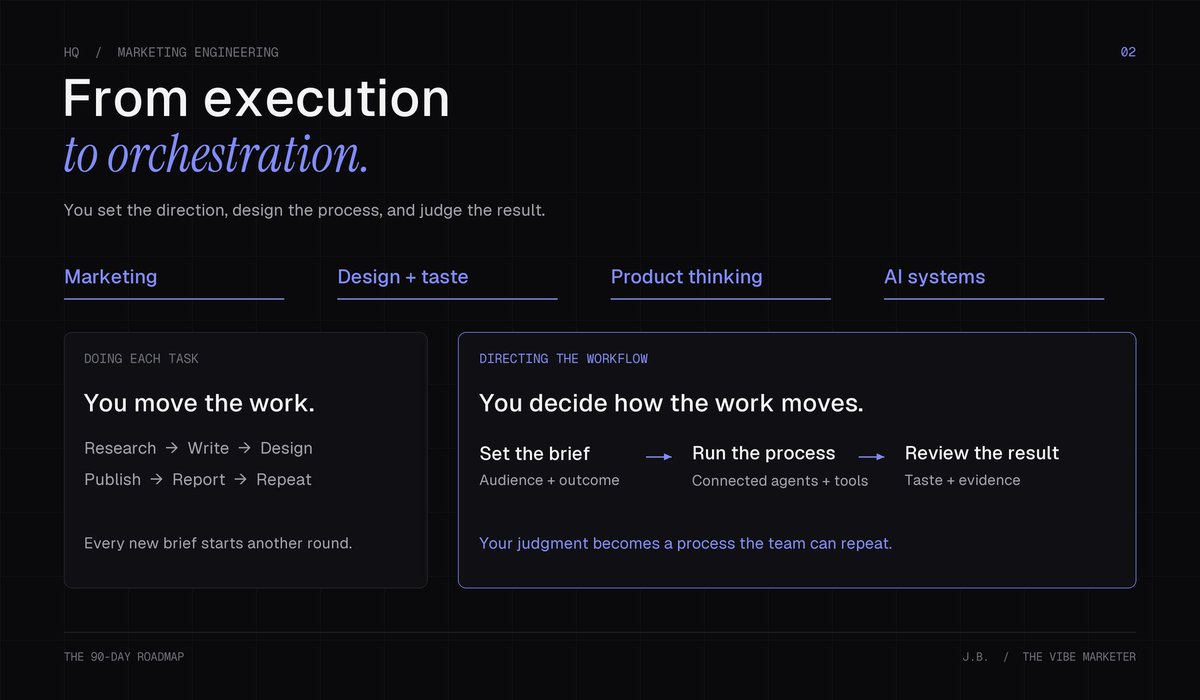
Month 1: build your first repeatable workflow in Claude Code or Codex, then give it company context, examples, and reusable skills.
-
Month 2: connect your tools through APIs, MCP servers, and browser use, build a KPI dashboard, and create audience workflows with Clay or Apollo.
-
Month 3: add creative production, landing pages, automations, and a recurring cycle of testing and improvement.
-
Bonus: SQL, Snowflake or BigQuery, and a little Python when you want more control over the data.
We'll use one company or product throughout, building a campaign workflow and the reporting around it. You can apply the same approach to prospect research, lifecycle campaigns, or another recurring process you know well.
Why become a marketing engineer?
Think about the work around next week's creative test. Someone gathers the customer research, turns it into a brief, checks the assets, pulls the numbers, and explains what happened. You might be that person for every step.
Now you can build a system that prepares the research, develops concepts, and updates the campaign report. You spend more of your time deciding which customer problem to focus on, whether the creative communicates it, and what the results justify doing next.
That requires product thinking. Treat the workflow as something your team will use: define its inputs, make the output useful, and watch where people struggle. If a report gives you ten charts but still leaves everyone asking what to do, improve the report.
Your taste matters throughout. You need to explain why an ad feels generic, why a page buries the offer, or why a recommendation ignores how your customers buy. Save those corrections so the next run has better direction.
What a marketing engineer actually does
A marketing engineer builds and operates systems around real marketing work. That could mean a reporting skill that prepares client updates, a dashboard showing spend and conversions, or a workflow that turns customer insights into creative briefs.
Start by sitting with the people doing the work. Watch how a media buyer checks pacing or how a designer interprets a brief. Build around those decisions, test it in their actual process, and keep improving it until they can use it without you walking them through every step.
The role overlaps with GTM engineering around data, enrichment, and revenue workflows. Here we'll also cover creative, landing pages, and campaign measurement. You should be able to explain what your system produced, who uses it, and which business outcome it supports.
A media buyer might specialize in creative testing; a lifecycle marketer in segments and triggered campaigns. Start with work you understand well enough to teach.
Month 1: Build a campaign workflow you can run again
Days 1–14: Build your first repeatable process with Claude Code or Codex
Your goal: give your agent a new campaign brief and have it work through a defined process using your company's material.
We'll use your next round of ad concepts and creative briefs. You can review the output before it reaches production, and you'll recognize where the agent needs better direction.
What to learn
Choose Claude Code or Codex for your first build. Use a project folder for one brand and add the product information, customer research, current offer, and a few approved ads or briefs. Then describe how you'd use that material to prepare a campaign yourself.
Suppose you market software that helps agencies manage client approvals. Your customer interviews mention feedback spread across email, missed comments, and uncertainty about which version has been approved. Your next brief is for agency owners who are still managing this manually.
The workflow should read those interviews, identify the relevant objections, and develop different ways to show the product solving the problem. One concept might demonstrate scattered feedback becoming a single review thread. Another might focus on the handoff between approval and publishing. Each needs a reason to exist and a brief a designer or editor can work from.
Give the agent a starting instruction like this:
Build a repeatable creative-planning workflow for this brand. Read the product notes, customer interviews, and approved examples before working on the new campaign brief. Identify the customer problems relevant to the brief, then propose three distinct ad concepts. For each, include the customer insight, supporting source, opening hook, visual idea, copy, and a production brief. Flag missing information and save the output in a new campaign folder. Keep everything in draft for my review.
Review its proposed steps first, then run the process and inspect the output.
Are the concepts meaningfully different? Does the visual demonstrate the product solving a recognizable problem? Would someone in production understand what to make? Use those questions to guide your feedback.
How to learn it
Work through one campaign, correct the output, and ask the agent to save the useful changes to the procedure. Then give it a fresh brief in a new session. That second run shows whether you've created a repeatable process or left essential instructions buried in the first conversation.
Learn file handling through the project: Markdown for instructions, CSV for campaign data, and folders for sources and outputs. Ask the agent to explain unfamiliar changes. Add basic Git to save and recover working versions.
Match the tool to the job. Chat is useful for thinking through an idea; a file-based assistant can help prepare a deliverable; Claude Code or Codex can build and maintain a connected workflow. Choose one for this project and learn it through the work.
Resources
-
Claude Code overview or Codex quickstart: choose the guide for your environment.
-
Git and GitHub learning resources: saving versions and recovering an earlier change.
What to focus on: teaching the process, reviewing marketing quality, and making the next run easier.
Practice task: run two campaign briefs through the same project. Save the sources, drafts, your edits, and the revised procedure. Compare the preparation and review time with your usual process.
Day 14 checkpoint: a fresh brief produces a campaign folder with concepts and production briefs you can review without explaining the whole process again.
Days 15–30: Give it company context and reusable skills
Your goal: make your marketing standards available every time the workflow runs.
Use the first two weeks' mistakes to identify missing context or instructions. Writing for the wrong buyer and making three versions of the same concept need different fixes.
What to learn
Build a small company knowledge library with current product facts, positioning, customer language, offer details, and brand voice. Include approved examples with a short explanation of why they work. Record where facts came from and when they were updated, especially for pricing and product capabilities.
Package the procedure as a reusable skill: instructions covering inputs, steps, outputs, and checks. Both Claude Code and Codex support skills; follow the setup conventions for your environment. Build skills for work you repeat often enough to benefit from a saved process.
Have the skill read a brief, consult company material, and develop concepts in a consistent review format. Project instructions tell the agent where current facts live and how to handle missing information. Use CLAUDE.md for Claude Code or AGENTS.md for Codex.
Be specific about your corrections. If you reject an ad for being generic, explain what would make it useful. For the agency software example, “save time on approvals” gives production very little to work with. Showing a client approving the wrong version, then demonstrating how the product makes the current version clear, gives the concept a situation and a visual.
Save the reasoning with the revised example so future runs can use it.
Build a reporting skill alongside it. Start with a campaign export and your usual reporting template. Define the date range, conversion event, targets, and comparison period. Have the skill calculate spend, conversions, cost per conversion, and budget pacing, then prepare a short update with the campaigns behind each observation.
Keep calculations in a script or spreadsheet you can inspect. Let the agent explain the results after the numbers are checked. A useful report should show what changed, where attention is needed, and what you'd investigate next.
How to learn it
Try the skill against several briefs that change the audience, objective, or offer. Keep a few strong outputs as reference examples and write down the problems you still have to correct. Update the relevant source or instruction, then rerun a brief to see whether the change helped.
Resources
-
Claude Code skills or Codex skills: instructions, examples, and supporting files for your chosen environment.
-
Your company's approved campaigns, customer research, and brand guidelines.
What to focus on: preserving useful judgment and making the workflow work across different briefs.
Practice task: test the campaign skill on three briefs and the reporting skill on two date ranges. Give a colleague a short guide and have them run both. Check the report against the export before using it to inform a brief.
Day 30 milestone: you have campaign and reporting skills, a company knowledge library, and a workflow another marketer can operate.
Month 2: Connect the information your workflow needs
Days 31–44: Connect your tools and build a live KPI dashboard
Your goal: connect one data source and use it to power a reporting dashboard.
Use the reporting skill from Month 1 as your starting point. The next step is getting fresh numbers into it without exporting a new spreadsheet every time.
What to learn
An API lets software request data or perform an action in another service. For this workflow, you might pull recent customer feedback or retrieve campaign results for a defined date range. Learn which operation you're requesting, what fields come back, and how to tell whether you've received all the records.
To connect a service that uses an API key, create one in an account you're authorized to use. Give it the permissions the workflow needs and store it in the tool's credential settings or environment. Keep it out of shared instructions and source files. Check usage charges and rate limits before turning a small pull into a recurring job.
MCP servers give agents a standard way to access tools and context. If your service has an appropriate server, connect it to your agent environment and inspect the actions it exposes. You might be able to search records, read documents, or create a draft, depending on that connection.
Have the agent retrieve the information, save a dated snapshot, and show which records informed the report. Verify dates and calculations before using metrics to recommend a test.
Build the dashboard around a decision you make every week. For a media buyer, that could be whether spend is on pace and which campaigns need investigation. Show month-to-date spend, budget remaining, conversions, and cost per conversion, with a campaign breakdown and date filter.
Give your agent a build brief:
Build a campaign dashboard using our reporting calculations and connected data source. Show spend against the monthly budget, conversions, and cost per conversion by campaign. Include a date filter, the conversion definition, and the last successful refresh time. Use the same data and calculations for the dashboard and weekly report. Flag missing or stale data. Start with read-only access.
For a live KPI view, set a refresh schedule the source can support. Show when the data was last updated: ad platforms can delay or revise conversions, so a dashboard that refreshes every hour still needs to make those limits visible.
Check a campaign and date range against the source platform. If the numbers disagree, investigate time zones, attribution settings, filters, and conversion definitions. Then use the browser to check whether someone can open the dashboard and understand it on their phone.
Browser use adds another way to work. With an appropriate browser tool or integration, your agent can inspect a product page or check a campaign destination. Codex's browser tools are one option. Check the browser access available in your setup, give it a specific task, and verify the result, including which account or session it used.
Ask it to compare your proposed ad claims with the current product page. Review mismatches before updating the company context.
How to learn it
Connect one source, reconcile a small result, and use it in both the dashboard and report. Try an empty result or failed refresh. The dashboard should show the problem rather than quietly displaying old numbers as current.
Resources
-
MCP introduction: how tools and context are exposed to agents.
-
Claude Code MCP guide or Codex MCP guide: connecting and using servers.
-
Your chosen service's API and authentication documentation. Apollo's developer docs and API-key guide are concrete examples.
-
Your ad platform's reporting guide, such as Google Ads reporting: metric definitions, attribution, and data freshness.
-
Codex browser guide or the guide for your chosen browser integration: sessions, access, and browser tasks.
What to focus on: fresh inputs, visible sources, and knowing whether the connection worked.
Practice task: build the dashboard for one account, connect it to your reporting skill, and have a colleague use it to answer a pacing question. Use the findings as an input to the next campaign brief.
Day 44 checkpoint: your dashboard and report use the same checked data, show refresh status, and help the team decide what to investigate next.
Days 45–60: Clay, Apollo, and audience workflows
Your goal: make the audience a useful input to the campaign process.
A campaign for an agency owner managing five clients needs different examples from one for an operations lead coordinating 50. Audience work should help you decide whom to reach, what to say, and which offer fits.
What to learn
For paid media, start with first-party customer or CRM data you can use for the intended destination. Build a segment around a meaningful condition, such as customers who bought one product but haven't bought the complementary one. Have the workflow explain who qualifies and keep existing buyers out of an acquisition segment where appropriate.
Clay can help organize the records, enrich useful fields, and maintain targeting or exclusion audiences through Clay Ads. Learn how records are matched and updated, then check the destination's audience requirements and readiness. You'll still create and manage the campaign in the ad platform.
For B2B work, Apollo gives you another route into account and contact research. Search for accounts that fit your criteria, then enrich the records where more information changes the decision. Apollo's people search and contact enrichment are separate operations; a search result alone doesn't provide email addresses and phone numbers.
Use Clay to organize that research and keep the evidence beside the classification. An agency's service pages or open roles might suggest a relevant campaign angle. Have the agent explain that connection in the brief so you can judge whether the angle fits. Keep purchased prospect data separate from an ads audience unless the destination permits that use.
Feed the segment or research table into your existing skill and check how it changes the campaign.
Work through the data in order: clean the records, define who qualifies, then decide what action follows. For the agency software example, match accounts by company domain, add evidence about their approval process, and classify fit before preparing a campaign brief. Keep a reason beside each decision so you can review it.
How to learn it
Start with a small table you can inspect yourself. Check duplicates, company matches, missing fields, and the reason each record qualifies. Spend enrichment credits on fields you will actually use in a decision.
Resources
-
Clay University and the Clay–Apollo integration guide: tables, enrichment, and connected research.
-
Apollo’s people search, people enrichment, and API-key guide.
-
Clay Ads guide: audience synchronization and destination requirements.
-
Clay’s GTM engineering guide: connecting data, qualification, and activation.
What to focus on: a defensible segment and a clear connection between the audience and campaign.
Practice task: prepare a first-party segment for your campaign, or research 50 relevant B2B accounts. Use the result to generate a new brief and review how the concepts change. A small practice segment may need more eligible records before it can run as a live ad audience.
Day 60 milestone: your workflow connects checked performance data, audience research, and campaign planning, with rules you can explain and refresh.
Month 3: Take the workflow through production and back again
Days 61–74: Generative creative, landing pages, and experiments
Your goal: turn the reviewed concepts into a campaign package you could put into production.
Extend the process through production and the landing page, keeping the customer insight and offer consistent.
What to learn
Choose Higgsfield or Runway for your first creative project. Learn how to direct a shot with references, composition, movement, and a clear idea of what the viewer needs to see. Use your agent to turn an approved concept into scripts, shot lists, and prompts, then review the generated material against the brief.
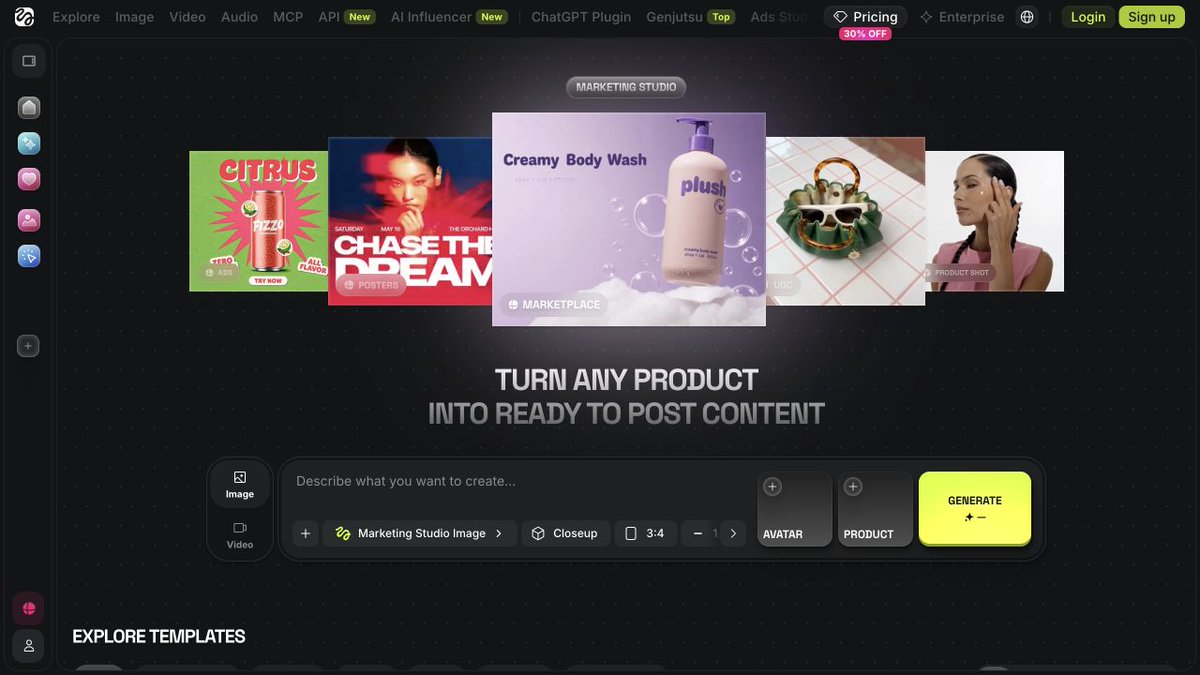
Higgsfield Marketing Studio: product creative, templates, and a generation workspace.
For the agency software campaign, a generic office clip won't demonstrate the approval problem. You may need actual product screenshots, a screen recording, and generated footage for the surrounding story. Your job is to decide which material communicates the idea and how it fits into the edit.
Save the approved concept, prompts, selected assets, and copy in the campaign folder. Check the integration options for the exact generation feature. Where website use is required, have the workflow prepare the inputs and organize the resulting assets.
A Higgsfield template-editing view, with a visual reference and fields for your product and edit instructions.
Then use Claude Code or Codex to build a landing-page prototype for the same offer. Have it work from your approved copy and design references. Use the browser to review the mobile layout, message consistency, CTA, form, and tracking. Follow a test submission to its destination so you know the conversion path works.
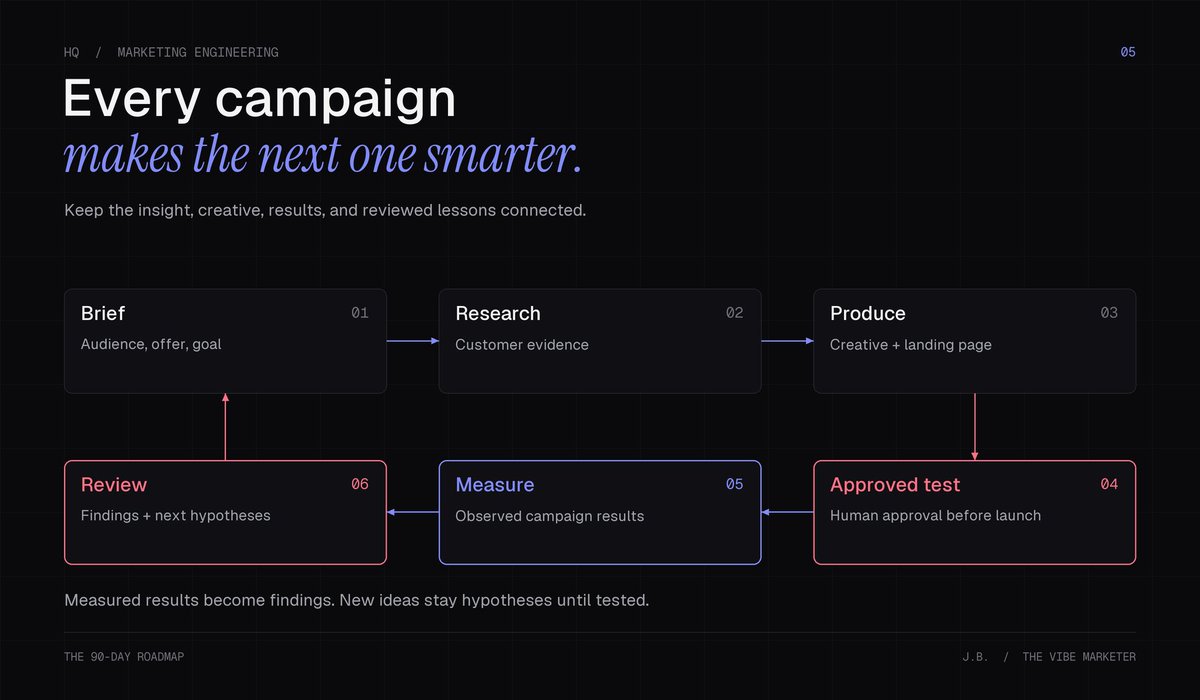
Before testing, write down the hypothesis for each concept and the metric you'll use to assess it. If you're testing the customer problem shown in the ad, keep the audience and offer stable enough to learn from the difference.
How to learn it
Include review and editing time when comparing the workflow with your usual production process.
Start keeping a weekly campaign-run record from day 61. Repeat on days 68, 75, and 82, with a new brief or an iteration each time. Save what went in, what came out, what you changed, and what you learned. Use live campaign results when available; otherwise, record production and review findings.
Resources
-
Higgsfield Marketing Studio, its video-ad guide, and Higgsfield Academy.
-
Runway Academy’s AI for Advertising course and text-to-video prompting guide.
-
Your approved product assets, design references, and campaign measurement setup.
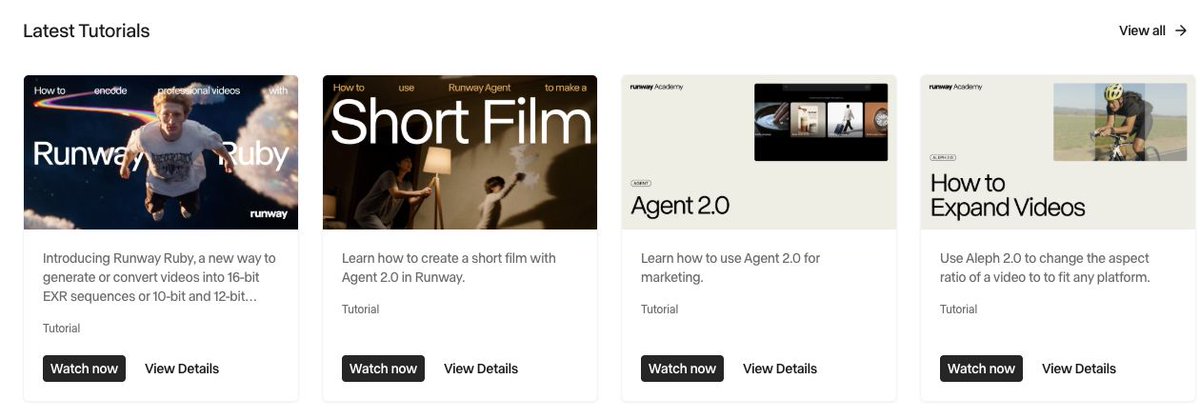
Runway Academy* has visual walkthroughs for creative production, agent workflows, and editing.*
What to focus on: an idea that survives production, a working conversion path, and a test that teaches you something.
Practice task: produce three approved concepts with two variants each, a landing-page prototype, and an experiment plan. Run the test if you have a live campaign and an approved budget. Otherwise, present it as a campaign ready for review and testing.
Day 74 checkpoint: you can demonstrate the campaign package and explain what each concept is intended to test.
Days 75–90: Recurring work, Hermes, and a system you can hand over
Your goal: run the process regularly and make it usable by someone else.
Review the weekly runs. Identify manual inputs, repeated corrections, and steps reliable enough to schedule. Use those findings to decide what to build next.
What to learn
Add recurring runs where they help: refresh the dashboard, prepare the weekly report, and gather the next brief's inputs. Learn which files, tools, and accounts a scheduled run can access. Record each run so you can see what completed and where it stopped.
Use alerts for changes that deserve attention, such as spend moving outside the pacing range you've set. Have the agent bring you the relevant numbers and a suggested investigation. Keep campaign edits and budget changes subject to your approval while you learn how reliably it handles the work.
Learn enough about Hermes to judge whether you need it. Its memory, skills, scheduling, and messaging integrations can fit a workflow you host and maintain, with updates delivered into a team channel.
Use Hermes for a weekly competitor update if its hosting and delivery fit your needs. Maintain its access and runtime. Check your existing setup's scheduling options before adding another environment just to run a job on a timer.
Zapier is useful for straightforward handoffs, such as recording a new brief from a form or notifying someone that a package is ready. Keep the steps clear enough that you can explain what triggers the next action.
Before handing the workflow over, try a missing brief, an unavailable source, and an outdated product claim. Check whether it identifies the issue and leaves you enough information to fix it. Restart a failed run and confirm it doesn't duplicate the work.
Your reporting skill now closes the campaign loop. After a test, have it compare results with the original hypothesis and prepare a review. Add your interpretation to the campaign record, update useful instructions, and have the next brief consult those lessons. Keep measured findings separate from explanations you still need to test.
How to learn it
Have another marketer run a new brief, review the output, and update an instruction using your guide. Fix the gaps where they need your help.
Resources
-
Claude Code scheduling or OpenAI’s scheduled-task guide: recurring runs and execution requirements.
-
Hermes documentation and scheduled-task guide: skills, memory, scheduling, and messaging integrations.
-
Zapier’s quick-start guide: triggers and actions.
What to focus on: reliable runs, useful feedback, and a handover the team can follow.
Practice task: turn the four campaign runs into a case study. Show the original process, the system you built, the changes you made, and the time spent producing and reviewing the work. Include measured campaign performance where you have it, and label prepared tests clearly.
Record a short demo that follows one brief through the system. Include the source material, audience input, creative package, dashboard, report, and feedback saved for the next run.
Day 90 milestone: you have a campaign workflow, reporting skill, connected KPI dashboard, four recorded runs, and a case study with a guide another marketer has used.
Bonus: SQL, Snowflake or BigQuery, and a little Python
Bring existing data skills into the roadmap earlier. SQL helps connect campaign spend with leads, purchases, and customer behavior in a warehouse.
Choose Snowflake or BigQuery based on what your company uses. Learn filtering, grouping, joins, and dates through a question you need answered. Check that joins haven't duplicated records and inflated the numbers before those results enter your campaign workflow.
Use Python to clean exports and make API requests. Build with the agent while learning to inspect the logic and handle failures.
Resources: BigQuery’s sandbox guide, Snowflake’s getting-started documentation, and Harvard’s CS50P for Python fundamentals.
Practice task: connect a campaign's spend to lead or purchase data, check the totals, and use the result to inform the next brief.
What you can do after 90 days
You'll have a campaign process with company knowledge, connected data, creative production, and reporting behind it, plus four runs showing how you improved it.
Bring the demo to your team or a client. Show how the system helps them prepare a campaign, see the results, and make the next decision. Explain what improved in speed, quality, or performance, and what you still have to fix.
That's execution to orchestration in practice. You're shaping how the work happens, applying your marketing and design judgment throughout, and taking responsibility for whether the system is useful.
For the first day, choose the campaign you're already preparing. Open a project in Claude Code or Codex, add the sources you'd use yourself, and write down how you turn those sources into a brief. Use that process as the starting point for the next 90 days.
Thanks for reading. Follow @VibeMarketer_ for more breakdowns