System Design Essentials - 2
文章目录
Knowing the components of a system is not the same as knowing how to put them together.
Part 1 covered the essentials. Part 2 is about the decisions that follow: which architectural style to pick, where to optimize, and what those choices cost you later.
This is the second article in a 3-part series on system design. Part 1 is below:
21. Event-Driven Architecture
Event-driven Architecture
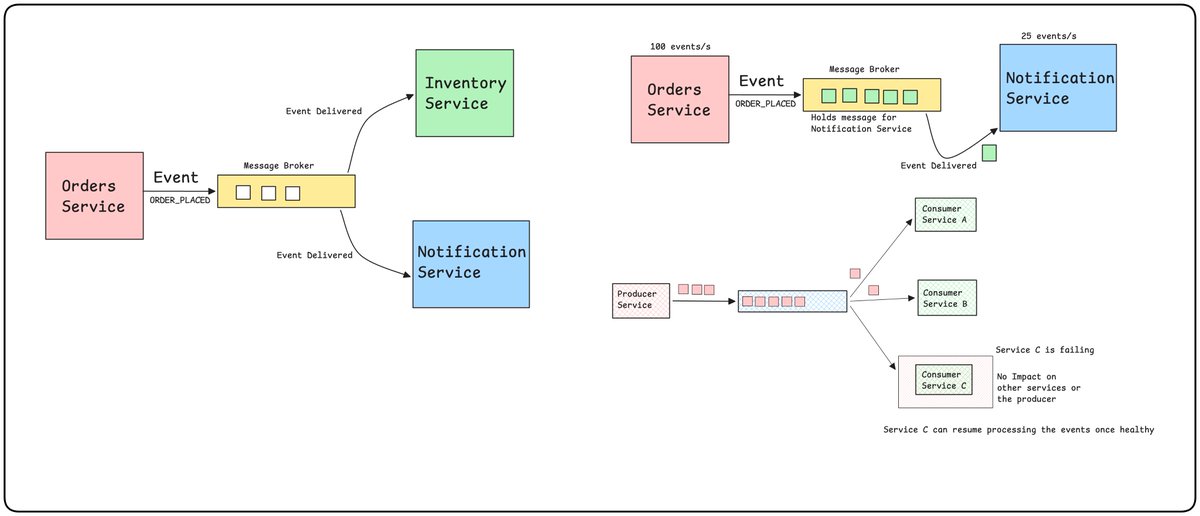
Event-Driven Architecture (EDA) is a design pattern in which services and applications communicate asynchronously through events. In synchronous communication, the calling service waits for a response from another service before moving forward. This creates tight dependencies between services. If one service starts responding slowly or goes down, the entire flow goes down.
In Event-Driven Architecture, instead of services calling each other directly, a Service triggers an event and doesn’t wait for any other service to respond. Other services listen to this event and take necessary actions based on it.
Service A -> Raise an event -> send response back to the user request
Service B -> listen to the event and react
Building Blocks in Event-Driven Architecture
Event: A message about something happened(ORDER_PLACED, USER_CREATED, ORDER_DELIVERED)
Producer: The service that emits the events
Consumer: A service that listens to events
Event Broker/ Message Queue: A service to hold the messages. Receives the message and delivers it to the consumer
Advantages
-
Loose Coupling between services
-
Consumers can scale independently
-
Asynchronous Processing
-
Easy to add a new Consumer
22. Serverless Architecture
Serverless Architecture
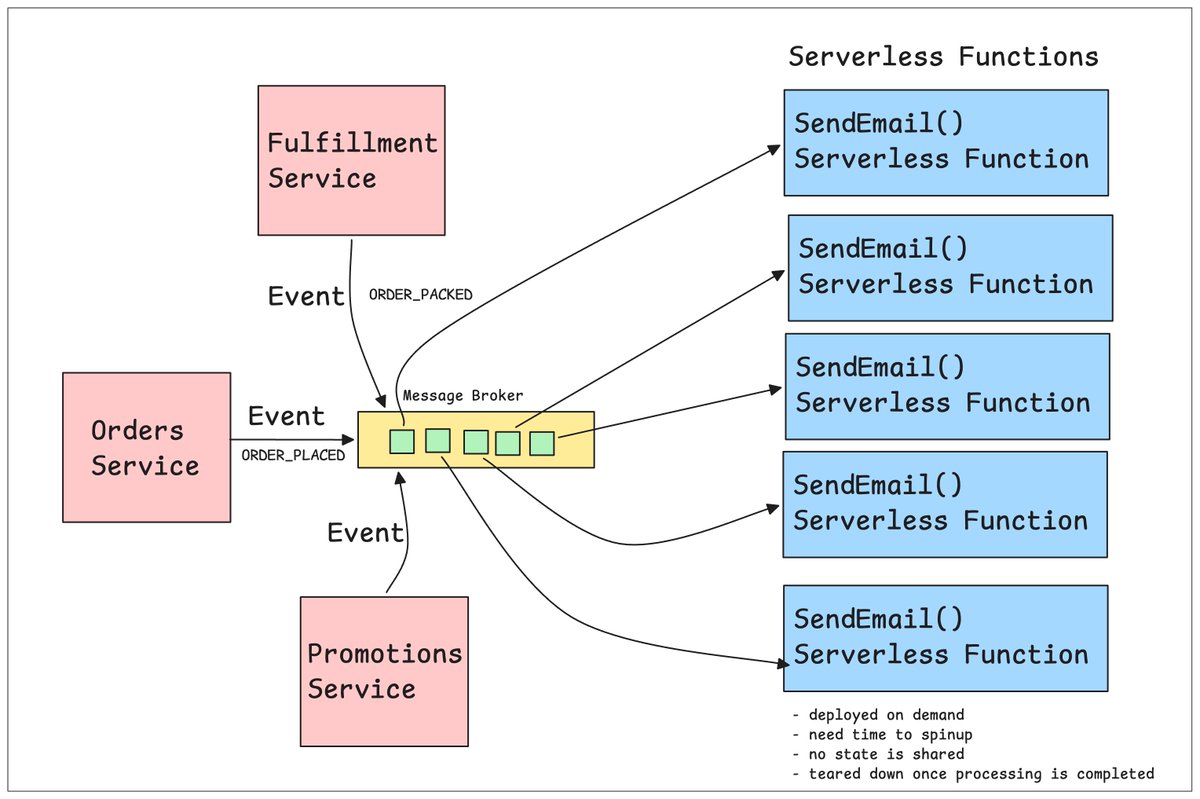
Monolith and microservices both run on servers you manage. Serverless does not. The name is misleading. Servers still exist. You just don’t provision, scale, patch, or shut them down. The provider does that.
You write a function and deploy it. The platform runs it when a request comes in and stops it when the work is done. Serverless is an on-demand server, not the absence of one.
Event-driven: Functions are triggered when a request arrives (Events are triggered).
Auto Scaling: If 1000 requests are received, as many functions will be spawned.
Cold Start: Since a new environment needs to be set up for processing any request, there is a delay in processing, which is called a cold start.
Stateless: Each function is independent and shares no state with any other function.
Pay-per-use Billing: Billed based on your usage.
When Serverless makes sense:
-
Event-driven tasks
-
Infrequent or unpredictable traffic
-
Rapid Development
23. Content Delivery Network - CDN
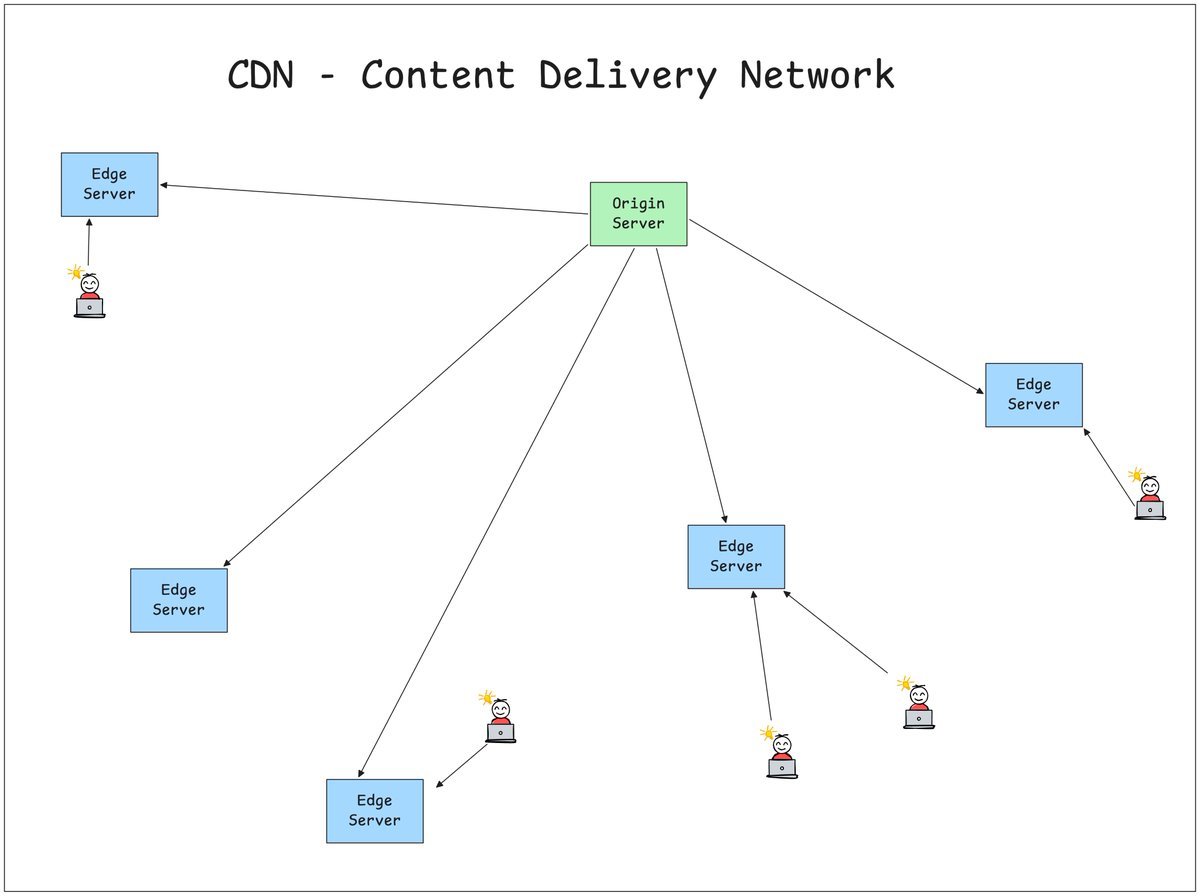
Content Delivery Network
CDN, which stands for Content Delivery Network, is a network of geographically distributed servers that cache and deliver your content from a location physically closer to the user instead of the request travelling back to the origin server.
How does it work?
-
The origin server is the actual server where all the real content lives.
-
Content gets cached on Edge Servers all across the world.
-
Static content like CSS, JS, HTML, and images gets cached on these edge servers and served through them.
-
Every user request is routed to the nearest Edge server.
In case of a cache hit -> return immediately
In case of a cache miss -> get from the origin server, create a copy on the edge server, and return the response
CDNs are best suited for static or infrequently changing content, not real-time, highly dynamic data like a live bank balance.
24. Message Queues
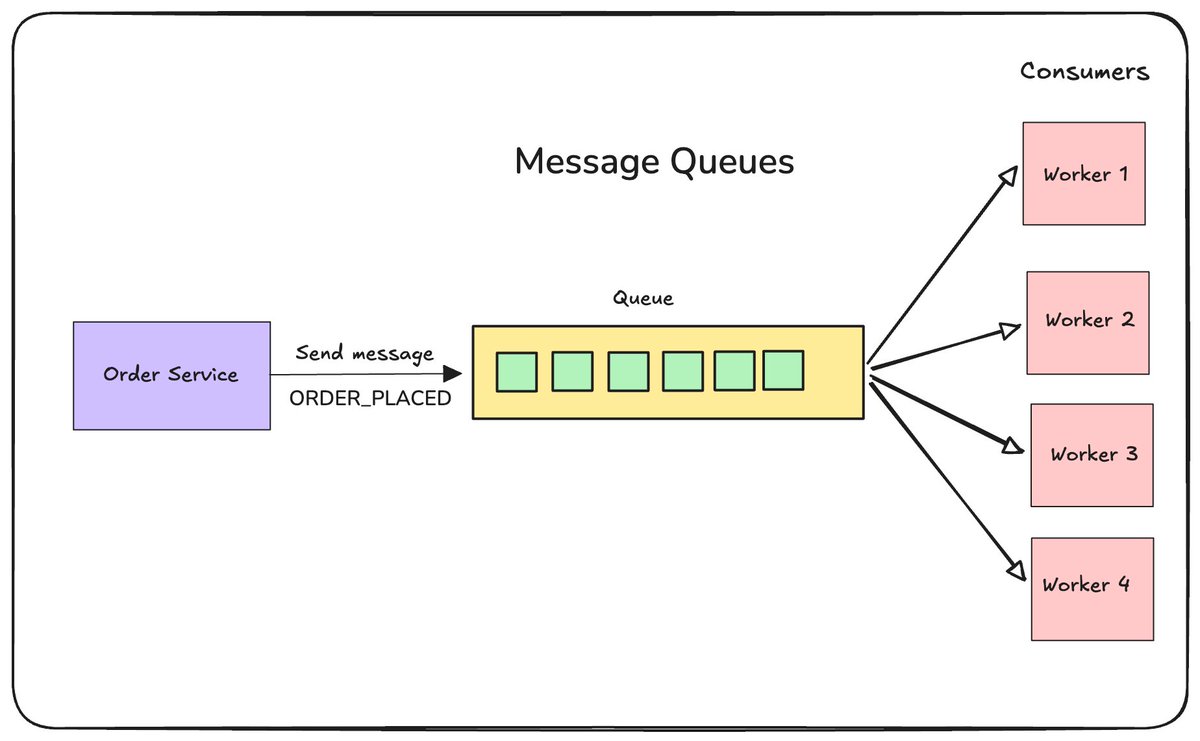
Message Queues
A Message Queue is a buffer between a producer and a consumer that holds messages until they're processed, so the producer doesn't have to wait for the consumer to be ready.
Producer -> pushes message -> Queue -> Consumer picks it up whenever ready
Why can't we call the consumer directly?
In a direct Producer -> Consumer call, the Consumer must be up, fast, and available at all times. If the Consumer is down or recovering, the call will fail, and hence the request fails.
A queue sits in between the Producer and Consumer:
Producer -> Queue -> Consumer
Producer doesn't care if the Consumer is slow or down. It pushes the message to the queue, and its job is done. The consumer can, at its level, access the message and perform its action. If the consumer crashes, messages just wait in the queue and nothing is lost.
Real-world example:
Order Service -> pushes "SendInvoice" to Queue
Order Service -> responds to client immediately
Invoice Worker -> pulls message from Queue -> generates invoice
Producer moves on instantly. Consumer processes at its own pace.
Key properties
Decoupling: Producer and consumer don't need to know about each other
Buffering: Absorbs traffic spikes; consumer processes at its own speed
Reliability: Messages persist in the queue until successfully processed
Async by nature: Producer never waits for a response.
A Message Queue is an important component of Event-Driven Architecture.
25. Pub-Sub or Publish-Subscribe
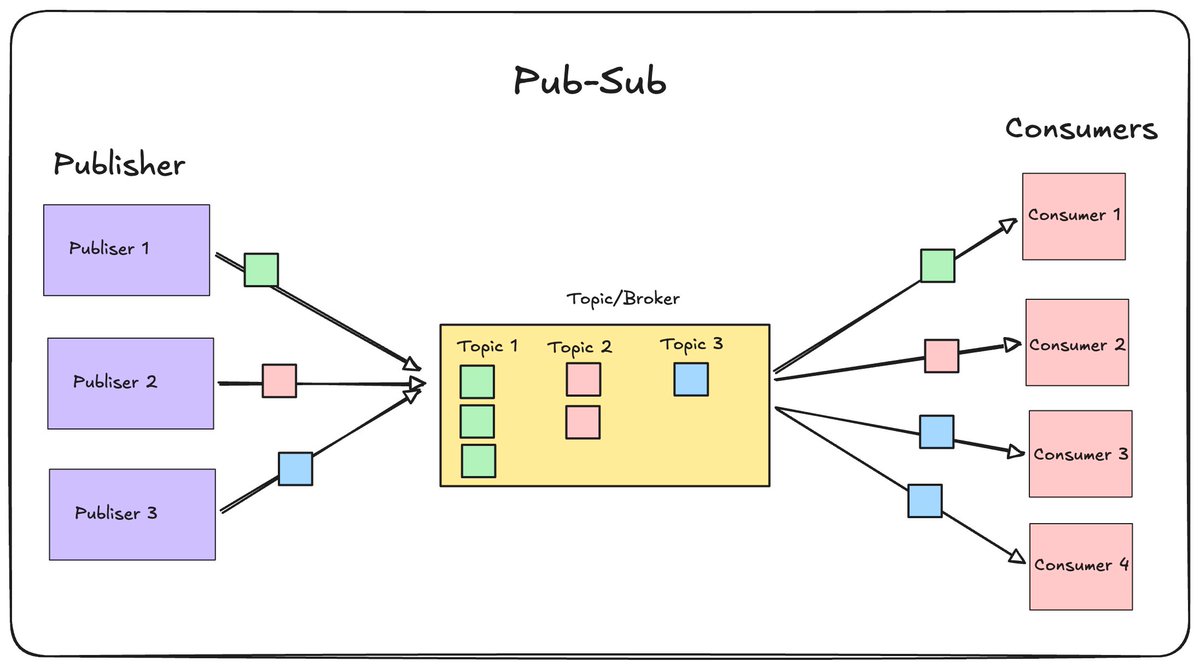
Pub-Sub
A message queue has one producer and one consumer processing each message. Pub/Sub solves a different problem: what if multiple services need to react to the same event?
A publisher sends a message to a topic, and every subscriber listening to that topic gets a copy; unlike a queue where each message goes to one consumer, pub/sub fans out each message to all subscribers.
The publisher doesn't know or care who's subscribed. It just publishes.
Queue vs Pub/Sub:
Queue: one message, consumed by ONE consumer
Pub/Sub: one message, delivered to EVERY subscriber
26. Background Processing Job
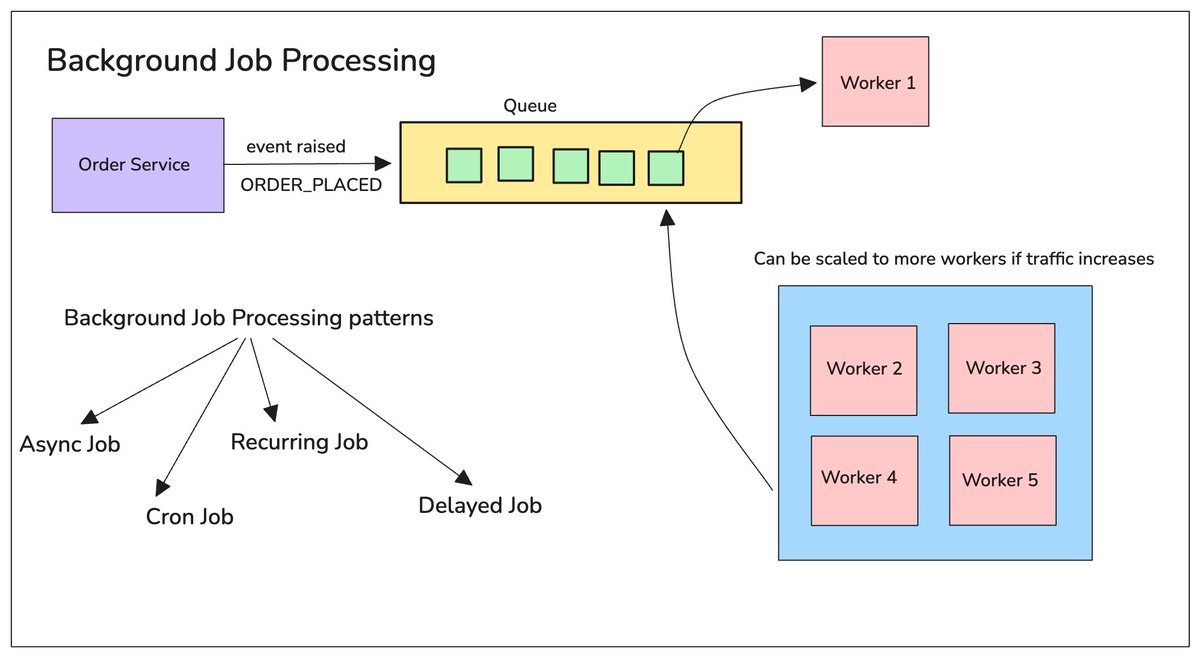
Background Job Processing
Imagine a user places an order for a product. You are designing a feature where once the order is placed, the system should
-
Send the user a confirmation
-
Generate the order invoice PDF and send it by mail
-
Send an SMS to their number with the order number and estimated date of delivery
-
Sync the data with analytics
If we do all these tasks inside the same API call, i.e., the Create Order API, the user will have to wait for a longer time to receive the response from the service. In peak traffic times, the system might even take longer, or the request can even fail.
This is exactly the problem Background Job Processing solves.
Instead of doing everything in a synchronous manner, the idea is to move the non-critical jobs to the background to process later and finish the main request first. The main request is handled first, with all the critical operations performed, and the response is sent back. The non-critical operations are performed later.
Core Building Blocks:
Job/Task: a unit of work that needs to run (e.g., “send this email,” “generate this report”)
Job Queue: where jobs wait until a worker is free to process them (Redis, RabbitMQ, SQS, BullMQ)
Worker: a separate process that picks up jobs from the queue and executes them.
Background Processing Job Patterns:
-
Async or event-based
-
Scheduled or Cron Job
-
Recurring Jobs
-
Delayed Jobs
27. Cron Job
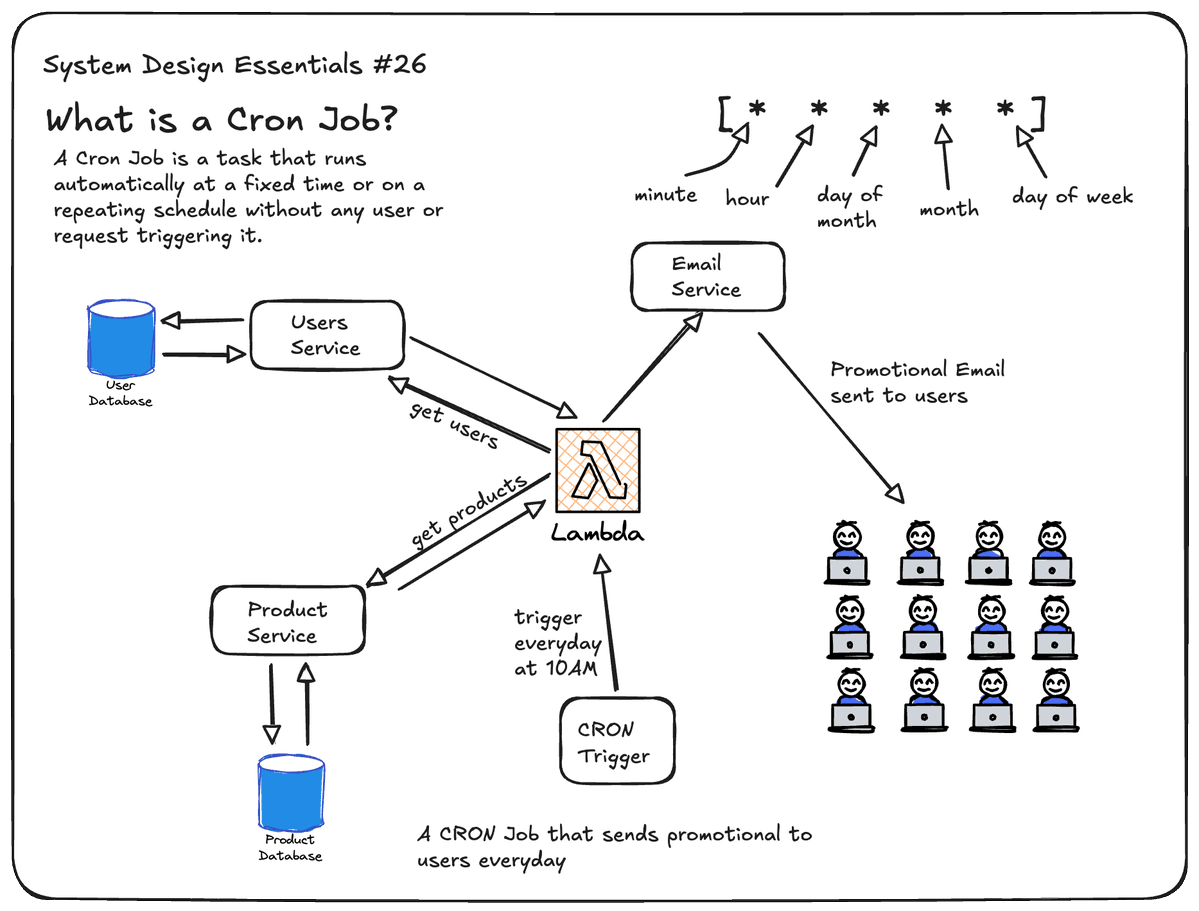
Cron Job
A Cron Job is a task that runs automatically at a fixed time or on a repeating schedule without any user or request triggering it.
Regular Request: Client -> sends request -> server responds
Cron Job: Clock hits scheduled time -> job gets triggered
Cron jobs are scheduled using a specific syntax
[ * * * * * ]
0 0 * * * → runs every day at midnight
0 */6 * * * → runs every 6 hours
Use cases of Cron jobs:
-
Daily Database Backup
-
Daily Report Generation
-
Clean up data every few hours
-
Send email alerts every 6 hours
28. Reverse Proxy
Reverse Proxy
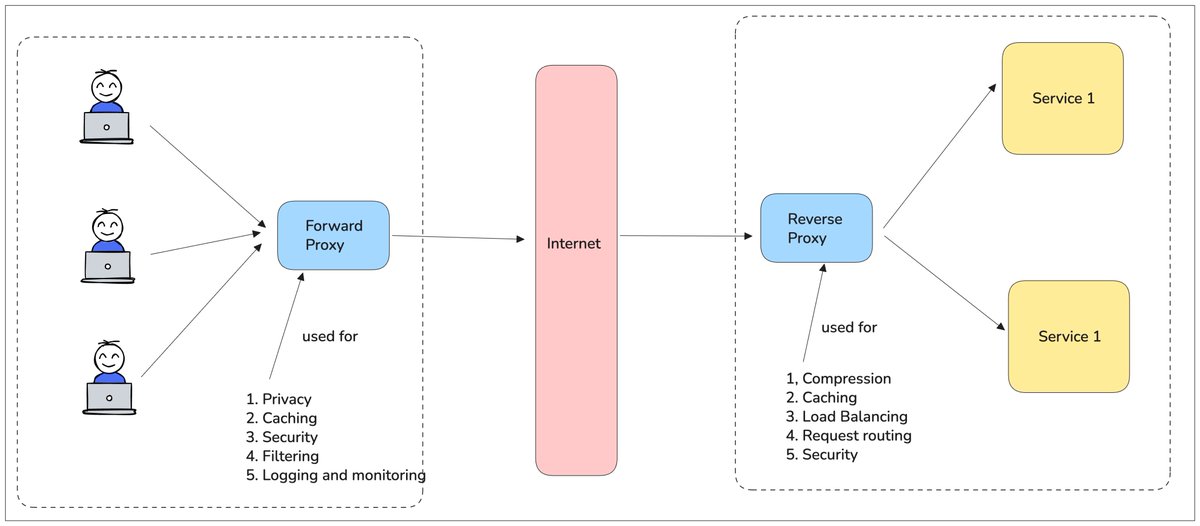
A Reverse Proxy sits in front of the server, hiding the server from the client. Instead of clients talking directly to your actual server(s), they talk to the reverse proxy first. The proxy forwards the request to the right server internally, gets the response, and sends it back to the client. From the client's point of view, the proxy IS the server, and they never see what's actually behind it.
Without Reverse Proxy:
Client → Server (client hits server directly)
With Reverse Proxy:
Client → Reverse Proxy → Server(s) (client only sees the proxy)
Use Cases of Reverse Proxy
-
Load Balancing
-
SSL Termination
-
Caching
-
Security
-
Request Routing
-
Compression
29. Forward Proxy
Forward Proxy
A Forward Proxy sits between a client and the internet and acts on behalf of the client. Instead of the client talking directly to the server, it talks to the proxy first. The proxy forwards the requests and accepts the response on the client’s behalf. From the server’s point of view, the request came from the proxy and not from the client. The server is not aware of the actual client.
Use Cases of Forward Proxy
-
Privacy
-
Content filtering
-
Caching
-
Bypass geo-restrictions
-
Logging and Monitoring
Forward Proxy → sits in front of the CLIENT, hides the client from the server. Reverse Proxy → sits in front of the SERVER, hides the server from the client.
30. Authentication
Authentication
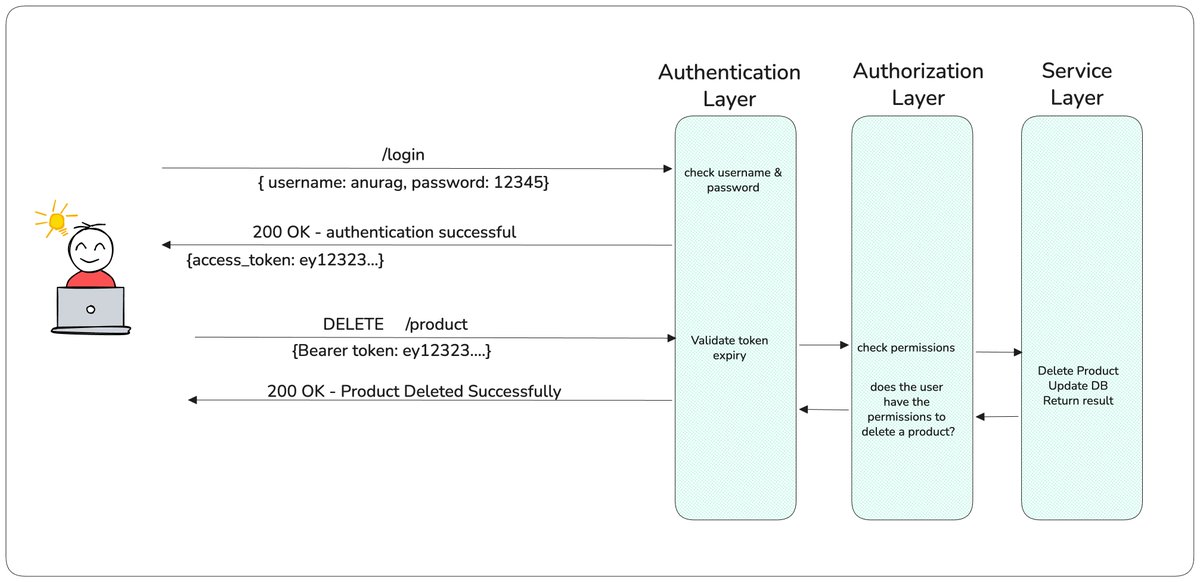
Authentication is the process of verifying a user's identity. Imagine an Employee Management application. For any user to use this application, they need to enter their username and password.
User -> Username + Password -> Server verifies credentials -> Identity confirmed -> User logged in
The server now knows who the user is. This is Authentication.
Common authentication methods:
-
Username + Password
-
OTP
-
Biometrics
-
API Keys
-
OAuth
-
JWT
-
Session-based authentication
31. Authorization
Authorization
Authorization is the process of verifying if the user has enough permissions to act. A user can be authenticated but not authorised for a particular resource or action.
For example, an Employee Management application has two types of users
Admin
-
Add employees
-
Delete employees
-
Update employee details
-
View salary information
Employee
-
View own profile
-
Update own profile
-
View assigned tasks
Now imagine an employee tries to delete another employee:
The user is authenticated, but not authorised to perform that action.
Authentication vs Authorisation
Authentication = Who are you?
Authorisation = What are you allowed to do?
32. JWT - JSON Web Token
JSON Web Token
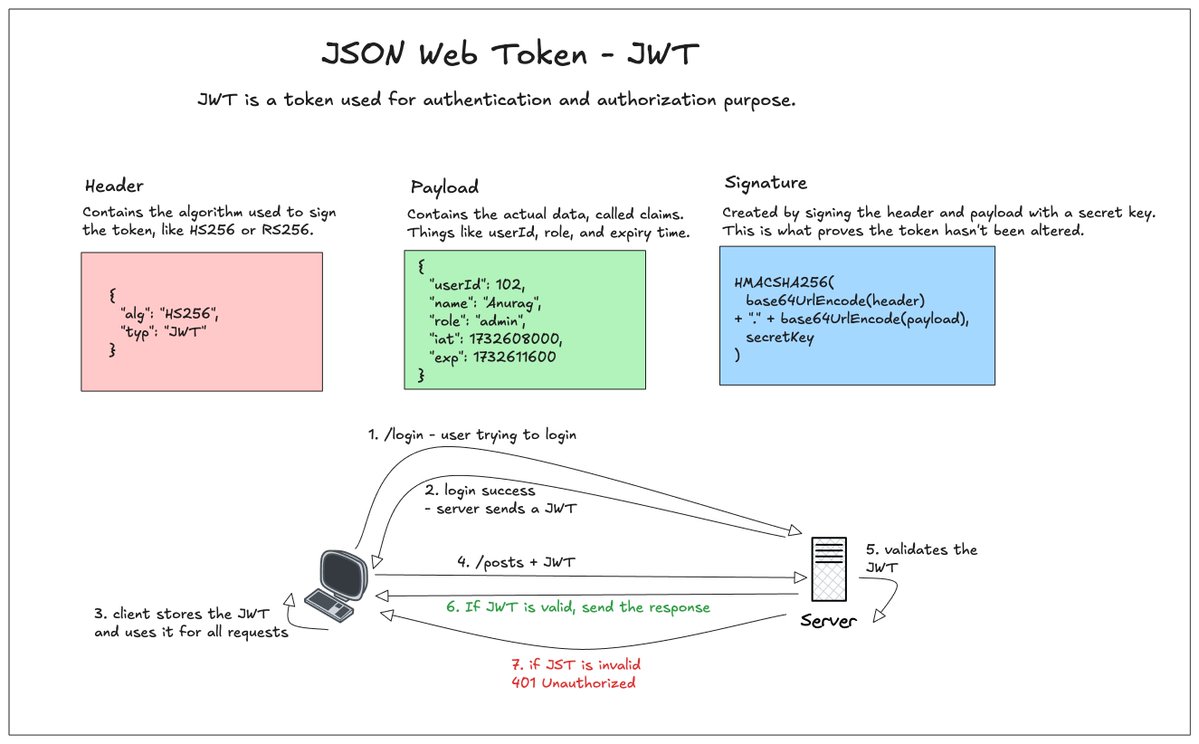
JWT, also called a JSON Web Token, is a token used for Authentication and authorisation. It lets a server verify a user without looking anything up in a database, since the token itself carries the data and a signature proving it wasn't tampered with.
A JWT has three components
Header Contains the algorithm used to sign the token, like HS256 or RS256.
Payload Contains the actual data, called claims. Things like userId, role, and expiry time.
Signature Created by signing the header and payload with a secret key. This is what proves the token hasn't been altered.
How it works
Login -> Server creates a JWT, signs it with a secret → sends it to client Client -> stores the token, sends it in the Authorization header on every request Server -> verifies the signature → if valid, trusts the data inside, no database lookup needed.
33. OAuth
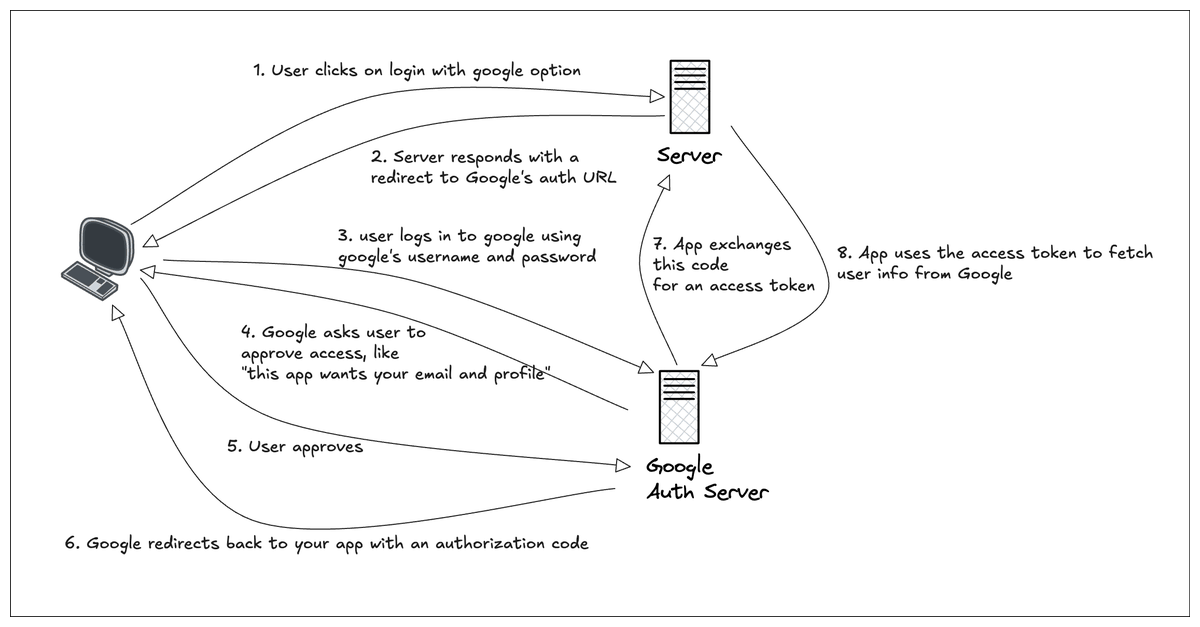
OAuth
OAuth is a way to let a user log in or grant access using an existing account, like Google or GitHub, without giving your app their password.
The problem it solves:
Without OAuth, if you want to let users log in with Google, you'd need Google to somehow share the user's password with your app. That's a terrible idea, since your app would now be able to log into their actual Google account.
OAuth avoids this entirely. Your app never sees the password.
What OAuth actually is:
An authorization framework where a user grants your app limited access to their data on another service, without sharing credentials. Your app gets a token instead, scoped to only what it needs.
OAuth flow:
-
User clicks Login with Google
-
App redirects user to Google's login page
-
User logs in directly on Google, enters password there, not on your app
-
Google asks the user to approve access, like "this app wants your email and profile"
-
User approves
-
Google redirects back to your app with an authorization code
-
App exchanges this code for an access token
-
App uses the access token to fetch user info from Google
34. Cookies, Local Storage and Session Storage
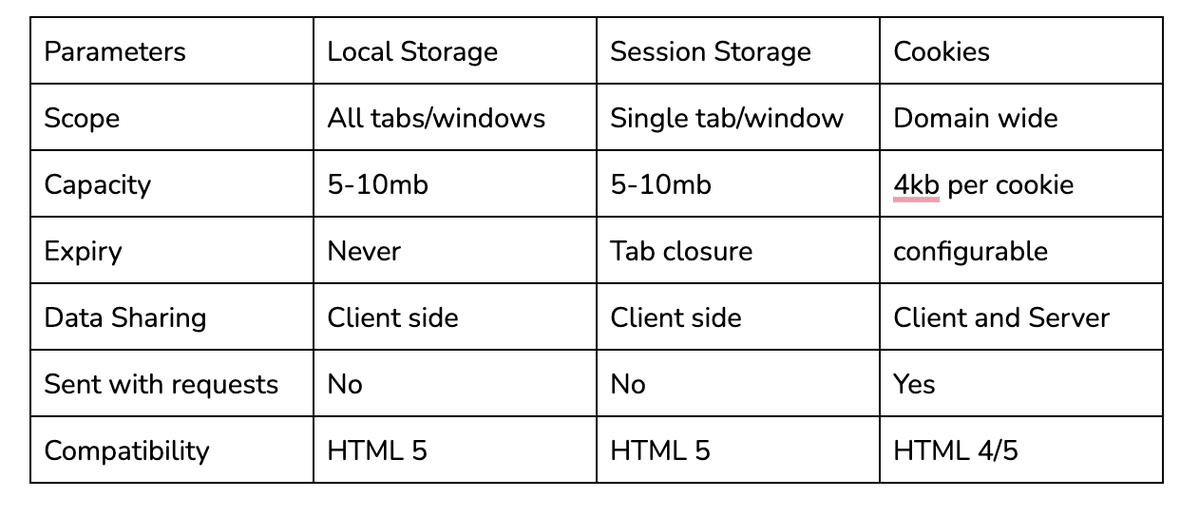
Local Storage vs Session Storage vs Cookies
Client-side storage lets the browser hold small pieces of data, so the app doesn't have to fetch everything from the server every time. Here are the three common options.
Cookies
Small pieces of data, sent automatically with every HTTP request to the server.
Local Storage:
Stores data in the browser; persists even after the browser is closed and reopened.
Session Storage:
Same as Local Storage, but data only lasts for that browser tab's session.
35. Load Balancing
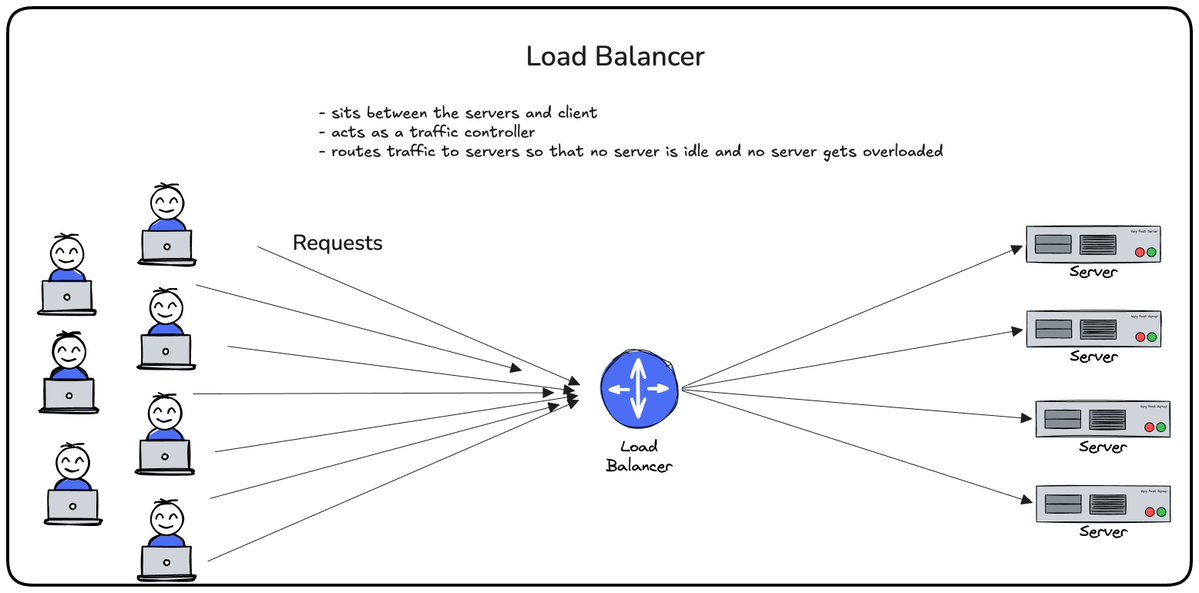
Imagine you're building an E-Commerce application and hosting a big sale at midnight. Suddenly, thousands of users start visiting your application. Your single server receives more requests than it can handle. So how do we handle increasing traffic?
By adding more servers.
But now another question arises:
How do we decide which request goes to which server?
This is where Load Balancing comes in.
Load Balancing is the process of distributing incoming requests across multiple servers. The Load Balancer sits in front of your servers and decides where each incoming request should go so that one server does not get overloaded with requests and the rest of the servers don't sit idle. Where the request should go depends on the Load Balancing Algorithm.
36. Load Balancing Algorithm - Round Robin
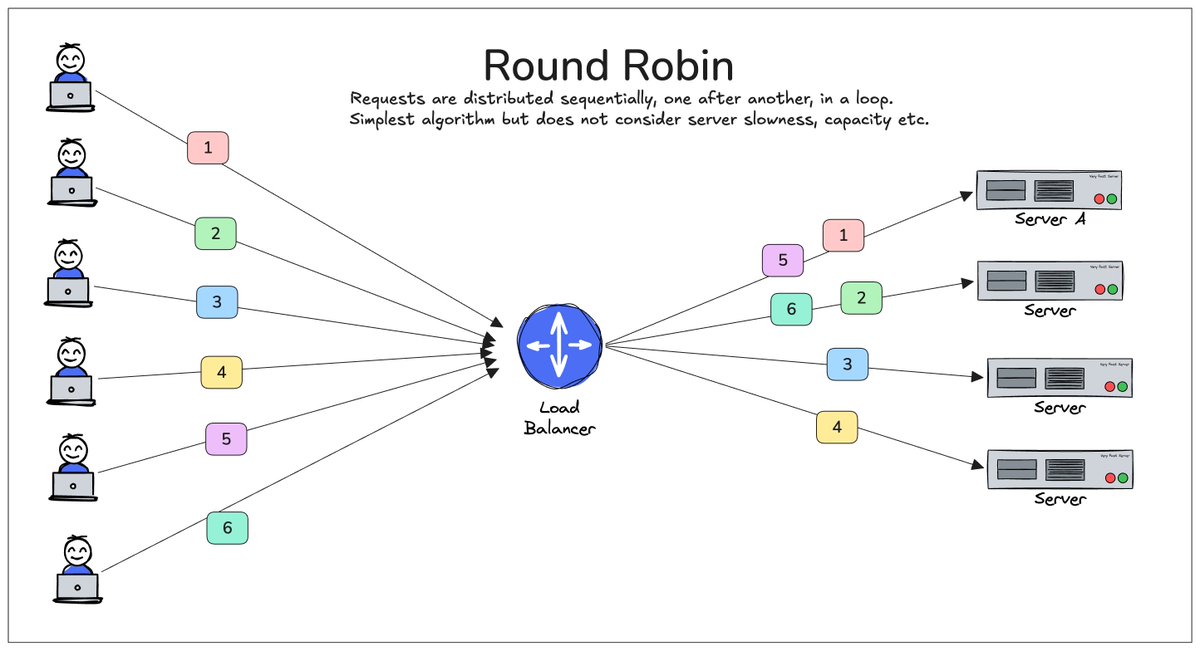
Load Balancing Algorithm - Round Robin
Requests are distributed sequentially across servers. Once it reaches the last server, the cycle starts again.
Request 1 → Server A
Request 2 → Server B
Request 3 → Server C
Request 4 → Server D
Request 5 → Server A (Requests start from Server A again)
Request 6 → Server B
37. Load Balancing Algorithm - Least Response Time
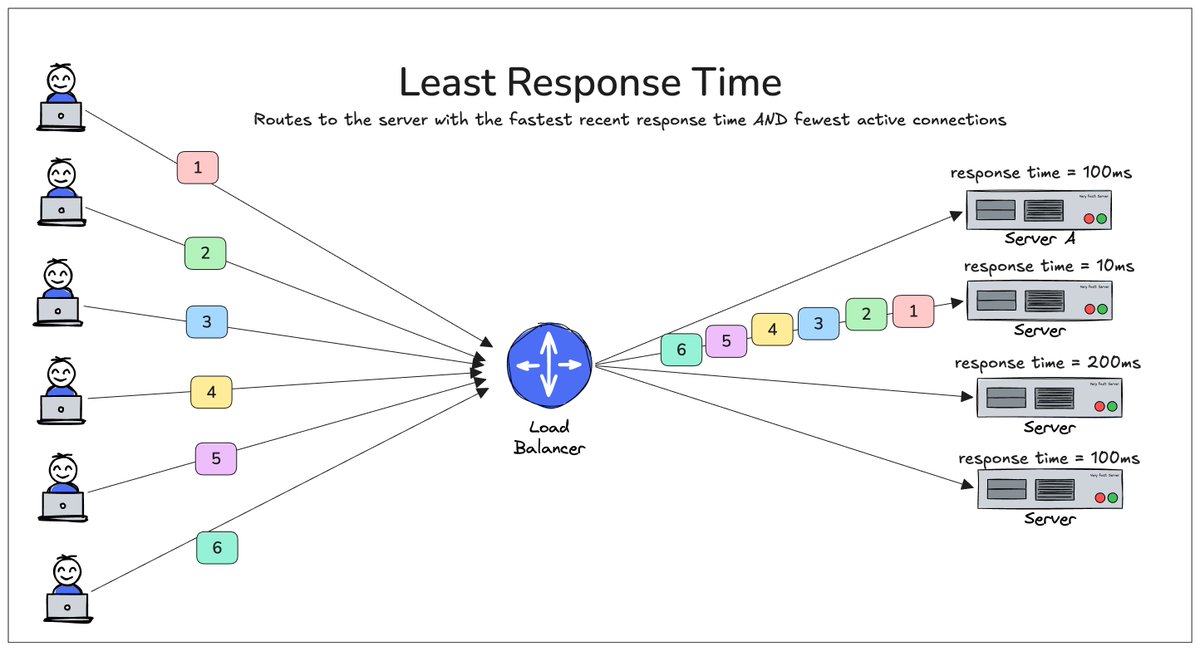
Load Balancing Algorithm - Least Response Time
The request is sent to the server with the fewest active connections.
Server A → 10 connections
Server B → 3 connections ← Next request
Server C → 9 connections
This can be better than Round Robin because not all requests take the same amount of time to complete.
38. Load Balancing Algorithm - Least Connections
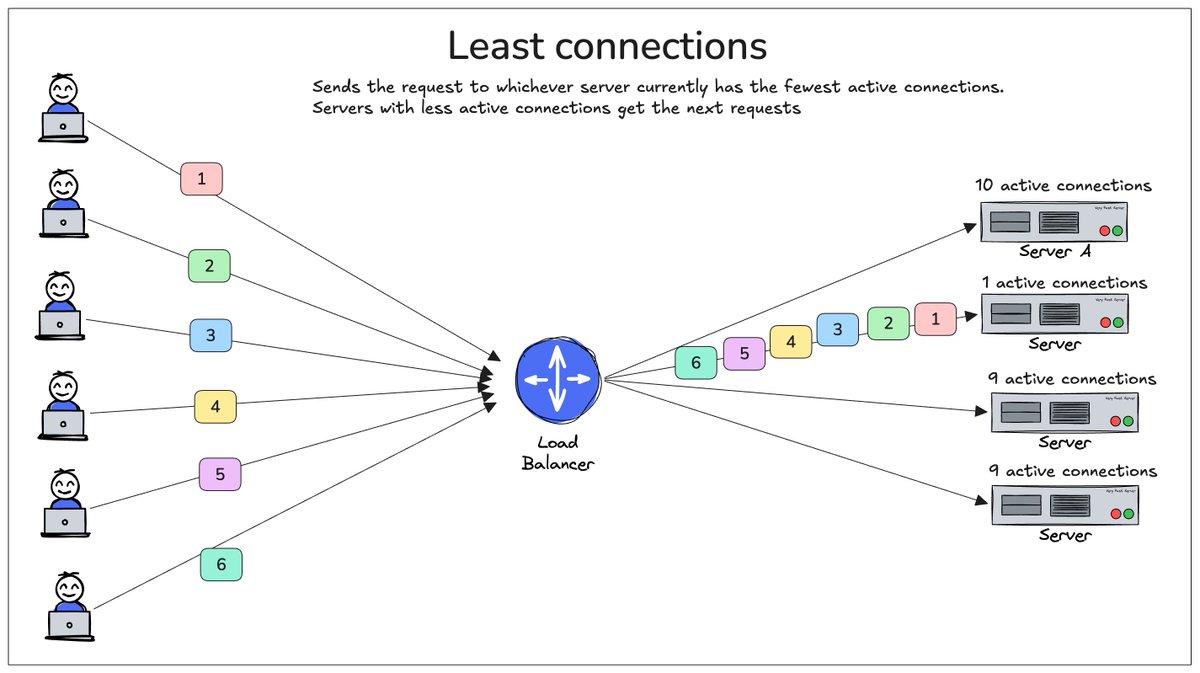
Load Balancing Algorithm - Least Connections
Requests are routed based on server performance. The Load Balancer considers factors such as:
-
Current active connections
-
Recent response times
Requests are sent to servers that are responding faster and have less load.
39. Load Balancing Algorithm - Weighted Round Robin
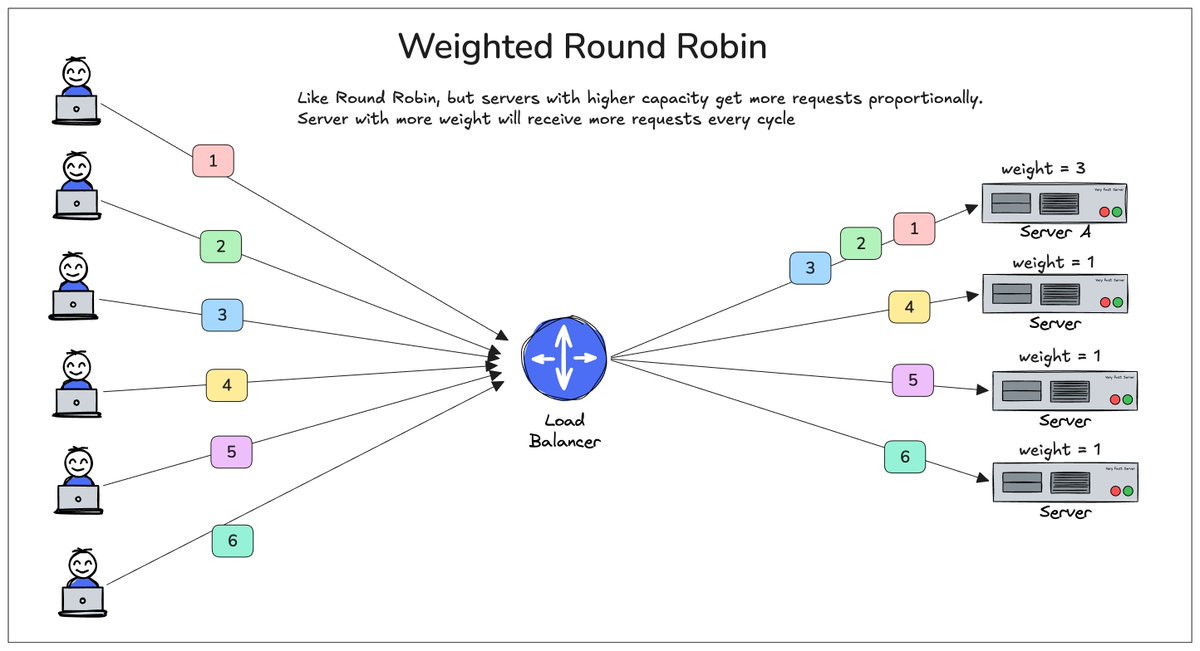
Load Balancing Algorithm - Weighted Round Robin
Some servers may be more powerful than others. Weights allow stronger servers to receive more traffic.
Server A → Weight 3
Server B → Weight 1
For every cycle:
Server A → 3 requests
Server B → 1 request
40. Load Balancing Algorithm - IP Hash
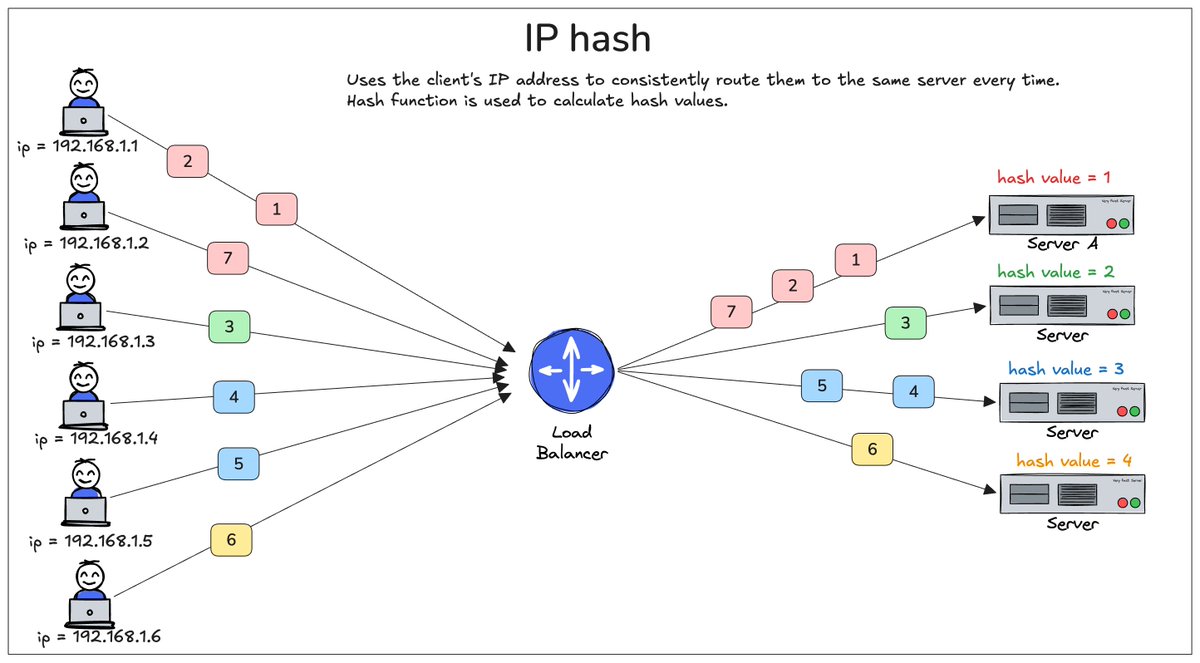
Load Balancing Algorithm - IP Hash
The client's IP address is used to determine which server receives the request.
*Client IP -> (Hash Function) -> Server B. *
The same client will usually be routed to the same server. This can be useful for session persistence (sticky sessions).
That's it for the second part. Stay tuned for the third part, where I will explain topics like Caching and Caching algorithms, Rate Limiting Algorithms, Circuit Breakers, deployment strategies, etc.