4 patterns for building AI voice agents that can see, talk, think, and code in real-time
文章目录
If you have ever built a voice agent, you know the awkward pause. You ask a question, the agent runs a lookup, and the line goes quiet while you wait.
In this demo, the insurance claim agent, built with Gemini 3.8 Live and Google's Agent Development Kit (ADK), keeps the conversation going. In the two-minute call below, the caller reports cracks in their apartment wall. The agent keeps talking while it looks up the policy. Halfway through, the caller switches to Hindi and the agent follows, though nothing in the code sets a language. Then the caller turns on the camera, points at a faint mark, and calls it a crack. The agent says what it actually sees, saves the photo, and marks the caller's claim as not confirmed.
Gemini 3.8 Live does the hard parts of voice for you. It hears the caller, answers out loud, notices when they stop talking, and stops mid-sentence when they cut in. If you are new to live voice agents, start with this Google Cloud Tech walkthrough. It covers the connection, the audio loop, and interruptions. This post picks up where that one ends, with four patterns that make a voice agent work on a real call:
-
Keep talking while your code works.
-
Double-check what the caller shows you on camera.
-
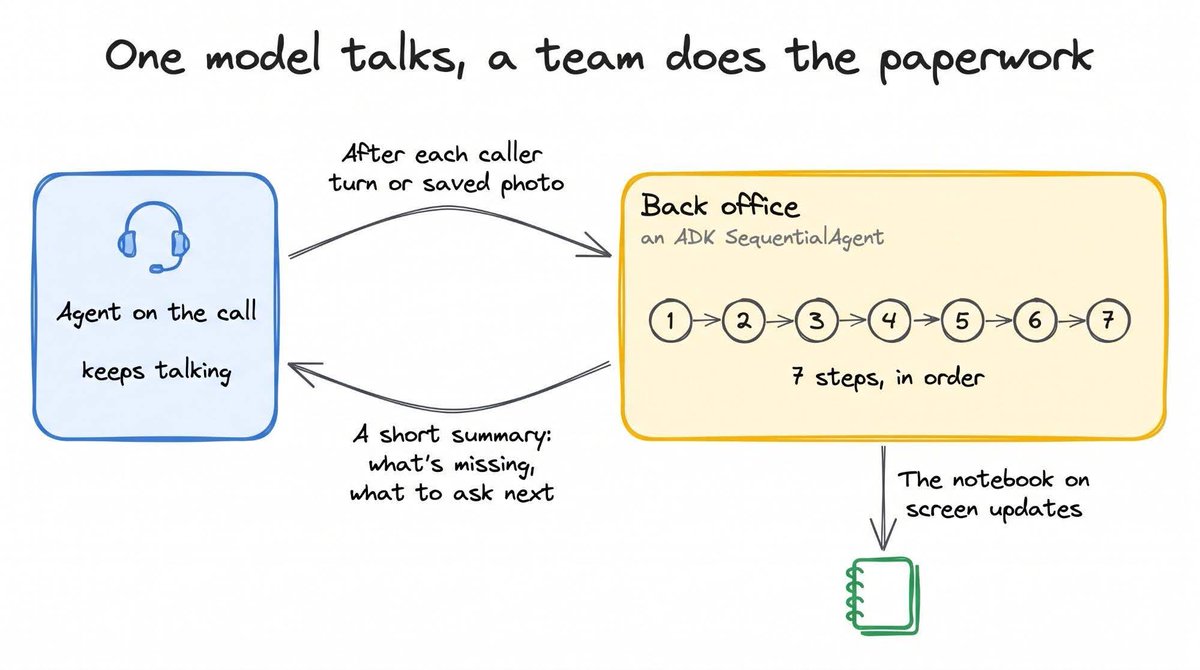
Let one model talk while a team of agents does the paperwork.
-
Let the model read, and let Python decide.
The full code is on GitHub.
What you're building
The app has three parts:
| Part | What it does | Built with |
|---|---|---|
| Browser | Sends the caller's voice and one camera frame per second to your server, and plays the agent's voice back | JavaScript |
| Agent on the call | Talks with the caller, watches the camera, and calls your tools | Gemini 3.8 Live, through the google-genai SDK |
| Back office | Turns the conversation into a claim and checks it against the insurance rules | A team of agents in ADK (google-adk), with Gemini 3.8 Flash |
1. Keep talking while your code works
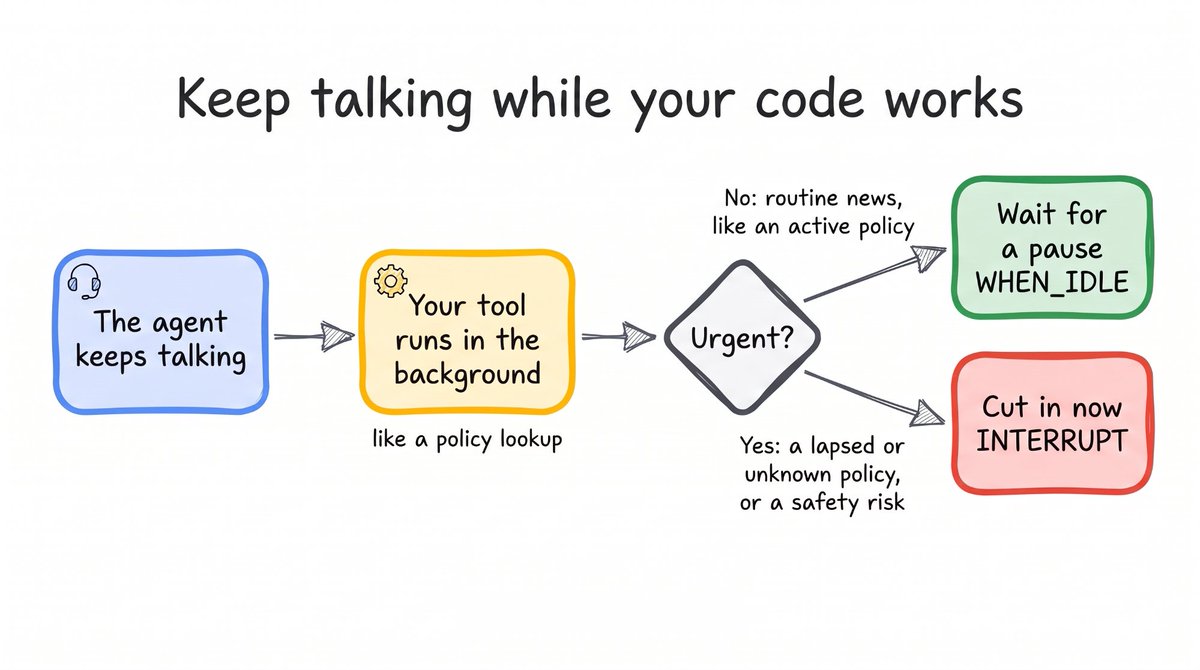
When a tool is slow, the agent goes quiet. While your code checks a policy number, the caller hears nothing and starts to wonder if the call dropped. On a claim call, the answer often changes what the agent should say next. If the policy has lapsed, the caller needs to hear it.
Gemini Live has a setting for this. Mark a tool as NON_BLOCKING, and the agent keeps talking while your code runs. When the result comes back, you tell the agent how to deliver it:
-
Wait for a pause (WHEN_IDLE) for routine news, like an active policy.
-
Cut in (INTERRUPT) for news that can't wait, like a lapsed or unknown policy, or a safety risk.
In this app, every tool is non-blocking, and only a policy problem or a safety risk cuts in.
2. Double-check what the caller shows you on camera
In the demo, the caller points at a faint mark on the wall and calls it a big crack. The agent hears the claim and sees the mark at the same moment. The risk is that it sides with the voice and writes "crack" into the claim.
The fix starts with the photo tool. When the agent saves a photo, pin_evidence_photo makes it keep three answers separate:
-
What the agent sees: Only what is in the photo.
-
What the caller says it is: In the caller's own words.
-
Whether the photo backs that up: Yes only if it clearly shows what the caller described.
Then the server checks again. It sends the saved photo and the caller's words to a second model, Gemini 3.8 Flash, and uses that model's answers for the caption and the confirmed label. The agent can still be polite on the call, but the saved caption and label come from the second check.
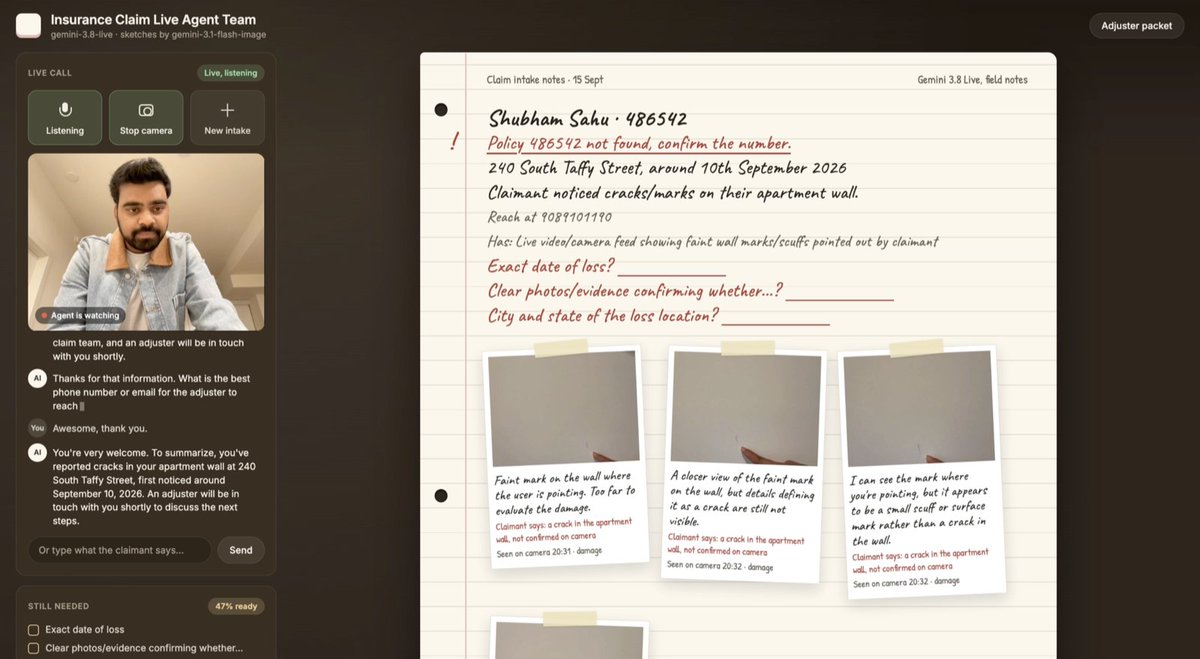
The notebook from the demo call. Each photo's caption describes what the camera shows, and the caller's words are marked as not confirmed.
3. Let one model talk while a team of agents does the paperwork
A claim needs a lot of structure: who is calling, the policy number, when and where it happened, what proof exists, and where the claim should go next. If the agent on the call had to fill all of that in before answering, the caller would hear dead air.
. It is a SequentialAgent from ADK, which runs seven steps in order. The steps pull facts out of the conversation, flag what is missing, apply the rules, and write up the claim for a human adjuster. Meanwhile, the agent on the call keeps talking.
The back office runs in the background each time the caller finishes speaking or a photo is saved, and the notebook on screen updates as it goes. When the agent wants to catch up, it calls a tool and gets back a short summary, including what is still missing and a suggested next question. Like the results in pattern 1, the summary waits for a pause unless it flags a safety risk.
4. Let the model read, and let Python decide
A model might tell a caller that a $24,800 repair is over a $25,000 limit.On a live call, the caller hears it before anyone can check.
Only two of the back office's seven steps use a model, Gemini 3.8 Flash. The first turns the conversation into clean fields, like the loss amount and the date. The second sorts the claim by type and severity. The other five steps are plain Python functions, and they apply the rules about money, dates, and safety:
-
A loss of $25,000 or more is flagged for review by a human adjuster.
-
A claim reported more than 90 days after the loss is flagged for investigation.
-
"Thankfully, no one was hurt" should not set off an injury alert. The model labels each safety fact as present, absent, or unsure, and Python escalates anything present or unsure.
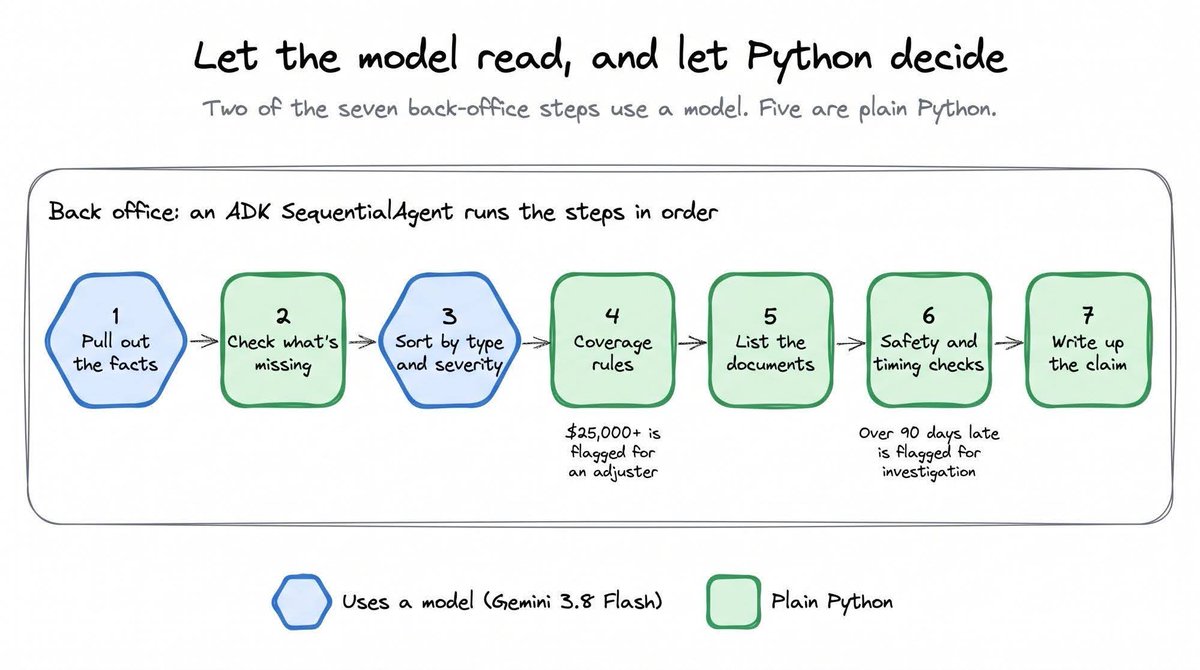
In the repo, the Python steps use a small class called FunctionNode. It runs an ordinary function and saves the result for the next step, so the rules stay easy to read and change. The repo also includes tests for these rules that run without an API key.
Try it
In all four patterns, Gemini 3.8 Live runs the conversation, and your code decides when the agent speaks up and what goes into the claim.
The demo runs only on your own machine, uses a mock list of policies, and keeps each claim in memory, so restarting the server clears it. To run it, clone the repo, add a Gemini API key, and follow the README. Then give policy number AUTO-11111 to try the cut-in for a lapsed policy, or H0-44721 for an active one.
Get the code: Insurance Claim Live Agent Team on GitHub
沿着这个主题继续读
从一篇文章,找到相关的教程、经验和阅读路径。