How to Build a Real-Time Voice AI Agent with the Gemini Live API
文章目录
部分视频或图片暂未收录,已在正文保留提示;需要时可查看原文。查看原文 ↗
Most of us talk to AI assistants throughout our day. When you want to listen to a specific song, you probably just use your voice instead of manually typing on your phone or touching buttons on a speaker.
But there is a big difference between that experience and a live voice agent. It all comes down to a natural conversational dynamic.
By: Annie Wang, Developer Relations Engineer, Google Cloud and Annie Cusack, Developer Marketing Manager, Google Cloud
For example:
-
Me: "Hey, Mira, can you play something dream pop?"
-
Live voice: "That sounds perfect."
-
Me: [Interrupts] "Skip this one."
-
Live voice: "Skipping it for you."
That is a live voice agent. It listens, it answers in real time, and you can interrupt it mid-sentence, just like a real phone call. Most AI voice systems can't do this. Here’s how to build an agent that can, using the Gemini Live API.
Text-to-speech vs. Gemini Live (one direction vs. two)
Before we build, it’s helpful to ground ourselves in some context. Most AI assistants today use Text-to-Speech (TTS). TTS is simple in that you give it text and it sends back an audio response. In this case, it can speak, but it can’t “hear you” as a human would.
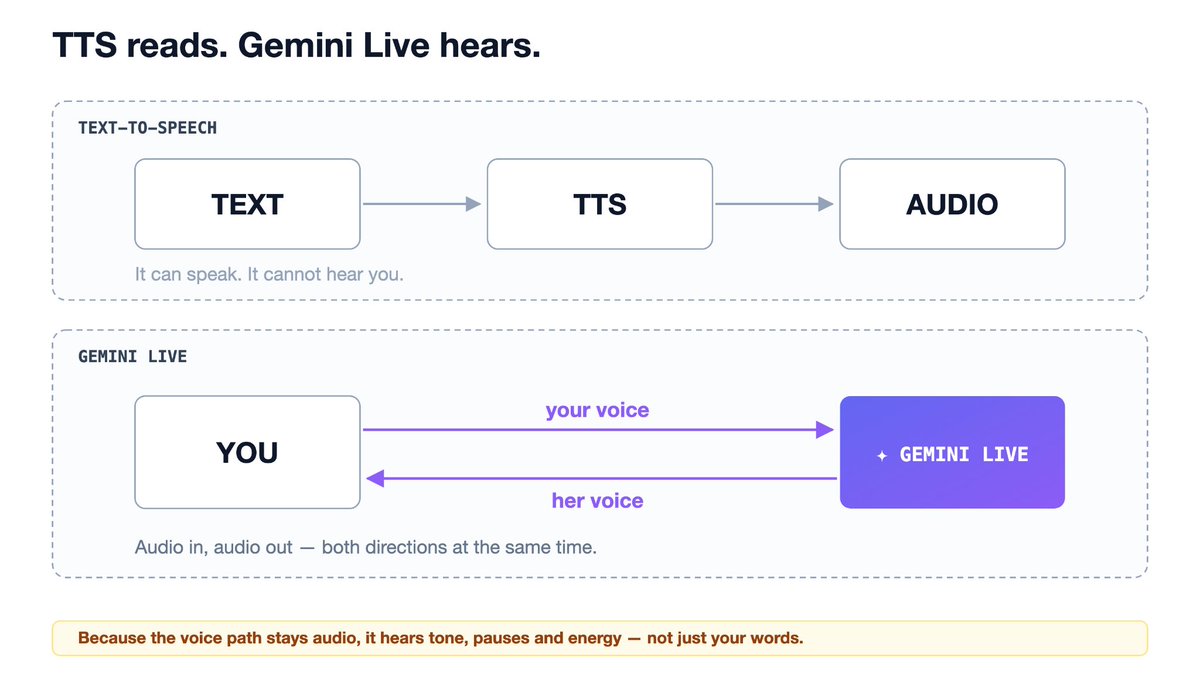
Gemini Live uses audio-to-audio, which communicates both directions at the same time. It hears your voice as raw audio and speaks back as raw audio. Because it is audio-native, the model can perceive tone, pauses, energy, and inflection. It even starts speaking while it is still forming the answer, instead of waiting for the entire text response to finish.
The Architecture and the Core Loop
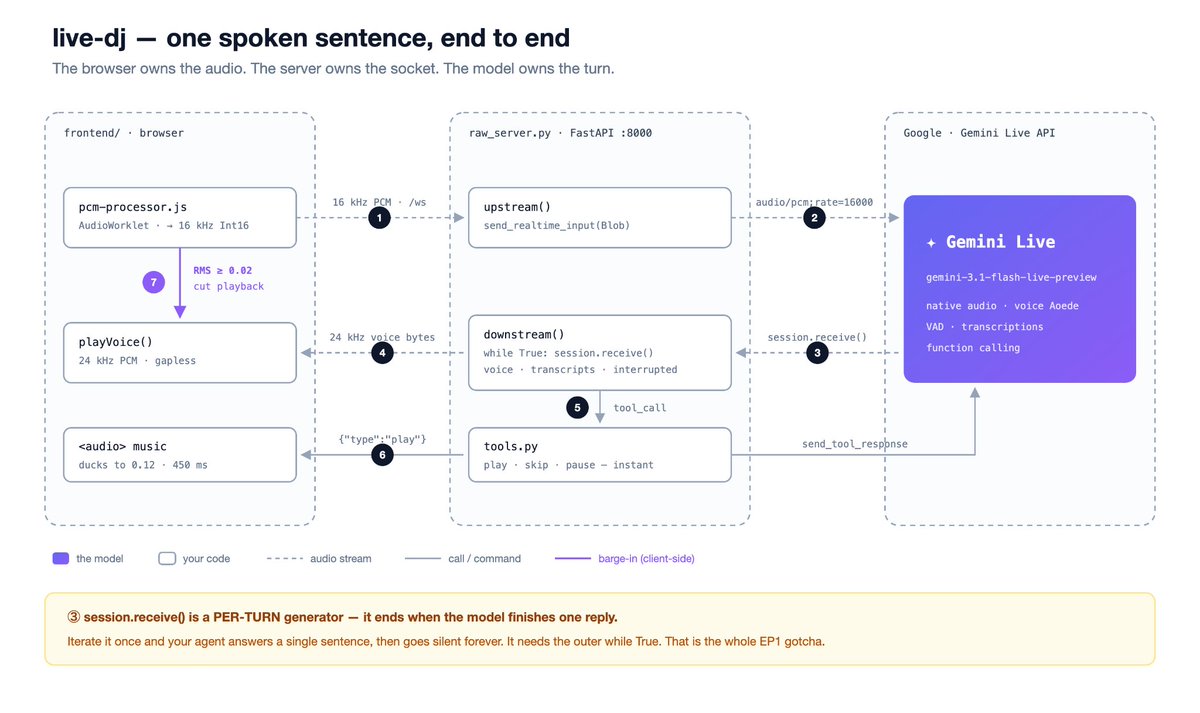
To build with the Gemini Live API, there are three pieces you need to connect:
-
Browser client: Captures your microphone audio and plays a response.
-
Gemini Live API: The audio-native model that processes live audio, detects speech, and generates voice.
-
Python backend: A lightweight relay that holds a persistent connection to Gemini and passes audio via the google-genai SDK.
The browser and backend talk over a WebSocket. A normal web request asks once and closes. A WebSocket stays open. That persistent connection allows audio to flow continuously in both directions at the same time.
Step 1: Open the bidirectional WebSocket connection
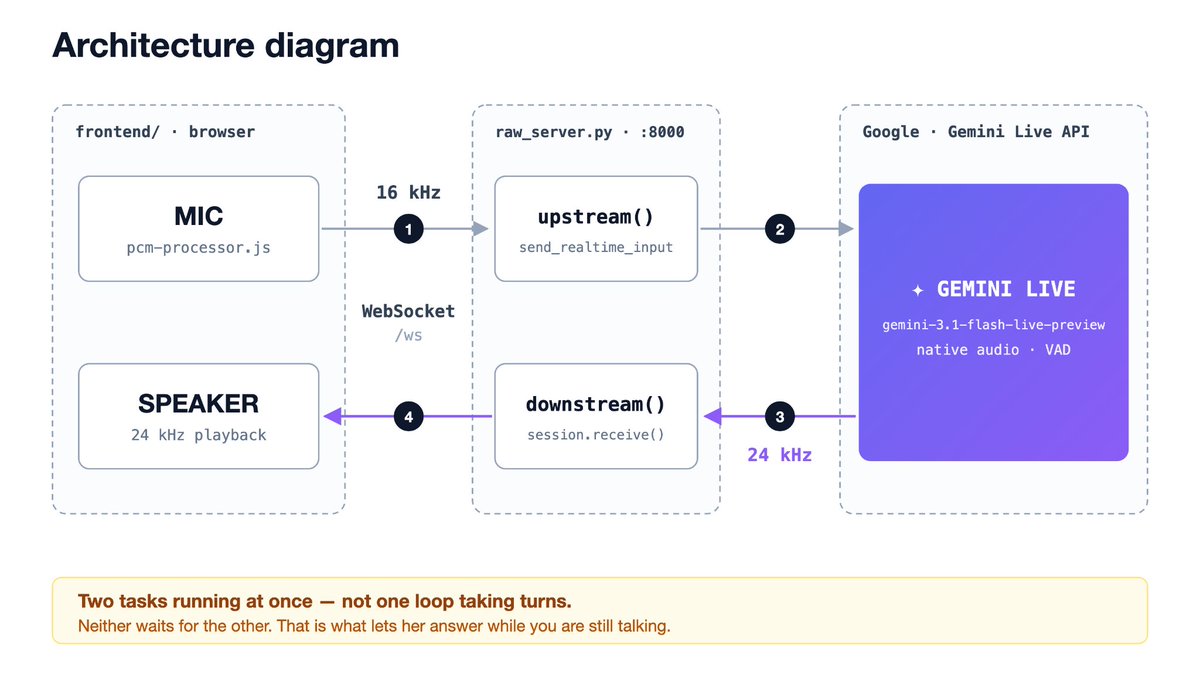
A standard HTTP request asks once and closes. A live voice call needs an open channel where audio travels both ways simultaneously: streaming your microphone audio to Gemini, and receiving Gemini's voice back down.
| Action | Protocol | Implementation |
|---|---|---|
| Client ↔ Backend | WebSocket | Connects the browser microphone and speaker streams to your server. |
| Backend ↔ Gemini | Gemini Live session | Establishes a persistent, bidirectional audio pipeline using the SDK. |
Step 2: Implement the 4-Step Core Loop
Once the connection is open, your backend runs two loops at the same time, not one after the other. One pumps microphone audio up to Gemini. The other pulls voice chunks down and plays them. Neither waits for the other to finish. That concurrency is what makes the conversation feel live, and it is what makes interruption possible at all.
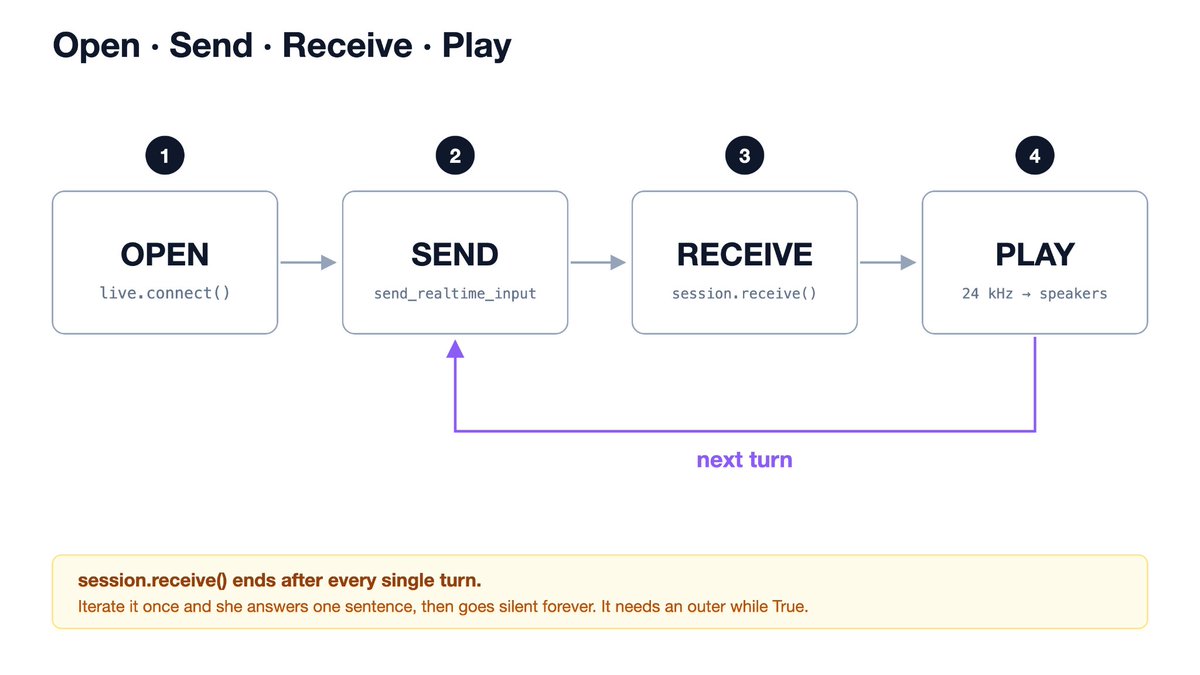
Four operations that run continuously:
| Step | Operation | What the code does |
|---|---|---|
| Open | open_session() | Open the live bidirectional session with the Gemini Live API. |
| Send | send_realtime_input() | Stream raw microphone audio up from the client in real time. |
| Receive | session.receive() | Listen for incoming audio chunks from Gemini as they stream down. |
| Play | play_audio() | Play the returned audio chunks in the browser with no delays. |
Step 3: Reduce latency with the barge-in trick
Interruption is the hardest part of the whole build, and it is the part that decides whether the agent feels alive or feels like a phone tree. The problem is that the model can only tell you it has been interrupted after your voice has crossed the network, been processed, and a signal has come back. By then the agent has been talking over you for a few hundred milliseconds, and the illusion is gone.
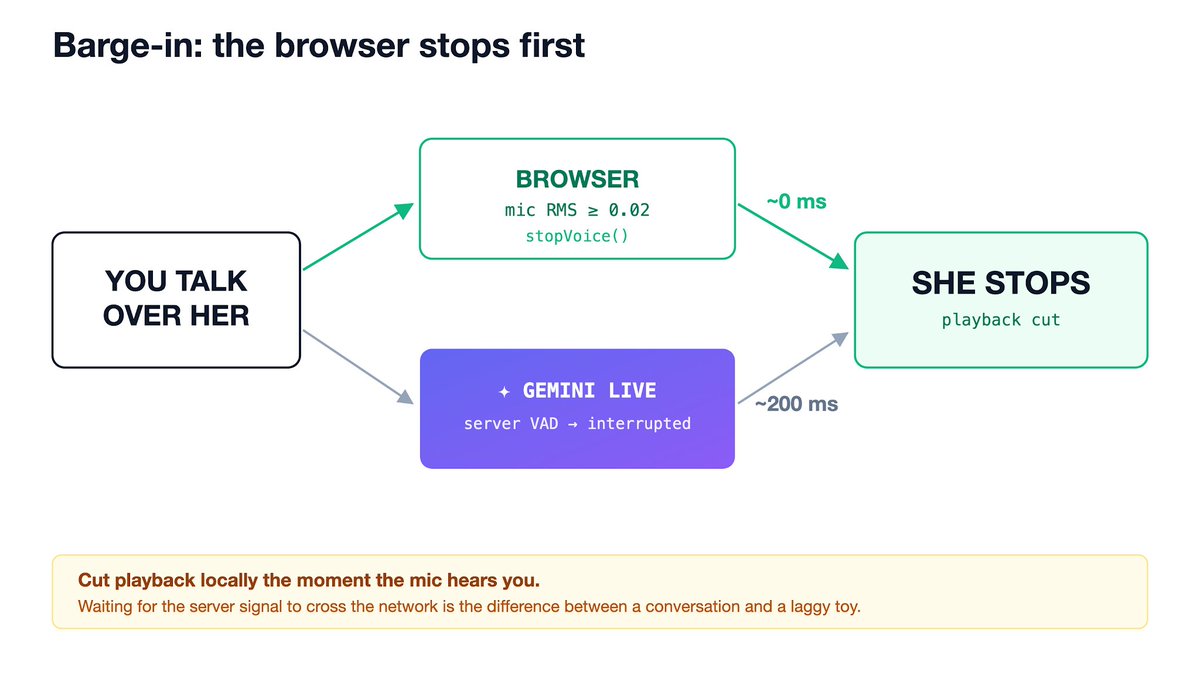
To make the agent’s response feel like a natural interaction, the model needs to know when you start talking and when you stop. This is called voice activity detection (VAD) and it’s built into Gemini Live.
When the built-in VAD hears you speak while the model is outputting audio, the model halts generation and sends an interrupted signal. Because VAD is handled automatically on the server, your client needs to stream audio even when you are quiet so the model has a steady baseline to catch the exact millisecond you begin speaking.
This same VAD is what powers barge-in, which helps the agent stop instantly the moment someone starts talking over it.
Although, waiting for that signal across the network creates a delay. To make interruption feel truly instant, you need to mute and clear your local playback buffer in the browser the exact millisecond your microphone hears you speak. Do not wait for the server-side interruption signal to travel back across the network. Cut local audio first, and let the model catch up.
Step 4: Add tools to give your agent capabilities
On its own, a voice model can only produce words. It can’t do things like play a playlist, skip a track, or pause music. To give your agent those types of capabilities, you need to attach tools.
A tool is a function in your code with a name, description, and parameters. For example:
-
play_playlist(genre)
-
skip_track()
-
pause_music()
When the model decides an action is required, it outputs a tool call containing the parameters it extracted from your voice. Your backend code executes the function and reports the result back.
But voice interactions have a strict constraint: Slow tool = silent agent.
While a tool is running, the model pauses voice generation to wait for the result. If a tool takes three seconds to complete an external API request, your agent stops talking, which creates an awkward pause.
To keep the conversation flowing, implement the asynchronous fire-and-acknowledge pattern:
-
When a tool like play_playlist is triggered, dispatch the slow playback action asynchronously.
-
Immediately return an instant confirmation code or receipt (e.g., {"status": "success"}) back to the model.
-
The model receives the instant success receipt and continues talking seamlessly (i.e. "Skipping it for you"), while the actual music begins playing in the background.
Dive into the code and try for yourself
Building a real-time voice agent with the raw Gemini Live API unlocks low-latency, audio-native capabilities that standard chained TTS pipelines can’t replicate, and it helps you create voice agents that interact in a natural, conversational way.
See the full code and run the demo yourself. Find the complete implementation for Mira, our late-night radio DJ voice agent, in this GitHub repository.
沿着这个主题继续读
从一篇文章,找到相关的教程、经验和阅读路径。