Jev, System One models, and the future of computer use

文章目录
部分视频或图片暂未收录,已在正文保留提示;需要时可查看原文。查看原文 ↗
*What we've been building with decision models at Cua - by *@ddupont808 and @francedot
Over the last few days we've deprioritized some other shiny objects because we've all been Jev-crazy. TypeSafe released Jev, which they call a System One model. We were wondering how many decisions inside a computer-use agent actually need a general-purpose LLM.

In a typical LLM-driven agent, a general-purpose model, such as one from the GPT or Claude families, interprets the user's request and decides what to do next. It can make a plan, generate text or code, and produce tool calls for the surrounding software to execute. When something unexpected happens, the agent can give it the new state and ask it to reconsider. That flexibility is useful when the task isn't fully specified in advance.
Think about what happens once that agent reaches a form. Getting there can involve planning, exploration, and recovery when a page doesn't behave. The decisions on the form itself are much more local. Does this value from the document belong in this field? Is that checkbox already checked? Should this element be left alone? One way to answer them is to ask the LLM to generate another tool call. We wanted to see what changes when a model only has to score choices the application already defined.
The question for us is how much of the workflow needs that general-purpose flexibility. A specialist won't write a missing explanation, figure out an unfamiliar process or recover from every failure. But it might handle a recurring decision without another full LLM call.
What Jev returns
Jev takes text as input, including structured text such as JSON describing the current state, and returns a typed decision rather than generated prose or code. TypeSafe's primitives come in three shapes:
-
Choice picks one of the options you supply.
-
Score rates something against descriptive levels you define.
-
Noul estimates a probability for a yes/no question.
General-purpose LLMs can also choose from a list and return structured outputs or tool calls. The difference isn't simply JSON versus prose. Jev exposes a decision interface rather than an open-ended text-generation interface: you supply the context and the decision to make, and receive a typed result.
It's tempting to read that as action selection for agents, but the interface is more general. Routing a request, ranking candidates, deciding whether a condition holds: those are all decisions over bounded choices, and none of them requires controlling a computer. Jev can sit inside a coding workflow and pick the next tool to call, though it won't write the patch. It also doesn't take screenshots today, so anything visual has to become text before it reaches the model.
The loop we care about looks like this. The application observes state and builds a short list of allowed candidates. The model scores them. The application validates the selection, executes it through Cua Driver, and then observes fresh state to check what actually happened.
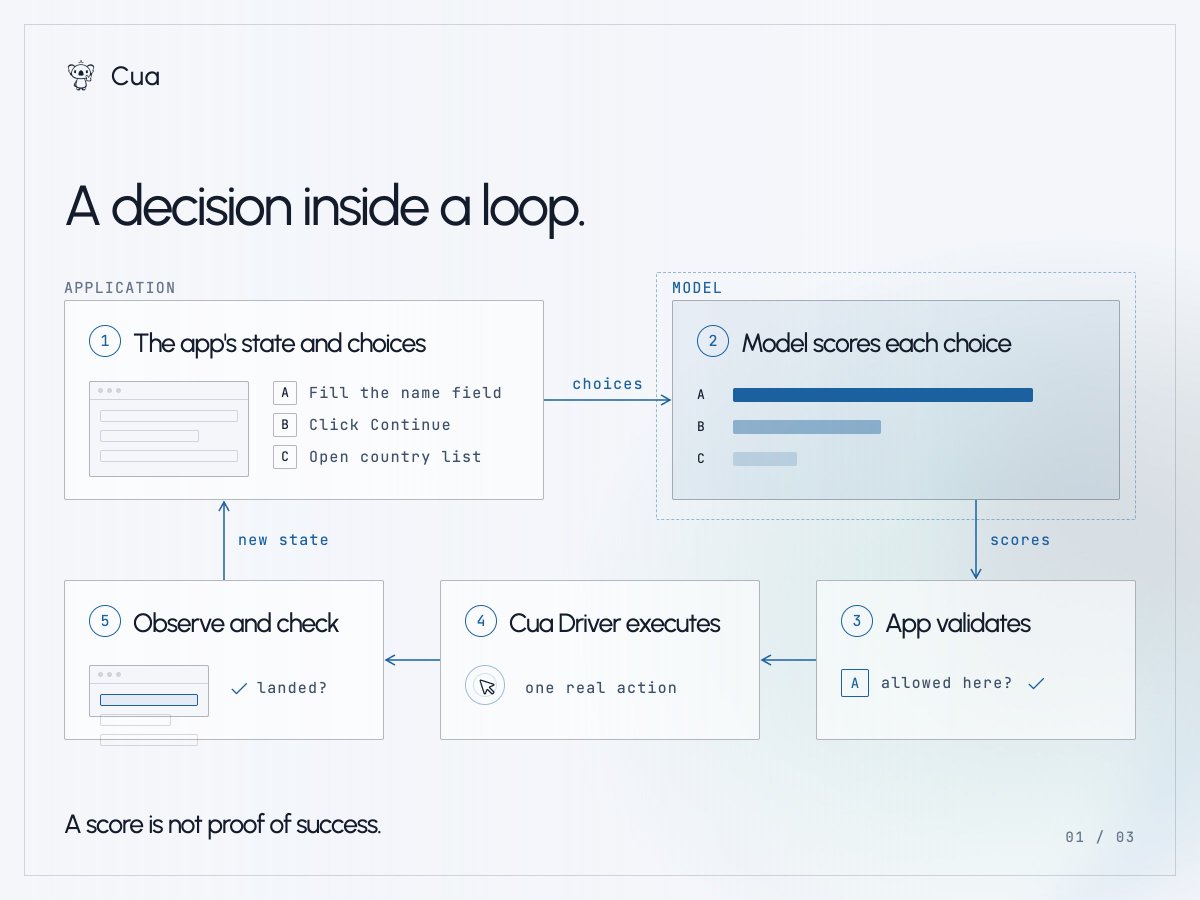
A score is not proof the action worked. Calibration describes how predictions behave across many examples, not whether this particular click was right, so the application still has to look.
How a screenshot becomes a set of choices
Jev and our current CUA-S1-FORMS model are text-only. Neither looks at pixels. A vision-capable general-purpose model can take a screenshot directly, but a text-only decision model needs a representation it can read. If a browser or app exposes useful DOM or accessibility information (AX), the application can use that structured state directly. But what about an interface where all you have is a screenshot?
Microsoft's OmniParser is a useful example of the missing perception step. It combines text recognition, UI region detection and icon descriptions to turn a screenshot into structured elements: bounding boxes, recognized text or icon descriptions, and an indication of interactivity. Application code can use that output to identify possible controls and build candidates. It still has to work out, for example, whether the word "Save" belongs to a clickable button.
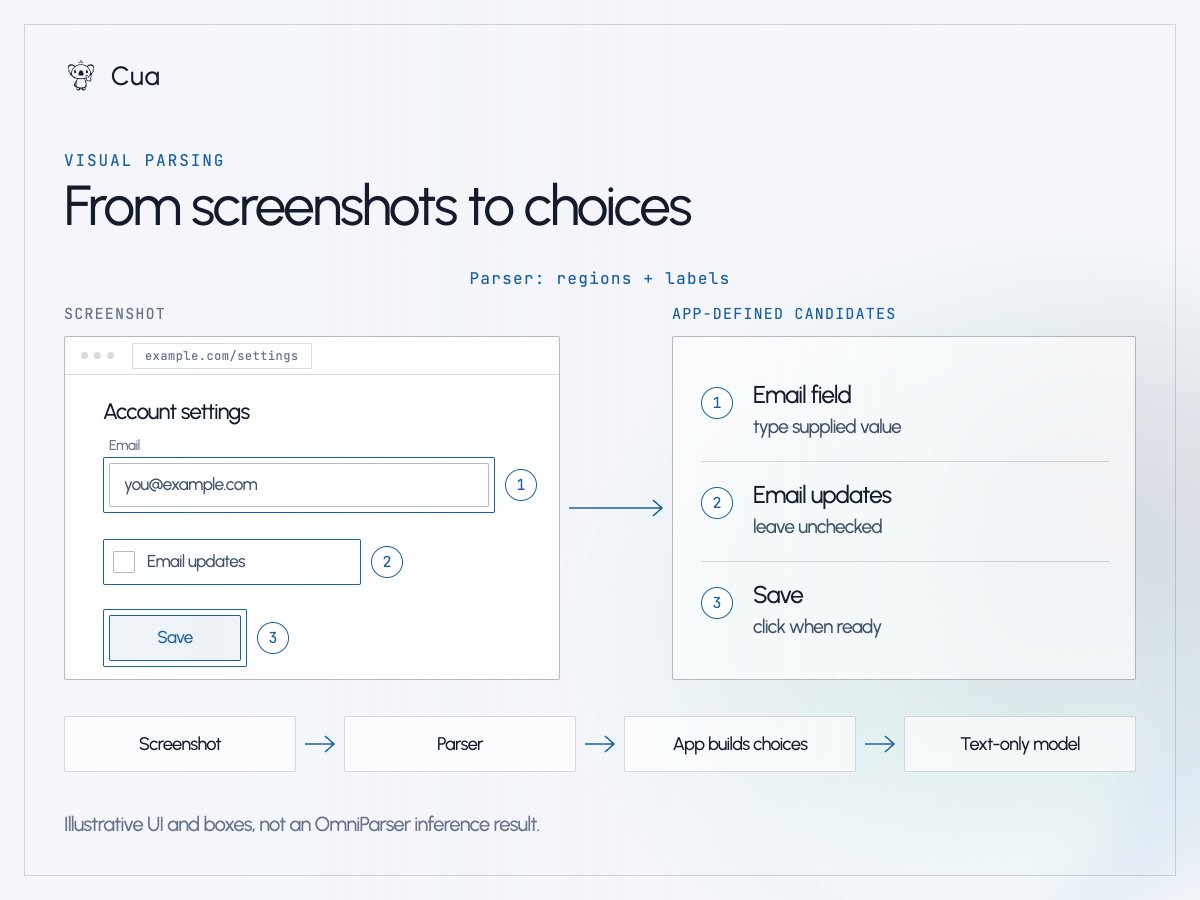
The boxes aren't the decision space on their own. The application still has to decide which actions are allowed, attach any supplied values and give each candidate an ID. A text-only model can then score those choices. If it selects the Save candidate, the application resolves that ID back to the current target, validates it, clicks, and checks the new state. The model doesn't need the screenshot to make that particular choice; it needs a useful description of what's on it.
This separation is interesting to us because perception and decision-making can improve independently. It also gives us another place to be wrong: a missed control or a bad label can spoil the decision before scoring even starts, and parsing adds its own latency. This is an architecture we want to explore, not an OmniParser integration we're shipping here. Our form specialist would still need an adapter to its expected inputs and evaluation on the parsed output.
About the System One name
TypeSafe's framing nods to the distinction Daniel Kahneman popularized between fast, intuitive thinking and slower, deliberate thinking. We find the analogy useful for framing the engineering question, but we'd stop there: it isn't a taxonomy of models. An LLM isn't automatically System Two, and a small model can make a snap decision that's wrong. Classifiers, rankers and learned policies have made bounded decisions for decades, and Jev didn't invent any of them. What it adds is an accessible decision interface: hand over context and choices, get back a decision the application can use directly.
Why agent loops raise the question now
When a model is called once, latency and cost are a line item. When it's called at every step of a browser workflow, a person watching the agent feels every pause, and you start noticing how much of the work is generation and how much is choosing among things the application could already do.
Sometimes the right answer is still a script: if a rule is stable and explicit, write the rule. The interesting middle is where context varies from run to run but the choices stay narrow enough to score. We spent the last few days on two experiments in that middle.
Using Jev with Cua Driver
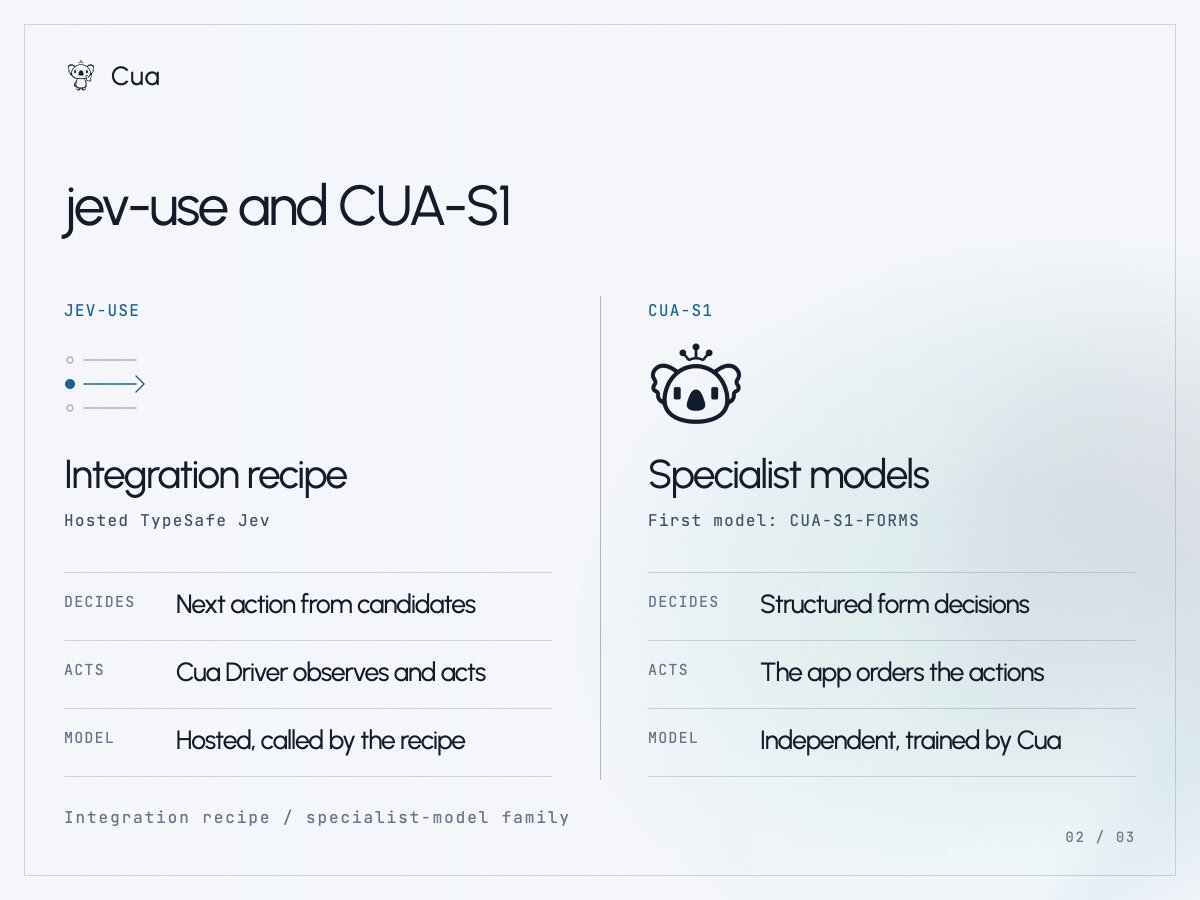
jev-use is a public-preview integration recipe with examples connecting hosted TypeSafe Jev to Cua Driver. The application builds concrete candidate actions from the current browser state, each with an ID. Jev chooses an ID. The application resolves it back to the action it predefined, validates it, and asks Driver to execute. Then it observes the page again and verifies.
jev-use in action: the app builds candidate actions, Jev selects one, and Cua Driver executes it. The app then checks the updated page.
In an LLM-driven loop, the model might generate a tool call and its arguments. In this recipe, those actions and arguments already exist in application code; Jev selects an ID. It can't invent tools, coordinates or arguments. Keeping the candidate menu in code gives us a boundary we can validate, though it doesn't remove the hard work of building good candidates or noticing when the page has changed underneath you. Driver executes the actions in either setup; it isn't the model making the decision.
The examples include a deterministic mock path and a live path that uses your own TypeSafe API key. The mock proves the loop wiring, not live model behavior. It isn't a new model living inside Driver.
CUA-S1-FORMS, our form specialist
CUA-S1 is our research family of small, independent specialist models, and CUA-S1-FORMS is the first one. Dillon adapted ideas and code from jevlike and trained an independent form specialist. It's not a fine-tune of Jev, and it doesn't reproduce TypeSafe's calibration work.
The model has 706,048 trainable parameters and the original checkpoint is about 2.8 MB. Given structured form elements plus values already extracted from a document, it scores each element in a batch: use this supplied value, check, click, or skip. Elements are scored independently, and code decides the execution order. It can't invent values, read screenshots or navigate an unfamiliar app. The current release is an English-centric forms research prototype, not something you should expect to work reliably on arbitrary forms.
CUA-S1-FORMS alongside an LLM agent using Cua Driver. This shows one form workflow, not a controlled benchmark.
That distinction matters when comparing it with an LLM agent. The specialist starts with the form elements and supplied values; it doesn't do the work of interpreting the original request or extracting those values. A general-purpose LLM could handle those steps in a larger workflow, but that would be a separate part of the system, not a capability of CUA-S1-FORMS.
Dillon's initial head-to-head on the form task reported 99.7% overall decision accuracy for the specialist against 83.6% for hosted Jev. The specialist was trained for exactly this task, including the convention of skipping already-filled fields, and hosted Jev was not fine-tuned for it. It's a decision-level result from a narrow experiment, not a general computer-use benchmark.
His initial timing numbers were 7-9 ms for local form scoring against 260-280 ms per hosted Jev call including network. Those measure different boundaries, a local forward pass on one side and a round trip to a hosted service on the other. They aren't a controlled model-speed comparison, and they aren't end-to-end form completion times.
The source, weights and synthetic dataset are public under MIT. The model card covers architecture, evaluation and limitations.
When to hand work back to the general agent
Faster decisions don't fix missing perception, stale state, a bad candidate menu or long-horizon planning. A computer-use agent needs a usable representation of the interface, a way to notice the page has moved on, and a way to confirm an action landed.
The handoff we'd like to explore goes like this. A general-purpose LLM interprets the request and plans the unfamiliar parts: getting to the form, working out what information is needed, recovering when something unexpected appears. It could also extract values from a document or generate text when the task calls for it. Once the decisions become familiar and narrow, the agent delegates to a specialist. Application code enforces constraints, executes, and checks. An unexpected dialog or a failed check returns control to the LLM-driven planner.
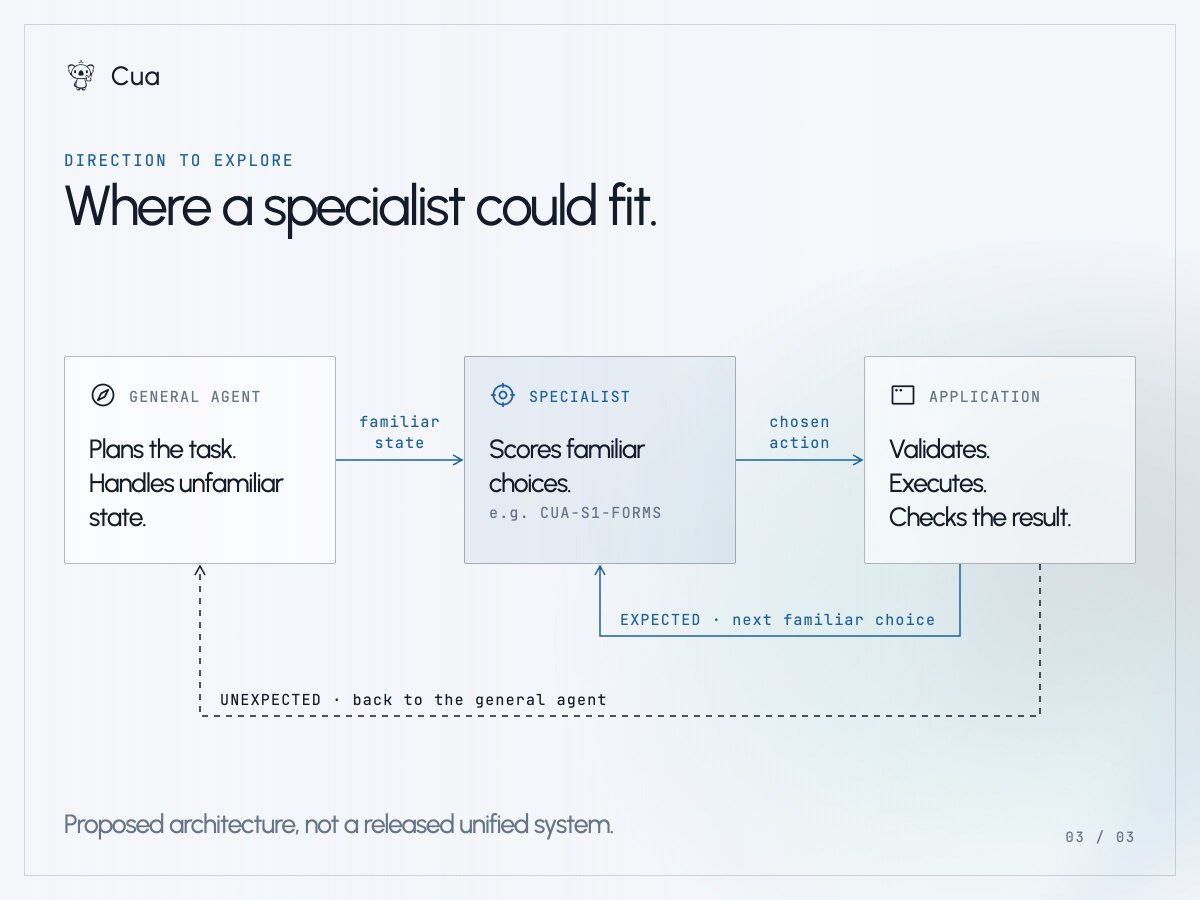
This is a direction, not a unified system we've shipped. Knowing when a specialist is out of its depth is itself a hard problem, and a high score alone isn't an answer to it.
Workflows we'd like to look at next
Forms gave us a bounded task to test. We'd like to hear where else this approach would be worth trying.
If your company has a repetitive computer or browser workflow where the context changes every run but the choices stay narrow, tell us about it at hello@trycua.com. Those are the tasks we want to look at for future CUA-S1 specialists. Both projects live in trycua/cua.