How to build animation pages getting 100M+ views with Fable 5.2 (And How To Make $20k/month With It)
文章目录
Animation pages are the single best way to get millions of views and build a personal brand but for some reason nobody is paying attention to them.
The clearest example is an Instagram account called @neuronvisuals, it got 228 million views from 3 videos in one week in October and every single video is a stick figure animation of about 10 seconds on a black background.
The guy behind it sells a course on how to make them and charges companies $2000+/month to make the same videos for them.
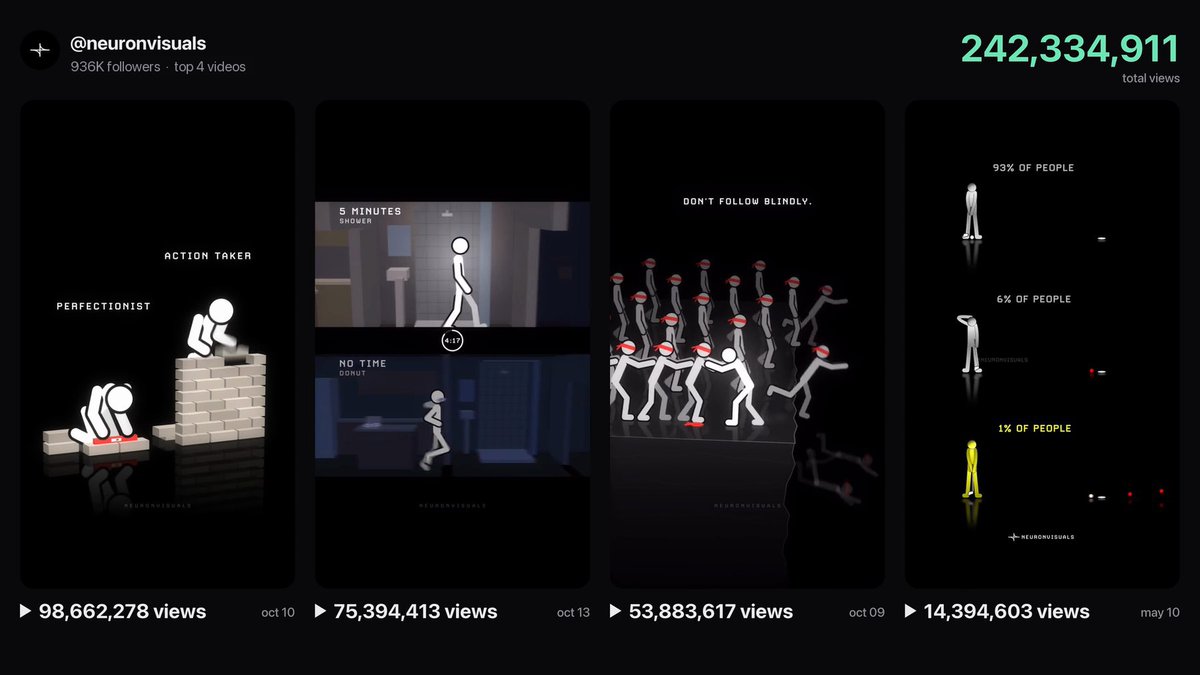
the 4 best neuronvisuals videos side by side with the views under each, the top 3 alone did 228 million
And he's not the only one, I've been studying these pages for a month now and they're everywhere once you know what to look for.
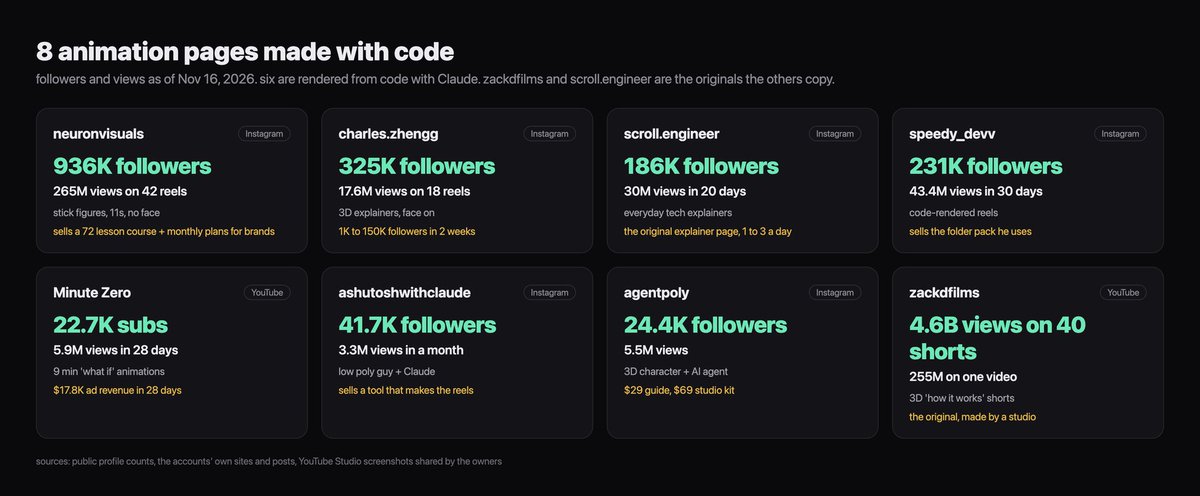
8 of the pages I studied, with followers, views and how each one makes money. The other 2 are the accounts the rest learned from, @zackdfilms, a YouTube channel that makes short 3D animations explaining how everyday things work, and @scroll.engineer, an Instagram page that explains everyday tech in short animated videos.
A year ago a video like this needed a motion designer and cost hundreds to a couple thousand dollars, and today Claude writes the animation as code and renders it on your laptop in a few minutes, so the video itself costs you nothing.
The only reason people aren't doing this is because they either don't know Claude can make animations for you or they are just too lazy to build the systems, and that's exactly what I'm going to show you in this article.
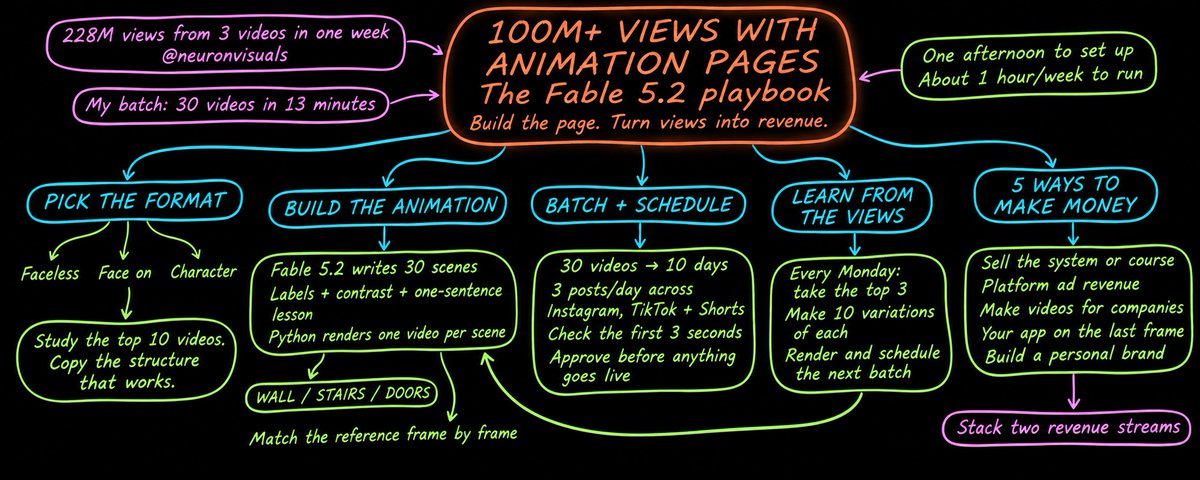
I'm going to go over the whole thing: how to pick a format, how to get Claude to write and render the videos, how to schedule 10 days of them in one sitting and the 5 ways these pages actually make money,
with the exact prompts I used and the batch of videos I scheduled while writing this.
Let's begin.
Step #1: Pick your format
There are 3 kinds of animation pages working right now and you need to pick one before you make a single video.
All 3 run the same way as the slideshow pages and the AI talking head pages people already run today, you make a batch of videos in one sitting and you schedule them.
Faceless. Videos where no human face ever appears, for example stick figures acting out a lesson, 3D videos that answer one "what if" question, or low poly characters, which are simple blocky 3D people like in an old video game.
Three pages show how this works. @neuronvisuals is the stick figure account I showed at the top of this article and has 936K followers.
@agentpoly has 24.4K followers, he says the first 10K came in one week, and the whole page is a blocky 3D character who talks to an AI about life at the edge of the world.
Minute Zero is a YouTube channel that makes 9 minute 3D videos, each one takes a single question like what if you sped up and couldn't stop, and shows a man walking down a street faster and faster until the whole city is a blur.
Faceless is the easiest of the three to start and the easiest to copy, and the money comes from volume, ads, courses, selling the system or putting your app on the last frame.
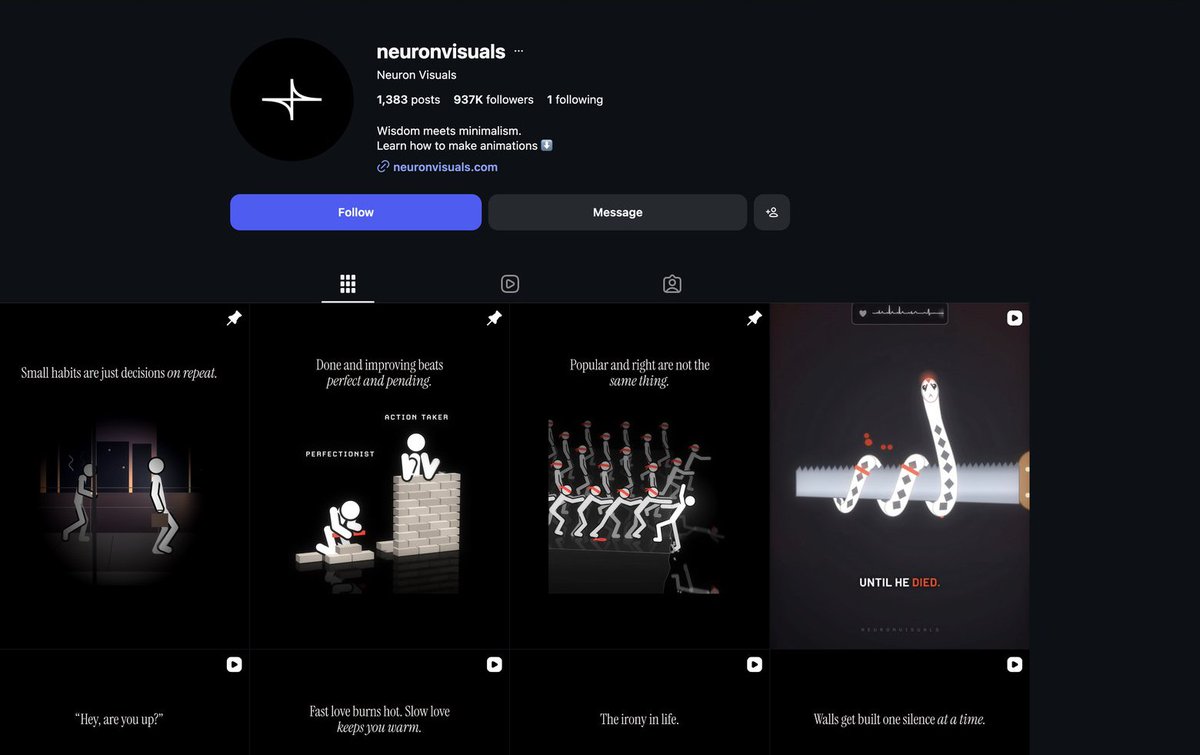
neuronvisuals on Instagram, every post is the same stick figure format
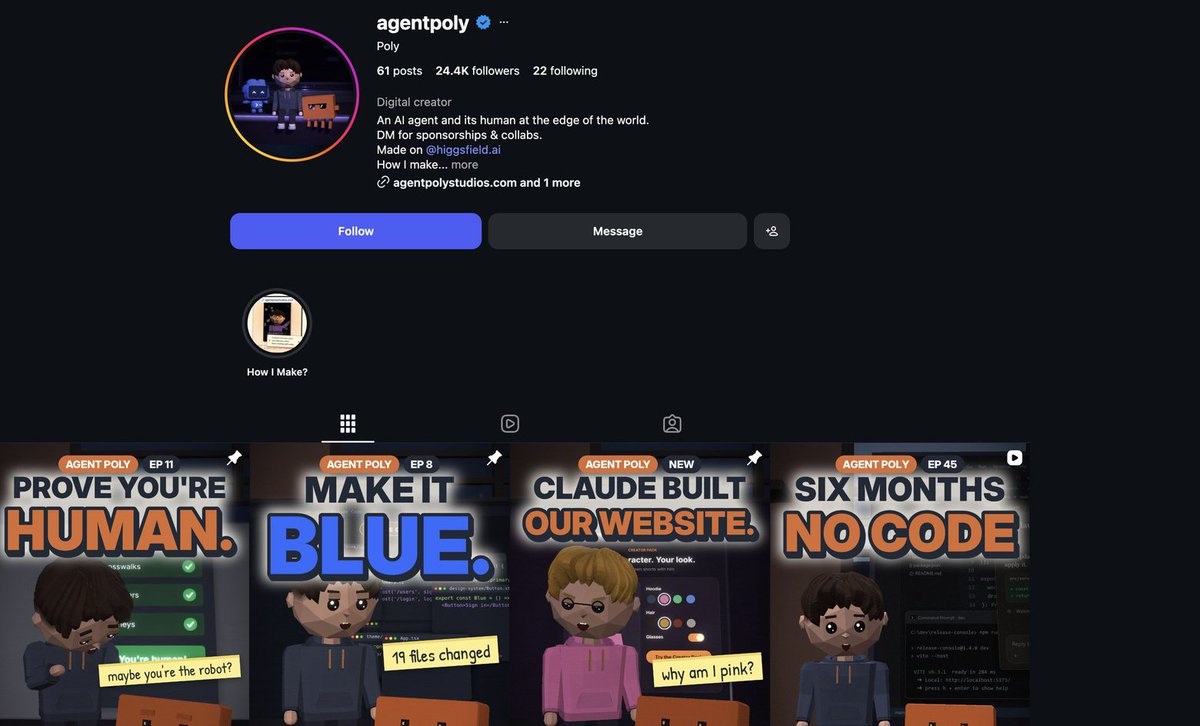
agentpoly on Instagram, the blocky 3D character and his AI
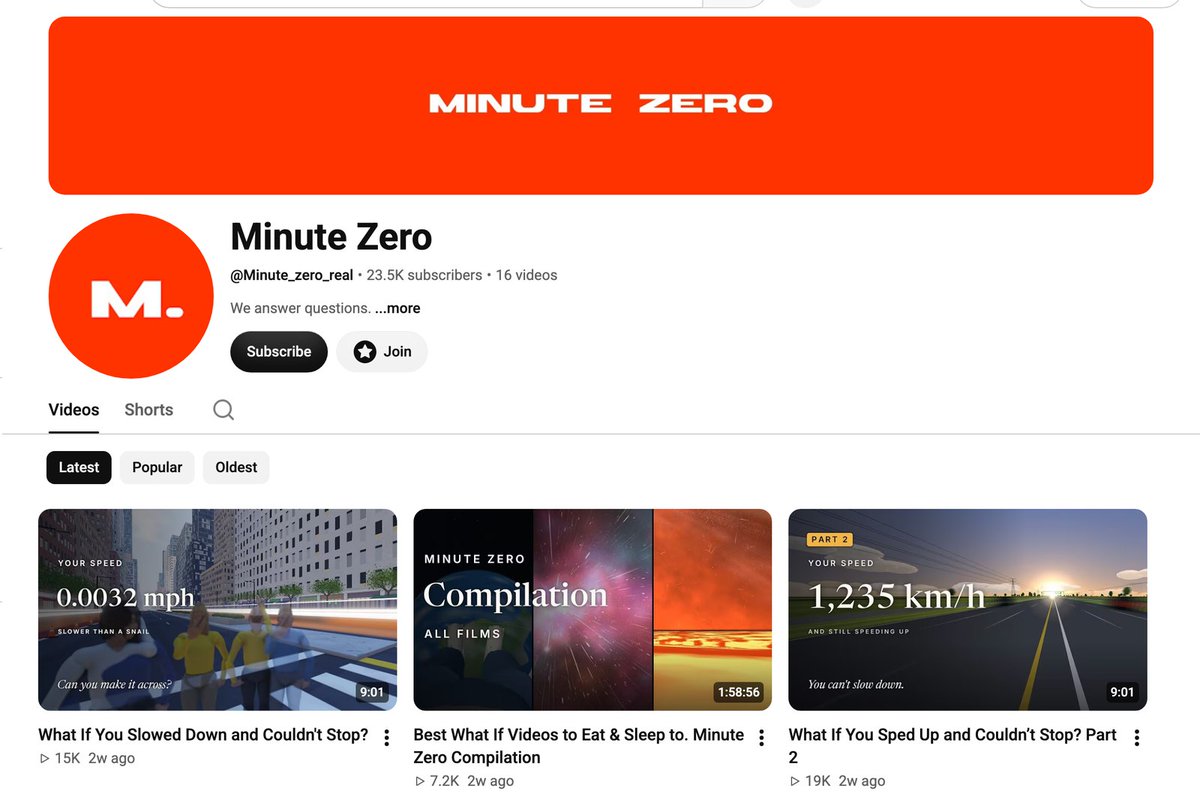
Minute Zero on YouTube, 9 minute "what if" videos, about a month old
Face on. Explainer pages where the whole video is a 3D animation of how something works (how the internet works, how your phone knows where you are) and you show up on camera for a few seconds in the middle of it to say one line.
This is @charles.zhengg, 26 posts, 325K followers, 11.6M views on one reel about how the internet works, and he says his videos are made with Claude plus a few skills he wrote himself.
It's harder because you have to record yourself, but people follow a person, and that is what gets you brand deals and lets you sell your own products later. I would choose this over any other format since this actually builds a personal brand.
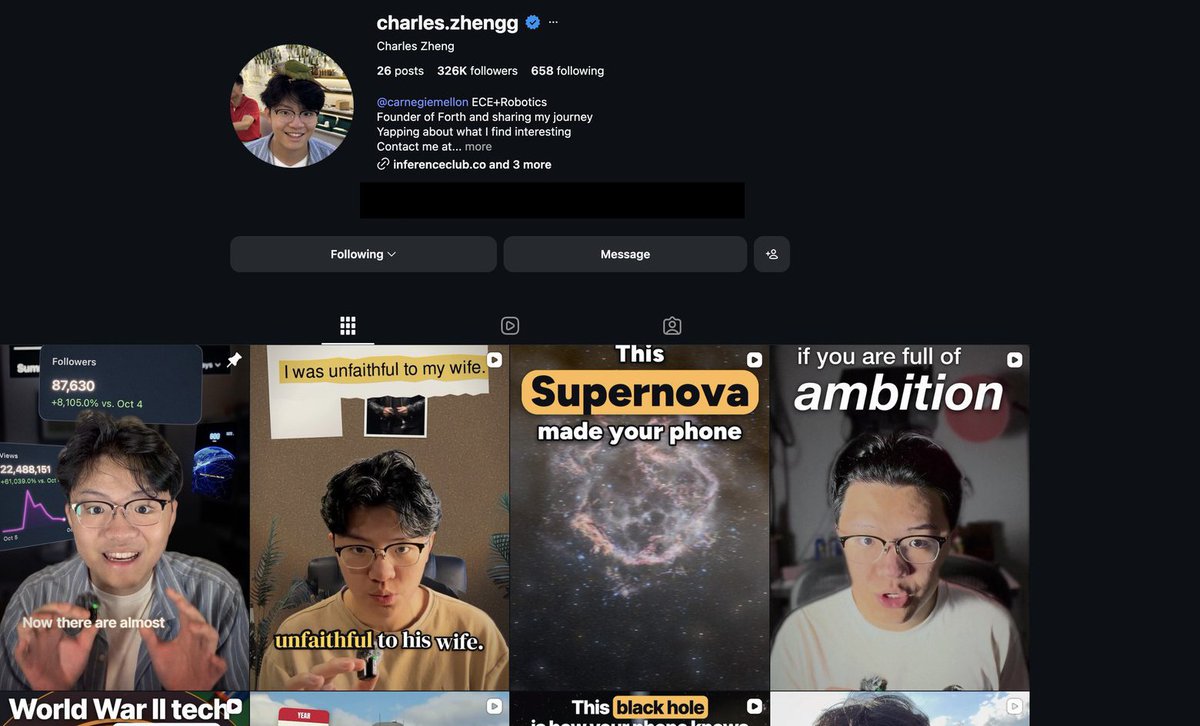
charles.zhengg on Instagram, he says he went from 1K to 150K followers in two weeks
The mix.
A character that is clearly not you but has a voice and a personality, so people follow the character instead of a face.
@ashutoshwithclaude is a low poly guy who sits in front of the camera and asks Claude dumb questions like how to get a job at Claude's own company, 41.7K followers on 52 posts, and he now sells a tool that makes the videos for you.
You get the volume of faceless with some of the loyalty of a face.
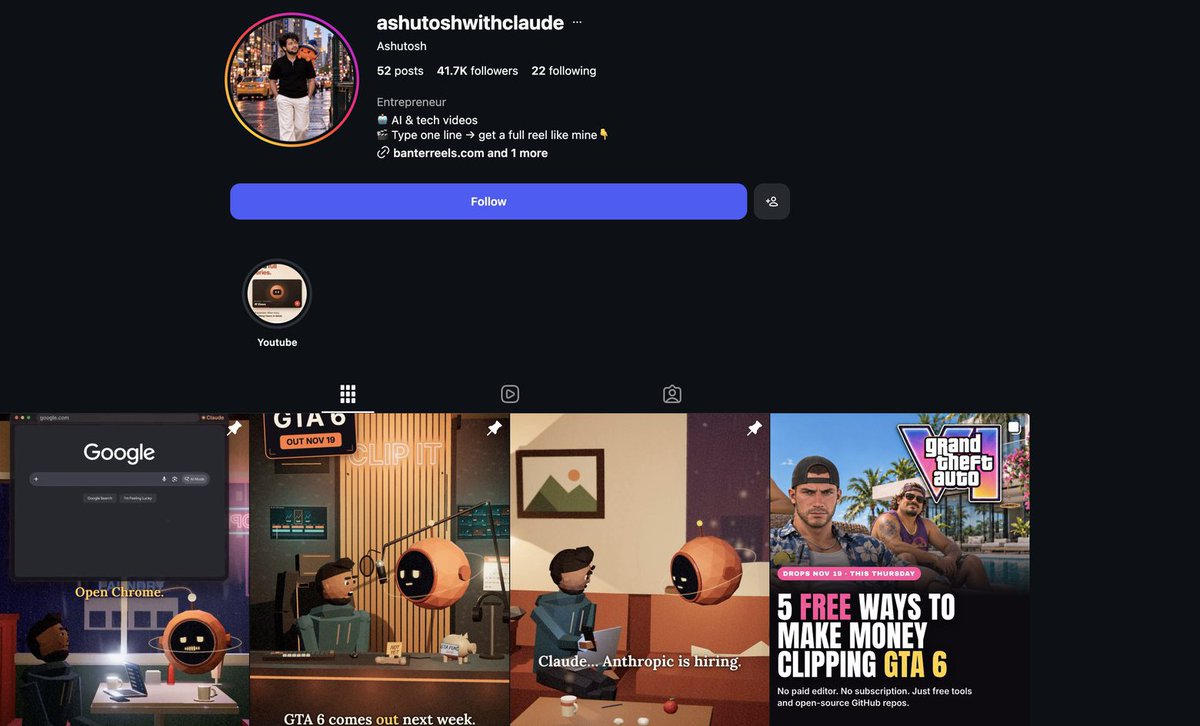
ashutoshwithclaude on Instagram, the character and Claude
I'm using faceless for the example in this article because it's the fastest to make and it has the biggest numbers, but every step below works the same for the other two.
And the real point of all of this is that once the videos cost nothing you don't have to pick only one format, you can run a stick figure page, a "what if" page and a face on page at the same time and let the numbers tell you which one to double down on.
Step #2: Copy the account that's already winning
Don't invent a format, find the one that already works in your niche and figure out why it works.
I use ViewTrack for this, which is a small tool we built that takes an Instagram or TikTok account and lists every video it posted next to its view count,
but you can do the same thing by hand, open the account on your phone, sort the posts by most viewed and write down the top 10.
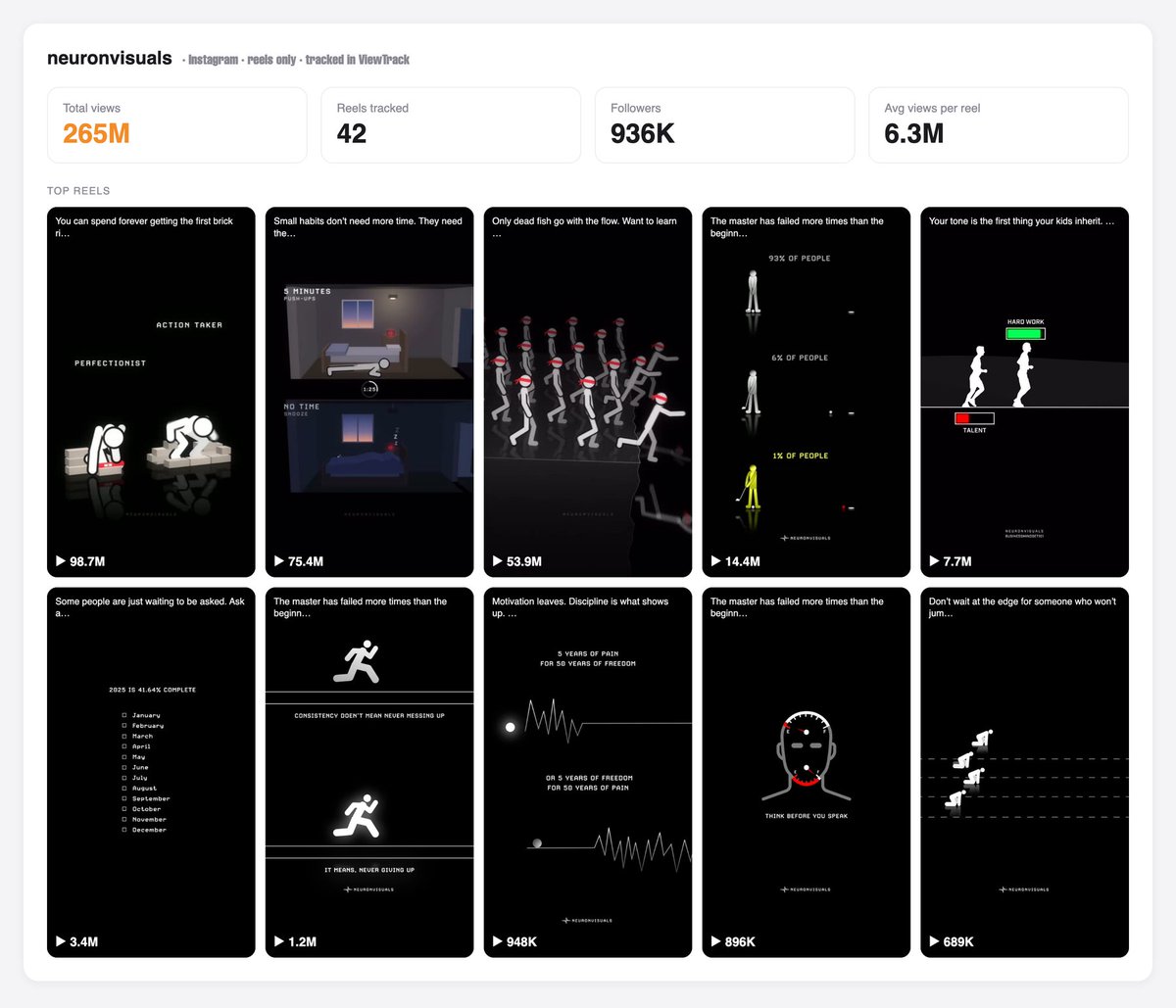
ViewTrack view of neuronvisuals, top 10 videos with views
I watched the top 10 frame by frame and they all have the exact same 5 things:
-
A pure black background with two smooth white figures, no faces, thick rounded arms and legs, a soft glow around them and a faint reflection on the floor like they're standing on black glass
-
Two short labels in spaced out capital letters above the figures, like PERFECTIONIST and ACTION TAKER, and that's all the text on screen, the sentence goes in the caption
-
A tiny silent story that takes 8 to 16 seconds with no voice and a trending sound, for example the perfectionist keeps fixing the same brick while the action taker builds a whole wall and climbs it
-
The payoff in the last 2 seconds, the winner turns yellow and raises his arms, and the loser stays white
-
A caption that says the lesson in one sentence, and on the videos that are selling the course it ends with "want to learn how I make these animations? comment animate"
That's the whole format, there's nothing else to it, and once you know the 5 things you will see them in every video on the page.
The labels are a contrast people already believe, the story shows that contrast in 10 seconds without a single word, and the account has 1,383 posts and every one I looked at follows this same structure with different props.
Step #3: Have Fable 5.2 write 30 scenes
This is the first of the two steps that need taste and it's the step most people get wrong, because they pick contrasts their audience doesn't actually feel.
Every video is a contrast between two kinds of people your audience already recognizes, and the contrast has to be something you can show with two figures and a prop, a wall, a staircase, a row of doors, so the viewer gets it with the sound off.
This is the exact prompt I typed into Claude using its newest model, Fable 5.2, you can paste it into the normal Claude app or website, copy it:
"I run a faceless animation page for app founders and people trying to make money online. Every video is 11 seconds, black background, two smooth white figures with no faces, left vs right, and a silent story with a prop where the right one wins and turns yellow at the end. I have 3 stories built: WALL (left keeps fixing one brick, right builds a wall and stands on top), STAIRS (left stands at the bottom looking up, right climbs to the top) and DOORS (left waits in front of one closed door, right knocks on door after door until one opens). Write me 30 scenes. Each one picks one of the 3 stories and gives the two labels that go above the figures, one or two words each in capital letters, a contrast my audience already feels (PERFECTIONIST vs ACTION TAKER, WAITING vs STARTING, ONE PITCH vs 100 PITCHES). Then write the caption for each one, a single sentence that says the lesson in plain words, lowercase, no hashtags. Output as JSON with id, template, left, right, caption."
This file is the only thing you will edit from here on, because in the next step Claude writes a script that reads it and makes one video per scene.
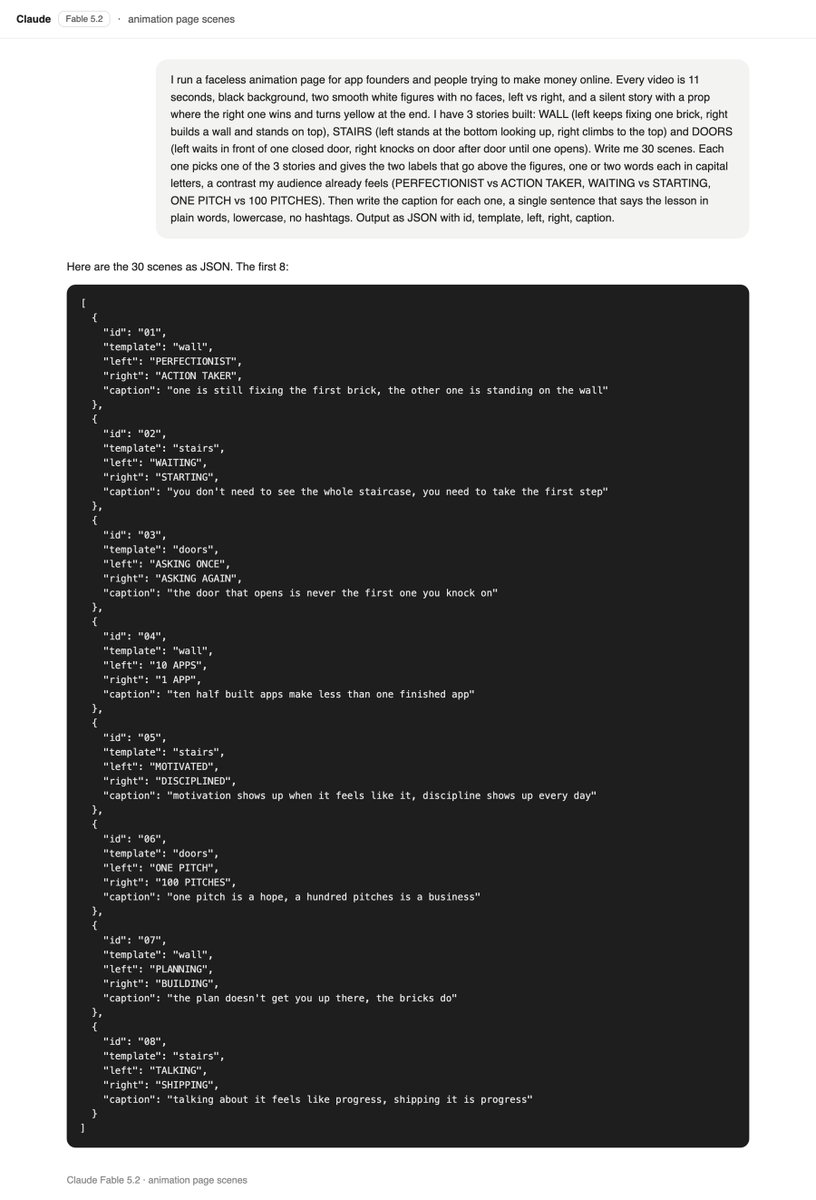
the Claude Fable 5.2 chat with the prompt and the first 8 scenes of the output
Here are 3 of the 30 it gave me:
-
WALL, PERFECTIONIST vs ACTION TAKER, "one is still fixing the first brick, the other one is standing on the wall"
-
STAIRS, WAITING vs STARTING, "you don't need to see the whole staircase, you need to take the first step"
-
DOORS, ASKING ONCE vs ASKING AGAIN, "the door that opens is never the first one you knock on"
I kept all 30 even though not all of them are great, because at this point you don't know which contrasts are going to hit and the page is going to tell you in a week anyway.
Step #4: Have Fable 5.2 build the animation
This is the part everyone thinks is hard, and to be honest it is, but not because of the code.
Getting an animation out of Claude is easy, getting YOUR style out of it is not, you have to have a clear picture of what you want the video to look like before you type a single prompt.
Then you put your frame next to the one you're copying, fix one thing at a time, and keep going until every video on the page looks like the same person made it, and that part is manual and you have to be very involved in it.
It took me most of the afternoon, but it's the only part that works like this, because once you have the style you never do it again, every video after that is the same script with different labels.
You describe the style and the 3 stories to Claude and it writes a script that makes the videos, you run it once and from then on every new video is the same script with different labels.
The exact prompt:
"Write me a Python script that renders 11 second 1080x1920 30fps videos in this exact style: pure black background, two smooth white figures with no faces made of thick rounded capsules with a thin dark rim around them so they look 3D, a round head, a soft white glow around each figure, and a faint blurred reflection of everything under the floor line like black glass. Above each figure a short label in bold spaced out capital letters. Build 3 story templates. WALL: the left figure kneels over one brick and keeps adjusting it with a small red tool, the right figure stacks a brick wall row by row for 7 seconds then climbs on top of it. STAIRS: the left figure stands at the bottom with a hand on his chin looking up, the right figure climbs one step per second to the top. DOORS: the left figure stands in front of one closed door the whole time, the right figure walks door to door knocking until the fourth one opens with yellow light. In every template, at second 9 the winner turns yellow (figure and label) and raises both arms, the loser stays white. The bricks have a visible top face and a darker side so they look like real blocks. Small watermark at the bottom. Read a JSON file of scenes with template, left, right and render one mp4 per scene with ffmpeg. Use PIL only, no other libraries."
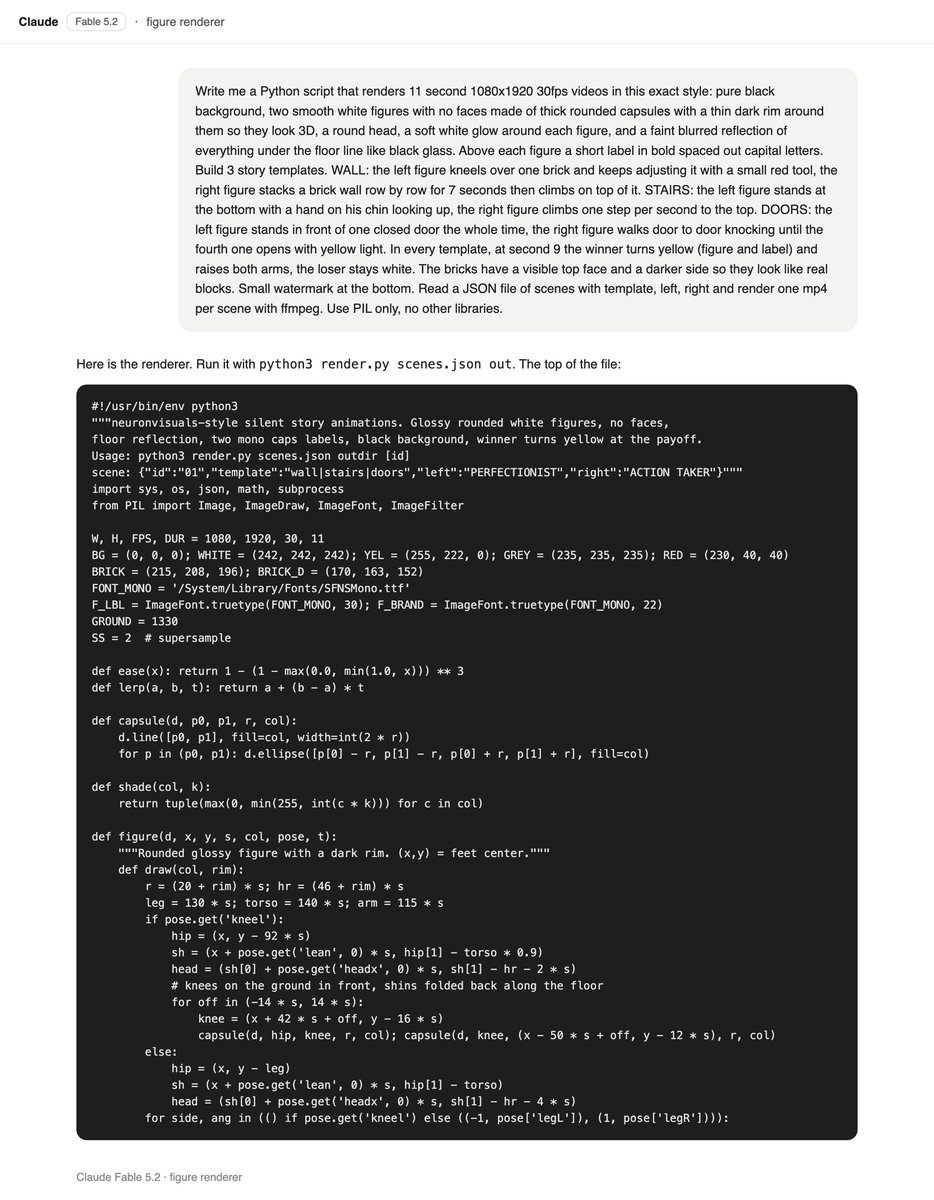
the script Claude wrote, the top 40 lines
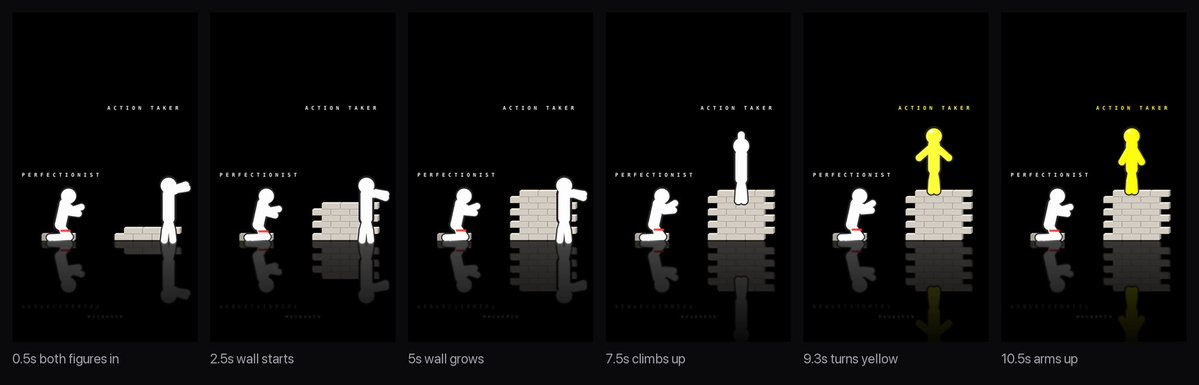
6 frames from the WALL video: both figures in, the wall grows, the climb, yellow at 9 seconds, arms up
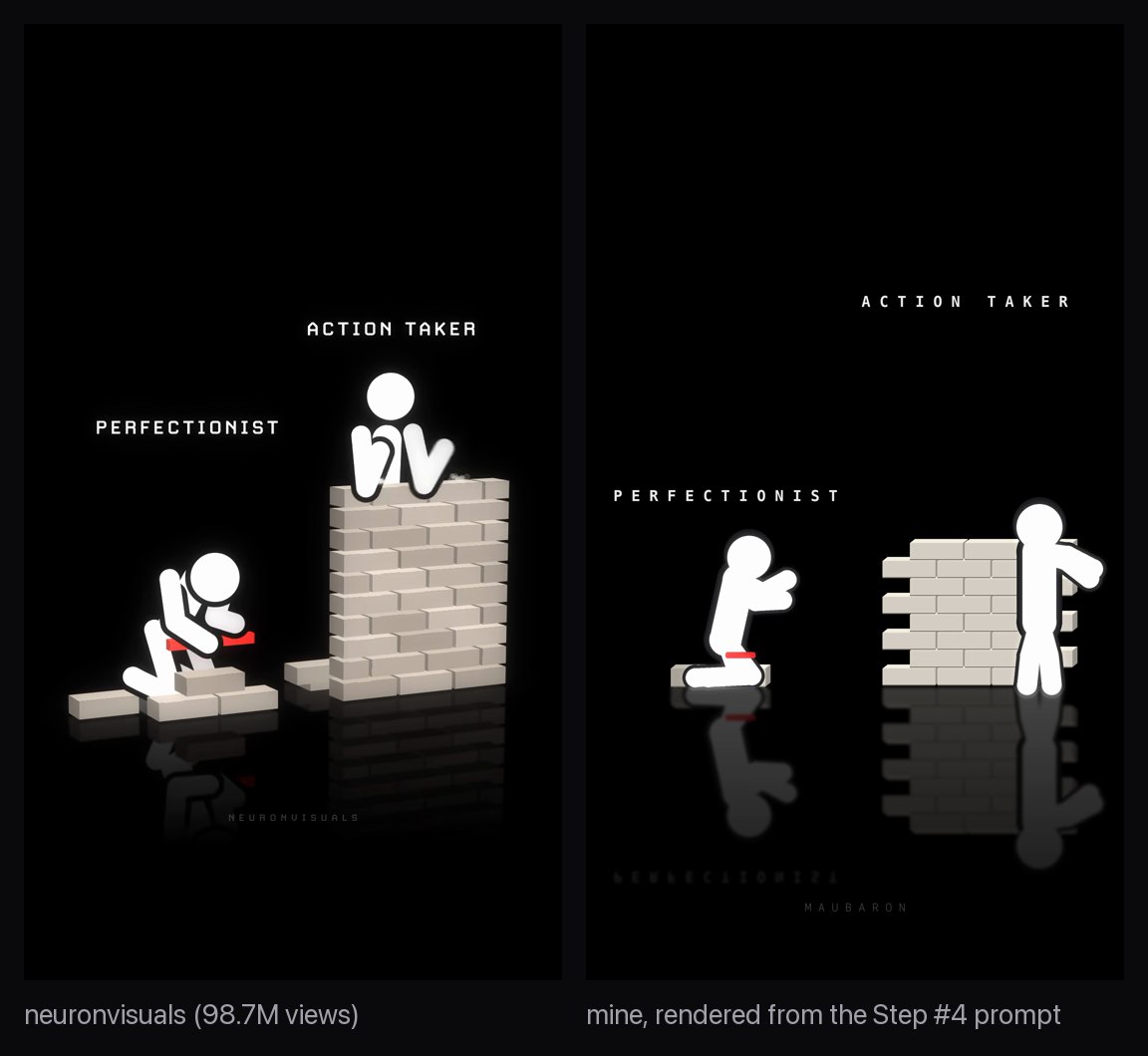
their frame on the left, mine on the right, same story rendered from the Step #4 prompt
It took one prompt and a couple of rounds of fixes next to the original videos (the figures were too thin, the labels were sitting on the heads, the glow was lighting up the bricks), which is normal,
you put your frame next to theirs and fix the biggest difference until you can't tell them apart, and rendering one video takes 2 to 3 minutes on a MacBook.
Step #5: Render the whole batch at once
Once the script works you only touch the JSON, and the only time you go back to the script is when you ask Claude to add a new story so the page feels new.
To run it you need Python on your computer, Claude gives you the install commands if you ask, then you open a terminal and run one line and Claude tells you which one.
One more tip, when you ask Claude for the script add "render 6 videos at the same time", that is what made my batch finish in 13 minutes.
I put the 30 scenes in one file and ran it once, and it gave me 30 videos of 11 seconds each in about 13 minutes.
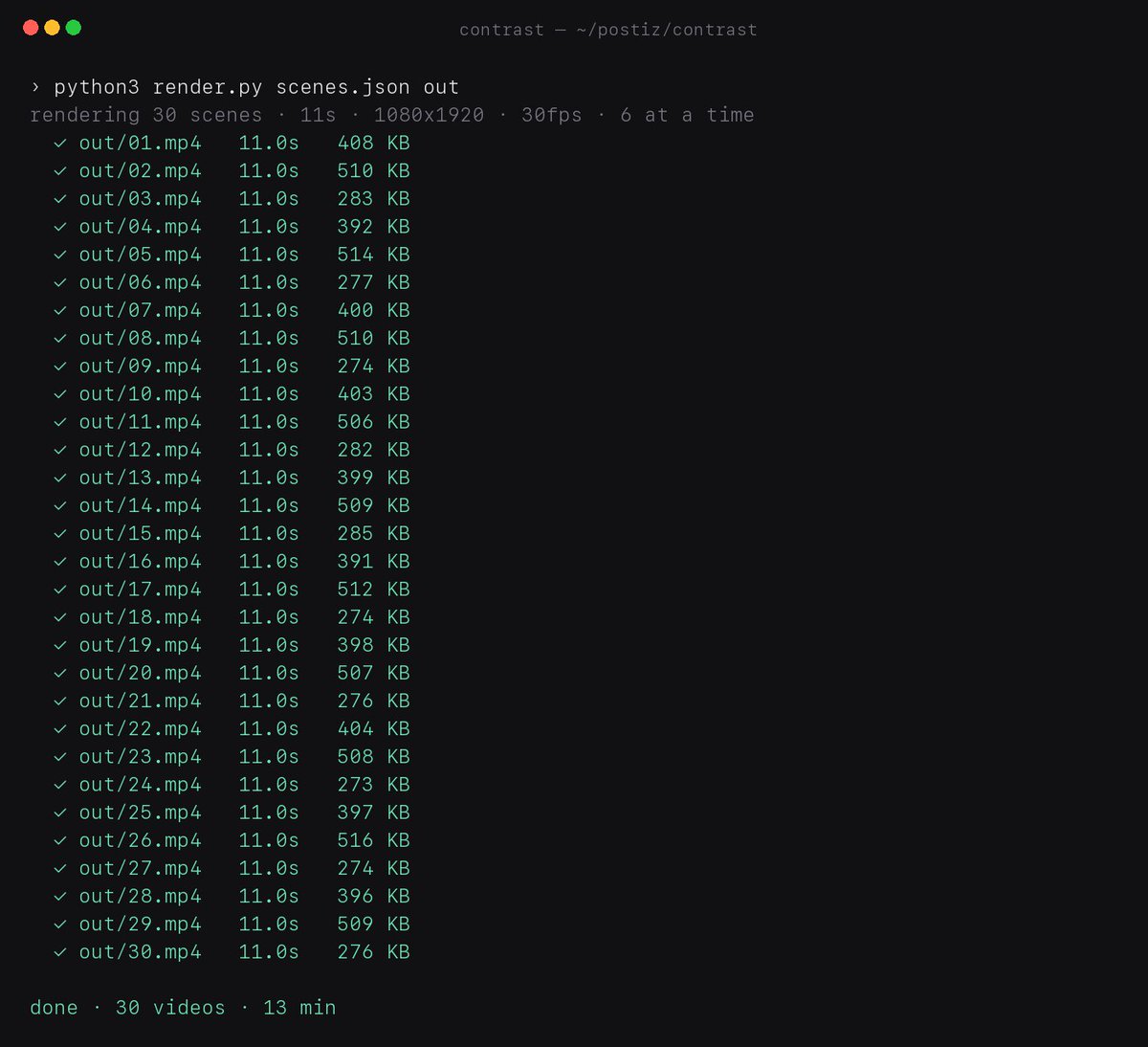
the terminal after the run, 30 files in 13 minutes
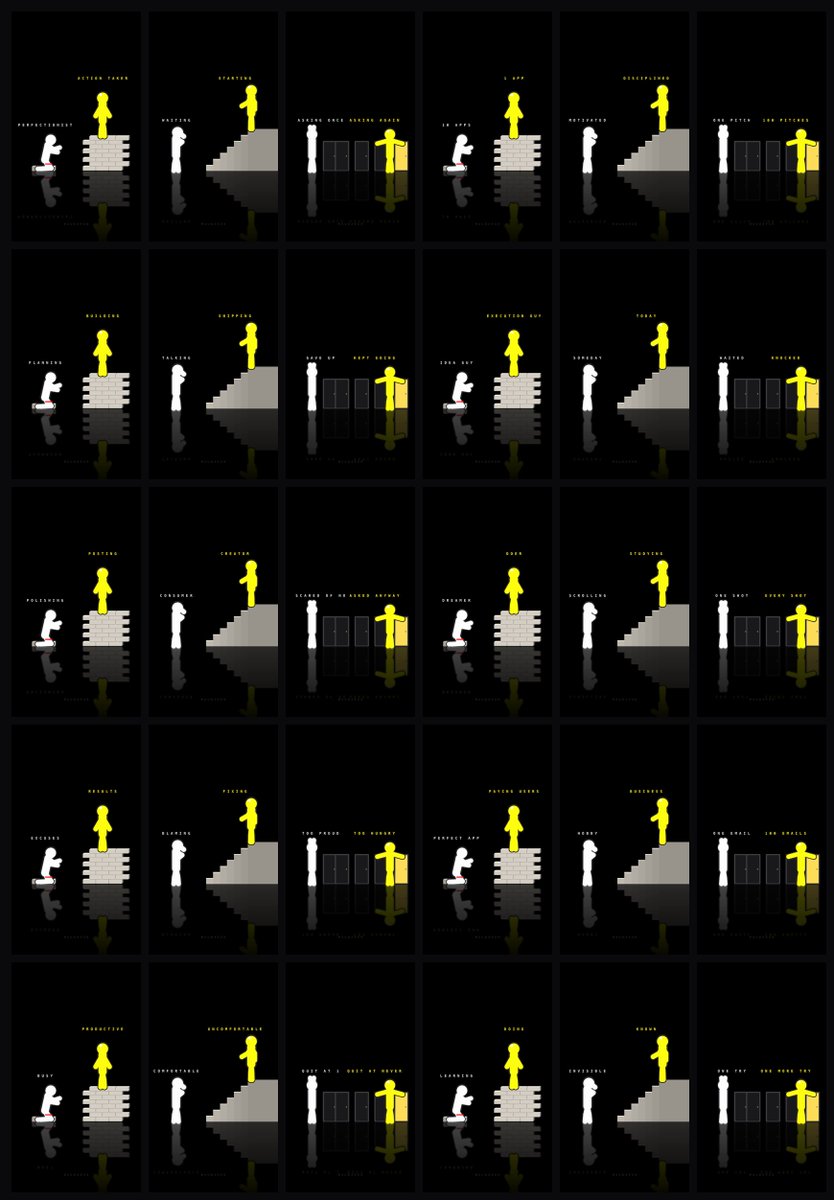
the 30 videos at the moment the winner turns yellow
To put this in perspective, a creator you hire to film short videos for your brand charges $500 to $1,000 for 60 videos a month,
and this made 30 videos in 13 minutes with nothing but the Claude subscription I already pay for.
Step #6: Check the first 3 seconds of every video
Don't skip this.
I watch the first 3 seconds of every video, that's all anyone watches before they decide to keep scrolling,
and I look for 3 things: both figures are on screen and doing something by the first second, the labels are readable on a phone, and nothing is broken (a label touching a head, a figure walking off the frame).
Step #7: Captions and sound
The caption has three parts, first the one sentence lesson Claude already wrote in the JSON for that scene, then one question to get people commenting, then a closing line that matches how you plan to make money in Step #10,
for example the course pitch neuronvisuals uses or your app name.
For the sound, go back to the account you copied in Step #2, open their top 3 videos and use the same sounds, because they already tested those sounds for you.
A scheduler can't pick a trending sound for you, so the 3 scenes I think are strongest I post from the Instagram app myself with the sound from the account I copied,
and the other 27 go out through Postiz with a free music track I downloaded and asked Claude to add to every video in the script.
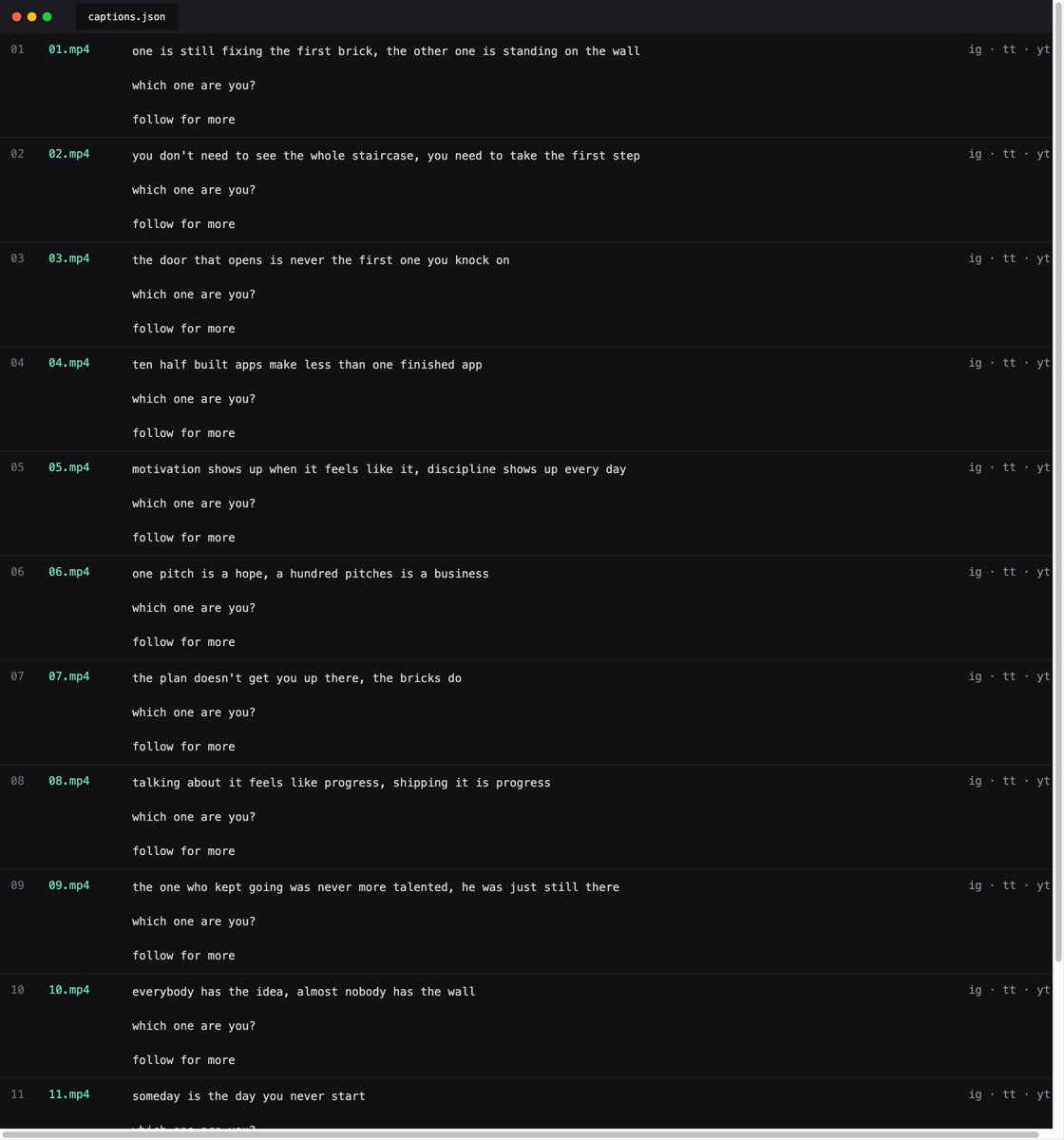
the captions file, the first 12 of the 30 rows
Step #8: Schedule all of them with Postiz
Once the 30 videos are ready the last thing I want to do is upload and schedule every one of them by hand.
The pages that grow fastest post 1 to 3 times a day on Instagram, TikTok and YouTube Shorts, and doing that by hand is a waste of time,
I use a tool that lets you schedule posts to all of your social accounts from one calendar, it's called Postiz.
The first time I did this I uploaded the 30 videos once, picked the 3 accounts and spread them across the calendar, 3 a day at the hours the account I copied posts at, which covers 10 days.
After that the Monday batch from Step #9 keeps the calendar full and I never sit down for more than an hour.
This is also what makes running several formats at once possible, every page I open is just one more account in the same Postiz calendar, so 3 pages is the same hour of work as 1.
The caption goes in once per video and the same post goes out to Instagram, TikTok and YouTube at the same time, so 10 days of posting is done in one sitting.
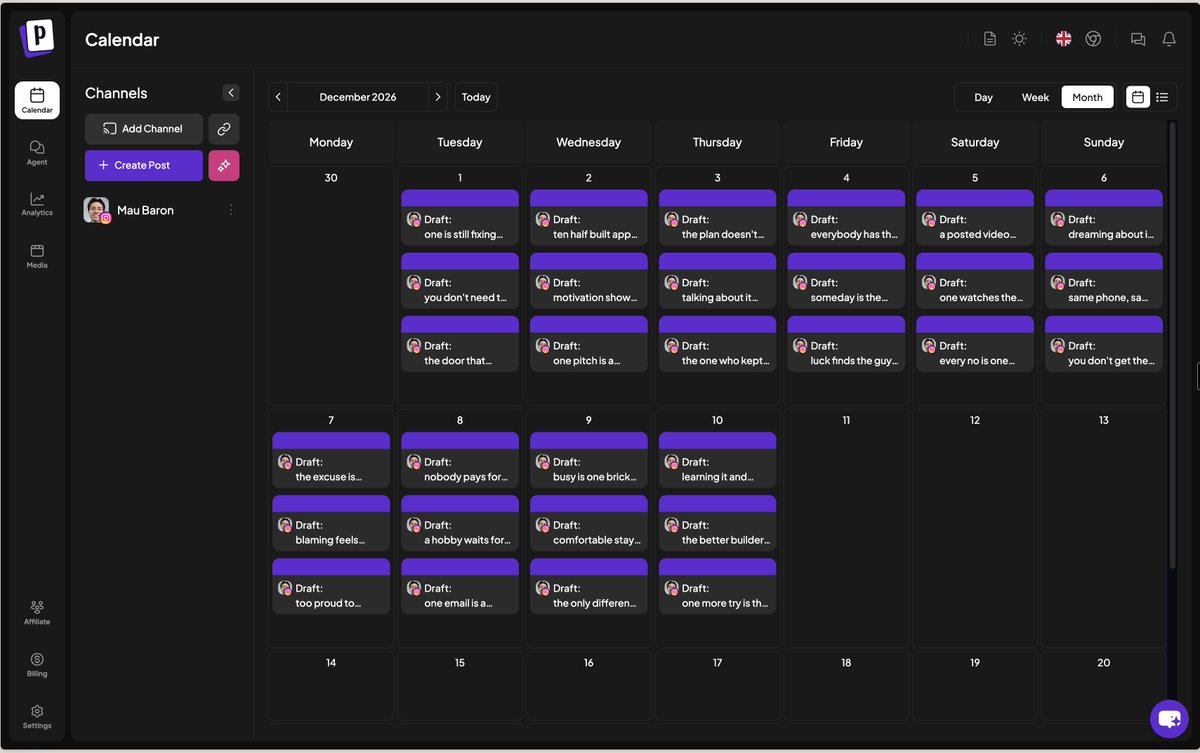
the Postiz calendar after the first upload, 30 videos, 3 a day for 10 days, all waiting for approval
And you don't even have to fill the calendar yourself, because Postiz plugs into Claude, you connect the two once at claude.ai/directory/postiz and from then on the whole thing is one message:
"Take the 30 videos in the folder I just shared and the captions file next to them, the caption for each video is the row with the same number. Schedule them on my Instagram, TikTok and YouTube Shorts accounts starting tomorrow, 3 a day at 9am, 2pm and 7pm my time, in order from 01 to 30 so every day gets one wall, one stairs and one doors video. Same caption on all 3 platforms, no hashtags. Leave every post as a draft so I can approve them from the calendar, and when you're done tell me which day the last one lands on so I know when to render the next batch."
I still look at the calendar before anything goes live, but I don't fill it by hand anymore, and that's the whole reason a page like this can run on an hour a week.
Step #9: Read the numbers every Monday
The views tell you which scenes work, you just have to look at them every week.
Every Monday I pull the views per video. The format is so simple that the only things that change between videos are the two labels and the caption, so the top 3 are telling you exactly which contrasts your audience feels the most.
I send those 3 back to Fable 5.2 with the same prompt from Step #3 and one extra sentence: "these three did the most views, write me 10 variations of each that keep the same contrast." Then I render them, schedule them and do it again next Monday.
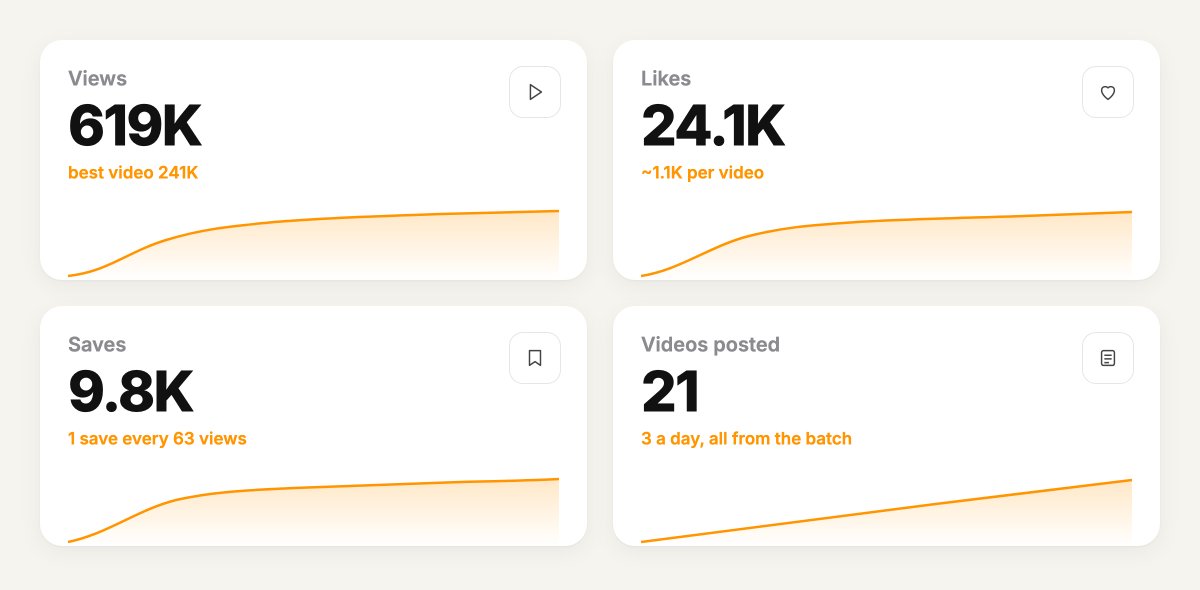
That loop is the entire page, there's no editing and there's no filming, which is why one person can run 3 of these at the same time.
Step #10: Turn the views into money
Views by themselves mean absolutely nothing, so this is the step that actually matters, and every account in the image at the top of this article does it differently.
- Sell the system. @neuronvisuals sells a 72 lesson course on how to make the animations and a "work with us" monthly plan where they make the videos for brands.
@agentpoly sells a $29 guide and a $69 studio kit that includes the code. @ashutoshwithclaude turned the videos into a tool where you type one line and it makes the reel for you.
In all 3 cases the videos are what gets people to follow the page and then they sell those followers the way they make the videos.
- Platform money. Minute Zero is the YouTube channel I mentioned in Step #1, 9 minute "what if" animations, 22.7K subscribers at the time of the YouTube Studio screenshot the owner posted (23.5K today), 5.9M views and $17.8K in estimated ad revenue in 28 days.
Keep in mind Shorts pay far less per view than long videos, so if you're on YouTube make the 9 minute version too.
- Make them for companies. Every brand with a social team needs 3 posts a day and has nobody to make them.
This is literally what the "work with us" plan on neuronvisuals is, and 5 companies at $1,000 a month is $60k a year, and the page you already run is what you show them to close the deal.
- Put your app on the last frame. This is what we did with our app, the last 2 seconds say the app name, the caption has the app name and you watch the downloads next to the views.
neuronvisuals alone says the format has done over a billion views, and adding your app name under the yellow winner in the last 2 seconds costs you nothing.
- The personal brand. @charles.zhengg went from 1K to 150K followers in two weeks and is at 325K now with 26 posts, and he's building a company on top of it.
If you're the face, people follow you and not the format, so later you can sell them your own app, course or service without starting over.
Any one of these gets a page to a few thousand a month and sometimes a lot more, Minute Zero did $17.8K in 28 days on ads alone, but the pages that pass $20k/month stack two of them, the course plus the companies, or the ads plus the app.
What I still do myself
There are 4 things I still do myself every week and they take me about an hour.
I set the style, and this is the hardest part of the whole page and the one thing you can't automate, Claude can make you an animation in a minute but deciding what it looks like and keeping it the same across every video is on you.
I read the scenes, knowing which contrasts my audience actually connects with is something Claude is not good at doing.
I approve every video before it gets scheduled, which is 3 seconds each or 90 seconds for a batch, and that same check on the test renders is what caught the labels on the heads and the climber walking off the frame before I rendered the 30.
I pick the niche and the account to copy.
Everything else happens without me, Claude writes the scenes, the script renders the videos and Postiz posts them, and the only thing I open on Monday is the views page to pick the top 3.
The whole system
-
Pick faceless, face on or the mix
-
Find the account already winning in your niche and write down what the top 10 have in common
-
Fable 5.2 writes 30 scenes from one prompt
-
Fable 5.2 writes the animation script, then you iterate next to the original until it has your style
-
Render the batch in one go.
-
Check the first 3 seconds of each
-
Write the caption from the lesson in the JSON and use the same sound as the account you copied
-
Schedule 3 a day on every platform with Postiz
-
Read the views on Monday and make 10 variations of the top 3
-
Pick how you make money: sell the system, platform ads, make them for companies, your app on the last frame or the personal brand
The whole thing took me an afternoon to set up and it takes me about an hour a week to run it.
Most people are going to read this and go back to scrolling the pages instead of building one.
People aren't doing this because they still think animation costs money, and it doesn't anymore, the only thing stopping you now is sitting down for one afternoon.
Go make money.
Drop any questions below, I'll try to answer all of them.
Try Postiz here: postiz.pro/maubaron
Thank you Postiz for sponsoring this article.
沿着这个主题继续读
从一篇文章,找到相关的教程、经验和阅读路径。