The internal tool that helped one designer build Agent Controls in three weeks
文章目录
部分视频或图片暂未收录,已在正文保留提示;需要时可查看原文。查看原文 ↗
In November we launched Mercury Agent Controls, which give our customers clear visibility into and control over what their AI agents do in their Mercury account. What’s not obvious from the announcement is that one designer carried most of the work from idea to launch in just three weeks.
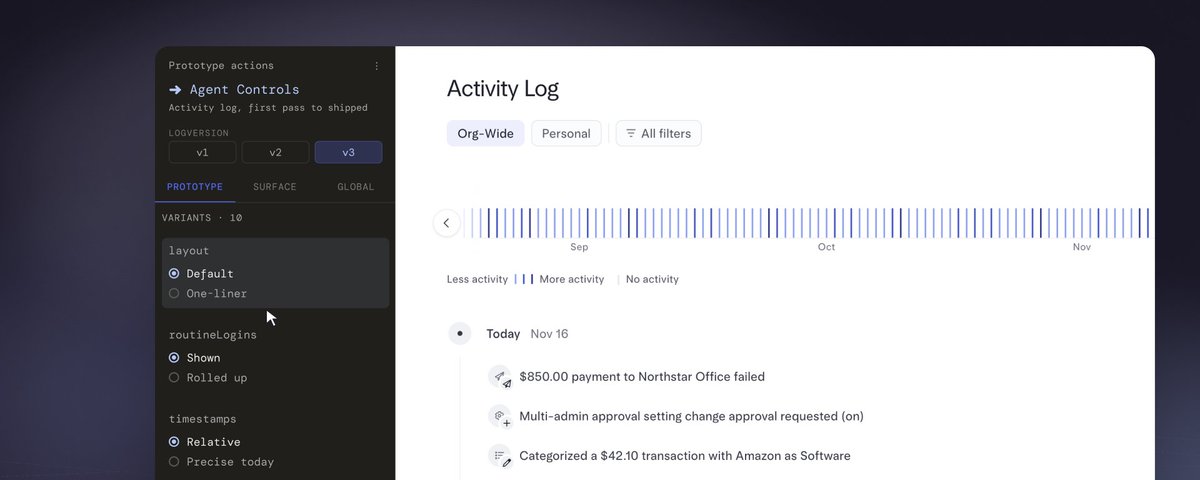
A big reason she could move that fast is Builder Mode, the prototyping tool we built in house. Builder Mode lets designers and PMs work with their coding agent right in Mercury’s product code, so their prototypes look and behave like the product our customers use. From a panel in the browser, they can switch between versions, user states, and feature flags; collect feedback right on the prototype; and send it to the agent to act on. When an idea is ready, engineers build from the same code instead of starting over.
That means anyone at Mercury can turn an idea into a working prototype in minutes and share it with a link.
**
The challenge of building for hundreds of states**
Before Builder Mode, we didn’t have a golden path for prototyping close to production. What we had was a sandbox that looked like our app without being the real thing. It helped us move fast, but it cost us in quality and made it hard to go from prototype to shippable work.
On the other side of the spectrum, a designer who wanted to prototype closer to production had to find an engineer, ask a favor, and then spend hours setting up a full stack dev environment. That left them with a massive system running on their machine and a slow workflow to ideate with. Getting set up took two to three hours on a good day, and plenty of attempts ended in failure.
Neither path let designers see the product the way customers do, in all the states it can be in. Every enterprise product holds more states than a design canvas can carry. An account can be new, frozen, under review, over a limit, or waiting on someone else’s approval, and even a mature design system won’t know about any of that.
The sandbox couldn’t show those states, and the full dev setup was too slow to explore them. We knew we needed a better way for designers to prototype.
**
How we built Builder Mode**
Builder Mode started as a feedback problem. We wanted designers prototyping in our product code, but setup kept failing them and we couldn’t always see what went wrong. So we had agents play designers, run a standard set of prototyping tasks, and show us where they got stuck. Setup was our first challenge, then other friction points kept coming up, and each round of evals shaped the next version.
Hundreds of eval runs showed where context helps. Agents picked Mercury’s components when they had targeted guidance, and a visual self check caught bugs they’d miss reading just the code.
What came out of those runs is three pieces that sit on top of the coding agents designers already use.
A toolkit of agent instructions and skills
The toolkit lets Claude Code, Codex, or Cursor set up Mercury’s frontend on mock data, switch versions and states, and run checks the same way every time. Versions and variants sit side by side in one prototype, so designers can compare directions without switching branches. Because prototypes live in GitHub as draft PRs, teammates can branch from each other’s work or from an engineer’s.
States, flags, and mock data
States and flags cover the screens we already know about, and mock data covers everything else. We’re starting to connect that mock data to a mock database so the product acts the way it does for a customer.
Ask for a freshly approved company and you get one, with every page showing what a new customer would see, empty states included, without anyone designing them screen by screen. Ask for an employee who’s halfway through onboarding, switch to the admin view, and come back, and their progress is still there. Teams will be able to save setups like a bill pay company or a treasury company so the next person doesn’t have to rebuild them.
Tapes
Our AI agent needed its own version of this, and we call it a tape. A tape is a saved conversation with the agent that plays back in the product. The moments designers spend the most time on usually come several messages into a conversation, and the model won’t answer the same way twice, so getting back to the same spot can take a lot of careful steps.
With a tape, anyone can open a link to the whole conversation or any point inside it. If you open a payment that’s waiting for approval, you can still approve or reject it and go from there. And because errors and timeouts can be tapes too, designers get to work on what happens when something breaks.
Why we didn’t buy it
Vibe coding had been around long enough that initially we figured someone had already solved this. Plenty of tools promise to open up prototyping for enterprise teams, and they’re great for a green field concept or a marketing site. But for Mercury they don’t get close to the quality we hold ourselves to or the velocity we need at our scale. Most off the shelf tools build you a new app, and the best of them hand the agent your UI kit and stop there. That gets the right component onto a superficial view of your product without any context into how the product works.
We wanted a setup that understood our existing codebase, integrated with the tools designers already use, and folded naturally into how we build at Mercury. More importantly, we didn’t want prototyping to create more design debt or keep slowing the move from design to build, so the code had to be usable to hand off to engineers. None of the prototyping products on the market met our needs, so we built our own.
**
Now all of Mercury can prototype**
Builder Mode started as a way for designers to iterate right in the same code we ship. Now PMs, PMMs, data scientists, and engineers use it too. Designers and PMs have built over 300 prototypes on it so far.
A recent redesign of our accounts pages shows why this matters for the divergent part of design ideation. In two days, one designer had several versions of the page, a few takes on its key sections, and a handful of account states to test them against, like business or personal banking, whether a card has a balance, and whether there are linked accounts. Some of those states came with Builder Mode and she prompted her way into the rest. That’s roughly 200 views in one prototype, each a click away with its own link she can send to her team. In a design file she’d have to draw every one of those frames and keep them in sync.
Agent Controls shows what that looks like on a real launch. One designer worked as the designer, PM, and engineer. She started the direction in Builder Mode, moved it toward production, and shipped it three weeks after the first idea.
Each session feeds back into our evals, and we evolve the setup based on what we learn from the team using it every day. The tools keep getting more specific to Mercury every week, and the whole company now has a shared way to make product ideas tangible, test them, and build on one another’s work. We don’t have to trade craft for speed anymore. The ceiling now is how much context your agents have.
It’s been exciting to see Builder Mode take off internally, and I can’t wait to see what the team builds next.
**
Want to work on problems like this?**
Mercury is hiring. Check out our careers page.