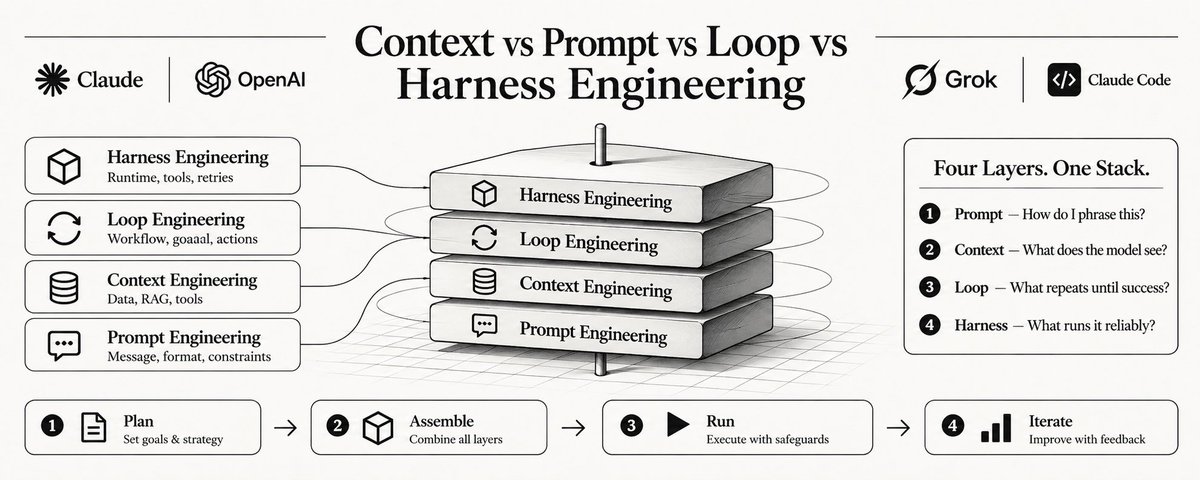
Context vs Prompt vs Loop vs Harness Engineering: The Four-Layer Agent Stack
文章目录
部分视频或图片暂未收录,已在正文保留提示;需要时可查看原文。查看原文 ↗
Prompt, context, loop, and harness engineering are four different layers. This guide maps the stack, shows where each lever lives, and links to deep dives on Claude Code, MCP, and production agent design
Context engineering, Loop engineering, Harness engineering = upgrades to "Prompt engineering"
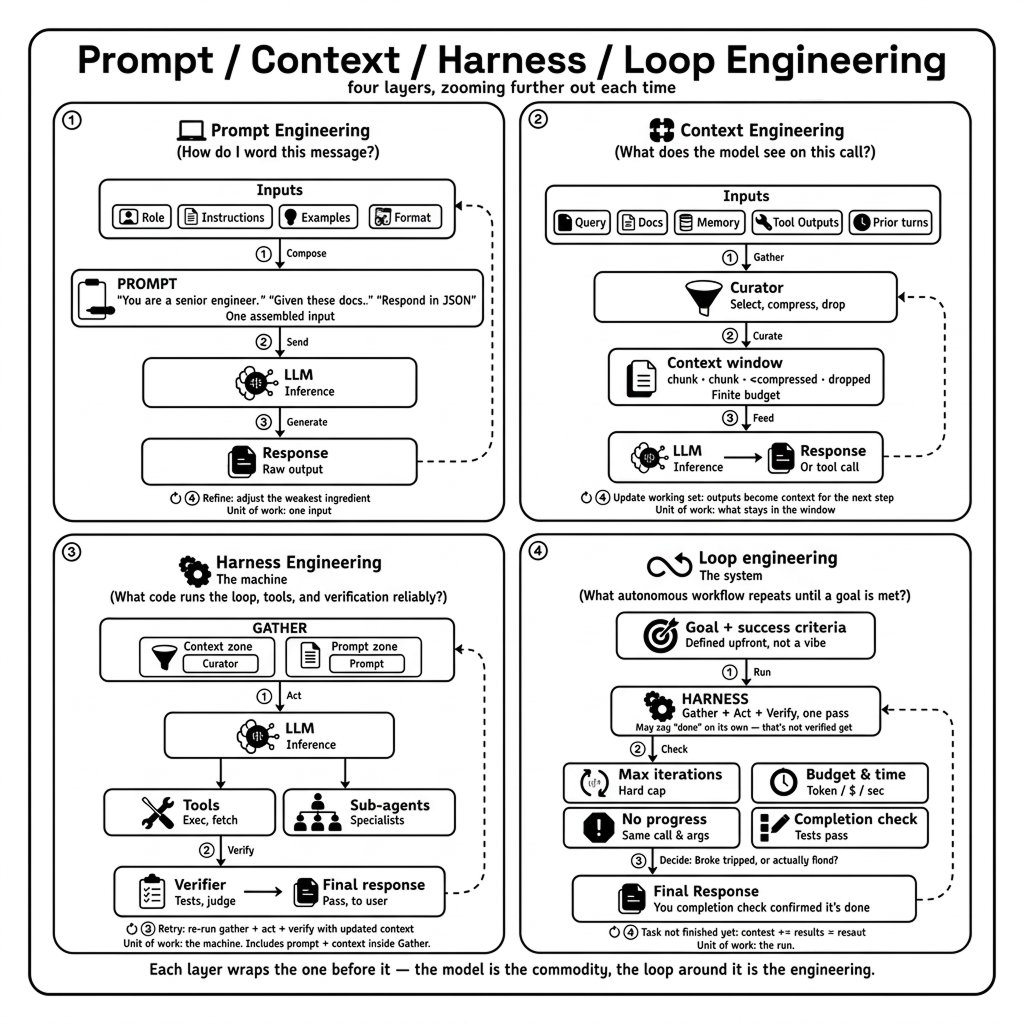
They are not interchangeable. They are four layers of the same stack, each with different units of work, failure modes, and tools
-
Prompt engineering asks: How do I word this message?
-
Context engineering asks: What does the model see on this call?
-
Loop engineering asks: What autonomous workflow repeats until a goal is met?
-
Harness engineering asks: What code runs the loop, tools, and verification reliably?
Confusing them is expensive. A team that rewrites prompts when the harness has no verification step will never fix silent failure loops. A team that builds a sophisticated harness with vague goals will burn tokens forever
The same model can also consume radically different token totals across harnesses, but token count alone is not a quality score
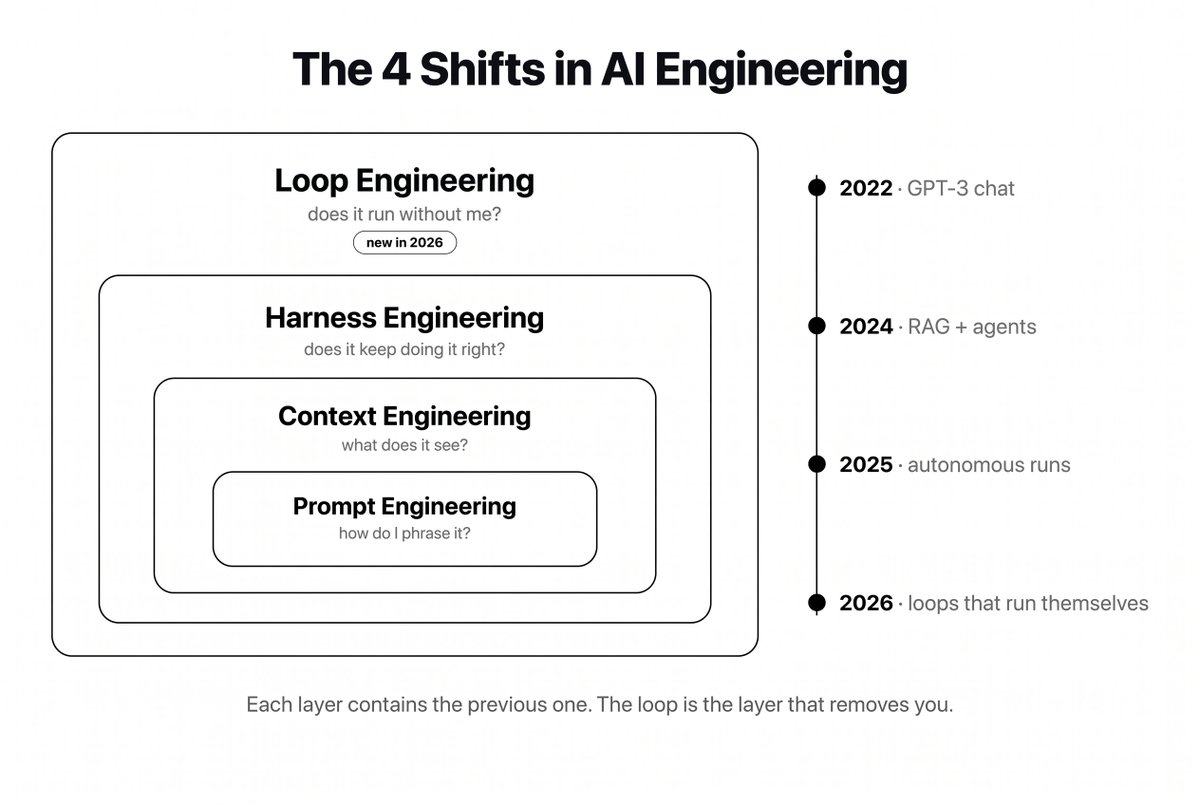
This guide maps the full stack - with diagrams, diagnostics, and detailed visuals
01. TL;DR - the four layers at a glance
| Layer | Unit of work | You design… | Typical artifacts | When it dominates |
|---|---|---|---|---|
| Prompt | One message | Wording, format, CoT, few-shot | System prompt text, user template | Single-turn tasks, prototyping |
| Context | One model call | Full context package | CLAUDE.md, RAG chunks, tool list, history prune rules | Multi-turn agents, RAG, cost control |
| Loop | Entire run | Trigger → goal → verify → memory | /goal, cron, Agent View, triage specs | Autonomous coding, scheduled agents |
| Harness | Runtime execution | Tool sandbox, retries, checkpoints | Claude Code, LangGraph, custom orchestrator | Production reliability, benchmarks |
Nesting rule: Harness implements loops → each loop step assembles context → context contains prompts
02. The stack diagram
┌─────────────────────────────────────────────────────────────┐
│  HARNESS ENGINEERING                                        │
│  Runtime: tool exec, sandbox, retries, checkpoints, logs    │
│  ┌───────────────────────────────────────────────────────┐  │
│  │  LOOP ENGINEERING                                     │  │
│  │  Workflow: trigger, goal, actions, verification, memory │  │
│  │  ┌─────────────────────────────────────────────────┐  │  │
│  │  │  CONTEXT ENGINEERING (per iteration)            │  │  │
│  │  │  Assembly: history, RAG, tools, CLAUDE.md, MCP  │  │  │
│  │  │  ┌───────────────────────────────────────────┐  │  │  │
│  │  │  │  PROMPT ENGINEERING (messages inside)     │  │  │  │
│  │  │  │  Wording: role, format, constraints, CoT  │  │  │  │
│  │  │  └───────────────────────────────────────────┘  │  │  │
│  │  └─────────────────────────────────────────────────┘  │  │
│  └───────────────────────────────────────────────────────┘  │
└─────────────────────────────────────────────────────────────┘
         ▲                              ▲
         │                              │
    Boris Cherny:                  Andrej Karpathy:
    "build loops"                  "context engineering"
    (loop + harness)               (context + prompt)
Boris Cherny about self-verification loops:
Boris Cherny: "Two of the most powerful features in Claude Code: /loop and /schedule":
Andrej Karpathy about "context engineering":
Think of it like web development:
| Agent stack | Web analogy |
|---|---|
| Prompt | Copy on a single button label |
| Context | Full page layout + data fetched for this view |
| Loop | User journey / multi-step checkout flow |
| Harness | Browser, server, DB, auth, error handling |
03. Layer 1 - Prompt engineering (innermost)
Boris Cherny: "I am surprised that people are surprised this is how I prompt Claude."
Definition: Optimizing the text of individual messages, usually the system prompt and current user turn, to elicit better model behavior
Techniques: Chain-of-thought, few-shot examples, role assignment, JSON schema instructions, temperature and sampling controls, system prompt structure
Unit of work: One message pair (system + user) or one turn in a chat
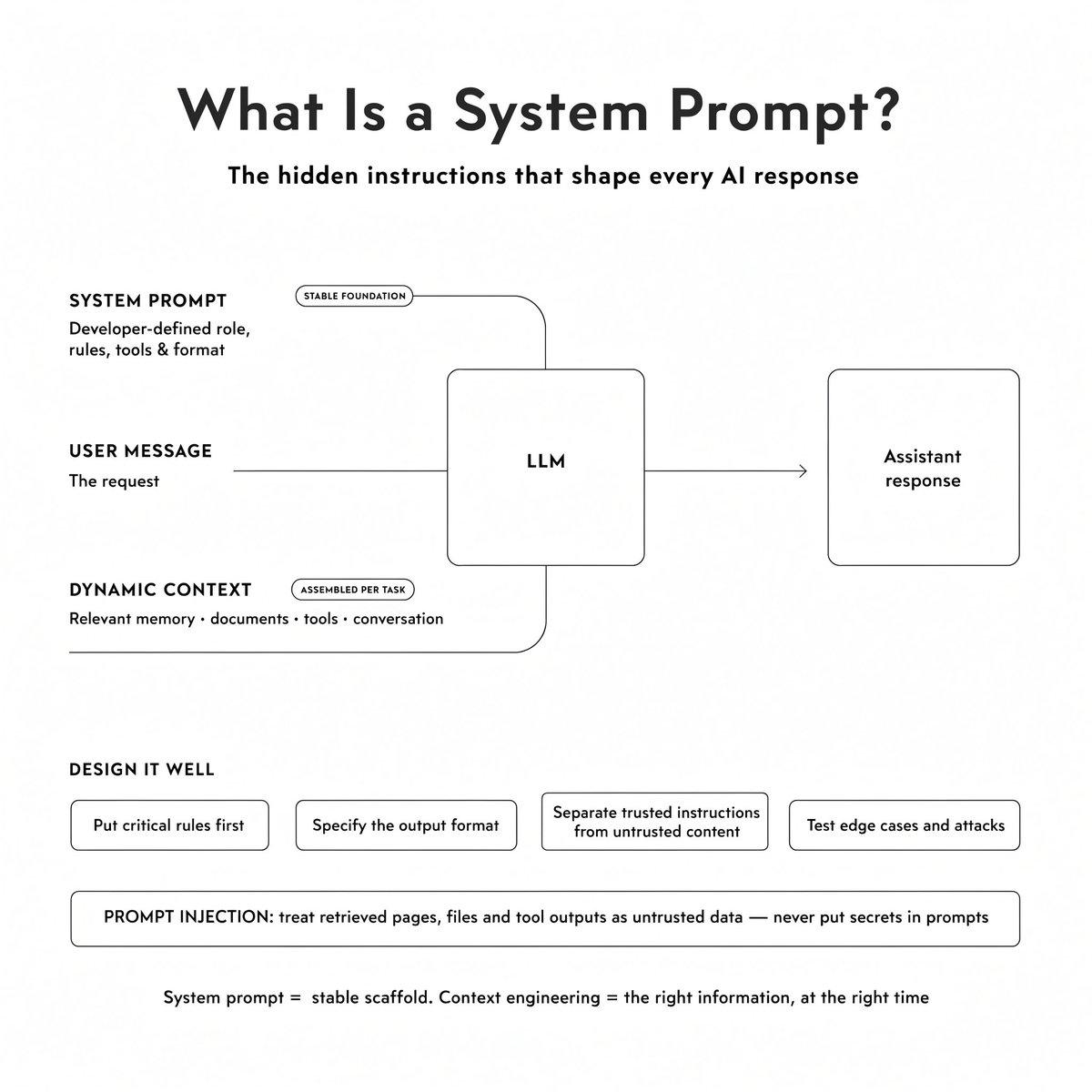
Example - prompt-level fix:
Before (vague):
Summarize this doc.

After (prompt-engineered):
You are a staff engineer writing release notes for developers.
Output: 3 bullets, each ≤25 words, past tense, no marketing language.
If the doc lacks version numbers, say "Version unclear" — do not invent one.
That improves a single call when the right document is already in context.
When prompt engineering is enough:
-
One-shot translation, classification, or formatting
-
Early prototyping before you know the workflow shape
-
Failures are clearly about misunderstood instructions, not missing files
When it is not enough:
-
The model "doesn't know" your codebase → context problem
-
The task needs 40 tool calls → loop problem
-
Tool calls hang or duplicate writes → harness problem
context vs prompt engineering:
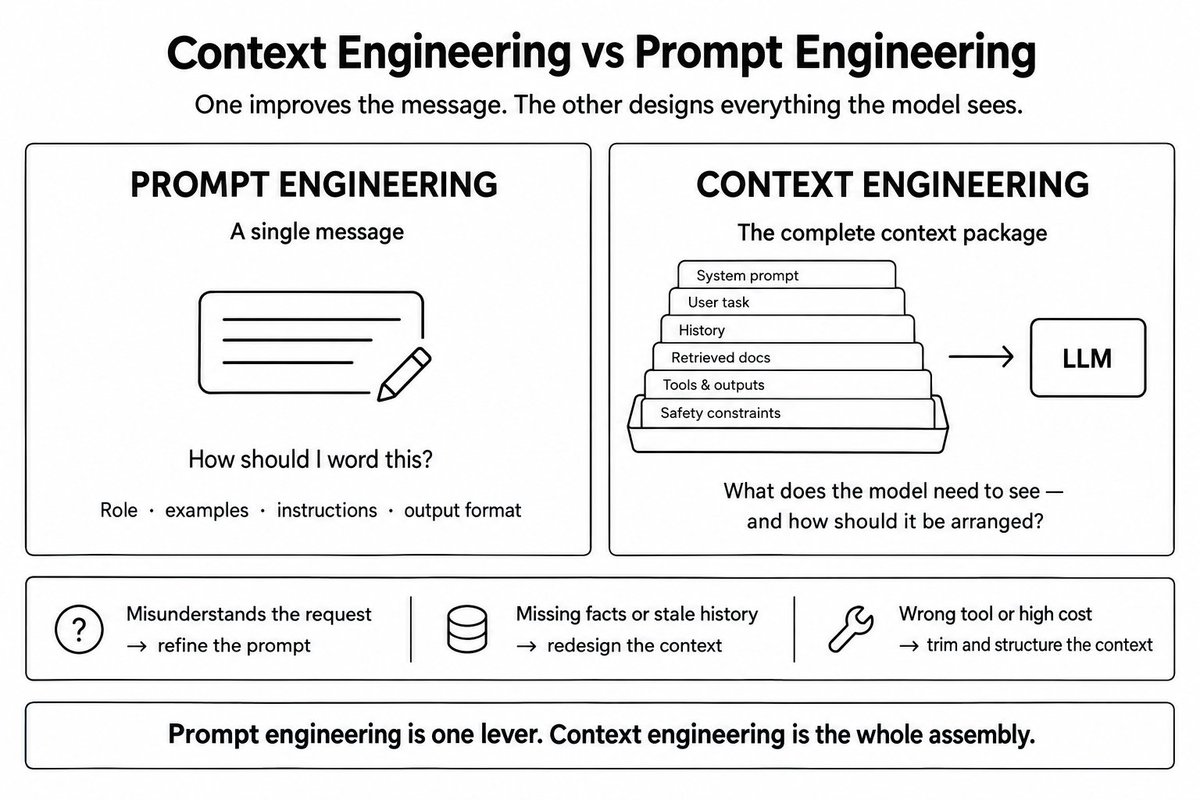
04. Layer 2 - Context engineering (per call)
Definition: Designing the full package the model conditions on for each API call
In mid-2026, Karpathy popularized the idea that the real challenge lies in curating the context window:
What lives in the context package
| Component | Context decision | Not a prompt decision |
|---|---|---|
| System prompt | Yes (wording) | Also placement — constraints at top |
| Conversation history | — | Keep, summarize, or drop turns |
| Retrieved docs | — | Which chunks, how many tokens |
| Tool definitions | — | Expose 3 tools or 30? |
| Tool outputs | — | Full stdout vs truncated summary |
| CLAUDE.md | — | Always-loaded project rules |
| SKILL.md | — | Load on trigger only |
| MCP results | — | Live data injected at query time |
The four context levers
-
Content selection = does this token earn its place?
-
Structure and ordering = constraints first; docs before user message
-
Token budget = protect budget for variable content
-
Cache placement = stable prefix (system + tools) before cache breakpoint
Example - context-level fix (same user message)
[SYSTEM — always loaded]
Project: [........]. Package manager: pnpm. Tests: pnpm test --filter web.
Never edit apps/mobile without explicit ask.

[RETRIEVED — grep hit, apps/web/lib/pathway-data.ts, lines 40-95]
{relevant_snippet_only}

[TOOLS — this task only]
Read, Edit, Bash(pnpm test:*)

[USER]
Fix the failing pathway progress test.
The user message is boring on purpose. Quality comes from what surrounds it
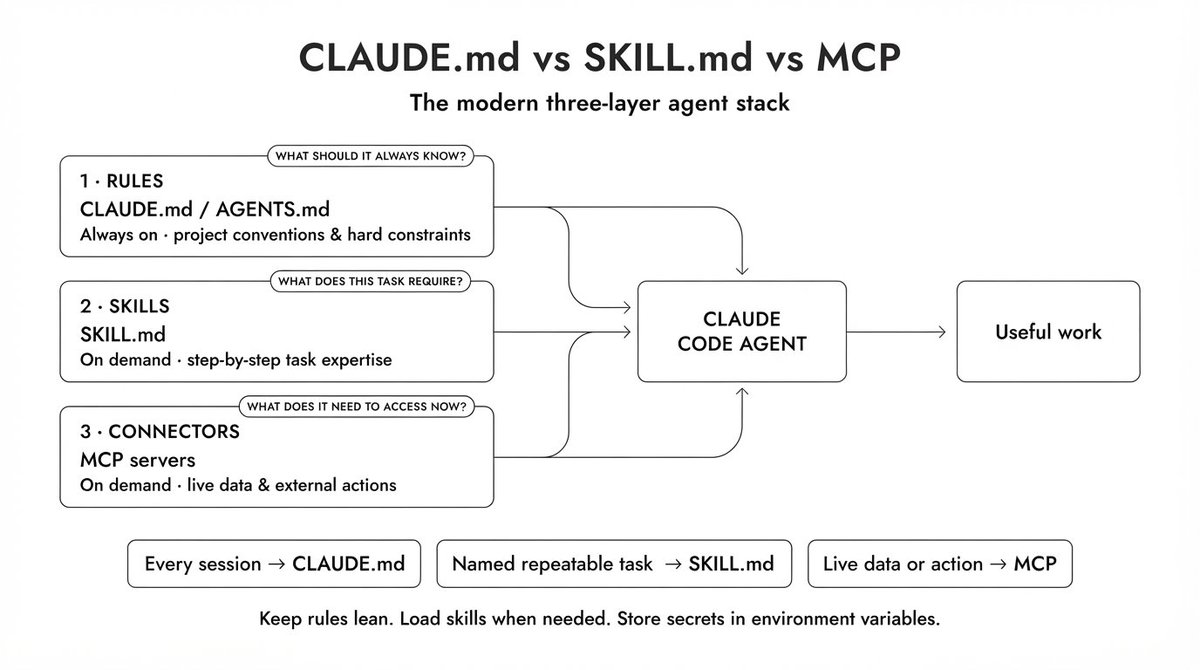
Context engineering surfaces in Claude Code:
| Surface | Layer | Loads when |
|---|---|---|
| ~/.claude/CLAUDE.md | Context | Every session |
| ./CLAUDE.md | Context | Project session |
| SKILL.md | Context | Task trigger |
| MCP servers | Context + Harness | Tool call time |
| Context Mode / sandbox MCP | Context + Harness | Isolated file reads |
Full stack breakdown:
When context engineering dominates
-
RAG pipelines and codebase Q&A
-
Sessions beyond ~10 turns (history pollution)
-
Tool-selection errors (too many tools exposed)
-
Cost/latency (200k context that should be 40k)
05. Layer 3 - Loop engineering (workflow)
Definition: Designing the autonomous workflow that decides when to call the model, what goal must be satisfied, and how to know the run is done without you typing each turn
Addy Osmani popularized loop engineering in June 2026, building on Boris Cherny at Anthropic:
"I don't prompt Claude anymore. I have loops that are running. They're the ones that are prompting Claude and figuring out what to do. My job is to write loops"
Addy Osmani's guide:
The loop still contains prompts = something generates them each iteration. You stop being that something
The five loop components
| Component | Question it answers | Bad design symptom |
|---|---|---|
| Trigger | What starts the run? | You still paste prompts manually |
| Goal | What verifiable state ends it? | Agent "finishes" but tests fail |
| Actions | What tools can it use? | Agent can't reach GitHub/DB |
| Verification | How do we check progress? | Infinite loops or premature stop |
| Memory | What persists across steps? | Re-reads same files, repeats edits |
Example - loop spec (not a prompt)
name: morning_p1_triage
trigger: cron "0 8 * * 1-5"
goal: zero open GitHub issues labeled P1 without assignee
actions: [github_mcp.list_issues, github_mcp.comment, github_mcp.assign]
verify: script checks assignee field on all P1 issues
memory: log file of triaged issue IDs this week
max_iterations: 20
human_gate: none  # read/write on issues only
No clever phrasing - workflow architecture
Loop engineering vs prompt engineering:
| Dimension | Prompt | Loop |
|---|---|---|
| Who drives turns | You | System |
| Duration | Seconds | Minutes to hours |
| Output | Text | Verified outcome |
| Leverage | 1× | 10–100× |
| Primary skill | Phrasing | Systems design |
When loops fail (and it's not the prompt)
| Symptom | Loop fix |
|---|---|
| Runs forever | Add max_iterations + no-progress detector |
| Stops after one file | Tighten goal; add test verification |
| Does wrong work confidently | Goal too vague — use verifiable criteria |
| Repeats same edit | Memory / checkpoint missing |
06. Layer 4 - Harness engineering
Definition: Building or configuring the orchestration code that executes loops: parsing model output, calling tools safely, managing retries, assembling context each turn, and enforcing exit conditions
Boris Cherny and Anthropic engineers use harness engineering for the systems that prompt Claude iteratively: observe, plan, act, reflect => over hours
Addy Osmani's guide:
The agent harness is the concrete artifact:
Goal in → context assembly → model call → parse → execute tools
       → capture results → verify → loop or exit → result out
Harness components
| Component | What it does | Loop vs harness |
|---|---|---|
| Task definition | Converts goal to first prompt | Loop designs; harness encodes |
| Context manager | Prunes history, injects memory | Context rules; harness implements |
| Tool executor | Sandboxed bash, MCP, file I/O | Harness |
| Loop controller | Iteration limits, exit signals | Harness |
| Verification | Runs tests, scripts, diff checks | Loop specifies; harness runs |
| Retry / checkpoint | Idempotent retries, resume | Harness |
| Observability | Logs, traces, cost meters | Harness |
Why harness beats model upgrades on benchmarks
LangChain's Deep Agents team reported gains on Terminal-Bench 2.0 from harness changes alone → same underlying model. The pattern generalizes:
Better harness on the same model > same harness on a better model - for many agentic tasks
Reason: the model only sees what the harness assembles and only gets the retries the harness allows
Products as harnesses
| Product | Harness features |
|---|---|
| Claude Code | Tools, hooks, permission modes, sessions, subagents |
| Cursor / Codex | IDE integration, model routing, agent modes |
| LangGraph | Stateful graphs, checkpoints, human-in-the-loop |
| OpenCode | Open-source coding agent harness |
| Custom | Your retry logic, your verification scripts |
07. How the layers interact on one real task
Task: "Migrate our auth module to Clerk and make all tests pass."
Prompt layer:
Migrate auth to Clerk. Make tests pass.
Works for a toy repo. Fails on a monorepo in one shot
+ Context layer
-
Load CLAUDE.md with package manager, test command, auth file map
-
Retrieve only apps/web/lib/auth/* via grep - not whole repo
-
Expose Edit + Bash(test) tools only
Each iteration of the agent sees a sane package
+ Loop layer
trigger: developer runs /goal
goal: pnpm test --filter web exits 0 AND auth routes use Clerk SDK
verify: test command + grep for legacy auth imports
max_iterations: 50
memory: PROGRESS.md updated each checkpoint
Agent runs until verified → not until it says "done"
+ Harness layer
-
Sandbox bash; block rm -rf
-
Hooks run lint after every edit
-
Checkpoint git stash every 10 turns
-
Retry transient API failures
-
Log token usage per step
-
Human gate before editing production env files
Production shipping requires all four
08. Diagnostic - which layer is broken?
Use this when an agent underperforms:
| Symptom | Likely layer | First fix |
|---|---|---|
| Model misunderstands instruction wording | Prompt | Rewrite system prompt; add few-shot |
| Model lacks facts not in prompt text | Context | Add RAG, CLAUDE.md, or file read |
| Model ignores constraints mid-session | Context | Move constraints to top; repeat before user msg |
| Wrong tool selected | Context | Reduce tool surface; improve schemas |
| Quality degrades after turn 15 | Context | Summarize/prune history |
| Never completes task | Loop | Add verifiable goal + test verification |
| Completes but wrongly | Loop | Strengthen verify step |
| Repeats same action | Loop | Add memory + no-progress detector |
| Duplicate emails / double writes | Harness | Idempotent retries, checkpoints |
| Hangs on subprocess | Harness | Timeouts, kill switches |
| Can't debug what happened | Harness | Structured logging, traces |
Fix bottom-up within a layer, outer layers first across layers: if verification never runs, no prompt edit helps
09. The 2026 career map
| Role focus | Primary layers | Secondary |
|---|---|---|
| Content / marketing AI | Prompt, Context | — |
| Support bot with KB | Context, Prompt | Loop (escalation) |
| Internal coding assistant | Context, Loop | Harness (CI integration) |
| Autonomous coding agent | Loop, Harness | Context |
| Platform / agent infra | Harness | Loop, Context |
Prompt engineering is table stakes → like knowing SQL if you build backends
Context engineering is required for any agent that reads your data
Loop engineering is required when you want autonomy measured in hours, not seconds
Harness engineering is required when failure has a cost → money, data, reputation
10. Practical learning path
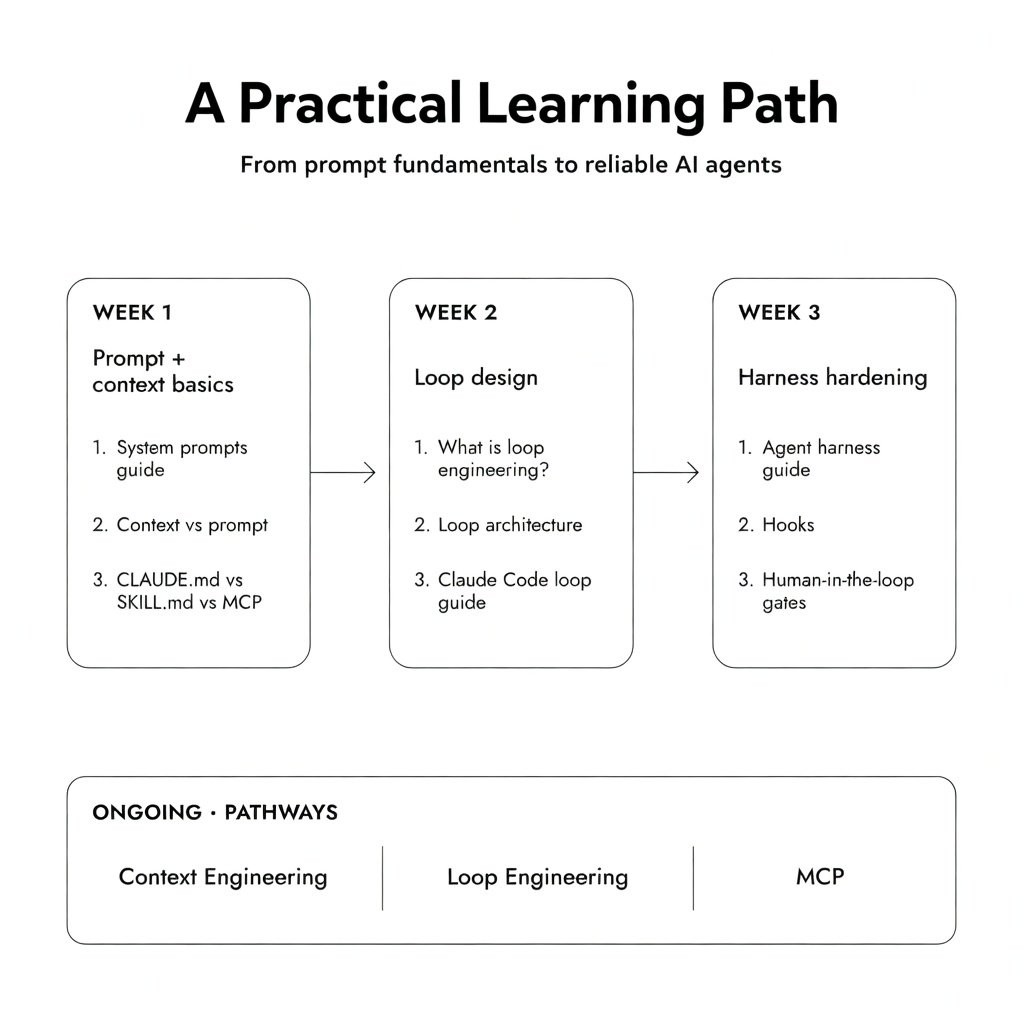
Bottom line
Prompt, context, loop, and harness engineering are not four names for the same job
They are four layers of one stack:
-
Prompt = message wording
-
Context = per-call assembly
-
Loop = autonomous workflow
-
Harness = reliable execution
Karpathy named the context crisis. Cherny named the loop shift. Production teams name the harness when benchmarks move without new models
When someone says "we need better prompts" on a long-running agent, ask: "Which layer is actually failing?"
The answer determines whether you edit a paragraph, redesign retrieval, rewrite the goal spec, or fix retry logic
Get the layer right → then optimize inward
Save this so you don't lose it
***Follow @beamnxw for more alpha ***
*=> *my substack
*=> *my telegram channel
=> my youtube
=> my github