The Go Concurrency Mental Model I Wish I Had on Day One.
文章目录
You can write a goroutine. You can open a channel. But do you know why they work?
When I started learning Go concurrency, I did what most people do. I read the docs, watched a tutorial, and nodded along like I understood everything. Then I sat down to write my own concurrent code and realized I did not actually understand why any of it worked. I knew the syntax but not the reasoning behind it. I could type go func() and wg.Wait() and ch <- 42 but I could not tell you what was actually happening under the hood, or why one tool was correct and another would silently break.
This article is the collection of every doubt I actually had while learning. The small ones. The embarrassing ones. The ones I was almost afraid to ask because they seemed too basic. If you are a beginner who feels like you are mixing up WaitGroups and channels and mutexes and defer, this is for you. I am going to walk through all of it slowly, with examples and real life analogies, and by the end I hope you will have the same mental model I finally built.
Let me start from the very beginning.
*If you want a cleaner reading experience,read at *https://vedantworks.com/blogs/the-go-concurrency-mental-model-i-wish-i-had-on-day-one
Part 1: What does go actually do?
Forget all the fancy concurrency theory for a second. Look at this tiny program:
You might expect this to print both lines. But run it and you will often see only:
func main() {
    go fmt.Println("hello from goroutine")
    fmt.Println("hello from main")
}
Where did the goroutine go? Why did its message disappear?
Here is what is actually happening. The go keyword does not call the function. It does not run it and wait for it to finish. What it does is schedule the function to run separately, on its own, in the background, and then the caller continues immediately. The word go means "start this on its own, I am moving on."
So in this program, main schedules the print, then immediately prints its own line, then returns and the program exits. The goroutine was still getting ready when main finished. When main exits, the entire program terminates and every remaining goroutine is killed instantly. The goroutine never got a chance to print anything.
This is the single most important thing to internalize about goroutines. They are fire and forget. The caller does not wait. Nothing is blocking. If you do not explicitly make main wait for the goroutine, main will not wait.
Every concurrent Go program has to answer the same question: who is responsible for waiting? If nothing waits, the program exits and all the work your goroutines were doing gets thrown away. That is the problem that WaitGroups, channels, and every other synchronization tool exist to solve.
Part 2: defer, the cleanup tool you need to understand first
Before we talk about WaitGroups, I need to explain defer because you cannot understand WaitGroup idioms without it. Every single WaitGroup example in the wild uses defer, and if you do not know what it does, the code looks like magic.
The simple definition: defer schedules a function call to run when the surrounding function returns. Not now, not immediately, but at the very end, no matter how the function exits. Whether it returns normally, returns early, or panics, the deferred call will run.
func greet() {
    defer fmt.Println("goodbye")
    fmt.Println("hello")
}


Output:

hello
goodbye
Notice the order. Even though defer fmt.Println("goodbye") appears first in the source code, it runs last. That is because defer postpones the call until the function is about to return. It is like saying "before you leave this function, do this thing for me."
The main use case is cleanup. When you open a resource, you want to close it. When you acquire a lock, you want to release it. When you launch a goroutine tracked by a WaitGroup, you want to decrement the count. All of these follow the same pattern: do the setup, defer the teardown, do the work. If anything goes wrong during the work, the teardown still happens.
func readFile() {
    f, err := os.Open("data.txt")
    if err != nil {
        return
    }
    defer f.Close()
    // ... read from f
}
Without defer, you would have to call f.Close() at every exit point of the function. If you forget one, the file descriptor leaks. If you add an early return later and forget to update the close calls, the file leaks. defer eliminates this whole class of bugs by attaching the cleanup to the function scope rather than to every individual exit path.
There are a few gotchas worth knowing. First, if you have multiple defers, they run in reverse order. Last deferred, first to run. This is called LIFO, last in first out.
func example() {
    defer fmt.Println("first deferred")
    defer fmt.Println("second deferred")
    defer fmt.Println("third deferred")
}


// Output:
// third deferred
// second deferred
// first deferred
Second gotcha: the arguments to a deferred function are evaluated immediately, not when the deferred call actually runs.
x := 1
defer fmt.Println(x)
x = 99
// prints 1, not 99
The value of x is captured at the moment you write the defer statement, not when the function actually exits. For wg.Done() this does not matter because there are no arguments. But it matters for closures.
Third gotcha: putting defer inside a loop defers everything to the end of the enclosing function, not to the end of each iteration. If you write:
for i := 0; i < 5; i++ {
    defer fmt.Println(i)
}
All five prints happen at the end of the function, in reverse order. Not what you might expect.
Now, why is defer so important for WaitGroups? Because of this pattern:
func worker(wg *sync.WaitGroup) {
    defer wg.Done()
    // do work
}
If the worker panics, defer wg.Done() still runs. If the worker returns early because of an error, defer wg.Done() still runs. The count always gets decremented, no matter what happens. Without defer, you would have to remember to call wg.Done() on every single exit path, which is impossible to get right in a real function with multiple branches.
Now we can talk about WaitGroups properly.
Part 3: WaitGroups, the full story
A WaitGroup is a counter with three operations: you add to it, you subtract from it, and you wait for it to reach zero.
The three methods are Add, Done, and Wait. In older Go code you see them everywhere:
var wg sync.WaitGroup

for i := 0; i < 5; i++ {
    wg.Add(1)
    go func() {
        defer wg.Done()
        // do work
    }()
}

wg.Wait()
What is happening here step by step. The Add(1) increments the counter by one. The go func launches the goroutine. The defer wg.Done() schedules a decrement for when the goroutine finishes. So the counter starts at five (one for each goroutine) and decrements to zero as each finishes. The wg.Wait() blocks the main goroutine until the counter reaches zero.
The counter is what makes this work. Add(1) says "I just launched one goroutine, count it." Done() says "one goroutine finished, subtract it." Wait() says "block until the counter is zero, which means every goroutine I counted has finished." Once the count is zero, Wait returns and main continues.
In Go 1.25 there is a newer, cleaner API called wg.Go:
var wg sync.WaitGroup

for i := 0; i < 5; i++ {
    wg.Go(func() {
        // do work
    })
}

wg.Wait()
wg.Go(func) is functionally identical to:
wg.Add(1)
go func() {
    defer wg.Done()
    f()
}()
Same three operations, just bundled into one safe call. You cannot forget to call Done. You cannot call Add too late. It handles the whole pattern for you. If your Go version is 1.25 or newer, use wg.Go. If you are on an older version or reading code from an older codebase, you will see the manual Add and Done pattern everywhere, so you need to understand both.
Now the golden rules. These are the ones that bite beginners.
Rule one: always pass *sync.WaitGroup as a pointer, never a copy. WaitGroup contains internal state. Copying it copies the counter, and the copy's counter never gets updated. If you pass sync.WaitGroup by value to a function, you are incrementing and decrementing a copy that has its own separate counter, and the original never learns anything. Always *sync.WaitGroup. go vet catches this for you if you forget.
Rule two: Add must happen before the go. If you call Add inside the goroutine, the race is between Add and Wait. Wait might see the counter at zero before Add even runs, and return early.
// WRONG
go func() {
    wg.Add(1)
    defer wg.Done()
    work()
}()
wg.Wait() // could return before Add

// RIGHT
wg.Add(1)
go func() {
    defer wg.Done()
    work()
}()
wg.Wait()
Rule three: always use defer wg.Done(). If you skip the defer and just call wg.Done() at the end, a panic in the middle will skip the decrement and Wait will hang forever.
Rule four: never reuse a WaitGroup before Wait returns. If you call Add while Wait is blocked, the behavior is undefined. Use a fresh WaitGroup for each phase, or wait for the current one to fully return before reusing.
Rule five: a WaitGroup carries no errors. Done has no return value. If a worker fails, main has no idea. For error propagation, you use a different tool (more on that in a moment).
Those five rules cover 95 percent of the WaitGroup bugs you will ever write.
Now for the crucial part that took me the longest to get. WaitGroup is not the only way to make main wait. Channels can do it too. And in fact, a channel receive is often all you need. But to understand why, you first need to understand what a race condition actually is.
Part 4: What a race condition actually looks like
This is the piece I want to walk through carefully, because understanding this is what made the WaitGroup vs Mutex distinction click for me.
Here is a program that looks correct and is not:
var wg sync.WaitGroup
counter := 0

for i := 0; i < 1000; i++ {
    wg.Go(func() {
        counter++
    })
}

wg.Wait()
fmt.Println(counter)
You launch a thousand goroutines. Each increments the shared counter by one. You wait for all of them. Then you print. The expected answer is 1000.
But the actual answer is often not 1000. It is usually something like 987 or 1000 or 843 or 951, and it changes every time you run the program. This is a race condition, and it is the kind of bug that will destroy your sleep if you do not understand it.
Here is why it happens. counter++ looks like one operation. It is not. Under the hood, it is three operations:
-
Read the value of counter from memory into a register.
-
Add one to the register.
-
Write the new value from the register back to memory.
Between any of those three steps, another goroutine can run. This is the key point. The Go scheduler can pause a goroutine between the read and the write, run another goroutine, and then resume the first one. From the perspective of any single goroutine, its own increment is atomic. But from the outside, two goroutines can be in the middle of their increments at the same time.
Here is a trace of what happens with just two goroutines, showing how one increment can vanish.
Goroutine A starts:
-
A reads counter and gets zero.
-
(Scheduler pauses A)
Goroutine B runs:
-
B reads counter and gets zero. It is still zero, because A has not written yet.
-
B adds one and has one.
-
B writes one. Now counter is one.
-
(Scheduler resumes A)
Goroutine A resumes:
-
A adds one to the value it read, which was zero. A now has one.
-
A writes one. Now counter is one.
Result: counter is one. Two increments happened but the final value is one. One increment was lost.
The same thing happens at scale with a thousand goroutines. Many pairs of goroutines read the same value before either has written, and each pair loses an update. Sometimes two goroutines read at just the wrong moment and both write back the same result. Multiply this across a thousand goroutines and the final value is a random number somewhere below 1000.
This is the mental model I want you to carry. The counter++ is not atomic. It is a three step dance that looks atomic from inside one goroutine. When multiple goroutines are doing this dance at the same time, their steps interleave in unpredictable ways, and updates get lost.
Here is the analogy I like. Imagine a thousand people in a room with a whiteboard showing a number. Each person must do three things: look at the number, add one in their head, and write the new number on the board. If person A looks and sees five, and person B looks at the same moment and also sees five, they both compute six and both write six. The board shows six instead of seven. One increment disappeared, even though both people did their jobs correctly. They just could not see each other's in progress work.
Part 5: Mutex, the lock
The fix for the race condition is a mutex. sync.Mutex is a lock. Only one goroutine can hold it at a time. When you want to touch shared data, you lock first, do your work, then unlock.
var mu sync.Mutex
counter := 0

for i := 0; i < 1000; i++ {
    wg.Go(func() {
        mu.Lock()
        counter++
        mu.Unlock()
    })
}

wg.Wait()
fmt.Println(counter) // always 1000
Now every increment is protected. When goroutine A locks, goroutine B blocks at its own mu.Lock() until A unlocks. Then B takes the lock and increments. Then C. The three step dance of counter++ is now atomic from the perspective of all other goroutines. They cannot read counter between A's read and A's write, because A is holding the lock.
Run this a hundred times and you will always get 1000. That is the signature of a correct concurrent program. Same answer every time.
The idiom is defer mu.Unlock():
mu.Lock()
defer mu.Unlock()
counter++
If counter++ panics, the unlock still happens. If you add more code later and one branch returns early, the unlock still happens. Without defer, a forgotten unlock is a deadlock. Every other goroutine waits forever for a lock that never gets released.
Now here is where the confusion sets in, and it is the exact confusion I had. Why not just use a WaitGroup to fix this? We already have a WaitGroup that waits for all the goroutines. Why is that not enough?
Part 6: Why WaitGroup cannot fix a race condition
This is the question I asked myself and it is the right question. The answer is about what each tool actually guarantees.
A WaitGroup answers one question: are all the goroutines finished? That is it. It says nothing about what the goroutines were doing while they were running. It says nothing about whether they touched shared data safely. It just tracks completion.
A Mutex answers a completely different question: is it safe for me to touch this shared data right now? It says nothing about completion. It just serializes access.
The race condition on counter happens while the goroutines are running, not after they finish. By the time wg.Wait() returns, the damage is already done. The goroutines have finished, but some increments got lost during execution. The WaitGroup did its job perfectly. It waited for all goroutines to finish. The problem is that the goroutines corrupted the counter while they were running, and the WaitGroup cannot prevent that.
Here is another way to see it. Imagine a bank with ten tellers all updating the same account balance at the same time. A WaitGroup is like the branch manager at the end of the day saying "are all tellers done, yes, okay, let us print the final balance." That is great, but it does not stop the tellers from stepping on each other while they work. A Mutex is like a single physical ledger on the desk that only one teller can use at a time. Now the tellers take turns updating safely. You want both: tellers take turns (mutex) and the manager waits for everyone before reporting (waitgroup). But they are solving different problems.
What if you use a WaitGroup in a way that serializes the goroutines? Something like launching one goroutine, waiting for it, then launching the next? That technically avoids the race, but it destroys concurrency. You have paid the cost of goroutines but gained none of the benefit. You are running everything sequentially. You might as well not use goroutines at all. The mutex is better because it only serializes the tiny critical section (the counter++), not the whole goroutine. Everything else in each goroutine still runs in parallel.
The clean rule I now use: WaitGroup is for knowing when everyone is done. Mutex is for making sure shared data is safe while they are working. Different problems, different tools, often used together.
Part 7: Channels, the other way to communicate
Now let us talk about channels. A channel is a typed pipe between goroutines. You send on one end and receive on the other. The syntax is ch <- value for send and x := <-ch for receive.
The crucial property of channels is this: a send blocks until someone receives. A receive blocks until someone sends. That is the entire magic of channels. They are synchronization built into the language.
Here is the tiny example every tutorial shows:
ch := make(chan int)
go func() {
    ch <- 42
}()
x := <-ch
fmt.Println(x) // 42
Walk through what happens in time.
Main creates an unbuffered channel. Main launches a goroutine. The goroutine tries to send 42 and blocks, because nobody is receiving yet. Main reaches x := <-ch and blocks, because the goroutine has not sent yet. Now both are waiting. The scheduler matches them up: the send and the receive complete together. The goroutine wakes up and continues, main wakes up with the value 42, and prints it.
This is why it is called a handshake. Both sides have to meet at the same point in time. Neither can proceed alone.
Notice there is no WaitGroup here. And this is the insight that took me the longest to get. Why no WaitGroup? Because the receive already blocks. Main cannot proceed to fmt.Println(x) until the goroutine has sent 42. The receive itself is the wait. Adding a WaitGroup would be redundant. You would be waiting twice for the same thing.
So here is the rule I want you to internalize. A WaitGroup is needed when nothing else is forcing main to wait. A channel receive is a wait that is built into the operation. If you are already receiving from a channel, you do not need a WaitGroup on top. The receive is doing the work.
This changes how you choose between the two tools. Ask yourself: does main have a natural blocking point that forces it to wait? If yes, and it is the receive from a channel, you do not need a WaitGroup. If no, because your goroutines just do work and report nothing back, use a WaitGroup.
A few concrete patterns to make this real.
Pattern one: get one value from one goroutine. Use a channel. The receive is the wait. No WaitGroup needed.
ch := make(chan int)
go func() { ch <- doWork() }()
result := <-ch
Pattern two: run a hundred goroutines that just do work and report nothing. Use a WaitGroup. There is no channel to receive from, so nothing else is forcing main to wait.
for i := 0; i < 100; i++ {
    wg.Go(func() { processFile(i) })
}
wg.Wait()
Pattern three: run a hundred goroutines, collect a hundred results. Use both. WaitGroup ensures all producers finish. Then close the channel and range over it.
results := make(chan int, 100)
var wg sync.WaitGroup

for i := 0; i < 100; i++ {
    wg.Go(func() {
        results <- compute(i)
    })
}
wg.Wait()
close(results)

for r := range results {
    fmt.Println(r)
}
Pattern four: get five values from five goroutines on one channel. Use a channel with a loop that receives five times. You know how many are coming, so you receive exactly that many. No WaitGroup needed.
ch := make(chan int)
for i := 0; i < 5; i++ {
    go func(i int) { ch <- i * i }(i)
}
for i := 0; i < 5; i++ {
    fmt.Println(<-ch)
}
The pattern I want you to see is that channels and WaitGroups overlap in one specific case: when the channel receive happens to block main. In every other case they serve different purposes. WaitGroup is for "when is everyone done." Channels are for "give me the values." Sometimes the value delivery is also the wait, and then WaitGroup is redundant. Sometimes there are no values, only work, and then WaitGroup is essential.
Part 8: Buffered channels, the mailbox
Now let us talk about buffering, which was the other big area of confusion for me.
A channel can be unbuffered or buffered. You control this with the second argument to make.go
ch := make(chan int)      // unbuffered
ch := make(chan int, 5)   // buffered, capacity 5
That is the whole rule. If you pass a second argument, the channel is buffered with that capacity. If you do not, or if the capacity is zero, it is unbuffered. A buffered channel with capacity zero is literally an unbuffered channel. You can verify at runtime with cap(ch).
The difference in behavior is about when sends and receives block.
An unbuffered channel is a direct handoff. Every send blocks until a receive happens. Every receive blocks until a send happens. It is like handing someone a ball. You cannot let go until their hand is there. Both sides meet at the exact same moment. No buffer, no storage, no waiting room.
A buffered channel is a mailbox with a fixed number of slots. The sender can drop items in without waiting, as long as there is room. The receiver can take items out without waiting, as long as there is something there. Blocking only happens at the boundaries: when the buffer is full on a send, or empty on a receive.
ch := make(chan int, 3)

ch <- 1  // no block, buffer has room
ch <- 2  // no block
ch <- 3  // no block, buffer now full
ch <- 4  // blocks, buffer full, must wait for a receiver

fmt.Println(<-ch)  // 1, unblocks the send above
ch <- 5            // okay, buffer has room again
So your mental model is correct. Unbuffered means capacity zero. Buffered means capacity N, and sends block only when full, receives block only when empty. The second argument to make is the tell.
Now the harder question, which I asked and it took a while to get a good answer. Why buffer at all? If unbuffered channels work, why would you ever want a buffer? What problem does it solve?
Part 9: Why buffer, in detail
Buffering solves a timing problem. It decouples the sender and receiver in time. Unbuffered requires them to be ready at the same moment. Buffered lets one side run ahead.
Here are the five concrete reasons I have run into.
Reason one: fast producer, slow consumer. Imagine a producer generating a thousand items and a consumer that takes ten milliseconds to process each one. With an unbuffered channel, the producer has to wait for every single item to be received. The whole system runs at the consumer's speed. The producer is blocked most of the time. With a buffered channel of size one hundred, the producer can dump a hundred items into the buffer in a burst and keep producing. The buffer absorbs the timing mismatch. The producer and consumer run at their own natural paces.
Real world example: a web server that receives requests quickly but processes them slowly by writing to a database. A buffered request queue lets the intake keep up with incoming traffic without stalling on the slow database. This is the same idea as a queue in any real system: put a buffer between a fast intake and a slow processor.
Reason two: avoiding deadlocks in subtle patterns. Sometimes you want to send a value before the receiver is ready to receive. With an unbuffered channel, that would deadlock. With a buffer of one, you can enqueue now and dequeue later.
ch := make(chan string, 1)
ch <- "done"  // no block, buffer has room
// do some setup
msg := <-ch   // receive when ready
With an unbuffered channel, ch <- "done" would block forever because nobody is receiving yet. The buffer lets you send early and receive late.
Reason three: decoupling lifetimes. With an unbuffered channel, sender and receiver are tightly coupled. Neither can proceed without the other being alive at that exact instant. A buffer means the sender can finish, exit, and die, and the receiver can still pick up the values afterward.
ch := make(chan int, 3)
go func() {
    ch <- 1
    ch <- 2
    ch <- 3
    close(ch)
}()
// sender is now dead

for v := range ch {
    fmt.Println(v) // 1, 2, 3
}
The sender goroutine has finished and exited, but the values are still in the buffer waiting for the receiver. Without the buffer, the sender would have to stay alive until each value is received, and the receiver would have to be alive at the same time as the sender. Buffering breaks that coupling.
Reason four: absorbing bursts. The producer bursts a hundred items in one millisecond, then goes idle for a second. The consumer processes ten items per second. With an unbuffered channel, the producer stalls on the first item. With a buffer of a hundred, the producer dumps the burst and goes idle, and the consumer drains at its own pace over the next ten seconds. The buffer is a shock absorber. This is the classic pattern of message queues, request buffers, log pipelines.
Reason five: performance. Every block and unblock requires the Go runtime to pause and resume goroutines, which costs time. Unbuffered channels block on every send. Buffered channels block only at the boundaries. For high throughput pipelines, a small buffer can give meaningful speedups just from fewer scheduler round trips.
Now the downside, because buffering is not free. A buffer hides backpressure. With an unbuffered channel, the sender feels immediately when the receiver is slow. With a buffer, the sender thinks everything is fine right up until the buffer fills, and then throughput collapses suddenly. For systems where you want to detect slow consumers early, unbuffered or a very small buffer is often better.
The rule I follow: buffer when you know a timing mismatch exists and you want to smooth it out. Unbuffered when you want tight coordination or immediate backpressure.
Part 10: Common beginner misconceptions corrected
Now let me go through the misconceptions I had, so you can skip them.
Misconception one: an unbuffered channel needs exactly one receiver. Close, but not right. The precise rule is every send must eventually be matched by a receive. It is not about counting receivers. It is about ensuring every send has a corresponding receive somewhere. One sender and one receiver works. One sender and a hundred receivers also works, as long as each send finds a receive. A hundred senders and one receiver works too, as long as the receives keep up. The rule is about matching sends and receives, not about the number of goroutines on each side.
Misconception two: a WaitGroup can fix a race condition. It cannot. The race happens while goroutines are running. The WaitGroup waits for them to finish. By the time the WaitGroup returns, the data is already corrupted. Use a mutex for shared data.
Misconception three: wg.Wait() makes goroutines wait for each other. It does not. It makes main wait for the goroutines. The goroutines themselves still run concurrently and can still race. The direction is main waits for workers, not workers wait for each other.
Misconception four: passing a WaitGroup by value is fine. It is not. It copies the internal counter and everything breaks silently. Always pass *sync.WaitGroup. Use go vet to catch this.
Misconception five: you need a WaitGroup whenever you launch a goroutine. Not if you are receiving from a channel. The receive is the wait. Adding a WaitGroup on top is redundant and often a sign you do not yet understand what the channel was already doing.
Misconception six: a buffered channel of size N is faster than unbuffered. Not always. It depends on whether you have a timing mismatch to absorb. If sender and receiver are already matched in speed, buffering adds no speedup and just hides backpressure.
Part 11: How to tell if a channel is buffered
This is the easy one and your understanding was correct. If you pass a second argument to make, the channel is buffered. If you do not, it is unbuffered.
make(chan int)      // unbuffered, capacity 0
make(chan int, 0)   // unbuffered, capacity 0
make(chan int, 5)   // buffered, capacity 5
You can check at runtime:
fmt.Println(cap(ch))  // buffer capacity
fmt.Println(len(ch))  // items currently in the buffer
If cap(ch) is zero, it is unbuffered.
Part 12: The decision table
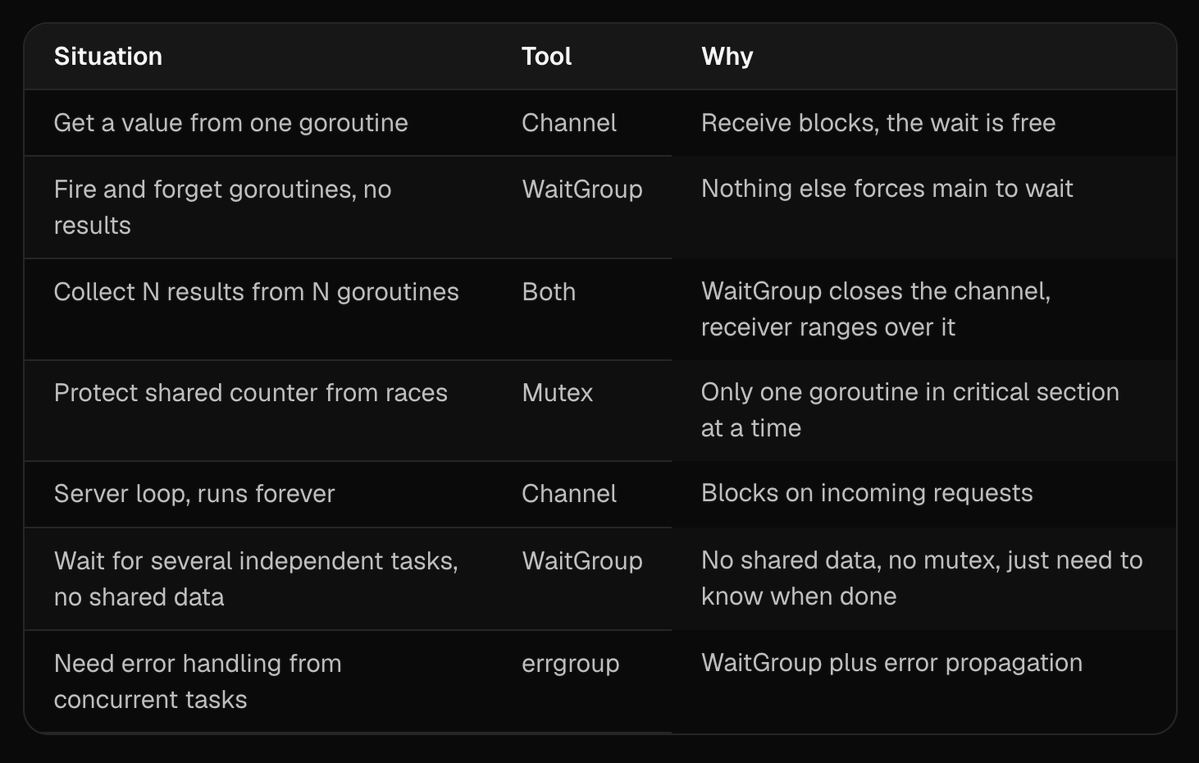
Part 13: A quick note on errgroup
Since I mentioned it in the table, a one line summary. errgroup is from golang.org/x/sync/errgroup. It is like a WaitGroup that also collects errors. If one worker fails, g.Wait() returns the first error. It also has WithContext which cancels sibling workers when one fails. If your workers can fail, reach for errgroup instead of raw WaitGroup. If they cannot fail, plain WaitGroup is fine.
Part 14: The mental model in one page
If I had to compress everything in this post into a handful of sentences, here is what I would say.
A goroutine is fire and forget. It runs separately and the caller keeps going. Something has to wait or the program exits and the work is lost.
A WaitGroup is that something, when nothing else is waiting. It makes main wait for workers to finish. It does not stop workers from racing each other.
A mutex makes workers take turns when they touch shared data. It does not wait for anyone to finish. It just serializes the critical section.
A channel receive is also a wait, but a more useful one. It moves a value and synchronizes at the same time. If you are already receiving from a channel, the receive is doing the waiting, and you usually do not need a WaitGroup on top.
A buffered channel is a channel with a mailbox. It lets senders and receivers be ready at different times. Use it when you want to decouple their timing. Use unbuffered when you want a direct handoff or immediate backpressure.
The four common patterns are: channel only (get one value), WaitGroup only (no values to collect), both (collect many values safely), and mutex only (protect shared data with no waiting needed).
Part 15: Final words
If you are a beginner and these questions felt familiar, I want to tell you something. The fact that you are asking "but why not this instead" and "what if I use a WaitGroup here" means you are actually learning, not just memorizing. That is the right path. Most people who write concurrent code for years still have fuzzy mental models of WaitGroup and channel synchronization. The questions you are asking are the questions that separate people who copy patterns from people who understand.
The best thing you can do now is stop reading and start writing. Write a program with five goroutines and a WaitGroup. Then add a shared counter and watch it give the wrong answer. Then add a mutex and watch it give the right answer. Then replace the mutex with a channel and watch it work in a different way. Then add a buffer and see how the timing changes. Each experiment will lock in one piece of the mental model faster than any blog post can.
Concurrency bugs are not failures. They are how you learn. The deadlock error is your friend. The race condition is a lesson. Every time something breaks, you will understand one more thing you only thought you understood before.
You are on the right track. Keep asking the small questions. They are the load bearing ones.
If you found this useful, share it with someone who is currently confused by Go concurrency. And if you have your own beginner doubts I missed, let me know. The collection is always growing.