The Ultimate Guide to ASO (App Store Optimization).

文章目录
I know, you built your app, you're excited about it, and you're probably thinking:
"Yo, this app is going to make me a millionaire."
I know because I've been there too.
And I still am, don't get me wrong ahaha. I'm not a millionaire yet.
But I've learned A LOT during this journey, and there are a few things I wish someone had told me before publishing my first app.
If you ever thought that just by publishing your app people would magically find it and start downloading it, well... you were completely wrong.
Nowadays everyone can build apps.
I don't know if your idea is actually a good fit for the market or not, but that's a story for another day.
What I can tell you is that, besides all the chaotic distribution strategies you're probably trying right now, there's a good chance you've completely skipped ASO (App Store Optimization).
Or maybe you're doing it, but you're doing it wrong.
Don't worry, because I'm going to share pretty much everything I've learned about ASO so far, including the mistakes I've made with my own apps.
Hopefully, by the end of this article, you'll have a much clearer idea of what you should be doing to get more organic downloads.
Enough talking, let's jump in.
1. Understanding the App Store Hierarchy
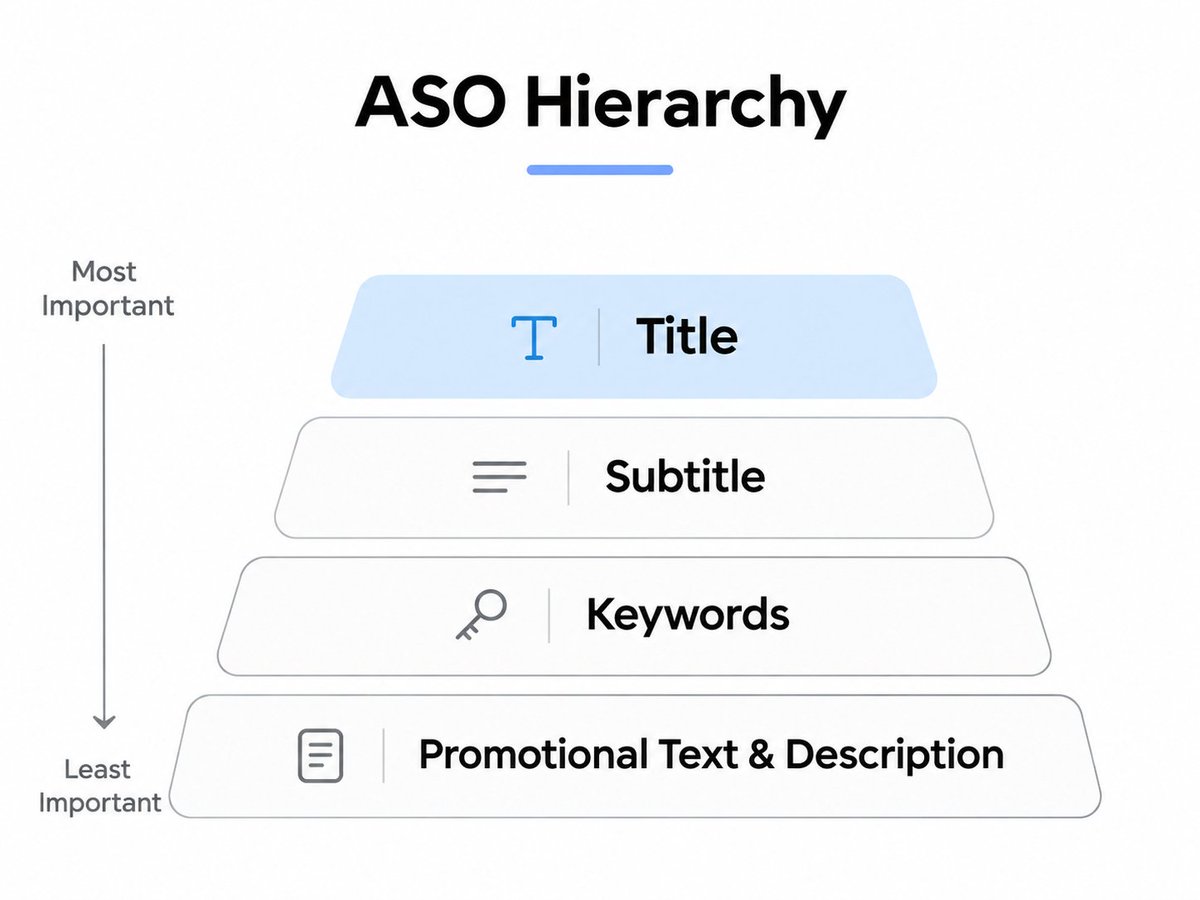
First of all, you need to understand how the App Store works.
Not every field on your App Store listing has the same importance when it comes to keywords.
Some fields are generally considered more influential than others.
And no, putting your keywords everywhere isn't going to magically make you rank #1.
Here's how I think about it:
The App Title
This is one of the most important places to put your main keyword. Apple gives you 30 characters, so don't waste them.
If your app is a habit tracker, you probably want people searching for "habit tracker" to understand what your app does immediately.
The Subtitle
The subtitle also plays an important role.
You get another 30 characters to explain what your app does and target relevant keywords.
It's generally considered less influential than the title, but still very important.
The Keywords Field
Here you get 100 characters.
And trust me, those 100 characters are worth using properly.
You want to include relevant keywords that people are actually searching for.
Apple can also combine words from your metadata to match different searches, so you don't necessarily need to write every possible keyword combination.
I'll explain this better in a second.
Promotional Text & Description
Here's something that might save you some time.
On Apple's App Store, the description and promotional text aren't direct keyword-ranking fields.
So stop stuffing them with keywords, lol.
That doesn't mean they're useless.
Your description should explain why someone should download your app, while promotional text can highlight updates or important features.
Just remember: we're trying to convince real people to download our apps, not only algorithms.
And one more thing: this is about Apple's App Store. Google Play works differently, especially when it comes to descriptions.
2. How to Optimize Your App Title for Search
One mistake I've seen people make is putting their beautiful app name first without explaining what the app actually does.
Yeah, I know.
You spent three days choosing that name, found the perfect domain, and now you want everyone to see it.
I get it ahaha.
But here's the problem.
Nobody knows your app exists yet.
Think about Duolingo.
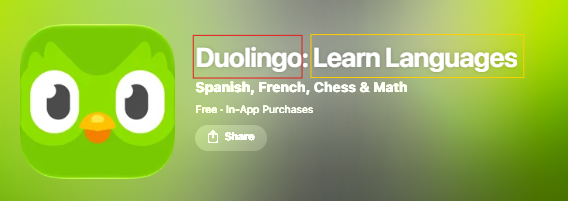
Duolingo has the luxury of putting its brand first because millions of people already know what Duolingo is.
People literally search for "Duolingo."
We're not there yet.
At least I'm not lol.
So instead of relying only on your brand name, try making your main keyword more visible.
For example:
Habit Tracker: MyApp
Instead of:
MyApp: Habit Tracker
This isn't some magical trick that guarantees better rankings just because the keyword comes first.
But it immediately tells people what your app does, and that's important when someone is scrolling through search results.
Keep the title natural, relevant, and within Apple's 30-character limit.
Hopefully, one day we'll have the luxury of people searching directly for our beautiful app names.
3. Stop Wasting Your 100 Keyword Characters
Now let's talk about the keywords field.
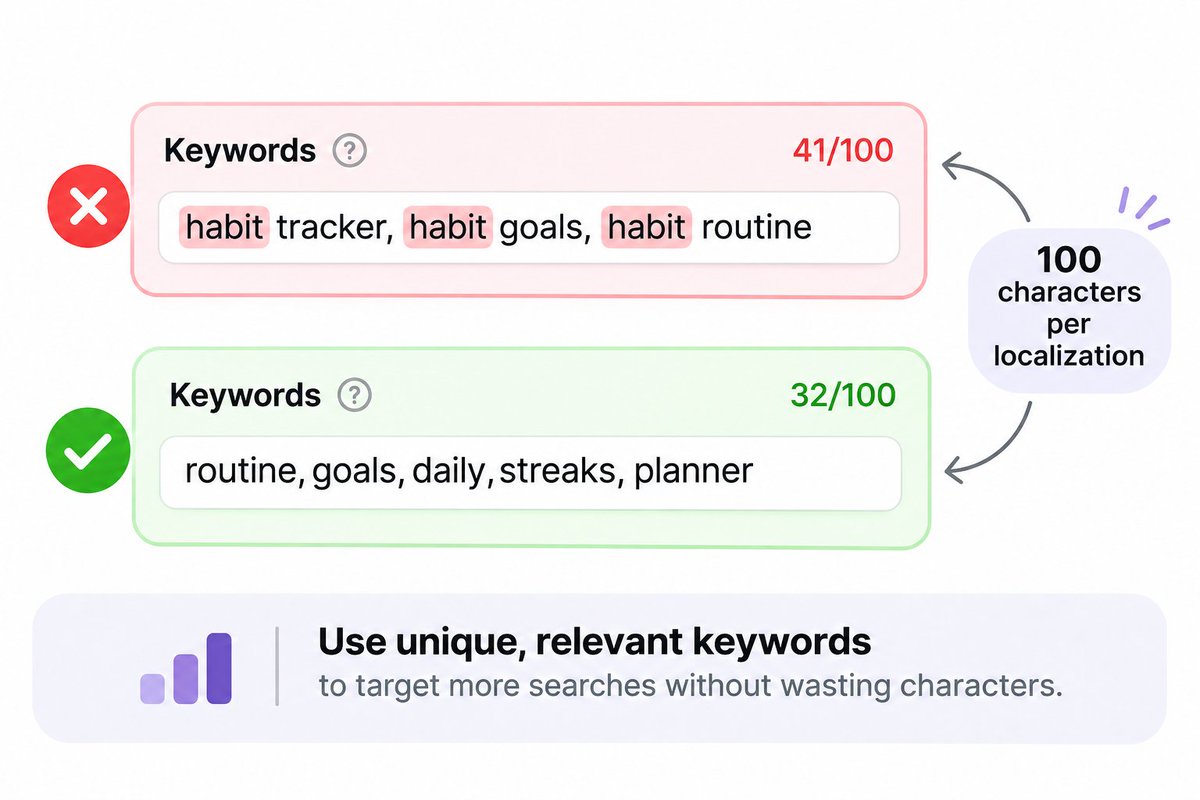
For each localization, Apple gives you 100 characters, and you should try to make good use of them.
But here's something interesting, you don't always have to enter complete search phrases.
For example, let's say you have a habit tracker.
Instead of writing:
"habit tracker, habit goals, habit routine"
You could use individual relevant words separated by commas, avoiding words you've already included in your title or subtitle.
Something like:
"routine,goals,daily,streaks,planner"
Why?
Because Apple can combine keywords from different fields and match multiple search queries.
So you're potentially targeting more searches without wasting characters repeating the same words.
Of course, that doesn't mean every possible combination will rank.
You still need to choose relevant keywords, and some exact phrases may be worth keeping together.
But in general:
Don't waste characters repeating words you've already used.
Oh, and one more thing.
Don't just target the keywords with the highest search volume.
If you're competing against apps with millions of downloads, good luck ranking above them from day one.
Sometimes a smaller keyword with less competition is a much better opportunity.
More about that later.
4. Your Screenshots Matter More Than You Think
Okay, now imagine this.
Someone searches for a keyword.
Your app appears in the results.
They see your icon, title, and screenshots.
And then... they keep scrolling.
Why?
Maybe because your screenshots look terrible.
I'm not saying yours do, but you get the point lol.
Your screenshots are one of the first things potential users see, and they can make a huge difference in whether someone downloads your app.
Here's what I suggest:
-
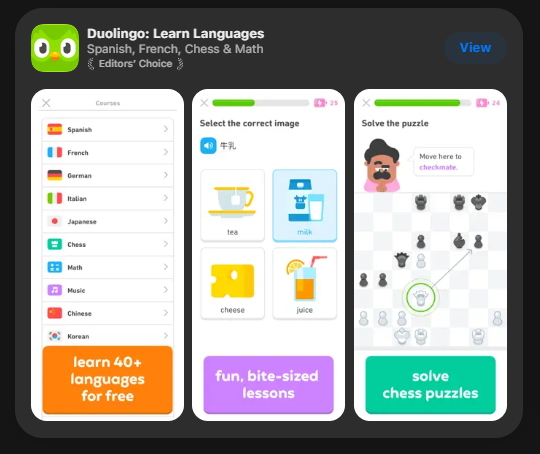
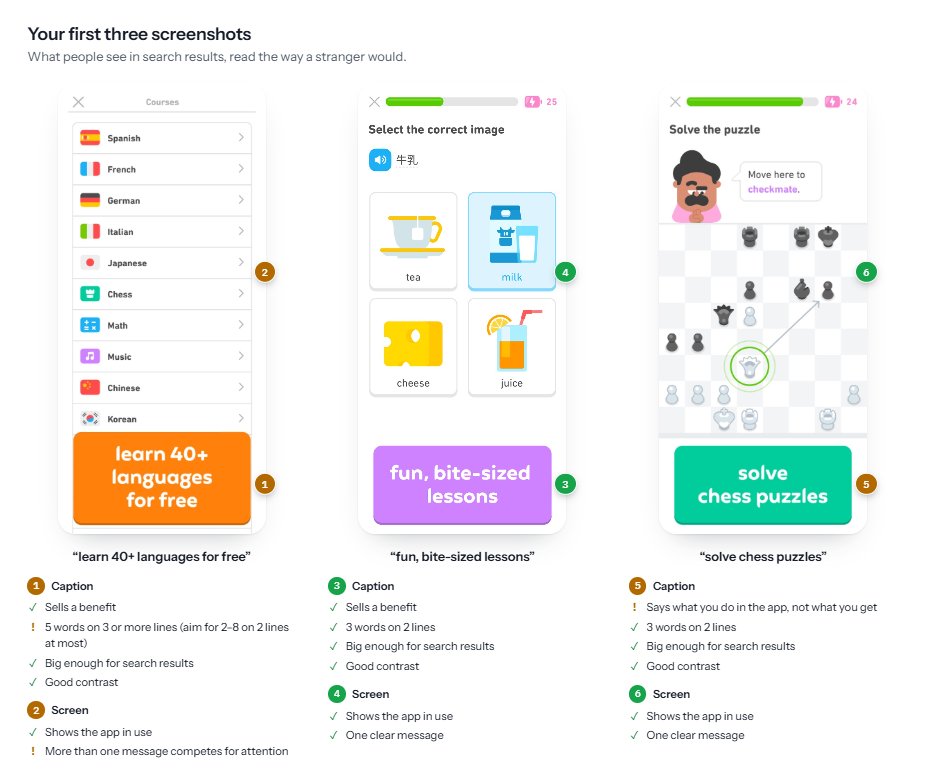
Focus on the first 3 screenshots. Depending on the App Store layout, users may see up to three screenshots directly in search results.
-
Make the message clear. People should understand your app's value without having to read five paragraphs.
-
Avoid tiny text. Remember that people are looking at these screenshots on their phones.
-
Use good contrast. Don't put light gray text on a white background and expect people to read it.
-
Show benefits, not just features. Explain what the user gets from using your app.
Here's how the first three screenshots appear in the App Store.
For example, instead of writing:
"Advanced Analytics Dashboard"
You could write:
"See How Much Money You've Saved"
The second one gives people an actual reason to care.
Another mistake is trying to explain EVERYTHING in the first screenshot.
You don't need to.
You just need to make someone interested enough to keep looking.
If you're unsure whether your screenshots are actually good, I built a free tool that analyzes your App Store listing and shows you what you could improve.
You can try it here:
https://www.minimalistscreens.com/tools/app-store-grader
And remember, getting people to find your app is only half the job.
You still need to convince them to download it.
5. Reviews Are Important Too
Every app has its own visibility in the App Store, and ratings and reviews are among the signals Apple considers.
But they're also important for something else.
--- Trust. ---
Imagine finding two similar apps.
One has 4.8 stars and hundreds of reviews.
The other has 3.2 stars and almost no reviews.
Which one would you download?
Exactly.
I'm personally working on this with my own app too.
One thing you can do is ask your users for a review directly inside your app.
But please, don't ask them immediately after opening it for the first time.
That's annoying.
Wait until they've actually experienced something useful.
Maybe they've completed a task, reached a milestone, or achieved something with your app.
That's a much better moment to ask.
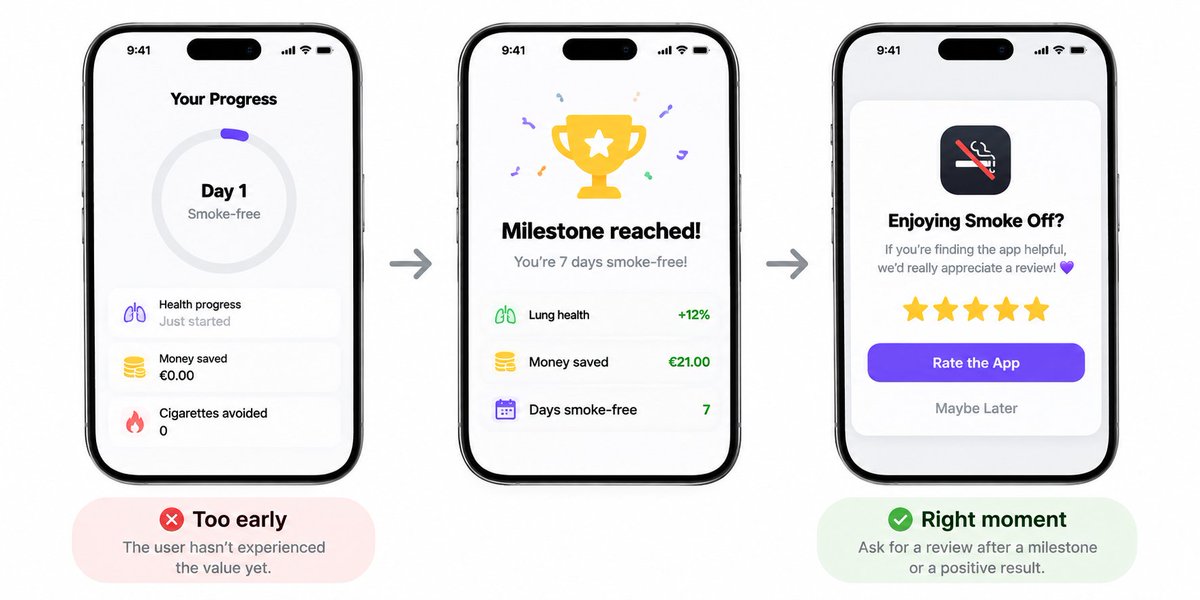
You can use Apple's native review prompt to make the process easier.
And obviously, the goal is to get as many genuine positive reviews as possible.
Hopefully five stars ahaha.
Just don't try to manipulate reviews or reward users for positive ratings.
Build something people enjoy using, and make it easy for them to share their experience.
6. Localization Doesn't Mean Translating Word by Word
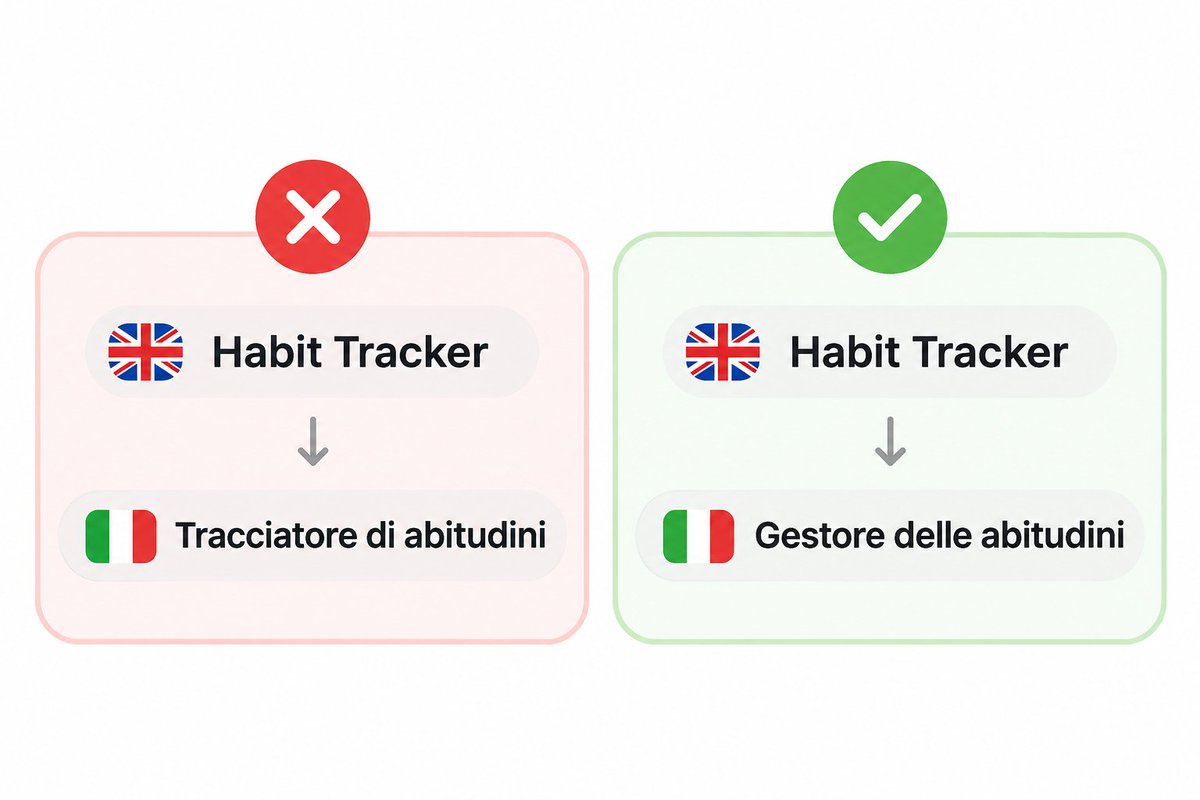
This is probably one of the most interesting things I've learned recently.
I've asked quite a few developers how they localize their apps.
And most of them were like:
"Well, I just translate everything from English."
That's it.
But here's the problem.
People in different countries don't necessarily search for the same things.
Even when they're looking for exactly the same type of app.
Let's say your English keyword is:
"Budget Tracker"
You can't automatically assume that its literal translation is the most searched term in Germany, Italy, or France.
Maybe people use another expression.
Maybe they search for something more specific.
Or maybe they use an English keyword even though their native language is different.
I've personally noticed this while researching keywords for my app, Smoke Off.
Some English keywords were getting searched in Italy, and that opened up opportunities I hadn't considered before.
So here's what I'd suggest.
Before localizing:
-
Research the keywords people actually use in that market.
-
Compare their popularity and difficulty.
-
Choose the ones that make sense for your app.
-
Adapt your title, subtitle, and keywords accordingly.
-
Don't forget to localize your screenshots too.
You can use ASO tools like Minimalist Screens to research keywords across different markets.
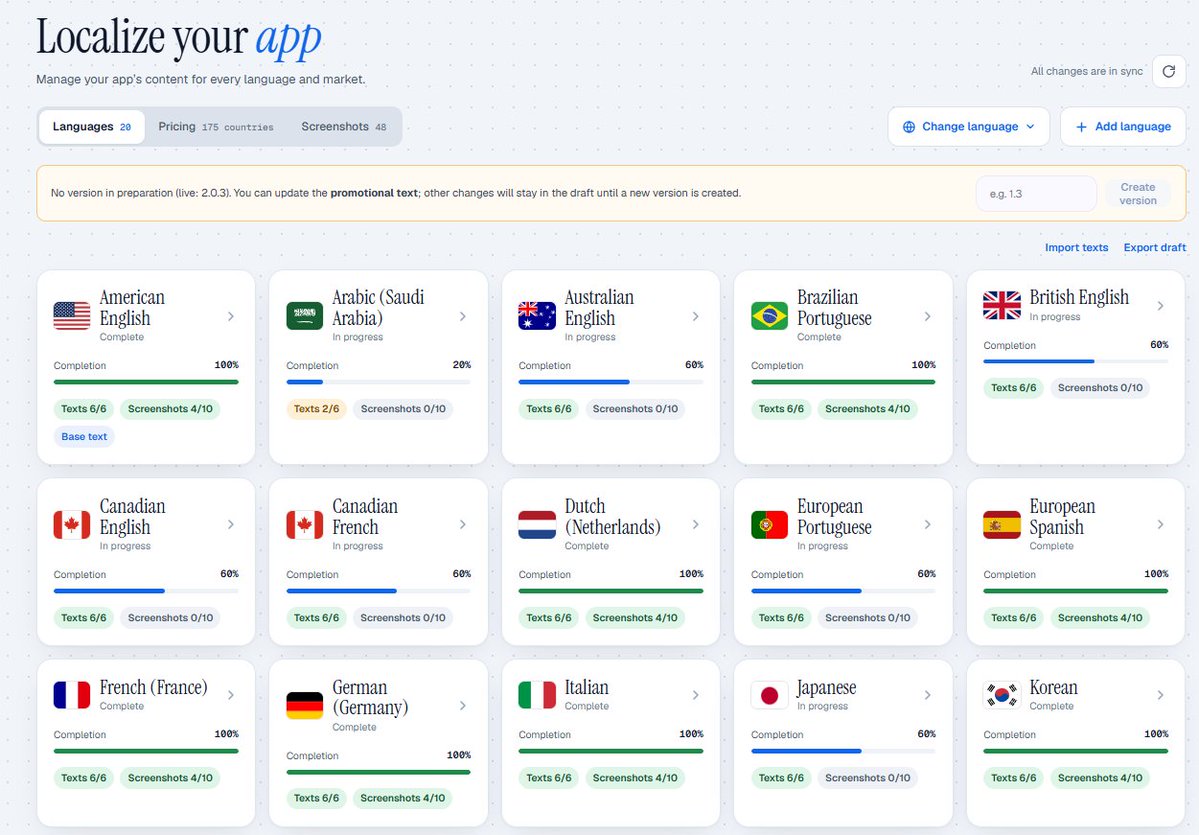
Or, if you don't have access to a tool yet, ask an AI to help you brainstorm relevant keywords in a particular language.
Just don't blindly trust the suggestions.
AI can give you ideas, but it doesn't automatically know which keywords have the best search volume or competition.
You'll still need to validate them.
Also, keep in mind that App Store localizations depend on supported languages and storefronts, not simply one independent keyword field for every country.
So check which languages Apple supports in your target markets.
The main point is simple:
Translate for how people search, not just how words are written.
7. Localize Your Pricing Too
Now here's something that some developers might disagree with me on.
I think you should seriously consider localizing your pricing.
Unless you have significant AI costs, infrastructure costs, or other expenses that make it difficult.
Think about it.
Someone living in a country with lower purchasing power might love your app but find your subscription too expensive.
And you might be thinking:
"But I want to make exactly €10 from every subscription."
Yeah, I get it.
But would you rather get €5 from someone who otherwise wouldn't subscribe, or €0?
I know what I'd choose.
Less money is better than no money.
Of course, you still need to make sure you're profitable.
Here's a simple framework I'd start testing with:
| Market | Starting Price |
|---|---|
| Tier 1 | 100% of your base price |
| Tier 2 | 55–70% of your base price |
| Tier 3 | 30–40% of your base price |
These are just starting points, not universal rules.
You shouldn't randomly throw countries into tiers either.
Research purchasing power, local competitors, subscription behavior, and your actual costs.
For example, if your base subscription is €10/month, you might test a lower price in a market where €10 is relatively expensive.
Apple already handles currency conversions and certain tax adjustments, but that's not the same as optimizing your prices for purchasing power.
With Minimalist Screens, you can explore localized pricing and adjust your pricing strategy for different markets.
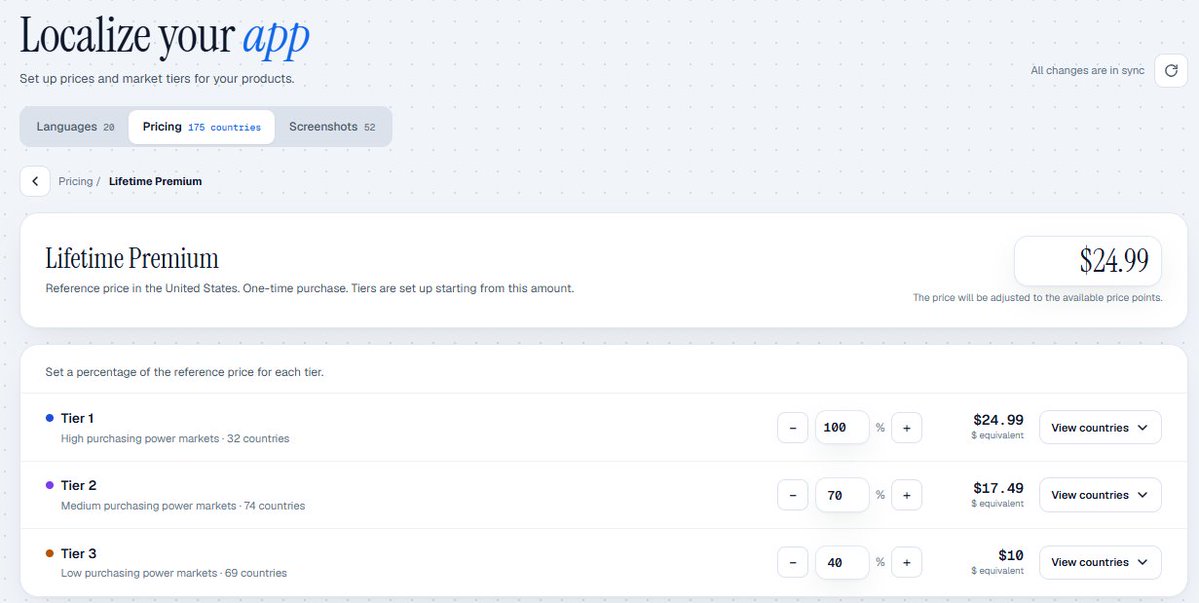
I think it's worth experimenting with, especially when you're trying to reach users outside your main market.
8. How I Actually Do Keyword Research
Okay, we talked about keywords a lot.
But how do you actually find the right ones?
There are plenty of ASO tools out there, and you can use whichever works best for you.
Personally, I built Minimalist Screens with my brother because I wanted to have everything in one place, without paying crazy prices for multiple tools.
We wanted to make ASO more accessible and affordable for indie developers like us.
Here's how I approach keyword research.
First, I look for relevant keywords.
I start with what my app actually does.
For Smoke Off, for example, I'd research terms related to quitting smoking, tracking cigarettes, cravings, and similar topics.
The idea is to find keywords with real search intent.
Then I look at popularity.
Obviously, we want keywords that people are searching for.
There's no point ranking #1 for a keyword nobody searches.
After that, I check difficulty.
This is where it gets interesting.
A keyword might have amazing popularity, but if the competition is too strong, it might be almost impossible for a new app to rank well.
That's why I prefer finding a balance between demand and competition.
Finally, I look at opportunity.
Minimalist Screens has an opportunity metric that helps me compare keywords based on their potential.
It makes it easier to decide which keywords are worth targeting and which ones I should probably leave alone for now.
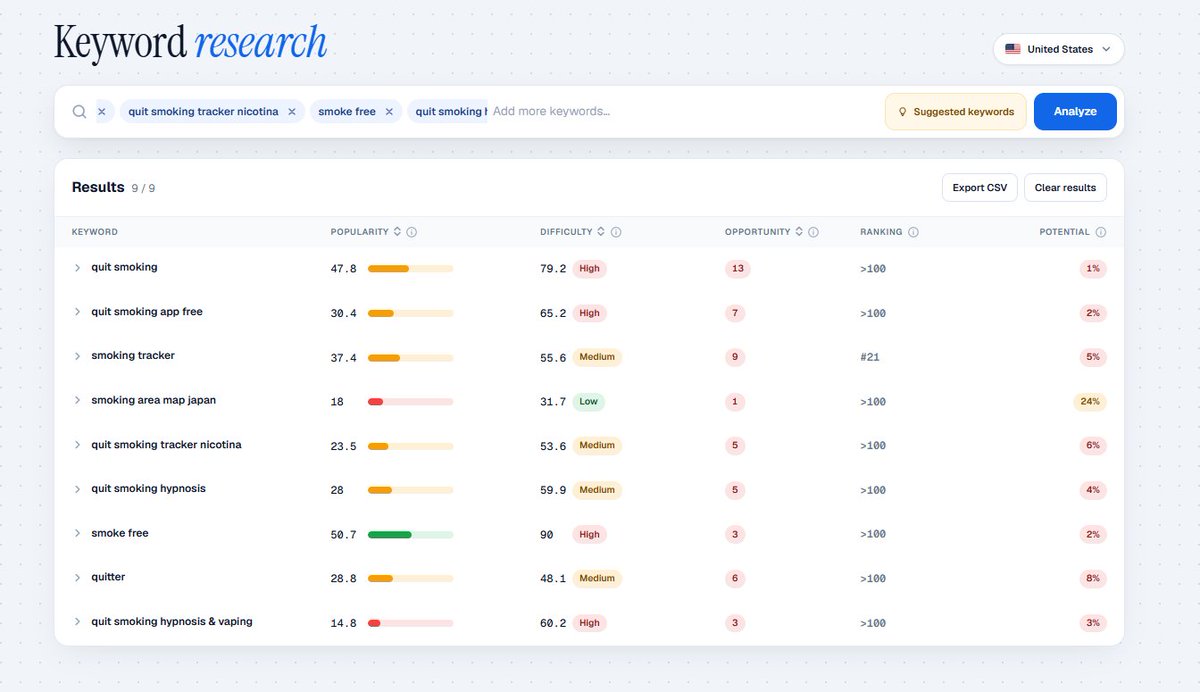
My general strategy is pretty simple:
Find relevant keywords with decent demand and competition that my app has a realistic chance of handling.
I don't always go for the biggest ones.
Especially when the app is still small.
You can always target more competitive keywords as your app grows.
9. Be Patient, Track Your Keywords, and Keep Improving
One last thing.
ASO takes time.
Please don't change your title today and expect to wake up tomorrow with a million downloads.
You need to test things, understand what's working, and keep improving.
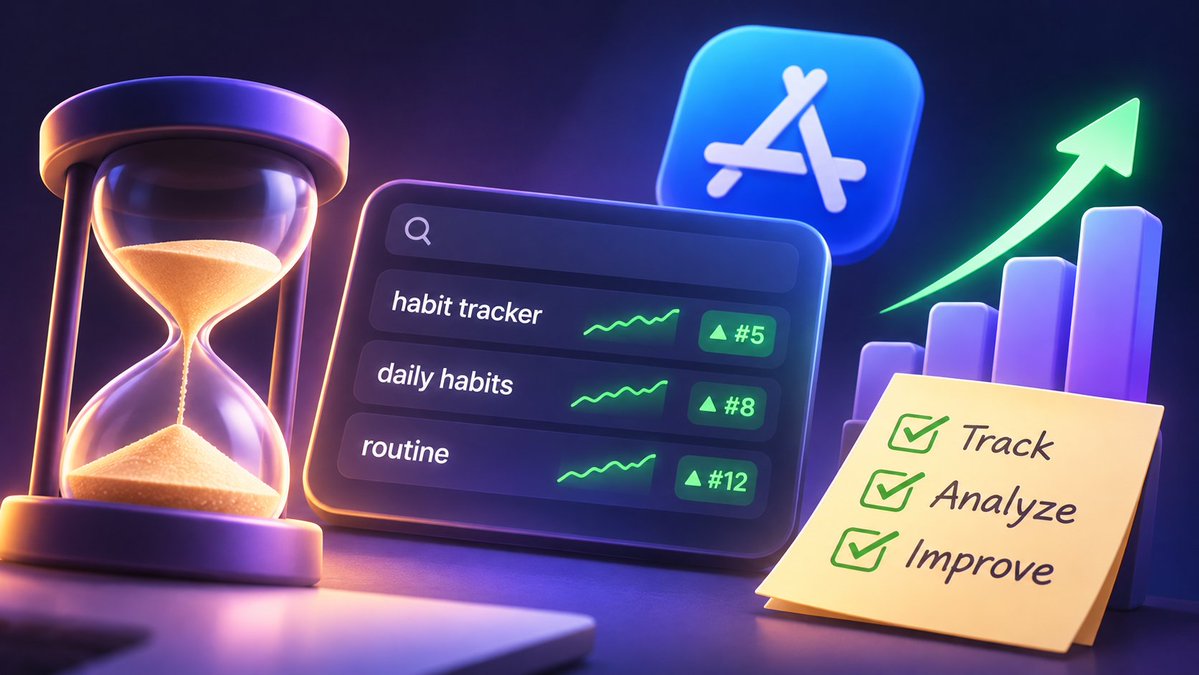
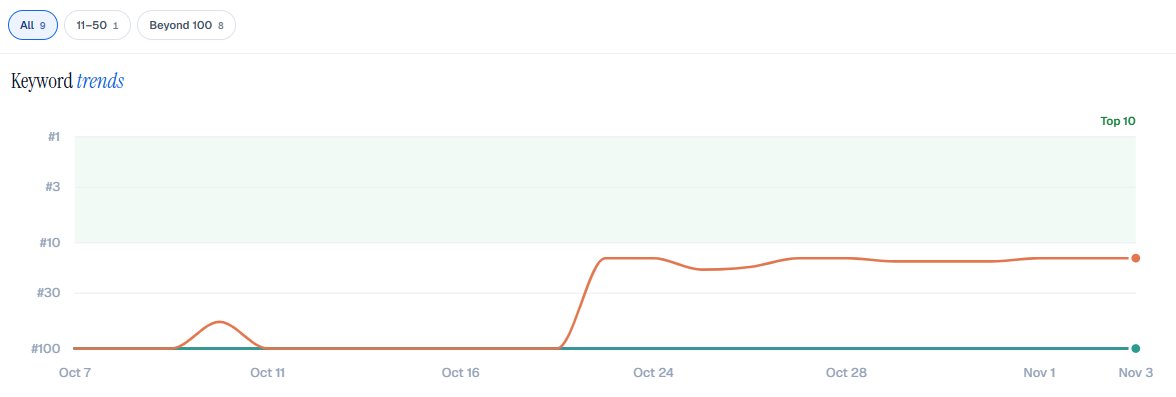
That's why tracking your keywords is important.
For example, let's say your app is ranking #47 for a keyword.
After making some changes, you move to #28.
Then #16.
That's useful information.
It doesn't necessarily mean every improvement came from your metadata changes, but at least you can start understanding how your visibility is changing.
And if your rankings aren't improving?
Maybe your keywords are too competitive.
Maybe you're targeting the wrong search intent.
Or maybe there are better opportunities you haven't found yet.
That's why I added keyword tracking to Minimalist Screens.
You can monitor your rankings over time instead of manually searching for your app every single day.
But don't forget to measure actual results too.
Better rankings are nice.
More downloads are even nicer.
And more paying users?
Well, that's the goal lol.
10. Don't Forget About the Actual App
Before wrapping this up, there's one more thing I want to say.
You can have amazing screenshots.
Perfectly optimized keywords.
Great localization.
And even a really good pricing strategy.
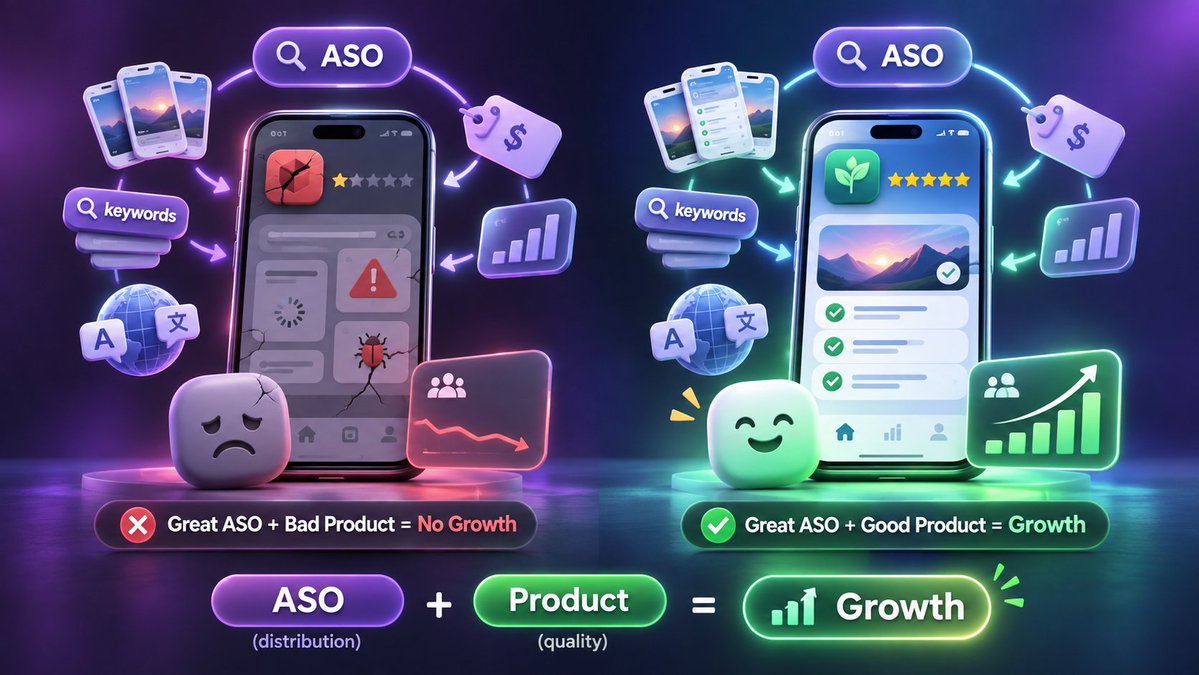
But if your app is terrible and nobody actually wants it, ASO isn't going to save you.
I know that's not what everyone wants to hear.
But it's true.
ASO helps people discover your app and can improve your chances of converting them into users.
It doesn't replace having a product that solves a real problem.
So keep improving your app while working on your distribution.
You need both.
One Last Thing Before You Go
That's pretty much everything I wanted to share about ASO.
Or at least the most important things I've learned so far.
I'm still learning too, and I'm constantly experimenting with my own apps.
Some things work.
Some don't.
If there's one thing I want you to remember from this article, it's this:
Building your app is only the beginning. Getting people to discover it is a completely different challenge.
And that's exactly why I'm building Minimalist Screens.
I wanted one place where indie developers like me could research keywords, track rankings, improve screenshots, and work on localization without having to jump between a bunch of different tools.
If you found this guide useful, I'd really appreciate a like and a repost!
I spent quite some time putting everything together, so it would mean a lot if you could help me reach more indie developers.
Hope it helps you get some more downloads ahaha.
沿着这个主题继续读
从一篇文章,找到相关的教程、经验和阅读路径。