All you need to know about Indexing
文章目录
Imagine you have a database with 1 million employee records.
A user sends this query:
SELECT * FROM employees WHERE id = 850000;
The database needs to find one employee.
But there is a problem.
We have not created any indexes yet.
1. The problem: Finding one record
How does the database find employee 850000?
Without an index, the database can scan the table.
It starts with the first record.
It checks the ID.
Then it moves to the next record.
It continues until it finds the required employee.
This is called a Full Table Scan.
For our example, the database may need to inspect 850,000 records before it finds the target.
Now imagine a table with 100 million records.
This approach becomes expensive.
But why?
2. Why is searching expensive?
You might think:
"Comparing two numbers is very fast. Why does searching take so much time?"
The important detail is where the data lives.
A database does not keep all its data in CPU registers or RAM.
Large amounts of database data live on persistent storage, such as SSDs and HDDs.
When the database needs a record that is not already in memory, it must read data from storage.
This is much slower than accessing data in RAM.
Therefore, the problem is not only the number of comparisons.
The problem is also the amount of data that the database must read.
We need a better way to find records.
3. The idea: An index
Think about a book.
Suppose you want to find a topic in a book with 1,000 pages.
You could read every page until you find the topic.
But books have an index at the back.
You search for the topic in the index.
The index tells you which page contains it.
You go directly to that page.
A database index follows a similar idea.
It is an additional data structure that helps the database locate records without scanning the entire table.
For example:
Without an index:
Record 1 → Record 2 → Record 3 → ... → Record 850000
With an index:
850000 → Location of the required record
The database uses the index to find where the record is stored.
It then reads the required record.
4. Indexes come with a trade-off
An index is not free.
It needs additional storage.
The database must also maintain the index when records are inserted, updated, or deleted.
So why use indexes?
Because they can reduce the amount of data that the database needs to read during a query.
This can make searches much faster.
But we have only understood the basic idea.
There is a more fundamental question.
5. How does a disk store data?
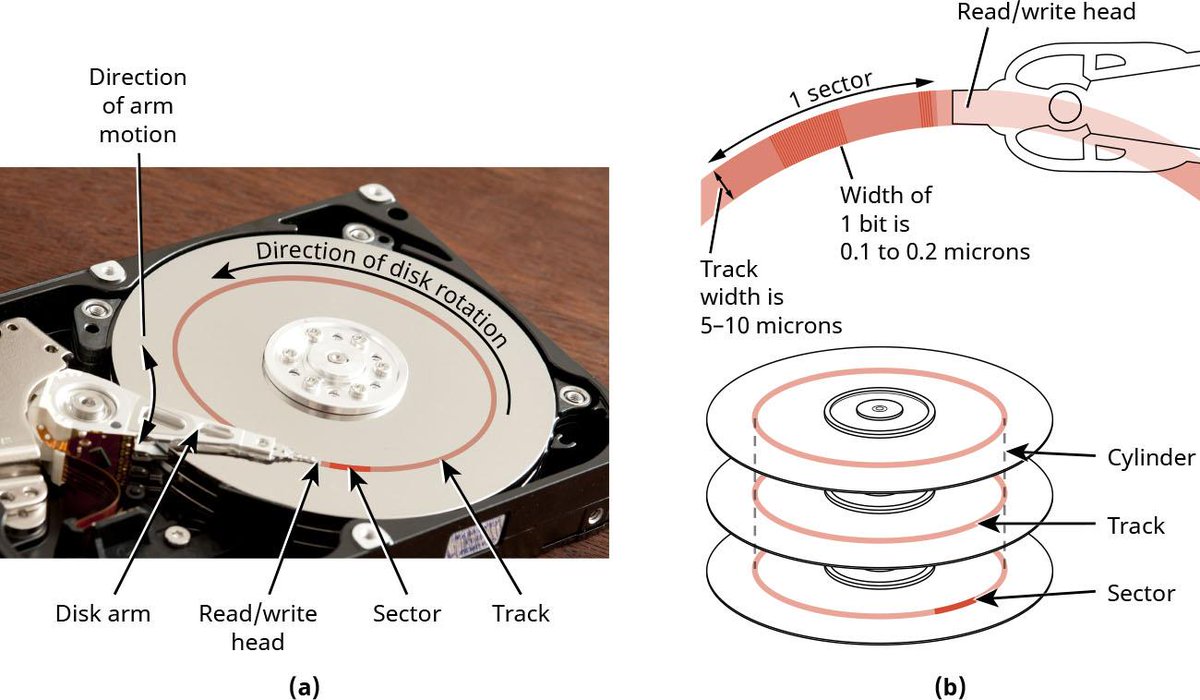
Consider a traditional Hard Disk Drive (HDD).
An HDD contains rotating platters. Each platter has circular tracks, and each track is divided into sectors.
A read/write head accesses data on the platter.
Here is the basic hierarchy:
-
Platter: The rotating magnetic disk.
-
Track: A circular path on the platter.
-
Sector: A subdivision of a track.
-
Disk block: A logical unit of storage read or written by the system.
Memory Hierarchy
Databases do not usually read one individual row directly from the disk.
They organize records into fixed-size units called pages.
For example, an InnoDB database commonly uses 16 KB pages by default.
A page can contain multiple records.
When the database needs a record, it generally reads the page containing that record into memory.
This gives us an important insight:
Reducing the number of disk page reads is a major goal of database indexing.
6. Why not simply use binary search?
Suppose we sort employee records by ID. We can now use binary search, which repeatedly divides the search space in half. For 10 million records, it takes roughly 24 comparisons.
However, there is a catch.
Binary search may jump between different disk pages during the search. Each page access can require a storage read, which is much slower than a memory comparison.
We need a structure that minimizes disk page reads, not just comparisons.
This is where trees come in. They organize keys hierarchically so that each page access helps narrow down the next location.
7. Why trees?
A tree organizes keys hierarchically. We start at the root and follow a path to find the required key.
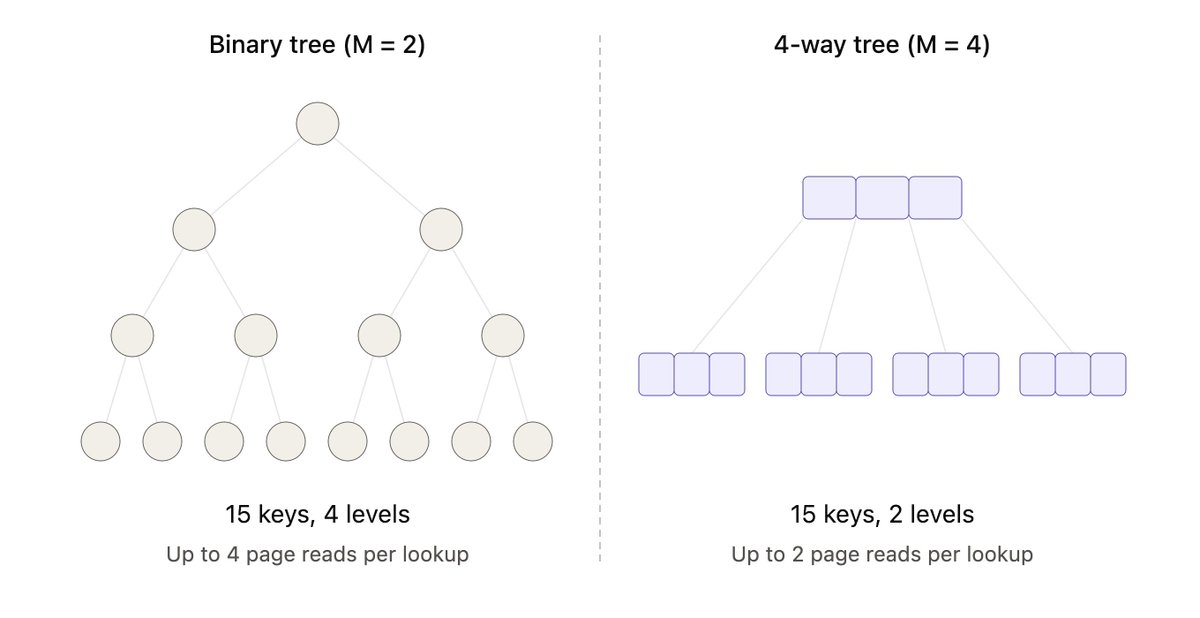
In a Binary Search Tree (BST), each node has at most two children: smaller values go left, and larger values go right.
This narrows the search at every level. However, each node can have only two children, which can result in a tall tree.
More levels mean more page accesses during a search.
We need a tree with more children per node to reduce its height.
8. Multi-level indexing and M-way search trees
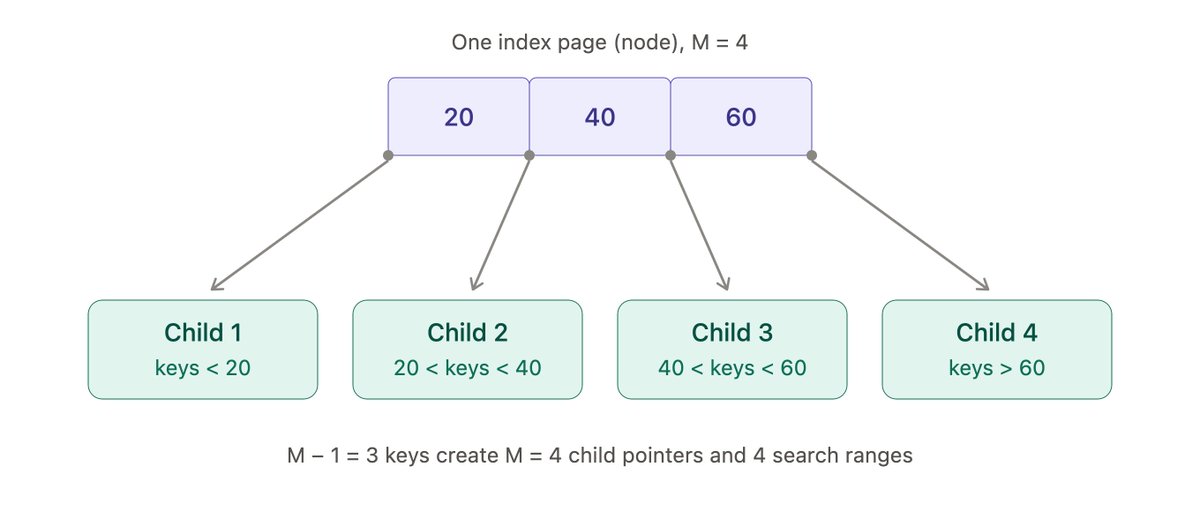
Imagine that one index page contains several sorted keys instead of just one.
This is the basic idea behind an M-way search tree.
A node can contain at most M children and M-1 keys. For example, a 4-way tree can have 4 children and 3 keys. These keys divide the values into 4 search ranges.
More children allow the tree to branch wider, reducing its height and the number of page accesses.
However, ordinary M-way search trees do not guarantee balance. Depending on the insertion order, some branches can become much deeper than others.
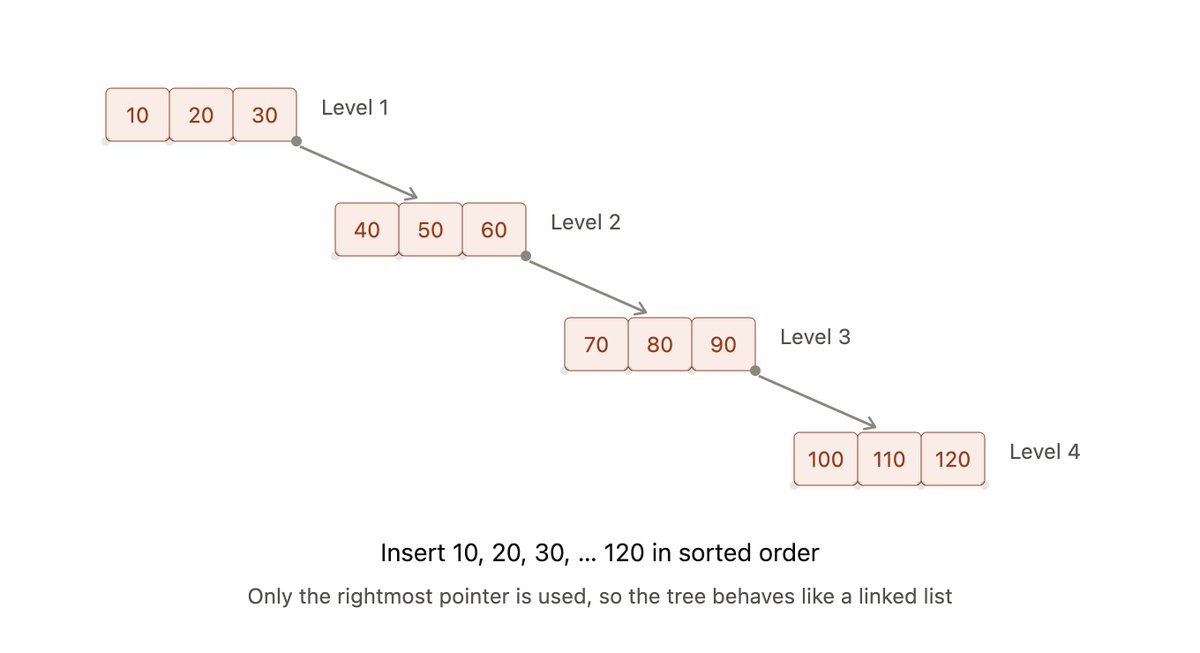
We need a tree that maintains its balance automatically. This leads us to B-trees.
Multi-level Indexing
As the number of records grows, a single index can also become too large to search efficiently.
The solution is Multi-level Indexing.
Instead of searching one large index, we build an index over the index itself.
-
The first-level index points to data blocks.
-
The second-level index points to first-level index blocks.
-
Additional levels can be added as the index grows.
The database starts at the top-level index and follows the pointers until it reaches the required data block.
This reduces the number of index pages that must be accessed.
9. B-trees: Keeping the tree balanced
A B-tree is a balanced multi-way search tree. Each node can store multiple sorted keys and have multiple children.
It maintains balance through:
- Splitting: A full node splits, and a key moves up to its parent.
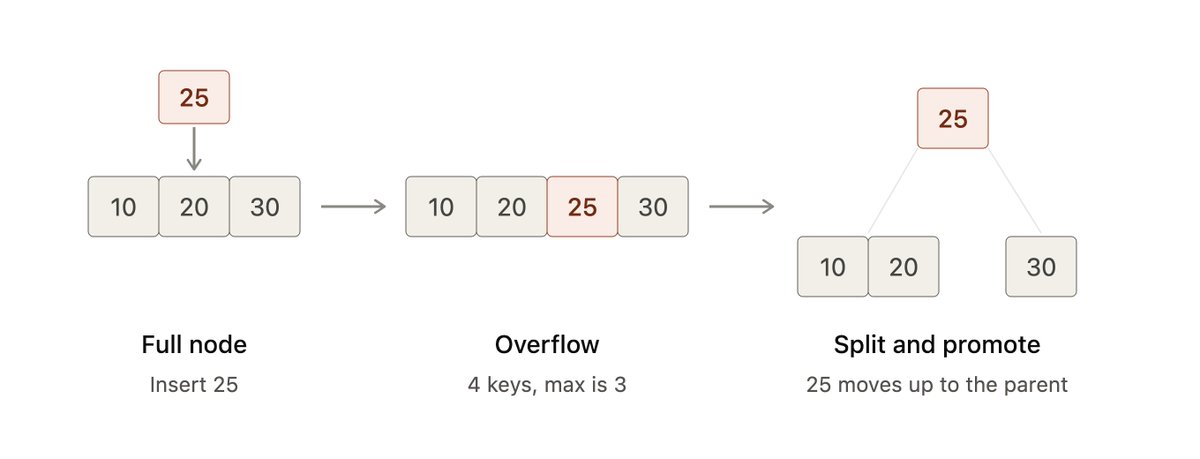
splitting
- Merging: Nodes combine when deletions make them too small.
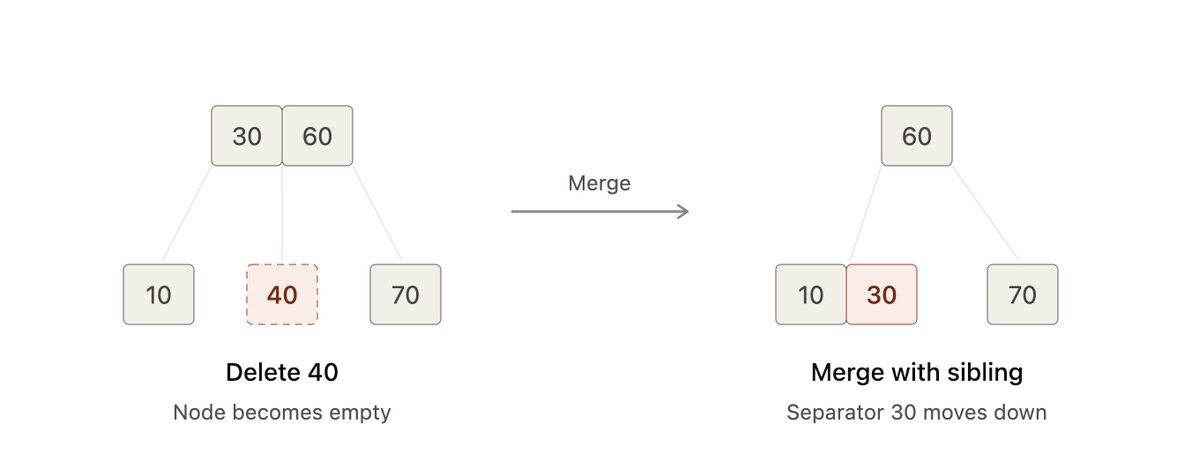
merging
All leaf nodes remain at the same depth, keeping the tree balanced and search paths predictable.
Its high branching factor also keeps the tree short, reducing page accesses.
10. B+ Trees
B-trees keep the tree balanced. But databases care about two more things: how many keys fit in a page, and how quickly a range of rows can be read.
A B+ tree is a variation of the B-tree built for both. It makes two changes:
-
Data lives only in the leaves. Internal nodes store just keys and child pointers, and are used only for routing.
-
Leaves are linked. Each leaf points to the next one in sorted order.
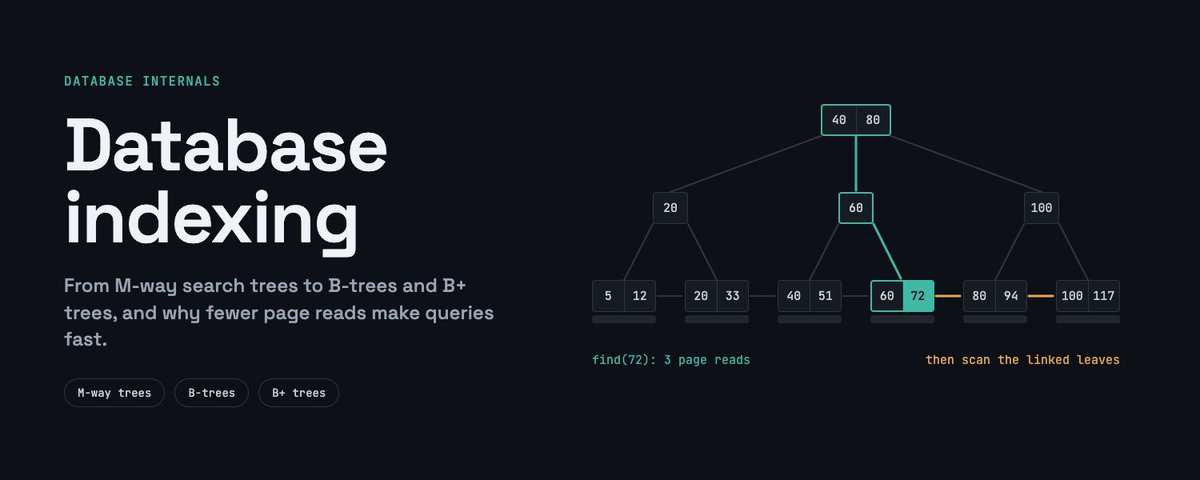
Shorter tree: Without data, internal nodes fit far more keys per page. The tree is wider and shorter, and its upper levels often stay in memory, so a lookup may need just one disk read.
Fast range queries: In a B-tree, a range query climbs up and down the levels, revisiting pages. In a B+ tree, it descends once, then walks sideways through the linked leaves.
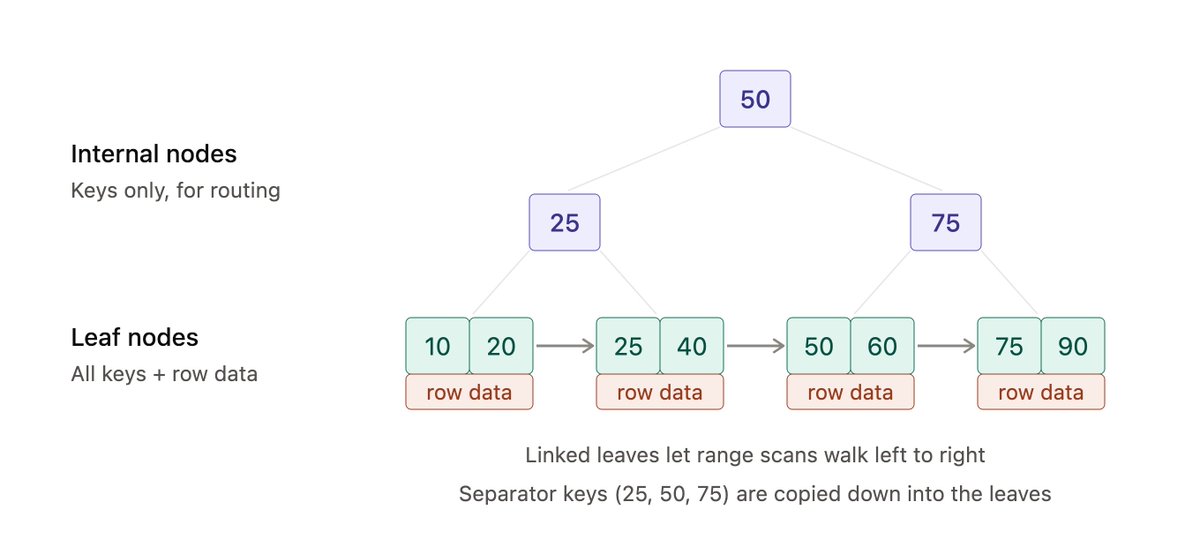
B+ Tree