I Reverse-Engineered How Cursor Self Improves Its AI Coding Agents. Here's What I Found.
文章目录
部分视频或图片暂未收录,已在正文保留提示;需要时可查看原文。查看原文 ↗
Cursor has become one of the most popular AI coding tools, and honestly, it's one of the best coding agents I've used.
As with every AI product I find interesting, I decided to reverse-engineer Cursor's self-improvement system to understand how it catches mistakes, learns from failures, and gets better over time.
I'm Dhruv, Head of Growth at Agnost AI (YC S26). At Agnost, we spend a lot of time figuring out why AI agents fail in production, how to detect those failures, and how to turn them into actual improvements. So naturally, I was curious about how Cursor approaches the same problem.
The interesting thing about Cursor is that a lot of its improvements don't necessarily come from training better models. They come from improving everything around the model, including its tools, context, evaluations, and feedback loops.
I went through Cursor's engineering blogs, public documentation, and research to piece together how its agent improvement system works. And surprisingly, a lot of what Cursor is doing aligns with how we think about improving agents at Agnost.
One thing worth clarifying before we get into it: Cursor's internal code isn't public. This is a technical reconstruction based on what its engineers have shared, not a claim that I've accessed its private infrastructure.
This is going to be a bit long, but I'll break down the architecture, the feedback loops, and how you could build something similar yourself.
Let's get into it.
1. First, Cursor isn't just an LLM inside a code editor
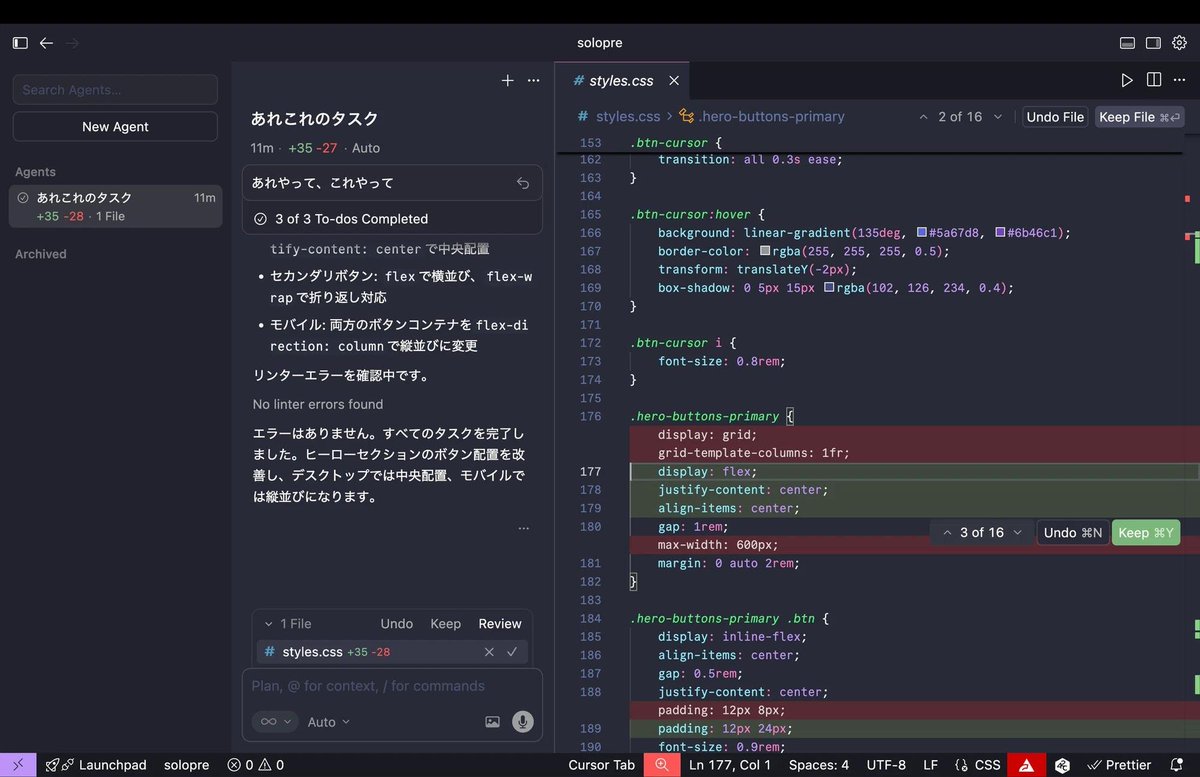
Before understanding how Cursor improves itself, we need to understand how its agent actually works. At a high level, you give Cursor a task, it figures out which files to read, makes changes, runs commands, and keeps working until it thinks the task is complete.
Sounds simple, right? But there's quite a lot happening between your prompt and the final output.
Cursor uses something called an agent harness. The easiest way to understand a harness is to think of it as everything surrounding the model that helps it do actual work. The model handles the reasoning, but the harness provides the tools, instructions, context management, and execution environment that allow the model to interact with your codebase.
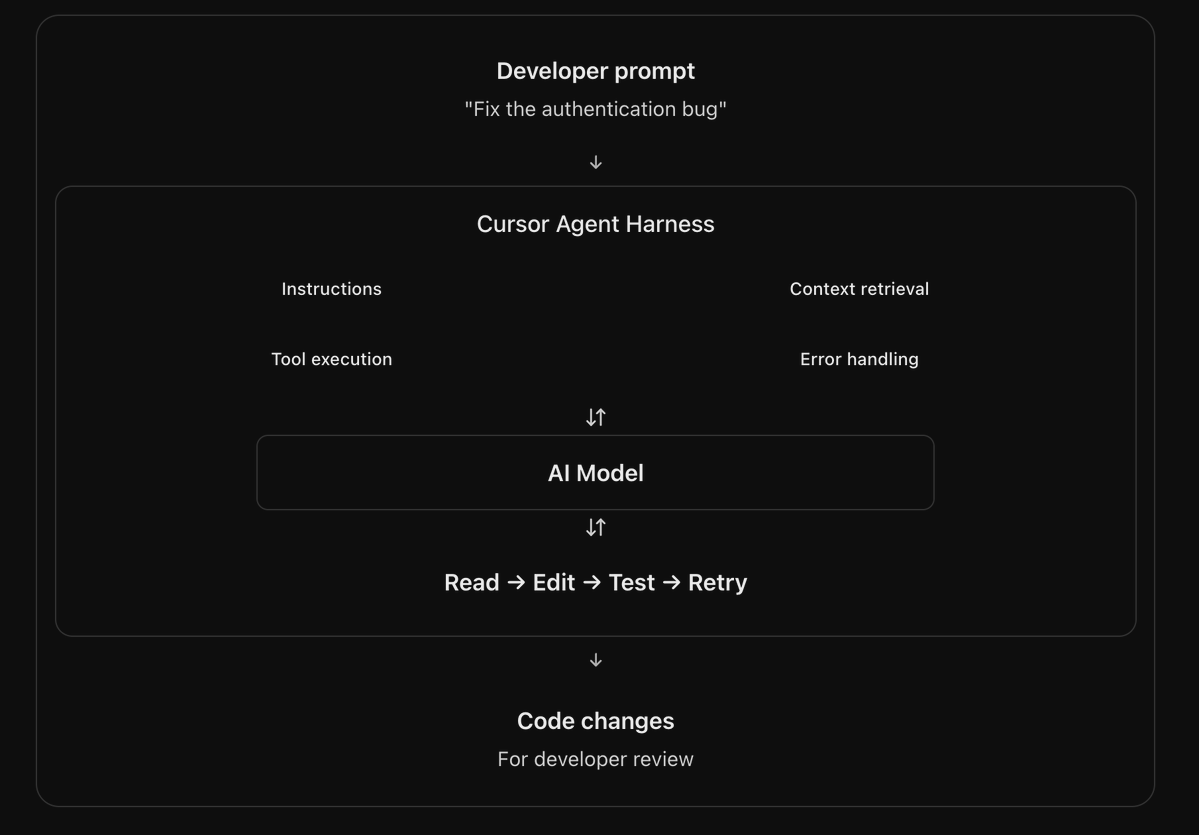
For example, let's say you ask Cursor to fix a login bug. It might first search the repository to find the authentication logic, read the relevant files, identify what could be wrong, and make a change. After that, it can run a test to check whether the fix actually works.
If the test fails, the error gets passed back to the model, which can inspect the failure and try another approach. This process continues until the agent reaches a result it considers complete or needs further input.
Here's a simplified version of how the system works:
Developer request
        |
        v
    Agent Harness
        |
        +-- Instructions
        +-- Context management
        +-- Code search
        +-- File editing
        +-- Terminal execution
        |
        v
      AI Model
        |
        v
   Execute actions
        |
        v
   Observe results
        |
        +-- Success --> Final response
        |
        +-- Failure --> Analyze and retry
What's interesting here is that the model doesn't necessarily need to get everything right on its first attempt. It can make a mistake, observe the result, and correct itself. This is the first level of self-improvement, although I'd call it self-correction rather than actual learning.
The agent isn't necessarily updating its model weights or remembering the mistake forever. It's using feedback from the environment to make a better decision during the current task. And that distinction becomes important when we look at how Cursor improves its agents across thousands of different sessions.
2. Cursor discovered that more context doesn't always make an agent better
This was one of the more surprising things I found in Cursor's engineering research.
When Cursor first started building its coding agent in late 2024, it gave the model a lot of context upfront. This included information about the repository structure, relevant code snippets, and additional instructions designed to help the agent understand its environment.
Cursor also added guardrails to help models avoid common mistakes. For example, it would automatically show lint and type errors after edits and sometimes expand file reads when an agent requested too little information.
At the time, these systems were useful because models weren't particularly good at deciding what information they needed. So Cursor tried to make some of those decisions for them.
But as coding models improved, Cursor noticed something interesting. Some of these systems were no longer helping, and in certain situations, they were actually getting in the way.
Think about it. If you're trying to fix a bug in a payment service, do you really need the contents of hundreds of unrelated files? Probably not. You need the payment logic, the relevant dependencies, and maybe a few tests. Everything else is consuming tokens and taking up space in the context window without necessarily helping the model solve the problem.
So Cursor gradually moved toward letting the agent retrieve information dynamically instead of supplying everything upfront. The agent could search the repository, inspect relevant files, and request additional context whenever it needed more information.
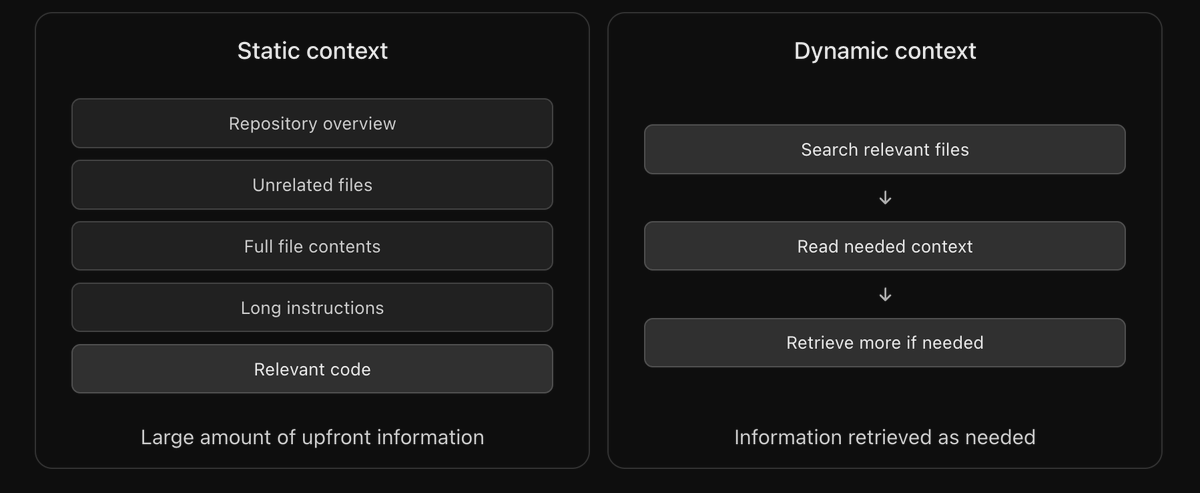
This sounds like a small architectural change, but it can have a significant impact on how an agent performs. It can reduce unnecessary context, lower token usage, and give the model more flexibility in deciding how to approach a task.
Cursor's engineers have discussed this evolution in their research on continually improving the agent harness. What I found particularly interesting is that improvement sometimes came from removing instructions and simplifying the system rather than adding more complexity.
Improving an agent doesn't always mean giving it more information. Sometimes the better approach is to let it find exactly what it needs.
I think this is especially relevant for teams building AI agents with huge system prompts and dozens of tools. It's worth asking how much of that information the agent actually needs and how much is just making the system more complicated.
3. Cursor measures whether developers actually keep the code it writes
Now this is where things start getting really interesting.
Most AI coding benchmarks measure whether an agent can solve a programming problem. You give it a task, run the generated solution, and check whether it passes the tests. That's useful, but it doesn't necessarily tell you whether the code was valuable to the developer.
Imagine Cursor generates 500 lines of code for a feature. The code compiles, the agent marks the task as complete, and everything looks successful. But then the developer reviews the changes, deletes half of the implementation, and spends another 20 minutes rewriting the rest.
Was that actually a successful agent run? Technically, the agent completed its task, but the outcome wasn't particularly useful.
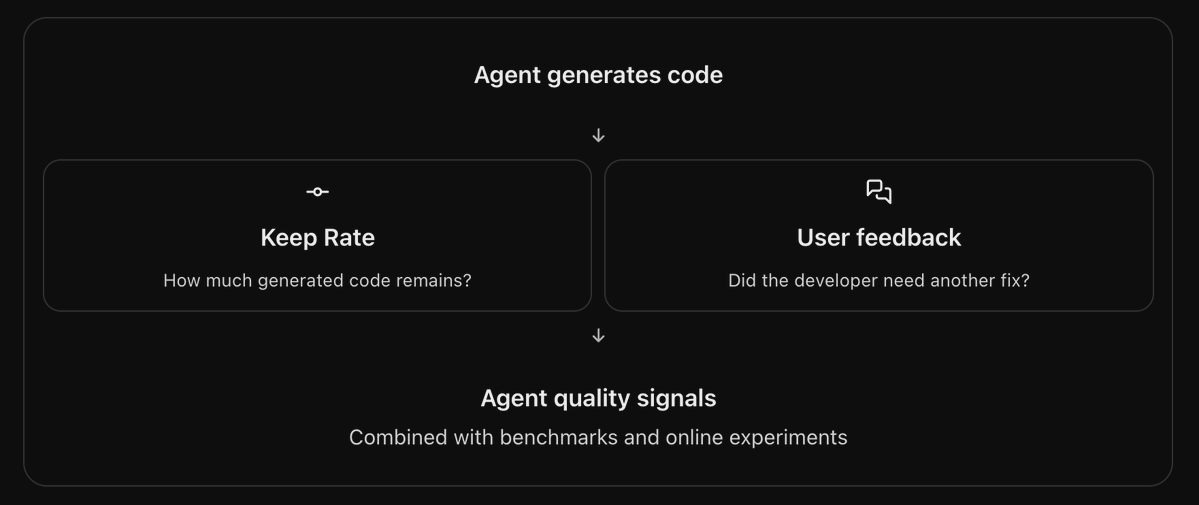
Cursor has a metric called Keep Rate to help measure this. It tracks what fraction of agent-generated code changes remain in the developer's codebase after fixed periods of time.
Let's take a simplified example. Suppose Cursor generates 100 lines of code, and the developer removes 30 lines and replaces another 20. Only 50 lines of the original output remain. In a basic line-based approximation, that would represent a 50% retention rate.
Cursor's actual measurement isn't necessarily calculated using this exact formula, but the underlying idea is straightforward. It wants to understand how much of the agent's work developers actually keep.
I really like this approach because it measures something much closer to actual product value. An agent generating 1,000 lines of code isn't necessarily better than an agent generating 200. What matters is whether those changes were useful.
Now imagine Cursor is experimenting with two different versions of its agent harness. The first version generates code quickly, but developers frequently rewrite its output. The second version is slightly slower but produces changes developers rarely need to modify.
If you're only measuring speed, the first version might appear better. But Keep Rate could tell a completely different story.
Of course, this metric isn't perfect. Sometimes developers delete good code because requirements change, and sometimes they keep bad code because they haven't reviewed it yet. That's why Cursor doesn't rely on Keep Rate alone. It also looks at how users respond after the agent finishes its work.
And this is where its evaluation system gets even more interesting.
4. Cursor uses another LLM to figure out whether users were satisfied
This is probably one of my favorite parts of Cursor's approach.
Cursor doesn't just measure what its coding agent does. It also tries to understand how the developer reacts to the result.
Its engineers have described using a language model to analyze subsequent user messages and estimate whether the original agent response was satisfactory. Instead of relying entirely on tests or tool execution, Cursor can look at what happens in the conversation after the agent claims to have completed a task.
Let's say you ask Cursor to build an authentication flow. The agent writes the code and tells you everything is done.
Now imagine you respond with, "Looks good, let's work on the dashboard next." That suggests the original task may have been completed successfully.
But imagine your response is, "This is still broken. I'm getting a 401 error when I try logging in." That's a completely different outcome. The agent might have completed all its tool calls successfully, but the developer's response suggests that the implementation didn't actually work.
Cursor can use an evaluator model to identify these kinds of signals. A simplified implementation might look something like this:
def evaluate_session(task, agent_response, user_reply):
    evaluation = llm.evaluate(
        task=task,
        response=agent_response,
        followup=user_reply
    )

    return {
        "satisfied": evaluation.satisfied,
        "reason": evaluation.reason
    }
This is illustrative pseudocode, not Cursor's actual implementation. The important part is the idea behind it.
Instead of trusting the agent's own statement that it completed the task, the system looks at what happened afterward. Did the user move on to another task? Did they repeat the same request? Did they report another error or ask the agent to undo its changes?
All of these can provide useful information about the quality of the original response.
When you analyze enough conversations, you can start identifying recurring patterns. Maybe the agent consistently misunderstands requests involving authentication, frequently generates incorrect database migrations, or struggles with certain types of repositories.
This is where evaluating an AI agent becomes much more interesting than simply checking whether it produced an answer. You're trying to understand whether the answer actually helped the user.
We think about this problem a lot at Agnost. A support agent can finish a conversation without resolving the customer's issue. A voice agent can complete a call while leaving the user frustrated. And a coding agent can finish writing code that the developer immediately removes.
A completed agent run doesn't necessarily mean a successful outcome.
That's the important distinction. And it's something every team building AI agents in production should be thinking about.
5. Cursor monitors its own tool errors to understand what keeps going wrong
Another thing I found interesting is how Cursor approaches tool failures.
A coding agent depends on tools to do almost everything. It reads files, searches repositories, edits code, executes commands, and sometimes interacts with external services. Every one of these operations can fail, and the reason behind that failure matters.
For example, the model might try reading a file that doesn't exist, pass incorrect arguments to a file-editing tool, or execute a command that takes too long and times out. Sometimes the model causes the problem, sometimes the tool itself is broken, and sometimes the execution environment behaves unexpectedly.
Cursor doesn't treat all these failures as one generic error. Instead, its engineers have described classifying them into categories such as InvalidArguments, UnexpectedEnvironment, ProviderError, Timeout, and UserAborted.
Each category helps explain a different type of problem. An invalid argument might suggest the model doesn't understand how to use a particular tool. A timeout might indicate an inefficient operation or an infrastructure problem. An unexpected environment error could reveal assumptions inside the harness that don't hold for certain repositories.
Unknown errors are especially interesting because they might indicate bugs in the harness itself.
Now imagine collecting this information across millions of tool calls. You might discover that one model frequently passes incorrect arguments to an editing tool, while another model tends to generate expensive search operations that time out.
These patterns become useful when you're trying to improve the system.
Cursor calculates error baselines separately for different tools and models, which makes sense because different tools naturally have different failure characteristics. A search timeout might be relatively common in a huge repository, while the same error frequency in another tool could indicate a serious problem.
It also uses anomaly detection to identify unexpected increases in errors. So if a new harness version suddenly causes a spike in failed tool calls, the team has a way to notice the regression.
What I find interesting is that this gives Cursor visibility into problems that developers might never explicitly report. A user might only see that the agent is taking longer than expected, while the underlying traces reveal that it's repeatedly calling the wrong tool or recovering from unnecessary errors.
And collecting these errors is only the beginning. The more interesting part is what Cursor does after identifying them.
6. Cursor has an automated system that investigates recurring failures
This is the part that got me especially interested in Cursor's self-improvement approach.
Cursor's engineers have described running a weekly automation that examines their logs and looks for emerging problems. The automation uses a skill that teaches the agent how to investigate those logs, identify new or increasing failure patterns, and create or update engineering tickets.
Cursor then uses Cloud Agents to help investigate and fix some of those issues.
Think about how useful that becomes when you're operating a product used by a large number of developers. Instead of relying entirely on engineers manually inspecting logs, part of the process of discovering and investigating problems can happen automatically.
Let's say an update to Cursor's harness causes file-editing errors to increase. The monitoring system detects the spike, and an automated investigation examines the affected sessions to identify a recurring pattern. It can then create an engineering ticket describing the issue, including relevant context about where the errors occurred.
A coding agent can help investigate the implementation and suggest a possible fix. The team can evaluate the change before deploying it and monitor whether the error rate improves afterward.
A simplified reconstruction of this process would look like:
This doesn't mean every issue is automatically fixed and pushed to production without human involvement. Cursor hasn't publicly described its complete internal approval process.
Production agent sessions
          |
          v
Collect tool logs and errors
          |
          v
Identify recurring problems
          |
          v
Automated investigation
          |
          v
Create engineering tickets
          |
          v
Investigate possible fixes
          |
          v
Evaluate and review changes
          |
          v
Deploy and monitor results
But it does show how parts of the journey from detecting a failure to producing an actionable engineering change can be automated.
Cursor reported that during a focused reliability effort, it reduced unexpected tool-call errors by roughly an order of magnitude. That's a significant improvement, especially considering that the work was focused on the agent harness rather than simply switching to a stronger language model.
And this is what I find particularly compelling about self-improving agents.
You don't necessarily need an AI system that autonomously rewrites its own model weights. Even a system that reliably catches recurring problems, investigates their causes, and helps engineers ship improvements can create a powerful feedback loop.
7. Cursor doesn't use the same agent harness for every model
Here's something else that stood out to me.
You might assume that switching models inside Cursor is as simple as changing the model name in an API request. But different language models don't necessarily behave the same way when using tools, following instructions, or working with large amounts of context.
Cursor's engineers have discussed an interesting example involving file editing. OpenAI coding models have been trained to work with patch-based editing formats, while Anthropic models have been trained around string-replacement formats.
Both approaches can modify the same code, but asking a model to use an unfamiliar editing format can create additional errors and reasoning overhead.
Because of this, Cursor customizes parts of its agent harness for different model families. This includes tool formats, prompts, and other model-specific instructions.
When Cursor gets access to a new model, its engineers don't simply connect the API and assume everything will work. They start with an existing harness configuration, run evaluations, identify the model's weak spots, make adjustments, and test again.
One interesting example from Cursor's research involved a model that became increasingly reluctant to work on large tasks as its context window filled up. Cursor's engineers referred to this behavior as context anxiety. The model would start hesitating or suggesting that a task was too large to complete.
Instead of immediately replacing the model, Cursor adjusted its prompts to reduce that behavior.
I think that's a useful example of why harness design matters. Sometimes a problem that appears to be a limitation of the model can be partially addressed by changing how the model is instructed or how it interacts with its environment.
The same model can behave differently depending on the tools, context, and instructions surrounding it.
You can improve an AI agent without changing the underlying model.
And in many situations, improving the harness might be a more practical approach than constantly upgrading to a newer model.
8. How Cursor tests whether its improvements actually work
So far, we've talked about collecting user feedback, measuring code retention, identifying tool failures, and making changes to the harness. But there's an obvious question here: how does Cursor know whether a change actually made the agent better?
Because fixing one problem doesn't necessarily improve the entire system.
You might change a prompt to reduce tool errors but accidentally make the agent slower. Or you might improve performance on one category of coding tasks while making another category worse.
Cursor approaches this through a combination of offline evaluations and online experiments.
For offline evaluations, Cursor maintains an internal evaluation suite called CursorBench, alongside public benchmarks. These allow engineers to compare how different versions of the agent perform on a consistent set of programming tasks.
Imagine you're experimenting with a new file-editing interface. You run the existing agent against a set of tasks and record its performance. Then you update the interface and run the evaluations again. By comparing the results, you can see whether the change improved task success and whether it introduced new problems.
But offline evaluations have limitations. Even a well-designed benchmark can't perfectly represent how developers use a product in the real world.
That's where online experiments come in.
Cursor runs A/B tests comparing different harness configurations in real usage. It looks at metrics such as latency, token efficiency, tool-call counts, cache hit rates, Keep Rate, and user satisfaction signals.
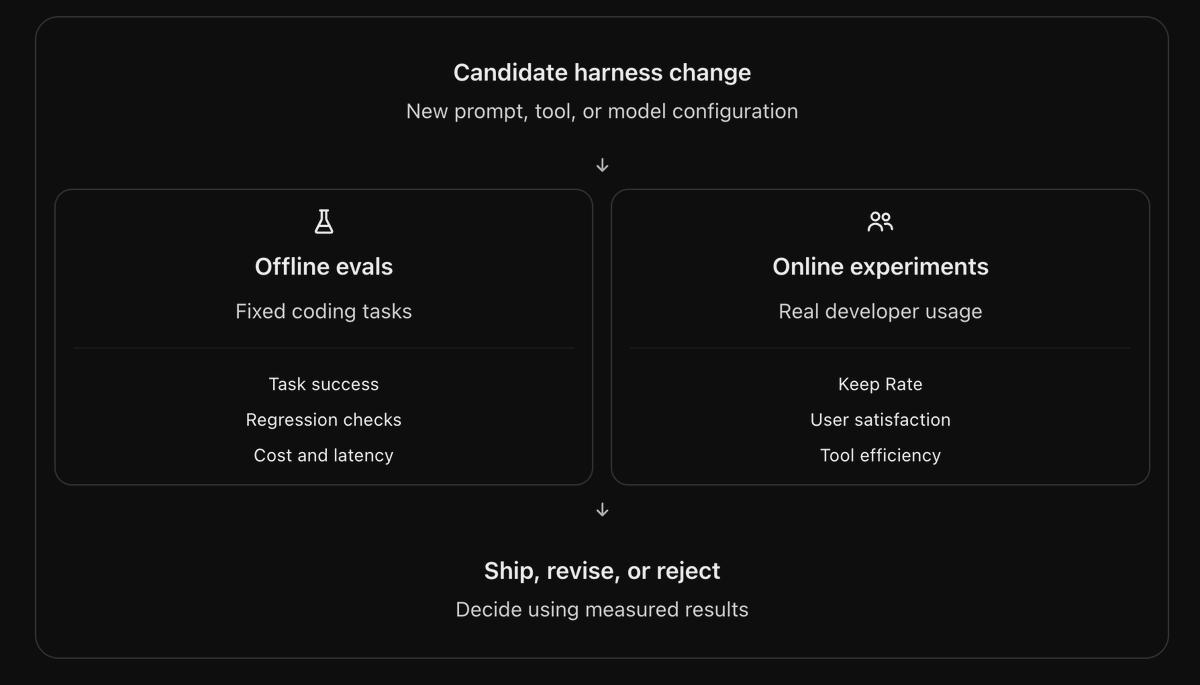
This helps the team understand whether changes that look promising in benchmarks actually make the product better.
One example from Cursor's research involved experimenting with a more expensive model for context summarization. You might expect a stronger model to produce better summaries and improve the agent's performance. But Cursor found that the quality improvement was negligible.
So spending more money on the summarization model wasn't justified by the results.
I think this is an important lesson for anyone building AI products. Not every improvement requires a more expensive model, a more complicated architecture, or additional compute.
Sometimes the experiment tells you that the existing approach is already good enough. And having the data to make that decision is just as valuable as discovering an improvement.
9. Cursor's Debug Mode shows how agents can correct mistakes using actual evidence
In December 2025, Cursor introduced Debug Mode, and I think it's a great example of how coding agents can become more reliable by using real execution data.
Normally, when you ask an AI coding agent to fix a bug, it reads the source code and tries to determine what might be wrong. Sometimes that's enough, but not every bug can be understood by looking at the code alone.
Imagine your checkout flow occasionally fails to create an order. The code looks correct, and the failure only happens under certain conditions.
The problem could be a race condition, an unexpected API response, or a database transaction that fails after the payment has already succeeded.
A normal coding agent might inspect the checkout function and start rewriting the logic based on its assumptions. That could work, but it could also introduce new problems without addressing the real cause.
Cursor's Debug Mode takes a more evidence-driven approach.
Instead of immediately changing the code, it generates hypotheses about what might be wrong and adds targeted logging statements to collect runtime information. The developer reproduces the issue, and the agent analyzes the resulting logs to understand what actually happened during execution.
With that information, it can identify a likely root cause and propose a targeted fix. The developer can then reproduce the issue again to verify whether the problem was resolved.
If the fix doesn't work, the agent can investigate further using the new evidence.
What I like about this approach is that the model isn't simply generating another answer based on the same incomplete information. It's actively collecting information that helps it understand the problem better.
That changes the debugging process from repeated guessing into something closer to hypothesis testing.
And the same idea applies beyond coding agents. If an agent can observe the actual consequences of its actions, it has a much better chance of understanding why something went wrong.
10. There's an important distinction between self-correction and actual self-improvement
After going through Cursor's research, I think it's worth separating three different ways an AI agent can improve.
The first is task-level self-correction. This happens when an agent encounters an error during a task and adjusts its approach. For example, Cursor writes some code, runs a test, discovers a TypeScript error, and fixes it.
The second is product-level continuous improvement. This happens when a team analyzes failures across many sessions, identifies recurring problems, and improves the tools, prompts, or orchestration used by future agent runs.
The third is model-level learning, where the underlying model is trained or fine-tuned using new data.
These approaches are related, but they aren't interchangeable.
An agent correcting a bug doesn't necessarily mean it has permanently learned how to avoid that bug in the future. And a product storing thousands of conversations doesn't automatically mean the model is learning from them.
For improvements to carry across future sessions, something in the system needs to change. That could be the model's instructions, the available tools, the context retrieval process, a persistent memory system, or the model weights themselves.
Cursor's publicly documented harness improvements are a particularly strong example of product-level continuous improvement.
And I think that's one of the more practical approaches available to AI teams today. You don't need to solve continual model training before you can start making your agents better.
You can begin by understanding where they fail and improving the systems surrounding them.
11. Could you build something similar yourself?
Yes, at least a smaller version of the core improvement loop. And you don't need to build an entire coding IDE to experiment with it.
Let's say you're already running an AI agent in production. It could be a customer support assistant, a coding agent, a sales agent, or an internal workflow automation.
The first thing I'd do is start collecting useful execution traces. For every session, you'd want to record what the user asked, what the agent did, which tools it called, what those tools returned, and how the interaction ended.
A simplified trace might look like this:
{
  "session_id": "session_123",
  "task": "Fix login issue",
  "model": "coding-model",
  "tool_calls": [
    {
      "tool": "read_file",
      "status": "success"
    },
    {
      "tool": "edit_file",
      "status": "success"
    },
    {
      "tool": "run_tests",
      "status": "failed",
      "error": "TypeError"
    }
  ],
  "outcome": "unverified"
}
This is an illustrative schema, not Cursor's actual trace format.
Once you have enough traces, you can start looking for patterns. Maybe your agent repeatedly calls the same tool without making progress. Maybe it claims to have completed tasks without verifying the results. Or maybe users keep repeating the same requests because the first responses weren't helpful.
The next step is to classify those failures. You could use an LLM to examine the conversations and tool outputs, identify what went wrong, and group similar issues together. But these classifications should be grounded in actual evidence rather than blindly trusting the evaluator's explanation.
Once you understand the recurring problems, you can start turning them into evaluation cases.
Let's say your coding agent frequently edits the wrong file. You could create a representative repository and a task with a known correct target file. That becomes a repeatable evaluation you can use to test different solutions.
You might experiment with changing the system prompt, improving the file-search tool, or giving the agent a better way to inspect repository structure. Then you run the evaluation again and compare the results.
If the change performs better, you can test it on a broader set of tasks before deploying it.
The overall process would look something like this:
Collect production traces
          |
          v
Detect recurring failures
          |
          v
Classify root causes
          |
          v
Create evaluation cases
          |
          v
Suggest improvements
          |
          v
Evaluate against baseline
          |
          v
Review and deploy
          |
          v
Monitor production outcomes
          |
          v
Now you have the foundation of a continuous improvement system.
Of course, making this reliable is harder than drawing the architecture. You need representative evaluation cases, good failure classifications, safe deployment processes, and a way to distinguish genuine improvements from random variation.
But the underlying idea is simple. Use what your agent gets wrong in production to make the next version better.
And that's something I think far more AI products should be doing.
Where Agnost fits into this
One of the reasons I wanted to reverse-engineer Cursor was that we're working on a similar problem at Agnost, but for AI agents beyond just coding assistants.
At Agnost, we're building the observability and improvement layer for AI agents in production. We help teams catch failures that are easy to miss, like repeated questions, lost context, user frustration, incorrect tool usage, and agents claiming they've completed tasks when they haven't.
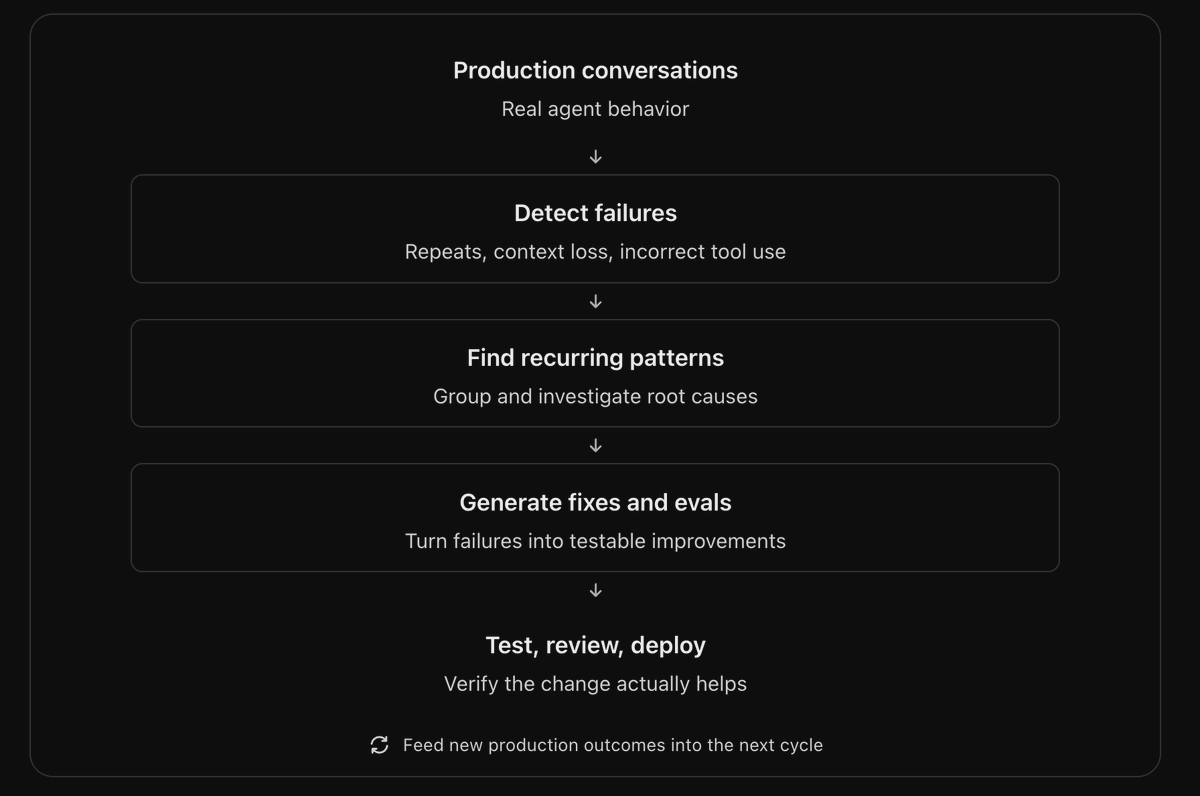
But detecting problems is only part of it. We're also working on turning recurring production failures into suggested fixes and evaluations, so teams can use what goes wrong in real conversations to improve their agents.
That's what I find particularly interesting about Cursor's approach. They've built feedback loops around their own coding agents, and we're trying to make similar capabilities available to teams building all kinds of AI agents, whether that's customer support, voice assistants, in-app copilots, or background workflows.
If you're building AI agents in production and want to understand where they're failing real users, you can check out agnost.ai.
12. Why this matters for every company building AI agents
The more I looked into Cursor's approach, the more I realized that these principles apply to almost every type of AI agent.
Think about a customer support assistant. It could successfully retrieve account information, execute its tools, and complete a conversation. But what if it gave the customer the wrong refund amount or promised that a refund had been processed when it hadn't?
From an infrastructure perspective, everything might look fine. The tools executed, the model returned an answer, and the conversation ended. But the actual outcome was wrong.
The same thing happens with voice agents. A call can complete normally even though the customer had to repeat themselves five times. Or an in-app assistant might provide a technically correct answer while completely misunderstanding what the user was trying to accomplish.
These are exactly the kinds of problems we focus on at Agnost.
We're building observability for AI agents to help teams understand what happens in production, especially the failures that aren't obvious from error logs or basic completion metrics.
And one thing has become pretty clear to me. Simply collecting traces isn't enough.
You need to understand which conversations went wrong, what caused those failures, and whether the same problems keep happening. Then you need a way to turn those findings into actual improvements.
That's why I found Cursor's approach so interesting. It doesn't just look at whether the model produced output. It also examines tool behavior, user feedback, evaluation results, and the quality of generated changes.
Those signals help its engineers understand which parts of the harness need improvement.
And there's a lot to learn from that approach, even if you're building a completely different kind of AI product.
13. My biggest takeaway from reverse-engineering Cursor
Before going through Cursor's research, I mostly thought about coding-agent improvements in terms of better models, better prompts, and better context retrieval.
Those things are obviously important. But what stood out to me was how much effort Cursor puts into measuring what its agents actually do in production.
It tracks whether developers keep generated code, analyzes follow-up conversations to estimate user satisfaction, monitors tool errors across different models, and uses automated investigations to surface recurring problems. It also runs evaluations and experiments before deploying changes to the agent harness.
None of these ideas is particularly magical on its own. But when you combine them, you get a system that can continuously identify what needs improving.
And that's the part I think more agent builders should pay attention to.
You can spend months optimizing prompts and upgrading models, but if you don't understand why your agent fails in production, you're mostly guessing about what to fix.
The interesting thing about Cursor is that it has built systems to make those failures visible and actionable.
We don't know every detail of its internal infrastructure, and I wouldn't claim that Cursor automatically learns from every single mistake a developer makes. But its public engineering research shows how powerful a well-designed feedback loop can be.
The best AI agents won't just be the ones that make the fewest mistakes. They'll be the ones built by teams that can find those mistakes, understand them, and systematically stop them from happening again.
And I think that's where a lot of the next wave of AI-agent engineering is going to happen.