How to Build an AI Content System (Full 2026 Setup Guide)

文章目录
Most people use AI for content like this: open ChatGPT, type “write me a viral post” and post whatever comes out
That’s exactly why so many posts look like AI slop and barely get any impressions
I manage personal brands for startup founders and their teams, and in this article I’ll show you the exact system I use to run my account & my clients’ accounts (every prompt and cost included)
You’ll learn how to build a system that:
-
builds your content strategy from your goals, so every post has a job (growth, trust or clients)
-
spots the posts in your niche that went viral (5x+ their usual views), so you always know which topics and formats work right now
-
picks fresh posts worth quoting every morning, with an angle for each one
-
turns your daily notes into post ideas and drafts in your voice (which saves you hours every week)
-
tracks how every post performs and tells you how to grow your personal brand more efficiently
But before we start, please hit the follow button. This system took me 3+ weeks of building, testing and fixing, and I’m giving you all the info for free
1. The Setup
#1 Get the Claude desktop app
Download it from claude(.)ai/download and sign in. You also need a subscription: I'm on Max ($100/month), but Pro ($20/month) works too (it hits the limits way too often once you run this every day though)
#2 Make one folder for everything
Create a new folder on your desktop (I called mine Buzz Content Engine)
Later in this article you'll add more files to it, and here's what your folder is gonna look like in the end:
Your Content Engine/
  CLAUDE.md             →  the rulebook every session reads first
  brand_master/         →  who you are, who you help, what you believe
  strategy/             →  your goals + what you post each week
  writing_and_rules/    →  your voice rules + every correction you made
  knowledge_base/       →  what you know about your topic
  data/
    knowledge-bank.md   →  your stories, opinions, wins, mistakes, life
    research/           →  lessons from videos + articles, with sources
    learnings.md        →  what works on your account right now
    posts-log.csv       →  every post you published + its numbers
    watchlist.md        →  the accounts you study
    outliers/           →  daily: posts that did way better than usual
    quotes/             →  daily: fresh posts worth quoting
    weekly-plan.md      →  this week's posts
    drafts/             →  one file per day
  .claude/skills/       →  the team (one file per job)
  scripts/              →  small helpers (X data, budget cap)
  app/dashboard.html    →  everything on one page
(Don't create any of this yourself. For now you only need the one empty folder, the setup prompt in #4 will build everything else for you)
#3 Open the folder in Claude
Open the Claude app, go to the Code tab, open a new chat and pick the folder you just created. From now on Claude can read and write the files in it
#4 Paste the setup prompt
This one prompt builds the whole structure and then interviews you, so Claude has enough info about you to work with
Every prompt in this guide works the same way: replace whatever is in [brackets] with your own info, then paste it into the chat:
SETUP PROMPT

I want to build an AI content system for my X account in this folder.
Goal: grow my personal brand by posting [2-3] times a day, with you
doing the research, ideas, first drafts and analytics, and me picking,
rewriting and approving every post. Nothing ever gets posted by you.

1. Create this structure: CLAUDE.md, brand_master/, strategy/,
   writing_and_rules/, knowledge_base/, data/ (knowledge-bank.md,
   research/, learnings.md, posts-log.csv, watchlist.md, outliers/,
   quotes/, weekly-plan.md, drafts/), .claude/skills/, scripts/, app/
2. Set up git so every change is saved and I can undo anything
3. Write CLAUDE.md: a map of every folder and file and what it's
   for, plus the rule that nothing ever gets posted without me
4. Give data/knowledge-bank.md these sections: stories, personal,
   opinions, lessons, wins (real numbers only), mistakes,
   experiments, building right now, formats that worked
5. Interview me, 5 questions at a time, until you can fill
   brand_master/who-i-am.md, strategy/goals.md and the knowledge
   bank: who I am, who I want to reach, what I want from my
   personal brand (clients, a job, a launch...), what I know that
   others don't, my stories, wins, mistakes, opinions and a few
   personal things (food, music, habits). Never invent anything,
   if you don't know, ask me
6. Show me every file and ask what to fix
Then just answer the questions it asks (be specific for better results). It takes about 30 minutes, and it's the most important half hour of the whole setup
2. The Rulebook (CLAUDE.md)
Open a new chat in your folder and paste this prompt:
RULES PROMPT

Add these 2 rules to my CLAUDE.md (the file you read at the start
of every session):

RULE 1: BEFORE WRITING ANYTHING (posts, quotes, articles, DMs)
read these 4 files first, every time, even for a one-line quote:
1. my posts from the last 7 days (data/posts-log.csv, or posts.txt
   until X is connected, or my voice samples if I haven't posted yet)
2. writing_and_rules/voice-rules.md (my voice + every correction)
3. the voice check skill (all banned words and phrases)
4. data/learnings.md (what works on my account right now)
then run the voice check before showing me anything

RULE 2: EVERY FIX BECOMES A RULE
When I correct anything you wrote, add the correction to
writing_and_rules/voice-rules.md (or the skill that made the
mistake) the same day, with my words and an example
Rule 2 is super important, because it makes the system improve every week based on the feedback you give it (so if Claude does something wrong, tell it exactly what and explain why)
Don't worry if some of these files are still empty, the next steps fill them
3. The Brain
Claude can only write good posts if it has good material: what you want to post, what happens in your life and what you learn
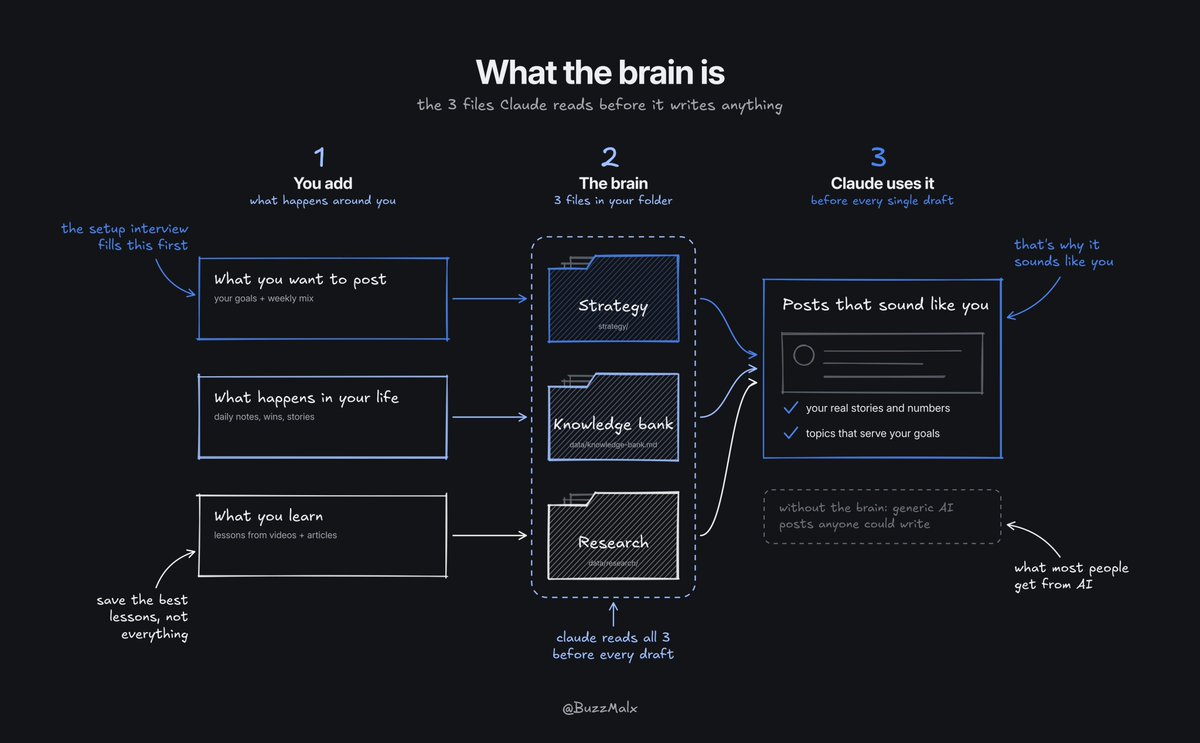
So here are 3 steps to set up:
#1 Build your content strategy
This decides how many posts you make a week and which types, so every post serves one of your goals:
STRATEGY PROMPT

Read strategy/goals.md and my knowledge bank. Suggest my weekly mix
in strategy/weekly-mix.md: how many posts a week, which types
(stories, lessons, opinions, quotes, proof, personal, selling...)
and how many of each, so every goal gets posts. Max 1 selling post
a week. Explain each choice in one line and ask me what to change
#2 Build your knowledge bank
Your stories, wins, mistakes and opinions are what make posts sound like you, and something post-worthy happens every day. Once a day (2 minutes, a voice note works too), paste:
NOTES PROMPT

Add this to my knowledge bank under the right section with today's
date: [what happened today, what I learned, what someone asked me,
what I noticed, a small win or a bad day]. If something could be a
post, tell me the idea in one line
#3 Build your research bank
Whenever you find something great (a YouTube video, an X article, a study), save the best lessons
For YouTube videos, get the transcript first (click "Show transcript" under the video), for articles and studies just copy the text. Then use this prompt:
RESEARCH PROMPT

Read this [transcript / article / thread] and pull out the 5 most
useful lessons, with the author's name and the link for each. Put
them under the right topic in data/research/insights-bank.md and
mark anything you're not sure is true
If you already have notes or courses on your topic, drag them into the knowledge_base folder
4. Your Voice
Now let's teach AI how to write like a human
#1 Start with the general rules
These rules ban AI from using the most common slop phrases. Just copy & paste this prompt into the chat:
VOICE RULES PROMPT

Save these as writing_and_rules/voice-rules.md:

TONE: talk like you'd explain it to a friend, simple words a
14-year-old gets, one idea per post, short lines

NEVER USE:
shapes:  "it's not X, it's Y" (and "not because X, because Y",
         "X wasn't the problem, Y was"), "X beats Y" slogans,
         "do X, never Y", "X is Y, not Z", "do X before someone
         does Y", symmetric closers ("the AI does the boring
         part, we do the taste part"), "the last one is the
         hardest, most people...", "where most people get it
         wrong"
phrases: em-dashes, "in a world where", "at the end of the day",
         "here's the catch", "the whole game", "that's the game",
         "shows up", "before you need it", "still early, but",
         "you'll never see", fake questions ("The good news?",
         "Pretty wild, right?")
words:   leverage, delve, unlock, seamless, robust, landscape,
         game-changer, insights, elevate, harness, foster, realm,
         testament, tapestry, crucial, pivotal, myriad, quietly,
         bottleneck, noise

ALWAYS:
- every number has its noun ("4 ways", never "these 4")
- every "it / this / they" points to something already named
- every line makes sense to a stranger (no vague "stuff",
  "things" or "work" without saying what)
- no made-up numbers, stories or results, ever
- every tip says what the reader gets out of it
- never start 2 lines in a row with the same words
#2 Add your own voice
Depends on where you're starting:
-
you've posted before: open your X profile and copy the text of your last 20-30 posts. If you want all of them, X can send you everything (Settings and privacy → Your account → Download an archive of your data, it takes about a day)
-
you've never posted: copy 20-30 messages you've written to friends or coworkers (the way you text is the way you should post), or record a 3-minute voice note about your work and copy the transcript
Theoretically you could also copy posts from writers you like and give them to Claude, but I don't recommend it: you would end up sounding like a copy of them
Then paste this (put your posts inside the brackets):
POSTS PROMPT

Save these as posts.txt in my folder:
[paste your posts, messages or transcript here]
After that, paste the voice prompt:
VOICE PROMPT

Read posts.txt and study how I write: line length, capitals,
punctuation, the words and phrases I use a lot, how I start and
end, how I use numbers and examples. Add what you find to
writing_and_rules/voice-rules.md under the general rules, as short
clear rules with an example for each. Then write 3 posts in my
voice about [a topic I know] so I can check if it sounds like me
#3 Every fix becomes a rule
From now on, every time you change a draft, tell Claude what you changed and why, and it becomes a new rule
My voice rules are over 100 lines now, every line a correction I made (even tiny ones, like banning one word). Honestly, your first 2 weeks of drafts will need a lot of fixing, but every fix makes the next draft way better
5. The Team
Claude can save "skills": one instruction file for one job, loaded when that job comes up. Think of each one as a person on your content team
So let's add a few:
#1 Start with 3
Every skill needs a few rounds of your corrections before it's good, so start with only 3 skills (quality over quantity). Paste this prompt:
SKILLS PROMPT

Create 3 skills. Before every task, each one reads the 4 files
from CLAUDE.md plus brand_master/ and data/knowledge-bank.md, and
never invents numbers or stories:

1. content-writer: turn one idea into 5 rough X post options in
   my voice for me to rewrite, run them through the voice-check
   and save them to a file with today's date in data/drafts/
2. voice-check: check every draft against
   writing_and_rules/voice-rules.md and fix it. Cut or flag any
   number or story that isn't in my knowledge bank. Fix it,
   don't just report it
3. idea-engine: turn my knowledge bank, research and outliers
   into 15 ranked post ideas that fill strategy/weekly-mix.md,
   with the source of each
Then just start using them: ask Claude something like "write posts about [idea]" and correct the drafts until they sound like you
#2 Add the rest
Once you have the first 3 skills working, add these too (they make the system way more useful, and the last 3 need the data from part 6):
MORE SKILLS PROMPT

Create 4 more skills, with the same rules as the first 3:

1. plan-week: when I say "plan my week", make data/weekly-plan.md
   from my weekly mix and learnings, and fill it with ideas from
   the idea-engine
2. quote-finder: pick the best posts in today's file in
   data/quotes/ and suggest an angle for each
3. trend-scout: read today's file in data/outliers/, skip
   anything off my topics, and explain why each outlier worked
   + which format I could reuse
4. performance-review: every Sunday, read data/posts-log.csv and
   rewrite the rules at the top of data/learnings.md (do more
   of / do less of)
6. Data & Routines
Now here's the part that makes the system really useful
#1 Connect X
Optional, but worth it: the system reads public X posts on its own (your numbers, posts to quote, outliers in your niche)
I use twitterapi(.)io for that (not an ad, it's just the cheapest option I found)
How to set it up:
-
go to twitterapi(.)io and sign up
-
add credit (a few dollars is enough to start: it costs $0.15 per 1,000 posts it reads, all of my reading costs me about $2-4 a month, and you can pay with crypto)
-
copy your API key from the dashboard
Your key works like a password, so don't paste it into the chat. Paste this instead, and Claude makes a safe place for it:
KEY PROMPT

Create a file called .env in this folder with one line:
TWITTERAPI_IO_KEY=
Add .env to .gitignore so it never gets saved in git or uploaded
anywhere, then tell me how to open it
Now open the .env file (Claude will tell you how), paste your key right after the "=" and save. Then paste:
X DATA PROMPT

My X username is @[yourname]. My twitterapi.io key is in .env
(never show it). Use the twitterapi.io docs (docs.twitterapi.io).
Write a script that adds my new posts (skip retweets) with their
views, likes, replies, reposts and bookmarks to data/posts-log.csv.
Every API call goes through one file that counts it, logs it and
stops at [2,500] calls a month, so a broken script can't burn my
money. Run it once so I can see my posts come in
One important thing you need to know: twitterapi(.)io is an unofficial API. It only reads public posts and never logs into your X account, but X's own terms prohibit scraping without prior written consent. If you want the fully official way, X has its own API too (pay per use, about $5 per 1,000 posts it reads, so a lot more expensive)
If you have X Premium, also download your analytics once a month (Account Analytics → Export data) and drag the file into your data folder. It shows which posts brought the most follows + profile visits, and Claude can use it to build a better strategy for you
#2 Make a watchlist
A really important part of growth in any niche is tracking competitors and seeing what works for them right now, so you can make your own, better version of it
All the top businesses and brands track their competitors, and you can do the same on X in a few minutes a day
Pick 20-30 accounts in your niche and write one line on why you watch each. Mix big accounts with smaller ones, because a small account with a viral post shows what YOU can do too. Copy each handle straight from their profile, then paste:
WATCHLIST PROMPT

Add these accounts to data/watchlist.md, one line each:
@[handle] - [why I watch them]
@[handle] - [why I watch them]
You could also put all your competitors into X lists (Lists → Create a list → add the accounts → copy the link) and paste the links into the watchlist, because reading a list takes fewer calls than reading every account. Then paste this prompt:
QUOTES & OUTLIERS PROMPT

Write a script that once a day reads the latest posts from my
X lists (or every account in data/watchlist.md if I have no
lists), skips retweets and goes through the same budget file:
1. posts from today or yesterday with lots of bookmarks go to
   a file with today's date in data/quotes/ (posts worth quoting)
2. posts from the last 7 days that did 5x+ that account's usual
   views go to a file with today's date in data/outliers/
First check that every handle in my watchlist returns posts and
tell me which ones don't
#3 Put it on a schedule
Automating the research is a big part of the system, and it makes your life way easier because it all runs without you
To start, paste this prompt (feel free to change the times):
ROUTINES PROMPT

Create 4 scheduled tasks:
1. every day at 9:00: run the quotes & outliers script, then the
   quote-finder skill
2. every day at 10:00: run the trend-scout skill on today's
   outliers
3. every day at 22:00: run my posts script, so today's posts and
   their numbers land in data/posts-log.csv
4. every Sunday at 17:00: run performance-review, then plan-week
They run on your computer while the Claude app is open (if it's closed when a task is due, it runs the next time you open the app)
#4 The dashboard
Also, to make the system simple and comfortable to use, you can add a dashboard: one page with everything on it, so you don't dig through files every morning. Paste this prompt:
DASHBOARD PROMPT

Write scripts/build_dashboard.py that builds app/dashboard.html
from my data folder (one file I open in the browser, no server).
Tabs: Today (today's drafts that passed the voice check, each in
a card with a copy button), Posts (my posts with views, likes and
bookmarks, best first), Quotes, Ideas (this week's plan), Results
(my learnings) and Reports (outliers). Design: dark background,
one accent colour, rounded cards with space between them, one
clean font, big readable text, max ~900px wide, works on my phone
too. Numbers with commas (2,637), no raw links (show "open post"),
no markdown symbols (#, **, |), a short friendly line when a tab
is empty. When it's built, open it, screenshot every tab and fix
anything that looks messy before showing me. Rebuild it at the
end of every routine
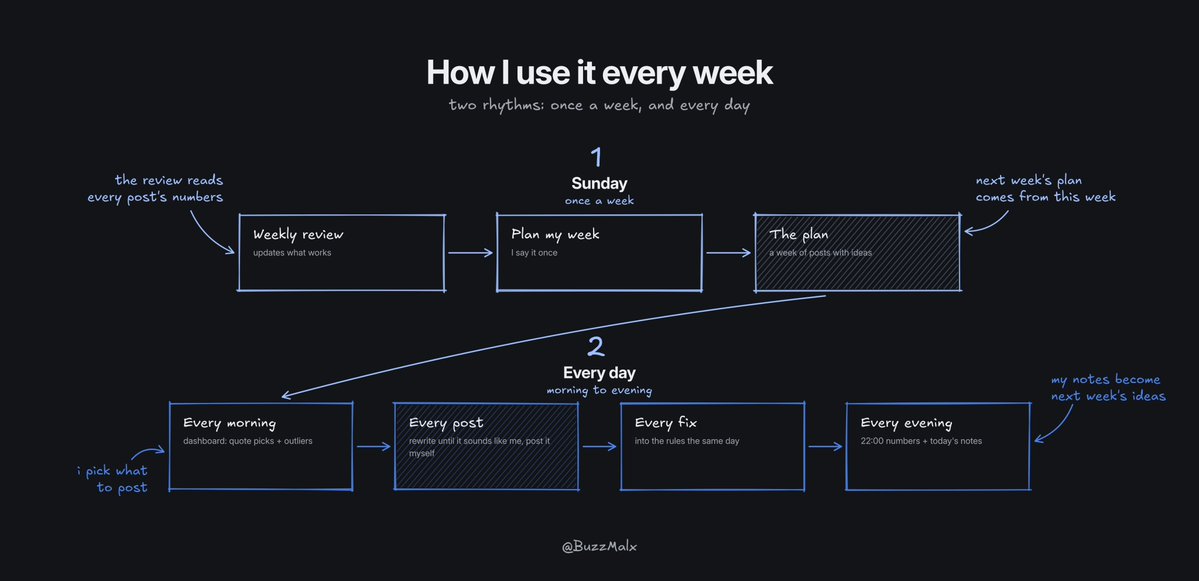
7. How I Use It Every Week
-
sunday: the weekly review updates what works, then I say "plan my week" and get a plan with ideas
-
every morning: I open the dashboard, read the quote picks and the outliers, and pick what to post
-
every post: I rewrite the draft until it sounds like me and post it myself
-
every correction: goes into the rules the same day
-
every evening: the 22:00 routine logs how my posts did, and I add today's notes to the knowledge bank
#1 Nothing posts on its own
I really don't recommend fully automating this. Don't let it post on its own: always double check everything it writes and rewrite it the way you'd normally write
#2 How much time it takes
Honestly, I spend most of my day on content (I study viral posts, work on ideas, write articles, analyse what's working, train AI etc etc). You don't have to, though: 10-30 mins a day is enough to run it. But then you wouldn't learn much yourself, and your results wouldn't be as good
Here's the whole system in short:
-
setup: the Claude app, one folder and one setup prompt that interviews you
-
rulebook: CLAUDE.md, read first, every fix becomes a rule
-
brain: your content strategy, knowledge bank and research bank
-
voice: general rules first, then yours
-
team: one skill per job, start with 3
-
data: your X numbers, a watchlist and 4 routines on a schedule
-
you: pick, rewrite and approve everything
AI can help with a lot of the work around your content now, but the part people actually follow you for is still yours: your stories, your opinions and the final words
Tell me in the comments which step you're on (and if you get stuck anywhere, drop your question there, I'll answer every one)
Hope this helps you build something great. And if it did, a follow means a lot <3