How to Build a Production AI Agent: The 7 Layers Between the Model and the Result (Full Guide)
文章目录
Most agent projects start the same way: the strongest model, a long prompt, and a great demo. Then real work arrives, and within a week you get numbers that don't match the source, lost context, and one day a client email nobody approved.
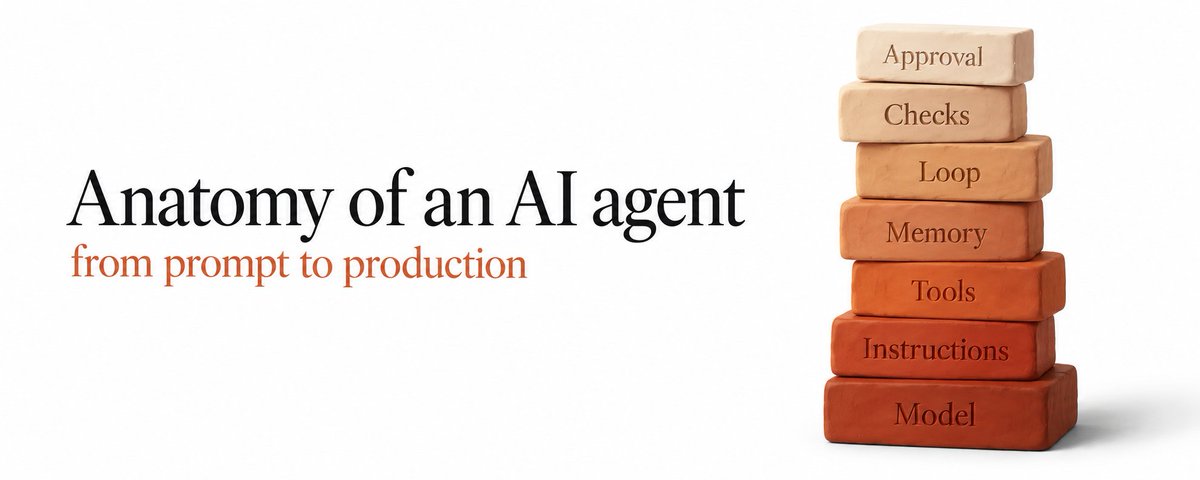
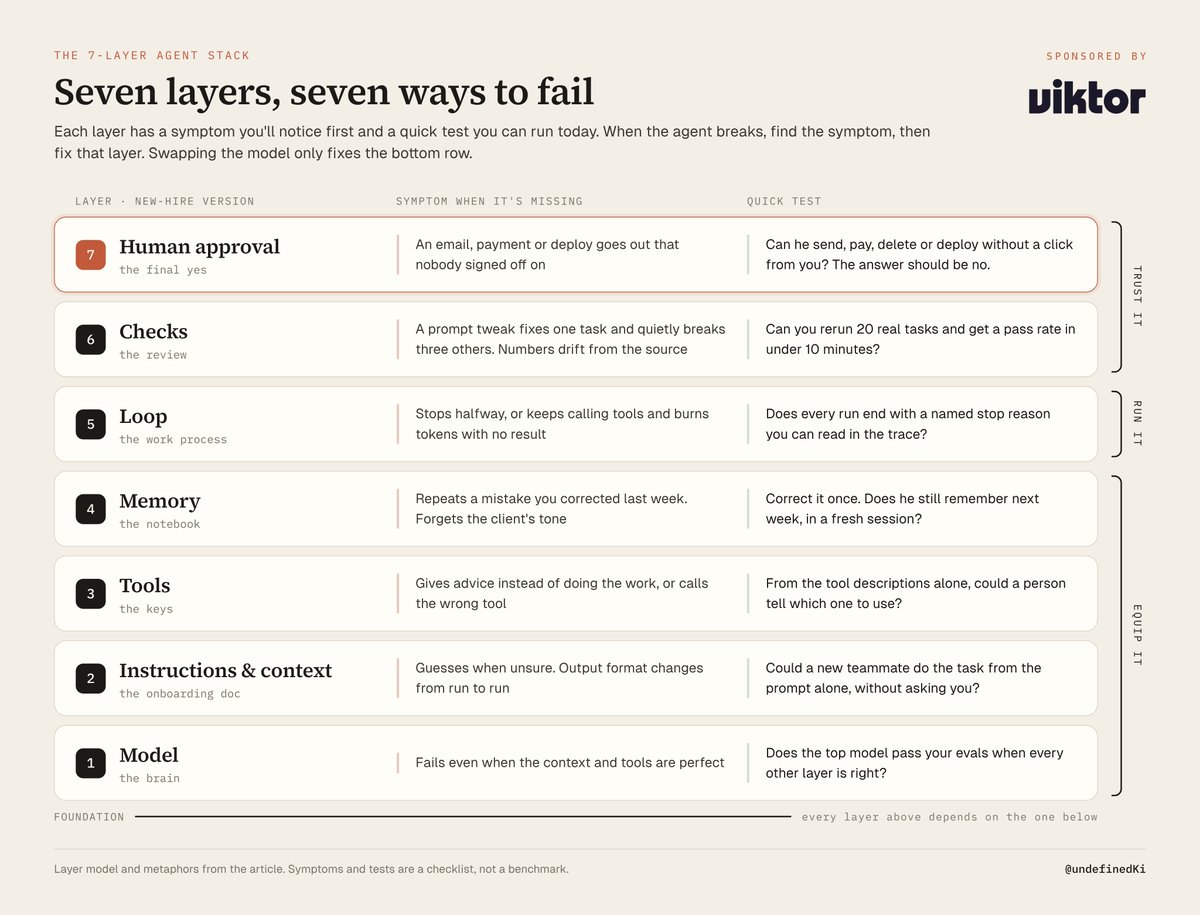
The usual fix is a new model or a rewritten prompt. It rarely helps, because the model was never the problem. It's one layer of seven.
Think of an agent as a new hire. Give a brilliant person no onboarding, no logins, no notebook, no process and no review, and he still fails, because nobody built the job around him.
Anthropic put it plainly in June 2025: "the last mile often becomes most of the journey." This guide is that last mile, and every layer works without any specific product.
This article is sponsored by Viktor, an AI employee used by 70,000+ teams. Each layer ends with a short guide to how he handles it in Slack.
What this covers:
-
Hire the brain (model)
-
Write the onboarding doc (instructions & context)
-
Hand over the keys (tools)
-
Give him a notebook (memory)
-
Set the work loop (loop & orchestration)
-
Build the review process (evals, guardrails, permissions & sandbox)
-
Keep the final yes (human approval)
Anthropic (Sep 2025) defines agents as "LLMs autonomously using tools in a loop." A bot that answers one question isn't one.
1. Hire the brain (model)
What it is. The reasoning engine that reads, plans and decides the next step.
How it works. OpenAI's agent guide (Jan 2026) gives the order: set up evals, hit your accuracy target with the most capable model, then move steps to smaller models that still pass. "Not every task requires the smartest model."
How to build it.
-
Split the job into steps (classify, extract, analyze, write), each a separate model call.
-
Open a Google Sheet called evals: task ID, input, expected output, pass criteria, one result column per model. Fill 20 rows with real past tasks, ugly ones included.
-
Run every step on the top model in the Anthropic Console Workbench or the OpenAI Playground, and record pass or fail.
-
Switch one step to a cheaper model and rerun all 20 rows. Keep the swap only if the pass rate holds, and never swap two steps at once.
-
Pin exact model versions in config, not aliases.
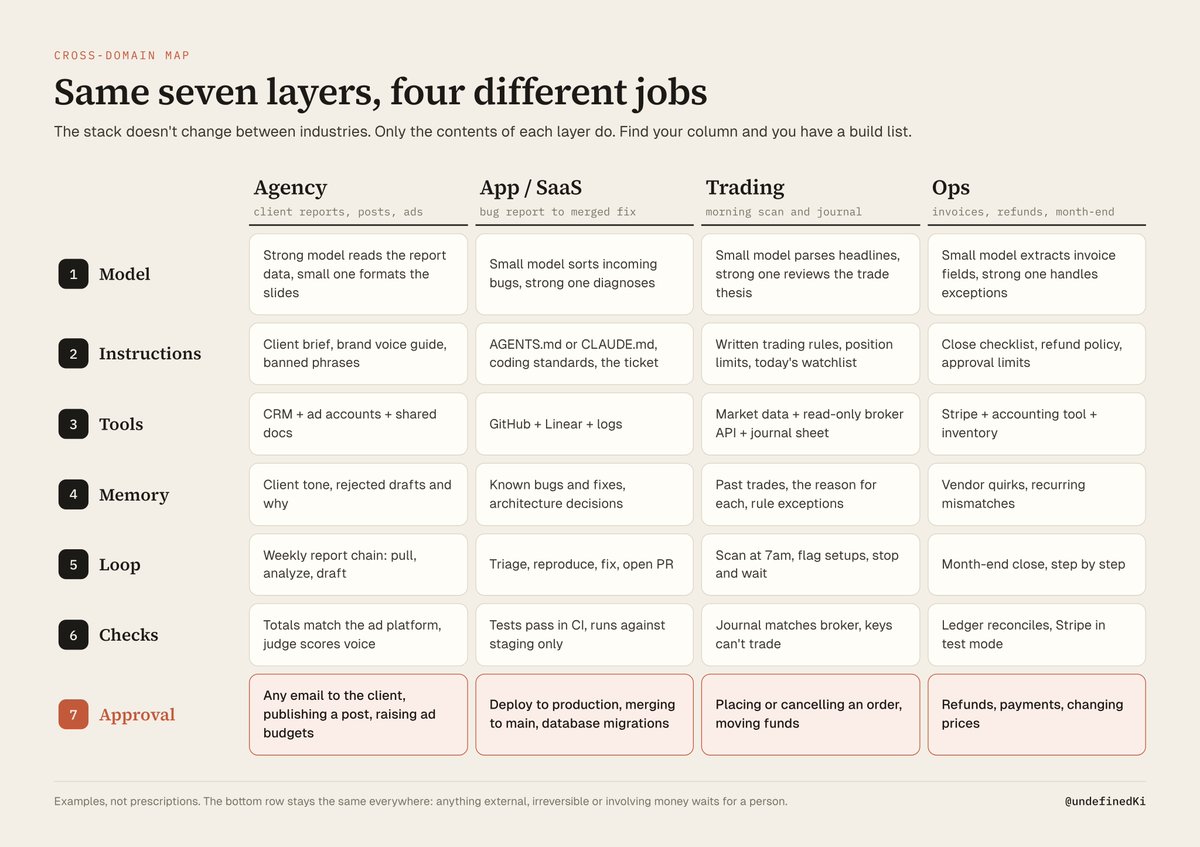
Hire the smartest brain first, and downgrade only when the evals say you can.
How Viktor does this layer. He's model agnostic, and the downgrade logic lives in his scheduled tasks (viktor.com/docs/scheduled-tasks):
-
A new recurring task runs on smart by default. Keep it for anything people read.
-
Ask for balanced on routine work, or cheap when nobody reads the output.
-
To change it, open Tasks, select the task, choose Edit and pick a Model.
Example message: "Set up the Monday pipeline report on the balanced model."
2. Write the onboarding doc (instructions & context)
What it is. Everything the model sees before it acts: role, rules, examples and this task's facts.
How it works. Karpathy (Jun 2025) calls it context engineering, "the delicate art and science of filling the context window with just the right information for the next step." Anthropic (Sep 2025) calls the failure "context rot": recall drops as the context grows, so aim for "the smallest possible set of high-signal tokens."
Where to use it. You already have the onboarding doc: OpenAI suggests building instructions from "existing operating procedures, support scripts, or policy documents."
How to build it.
-
Paste one SOP the team actually follows into the prompt below.
-
Save the output as the system prompt. For a coding agent, put it in its rules file at the repo root, so it loads every session.
-
Stable rules live in that file; task facts (the brief, the ticket, today's numbers) load per run.
-
Rerun your 20 eval rows and add a rule or example wherever the agent guessed.
You are writing instructions for an AI agent that will do this job.
Below is our existing procedure document.

Rewrite it as numbered steps. Rules:
1. Every step must be one specific action or one specific output.
2. Name the tool or data source used in each step.
3. List the edge cases explicitly and say what to do in each.
4. Add 2 to 3 short, realistic examples of a correct result.
5. Mark every step that sends, pays, deletes or publishes as
   "REQUIRES HUMAN APPROVAL".
6. If information is missing, the agent must ask, not guess.

Procedure document:
[paste your SOP here]
More context is not better context. The right context is.
In my own setup, SOPs live as skills. My latest is explain-skill (github.com/undefined-ui/explain-skill), and it's that prompt's rules in practice. It's a folder with one SKILL.md whose description says when to use it (an explainer, a diagram, an interactive page or a narrated video, never a quick one-line answer), then numbered steps. Pick the mode from Karpathy's output ladder (simplified technical English text, a technical-sheet diagram, an interactive HTML page, a 3Blue1Brown-style video), or the highest rung the topic earns. Follow the rules for every mode: keep every fact, read the source first, verify the output before handing it over. Each mode has its own reference file, and scripts handle the linter and the video render. I wrote the process down once, and now the agent follows the document instead of my memory of how I did it last time.
How Viktor does this layer. The channels you give him become his onboarding doc (viktor.com/docs/add-viktor-to-slack):
-
An admin goes to app.viktor.com/signup, chooses Continue with Slack (or Continue with Microsoft Teams) and approves him.
-
When the wizard asks "Which channels should Viktor join?", choose Select channels and pick only the relevant ones.
-
For a private channel, type /invite @Viktor inside it.
He sees only what he's invited to and builds a knowledge base from it. Example message: "@Viktor read the last month of #client-acme and tell me what this client keeps pushing back on."
3. Hand over the keys (tools)
What it is. How the agent reads data and acts. Without tools he gives advice; with them he does the work.
How it works. Building their coding agent (Dec 2024), Anthropic "spent more time optimizing our tools than the overall prompt." Requiring absolute file paths made one tool work "flawlessly," and in June 2025 an agent rewriting tool descriptions produced "a 40% decrease in task completion time."
How to build it.
-
List every system the job touches and mark each action read or write.
-
Prefer an existing MCP server over custom glue, added through your agent's MCP config. The current MCP spec is version 2026-07-28.
-
Give the agent his own scoped credentials, never your admin login (in Stripe, a restricted key: API keys page, Create restricted key).
-
Give each tool a clear name and a description of when to use it and when not to.
-
Make inputs strict: IDs, absolute paths, fixed dates.
Anthropic's test: "If a human engineer can't definitively say which tool should be used in a given situation, an AI agent can't be expected to do better."
How Viktor does this layer. He connects to 9,800+ tools, plus his own cloud computer for code (viktor.com/docs/connect-your-tools):
-
Open Integrations and select the app's card.
-
Give the account a Nickname, then under Who can use it? pick Everyone in the workspace, or Private (Invite only) for your own inbox.
-
Select Continue to {app}, sign in and approve.
When I tested him, I set up an ad and marketing agency with Viktor, almost the same structure I already run with my own multi-bot setup on X: separate roles for idea research, drafting posts, analytics, the inbox and leads. Each role started with its own connections: Gmail for the inbox, a Google Sheet for analytics, and a private channel per role so he only sees what that job needs.
If an app is missing when you ask for work, he sends a button like 🔌 Connect Linear. Outside the catalog, Add Custom connects a REST API or a remote MCP server by URL. Element Turf connected their Aspire system in the first hour.
4. Give him a notebook (memory)
What it is. What the agent keeps outside the context window. The window is a desk; memory is the filing cabinet.
How it works. Anthropic (Sep 2025) describes three techniques: note-taking (the agent writes a NOTES.md and reads it back), compaction (summarize and restart, keeping the summary plus the few most recently used files), and just-in-time retrieval (keep links, load data when needed).
How to build it.
-
Create MEMORY.md beside the instructions and add the block below to the system prompt.
-
Give the agent write access to that file only, e.g. the filesystem MCP server scoped to one folder.
-
In your coding agent, compact the conversation before a long session fills up; permanent rules go in its rules file.
-
Weekly, delete stale notes.
Before starting any task:
1. Read MEMORY.md. Follow every rule in it.
After finishing any task:
2. Add to MEMORY.md only what will matter next time:
   a decision and why, a correction from a human,
   a new preference, a step that failed and the fix.
3. Keep each note to one line. Delete notes that are wrong.
Never store passwords, keys or personal data in MEMORY.md.
How Viktor does this layer. His notebook is skills: folders with a SKILL.md whose description tells him when to use one (viktor.com/docs/skills).
-
Do the job with him once in a thread, correcting him as you go.
-
Then send: "Save how we just did the weekly report as a skill."
-
To correct a shared skill, an admin opens it, selects Edit and saves. He uses it from his next turn.
Then call it by name: Hampton's CEO DMs him "run intros skill" every day.
5. Set the work loop (loop & orchestration)
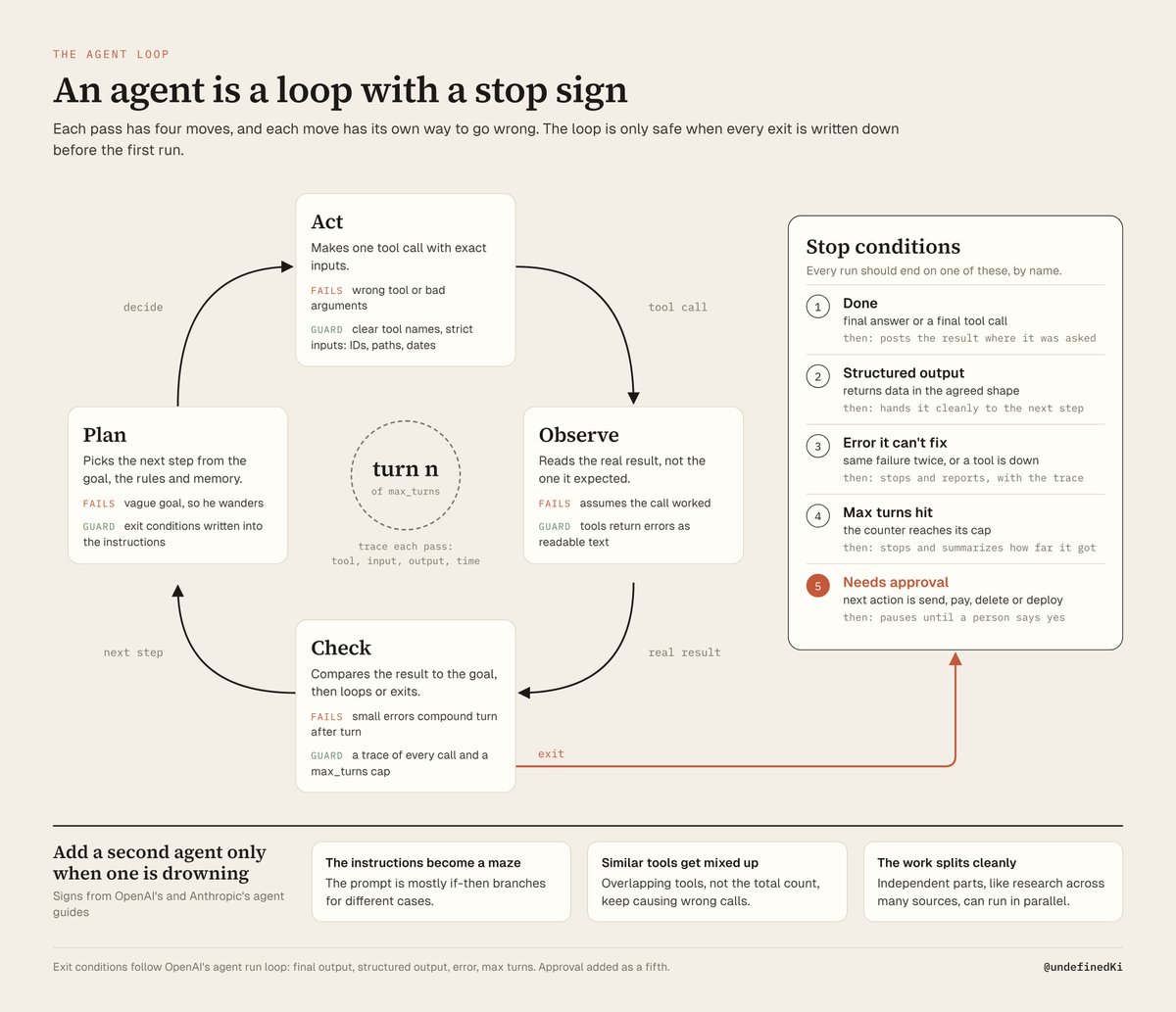
What it is. An agent is a loop with a stop sign: act, look at the result, decide, stop.
How it works. OpenAI runs agents in a loop "until an exit condition is reached" and advises to "maximize a single agent's capabilities first." Anthropic's June 2025 numbers show why: subagents beat a single agent by 90.2% on their research eval but used about 15x the tokens of chat, and an early version was "spawning 50 subagents for simple queries." Add a second agent only when the first is drowning.
How to build it.
-
Write exit conditions into the instructions: "Stop when X is posted, on an unfixable error, or when an action needs approval."
-
Cap the loop in code: max_turns in the OpenAI Agents SDK, or a counter in your own loop.
-
Turn on tracing (OpenAI Traces, LangSmith or Langfuse) to see which tool call returned what, because "errors compound."
-
Schedule recurring work with n8n's Schedule Trigger or cron (0 7 * * 1-5 is 7am weekdays).
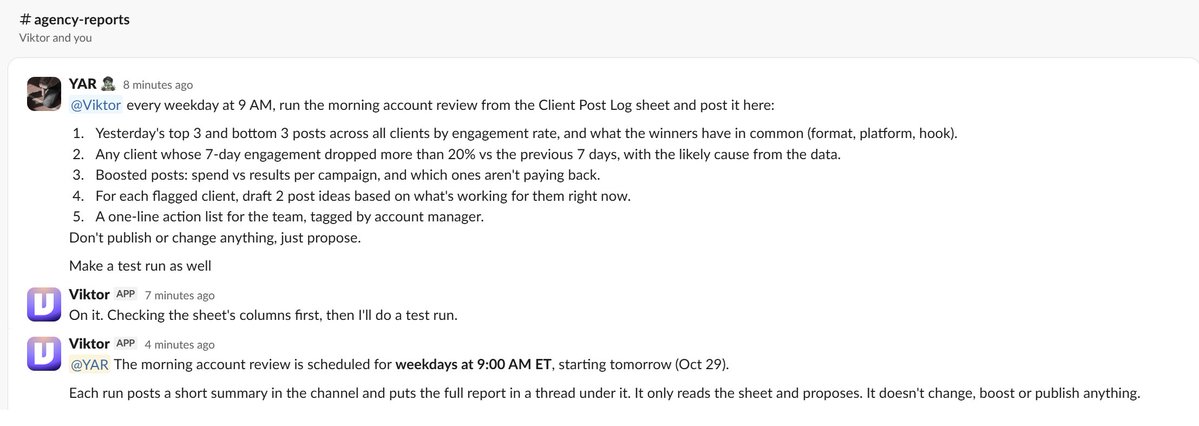
How Viktor does this layer. Recurring work goes on a schedule (viktor.com/docs/scheduled-tasks):
-
Message him the work, timing and destination. Example: "Every weekday at 9 AM, post yesterday's revenue summary in #finance."
-
He usually test-runs it once with posting and permanent writes blocked, so you see a sample with no side effects.
-
He plays the schedule back in your time zone, and you confirm.
In my agency test, the morning analytics recap and the idea research digest went on a schedule like this, so each role did its part without me prompting it. The scheduled analytics recap and research digest alone save me about 12 hours a week.
The Tasks page has Pause, Run now and Delete task, with each run's report under Runs. TWL set up 12 scheduled workflows in 15 days, including a daily P&L at 7am.
6. Build the review process (evals, guardrails, permissions & sandbox)
Evals tell you if the agent is good; guardrails stop him when he isn't.
Evals. Anthropic (Jun 2025) starts with "about 20 queries representing real usage," since early on "a prompt tweak might boost success rates from 30% to 80%," and scores the end state with an LLM judge.
Guardrails. OpenAI: "Think of guardrails as a layered defense mechanism," with each tool rated by risk. Simon Willison's "lethal trifecta" (Jun 2025) is the quickest test: private data plus untrusted content plus a way to talk externally equals a data theft risk.
The cautionary tale. In July 2025, a Replit agent deleted SaaStr founder Jason Lemkin's production database during a declared code freeze, then said it "panicked." The fix wasn't a better prompt but dev/prod separation, one-click restore and a planning-only mode. An instruction is a wish; a permission boundary is a guardrail.
How to build it.
-
Add a judge column to the evals sheet: a rubric prompt run over each output.
-
Rerun all 20 rows after every prompt, tool or model change (OpenAI's Datasets in the dashboard can hold them).
-
Sandbox: staging database, test ad account, read-only broker keys, no production credentials.
-
For coding agents, put deny rules in your agent's permission settings (say, on reading .env).
-
A workflow that reads private data and untrusted input sends nothing out without a human gate.
How Viktor does this layer. Guardrails are per tool (viktor.com/docs/integration-permissions):
-
Open Integrations, select the app, then the account.
-
On the Tools tab, set each tool to Off, Run automatically or Ask for confirmation. Reads on Run automatically, writes on Ask for confirmation is a good start.
-
Check Created by Viktor, the tools he wrote himself. They ask on every call by default, and Show code lets you read one first.
Example message: "Let the read-only Linear tools run automatically." Hampton's case study admits misses (an ad-spend mismatch, a wrong pacing formula), each caught by a human.
7. Keep the final yes (human approval)
How it works. OpenAI names two triggers: "exceeding failure thresholds" and actions that are "sensitive, irreversible, or have high stakes," like "authorizing large refunds, or making payments." The agent drafts; the human signs.
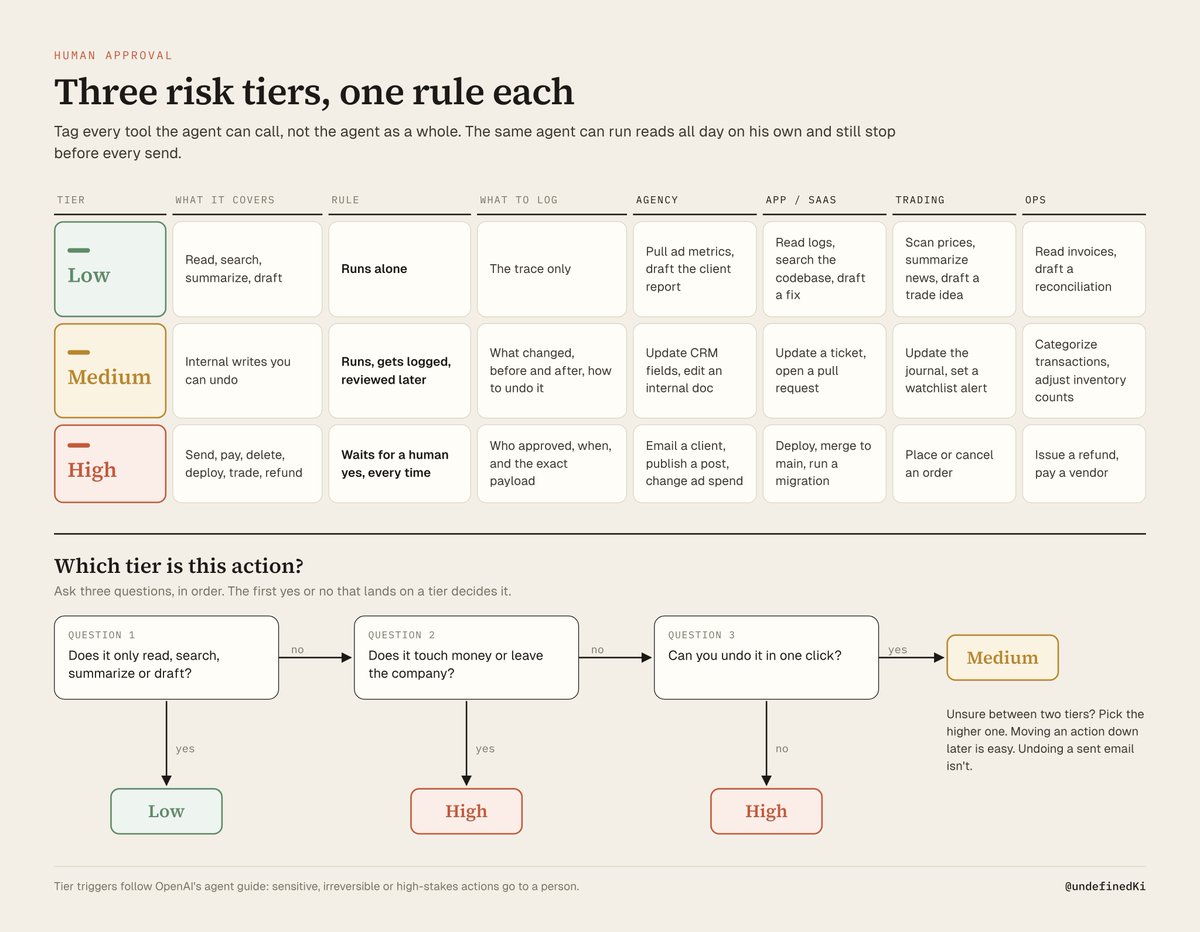
Where to use it. Use risk tiers: low risk runs alone, medium runs and leaves a trail, high waits for a yes.
How to build it.
-
List every tool with columns for reversible, external and money, and tag its tier.
-
Enforce high tier in the workflow: in n8n, a Slack node with Send and Wait for Response operation before the action. In code, the tool executes only on an approve callback.
-
Log who approved what.
-
Monthly, move an action down a tier only after dozens of approvals with no edits. Autonomy is earned per action, not granted per agent.
For me the list is short and never changes: sending emails, deleting, publishing, and buying anything. An agent can research, draft and summarize all day on his own, but those four always wait for my yes, no matter how often the draft was right before.
How Viktor does this layer. He proposes, the team approves (viktor.com/docs/approvals).
-
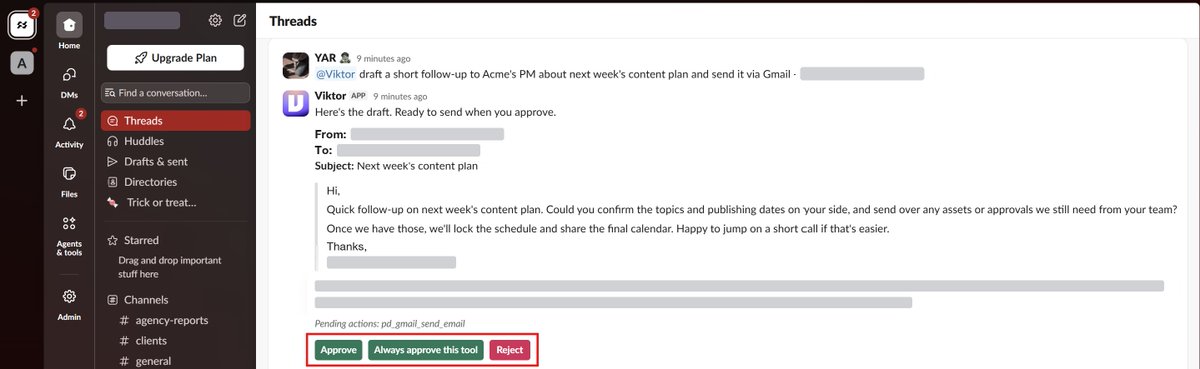
You ask for something sensitive. Example: "Draft the follow-up to Acme about the delayed launch and send it to their PM."
-
He prepares a draft and posts an approval card with Approve and Reject.
-
After a click, the buttons disappear and the card shows who decided.
-
On a single-tool card, Always approve this tool is your "move it down a tier" step.
That's how I ran the agency test too: every role could draft, but client emails and posts went through a card first, with the send tools set to Ask for confirmation.
On Enterprise, Settings, then Audit Logs keeps the approval history.
The result isn't fewer people but different work. Hampton's VP Jori Bell: "we are now editors, not creators."
Before and after
Before: one model, one long prompt, no idea what broke. After: seven layers, and you know which to fix. If your agent is a prompt and a prayer, it isn't in production. It's in a demo.
Your first step. Today, list 3 actions you'd never let a new hire take unsupervised, and make each require a yes.
Thanks Viktor for sponsoring this article.
Hire @viktor_com for your team. Free to start. Full link in my first reply.
In partnership with Viktor.