how to automate marketing with grok bot (FULL GUIDE)
we're at the point where marketing and customer acquisition can be fully automated with the right setup. here's how to set grok bot up to build your customer profile, find what's working, make the content, find leads and have it do the outreach for you.
by the end of this guide you'll have:
-
a customer profile built from real research
-
a list of places grok bot checks for them daily
-
every buying signal sent to you with a draft
-
content and creatives made from research
-
grok bot running all of it and improving every week
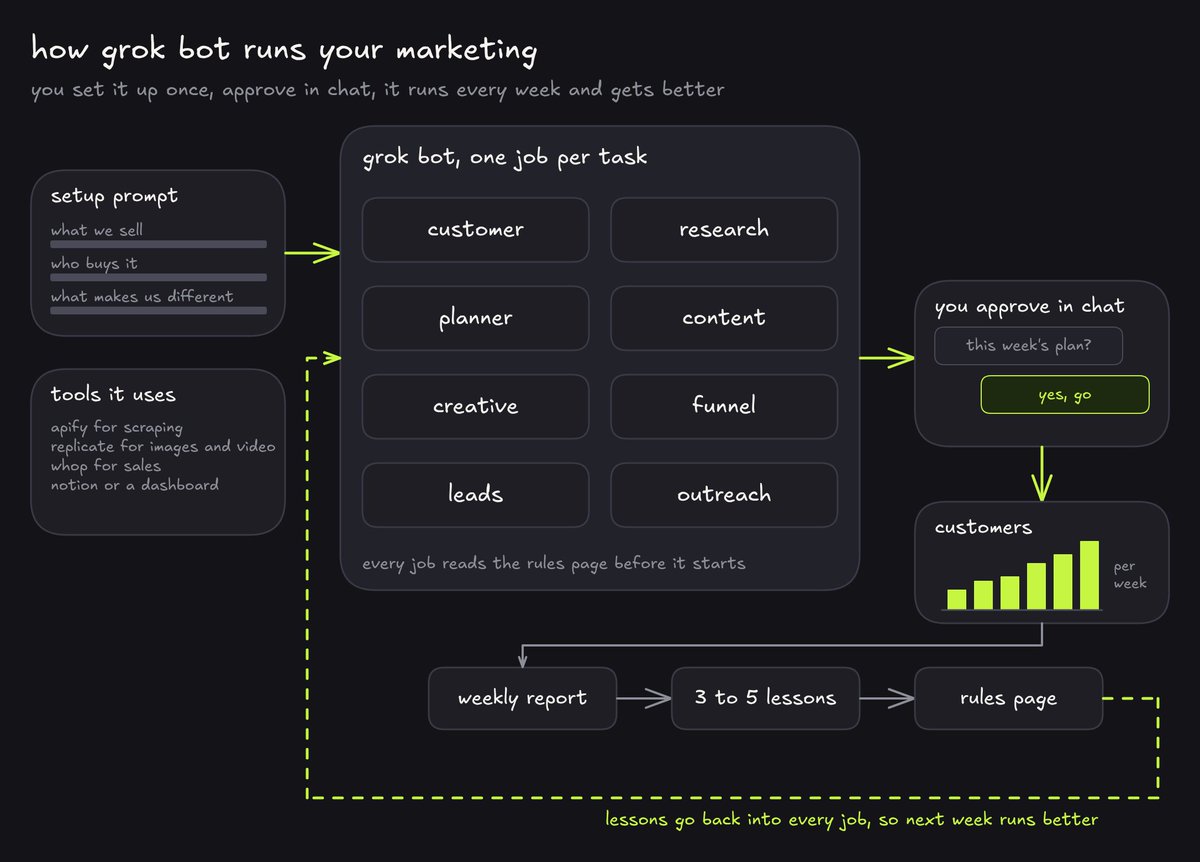
how it basically works
the idea is simple. grok bot has its own computer, so it can sign into tools and scrape the web, and it can run routines on a schedule. you give it a setup prompt with everything about your business, and it sets itself up as your marketing team.
it splits the work into separate jobs, like one job researching your customers, another writing the content, another finding leads, and so on. you can think of each job as a small bot with one task, and how many it needs depends on your business.
this works for any kind of business, b2b or consumer. what changes is what a conversion is for you and which channels are allowed to reach your customers. for example, a b2b service can email a company that's publicly listed its address, but a consumer app can't email strangers, so its outreach is content and ads instead. the bot works this out from what you tell it.
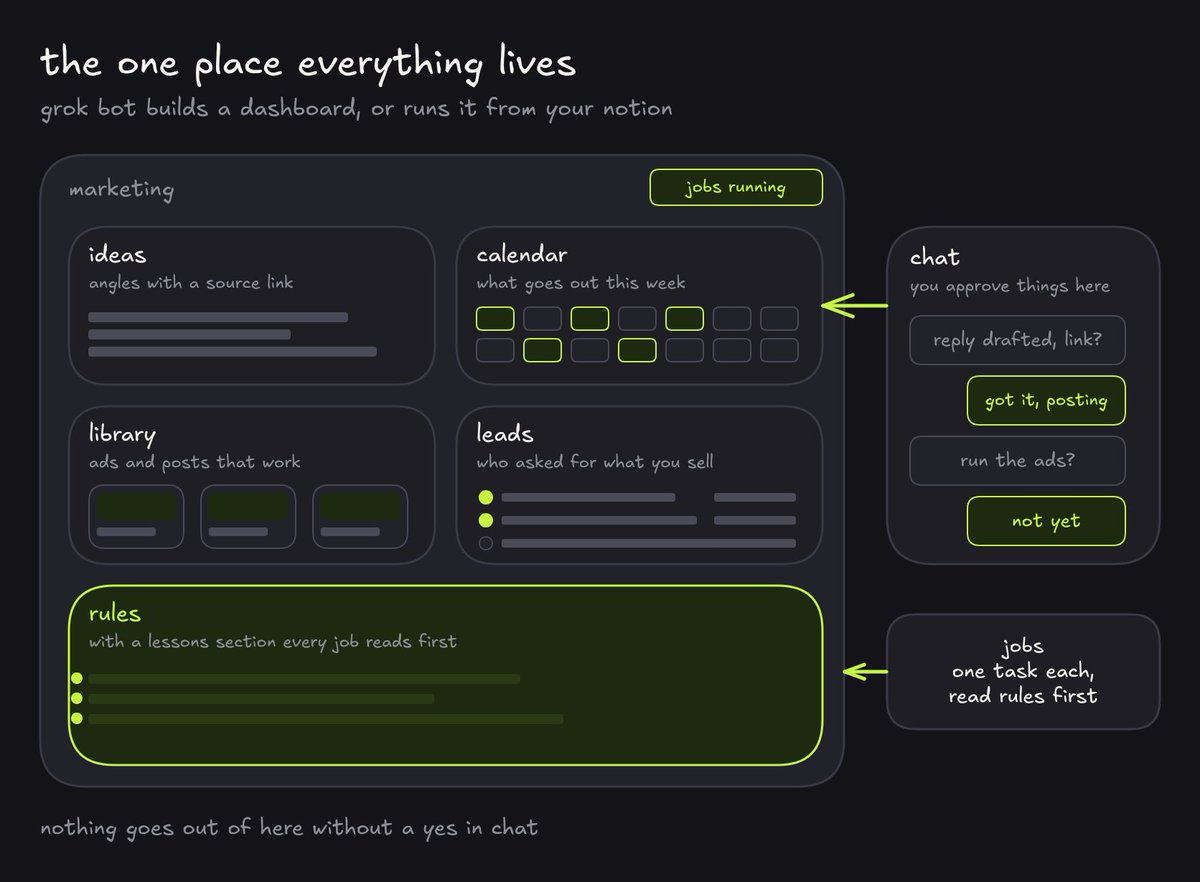
everything lives in one place. either grok bot builds you a dashboard with everything in it, or you connect it to notion and it runs everything from a channel there.
the whole setup is built around whatever your conversion is, let's say a booked call or a signup, not content for its own sake. so the research looks for the problems your customers actually have and the content speaks to those problems, and at the end of the week the report writes down what actually brought customers.
what you need
apify, which is a scraping service. it pulls reddit, google maps, the meta ad library, stuff like that, and grok bot calls it with an api key.
replicate for images and video, with gpt image 2.5 for images and seedance for video. (they are currently the best models)
if you sell through whop, connect that too. grok bot has a whop connector, so it can see what's actually selling and who's joining.
and if you sell to businesses, a separate email sending domain, not your main one, so it can send cold email.
the setup prompt
this is the prompt that starts everything. it tells the bot what you sell and who buys it, sets up the dashboard and the jobs, and runs everything once as a test so you can see the output.
fill in the brackets with as much as you know. the more it knows about your business and your customer, the better everything downstream gets.
you are the head of marketing for my business. set up and run my marketing as a set of separate jobs, each with one task, that work together in one place. the goal is [a booked call, a signup, a purchase, or whatever a conversion is for us], not content for its own sake.

my business:
- what we sell: [what you sell, in plain words]
- who buys it: [businesses or consumers, and the type of person or company, as specifically as you can]
- what it costs and what's included: [price and offer]
- what makes us different: [your main difference, or say "work it out from the research"]
- where our customers spend time: [subreddits, groups, forums, app stores, review sites, or say "find them"]
- our website and conversion link: [url]
- what we can and can't claim: [anything that must never be said, like results or guarantees]

api keys (save them to your secrets on your first run and read them from there from then on. never paste them into the dashboard, a chat, a page, a post or any file):
- apify: [your apify key]
- replicate: [your replicate key]

tools:
- apify for scraping reddit, app stores, review sites, google maps, websites and the meta ad library. pick the actor that fits each job, and scope every search to the right community
- replicate for images with gpt image 2.5 and video with seedance. look up the exact model names before your first call
- [build me a dashboard, or use my notion] as the one place everything lives, and this chat for approvals
- the whop connector, if we sell through whop, to pull sales and new members

step 1. set up the dashboard with these sections: ideas, calendar, library, leads and rules, with a lessons section inside rules.

step 2. create these jobs, each as its own routine. every job reads the rules page before it does anything.
- customer: build a customer profile per customer type from public research, with source links. review every piece before i see it, score it 1 to 10 as the customer would, mark scores as simulated, and send anything under 7 back with notes.
- research (twice a week): find what customers complain about and what competitors run. add ideas with source links and the best examples to the library. watch competitors weekly.
- planner (start of each week): turn the best ideas into the week's calendar and ask me to approve it here.
- content: write each approved piece in plain language, speaking to the customer's problem, with our main difference every time. never invent numbers, prices or customers.
- creative: write a style note from the library, then make images and video within [$ per week], logging the cost of each.
- funnel: check every landing page for the promise, proof near the top, and the main action visible without scrolling. list each leak with a fix and draft the fixed copy.
- leads (daily): find people asking for what we sell, check each community's rules, and draft a help-only public reply for me to post.
- outreach: if we sell to businesses, run cold email under the email rules i'll give you. if we sell to consumers, propose and run the channels that fit instead, like ads, creators and partnerships, with every spend approved here.
- report (end of each week): report what went out, what got attention and what brought customers, using whop sales if it's connected, then write 3 to 5 plain lessons into the rules page that every job follows.
if my business needs a job that isn't here, or doesn't need one that is, say so and adjust.

step 3. rules
- you can research, draft, design and build pages on your own
- nothing is published, posted, sent, mailed or paid for without my approval here
- you never post, comment, reply or dm on any social platform yourself. send me the link and the draft and i'll post it
- email, if we use it, is the only channel you send on, under the email rules i'll give you
- when you need something from me, suggest the best option with one line on why, and ask me to confirm
- every morning send me a short message here: new leads, what's waiting for my approval, any problem or opportunity you spotted, and the one thing you'd do next
- if you're unsure, ask here instead of guessing

step 4. run every job once as a test, without posting or sending anything, and show me what each one made and what it spent.
start with your customer
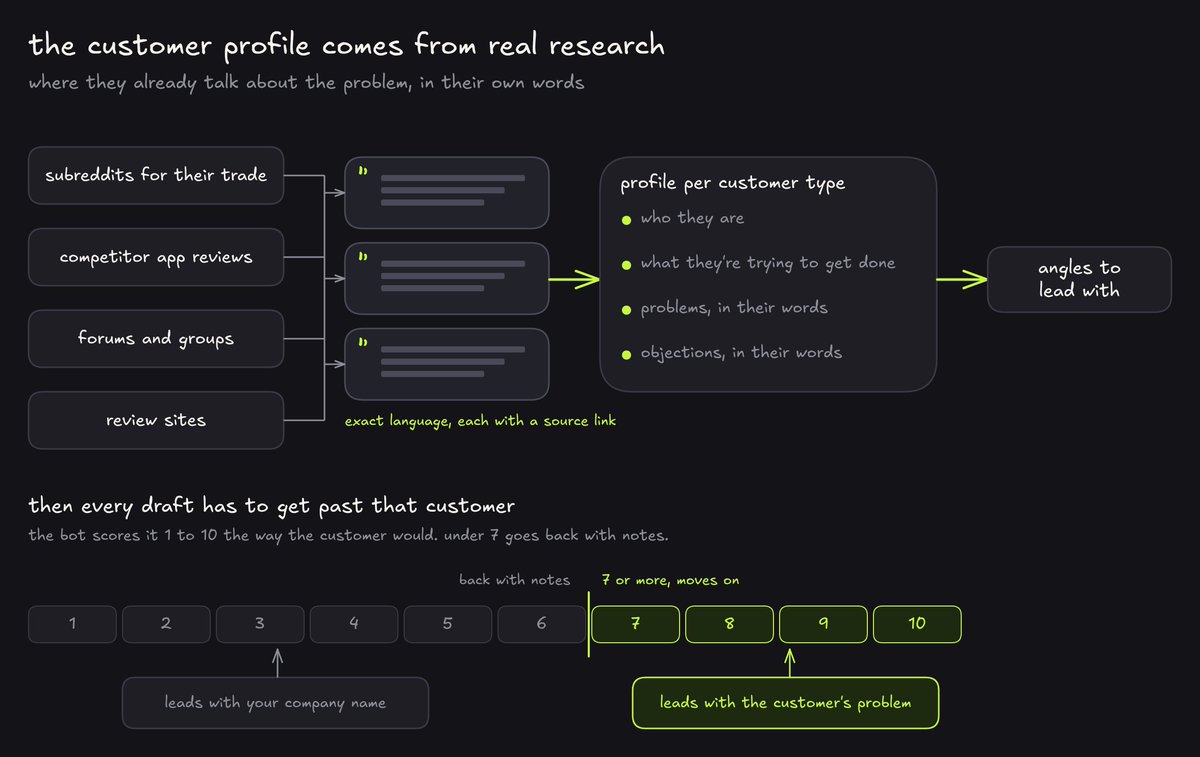
the first thing the bot does is build your customer profile from real research. it goes where your customers already talk about the problem you solve, and pulls the actual language people use, with a link to every source.
for each type of customer it writes a profile of who they are and what they're trying to get done. this matters because the language customers use to describe a problem is usually different from the language a company uses to describe its product, and the bot writes everything downstream in the customer's version.
let's say you sell to roofers. the profile will be full of complaints about lead platforms selling the same lead to three other roofers at the same time, which turns straight into an angle like "leads nobody else gets." just an example.
then every piece of content has to get past that customer. the bot scores each draft from 1 to 10 the way the customer would. a piece that leads with your company name tends to score low, and the same piece rewritten to lead with the customer's problem scores higher. these scores are the bot playing the customer.
if you don't know who your best customer is yet, the bot can help there too. tell it to propose a handful of customer types, ranked by how well your product fits and how active those people are online, and let you pick.
build my customer profiles.

- for each customer type in [customer types], find public posts and reviews where they talk about [the problem we solve] on [communities, app stores, review sites, or find the right ones]
- copy the exact language with a source link and date. never reword or invent a quote, and never name the people, describe them instead
- write a profile per customer type: who they are, where they spend time, their core job, and their problems, goals and objections in the language they use
- turn the strongest findings into angles we can lead with
- from now on, score every draft 1 to 10 as this customer would, mark the score as simulated, and send anything under 7 back with notes
- keep scraping under [$ budget]
research what's already working
twice a week the bot looks at what your customers are complaining about right now and what your competitors are running, and turns it into ideas and a library.
the sources are the communities for your customer and the meta ad library, which is a public list of every ad running on facebook and instagram.
each idea goes into the dashboard with an angle and a link to where it came from. the library is where it saves the ads and posts that work, explaining why each one works.
it also watches your competitors every week, and when it finds one doing something close to what you do, it rewrites your main difference so every piece says what they can't. one tip tho, scope every search to the right community, because a broad reddit search just returns random posts.
run research for my business.

- each [day], search [communities], google, [review sites] and the meta ad library for what [customer type] complain about and what competitors are running
- add 10 ideas to the ideas section, each with a title, an angle, a channel and a source link
- add the strongest ads and posts to the library with one line on why each works
- check [competitors] every week, and if one of them does something close to us, rewrite our main difference so every piece says what they can't
- every item needs a real link. stay under [$ budget]
plan the week and write the content
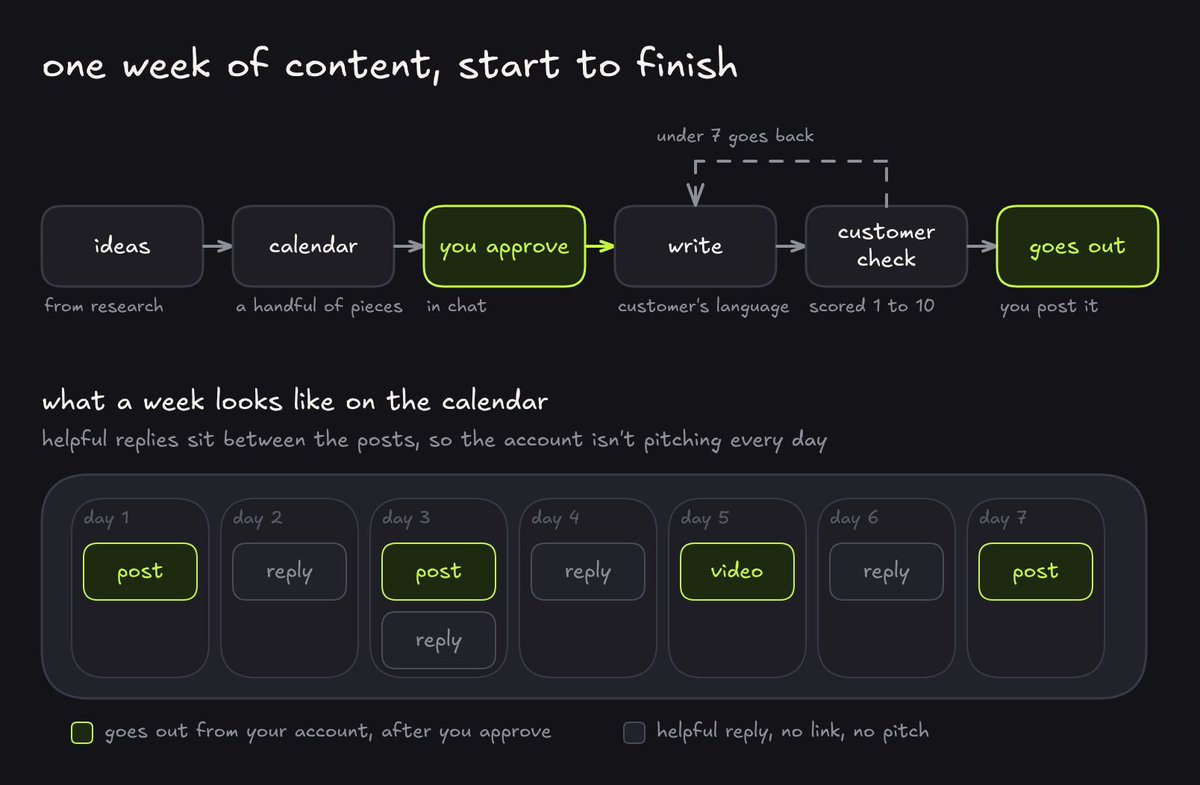
the first day of the week, the bot turns the best ideas into a calendar for the week and asks you to approve it. a week is usually a handful of pieces across a couple of channels.
once you approve, it writes each piece in plain short sentences in the customer's tone, with your main difference stated every time.
the customer check catches the usual problems. a post that just lists complaints and never says what to do gets a note like "so what do i do about it?" and comes back with actual steps.
plan and write next week.

- turn the best ideas into next week's calendar: piece, channel, publish date, status, customer type. mix [channels] and put helpful replies between the posts
- show me the calendar here and wait for my approval
- then write each approved piece in plain, short sentences, in the customer's language, leading with the angle for that customer type, and state [main difference] every time
- never invent numbers, prices or customers. if you don't know something, ask me
- score each draft as the customer would, mark it simulated, and rewrite anything under 7 before showing me
make the creatives
before it makes any images or video, the bot writes a style note from the best examples in the library. the style note says what every creative should look like, like photoreal, the product shown in the customer's actual situation etc., then every image and video follows that note, so the account basically looks like one brand.
it generates within a weekly budget you set and only for pieces you've approved. for everything else it just writes the prompts, so you can see what it would make.
make the creatives for the approved pieces.

- first write a style note from the best examples in the library: the look, the colours, the type, what's always shown and what's never shown
- for each approved piece, write an image or video prompt that shows [product] in [the customer's real situation, like their roof, their kitchen, their phone screen or their shop]
- generate with gpt image 2.5 for images and seedance for video, only within [$ per week], and log the cost of each one
- for anything over budget or not yet approved, deliver the prompt only
- never generate a fake customer, review or result
fix the page they land on
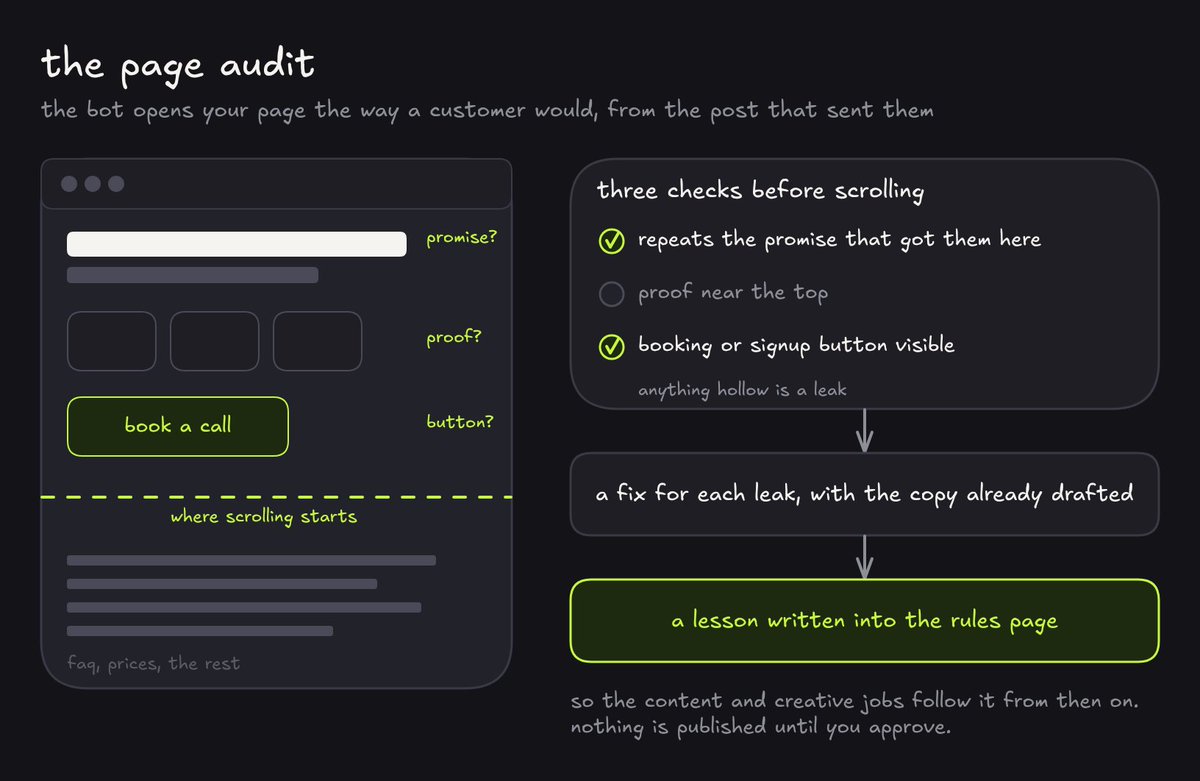
a lot of businesses lose people on the page, not on the way to it. so the bot opens every landing page the way a customer would, coming from the post or ad that sent them, and checks whether the page repeats the promise that got them there and whether the booking or signup button is visible.
the usual leaks are a headline that doesn't say who it's for and prices that are missing, stuff like that. the bot lists every leak with a fix and drafts the fixed copy.
it also writes what it learned into the rules page as a lesson, something like "say who it's for and show real proof in the first screen of anything we publish", so the content and creative jobs follow it from then on.
audit my pages.

- open [website] and [landing pages] as a [customer type] arriving from our content
- check three things on each page: does it repeat the promise, is proof near the top, is [the main action] visible without scrolling
- list every leak with a fix, and draft the fixed copy in plain text with one section per customer type
- write what you learned into the rules page as a lesson for every other job
- publish nothing
find leads without getting banned
every day the bot finds people asking for exactly what you sell and writes the reply, and you post it yourself.
this is the same whether you sell to businesses or consumers.
the hard rule is that it never posts or dms on any platform itself, because automated posting gets accounts banned and a lot of communities ban self-promotion outright. so public replies are help-only, with no link and no mention of your business unless someone asks what you do.
let's say someone posts that they're unhappy with the options they've tried. the bot drafts a reply that actually helps, with real advice on what to look for, and sends you the link and the draft in chat. you read it and post it from your own account, and if they ask what you do, you tell them.
it logs every community's rules in the dashboard, and where a rule can't be confirmed it treats that community as no-link.
find leads for my business.

- every day, find recent public posts where [customer type] ask about [the problem we solve] on [communities]
- log each lead: customer type, described not named, link, what they said, status
- check each community's rules and log them. if you can't confirm a rule, treat that community as no-link
- draft a purely helpful public reply with no link and no mention of us unless they ask
- send me the link and the draft here. you never post, comment or dm yourself, even after someone replies to us
outreach, which depends on who you sell to
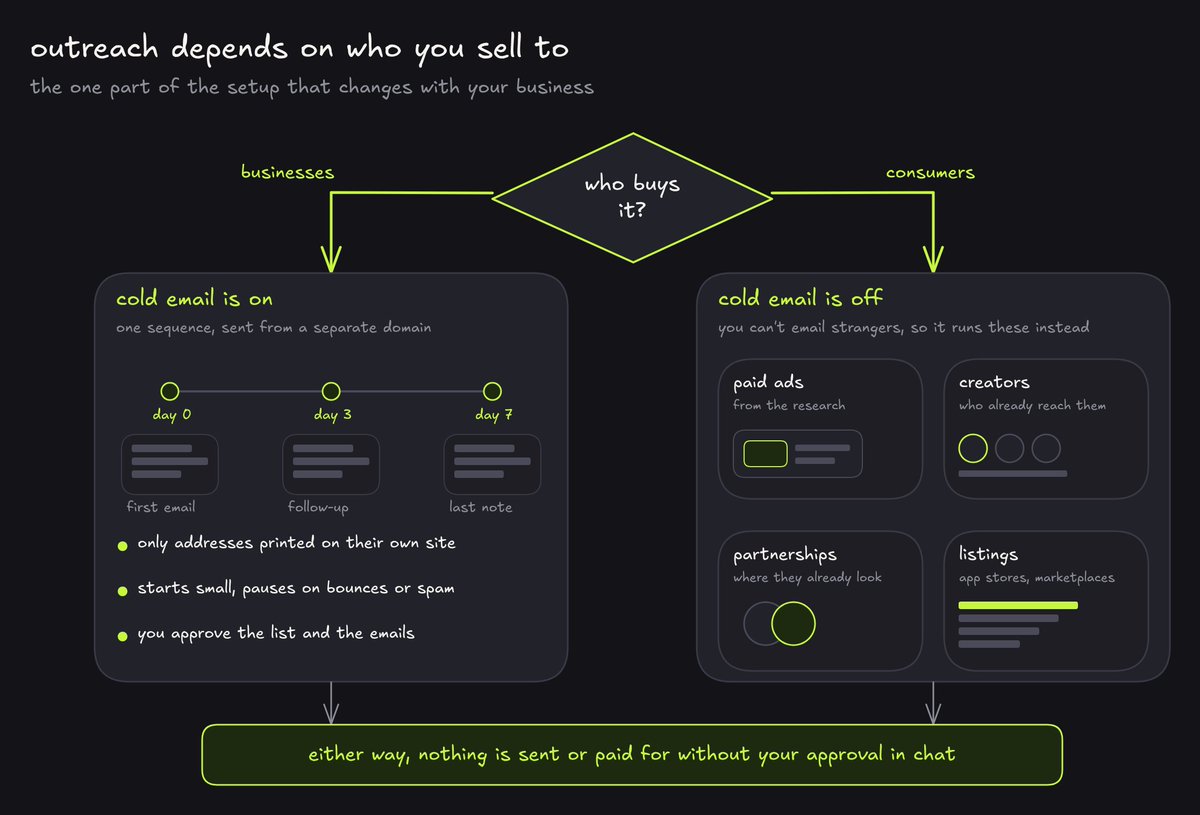
this is the one part of the setup that changes with your business, so the bot runs one of two versions.
if you sell to businesses, cold email is on. a company that lists its email on its own website can be contacted, and the bot can build that list and send the sequence under proper rules.
if you sell to consumers, cold email is off. you can't find a stranger's personal email, and you shouldn't email it if you could. so the outreach job runs the channels that actually work for consumers instead, like paid ads built from what the research found, or creators and affiliates who already reach your customer. the bot proposes the channels and drafts everything.
for b2b, here's how the email runs. it sends from a separate domain, never your main one. before each campaign you approve the list and the emails in chat, and only then it sends. every email has your business name and should have an easy unsubscribe. it only emails business addresses that are publicly listed on the company's own site. it starts at 20 a day and pauses if bounces go over 3% or anyone marks it as spam, and every reply comes to you.
the list gets built from google maps or a directory through apify. the bot searches your customer type in the places you want, keeps only the addresses printed on each company's own site, and removes the listings that aren't actually your customer. a sequence is usually three emails spread over a week, each one offering something small and free.
set up cold email for my business. we sell to businesses.

- build the list from [google maps or a directory] through apify: [customer type] in [places]. keep only addresses printed on the company's own site whose domain matches, no gmail and no guessed addresses, and remove listings that aren't our customer
- send only from [separate sending domain], never from my main domain or personal inbox
- write a three email sequence: day 0, a follow-up on day 3 and a last note on day 7, each leading with the customer's problem and offering [something small and free]
- before each campaign, show me the list, the emails and the follow-ups here, and send only after i approve
- every email has a real subject line, our business name and mailing address, and an easy unsubscribe. remove anyone who unsubscribes right away and never email them again
- start at 20 a day and increase slowly. pause and tell me if bounces go over 3% or anyone marks it as spam
- send every reply to me here with a suggested answer. anything about money, a booking or a complaint comes to me first
and for consumers:
set up outreach for my business. we sell to consumers, so no cold email.

- from the research and the library, propose the channels that fit us best, ranked, with one line on why: paid ads, creators and affiliates, partnerships, listings and marketplaces, or anything else you find working for competitors
- for ads, draft the campaigns from the strongest angles, with the creative prompts and a weekly budget of [$ budget], and show me before anything runs
- for creators and affiliates, find people who already reach [customer type], described not named until i approve, and draft the offer and the first message for me to send
- for partnerships and listings, list where our customer already looks and draft what we'd need for each
- nothing is paid for, sent or submitted without my approval here, and log the cost and result of every channel
the weekly report and the learning loop
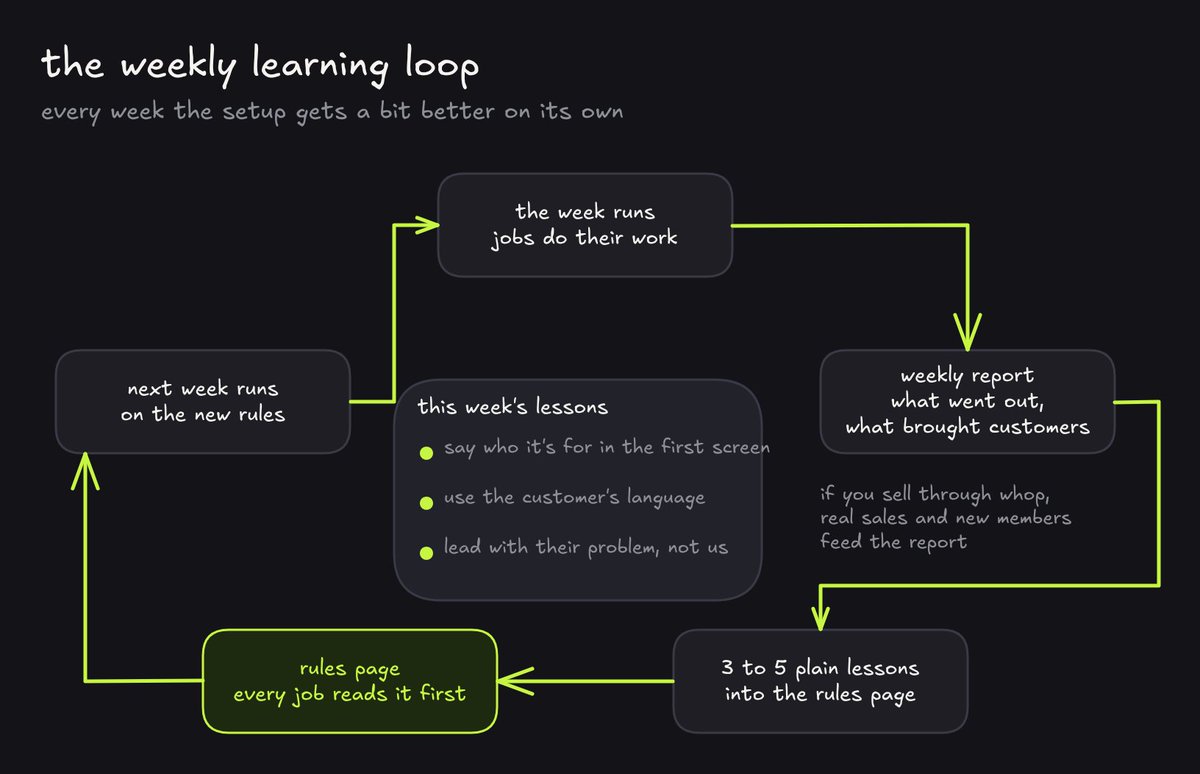
at the end of every week the bot reports what went out and what brought customers, then writes 3 to 5 plain lessons into the rules page. every other job reads those lessons before it works, so the whole setup gets a bit better every week.
if you sell through whop, this is where you should use the connector. the bot pulls real sales and new members from there, so what brought customers means people who actually paid.
write the weekly report.

- at the end of each week, summarise what each job did, what it found, what it spent, and what's waiting on me
- report what went out, what got attention, and what brought customers, signups or replies. if whop is connected, pull sales and new members from there and use those as the real numbers
- write 3 to 5 plain lessons into the rules page that every job follows, and say what changed after each one
- use only real numbers. mark anything simulated or not run yet as such
the weekly schedule
every morning you get a short check-in with new leads and what's waiting for your approval, plus anything it spotted.
once a week the report and lessons come in along with fresh research, and the plan for the week shows up for you to approve. the page audit runs once a week too.
everything else runs after you approve the plan.
hope you have fun setting this up.
join here for more value: https://t.me/+pbCBBtUEtu1lZDA1
沿着这个主题继续读
从一篇文章,找到相关的教程、经验和阅读路径。