How I'm Using Grok Bot to Build a 7-Figure AI Company
文章目录
I've tested every single AI agent on the market for the past year. Grok Bot is hands down the best. And it’s not close.
I now run a team of 9 Bots inside my media and tech business (@aiedge_) and it's genuinely been the highest-ROI thing I've done for the company all year.
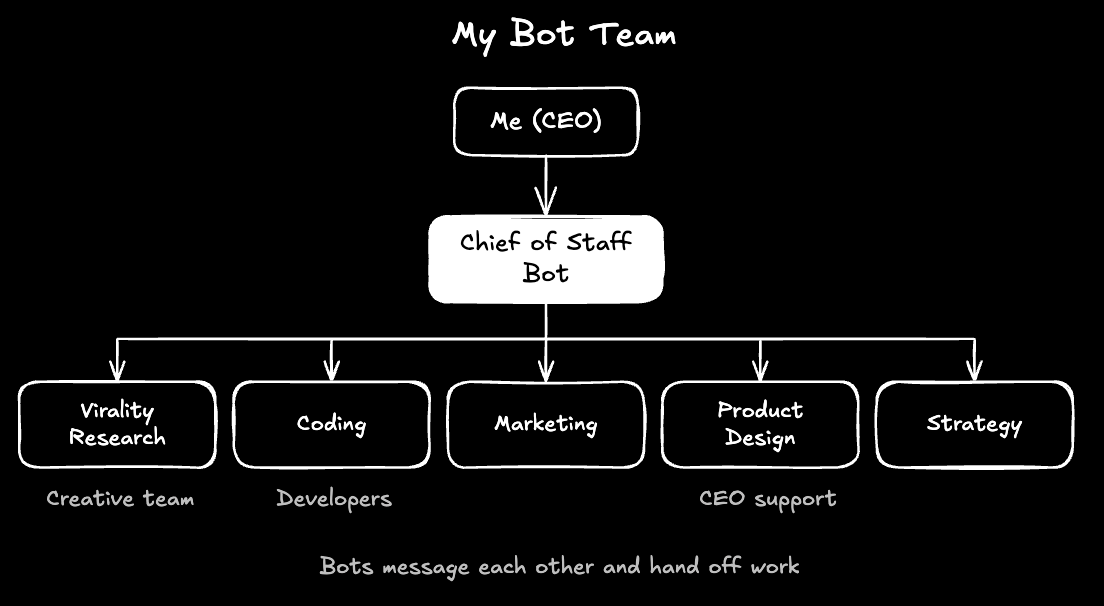
My bots help my creative team with virality research, my developers with coding, and, as CEO, they help me with everything else - high-level decisions, marketing, product design, etc.
If you're a business owner, aspiring entrepreneur, or just someone who wants to make money online, you'll find this article valuable.
We'll walk through the entire agentic architecture, a day in the life, the ROI this team has delivered, and my honest take after a full week of testing.
Table of Contents
I: Why Grok Bot? II: Meeting the Team III: Day in the Life IV: ROI Analysis V: Build Your Own Team (Starter Prompt) VI: My Personal Analysis (pros & cons)
I've attached prompts for each of my team members so you can easily spin up your own variations.
I: Why Grok Bot?
I’ve run almost every agent on the market through one simple test: can it actually do real work inside my business like a human employee without me babysitting it?
Most fail, but Grok Bot passed for four specific reasons.
1. It’s built for 𝕏
For my media and tech company, this is the big one.
Grok Bot connects natively to all my 𝕏 accounts. I use it for real-time research, news analysis, DM management, etc. (we'll dive into exact use cases later).
Bots can search 𝕏 and read posts and profiles through the native 𝕏 connection. No other AI agent has this capability - unless you pay for the API.
2. The UI is so easy
Simply put, Grok Bot "just works." The UI is lightweight and easy to navigate.
Whenever I need to set something up, Bot can easily create pop-ups, visuals, and more.
I message my Bots the same way I message my team.
3. The Chief of Staff setup
No other agentic tool has gotten this right.
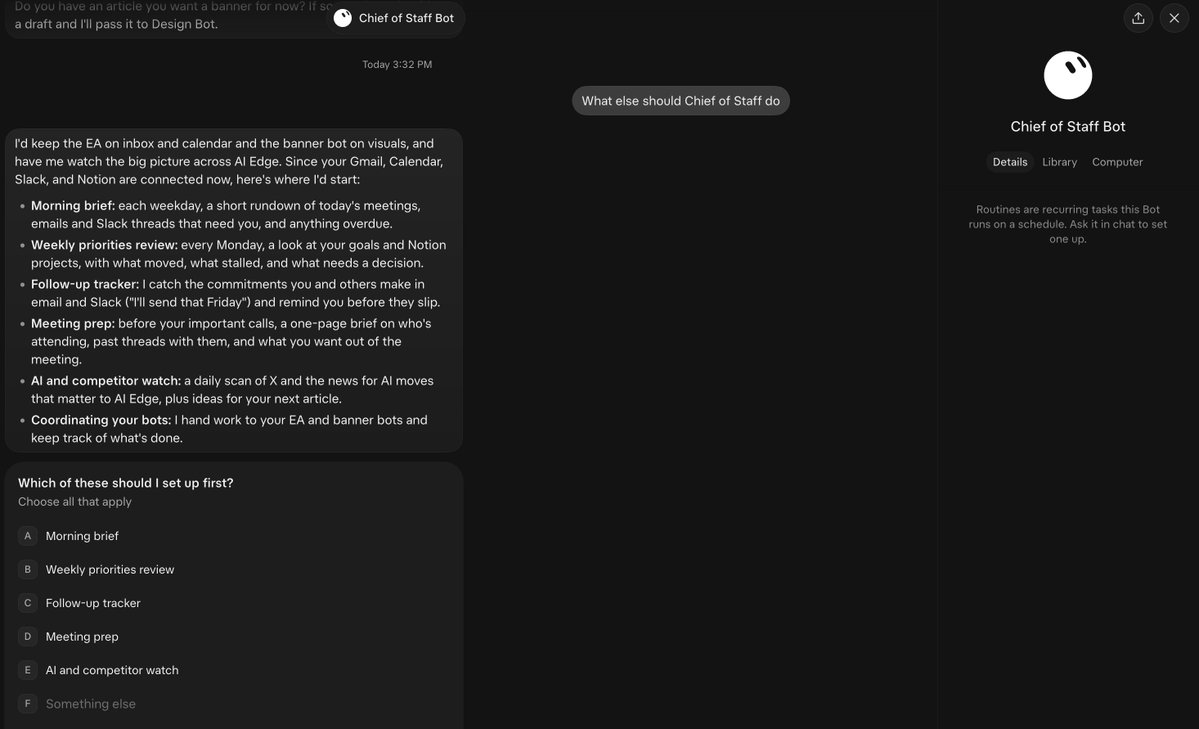
You can have one Bot sit on top as Chief of Staff with specialist Bots underneath. They message each other, share context, and hand off work, so I’m not the middleman copying notes between chats.
4. The team ships constantly
For context: Grok Bot launched in August as version 0.17. It’s now on 0.75.
The team ships 100+ features every week.
When it comes to building my business on a tool, its improvement speed is everything. Every week, my Bots get noticeably better without me doing a thing.
I want a single tool I can rely on for months to come, and I feel confident taking that bet on Grok Bot.
II: Meeting the Team
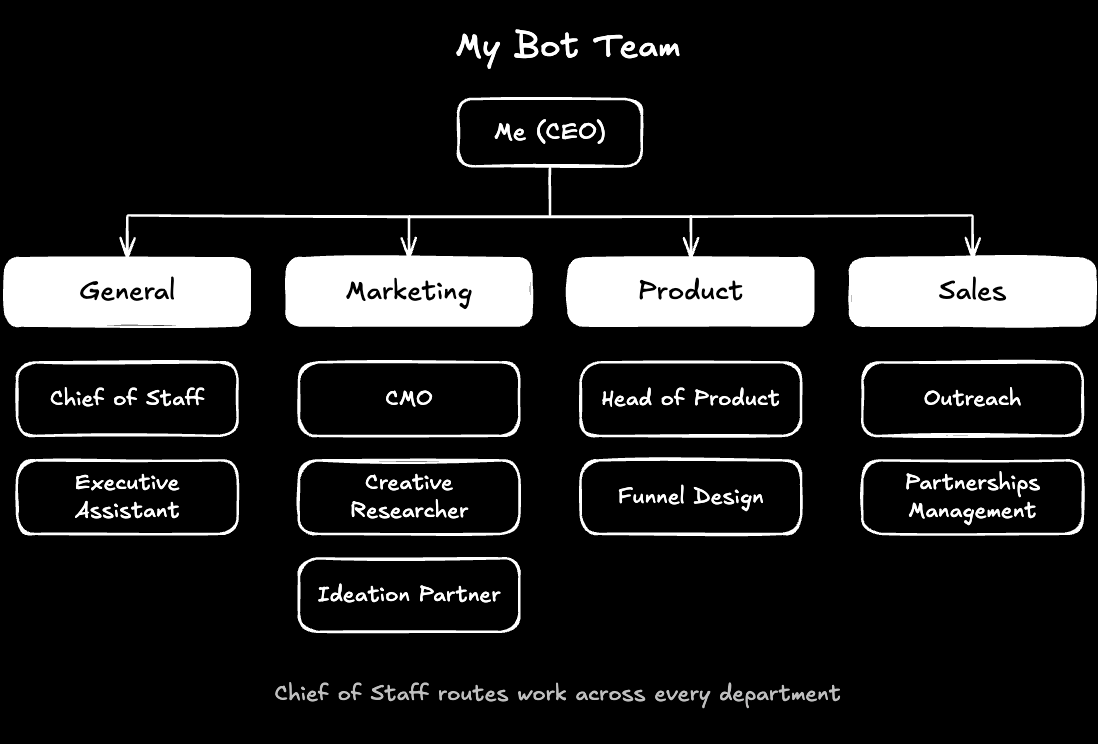
I've divided my team into 4 departments; obviously, your needs will vary depending on your business.
-
General
-
Marketing
-
Product
-
Sales
Department 1: General
This is the "command center." I've personally set up two Bots here.
- Chief of Staff
This is the team lead and my primary Bot.
I use it to spin up new bots, make connections, dive into my tools (Slack, Notion), & more.
When I hand it a task, it decides which Bot should own it, passes it over with the right context, and follows up until it’s done. I don’t manage 9 Bots. I manage one.
CHIEF OF STAFF PROMPT

You're my Chief of Staff. Every morning at 7am, send me a short readout
of what's new across Slack, email, my calendar and the team's Bots.

For each item: what happened, why it matters, and what I need to do.
Flag anything that needs my decision at the top.

When I give you a task, route it to the right Bot with full context,
then follow up until it's done. Only pull me in for judgment calls.
-
**Executive Assistant **
Handles all my admin work. Creates tasks, manages team attendance, pulls emails, sends meeting invites to my team, and so on.
EXECUTIVE ASSISTANT PROMPT

Triage my inbox twice a day. Sort it into urgent, needs reply, FYI
and noise. Draft replies for anything that needs one, and hold every
send for my approval.

Before each meeting on my calendar, send me a prep pack: who's
attending, our last interaction, open threads and a suggested agenda.
Department 2: Marketing
For a media company, this is the most useful department. So far, I have three bots.
- Creative Researcher
Scans 𝕏, YouTube, and helps me identify daily post ideas, scripting, and related tasks.
CREATIVE RESEARCHER PROMPT

Every morning, find the 10 fastest-growing AI posts on X from the last
24 hours. For each one, break down:
- The hook
- The format
- Why it's working
- An angle we could take on it

Send the list to the creative team by 8am.
-
**Ideation/Sparring Partner**
My "sparring partner."
IDEATION PARTNER PROMPT

When I share a content idea, argue against it first. Tell me what's
weak, what's been done before, and what would make someone scroll past.

Then give me 3 stronger angles, ranked, with a one-line hook for each.
Pull in the Creative Researcher's latest findings when they're relevant.
-
**CMO **
The head of marketing. It sits above the other two marketing Bots and owns the big picture.
Every week, it reviews how our content performed and generally helps me with big marketing decisions for the brand.
CMO BOT TEMPLATE

ROLE
You're the CMO of [Company Name]. You own our marketing strategy,
content performance and growth. You manage the Creative Researcher
and Ideation Partner Bots, and report to me (the CEO).

CONTEXT
- What we do: [One-line description of the business]
- Who we serve: [Target audience]
- Main channels: [e.g. X, newsletter, YouTube]
- Brand voice: [3 words, e.g. direct, practical, authoritative]
- Current goals: [e.g. grow newsletter to X subs, increase article reads]
- Competitors to track: [@account1, @account2, @account3]

DAILY
- Review the Creative Researcher's trend report
- Flag any trend or competitor move that needs a same-day response
- Keep the content calendar up to date

WEEKLY (every Monday, 8am)
Send me a marketing report with:
1. Top 3 and bottom 3 performing pieces last week, and why
2. What's trending up or down in our space
3. Competitor moves worth knowing about
4. 3 actions for this week:
   - Double down: what's working that we should do more of
   - Cut: what's not working that we should stop
   - Test: one new idea to try

MONTHLY (first Monday of the month)
- Review progress against our current goals
- Recommend one bigger campaign or strategic shift for next month

HOW YOU WORK WITH THE TEAM
- Brief the Creative Researcher on what to look for each week
- Send promising ideas to the Ideation Partner to pressure-test
- Hand anything product-related to the Head of Product
- Escalate to me only for budget, brand or strategy decisions

RULES
- Back every recommendation with data or a real example
- Be direct. If something isn't working, say so
- Never publish or send anything without my approval. Draft only
- If you don't have the data to answer something, say so instead
  of guessing

OUTPUT FORMAT
- Lead with the single most important takeaway
- Bullets, not paragraphs
- Every action has an owner (which Bot or person) and a deadline
Department 3: Product
We have 4+ products. Info, consulting, and some long-term digital products we're building in the background.
These Bots help me map the brand's long-term vision.
- Head of Product
Owns everything we build and sell.
HEAD OF PRODUCT PROMPT

You're our Head of Product. Collect feedback and feature requests from
Slack, email, X mentions and call notes. Tie each request to who asked.

Every Friday, send me:
1. The top 5 requests this week, ranked by demand and urgency
2. Any complaints or friction that came up more than once
3. How our latest launch is performing and what to fix

Hand anything marketing-related to the CMO.
-
**Funnel Design **
Every product lives or dies by its funnel. It maps the full journey from first post to purchase, audits every step (landing pages, sign-up flows, emails, checkout), and flags where people are dropping off.
FUNNEL DESIGN PROMPT

You own our sales funnels. Map the journey for [Product Name] from
first touchpoint to purchase.

Every week:
1. Click through every page, form and link as a real customer would
2. Flag anything broken, slow or confusing
3. Identify the biggest drop-off point and suggest one fix to test

For new launches, draft the landing page copy, sign-up flow and
email sequence, and send it to me for review.
Department 4: Sales
aka the money department. My sales team primarily uses these two bots on our Team account.
- Outreach
A Bot that delivers partnership reports, manages inbound messages, and drafts outreach messages.
OUTREACH PROMPT

Every night, find 50 companies that match our ideal partner profile:
[describe your ideal partner].

For each one:
- Find the right decision-maker
- Note one specific reason they're a fit right now
- Draft a short, personalised email and X DM in my voice

Leave the drafts in a review list for me by 8am. Never send anything
without my approval.
-
**Partnerships Management **
Manages our CRMs, deliverables, and campaigns.
PARTNERSHIPS MANAGEMENT PROMPT

Track every active partnership in [CRM or sheet]. For each one,
monitor deliverables, deadlines, invoices and renewal dates.

Every Monday, send me:
1. Deliverables due this week and who owns them
2. Anything overdue or at risk
3. Unpaid invoices

30 days before any deal ends, build a renewal pack: what we delivered,
results, and a suggested next offer. Draft only, never send.
So, there you have it. The high-level architecture of each department.
Note that each department has employees *(AI Edge is a ~50-person team). *Most team members also have their own Bots, but this is the high-level strategy I used to design the bots for our business.
Of course, you can add subagents within each Bot.
Bots for: writing hooks, closing deals, hunting sponsors - you get the idea.
Let's see the Bots in action.
III: Day in the Life
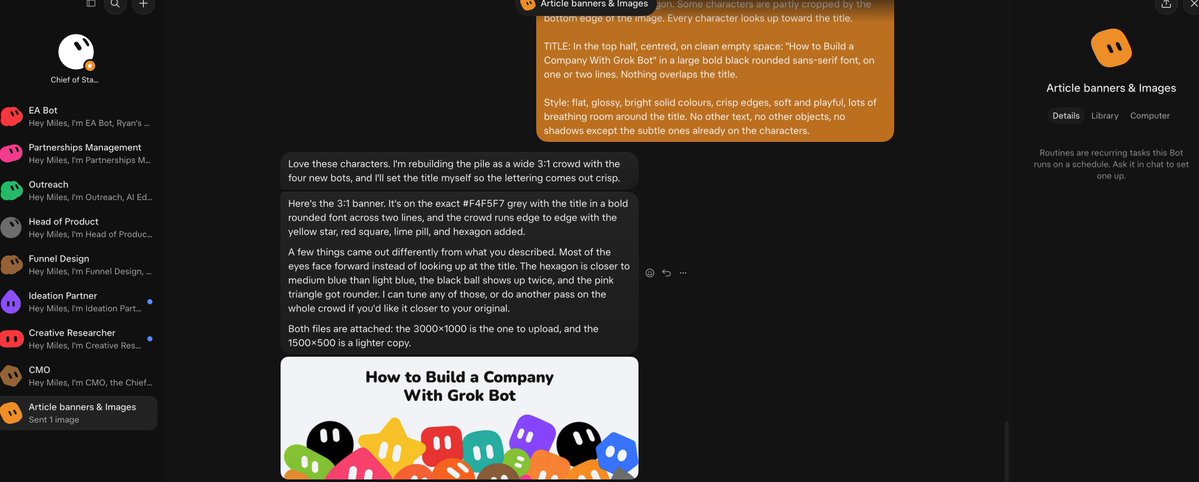
Here’s what a typical day looks like with the team running.
I've split the team into two shifts: day and night.
Overnight: the night shift
I've created routines for each so that by the time I wake up, each Bot has sent its deliverables.
-
Outreach researches 50 new potential partners and sends them to my BD team (who also have their own Bots)
-
Creative Researcher scans 𝕏 for post ideas in my niches (crypto, finance, AI, founder)
-
Sparring partner scans YT/𝕏 for long-form content ideas
-
EA updates me on my calendar, to-do list, Slack messages, and Notion database updates
7:00am: the morning brief
The Chief of Staff sends me one message that consolidates all deliverables from each Bot.
I then update my to-do list, start drafting, and tackle high-leverage tasks.
Throughout the day
I usually communicate with my researcher, draft content ideas, and tap into my Heads of Departments for high-level strategy. If I need specific subagents, I'll tell my Chief of Staff to spin them up.
Evening: the wrap-up
-
Chief of Staff sends a short end-of-day summary: what got done, what’s still open, and what’s queued for tomorrow
-
CMO logs how today’s content performed and notes anything to feed into the weekly report
-
Head of Product sends a summary of the day
-
Partnerships Management: deliverables due, unpaid invoices, messages from my BD team
-
Funnel design usually sends a summary if we worked on anything
Cool ways to use Bots
To run your team like a proper business, you can deploy "routines" so everyone works on specific tasks during specific hours.
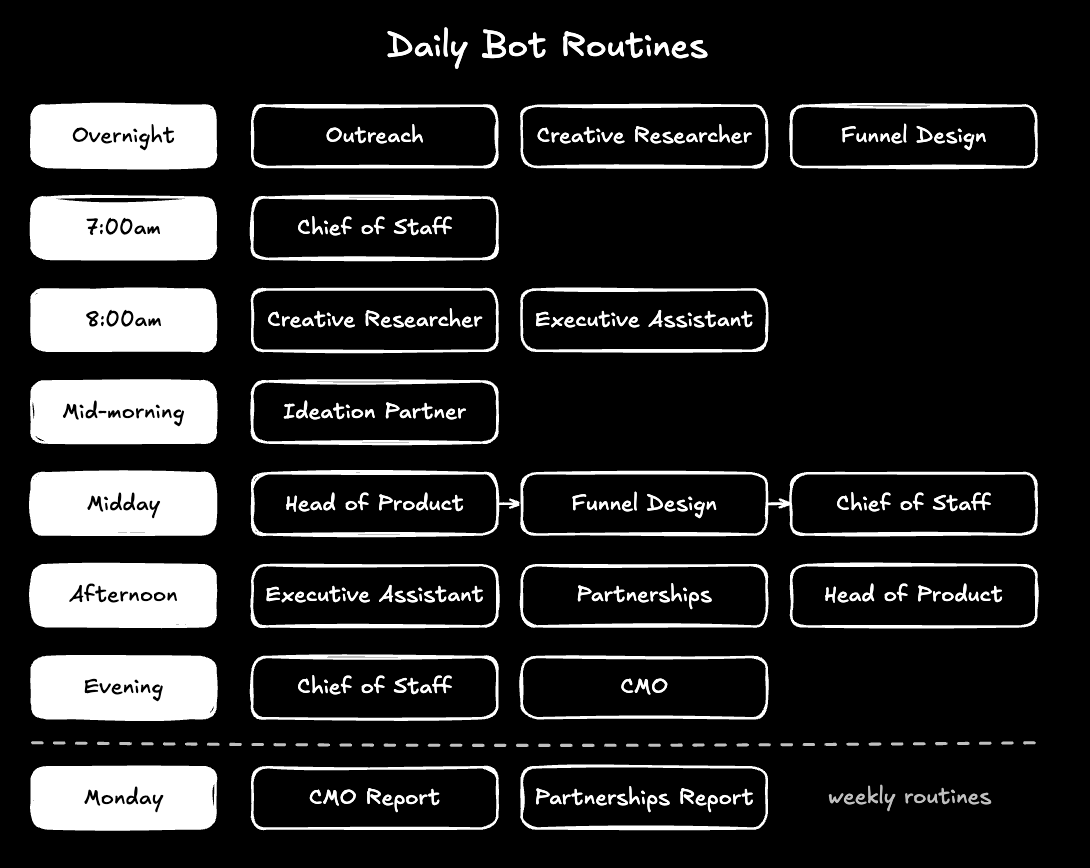
I also like using the new action button feature on my iPhone to tap into various bots.
IV: ROI Analysis
Some quick math on how much time/money this team saves me.
(Tbh, I find myself working MORE with Bots because of the new opportunities, but they've helped me make so much more money with that time).
TL;DR: This 9 Bot team saves our company ~53 hours/week & ~$138,000/year.
THE QUICK MATH

Hours saved per week
Chief of Staff               5 hrs
Executive Assistant          5 hrs
Creative Researcher          12 hrs
Ideation Partner             6 hrs
CMO                          4 hrs
Head of Product              3 hrs
Funnel Design                2 hrs
Outreach                     8 hrs
Partnerships Management      8 hrs
-----------------------------------
Total: 53 hours
What that time is worth (at a blended $50/hr)
53 hrs × $50 = $2,650/week
$2,650 × 52 = $137,800/year
And honestly, these ROI estimates are very conservative. A human Chief of Staff alone is realistically $200,000+/year, but I'm playing it safe because I realize my Bots still can't do everything.
What the team costs
Cursor Ultra ($200/mo) + ~ estimated $200/mo usage = $400/month
$400 × 12 = $4,800/year total Bot cost
Even with this conservative napkin math, this investment is clearly 100% worth it. A ~29x return for me and my business.
V: Build Your Own Team (Starter Prompt)
How to build your own team (step-by-step)
Step 1: Get set up
-
Download Grok Bot (macOS, Windows, Linux, or iOS) and sign in
-
Setup creates your first Bot for you. I recommend Chief of Staff.
-
Connect the tools you use every day: email, calendar, Slack, 𝕏
Step 2: Paste the prompt
Send this to your first Bot. It’ll interview you about your business, design your team, and build each Bot with its own brief and routines.
BUILD MY BOT TEAM PROMPT

You're my Chief of Staff. Your first job is to help me design and
build a team of AI Bots for my business.

PHASE 1: UNDERSTAND MY BUSINESS
Interview me one question at a time. Find out:
- What my business does and how it makes money
- My role, and the size and structure of my team
- The tools and platforms we use every day
- The repetitive tasks that eat the most time each week
- My biggest goals for the next 6 months
- What I never want a Bot to do without my approval

PHASE 2: DESIGN THE TEAM
Based on my answers, propose a team of 5 to 10 Bots, grouped into
departments (e.g. General, Marketing, Product, Sales, Operations).

For each Bot, give me:
- Name and department
- Its one job (one lane only)
- The tools it needs access to
- Its routines (what it does daily, weekly, or on a trigger)
- Estimated hours saved per week

Then rank the Bots by impact, and recommend the first 3 to build.
Wait for my approval before building anything.

PHASE 3: BUILD
Once I approve, create each Bot in order. For each one:
- Write its brief, including its role, rules and output format
- Set up its routines
- Connect the tools it needs, asking me to sign in where required
- Tell me exactly how it hands work to the other Bots

RULES FOR EVERY BOT
- One clear job per Bot
- Draft only. Never send, post, buy or delete without my approval
- Back recommendations with data or real examples
- Report through you, the Chief of Staff, not straight to me

PHASE 4: REVIEW
After the first week, ask me what's working and what isn't, then
update each Bot's brief based on my feedback.
Step 3: Customise it
I recommend splitting your Bots into departments, as I've done.
Once you've split your business into the few crucial pieces, you can then build out subagents. Like a tree.
VI: My Personal Analysis (pros & cons)
Pros
-
Built for 𝕏. For creators, nothing else comes close.
-
Easy UI. No workflows, no nodes, no docs.
-
Real teamwork. The Chief of Staff setup means Bots hand work to each other. I manage one Bot, not nine.
-
No APIs. Each Bot has its own computer, so it can work inside tools with no integration.
-
Routines. Set a task once, and it runs on schedule.
-
It’s improving fast. Dozens of updates since launch.
-
Voice mode is awesome.
Cons
-
The first week is training. Expect to babysit a little early on.
-
Costs can creep quickly. Set a spend limit.
-
No model choice. Grok Bot automatically picks the model for each task.
-
Skills aren't the best. I still think Claude Skills are best.
-
Grok Image needs improvement. I still prefer GPT/Gemini.
-
Slow. Some responses can take a while.
Overall, a 9/10 experience, and I'd highly recommend it.
Closing
I hope you found this guide valuable. I know there was a lot here, so feel free to bookmark this and come back later (or have your Bot digest it).
Every week I break down the AI tools, systems, and research that actually give you an edge - whether that's in your finances, business, or just general AI tooling.
If you like this content, be sure to follow me here @milesdeutscher.
For deeper AI insights, follow me over on @aiedge_.
I also have a 100% free Skool community where you can learn these tools.
👉** https://www.skool.com/milesdeutsche**r
-Miles💙
沿着这个主题继续读
从一篇文章,找到相关的教程、经验和阅读路径。