How to Save Tokens in Grok Bot Without Upgrading Your Plan

文章目录
Most people blame Grok Bot for tiny limits, but I've found a solution.
Many of you assume that Grok Bot counts your messages (and you think the same about other models and assistants), but that’s far from the truth. In reality, it counts actions: tools, the browser, sub-agents, and RE-READING the conversation at every step.
That’s why the same Subscription Plan seems enormous to some and tiny to others. One person uses it all up in a few days, while it lasts another a whole month, and it has nothing to do with what they use it for (though that does play a role, too).
I was also curious to see if there was a way to save tokens without sacrificing performance, so I dug through the xAI documentation, the Cursor forum, Anthropic’s research, and a bunch of Chinese guides from advanced users.
And I put together a list of habits that actually save tokens.
I even asked Grok Bot itself. Half of the tips were useful, but one line was blatantly INCORRECT about its own product.
1. Start a fresh chat for every task
Most people communicate with the bot in a single, never-ending chat, they have just one assistant.

Don't ask for news, advice, coding help, etc., all in the same chat.
Because of this, Grok Bot RE-READS the entire conversation on every step. For example, one Cursor employee checked a single command account:
The busiest bots re-read 80,000–90,000 tokens per step!
Let's do the math:
Re-read tokens = context per step × steps:
85,000 × 20 = 1,700,000 tokens (20 - the number of messages)
This is the number of tokens it will be used just for the bot to understand what you're writing; if you ask it a question unrelated to the chat topic, you'll just be wasting tokens.
Now imagine that you’ll be asking even more questions each day, then the context per step will grow at a geometric rate and, sooner or later, reach a point where you’ll hit the limits after just one message (one prompt).
So, create a separate bot for each task:
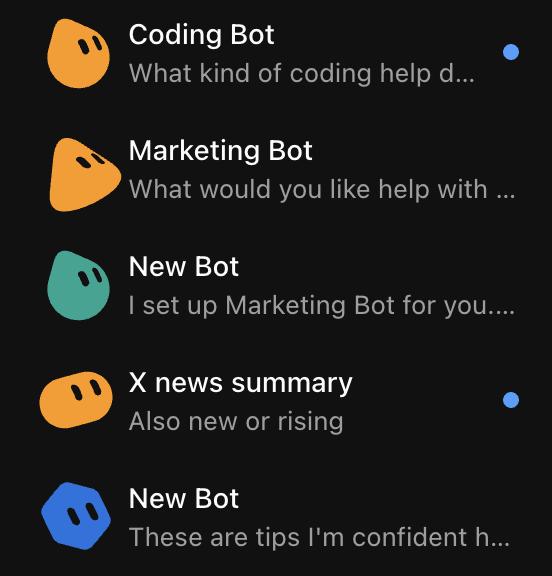
Create a separate bot for each task, the more you break things down, the more tokens you'll save.
Confirmation of this information from a Cursor employee:
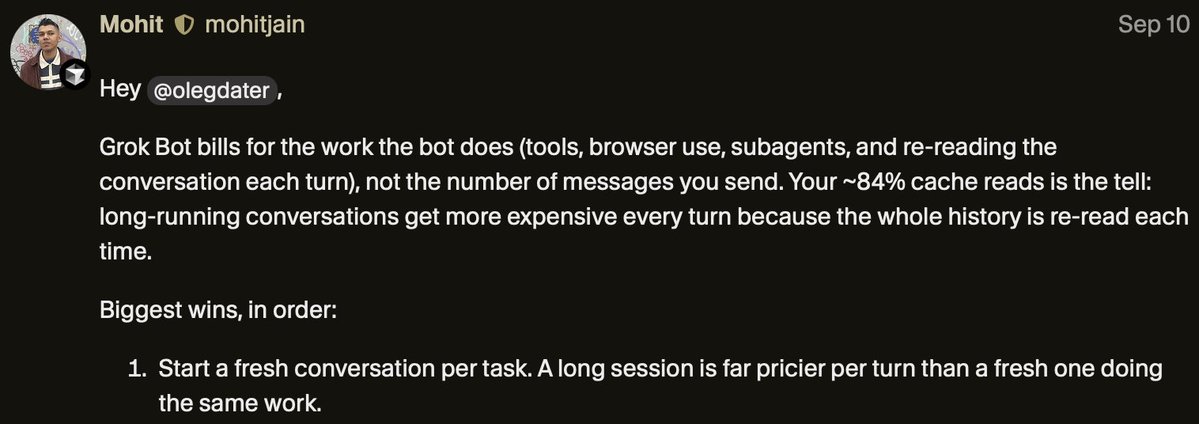
2. Connectors first, browser last
When you ask a bot to navigate a website, every step it takes involves taking a screenshot, making an educated guess, and verifying it.
Browser-based agent:
53 steps and ~551,000 tokens = 17 minutes to complete.
Agent via API:
8 calls and ~12,000 tokens = 20 seconds to complete
That’s a difference of 45 times!
The xAI documentation itself recommends choosing a connector if one is available.
How can you make the bot run more efficiently?
Just add one line to the prompt:
“Connectors first. Browser as a last resort.”
For X, it not be needed at all: bots can now search and read public X natively [ read-only mode ].
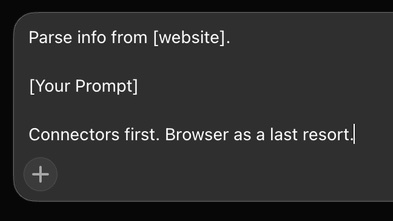
Prompt Template for Use
3. Slow down your routines
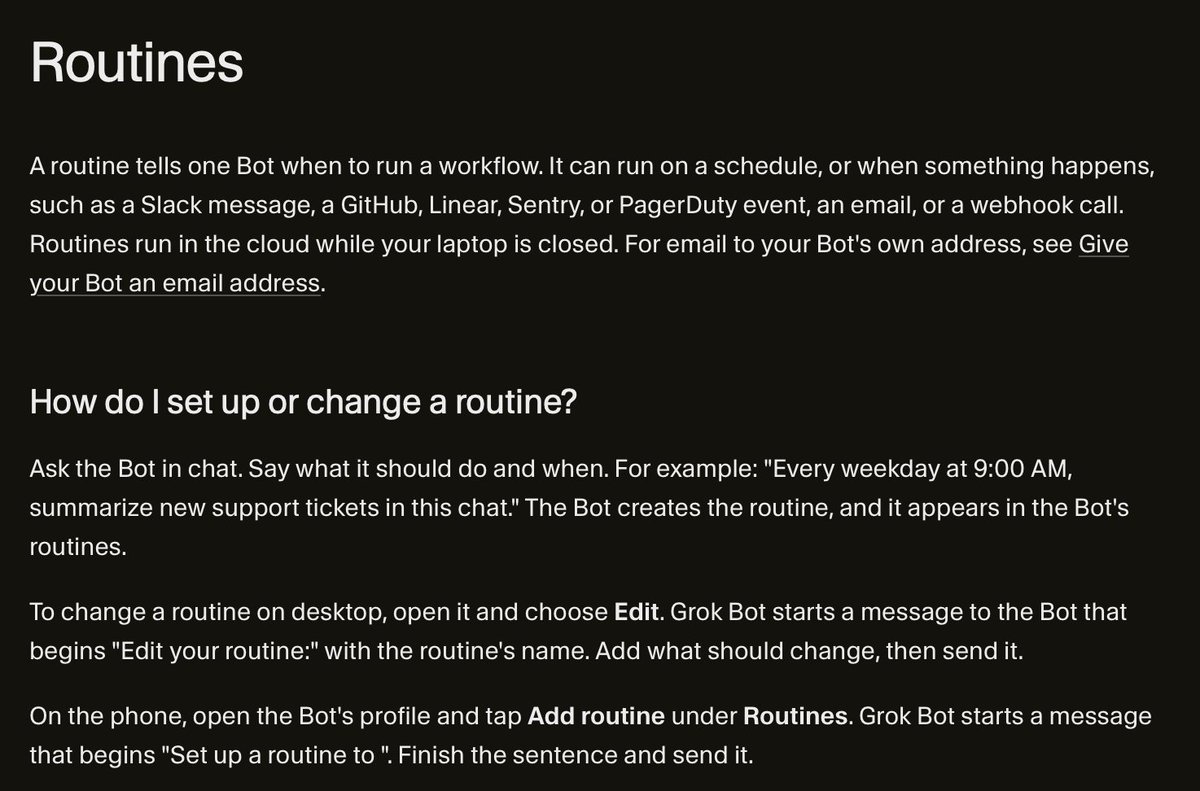
A routine is a task that the bot performs on its own. It tells the Bot when to run the task, either on a schedule or, where supported, in response to an event and it works even when the laptop is closed.
For example:
“Every morning, generate a summary of my mentions” or “Every 15 minutes, check if this account has posted anything.”
One more example:
I have a Bot set up to search for the latest information about X, Grok, Grok Bot, SpaceX, Tesla, and everything related to Elon Musk:
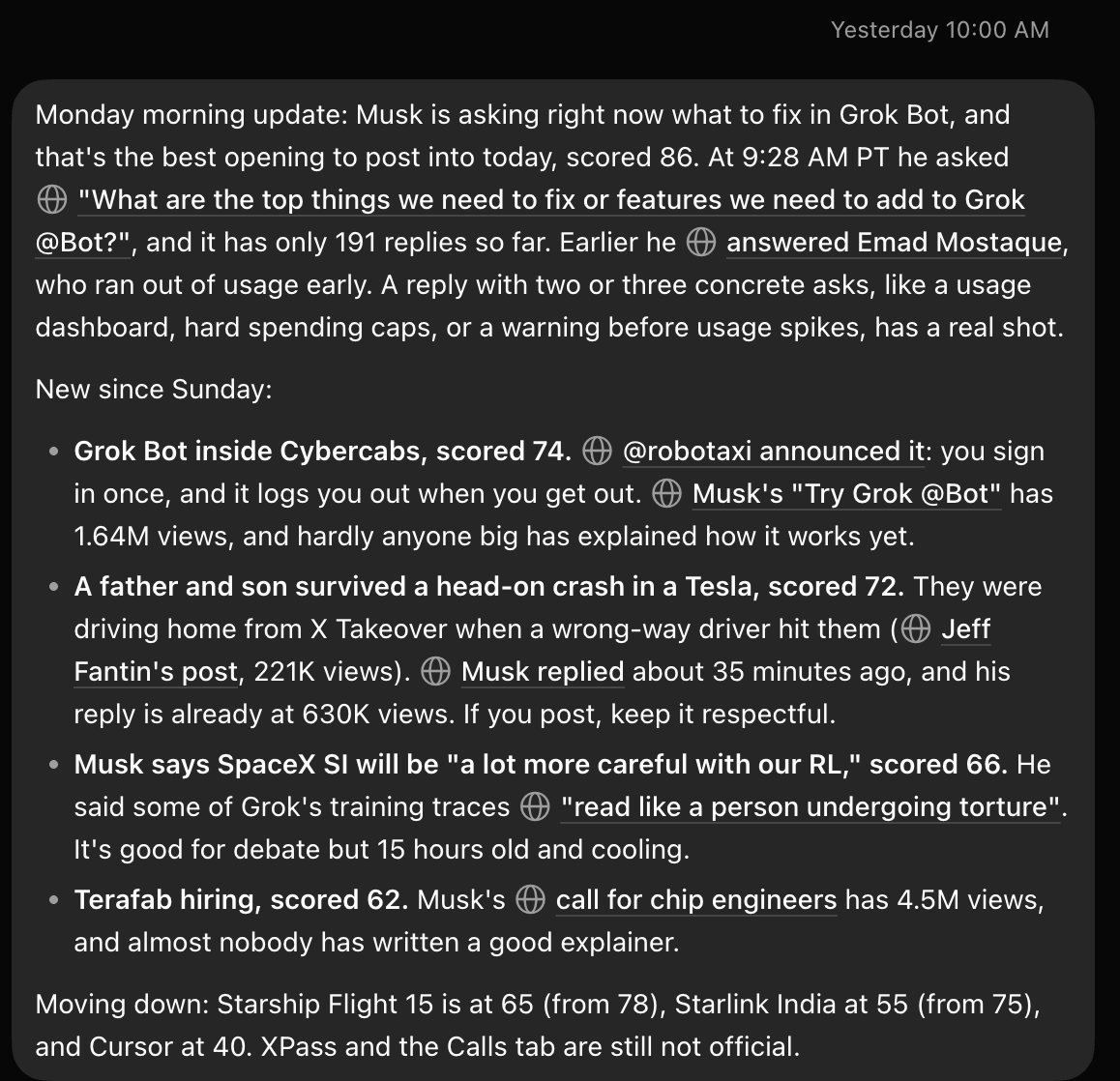
It sends me a summary twice a day and performs the search right when it sends it
Many people think routines are FREE because their work isn’t visible, but that’s far from the truth.
Every time it runs, the bot wakes up, loads context, opens tools, and has to think and write a report.
Every run uses up your limit, even if the bot wakes up and finds nothing!
The Cursor help center warns: an hourly schedule, a short interval, or a listener in an active Slack channel can use up a week’s worth of quota in a single day, and a routine that doesn’t trigger is worth nothing.
Every 15 min  → 96 runs/day → 672 runs/week
Every hour    → 24 runs/day → 168 runs/week
3 times a day →  3 runs/day →  21 runs/week
And this isn't just a theory. One Chinese user tested his setup and found a routine that ran 672 times a week. After switching to an hourly schedule, that number dropped to 168.
Cursor employees say the same thing: a routine that runs every few minutes triggers about 100 times a day, so it’s better to run it once an hour or a few times a day.
And the prompt “don't send information if nothing has changed” doesn’t solve the problem. It reduces the report, but not the trigger itself. The bot still wakes up, loads everything, and checks.
Instead:
1. Ask yourself how often you really need to check. For most monitoring tasks, two or three runs a day are enough.
2. Work on a fixed schedule. A rule from one Chinese user: instead of constantly checking, read the feed and select topics in batches—in the morning, afternoon, and evening.
3. Use narrow triggers instead of broad listeners. xAI warns that listeners like “every new message” create noise and waste your quota.
4. Assign routines to a separate bot. Cursor employees recommend running regular tasks on a separate bot rather than in the main chat.
5. Pause anything you don’t read. A routine that doesn’t trigger is worthless.
Instead of:
“Check my mentions every 15 minutes and let me know what’s new.”
Write:
“At 9:00 a.m., 2:00 p.m., and 8:00 p.m., check my mentions since the last run. If there’s nothing to reply to, reply with a single line.”
4. Write the entire task in a single prompt
When the bot doesn’t understand, there’s no need to correct it piece by piece: “No, I meant…,” “Check this too…,” “Now write a draft…” etc..
Each such message counts as a new turn. And every new turn causes the bot to re-read the entire history, often redoing part of the work and BURNING TOKENS.
3 clarifications × 85,000 re-read tokens = 255,000 tokens
Anthropic’s guide on the resource usage of their own code agent advises the same thing: write specific prompts, because vague ones force the agent to scan through unnecessary information.
An example of a well-formulated task from xAI itself tells the bot four things at once: what to do, where to work, what context to pull in, and what the final result should look like.
Instead of:
Check my mentions. Now find the ones that need a reply. Now write draft replies.
Write:
Check my mentions from the last 24 hours, select 5 that need a reply, write drafts in my style, and save them in /workspace.
And if the bot still makes a mistake, don’t argue for five turns in a row. Start a new chat with a more precise first message.
ONE TASK. ONE MESSAGE. ALWAYS.
5. One Bot - One Role
In Grok Bot, you can create multiple named bots, each with its own role. Their conversations and accumulated context are stored separately. This isn’t just a matter of organization, it’s a way to keep each bot’s context manageable.
A classic pitfall (many people do this): “chief of staff” bot that you ask about everything.
This is exactly what Craig Hewitt described when his weekly limit ran out in a single day: he was constantly chatting with his chief-of-staff bot, and it reloaded the entire history with every message.
Such a bot drags the context of all past topics into every new task.
And the more context there is, the worse the answers get:
> Chroma tested 18 models and found that as the input size increases, the quality becomes less reliable, even on simple tasks.
> A Chinese user on the Heavy plan broke the work down into stages, assigning one bot to each, so that no single bot had to keep track of all the projects.
> Cursor employees also recommend running regular tasks on a separate bot rather than in the main chat.
A simple setup:
- Researcher finds and summarizes sources.
- Monitor runs your routines and nothing else.
- Writer drafts posts in your voice.
- The researcher finds and summarizes sources.
- The monitor runs your routines and nothing else.
- The writer drafts posts in your style.
But don’t overdo it, a task isn’t the same thing as a subtask. Separate bots for separate tasks, YES. Multiple bots for a single task, NO. Otherwise, you’ll waste a TON OF TOKENS.
6. Stop constantly editing the bot’s description
The bot’s description is its permanent set of instructions: who it is, what it does, and what rules it follows.
This is where caching comes into play. When the beginning of a prompt matches the previous one, the provider can use the cache, which reduces both latency and cost.
Rereading the same text becomes much cheaper:
Grok 4.6 API, for 1 million input tokens:
Without cache: $2.00
From cache: $0.50
As result, 4 times cheaper if the beginning doesn’t change.**
These are the official xAI API rates for Grok 4.6:** cached input comes with a 75% discount. On Claude Sonnet, the difference is 10-fold: $0.30 from cache versus $3 without it.
xAI hasn’t described how Grok Bot caches data, but that Ultra user’s output consisted mainly of cache reads, so the cache clearly works.
The catch is that, as Manus discovered, even a difference of a single token breaks the cache for everything that follows, and a timestamp at the beginning of the prompt is a classic mistake.
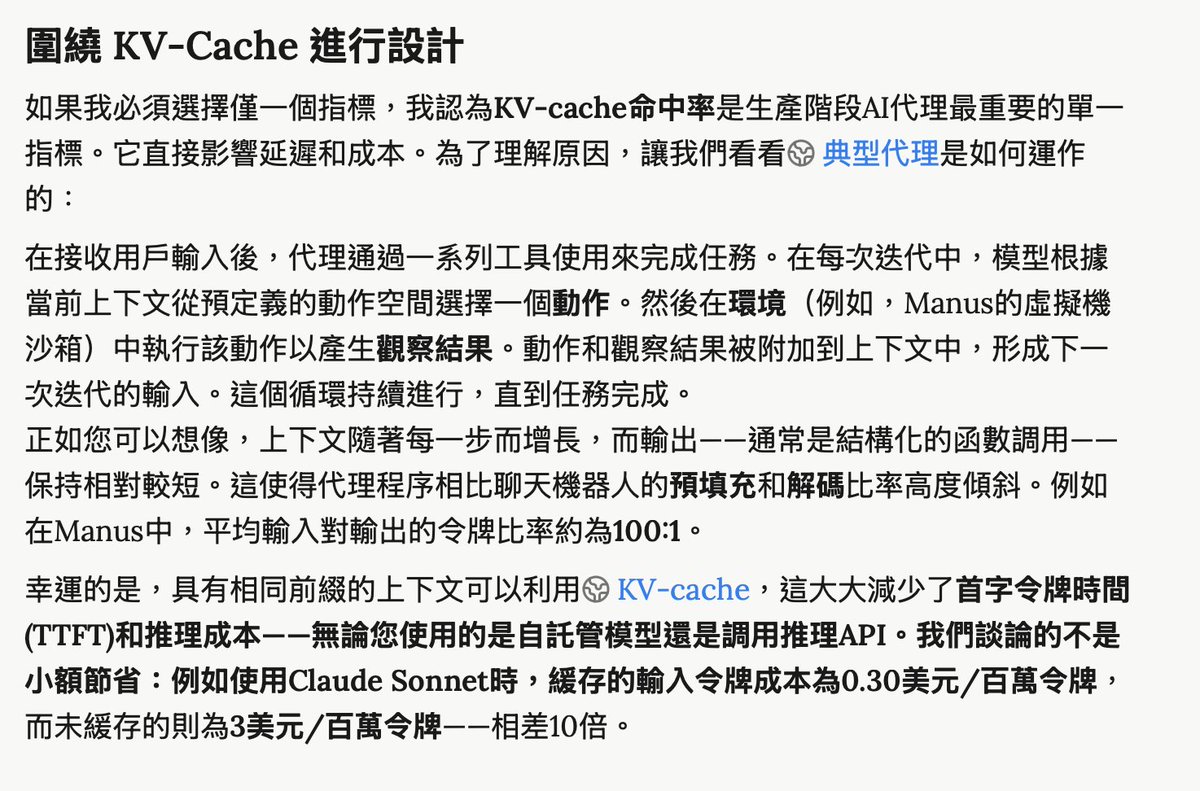
Link to read: manus.im/zh-tw/blog/Context-Engineering-for-AI-Agents-Lessons-from-Building-Manus
The DataCamp tutorial puts it precisely:
The description contains the rules that apply each week, while the topic for the current week should be located elsewhere, in a file that the bot reads.
Instead of:
This week’s focus is on an article about Grok Bot. Today is October 13. Use these 5 links..
Write:
You are my researcher on X. [Your standard rules.] Check /workspace/priorities.md for current priorities.
And from then on, update the file, not the description.
7. Let the tools you’re already paying for do the heavy lifting
First, figure out what counts. Almost everything the bot does on its own comes out of the weekly pool: chats, routines, browser and computer tasks, terminal commands, sub-agents, and MCP calls.
The only exception is work that the bot delegates to the Cursor cloud agent.
if you write hundreds of lines of code in a chat or re-read the entire repository for the sake of refactoring, you’ll hit the limit very quickly.
So divide up the roles: the bot plans and verifies, while other tools do the heavy lifting.
Cursor employees have confirmed that the “bot-manager” setup works: coordination is handled easily by the bot, while the heavy lifting is done using a separate Cursor quota.
Advanced users in China are taking it a step further: they install Grok Build on the bot’s cloud computer; the bot sends commands, the CLI writes the code, and the bot simply reports the result.
A fair disclaimer: this shifts the usage, it doesn’t eliminate it.
One SuperGrok Heavy user who submitted code to the Grok Build CLI still used up 70% of the bot’s limit in 2.5 days and only 6% of the Heavy limit. Coordination also costs money, especially in long chats.
Instead of:
“Refactor my repository and fix all the bugs.
Write:
Pass the refactoring to the Cursor cloud agent with this spec. Let me know when the PR is ready.
8. Limit retries and ask for short answers
Agents constantly run into issues: pages fail to load, logins time out, or CAPTCHAs pop up. Websites may block automation, reset the session, or require human intervention. When a step fails, the agent tries again. And every retry means another full cycle of screenshots and tokens. Without a stop rule, the bot can keep running for a very long time.
xAI recommends specifying in your routines what to do when data is missing or out of date, and where to report partial completion.
Simply put: tell the bot when to give up and where to save what it has managed to do.
Short answers are important too, but not for the reason you might think.
In the xAI API, Grok 4.6 output tokens cost $6 per million, compared to $2 for input tokens.
But Manus found out (the link to the article was above) that agents use roughly 100 times more input tokens than output tokens. The real cost of a long response is that it becomes a history that the bot re-reads at every subsequent step.
A 2,000-token response × reread over the next 20 steps = 40,000 tokens
A 200-token response × reread over the next 20 steps = 4,000 tokens
Instead, add the following to the task or the bot’s description:
If a step fails 3 times, stop and say where you’re stuck. Respond in 3 lines. Save everything else to /workspace.
9. Measure Before Scaling
The unpleasant truth: you won’t know the cost of a task until you run it.
Neither SpaceXAI nor Cursor publishes pricing limits. So the only way to find out is to measure it.
Check your Grok Bot usage in Settings → Usage & Billing, not in the Grok app.
Here’s a 5-minute test:
-
Pause every routine so that background runs don’t skew the numbers.
-
Write down your current usage percentage.
-
Run one task with a narrow scope.
-
Check the percentage again.
-
Run the same task the cheaper way (using a connector and a short reply) and compare.
-
Pause all routines so that background runs don’t skew the numbers.
-
Write down your current usage percentage.
-
Run a single task with a narrow scope.
-
Check the percentage again.
Run the same task the cheap way (connector, short reply) and compare.
Then calculate the costs for the routines:
Weekly cost of a routine = price per run × number of runs per week
Also, try this request:
Check your usage over the last 7 days. Which chats and routines were the most expensive? Answer in 5 lines.
Conclusion
Most people who hit their daily limit don’t need a higher-tier plan. They need a more cost-effective setup: new chat rooms, connectors, and fewer repetitive tasks.
In other words, people literally don’t know how to use the tools they already have effectively.