How To Become A GTM Engineer (Full Step-By-Step Guide)
文章目录
Our team launches 50 to 100 cold email campaigns a day from a terminal.
1 message in Slack builds a qualified, verified lead list in about 14 minutes.
Positive replies get answered in under 30 seconds.
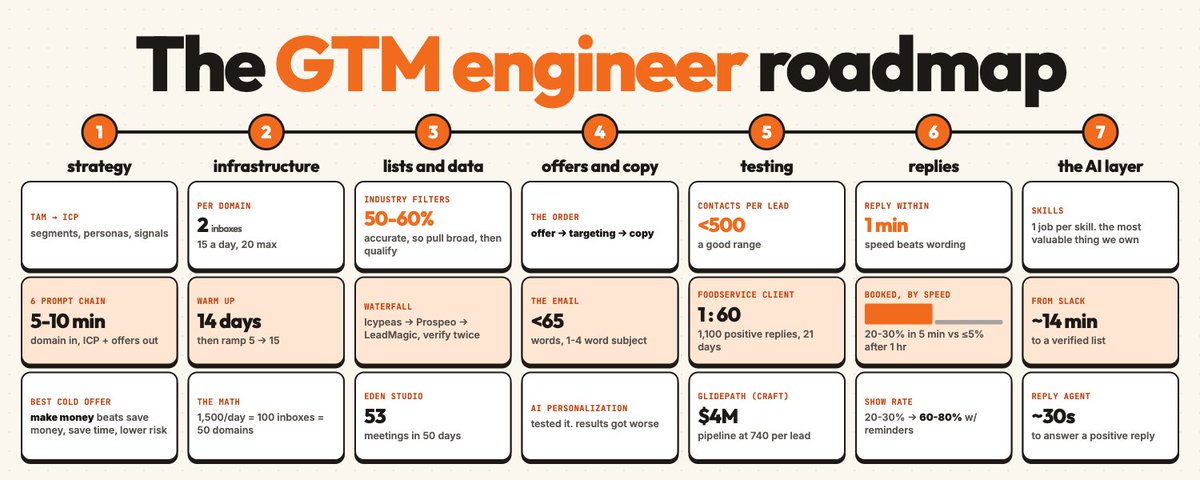
Behind it is everything a GTM engineer learns: strategy, infrastructure, data, copy, testing, reply handling and AI agents tying it all together.
That system has sent 17M+ cold emails and produced $100M+ in pipeline across 100+ B2B companies.
We just put the whole thing into a free 6 lesson course on YouTube.
This article turns that course into a step by step path for becoming a GTM engineer.
It covers what the job actually is, the 7 levels to learn in order, the project that proves each level, how to get paid for it, and a 90 day plan.
What a GTM engineer actually does:
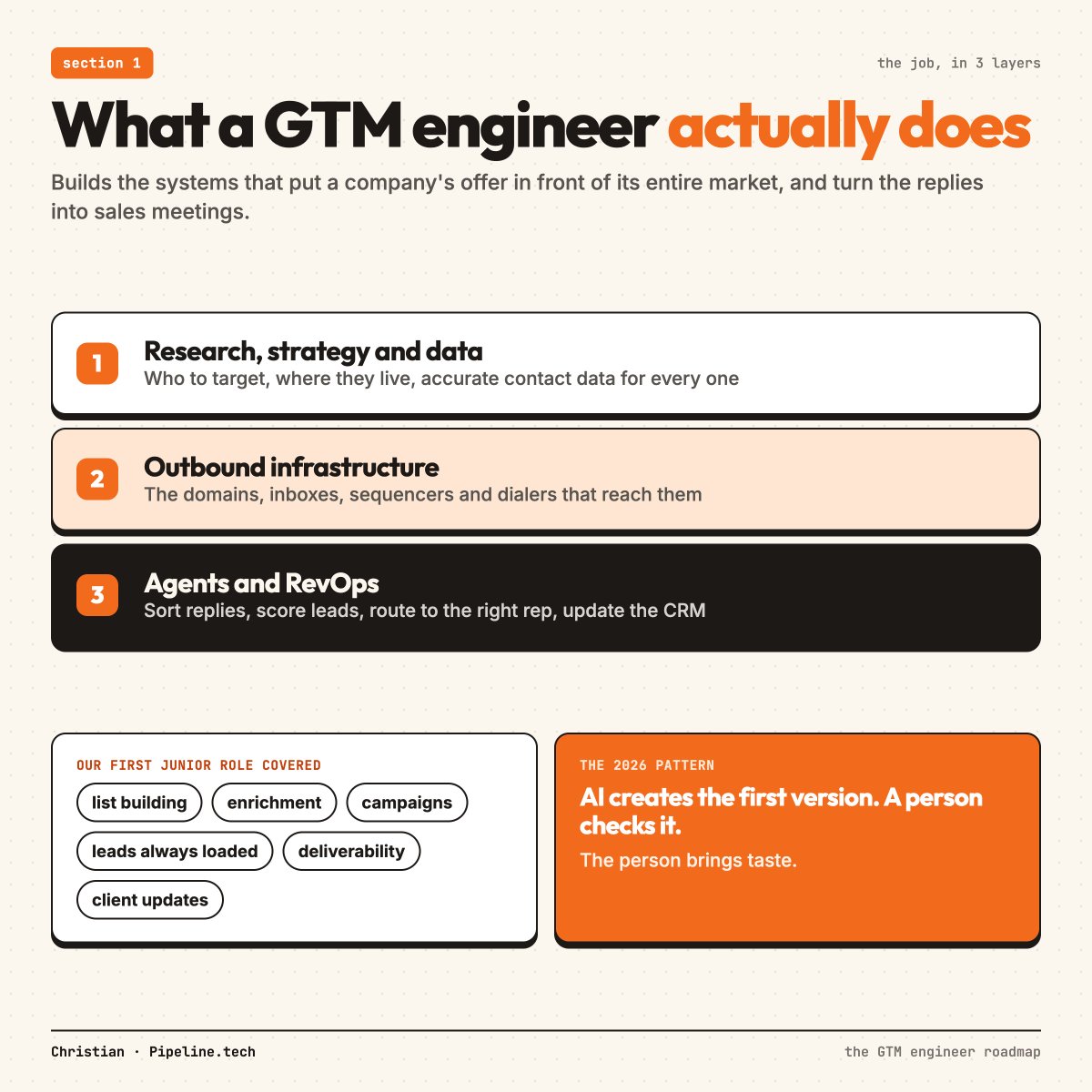
A GTM engineer builds the systems that put a company's offer in front of its entire market and turn the replies into sales meetings.
In practice, that's 3 layers:
-
Research, strategy and data: who to target, where they live, and getting accurate contact data for every one of them
-
Outbound infrastructure: the domains, inboxes, sequencers and dialers that reach them
-
Agents and RevOps: the systems that sort replies, score leads, route them to the right rep and update the CRM
A good GTM engineer owns all 3 and knows how each one breaks.
What the work looks like week to week:
When we hired for our first junior GTM engineer role, the job covered:
-
List building
-
Running enrichment
-
Building out campaigns
-
Making sure every campaign always has leads to send to
-
Deliverability checks
-
Client updates
The path we laid out was junior GTM engineer, then senior, then GTM lead.
We asked every applicant for a 2 minute Loom.
The ones who stood out showed something they'd built.
How the job changed in 2026:
A few years ago, building a list meant pulling contacts out of Apollo by hand, finding emails 1 by 1 and uploading the file to a verifier yourself.
Scraping anything unusual meant writing a custom Python scraper.
Now our team types a request into Slack, and an agent connected to our tools builds, qualifies, enriches and verifies the list.
A full strategy and list used to take hours.
Now it takes minutes.
The pattern for every workflow now is the same: AI creates the first version, and a person checks it.
Where the person matters:
The person brings taste.
If you let AI run on its own, the output is usually average.
The GTM engineer's job is to know what good looks like, catch what the AI got wrong, and give it the context it needs to get it right next time.
That takes both halves of the job: knowing how to build, and knowing what to build.
Before you learn a single tool, learn the marketing half:
Thousands of engineers have learned Clay, n8n and Claude Code over the last 2 years.
Plenty of them can build a 27 step workflow.
Far fewer know what a good offer looks like, how to define an ICP, or why 1 email gets replies and another doesn't.
That second set of skills is rarer, and it's the half that decides whether a campaign makes money.
The best GTM engineers we know are marketers who can build.
The 4 things to understand before you touch a tool:
-
Who buys, and why
-
What makes an offer easy to say yes to
-
How a cold email gets read in 5 seconds
-
How a reply turns into revenue
Every level below teaches 1 piece of those, plus the tools that run it.
Why the order matters:
You can't build a qualification agent if you can't say what qualifies a company.
You can't build a messaging skill if you can't tell a good email from a bad one.
The tools speed up what you already know.
So the roadmap below starts with strategy and ends with AI agents.
Levels 1 to 3: strategy, infrastructure and data:
Level 1: Strategy:
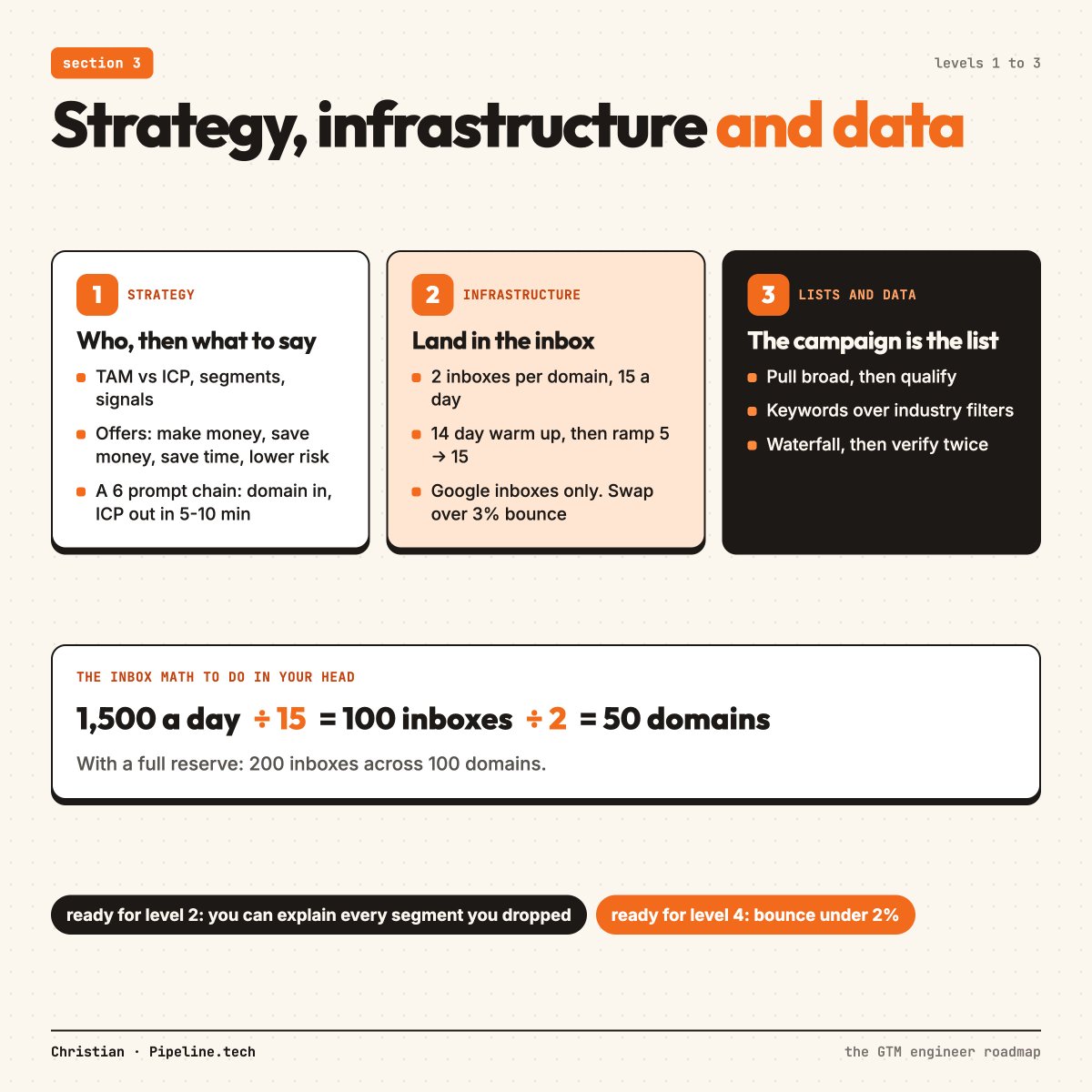
Every campaign answers 2 questions: who are we targeting, and what do we say to get their interest?
Who comes first.
What to learn:
-
The difference between a TAM (every company that could buy) and an ICP (the part most likely to buy)
-
Breaking an ICP into segments by industry and sub industry
-
The signals that show a company fits: headcount, the tools they use, a new head of sales, hiring, funding
-
What each persona is measured on, and the problems in their day
-
The 4 offer categories: make money, save money, save time, lower risk
Make money beats the other 3 in cold email.
Lowering risk (cybersecurity, bookkeeping) is the hardest to sell cold, because people buy it when the need shows up.
How we do it now:
We run strategy as a chain of 6 prompts, where each output feeds the next:
-
Deep market research on the company
-
Mapping every segment of its market
-
ICP and personas for each segment
-
Where to find the company data
-
Keywords to filter databases with
-
First drafts of the messaging
It's packaged as a Claude Code skill.
A company domain goes in, it runs for 5 to 10 minutes, and it returns the ICP, the market map, offers to test and messaging angles.
The skill you're learning here:
When we ran it on our own company, it ranked cybersecurity firms near the top of our market.
That segment is 1 of the hardest to sell to cold, so we cut it.
Catching that is the job.
The project that proves Level 1:
-
Pick a real company, ideally one you'd want as a client
-
Run the 6 prompts on it, in ChatGPT if you don't use Claude Code yet
-
Fix every output by hand
-
End with 1 document: the top 3 segments, 3 personas in each, the signals, and 3 offers
You're ready for Level 2 when you can explain why you picked each segment, and why you dropped the others.
Level 2: Infrastructure and deliverability:
Nothing else matters if the emails land in spam.
This is the most technical level, and it's where most of the expensive mistakes happen.
What to learn:
-
Why you never send from the main domain, and how to buy secondary domains that look like it
-
SPF, DKIM and DMARC, and what each one does
-
Inbox math: 2 inboxes per domain, 15 cold emails per inbox a day, 20 at most
-
Warm up: 14 days, starting at 5 emails a day and adding 1 a day up to 20
-
The cold ramp: start at 5 a day after warm up, add 1 a day to 15
-
Reserve inboxes, ideally 1 spare for every inbox sending, and at least 20%
-
How long inboxes last: 3 to 6 months normally, 6 to 9 on a great offer, about a month on a bad one
-
Splitting campaigns by the receiving provider: Google, Outlook, security gateways and personal emails
-
Bounce rules: swap inboxes over 3%, replace everything and check the list over 10%
The stack we run:
-
Porkbun for domains
-
ScaledMail for Google inboxes, at about $3 an inbox
-
EmailBison as the sequencer, at about $600 a month, or PlusVibe at around $97 under 50,000 emails a month
-
MillionVerifier, then BounceBan for catch all emails
-
EmailGuard or Mailmeteor for placement tests
We send from Google inboxes only.
Microsoft inboxes have underperformed Google for us for about a year.
The math you should be able to do in your head:
1,500 emails a day at 15 per inbox needs 100 inboxes.
That's 50 domains at 2 inboxes each.
With a full reserve, it's 200 inboxes across 100 domains.
The project that proves Level 2:
-
Set up 5 to 10 secondary domains and 2 Google inboxes on each
-
Run the full 14 day warm up
-
Connect them to a sequencer with open tracking off, plain text on and no links
-
Run a placement test before the first cold email goes out
You're ready for Level 3 when you can look at a campaign's reply rate and bounce rate and tell whether it's an inbox problem, a list problem or a copy problem.
Level 3: Lists and data:
The campaign is the list.
This is where GTM engineers spend most of their time, and where the best ones pull ahead.
What to learn:
-
A tight list is 1 segment, 1 group of similar job titles and 1 employee range
-
Pull broad, then qualify, because a raw database pull only lands 50 to 60% ICP fit
-
Use keywords over industry filters
-
Use headcount over revenue, because private company revenue is mostly guessed
-
Qualify companies before you pay to find people at them
-
Find 3 to 5 decision makers per company
-
Run several email finders in a row (a waterfall), cheapest first
-
Verify twice, once for normal emails and once for catch alls
Learn 3 ways to build a list:
- A database
Prospeo, Apollo and AI Ark all work.
Filters worth using: location, keywords, employee range, the tools they use, funding stage, salespeople in the team, and headcount in a country.
Filters to skip: buying intent, revenue, headcount growth, website traffic and company news.
Those are often wrong inside databases.
- Clay
Build it the old fashioned way once, so you understand the logic before you automate it.
1 AI column per question, like "is this a B2B SaaS company?" and "does it have a live pricing page?"
1 job per agent, because an agent given 3 jobs gets sloppy.
Test on 10 rows before you run the full list.
We've burned a lot of credits learning that 1.
If the answers come back blank or unsure, switch to a stronger model.
Then the email waterfall: Icypeas, then Prospeo, then LeadMagic.
BlitzAPI for phone numbers.
- An agent
Connect an AI agent to the APIs of every data tool you use, give it written instructions for each step, and ask for the list in plain English.
That's how our team builds lists now, and Level 7 covers how.
The data sources to know:
-
Databases like Apollo, Prospeo and AI Ark for most B2B companies
-
Ocean(.)io and AI Ark for finding companies that look like your best customers
-
Google Maps for local businesses that barely exist on LinkedIn
-
Industry directories, scraped with Instant Data Scraper or Apify
A real list build to study:
For our client Eden Studio (landscape design software for contractors), we scraped 69,204 landscaping and hardscaping businesses off Google Maps.
Every account got scored on what signals buying intent for that product.
The biggest weights:
-
12 points for outsourcing their design work
-
10 points for reviews complaining about slow quotes, or clients who couldn't picture the finished job
-
10 points for hiring a designer, estimator or project manager
-
10 points for a high ticket portfolio with a small team
-
10 points for a spike in reviews over the last 90 days
That list fed a campaign that booked 53 meetings in 50 days, from a company with no outbound at all before it.
The info@ lesson:
For local businesses, the info@ inbox usually goes straight to the owner.
On 1 local market, the paid databases found 3,621 business emails, and the companies' own websites found 4,553 more.
The website emails took 54.97 contacts per positive reply.
The business emails took 94.94.
The project that proves Level 3:
-
Build the same list 3 ways: from a database, in Clay and from Google Maps
-
Qualify every company with AI, and write down what qualifies and what disqualifies
-
Run a waterfall and verify twice
-
Compare the cost and the accuracy of each method
You're ready for Level 4 when your verified list bounces under 2%.
Levels 4 and 5: offers, copy and testing:
Level 4: Offers and copy:
This is the level engineers skip, and the 1 that decides whether any of the systems above make money.
The order is offer, then targeting, then copy.
A great offer gets replies with average copy.
A bad offer gets nothing with perfect copy.
What to learn:
The 6 parts of a good offer:
-
Low risk
-
Little effort to say yes to
-
A big upside
-
Something they actually want
-
Urgent for their role
-
Fast to deliver value
A good offer has at least 3.
Cold email needs low risk, little effort and fast value every time.
The 3 types of front end offer, from least work to most:
-
A sales asset: a case study, a playbook, a video course
-
A small paid deliverable: a fast, cheap version of what you sell
-
A free trial or pilot: free credits, a free month, a free campaign
The harder the offer, the further down that list you go.
How a cold email gets read:
It gets treated as spam before anyone reads a word.
The reader is asking 5 things in about 5 seconds:
-
Does this make me money, save me time or lower my risk?
-
Has this person done it before?
-
Do they know anything about me?
-
Is this a real person?
-
Is this a waste of my time?
The 5 building blocks of a cold email:
-
A specific problem
-
A result from a company like theirs
-
An offer that's easy to say yes to
-
A detail about their company you could only know by looking
-
An insight about their market or role
Anything outside those 5 is usually filler.
The rules:
-
Under 65 words, and shorter for crowded markets
-
1 to 4 word subject lines, all lowercase
-
A permission ask like "worth a quick look?" in place of a meeting ask
-
2 emails, then come back later with a new angle
-
No AI personalization
We tested AI personalization against leaving it out, and adding it made results worse.
A tight list makes the email relevant on its own.
Learn the frameworks:
The 1 liner: "{First name}, interested in {front end offer} for {company}?"
The problem and fix: "{Problem you can verify from outside}. Our {solution} does {fix} so you can get {result}. Interested?"
The lead magnet and case study: "Created a {lead magnet} for {company} covering the {mechanism} we used to help {similar company} get {result} within {time frame}. Mind if I share?"
(All 6 of our email frameworks, plus 200+ of our best performing scripts, are inside GTM University at gtmu.io)
How we write copy now:
We don't write cold emails from scratch anymore.
Our messaging skill holds all of our frameworks and asks for the segment, the job titles and a few dream companies before it writes.
The first draft is rarely right.
On a recent run, it opened with a decent line and a weak offer.
We told it to lead with new SDRs ramping and to offer 2 or 3 meetings from a free campaign.
The second draft was 1 we'd send.
That back and forth is the skill you're learning.
AI handles the volume of drafts.
You decide which 1 goes out.
The project that proves Level 4:
-
Write 3 offers for the company from Level 1
-
Write 1 email for each offer, with everything else the same
-
Ask someone in that industry which 1 they'd reply to, and why
You're ready for Level 5 when you can explain why your best email works, using the 6 offer parts and the 5 building blocks.
Level 5: Sending, testing and scaling:
What to learn:
The variable worth testing is the offer.
Swapping "Mind if I" for "Cool if I" tells you nothing.
The metric that matters is contacts per lead: how many people you contacted for every positive reply.
-
Under 500 is a good range
-
Around 1,000 is where offers catching existing demand often sit
-
2,000 to 3,000 means the offer or the segment needs to change
Real campaigns to study:
-
A custom foodservice disposables manufacturer selling branded cups and packaging to local shops hit 1 positive reply for every 60 people contacted, with 1,100 positive replies in 21 days
-
An agency selling to 7 figure ecom brands hit 266 contacts per lead in 1 of the most crowded inboxes in B2B
-
An enterprise focused B2B team took 867, because enterprise needs more contacts for every lead
A high number can still be a great campaign.
For our client Glidepath (CRAFT), a financial services company building tax efficient products for people holding concentrated stock, 22,939 people contacted turned into 31 interested leads.
That's 740 contacts per lead, and $4M in pipeline.
Judge a campaign by what a lead is worth, and the right number follows from that.
Volume and timing:
Our base package is 100,000 emails a month.
We refresh every client's full market every 30 to 60 days, because someone who said no in March can be ready in June.
If a market is only around 10,000 companies, automation isn't worth building, and account based marketing works better.
Diagnosing a drop:
-
Reply rate halved with nothing changed: run a placement test
-
Landing in Google but not Microsoft: change the Outlook copy or pull that side
-
Landing everywhere with no replies: the copy is stale or the offer stopped working
-
Reply rate under 0.5% after several copy changes: it's deliverability
The project that proves Level 5:
-
Launch the 3 emails from Level 4 to the list from Level 3, on the inboxes from Level 2
-
Track contacts per lead for each offer
-
Kill anything above 1,000 and scale the winner into a second segment
You're ready for Level 6 when you've found 1 offer under 500 contacts per lead.
Levels 6 and 7: replies, RevOps and the AI layer:
Level 6: Reply handling and RevOps:
A positive reply is worth nothing until it turns into a meeting that shows up.
Most teams lose more money here than anywhere else.
What to learn:
Speed to lead:
-
Reply within 1 minute, because speed matters more than the wording
-
Inside 5 minutes, around 20 to 30% of positive replies become meetings
-
After an hour, it's about 5% or less
Calling positive replies:
When they pick up, 80 to 90% book.
The call takes about 60 seconds.
Booking:
-
Offer 2 specific times, and never send the booking link alone
-
Book within 2 days, and same day is best
-
Keep the price for the call, because exact prices over email almost never convert
The pre call workflow:
Without reminders, cold meetings show up 20 to 30% of the time.
With a confirmation video, a same day LinkedIn connection and reminders 24 hours, 4 hours and 1 hour before, it's 60 to 80%.
The 6 reply types:
-
Interested
-
Wants more info
-
Asking the price
-
Wrong person
-
Later
-
Out of office
Plus not interested, which goes on a do not contact list for good.
The system to build:
-
A reply lands in EmailBison
-
A webhook sends it to n8n
-
AI tags the intent
-
Positive replies get a phone number lookup, a CRM record and their LinkedIn
-
Everything posts to Slack with the full thread, and the rep gets buttons to call, send an AI draft, edit it or skip it
Build 1 agent per job.
An agent deciding positive or negative does it better when that's its only job.
Then a second agent sorts the type, and a third scores how well the lead fits.
Where this ends up:
For some of our clients, the reply engine now tags intent, writes the reply and sends it on its own in about 30 seconds, and every lead syncs into HubSpot with the full conversation.
On our own offer, our AI reply agent books around 10 meetings a week at 4,000 emails a day.
The project that proves Level 6:
-
Connect your sequencer to Slack with a webhook and n8n
-
Add an AI step that tags positive replies
-
Set up the pre call workflow in your calendar tool
-
Run it on the campaign from Level 5 and track reply to meeting, and meeting to show
You're ready for Level 7 when positive replies reach a person inside 5 minutes without anyone watching the inbox.
Level 7: The AI layer:
This is the level everyone wants to start at.
It only works once you have Levels 1 to 6, because the AI runs on what you've written down from them.
What to learn:
Skills:
A skill is a written set of instructions an AI agent follows for 1 job.
We have skills for market research, TAM mapping, ICP and personas, lead sourcing, messaging, enrichment and Google Maps scraping.
Each 1 holds the order of steps, the tools to use and what good output looks like.
Our enrichment skill, for example, tells the agent to try Icypeas first, then Prospeo for anyone missed, then LeadMagic, then verify with MillionVerifier and BounceBan.
The skills are the most valuable thing we own.
Connecting the tools:
An agent gets access to your tools through their APIs, MCP servers or command line tools.
We connect Clay through its command line tool, and EmailBison through its API, which lets us launch campaigns straight from the terminal.
Give the agent your skills, connect it to your tools, and it can run the whole build.
Guardrails:
-
The agent runs a small test first and shows you the result
-
It asks before spending paid credits
-
It stops and asks when the request is unclear
The context:
Everything comes down to the context you give the agent.
Our copy skill reads thousands of past email scripts along with their results.
Our strategy skill reads the client's onboarding form, sales call transcripts and best closed deals.
Sales call recordings are the best context there is, because they're the buyer's own words.
Picking the right tool for the job:
-
Claude Code for strategy, messaging and anything you want to iterate on
-
Codex for running large batches of enrichment, because it's cheaper at scale
-
n8n for high volume automations like reply scoring, which can handle thousands of replies a day
-
Clay for testing a workflow on a small, tight list before you rebuild it elsewhere
1 shared agent for the whole team:
Our agent lives in a Slack channel, runs on a server around the clock and is connected to our full stack.
The whole team can ask it for a list from their phone.
We're moving that setup onto Claude now.
The upkeep is real: agents go down, skills need updating and tools change their APIs.
For an agency it's worth it.
If GTM isn't your whole business, think hard before you build all of it in house.
The monthly jobs to automate:
Every month, we connect the sequencer's data to Claude Code and pull the bottom 20% of inboxes, anything around a 0.5% reply rate or lower, or a 3 to 5% bounce rate or higher.
Those get replaced.
That used to be a day of spreadsheet work.
The project that proves Level 7:
-
Write 1 skill for your list build, with the exact steps and tools
-
Connect an agent to 2 or 3 of your data tools
-
Ask it for the list from Level 3 in plain English
-
Compare its output and cost against the list you built by hand
You've finished the roadmap when you can ask for a campaign in a sentence, and check the agent's work well enough to put your name on it.
How to get paid as a GTM engineer:
There are 3 routes.
Route 1: A job:
Companies and agencies hire GTM engineers to build and run these systems.
What gets you hired is proof you've built something.
When we hired, the applicants who stood out showed a working build in their Loom.
The ones who sent a resume or a slideshow of theory didn't make the cut.
Your portfolio is the 7 projects above, with real numbers from each.
Route 2: Clients:
You sell the system to companies directly.
Use the same playbook on yourself: a tight list, a front end offer and fast replies.
1 offer we've run ourselves: offer a prospect 1,000 ICP fit accounts from their own segment, ranked by fit and buying signals.
When they say yes, send the list, then ask how they plan to reach those accounts, and offer to run a campaign on it.
The list proves you can do the work before anyone pays you.
Route 3: In house at your own company:
If your company sells B2B and has a market of 50,000+ contacts, these systems can become its main acquisition channel.
The 3 checks from our course still apply:
-
A deal worth $10K+ a year
-
50,000+ contacts in the market
-
A sales process ready to take the meetings
What makes you worth more:
Engineers who can build are getting easier to find.
People who can build and also pick the right segment, write the offer and read a campaign's numbers are rare.
Every level of marketing skill you add on top of the technical ones makes you harder to replace.
Your first 90 days:
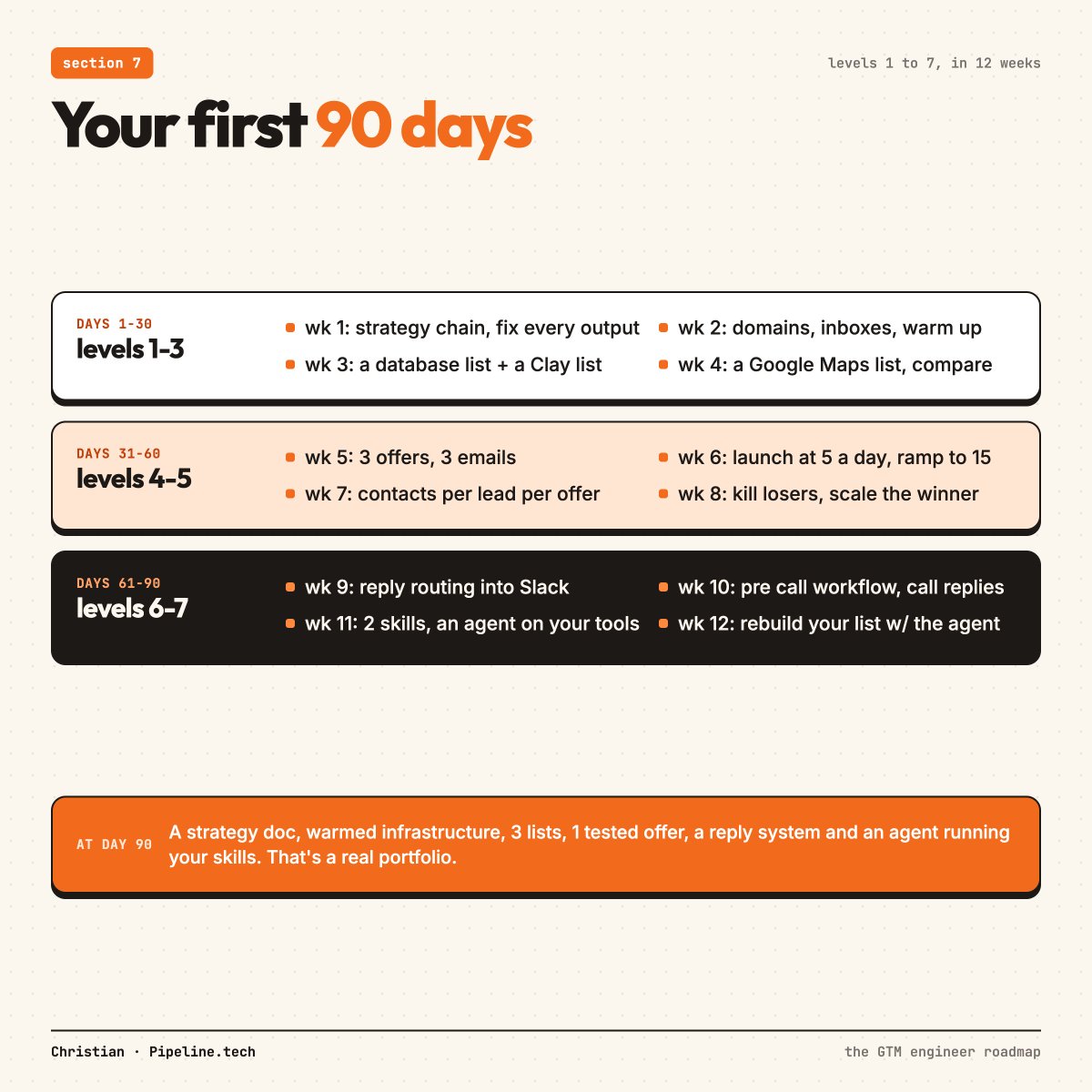
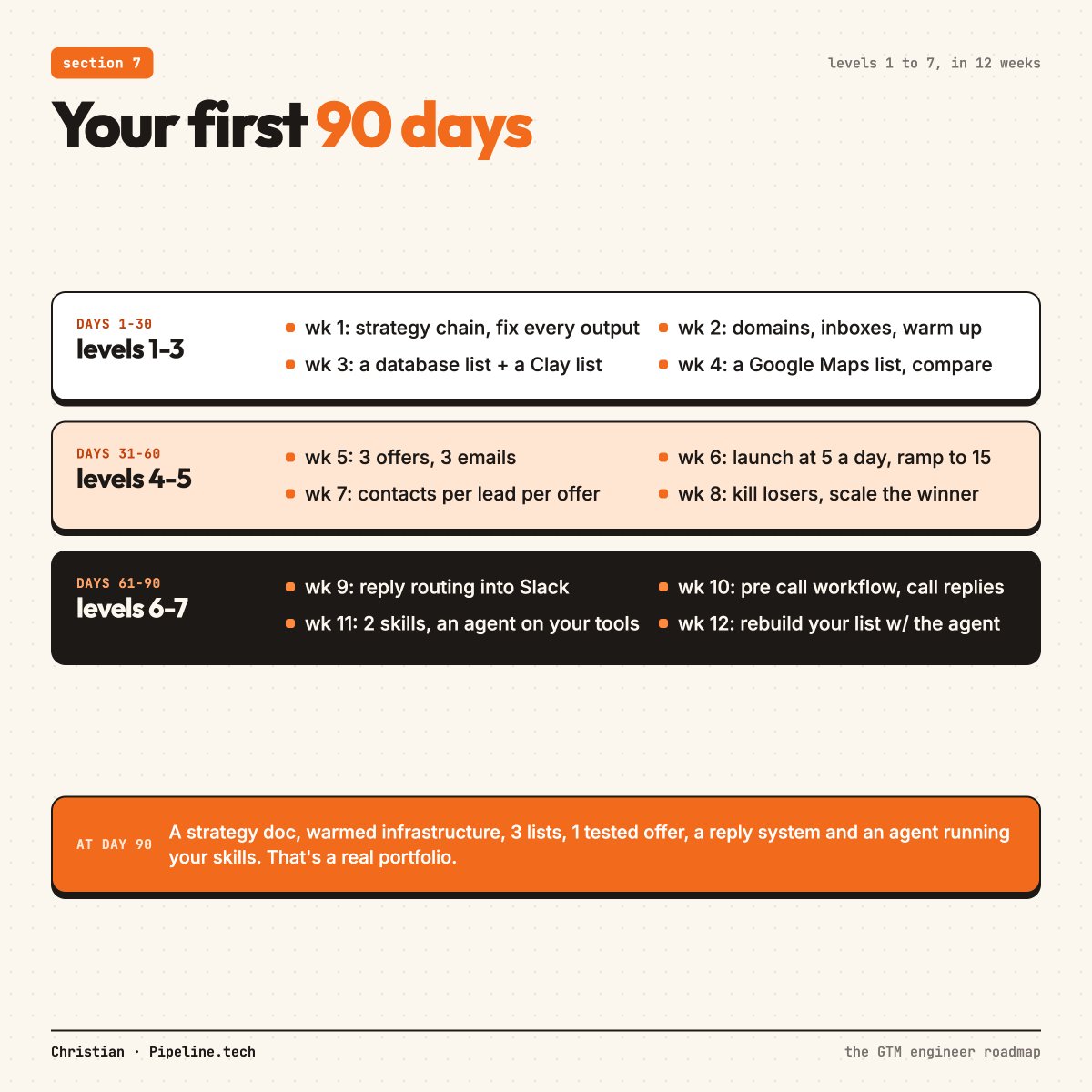
Days 1 to 30, Levels 1 to 3:
-
Week 1: run the strategy chain on a real company and fix every output
-
Week 2: buy domains and inboxes, and start the 14 day warm up
-
Week 3: build 1 list from a database and 1 in Clay
-
Week 4: build 1 list from Google Maps, then compare all 3
Days 31 to 60, Levels 4 and 5:
-
Week 5: write 3 offers and 3 emails
-
Week 6: launch at 5 cold emails per inbox per day, ramping to 15
-
Week 7: track contacts per lead for every offer
-
Week 8: kill the losers and scale the winner into a second segment
Days 61 to 90, Levels 6 and 7:
-
Week 9: build the reply routing into Slack
-
Week 10: set up the pre call workflow and call every positive reply
-
Week 11: write your first 2 skills and connect an agent to your tools
-
Week 12: rebuild your first list with the agent and compare it with the hand built version
At day 90 you'll have:
-
A strategy document you wrote and corrected
-
Warmed infrastructure you set up
-
3 lists built 3 different ways
-
At least 1 tested offer with real contacts per lead numbers
-
A working reply system
-
An agent running your own skills
That's a real portfolio, and it's the same system companies pay to have built.
TLDR:
-
A GTM engineer builds the systems that reach a company's whole market and turn replies into meetings
-
Learn the marketing half first: who buys, what makes an offer work, how a cold email gets read
-
Level 1: strategy, with AI doing the first draft and you fixing it
-
Level 2: infrastructure, with Google inboxes, 2 per domain, 15 a day, after 14 days of warm up
-
Level 3: lists, pulled broad, qualified with AI and verified twice
-
Level 4: offers and copy, with the offer first and no AI personalization
-
Level 5: testing, judged by contacts per lead, with under 500 as a good range
-
Level 6: replies, answered inside 1 minute, with positive replies called and reminders before every meeting
-
Level 7: AI agents running your skills, connected to your tools, with you checking the output
-
Build a real project at every level, because that's what gets you hired or paid
The skills take months to learn.
Using them every day is what makes you good.
Simple as.
- Christian
If you're running GTM/outbound yourself, we teach a ton of stuff about GTM and outbound in our community. (Like this article but better)
50+ modules, 3 live calls a week, and direct access to the operators running this at scale.
All going over exactly how to make money/scale with GTM and outbound
Join up @ gtmu.io