How I Make $10K Launch Videos for $0 with Opus 5.5 (Full Course)
文章目录
部分视频或图片暂未收录,已在正文保留提示;需要时可查看原文。查看原文 ↗
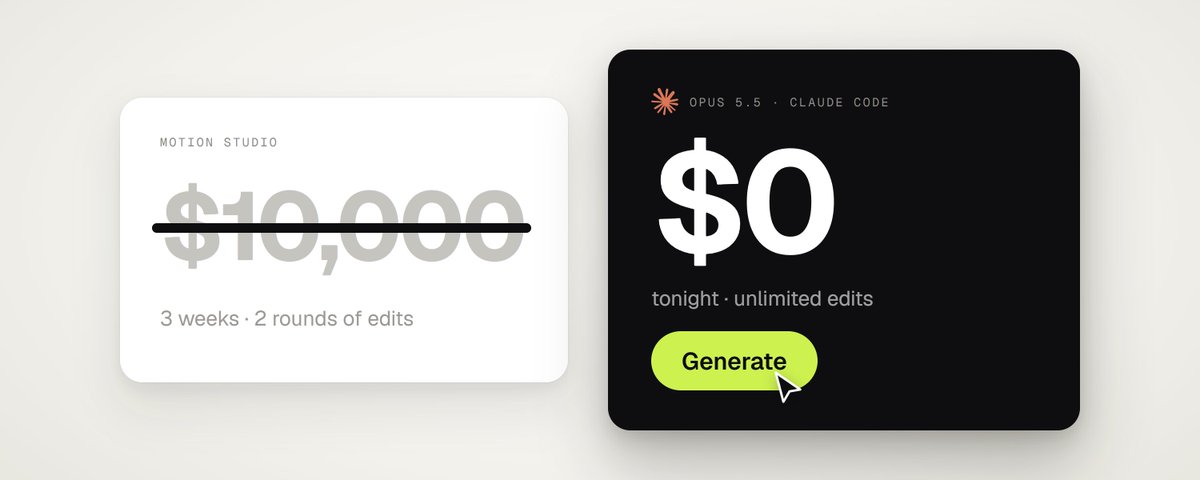
im open sourcing my entire workflow for making the motion designs that studios charge $5,000 to $15,000 for
this uses 0 mcp, 0 external tools and im not selling you any subscription
you dont need after effects or any editing program either, claude makes the whole thing in code
below is every step, from how i get the idea to how i prompt it to how it turns into a final finished product, with 0 effort and claude handling the entire process
every single frame of this is code opus 5.5 wrote, and i dont even know step 1 of motion design
(fair warning, this article is long. bookmark it now so you dont lose it, but dont skip it. i promise itll change how you look at motion design and save you a few thousand on your next launch video)
and if you find it useful, a like, RT or quote on the post goes a long way. took me hours to write, takes you 2 seconds
step 1: steal the idea
you dont need to be creative for this part
every video i made started from something that already exists, dribbble ui animations, an apple keynote, even someone elses app promo
so find a launch video you like, save it and give it to claude code with this:
Extract 2 frames per second from reference.mp4 with ffmpeg and put them on contact sheets. Go through them and break the video into beats: what happens on each beat, how each scene turns into the next, the camera moves, the colors and the fonts. Then write the same structure for my product: [your product + link].
no reference? ask it for 3 ideas for your product and pick one
one hint, claude goes for dark 3d looking videos by default and they still dont look high end, so i push mine to a 2d white minimal look instead, thats what actually feels premium
if youre writing your own prompt, add this so it doesnt default to dark 3d:
Style: 2D only. Warm white background, black UI, one accent color, one clean font (Geist or Inter). No 3D, no dark mode, no glows, no particles. Think Apple keynote, not a video game trailer.
step 2: turn claude code into a studio
open claude code and paste this:
Set up a motion design studio in this folder. Install ffmpeg and Playwright with Chromium. Then render a 2 second test where a black circle grows into a pill on a spring, 60fps, and show me the first and last frame.
thats your whole studio. opus writes one html file with a function called seek(t) that draws any frame you ask for, playwright screenshots every frame and ffmpeg turns them into an mp4
since its all code, if something looks off you just tell claude and it fixes that one part
step 3: get your assets, all free
free music: mixkit.co/free-stock-music
free sound effects: mixkit.co/free-sound-effects
free videos and photos: pexels.com
free fonts: fonts.google.com
plus your own screenshots and logo
you dont download any of this yourself either, paste this prompt into claude code:
Download a royalty-free track around 120 BPM with a clear drop from mixkit.co/free-stock-music. Analyze it with numpy and give me the beat grid and the exact time of the drop. Then download one sound effect per event from mixkit.co/free-sound-effects and measure where each one peaks.
always use real sound effects, i let it make its own at first and they sounded so cheap
step 4: the prompts
these are the exact prompts i used. paste one into claude code with opus 5.5 and itll ask you for what it needs first
theyre all built the same way: what to ask you for, how it should look, what happens when, and the mistakes to avoid
one note, these arent real product launches, theyre demos i made to show what opus can do
remix them with your own product and assets and you wont be able to tell them apart from a $15k launch video
each video below has the prompt under it to recreate it
<inputs>
Ask me for: my product and the one request a user types into it, 6 to 8 photos for the result cards, a royalty-free song around 130 BPM with a clear drop (Mixkit, free for commercial use), and my brand mark for the end card. If I skip any, use the defaults: the food-ordering story below, food photos from Pexels (fire noodles, birria tacos, hot chicken, buffalo wings, smash burger, spicy ramen) and Mixkit "Cat Walk".
</inputs>

<direction>
A 15 second product launch film, 1920x1080 at 60fps, 2D only, one continuous take. Every scene is made out of the previous one: nothing fades, blurs or cuts. Objects change shape instead: text rises out of a mask line, buttons grow into pages, a color floods out of one object and later shrinks back into another. The camera makes one move per scene on eased keyframes and never zooms in and out back to back.
Look: warm white canvas #f5f5f2, black UI #0e0e10, lime accent #cdf24f, one orange #ff6a2a, a blue send button #2f6bff. An Apple Intelligence style iridescent glow (a rotating conic gradient of pink, orange, lime, cyan and violet, blurred) around the input. Real food photography on dark cards. Geist for UI, a serif for the product name on the end card.
Banned: crossfades, blur-ins, 3D, particles, camera moves that reverse direction, holds longer than 1s, anything that looks like a template.
</direction>

<structure>
130 BPM, 32 beats (14.8s). The song starts 12 beats before its drop.
Beats 0-6, ask: close on the glowing composer (about 3x zoom, a slow push). The request types on three fixed lines with a real keystroke rhythm: "I'm really hungry, I don't know / what I want but something / spicy, crispy and filling".
Beat 6, send: the send button presses, a lime fill ripples out of it and turns the message into the chat bubble, and one pull-back grows the phone around it (428x900 screen, 11px black bezel, 9:41 status bar).
Beats 6-12, think: the send button grows into an orange wok (a half-disc with a thin handle) that tosses 6 colored ingredients on beats 8, 9, 10 and 11, under a shimmering "Finding something for you…".
Beat 12, the drop: a lime circle floods out of the wok edge to edge in about 0.35s. Dark food cards (330x440, radius 28, photo on top, name, one-line description, price, rating) burst in from the center, and the strip slides three cards onto "Fire Noodles", which lifts with a "Best match" pill.
Beats 16-21, chat: the lime shrinks back into the user's bubble carrying its words, and the chosen card flies into its slot. "Found it. Fire Noodles from Wok & Fire, smoky, spicy and seriously filling." rises in, then "Want me to order it for you?" and two pills pop in: "Order now" (black) and "More options" (outline). The cursor clicks Order now → spinner → "✓ Ordered".
Beats 21-32, outro: the black button grows into the whole page. It stays a pill until it reaches the edges while the camera pushes into it, and its label grows to headline size, then slides out. "You were craving noodles." then "Now it's on the way." rise word by word (92px, white on black), a courier dot rides a route to a pin, the pin becomes the brand mark, and the wordmark wipes out from behind it with "made with" above and the product name below.
</structure>

<build>
1. One HTML file, 1920x1080. Every style is computed from time inside seek(t): no CSS transitions, no timers, no state between frames.
2. The camera is one transform on a container, keyed [time, zoom, x, y] with eased segments and zoom interpolated in log space.
3. Springs are closed-form step responses for every pop and settle.
4. Every handoff between layers is a shared element: the lime flood carries a copy of the bubble's words, the button carries its own label into the page.
5. Sound: a downloaded SFX for every event (Mixkit): typing, the send pop, a pop per toss, an impact on the drop, a swoosh for the cards, a click, a success tone, a whoosh as the button fills the page, a sparkle on the mark. Place each by its measured peak and loudnorm to -14 LUFS.
6. Render with Playwright: 8 subframes per frame blended with ffmpeg tmix, 60fps. Then step through every fast moment frame by frame and scan the whole video for single-frame pops.
</build>

<gotchas>
4 subframes leave ghost copies on fast moves, so use 8 and slow the move down. A flood must clear the farthest corner and take about 0.35s, or it reads as a flash. Set z-index on every layer, or the card floats over the flood. Never let the camera chase a wrapping text cursor: fixed lines only. Declare every variable before the first seek() runs.
</gotchas>

<start>
Ask me for the inputs, then show me the beat map and 4 stills (ask, drop, chat, outro) before you write the full film.
</start>
<inputs>
Ask me for: a one-word brand name for the wordmark (a verb works best), 9 to 12 high-res photos, a royalty-free song around 120 BPM with a drop and a quiet breakdown (Mixkit, free for commercial use), and a free stock clip of a plain wall with moving plant shadows (Pexels).
</inputs>

<direction>
An Apple-keynote launch film, 2D only, one continuous take. Every scene is made out of the previous one: nothing fades, blurs or cuts. Objects change shape instead: text rises out of a mask line, icons pop from zero on a spring, bars draw across, pages push, and a black shape floods the whole frame and contracts into the next scene. Warm off-white canvas, black UI, iOS 26 liquid glass over the photos. Archivo (wdth 125, weight 800) for the wordmark, Geist for UI. A cursor drives every change with real clicks, drags and long-presses. The camera zooms screen-studio style so each moment fills the square, and the cursor scales with it.
Banned: crossfades, blur-ins, brightness "developing", 3D flips, particles, glows, holds longer than 1s, anything that looks like a template.
</direction>

<structure>
120 BPM, 54 beats, something happens on every beat.
Open: the wordmark squeezes into its own period like an accordion, the dot grows into a black pill, a label rises inside it. Click: six iris blades close over the label and snap open onto a photo. The circle becomes a square, shrinks, the grid unfolds from behind it like a paper map (center, plus, corners), reflows into a bento, and a click zooms into one tile, landing exactly on the drop.
Glass: a glass word pops in letter by letter, melts into a droplet that stretches into a glass toolbar. The adjust icon turns it into a slider. Dragging relights the photo from day to golden hour (two aligned shots), and the knob turns into a glass lens while held. It lifts into a glass orb, the next photo opens inside it as a circle, and the orb expands into a lock screen: glass clock digits, date, and a home bar that stretches into a glass music player.
Stage: the lock screen pulls back into a phone (the bezel grows out of the screen edge). The Dynamic Island stretches like liquid, pinches off, flies over and grows into a Mac window that rolls up like a blind. Long-press the wallpaper, drag it onto a Safari tab, the page pushes in, drop it and it becomes the hero of a landing page. Scroll: the hero morphs into a framed print on a product card, with the mat and molding growing out of the photo's edge. Pick a frame color (it paints across) and a size, then the nav button flies down into "Order print".
Order: one black shape keeps morphing: Ordered ✓ → Printing % → On its way (a van on a route) → Delivered ✓.
Wall: the delivered circle floods the frame edge to edge, holds black for a beat, and contracts into the framed print hanging on the real wall footage. The same iris opens onto the print, closes again, the frame floods the screen and contracts into the pill → the dot → the letters spring back out, landing on the beat return. Last frame = first frame.
</structure>

<build>
1. One HTML file, square 1440x1440. Every style is computed from time inside an async seek(t): no CSS transitions, no timers, no state between frames.
2. Springs are closed-form step responses. A value with many targets is the sum of one spring per change, so it stays a pure function of time.
3. Liquid glass: each glass element holds its own clone of the scene behind it, filtered with an SVG feImage displacement map (a rounded-rect distance field) through three feDisplacementMaps at slightly different scales for chromatic edges, plus a rim light. Glass letters: a canvas distance field per glyph gives the map, mask and highlights.
4. Goo: blur + alpha threshold, then composite the source atop it so the glass stays sharp inside.
5. Iris: 6 blades around a hexagonal aperture. Each blade is its two vertices, both edge extensions and the SHORT arc between them.
6. Wordmark squeeze: every letter moves toward the dot by the same factor and its drawn width follows (narrow the wdth axis, scale the rest), so the letters stay touching.
7. Footage: re-encode all-intra (ffmpeg -g 1), load it as a blob URL, await 'seeked' before drawing each frame.
8. Sound: a downloaded SFX for every event (Mixkit), never synthesized, each placed by its measured peak. The song starts on a downbeat: the zoom lands on the drop, the wall sits in the breakdown, the wordmark returns with the beat. Loudnorm to -14 LUFS.
9. Render with Playwright: 4 subframes per frame blended with ffmpeg tmix, 60fps. Check one frame per beat, then scan for single-frame pops (frame-difference spikes 3x their neighbours).
</build>

<gotchas>
backdrop-filter: url() misreads displacement maps in Chromium, so clone the scene instead. A flood must overscale past the corners and take about 0.3s, or half the screen changes in one frame. A child with visibility: visible shows through a hidden parent, so use inherit. Text that swaps inside a morphing shape needs its own mask. python http.server can't range-seek video, so use the blob URL.
</gotchas>

<start>
Ask me for the inputs, then show me the beat map and 4 stills (open, glass, stage, wall) before you write the full film.
</start>
<inputs>
Ask me for: 8 to 12 UI states I want the shape to become (e.g. button, loader, player, slider, toggle, tabs, chart, command palette, toast), pure black and white or one accent color, and a royalty-free song around 120 BPM (e.g. Mixkit, free for commercial use).
</inputs>

<direction>
Dribbble-level UI motion. One shape, never cut: every state is the same element morphing its size, radius and color while its content swaps with a short blur. A cursor drives every change with real clicks and drags. Light warm-gray canvas, black and white components, one clean UI font (Geist). Springs everywhere, a tiny overshoot at most. The camera zooms so each state fills the frame. The last frame is the first frame, so it loops.
Banned: bouncy easing, particle bursts, glows, gradients on UI chrome, mismatched icon strokes, dead time, anything that looks like a template.
</direction>

<structure>
120 BPM, 7 bars, something happens on every beat.
Button → loader → check → dynamic island → music player with a play/pause morph → scrub the progress bar → it becomes a volume slider that stretches when dragged past max → a toggle flips on the beat → the knob becomes a liquid tab indicator → the tabs open into a chart that draws itself, with a tooltip on hover → it collapses into ⌘K → type to filter → enter → toast → back to the button.
</structure>

<build>
1. One HTML file, square 1440x1440. Every style is computed from time inside seek(t): no CSS transitions, no timers, no state carried between frames.
2. Springs are closed-form step responses. A value that changes target many times is the sum of one spring per change, so it stays a pure function of time.
3. The tab indicator's two edges ride different springs, so the leading edge stretches ahead of the trailing one. Same trick for the toggle knob.
4. Drags are direct manipulation: while the cursor is held, the value is computed from its position. On release it springs back from wherever it was.
5. Analyze the song with numpy for the beat grid and start on a downbeat. Place every UI sound by its measured peak.
6. Render with Playwright: 4 subframes per frame, blended with ffmpeg tmix for motion blur at 60fps.
7. Render one frame per beat before the full render. Fix anything off the grid, cramped or hard to read.
</build>

<gotchas>
Never put will-change on anything the camera scales or the text renders blurry. Text that swaps inside a morphing container needs its own enter and exit timing or it overlaps. Make the last frame identical to the first, cursor position and speed included, or the loop stutters.
</gotchas>

<start>
Ask me for the inputs, then show me the state list on the beat grid before you write any code.
</start>
step 5: what makes it look expensive
if you dont tell it these, it looks like a powerpoint
-
nothing fades in, things change shape. a button grows into the next page
-
no cuts, every scene comes out of the last one
-
something happens on every beat of the song
-
things bounce a tiny bit when they land, like real objects
-
the camera does one move at a time
-
every click and whoosh has a real sound
-
it checks its own work before you watch it
step 6: finalize it
when you like the plan, tell it:
Render the final video in 60fps with motion blur. Put every sound effect exactly on the moment it belongs to, balance the audio, and check every frame for glitches before you show me.
then watch it and give it notes like a director, not a coder:
"this part is too slow"
"that fade looks cheap, make it change shape"
"make the zoom hit on the drop"
and so on, usually takes 2 or 3 rounds and youre done
this is my full process workflow, if you like my content dropping a follow @twoclipping would be appreciated
one hint if youre a founder:
a launch video is cool but it still doesnt solve distribution
our platform has scaled 5B shortform views for Rizz app taking it from 0 to 400k/m despite having over 300 copycats
if you would like to get access to our 150k+ creators and scale through the same engine, you can book a call here: https://affiliatenetwork.com/
0 flat pay, creators are only paid for results, at around $0.50 per 1k views
thank you for reading ❤️
沿着这个主题继续读
从一篇文章,找到相关的教程、经验和阅读路径。