How I make launch videos with AI
文章目录
部分视频或图片暂未收录,已在正文保留提示;需要时可查看原文。查看原文 ↗
I've generated 20M+ views from videos made using HyperFrames. Here's how I start every launch video project.
dump context and ideas, storyboard, animate.
So what is HyperFrames?
HyperFrames is an open source framework that turns HTML into video. Your agent writes each scene like a web page - HTML for the layout, CSS for the look, JavaScript for the motion - and HyperFrames renders it frame by frame into an MP4.
I never open a video editor. All of it happens in Claude Code.
repo: https://github.com/heygen-com/hyperframes
1. Dump everything
The first message of every project is a context dump - whatever I have, in any order:
-
what's launching, and the one thing a viewer should get from the video
-
the source material: docs page, PR, launch post draft, the Slack thread it came from
-
screenshots of the real product
-
a reference video, if there's one whose style I want
-
aspect ratio and rough length
I dictate most of it with Wispr, so it's messy.
Before anything gets built I ask for 5 story angles, a couple of sentences each, and iterate on one until it feels right. Then the agent writes it out scene by scene. This is one from our claude design to hyperframes launch:
| #  | On screen                                       | Motion                     |
|----|-------------------------------------------------|----------------------------|
| 1  | Claude Design button, big and centered          | cursor comes in, clicks    |
| 2  | Button morphs into the prompt box, prompt types | morph                      |
| 3  | Box slides up, option cards appear              | cursor picks Animation     |
| 4  | Agent replies "Done."                           | cut left into the full app |
| 5  | The video plays, then fills the frame           | scale morph                |
| 6  | Share menu → Send to HyperFrames                | cursor clicks              |
| 7  | Wall of Claude Design sessions                  | pull back, drift left      |
| 8  | A second project, sent faster                   | push into the window       |
| 9  | "Claude designs it. HyperFrames completes it."  | words cascade up           |
| 10 | HyperFrames editor: "Your video is ready."      | slides in from the right   |
| 11 | Rendered video goes full frame, end card        | push in on the player      |
2. Storyboard before any animation
Then I ask the agent to build one still frame per scene and lay them out in a grid - a contact sheet, basically a page of thumbnails, one for each row of the table.
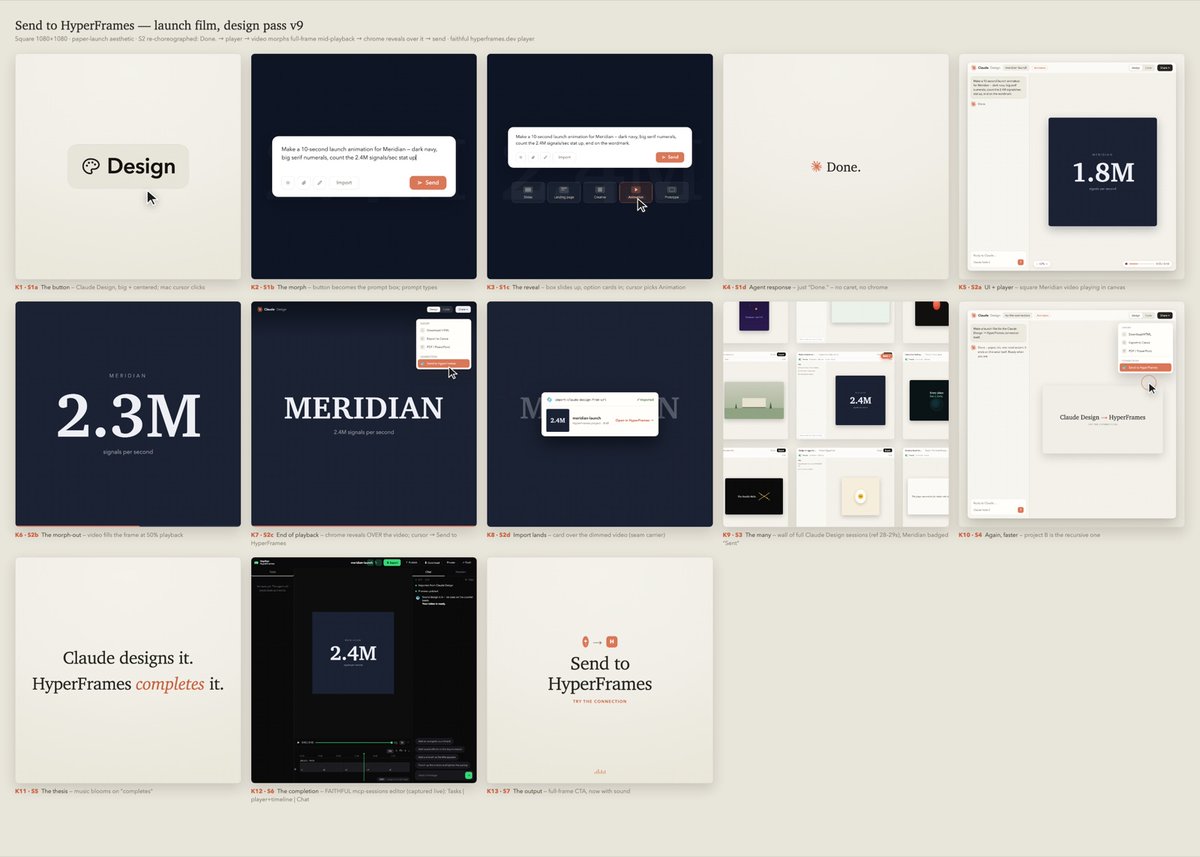
The Claude design to hyperframes storyboard
How to get real UI
The rule I push hardest: everything on screen is real UI. Anyone who uses the product knows what it looks like, and an invented button breaks it for all of them.
How I do it:
-
Start with a capture of real websites with npx hyperframes capture <url> - the site's actual fonts, colors and logos. For the hyperframes.dev launch that meant the site's own font files.
-
Screenshot the real app (or pull the frames from Figma) and have the agent rebuild the screen in HTML - or let the agent take the screenshots itself with computer use.
-
Pull the real icons out of the apps. On a Mac they sit inside the app bundles in /System/Applications and the agent extracts them with sips. A colored square standing in for an icon fails review.
Pro tip: ask the agent to show only what the scene needs. Have it rebuild just the part the story touches, around 1.8x bigger, on a clean background.
3. Animate
Once the sheet is approved the agent animates it. I usually have a bunch of notes on how to make the animation feel better - these are the words I use most frequently:
- A push in is the camera moving closer until one part of the screen fills the frame. A pull back is the reverse.
Templates launch - push in on the Claude Code prompt
- A pan slides the camera sideways or up and down without changing the zoom.
- A hard cut ends one shot and starts the next on the very next frame.
- A match cut lines something up across two shots (same spot, same movement) so the cut reads as one continuous move.
- Motion blur is the smear a real camera records when something moves fast.
- Easing is how a move speeds up and slows down.
How do I ask for motion?
It's all feel - watch the preview and say what's off:
-
"Slow every zoom and pan to 0.7x of current" - every camera move takes longer, nothing else changes
-
"Add a push in on the click" - the camera moves in on whatever the cursor clicked, then pulls back
-
"Have the cursor come in from off screen" - it slides in from the edge instead of fading in
-
"This scene leaves left, so bring the next one in from the right" - the cut reads as one camera move
"Add a push in on the click and pan along with the prompt box as the prompt is typed out"
Every video becomes a template
A HyperFrames video is a folder of HTML files, so once a scene works, you can reuse it in the next video.
- The HyperFrames logo ending was built once, then reskinned launch to launch - cream, dark, white, with a site button or a GitHub star click.
- The HeyGen App Store preview was built once, in English. 10 more versions (other languages, plus Android) are generated from that one file by a script.
- We've built the Claude prompt box a few ways now - Claude Design, Claude on iPhone, Claude Code on desktop - and the next video can start from any of them.
You also don't have to start from zero. The HyperFrames catalog has 380+ prebuilt blocks and components - transitions, text effects, captions, mock UI - and each one installs with one command:
npx hyperframes add text-match-cut
The launch video below is built from three of them.
https://x.com/jake11moran/status/2102802985541865482?s=20
We also have a library of most of the launch videos ive made at https://github.com/heygen-com/hyperframes-launches/ so you can give your agent the code
This is not meant to be an exhaustive guide. Video has many different forms and each have their own playbooks. If you have questions about specific things you want to achieve with HyperFrames feel free to reach out!