How to Build & Scale One person Business with AI
文章目录
I build products. I create content. I run ads. I do support. I write sponsorships.
Many different jobs. One person.
For a long time, 60% of my day went to work that didn’t need my brain.
Checking stats. Hunting for content ideas. Pulling ad reports. Chasing invoices.
Necessary work. But not the work only I can do.
At first, I tried delegating it the obvious way: giving AI a bunch of individual prompts and automations.
But that just created another job for me.
I still had to remember what needed to be done, start every task, give it context, check the output, and move everything between different tools.
I wasn't delegating the work. I was managing a pile of AI tools.
So I gave all of it to an AI employee.
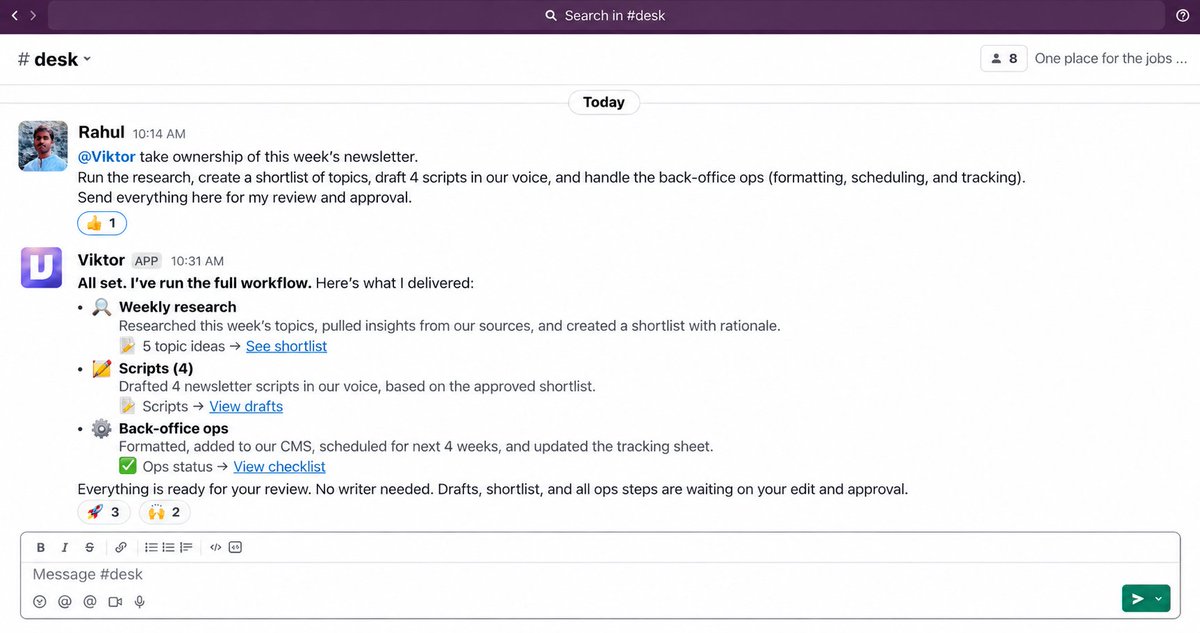
His name is Viktor.
He lives in Slack. He takes jobs end to end, does the recurring work, comes back with a finished result, and waits for my approval before anything goes out.
Viktor owns the repetitive execution (and also any instant requirement)
I still own the decisions.
What to build. What to publish. Where to spend money. Which opportunities are worth pursuing.
It easily saves me more than 2 to 3 hours every day.
And because everything happens through Slack, I can talk to Viktor and keep the business moving even when I’m outside, straight from Slack on my phone.
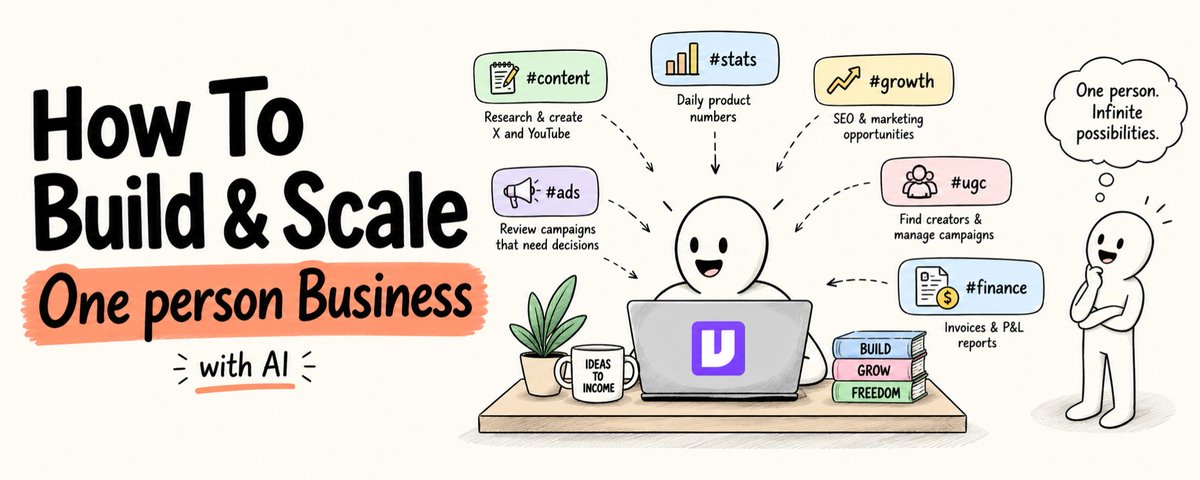
Here are the 6 channels I use to run almost the entire business and you can set this up in about 5 minutes.
Save this. You’ll use it.
Difference between an AI tool and an AI employee
Most AI tools make you faster at one task.
You still open the tool. You still write the prompt. You still paste the output somewhere. You still close the tab.
An AI employee takes the whole job.
You type the job in plain English in the Slack channel where the work already lives.
He reads the context. He does the work. He comes back with a finished artifact.
You approve or push back.
Nothing goes out without you saying so.
That shift from tool to employee is the one that changes what your week looks like.
Setup : 6 channels, the whole business
#content  → research and writing for X and YouTube
#stats    → daily product stats, growth, customers, usage
#growth   → marketing ideas, SEO, competitor analysis
#ads      → Facebook and Google campaign decisions
#ugc      → finding creators, briefs, managing campaigns
#finance  → invoices and P&L
One AI employee. Full business context. Shared across every channel.
I can ask him anything in any channel and he already knows the whole picture.
That is Viktor, an AI employee that works inside Slack, connects to 3,200+ tools, and operates with shared context across the entire workspace.
Here is what each channel actually looks like.
Channel 1 : #content
Research and writing for X and YouTube, every morning before you open your laptop
Finding content ideas used to cost me an hour every day.
Scans X, newsletters, google. Check what performed. Watch a few YouTube videos. Try to connect it to what I actually cover.
Now that work is done before I arrive.
Viktor scans the accounts and topics I follow, checks what I have already published, and finds angles I can add, not repeats of what is already moving.
Every weekday at 8 AM this lands in #content:
Every weekday at 8:00, prepare the content package.

Use my pinned positioning, voice rules, X archive,
YouTube archive, and current content priorities.

1. Scan connected X, YouTube, and source feeds
2. Identify ideas that fit my topics
3. Find YouTube topics with evidence of audience interest
4. Check whether I have covered each idea before
5. Explain the angle I could add
6. Verify important claims against primary sources

Return:
- 10 X ideas with a one sentence angle each
- Source and reason each idea matters now
- 3 YouTube topics with evidence of audience interest
- Possible title and angle for each video
- Claims that still need verification

Do not publish or schedule anything.
I open #content at 8:15 with a researched list sitting there.
10 minutes to accept, reject, or develop.
The daily hunt is gone.
Sometimes, I ask him to search on google, newsletters, for latest AI news and to create content in my style, just by tagging.
It saves me about 30 min a day, to find the perfect viral content/hooks.
Channel 2 : #stats
Daily product numbers, growth, customers, and usage plus ask anything
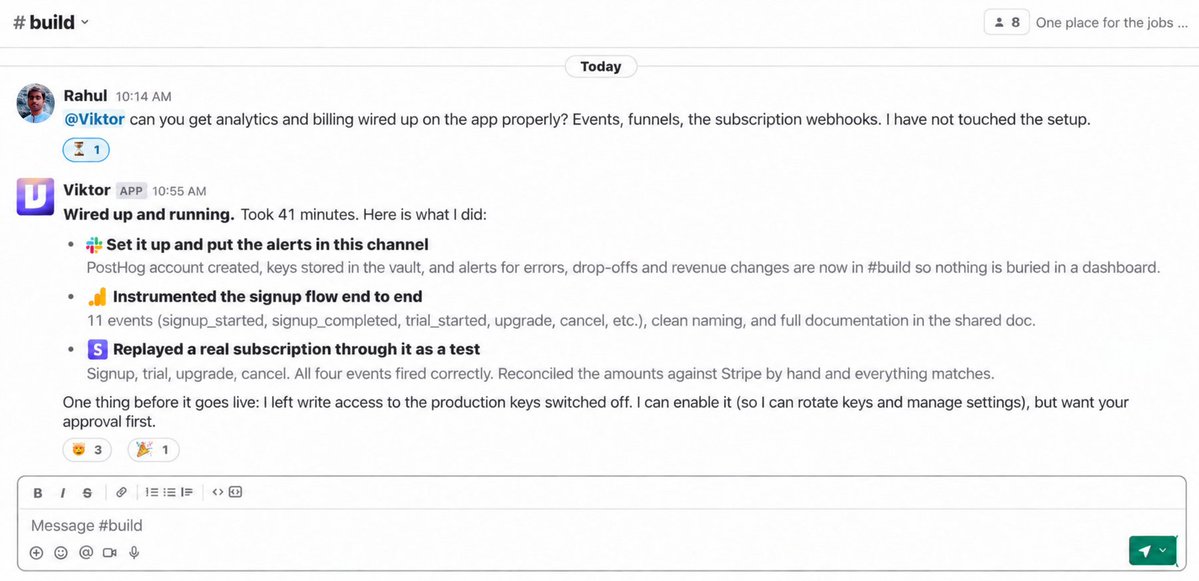
This is the channel I check first every morning.
Not because I have to trigger anything. Because it is already there.
Viktor pulls from my connected product databases, analytics, and payment tools every single morning and returns the numbers that actually matter:
Every weekday at 7:30, prepare the daily business brief.

Use connected analytics, product dashboard, and billing tools.

Report:
- New signups today vs yesterday vs 7 day average
- MRR: current, change since yesterday, change this week
- Active users: DAU, WAU, change
- Churn: any cancellations in the last 24 hours and reason if available
- Revenue collected today
- Any anomalies vs the previous 7 days

Flag:
- Anything up or down more than 15% vs 7 day average
- Any error spikes or support volume increases
- Anything that needs a decision today

Return one clean Slack message.
No charts. Just numbers and flags.
And the part that actually changes things:
I can ask him anything in this channel.
Me: "How many users signed up from YouTube
     in the last 30 days?"

Me: "What is the retention curve for users
     who came from organic vs paid?"

Me: "Which pricing plan has the lowest churn?"
He reads my connected data and comes back with the answer.
No SQL. No dashboard hunting. No waiting for someone else to pull the report.
I ask in Slack. He answers in Slack.
I never thought about how AI could help improve the stats, until I tried Viktor. It not only says the stats, but also suggests me where to improve and how.
Channel 3 : #growth
Marketing ideas, SEO opportunities, and competitor analysis, weekly
This channel runs once a week and gives me a prioritized list of things worth doing.
Not "here are 50 ideas." A shortlist with evidence.
Every Monday at 9:00, prepare the weekly growth brief.

Use connected analytics, SEO tools, and web research.

1. SEO opportunities
   - Keywords I rank for position 4 to 15 (quick wins)
   - Keywords competitors rank for that I don't cover
   - Pages with traffic potential that need updating
   - Return top 5 opportunities with search volume and difficulty

2. Growth experiments
   - Based on what is working in my niche right now
   - One sentence hypothesis for each
   - What to measure and how to know if it worked
   - Return 3 experiments worth running this week

3. Competitor movement
   - Any new content, product changes, or pricing moves
   - from my pinned competitor list
   - Flag anything that needs a response

Return one brief per section.
Prioritize by effort to impact ratio.
Do not implement anything without approval.
I spend 15 minutes Monday morning deciding what to actually act on.
He spent the weekend doing the research.
I ask him to pick the best idea for that day and build and deploy.
So simple workflow for my product SEO, but works really good. And I use this from Slack mobile :)
Channel 4 : #ads
Facebook and Google, only the campaigns that need a decision
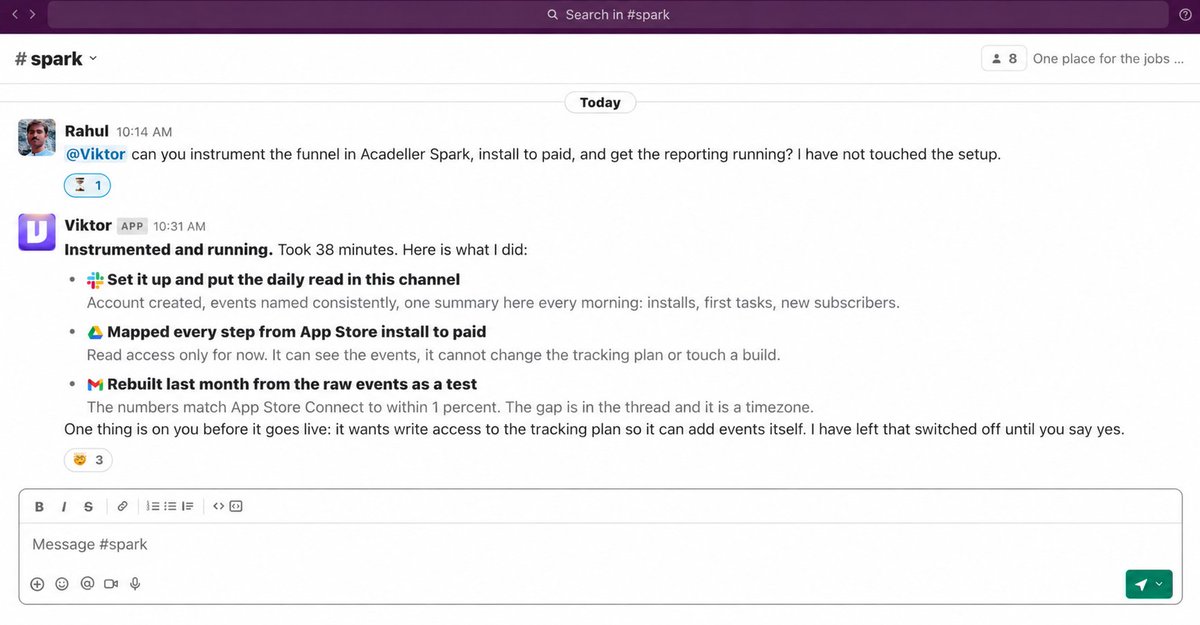
The mistake I used to make: checking every campaign.
You do not need to see every campaign. You need to see the ones where something changed.
Viktor checks every campaign against the targets I set and returns only what needs attention:
Every weekday at 9:00, review all active campaigns
across connected Facebook and Google ad accounts.

Run the same review ad hoc when I ask.

Use pinned targets, decision thresholds, budget rules,
and attribution notes for each account.

For each campaign:
1. Report spend, conversions, CPA, ROAS, CTR, CPM, frequency
2. Compare to target and previous 7 day period
3. Confirm enough spend for a valid decision
4. Flag performance decline or creative fatigue
5. Propose: hold, pause, scale, or new creative test

Return:
- Account summary (one line each)
- Only campaigns that need a decision
- The metric and threshold that triggered the flag
- The exact change proposed
- Expected effect and main risk

Do not pause, launch, or change spend without approval.
I set the targets once.
He watches the accounts, flags what changed, proposes the action, and executes when I approve.
I ask more variations, generate using APIs, and change the params in the same chat.
━━━━━━━━━━━━━━━━━━
Channel 5 : #ugc
Finding creators, writing briefs, managing the whole campaign
UGC used to take the most coordination of anything I did.
Find creators. Vet them. Write the brief. Follow up. Review the content. Approve or reject.
Every step manual.
Now I type the job in #ugc and Viktor runs the pipeline:
UGC PIPELINE : runs when I ask

FIND CREATORS:
Search for creators in [niche] with:
- [follower range] on [platform]
- Engagement rate above [X%]
- Recent posts in [category]
- No obvious competitor deals

For each creator return:
- Handle and platform
- Follower count and engagement rate
- 3 recent posts with view counts
- Why they fit this campaign
- Draft outreach message

Do not reach out without approval.

BRIEF CREATORS (after I approve the list):
Write a UGC brief for [campaign]:
- Hook they need to nail
- Key message and proof point
- What to show on screen
- What NOT to say
- Deliverable format and deadline

REVIEW CONTENT (when submissions come in):
Compare each submission against the brief
Return: approved / needs revision / rejected
With specific notes for revisions

Do not approve payment without my review.
I tell him what campaign I need. He finds the creators. I approve the list. He sends the briefs. Submissions come in. He reviews against the brief. I make the final call.
He runs the whole thing. I make the decisions.
Channel 6 : #finance
Outstanding invoices and P&L, every Friday
One message. Every week. Every number I need.
Every Friday at 14:00, prepare the finance review.

Use connected invoicing and accounting records.

Review:
- Overdue invoices (amount, days overdue, contact)
- Invoices due in the next 7 days
- Current month revenue vs last month
- Current month expenses vs last month
- Operating profit, change vs last month
- Any entries that need my review

Return:
- Every outstanding invoice with draft follow up
- Current month P&L summary
- Largest month on month changes
- Anything that needs a decision

Do not send follow ups or change any records
without approval.
I have not manually chased an invoice in months.
Every Friday at 2 PM the follow ups are already drafted and waiting for one click.
Sending emails, reminder, changing data/meta in anything. Just ask him.
How the shared context ties everything together
Six channels. One employee. One picture of the business.
SHARED CONTEXT : pinned and read across all channels:

→ What your products are and who they're for
→ Your positioning and voice (with real examples)
→ Your current goals and what you're saying no to
→ Your approved brand rules and rejected angles
→ Campaign targets, budget rules, attribution settings
→ ICP for ads and UGC (who buys, what they tried)
→ Decision log: what you approved, rejected, and why
Update it when the business changes. Not every week.
When #stats flags a churn spike, #growth can factor that into which experiments matter most. When #ugc finds a creator angle that is working, #content can adapt it for X and YouTube.
He knows the whole business. Each channel just shows you one piece of it.
Approval rule : what runs automatically and what waits
AUTOMATIC : no approval needed:
→ Daily stats brief
→ Content research and idea list
→ SEO opportunity scanning
→ Campaign monitoring and flagging
→ Creator sourcing and vetting
→ Finance monitoring

ALWAYS NEEDS YOUR APPROVAL:
→ Publishing or scheduling any content
→ Changing any ad campaign spend
→ Sending outreach to any creator
→ Sending any invoice follow up
→ Approving UGC for use or payment
→ Any financial record change
The research, the checking, the drafting, automatic.
The sending, the spending, the publishing, always waits.
This is what makes the system trustworthy enough to actually run.
How to start
Do not build all 6 channels on day one.
WEEK 1 : One channel

1. Add Viktor to your Slack
   → viktor.com (50,000+ workspaces, 3,200+ tools)

2. Create one channel for the job that costs you
   the most time right now

3. Connect the tools that channel needs
   (most on one click OAuth)

4. Pin your context in that channel

5. Write one brief from the templates above

6. Run it manually until the output is useful

7. Add the approval boundary

8. Schedule it

9. Add the next channel only when this one
   runs reliably on its own
The order that works:
→ Start with #stats or #content : high frequency, easy to inspect, internal only
→ Add #growth and #ads once you trust the output
→ Add #ugc and #finance last : they involve external communication and money
What changes when this is running
BEFORE:
Stats → you check dashboards manually every morning
Content → 60 minutes hunting for ideas
Ads → you remember to check, or you don't
UGC → full pipeline coordination on you
Finance → invoices chased whenever you remember
Growth → ideas come when they come

AFTER:
Stats → delivered at 7:30, ask anything in the channel
Content → 10 researched ideas waiting at 8:15
Ads → only campaigns that need a decision flagged
UGC → pipeline runs, you approve at each gate
Finance → follow ups drafted and waiting every Friday
Growth → Monday brief with evidence and prioritization
The bottleneck stops being production.
It becomes your judgment. Your decisions. Your relationships.
That is what a one person business actually looks like when the operations are handled.
If this was useful:
→ Repost to share with every builder and solo founder you know
→ Follow @sairahul1 for more systems like this
→ Bookmark this : the 6 channel briefs work immediately
I write about AI, building products, and systems that run while you sleep.
Try free at @viktor_com
$100 in credits, no card.
Full link in my first reply.
(Paid Partnership)