H3 AI 换装游戏视频提示词教程:从反复失败到稳定出片
文章目录
部分视频或图片暂未收录,已在正文保留提示;需要时可查看原文。查看原文 ↗
一、最终效果
输入一张"人物 + 服装选择 UI 框"的参考图 + 本教程提示词,H3 可稳定生成 10 秒换装游戏视频:
-
人物从 UI 框里依次拿出每套衣服并穿上
-
拿哪件穿哪件,UI 框里的衣服和人物身上的衣服完全一致
-
每套衣服只用一次,拿完后框变灰/显示已用
-
最后定格展示最终造型
-
全程人物、场景、UI 布局不变
二、核心原理:为什么这个提示词能成
经过 8 轮迭代失败后,最终成功的关键不是"写更多约束",而是做对了以下 5 件事:
- 具体描写每套衣服长什么样(最关键)
❌ 失败写法:the garment shown in that frame(通用描述,H3 锚定不住) ✅ 成功写法:pale pink sheer long dress with floral pattern(具体到颜色、材质、款式、花纹)
原理:H3 对参考图里 UI 小框中的服装细节识别能力有限。如果你只说"那个框里的衣服",H3 会"猜"一件类似的,一猜就不一样。用文字把每套衣服的样子写死,等于给 H3 双重锚定(图片 + 文字),对应关系自然锁住。
- 核心规则前置 + 最高优先级声明
把"点哪件穿哪件、完全一致"放在动作描述之前,用 Core rule — this is the single most important constraint 声明,H3 先读到规则再读动作。
- 用 identical 不用 match
-
match = 相似,H3 会留余地
-
identical = 完全相同,封死了 reinterpretation 的空间
-
后面紧跟 Not similar. Not inspired by. Identical. 三句强调
- 相机固定 + UI 和人物始终同时可见
强制 H3 每一帧都同时呈现 UI 框和人物身体。H3 最容易在"看不到 UI"的时候偷偷换一件不一样的衣服。
- 10 秒比 15 秒更稳
10 秒内 4 次换装 + 最终 pose,时间紧凑,H3 没有多余帧数去"自由发挥"。15 秒多出来的时间模型容易跑偏。
三、提示词完整模板(10 秒拿取版)
以下模板中 【】标注的部分是图片专属内容,换图后需要替换。其余部分固定不动。
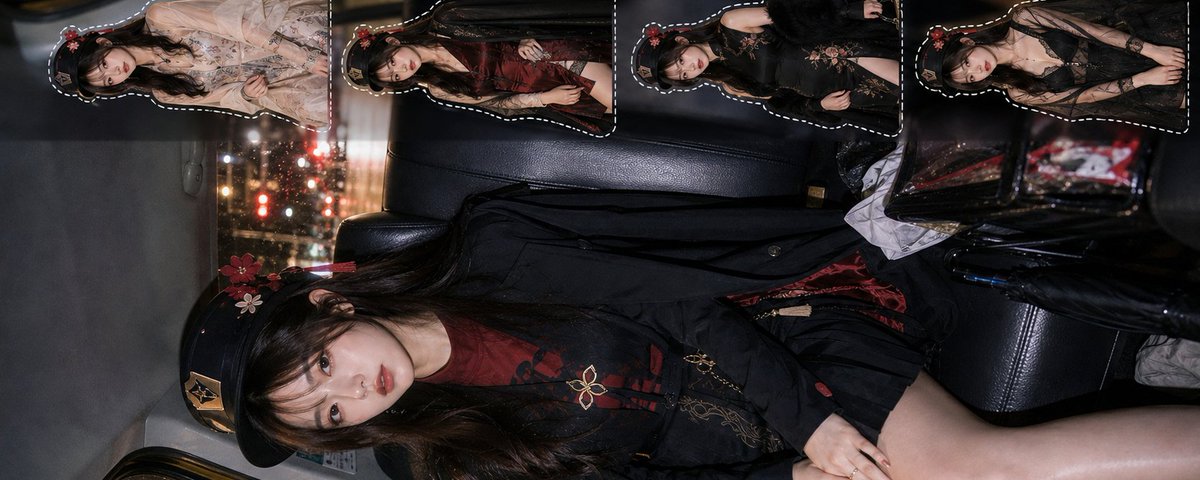
integrated_multimodal_description: For the target video, at 0.00 seconds into the target video, <Picture 1> is fully referenced. <Subject 1> is the exact same subject shown in <Picture 1>. Use <Picture 1> as the sole and complete visual authority for identity, face, body, hairstyle, 【帽子/配饰如有】, 【场景描述】, lighting, composition, color, and all other visible attributes. The video begins from the exact physical and visual state contained in <Picture 1>: the character is 【人物姿势,如 seated in the back seat of a taxi at night】, wearing the starting outfit (【初始服装具体描写】). 【UI布局描述,如 On the right side of the frame, a vertical UI panel displays 4 dashed white-framed garment preview thumbnails, stacked top to bottom.】 The 【数量】 UI thumbnails are static previews — they remain still and do not animate or act independently.
Fast-paced dress-up sequence. The character stays 【保持原姿势,如 seated】 throughout the entire video. She reaches toward the 【数量】 UI frames 【位置,如 on the right side】, one at a time, in strict order 【顺序,如 from top to bottom】, physically taking each outfit out of its frame and putting it on, with fast uniform rhythm.
Core rule — this is the single most important constraint of the entire video: the moment she takes an outfit out of a UI frame and puts it on, her entire outfit becomes exactly the garment shown inside that frame. The garment in that UI thumbnail and the garment now on her body are the same garment — identical color, identical fabric, identical cut, identical style, identical pattern, identical length, identical every visible detail. Not similar. Not inspired by. Identical. After an outfit is taken from its frame, that frame briefly dims or shows a used/empty state to confirm it has been taken.
Take sequence:
- Take from the 【第1框位置,如 top frame】 (frame 1, 【第1套衣服具体描写】) → her outfit becomes that exact 【重复衣服关键词】. Frame 1 shows used state.
- Take from the 【第2框位置】 (frame 2, 【第2套衣服具体描写】) → her outfit becomes that exact 【重复关键词】. Frame 2 shows used state.
- Take from the 【第3框位置】 (frame 3, 【第3套衣服具体描写】) → her outfit becomes that exact 【重复关键词】. Frame 3 shows used state.
- Take from the 【第4框位置】 (frame 4, 【第4套衣服具体描写】) → her outfit becomes that exact 【重复关键词】. Frame 4 shows used state. 【如果UI框数量不是4,按此格式增删行数】
After the 【最后一框编号】th outfit is taken and worn, all frames show used state. The character adjusts her posture slightly and holds a confident, clear 【姿势】 presentation pose in the final 【最后一套衣服关键词】 outfit, holding this pose for the remaining duration of the video.
Camera: fixed 【画幅,如 vertical】 shot matching the exact composition of <Picture 1>. Both the character and the UI panel stay clearly and fully visible at all times — this is essential so the correspondence between each taken outfit frame and the garment worn by the character is always visually verifiable. No cuts. No camera movement except an extremely subtle push-in of no more than 5 percent, or one soft flash frame, at each take-and-change moment, after which the camera immediately returns to the exact fixed framing. No wide shots, no orbiting, no angle changes, no panning.
No singing, no lip-sync, no dialogue, no new people, no additional props beyond what is visible in <Picture 1>, no weapons, no added garments beyond the UI options, no redesign of the character or the UI, no change to the 【场景】 environment, no face beautification, no anatomy alteration, no body proportion alteration, no gradual costume morph, no taking the same outfit twice, no outfit that does not exactly match its corresponding UI frame, no UI frames remaining full at the end, no dramatic camera movement, no 360 orbit, no wide-shot pull-out, no shot that obscures the UI or the character's body during a change, no background replacement, no teleporting.
overall_soundscape: Clean, minimal interaction and costume-change sound effects only. Each time she reaches and takes an outfit from a frame, a soft fabric-grab or pickup sound plays. Each outfit change is accompanied by a quick whoosh or shimmer sound effect lasting no more than 0.3 seconds, timed exactly to the moment she puts it on. The final presentation pose is marked by a single bright ding or chime sound. 【环境音,如 Very low-volume rainy city ambience from outside the taxi windows may be present at a subtle level.】 No loud footsteps, no prominent environmental noise.
non_diegetic_music: A light, upbeat, rhythmic background track at a steady tempo of approximately 120 to 128 BPM that supports the fast uniform take-and-change rhythm. Clear downbeats align with each take moment. The mood is playful and game-like but not overpowering — the music supports the outfit taking and costume changes rather than competing with them. The final pose may include a small musical flourish or resolution.
四、使用步骤(5 步出片)
第 1 步:准备参考图
图片需要包含:
-
✅ 一个主人物(大面积)
-
✅ 旁边/周围有 带边框的服装预览框(每个框里是一套衣服的预览图)
-
✅ 框的数量建议 3-5 个(4 个最稳)
-
❌ 不要有多余的人物、文字、水印
第 2 步:提取图片专属信息
把参考图发给 AI(比如本助手),输入以下提示:
请提取这张图片中的以下信息,用英文短语输出:场景描述(环境、时间、地点) 人物初始服装(从上到下具体描写:颜色、材质、款式) 人物姿势(站/坐/蹲等) UI 布局(位置、排列方式、框的数量、框的样式) 每个 UI 框里的服装具体描写(颜色、材质、款式、花纹、配饰) 画幅比例(竖版/横版)
第 3 步:替换模板中的【】部分
把 AI 提取的信息,替换到上面模板中所有【】标注的位置。
必须替换的 6 处:
-
场景描述
-
初始服装
-
人物姿势
-
UI 布局(位置/数量/排列)
-
每套衣服的具体描写(有几套写几行)
-
画幅比例
第 4 步:H3 参数设置
-
Duration:10 秒(不要用 15 秒,容易跑偏)
-
比例:和参考图一致(竖版图用 9:16,横版图用 16:9)
-
参考图:上传准备好的图(图 1)
-
提示词:粘贴替换好的完整提示词
第 5 步:生成 + 验收
检查以下 5 点:
-
拿哪件穿哪件,4 套衣服都和 UI 框里的一致
-
每套衣服只出现一次,没有重复
-
人物脸/发型/身份全程不变
-
场景/UI 布局全程不变
-
最后有 pose 定格
五、换图后怎么改(关键操作)
提示词分为固定部分和图片专属部分。换图后只改图片专属部分,固定部分一字不动。
部分 内容 换图后 固定部分(约 70%) 图片锁定声明、UI 静态声明、核心规则(identical)、拿取动作流程、相机固定、负面约束、声音设计、音乐设计 不动 图片专属部分(约 30%) 场景描写、初始服装、人物姿势、UI 布局、每套衣服的具体描写、画幅 必须重新生成
换图操作流程
新图片 → 发给AI提取信息 → 替换模板中的【】部分 → 生成
不要做的事:
-
❌ 不要直接把旧提示词套在新图上(衣服描写对不上,H3 会混乱)
-
❌ 不要把具体衣服描写删掉改成通用版(锚定不住,必失败)
-
❌ 不要改固定部分的核心规则和负面约束
六、失败经验总结(避坑指南)
以下是实际迭代中踩过的 8 个坑,每个都导致生成失败:
❌ 坑 1:通用描述不写具体衣服
the garment shown in that frame → H3 锚定不住,选的和穿的不一样。 必须具体描写:颜色 + 材质 + 款式 + 花纹。
❌ 坑 2:提示词越长越好
曾经写过 1800+ token 的"四层锁死"版(铁律声明 + 逐次复述 + 验证 beat + 逐条负面约束),结果 H3 被海量信息淹没,反而抓不住重点。 成功版约 1200 token,核心规则突出,其余简洁。
❌ 坑 3:强行套 Creative DNA 模板
曾经把简单换装需求强行套进"配饰材质接力"的 T8 结构,加了 inv-01 到 inv-05、Mechanism、Variable Slots 等学术术语,结果完全不行。 H3 是视频生成模型,理解直白的动作描述,不理解 Creative DNA 的学术术语。
❌ 坑 4:用 match 不用 identical
outfit changes to match the thumbnail → H3 理解为"相似就行"。 必须用 identical + Not similar. Not inspired by. Identical.
❌ 坑 5:不声明 UI 预览框是静态的
H3 会把右侧预览框里的小人也动画化,导致画面里有 5 个人在动。 必须写:The UI thumbnails are static previews — they remain still and do not animate or act independently.
❌ 坑 6:相机会动/会切远景
H3 一切远景或换角度,UI 框就出画了,然后人物衣服就开始自由发挥。 必须写:fixed shot, both character and UI stay visible at all times. No wide shots, no orbiting.
❌ 坑 7:15 秒比 10 秒好
以为时间越长效果越好,实际 15 秒多出来的时间 H3 会跑偏(加多余动作、换场景、衣服变样)。 10 秒最稳:开场 0.8s + 4 次换装各 1.6s + 最终 pose 2.8s。
七、快速对照表
维度 ✅ 成功写法 ❌ 失败写法 衣服描写 pale pink sheer long dress with floral pattern the garment in that frame 对应词 identical + Not similar. Not inspired by. match / similar UI 状态 static previews, do not animate 不声明 相机 fixed shot, UI and character always visible push in / orbit / 不限制 人物 stays in the same position 不限制(会站起来乱跑) 时长 10 秒 15 秒+ 动作 physically takes the outfit out and puts it on taps / clicks(拿取比点击更有物理感) 框反馈 dims / shows used state glows / 不声明 提示词长度 ~1200 token 1800+ token(太长反而乱)
八、一句话总结
图片负责画清楚每套衣服长什么样,提示词负责告诉 H3 拿取顺序和"拿哪件穿哪件、完全一致"的铁律。具体衣服描写是锚定的核心,删掉必失败。换图后只换图片专属描写,固定部分一字不动。
沿着这个主题继续读
从一篇文章,找到相关的教程、经验和阅读路径。